What Happens to Your BIMI Logo and Blue Checkmark When Your VMC Expires?

Published 27 Dec 2025
Updated 9 Aug 2026
12 min read
Summarize with
Updated on 3 Sep 2026: We clarified how VMC expiry affects Gmail's logo and blue checkmark, including the valid CMC fallback.
When your VMC expires, your BIMI setup no longer has valid certificate evidence. Gmail stops showing the blue checkmark after it revalidates the certificate. Gmail also requires a valid VMC or CMC for its BIMI logo display, so an expired VMC does not leave a Gmail logo-only path by itself. At providers that accept self-asserted BIMI, logo display depends on publishing a qualifying self-asserted record and passing the provider's authentication, reputation, and display checks.
The practical answer is that an expired VMC provides no valid verified mark. It does not become partly trusted, a CMC, or a self-asserted record. Providers do not all remove cached treatment at the same second, but the VMC path fails once a receiver checks the certificate date and finds it outside the valid period.
Treat this as a certificate lifecycle issue first and a BIMI DNS issue second. The BIMI TXT record can look correct while the certificate behind the a= tag is expired. A format-only BIMI check catches syntax, but it does not prove that the VMC is current, unrevoked, and trusted.
Short answer
An expired VMC makes the certified BIMI path fail. Gmail's blue checkmark disappears after Gmail revalidates the expired certificate. A valid CMC can provide Gmail logo-only display, while self-asserted logo display remains limited to providers that accept it.
What the receiver checks
A receiver does not simply read the BIMI record and trust the logo. It decides whether the message qualifies, whether the visible From domain passes DMARC alignment, whether DMARC is fully enforced, whether the logo is valid BIMI SVG, and whether any certificate evidence is valid. The BIMI Group VMC requirements explain the certificate path used for certified logo display.
- Message result: The message must pass DMARC through aligned SPF or DKIM for the visible From domain.
- DMARC policy: The organizational domain needs p=quarantine or p=reject with pct=100, not a monitoring-only or partial-enforcement policy.
- BIMI record: The DNS record must identify a valid SVG and, where the provider requires certification, a VMC or CMC through the a= tag.
- Certificate validity: The certificate must be inside its valid date range, remain unrevoked, contain the matching logo, and chain to an issuer the receiver accepts.
- Receiver policy: Each mailbox provider applies its own caching, reputation thresholds, and display rules.
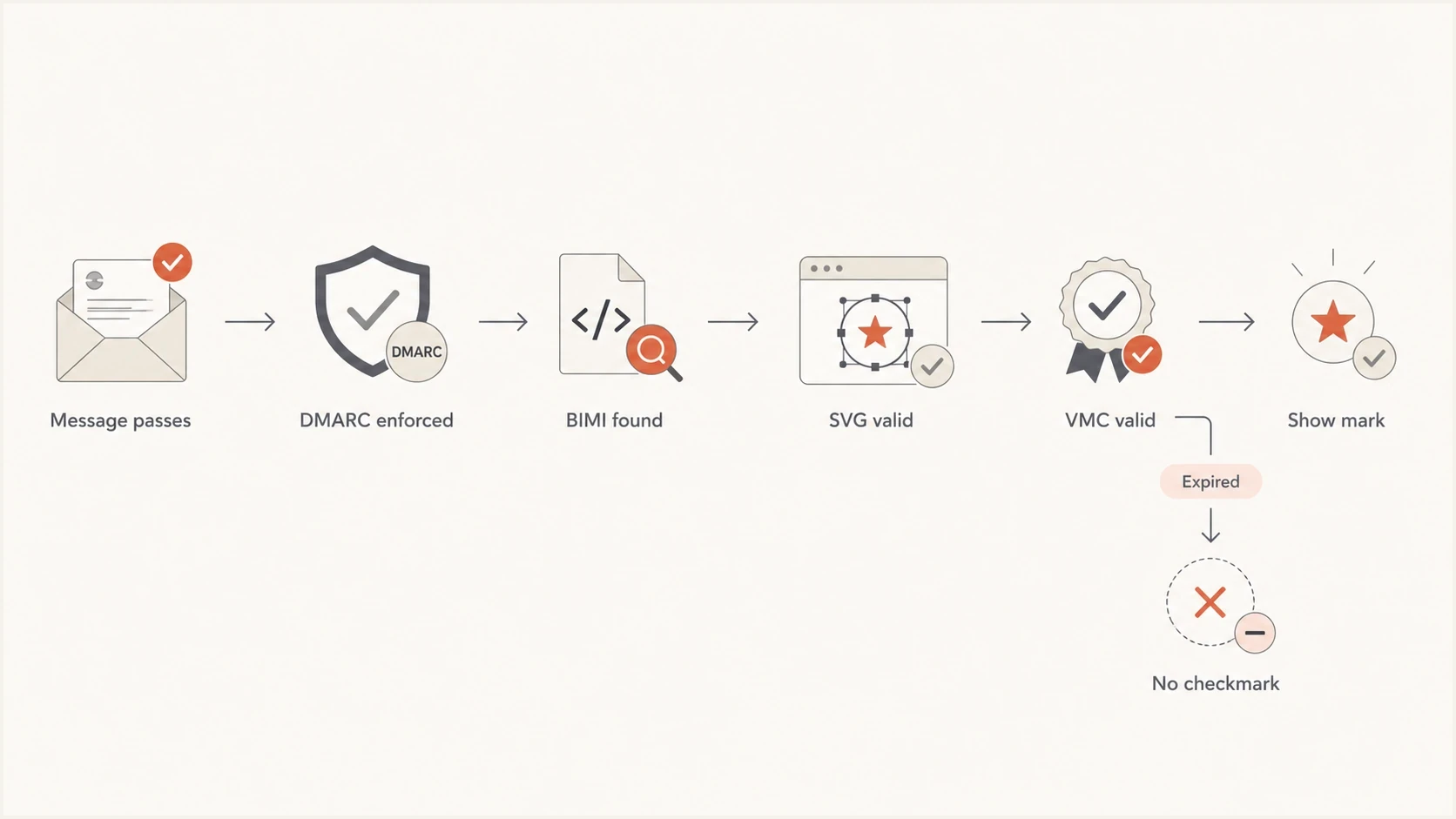
Flowchart showing BIMI display failing when the VMC validity check fails.
Does an expired VMC become self-asserted BIMI?
No. An expired VMC remains expired evidence referenced by the BIMI record. A self-asserted BIMI record has no certificate evidence, usually expressed with an empty a= value. Changing to that record is a deliberate DNS change, not an automatic receiver fallback.
A provider that accepts self-asserted BIMI can consider the logo after that change, subject to its own reputation and display rules. Gmail does not accept a standalone SVG for BIMI display. It requires a valid VMC or CMC, and only a valid VMC produces Gmail's blue checkmark.
Valid VMC path
- Certificate status: The VMC is inside its valid date range and chains to an accepted issuer.
- Gmail result: The message qualifies for the logo and blue checkmark when all other checks pass.
- Brand signal: The certificate provides validated rights to the mark for the sending domain.
Expired VMC path
- Certificate status: The date check fails even when the BIMI TXT syntax and certificate URL are correct.
- Gmail result: The logo and blue checkmark stop unless a valid replacement certificate is published.
- Logo-only option: Gmail needs a valid CMC; self-asserted display depends on another provider accepting it.
This distinction explains a confusing result: a sender can have a correct BIMI record, a reachable SVG, and a certificate file at the right URL, yet still lose Gmail's logo and checkmark because the certificate expired. A sender can also see different results across providers because their certificate and self-asserted display rules differ.
Can a CMC preserve the Gmail logo?
A valid Common Mark Certificate can qualify a BIMI logo for display in Gmail without the blue checkmark. It is a separate certificate path, not a fallback status applied to an expired VMC. The CMC must cover the sending domain and logo, be hosted as a complete PEM chain, and be referenced by the BIMI a= tag.
Choose the replacement by outcome
- Keep the Gmail blue checkmark: Renew or replace the VMC before expiry and publish the valid PEM file.
- Keep a Gmail logo only: Obtain a valid CMC and update the certificate reference after the file is reachable.
- Use self-asserted BIMI: Publish an empty a= value only when logo display at supporting non-Gmail providers meets the business need.
Do not wait for expiry to choose between VMC renewal and a CMC. Both certificate types require validation and issuance lead time. If uninterrupted verified display matters, only a renewed VMC completed before the old certificate expires preserves the blue checkmark path.
Expected behavior by mailbox provider
Use the table as a troubleshooting model, not a rendering guarantee. Reputation, certificate acceptance, caching, and interface rules still affect whether a provider displays a logo.
|
|
|
|
|---|---|---|---|
Certificate path fails | Valid CMC | No | |
Certificate evidence fails | Self-asserted record can qualify | No | |
Certificate evidence fails | Self-asserted record can qualify | No | |
Certificate evidence fails | Self-asserted record can qualify | No | |
Other providers | Policy varies | Provider-specific | No Gmail badge |
Likely receiver behavior after VMC expiry
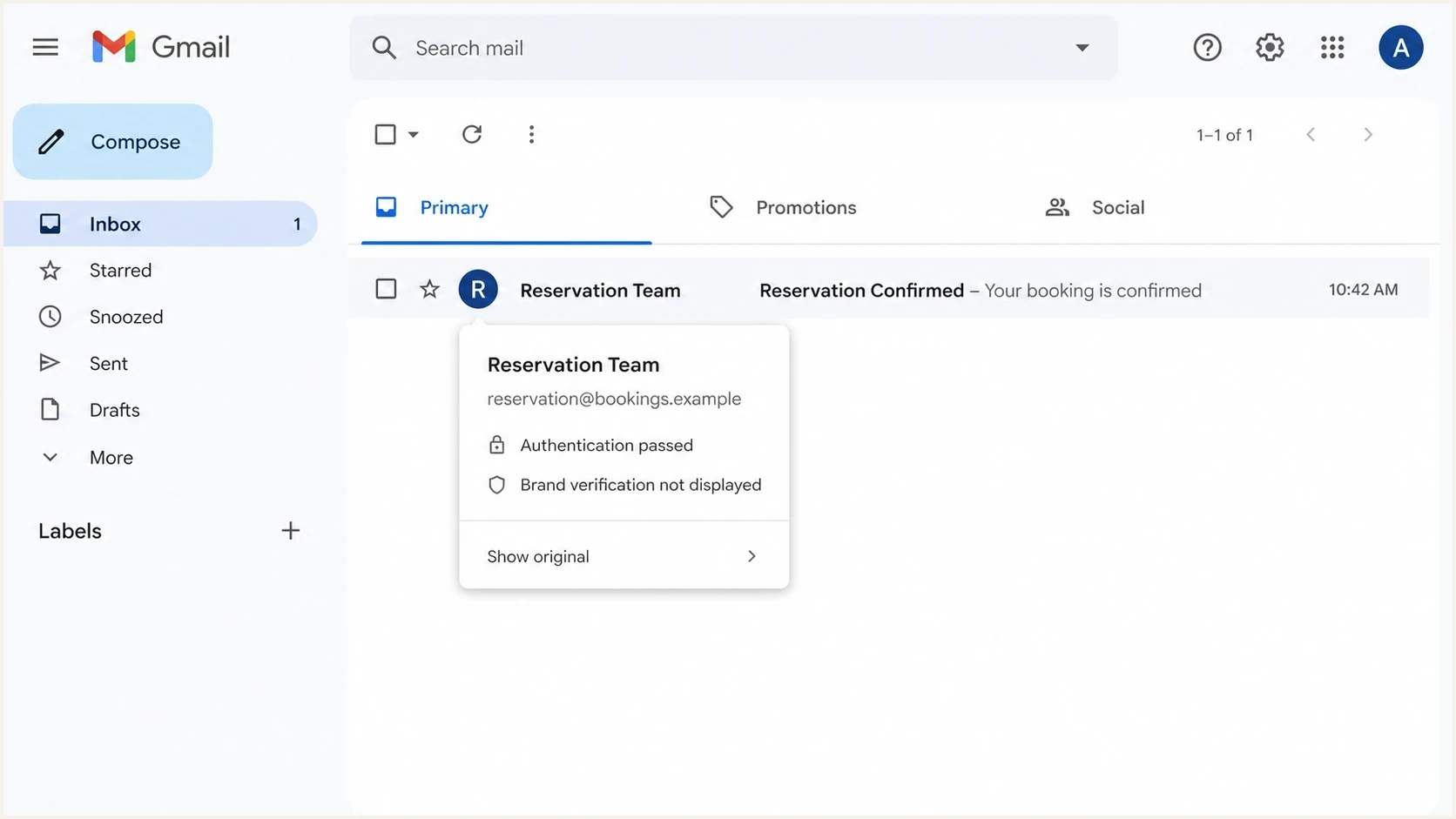
Gmail inbox row showing no blue verified checkmark beside the sender.
The common trap is assuming Gmail uses the same self-asserted path as providers that accept an uncertified logo. Gmail requires a valid VMC or CMC for BIMI logo display. The VMC adds the blue checkmark; the CMC does not.
How to confirm the VMC is the problem
Start with DNS because it identifies the evidence file. A normal BIMI record with a VMC has an l= tag for the SVG and an a= tag for the certificate. If the certificate URL returns a PEM file, check its type, chain, logo, revocation status, and validity period.
BIMI record with a certificateDNS
default._bimi.example.com. 3600 IN TXT (
  "v=BIMI1; l=https://assets.example.com/bimi.svg; "
  "a=https://assets.example.com/vmc.pem"
)
- Find the record: Look up the default BIMI selector first, then any selector the sending stream declares.
- Fetch the certificate: Open the URL in the a= tag and confirm it returns the expected PEM file without access controls or a broken redirect.
- Check the certificate: Confirm whether it is a VMC or CMC, inspect notBefore and notAfter, check revocation, and verify the full chain.
- Match the logo: Verify that the logo embedded in the certificate matches the BIMI SVG rather than a newer or older brand asset.
- Check DMARC: Confirm the organizational domain has full enforcement and the production message passes DMARC alignment.
- Send a test: Send real mail through the affected stream and inspect what each target mailbox renders.
Suped's product supports the DMARC part of this workflow by connecting sending-source authentication, SPF and DKIM results, policy state, and issue alerts. Its DMARC monitoring helps identify authentication failures that prevent BIMI qualification before certificate validation begins.
DMARC checker
Look up a domain's DMARC record and catch policy issues.
?/7tests passed
Use Suped's DMARC checker for a DNS and enforcement check before debugging the certificate. If the domain is not at full enforcement, fix that dependency first.
What to fix and in what order
The preferred fix is to renew or replace the mark certificate, publish the complete new PEM chain, update the BIMI record if the certificate URL changed, and then retest mail that leaves the production sending platform. Remove the certificate reference only when the business has deliberately chosen self-asserted BIMI at providers that support it.
Renewal sequence
- Renew certificate: Complete the VMC renewal before the current certificate expires.
- Publish PEM: Host the renewed entity certificate and its chain at a stable public HTTPS URL.
- Validate before cutover: Fetch the new file, verify its dates and chain, and confirm the embedded logo before changing production.
- Update BIMI: Replace the PEM safely and change the a= value only if the certificate URL changed.
- Retest mail: Send new messages and check authentication results plus inbox rendering.
Do not assume the logo returns immediately. DNS TTL and receiver caches for the certificate, logo, and display decision can add delay. Check again after the DNS TTL, then continue testing fresh messages across the affected mailbox providers.
Self-asserted BIMI recordDNS
default._bimi.example.com. 3600 IN TXT (
  "v=BIMI1; l=https://assets.example.com/bimi.svg; a=;"
)
An empty a= value makes the record self-asserted. That can support logo display at providers that accept self-asserted BIMI, but it does not qualify for Gmail. Use a valid CMC for a Gmail logo without the checkmark, or renew the VMC to restore the Gmail logo and blue checkmark.
Why a valid-looking BIMI record still fails
A BIMI record can be syntactically valid and still fail display. Separate record format from certificate validation. A DNS parser can confirm v=BIMI1, the SVG URL, and the certificate URL without proving that the certificate is current, unrevoked, issued for the right mark and domain, or chained to an accepted issuer.
VMC renewal risk window
Internal operating targets for deciding how urgently to act before certificate expiry.
Healthy
90+ days
Renewal has enough time for validation and publishing.
Watch
30-89 days
Start renewal and verify mark documentation now.
Critical
1-29 days
Escalate because display loss is close.
Expired
0 days
Verified BIMI fails until valid certificate evidence is published.
Current Mark Certificates have a maximum validity period of 398 days, so annual ownership and renewal planning is necessary. The chart uses internal warning thresholds, not protocol-mandated renewal dates.
Treat BIMI as the display layer above reliable domain authentication. Suped's domain health checker helps check the underlying DMARC, SPF, and DKIM posture. For controlled DMARC policy changes, Hosted DMARC lets teams stage enforcement without making each policy change manually in DNS.
Suped's product turns aggregate reports into source-level authentication issues and alerts on material SPF, DKIM, and DMARC changes. That workflow covers the authentication dependencies below BIMI; the VMC or CMC still needs a separate owner, renewal process, and certificate check.
Checks that prevent repeat failures
The prevention work needs a named owner. Assign responsibility for the certificate renewal date, hosted PEM file, BIMI SVG, and DMARC enforcement state. When ownership is split across teams without a common runbook, BIMI can fail without affecting message delivery.
|
|
|
|---|---|---|
VMC or CMC | Security or IT | Logo or checkmark missing |
Mark evidence | Legal | Renewal delay |
SVG | Brand | Logo rejected |
DNS and hosting | IT | Record or file unavailable |
DMARC | Email operations | BIMI blocked |
Operational ownership for BIMI and VMC
Keep a certificate-specific expiry test. BIMI record syntax alone does not show whether the PEM contains a current entity certificate, the required chain, or the logo that matches the published assertion.
- Expiry reminders: Set reminders at 90, 60, 30, 14, and 7 days before the notAfter date.
- Real-message tests: Test through each production mail stream, not only through a DNS check.
- URL stability: Keep certificate and SVG URLs stable, publicly reachable, and covered by change control.
- Policy guardrails: Protect DMARC enforcement from rollback to p=none or pct below 100.
For deeper follow-up, check the VMC expiry guide, confirm Gmail and VMC requirements, and use the BIMI validation guide when the SVG or certificate format is suspect.
Views from the trenches
Best practices
Track certificate expiry beside DMARC policy so logo loss is caught before launch dates.
Test BIMI with a real message because a valid DNS record alone does not prove display.
Keep the SVG, PEM file, and DNS record under owned HTTPS paths with change control.
Common pitfalls
Assuming an expired VMC automatically becomes a self-asserted BIMI configuration.
Expecting Gmail to show a verified mark when the VMC chain fails date validation.
Renewing the certificate but leaving the BIMI a tag pointed at the old PEM file URL.
Expert tips
Set renewal reminders at 90, 30, and 7 days because BIMI has receiver-side caching.
After renewal, send real mail through each major stream and inspect authentication results.
If display still fails, compare the From domain, DMARC policy, SVG, and certificate subject.
Marketer from Email Geeks says a brand can have a correct-looking BIMI record and still lose Gmail display when the certificate behind the record has expired.
2026-01-14 - Email Geeks
Expert from Email Geeks says the expired certificate should be treated as failed VMC evidence, not an automatic self-asserted BIMI fallback.
2026-01-15 - Email Geeks
Restoring the logo and checkmark
When a VMC expires, Gmail removes the blue checkmark after it refreshes the certificate decision. Gmail logo display also needs valid certificate evidence. A valid CMC restores the logo-only path, while a renewed VMC restores the logo and blue checkmark when the remaining BIMI checks pass.
Renew the VMC, keep DMARC at full enforcement, verify the SVG and PEM content, and test new messages after caches have time to refresh. A correct BIMI TXT record is not proof of health until the certificate date, revocation status, embedded logo, and chain have also been checked.
Best practical rule
Monitor VMC expiry like a production certificate. BIMI depends on DMARC, and the visible verified mark depends on valid certificate evidence when the receiver evaluates or refreshes it.