How can I find out when my VMC expires?

Published 1 May 2025
Updated 9 Aug 2026
11 min read
Summarize with
Updated on 9 Aug 2026: We added current VMC validity guidance and clarified what certificate expiry changes.
The fastest way to find when a BIMI VMC expires is to open the VMC certificate file referenced in the domain's BIMI TXT record and read the X.509 validity field named notAfter. If the BIMI record has an a= tag, that tag points to the certificate URL. Download the PEM file, decode it, and read the expiry date.
For BIMI, VMC means Verified Mark Certificate. It confirms that a Mark Verifying Authority validated the organization and its rights to the registered mark represented by the logo. The expiry date lives inside the certificate itself, not in DMARC aggregate reports, the SVG logo file, or the visible BIMI DNS record.
Treat the date as an operational deadline, not a branding detail. If the certificate expires, mailbox providers that require a valid certificate stop treating that certificate as valid. Your BIMI logo display then depends on provider policy, caching, and whether another accepted certificate type applies.
The shortest answer
Check these places in this order. In most setups, the first two steps give you the answer in under a minute. The issuer portal is a fallback when the certificate URL is access-controlled, missing, or owned by another internal team.
- BIMI record: Look up default._bimi for the sending domain and copy the URL in the a= tag.
- PEM file: Download the certificate and read the notAfter field with a certificate viewer or openssl.
- Issuer portal: If the file is not public, check the certificate authority account or renewal order.
- Internal owner: If another team bought the VMC, ask for the certificate file, expiry date, and renewal owner.
|
|
|
|---|---|---|
BIMI TXT | Certificate URL | Fast lookup |
PEM | notAfter | Exact date |
CA portal | Order expiry | Renewal admin |
Runbook | Renewal owner | Team handoff |
Common places where the VMC expiry date appears.
Use the live PEM and its notAfter value as the authoritative expiry date for what mailbox providers can retrieve. A portal date can help with renewal administration, but it does not prove that the current public file has been replaced.
The main trap is checking the wrong asset. The BIMI SVG has its own hosting URL, but the VMC expiry date is in the certificate referenced by the a= tag. If you only inspect the logo URL, you confirm the logo is reachable, but you do not confirm the certificate is still valid.
Find the certificate URL in DNS
Start with the BIMI TXT record for the exact domain in the RFC5322.From address. If the sender does not specify another BIMI selector, start with default, which makes the lookup name default._bimi.example.com. The record should include a logo location in l= and, when a VMC or related certificate is published, a certificate location in a=.
Example BIMI TXT recordDNS
default._bimi.example.com.  TXT  "v=BIMI1;
 l=https://assets.example.com/bimi/logo.svg;
 a=https://assets.example.com/bimi/vmc.pem;"
That vmc.pem file is the thing to inspect. If the a= value is empty or absent, there is no certificate URL to decode from DNS. That can be a self-asserted BIMI record, but support for self-asserted logos is limited and providers that require a mark certificate will not accept it as certificate-backed BIMI.
Check the real sending domain
Query the exact RFC5322.From domain with the selector used by the sender. Separately confirm DMARC enforcement for that domain and its organizational domain when they differ. Do not assume a BIMI record or certificate on the parent domain supplies the answer for every subdomain.
If you are also checking whether the domain is eligible for BIMI display, verify DMARC enforcement at the same time. Suped's domain health checker is useful here because VMC validity only matters after the underlying authentication posture is healthy.
?
What's your domain score?
Deep-scan SPF, DKIM & DMARC records for email deliverability and security issues.
Decode the PEM certificate
After you have the certificate URL, use a certificate viewer or decode it locally. Local decoding gives the exact validity fields without adding another dependency to the process. The field you want is notAfter. That is the end of the certificate validity period.
Download and read the expiry dateBASH
curl -L https://assets.example.com/bimi/vmc.pem -o vmc.pem
openssl x509 -in vmc.pem -noout -enddate -issuer -subject
Example outputTEXT
notAfter=Jan 31 23:59:59 2027 GMT
issuer=C = US, O = Example Certificate Authority
subject=jurisdictionC = US, O = Example Brand Inc.
In that output, the VMC expires at 23:59:59 GMT on January 31, 2027. Record that internally as 2027-01-31 with a separate renewal-start date. ISO 8601 avoids the day/month confusion that happens when an interface shows a date such as 04/05/2027.
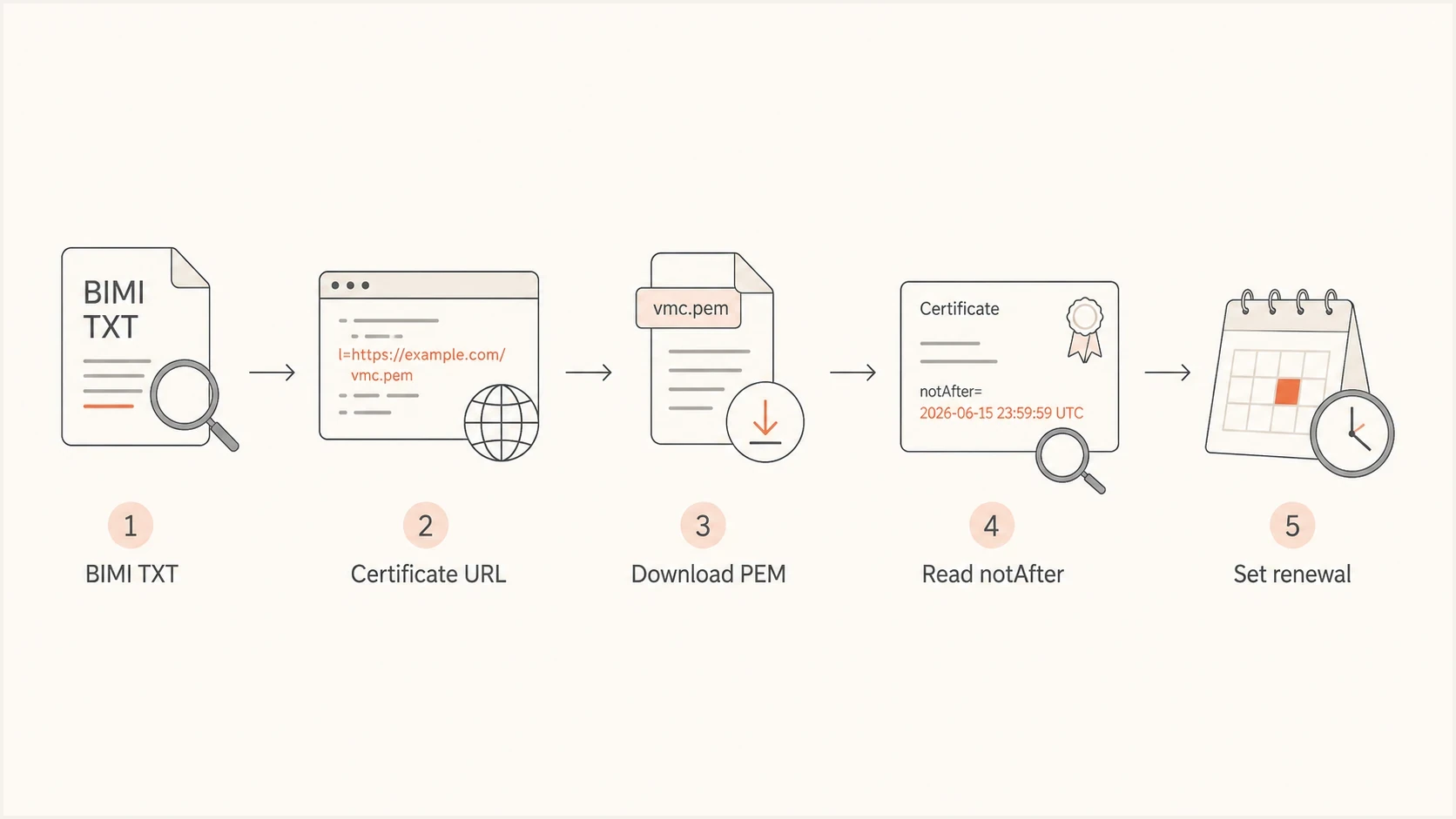
BIMI VMC expiry check from the TXT record and PEM URL to the notAfter date.
Use one date format
Some interfaces display certificate dates as day/month/year. Others display month/day/year. Store the renewal record as ISO 8601, such as 2027-01-31, and include the source output beside it.
What VMC expiry changes
VMC expiry is a BIMI display event. It does not by itself stop email delivery or change the underlying authentication results. Mailbox providers that require a valid certificate can stop showing the logo or a VMC-based verified badge once they detect the expired certificate.
- Logo and badge display: Providers that validate the VMC can stop rendering the BIMI logo or related badge.
- Email delivery: Messages continue to send and receive because the VMC is not an SMTP delivery credential.
- Authentication: SPF, DKIM, and DMARC keep operating independently of the VMC validity window.
- Visible timing: Provider checks and caching can make the logo disappear or return at different times.
The BIMI TXT record can remain published after the certificate expires, but its a= URL then points to invalid evidence. Replace or remove the expired certificate reference promptly, and do not treat a cached logo as proof that the certificate is still accepted.
If the certificate is not in the BIMI record
If the BIMI record has no usable a= value, the certificate was not published, the domain uses a self-asserted BIMI record, the sender is checking the wrong domain, or the VMC is managed in a certificate authority account that the email team cannot access.
Public DNS path
- Best case: The BIMI record has an a= URL pointing to a public PEM file.
- Evidence: The decoded certificate shows issuer, subject, and notAfter.
- Action: Record the date, set alerts, and confirm the renewal owner.
Private admin path
- Common case: The certificate is owned by legal, security, procurement, or an agency.
- Evidence: The issuer order or portal shows the validity window and renewal state.
- Action: Ask for the PEM file, order ID, expiry date, and renewal contact.
When the admin path is the only option, ask for a screenshot of the certificate validity and a copy of the issued PEM. The screenshot helps with procurement, but the PEM is better for technical verification because you can decode it the same way mailbox systems do. Compare the portal date with the live PEM before closing the renewal task.
If you are trying to determine whether a domain uses a VMC or another BIMI certificate type, the differences are worth checking before you renew. The practical comparison is covered in VMC vs CMC.
What to do with the expiry date
Once you know the date, turn it into a renewal workflow. BIMI Mark Certificates currently have a maximum validity period of 398 days, so renewal is normally an annual operational task. A VMC renewal can require time for trademark checks, organization validation, payment approval, certificate issuance, file hosting, DNS review, and provider-side caching. Waiting until the final week makes it harder to separate cache, certificate, DNS, and DMARC problems.
VMC renewal timing
A simple schedule for turning the notAfter date into operational deadlines.
Healthy
60+ days
Renewal owner confirmed and evidence stored.
Watch
30-59 days
Start renewal and confirm required documents.
Urgent
8-29 days
Issue, host, and validate the replacement certificate.
Critical
0-7 days
Expect display instability where a valid certificate is required.
Before expiry, keep the current certificate URL stable until the replacement certificate is published and verified. Do not continue publishing an expired certificate. If renewal gives you a new PEM file at a new URL, update the BIMI a= tag, then test the record after DNS propagation. If the same URL is reused, confirm the hosted file changed by downloading it again and reading the new notAfter value.
Minimum renewal record
- Domain: The visible From domain and the BIMI lookup name.
- Certificate: The PEM URL, issuer, subject, and notAfter output.
- Owner: The team or person responsible for renewal payment and validation.
- Alert dates: Calendar reminders at 60, 45, 30, 14, and 7 days before expiry.
Also check what happens operationally when the VMC expires. The visible result is not identical in every mailbox, and caching can hide or delay the impact. The practical failure modes are explained in what happens when VMC expires.
Keep DMARC healthy around the renewal
A valid VMC does not compensate for weak authentication. BIMI display depends on the domain meeting mailbox provider requirements, and DMARC enforcement is the foundation. A VMC renewal checklist should sit beside ongoing DMARC monitoring, SPF and DKIM source review, and DNS change control.
Suped's DMARC platform turns authentication data into concrete issues, alerts, and fix steps. It does not read the VMC's X.509 expiry date, but it supports the surrounding workflow by confirming enforcement and showing senders that fail authentication before or after the certificate change.
Suped DMARC dashboard showing email volume, authentication health, and source breakdown
The useful workflow is straightforward: confirm the VMC notAfter date, verify that DMARC is still at enforcement, check that authorized senders pass authentication, then publish the renewed certificate without changing unrelated DNS. Suped helps with the middle part by monitoring DMARC policy, detecting authentication issues, and sending real-time alerts when a sender starts failing.
If you only need to validate the current DMARC record before a BIMI change, Suped's DMARC checker gives a focused record check. For teams managing many domains, Suped centralizes DMARC reports and policy alerts around certificate work.
Troubleshooting odd VMC expiry checks
Most expiry checks are simple, but a few cases need extra care. Check these when the public record and certificate details do not match what the business expects.
- Wrong domain: The brand uses one domain for corporate mail and another for marketing mail.
- Old file: The certificate URL still serves the previous PEM after a renewal order completed.
- Bundle order: The PEM contains more than one certificate, so check the leaf certificate first.
- Date display: The interface shows local time or day/month order, while X.509 output uses GMT.
- Provider cache: Mailbox provider caching delays the visible effect of a replaced certificate.
If the certificate is in a PEM bundle, the first certificate is usually the leaf certificate, but verify the subject and issuer before trusting the date. The expiry date of an intermediate certificate is useful, but it is not the same operational deadline as the VMC leaf certificate expiry.
Inspect a PEM bundleBASH
openssl crl2pkcs7 -nocrl -certfile vmc.pem |
openssl pkcs7 -print_certs -text -noout
After renewal, validate the whole BIMI setup, not only the certificate. That means checking the SVG profile, certificate chain, DNS record syntax, HTTPS hosting, and DMARC enforcement. A focused BIMI validation checklist is covered in validating BIMI records.
Views from the trenches
Best practices
Store the VMC notAfter date in ISO 8601 format with the owner and renewal contact.
Download the PEM from the live BIMI record, then keep the decoded output as evidence.
Start renewal at least 60 days before expiry so validation delays do not affect display.
Check the exact sending domain, since parent and subdomain BIMI records can differ.
Common pitfalls
Reading the SVG logo URL confirms hosting, but it does not reveal certificate expiry.
Using local date formats causes month and day confusion in cross-region teams.
Assuming the issuer portal changed the live PEM leads to stale public certificates.
Checking only the parent domain misses subdomain mail that has separate BIMI records.
Expert tips
Keep the old certificate reachable until the new PEM is live and decoded correctly.
Set calendar alerts at 60, 45, 30, 14, and 7 days before the certificate expires.
Capture the issuer, subject, and notAfter fields together for each renewed VMC.
After renewal, test DNS, HTTPS hosting, SVG validity, and DMARC enforcement together.
Marketer from Email Geeks says the public BIMI record is the first place to check when it links directly to the certificate file.
2024-01-11 - Email Geeks
Marketer from Email Geeks says decoding the PEM file gives the expiry date when a public checker or UI is not available.
2024-01-11 - Email Geeks
Keep the expiry date visible
The direct answer is simple: find the BIMI a= certificate URL, download the PEM, and read notAfter. The operational answer is to store that date where the email, security, legal, and procurement teams can see it.
A VMC is easy to forget because it is not part of daily campaign execution. Put the expiry date in a renewal calendar, keep the decoded certificate output, and verify DMARC health before and after renewal. That turns a hidden certificate deadline into a routine maintenance task.




