Are gradients allowed in BIMI SVG logos?

Updated on 3 Sep 2026: We updated this guide with current Tiny-PS gradient rules and a stricter BIMI readiness checklist, including the 32 KB file limit.
Yes, gradients are allowed in BIMI SVG logos when they stay inside the SVG Tiny-PS profile. Simple linear and radial gradients are acceptable. Filter-based effects, embedded raster images, external references, animation, scripting, and other markup outside the profile are not.
The problem is usually not the idea of a gradient. The problem is how the design tool exports it. A clean gradient in a design file can become an embedded bitmap, a filtered object, or a pile of editor markup that fails Tiny-PS validation. That explains the conflicting advice: many gradient exports fail, but gradients themselves are not banned.
- Allowed: Simple SVG linear and radial gradients that validate as Tiny-PS.
- Rejected: Rasterized gradients, filter effects, external references, scripts, animation, and out-of-profile markup.
- Risk: A validator error can come from SVG content, DNS, file hosting, redirects, certificate checks, or a failed fetch.
- Preference: Keep the logo simple enough to work as a flat mark, then add a restrained gradient only when it helps recognition.
What the BIMI SVG profile allows
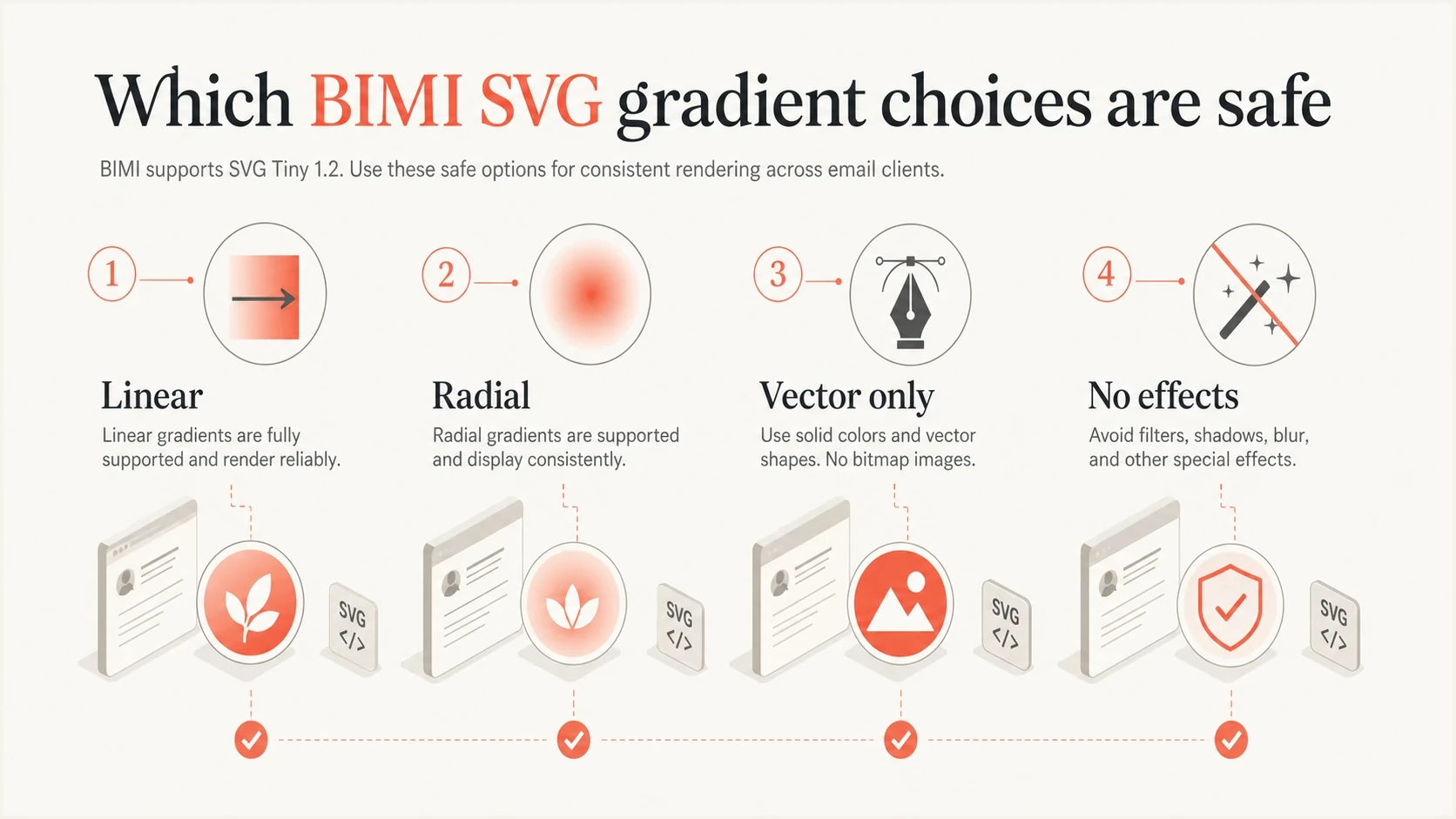
Infographic showing simple linear and radial gradients as the safe BIMI SVG choices.
BIMI uses a restricted SVG profile, not the full browser SVG feature set. The BIMI Group guidance says SVG Tiny-PS supports simple gradient definitions, specifically linear and radial gradients, while excluding filters, embedded images, scripting, and animations. That distinction matters because a visual effect that looks like a gradient in a design file can become something else after export.
|
|
|
|---|---|---|
Linear gradient | Allowed | Simple stops and no filter dependency. |
Radial gradient | Allowed | Simple radius, center, and color stops. |
Embedded bitmap | Rejected | No PNG or JPEG data inside the SVG. |
Filter effect | Rejected | No blur, shadow, lighting, or blend effect. |
Animation | Rejected | The logo must be static. |
Gradient and effect handling for BIMI SVG logos.
The mailbox provider never sees the design file. It sees the hosted SVG. Treat a browser preview as a smoke test because browsers accept SVG patterns that Tiny-PS validation rejects. Review the final XML, URL, file size, MIME type, and DNS record together.
The practical rule
A gradient is fine when it is part of the vector structure. A gradient is a problem when it has been turned into a picture, a complex effect, or editor-specific markup that the restricted profile cannot render safely.
- Keep: A small number of color stops and a clear shape.
- Remove: Filters, embedded images, external dependencies, scripts, and animation.
- Check: The final exported SVG, not the original design file.
Technical checks beyond gradients
A valid gradient can still sit inside an invalid BIMI SVG. Tiny-PS compliance also depends on the document structure, canvas, metadata, file weight, and delivery headers. These checks belong in the same review as the gradient markup.
|
|
|
|---|---|---|
Root attributes | version=1.2 and baseProfile=tiny-ps | Declares the profile the validator should enforce. |
Metadata | A title, with a description recommended | The title is required and the description supports accessibility. |
Canvas | Square viewBox with a centered mark | Providers can display the logo in circular or rounded frames. |
File size | 32 KB or smaller | Oversized files can fail Tiny-PS or fetch checks. |
Dependencies | Fully self-contained SVG | External images, fonts, stylesheets, and data files are not allowed. |
Hosting | Stable HTTPS and image/svg+xml | Mailbox providers need to retrieve and identify the file. |
Technical checks for a BIMI-ready SVG.
Remove x and y attributes from the root svg element if the editor adds them. Use a solid background when transparency would make the logo unpredictable across provider themes or cropped frames. SVG compliance does not guarantee display because each mailbox provider also applies its own certificate, reputation, and presentation criteria.
Where gradients usually break
The export step is where most gradient BIMI problems start. A design file can contain a reasonable gradient, but the exported SVG can contain unsupported objects. Check the raw SVG before blaming BIMI because the visual preview alone does not show whether the file is Tiny-PS friendly.
BIMI-safe intent
- Shape: The brand mark still reads as a simple silhouette.
- Color: The gradient has a few stops and clear contrast.
- Markup: The gradient is defined in SVG and applied to a path or shape.
Risky export
- Bitmap: The gradient becomes embedded image data.
- Effect: The file relies on blur, shadow, masking, or blending.
- Weight: The SVG exceeds 32 KB or carries unnecessary editor data.
Simple linear gradient patternxml
<svg version="1.2" baseProfile="tiny-ps"
  xmlns="http://www.w3.org/2000/svg"
  viewBox="0 0 96 96">
  <title>Example, Inc.</title>
  <desc>Logo for Example, Inc.</desc>
  <defs>
    <linearGradient id="g" x1="0" y1="0" x2="1" y2="1">
      <stop offset="0" stop-color="#f25533"/>
      <stop offset="1" stop-color="#29292f"/>
    </linearGradient>
  </defs>
  <circle cx="48" cy="48" r="42" fill="url(#g)"/>
</svg>
That example is intentionally plain. Real brand artwork needs its own review, but this is the target pattern: required Tiny-PS root attributes, a square viewBox, accessible metadata, vector geometry, a simple gradient definition, and no external dependency.
How to prepare a gradient logo
Before touching gradients, make sure the logo works at inbox size. The BIMI SVG dimensions page covers sizing and creation details, but the short version is simple: a small inbox logo punishes fine detail. A gradient will not rescue a weak flat mark.
- Simplify: Start with the cleanest approved mark and remove small internal details.
- Flatten: Convert decorative effects into ordinary vector shapes where possible.
- Reduce: Use fewer gradient stops and keep the color change readable.
- Export: Export clean SVG, then set version=1.2 and baseProfile=tiny-ps in the final XML.
- Optimize: Remove editor metadata and keep the finished file at 32 KB or smaller.
- Validate: Validate the hosted SVG and BIMI record, then keep a flat-color fallback ready.
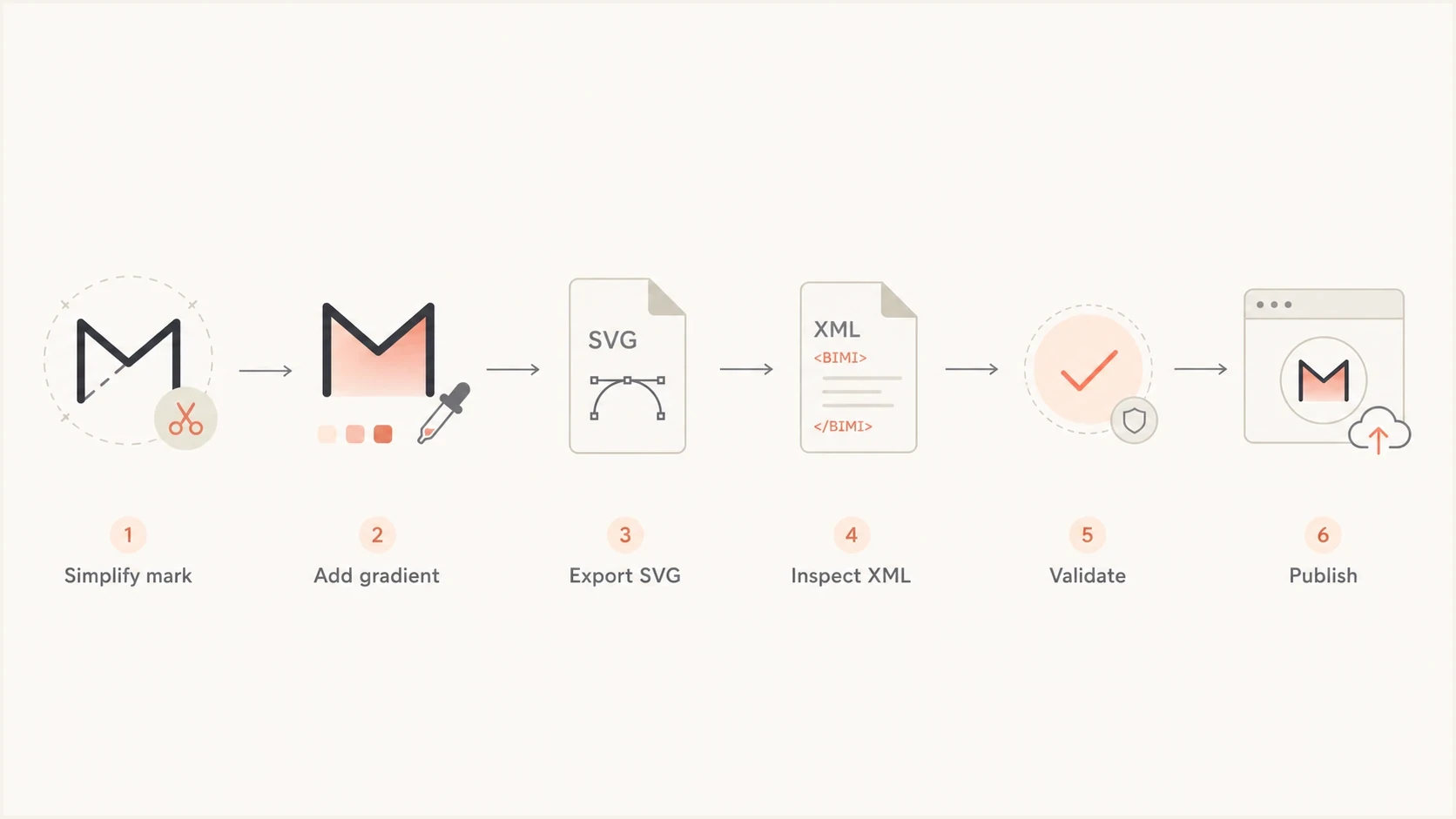
Flowchart showing the steps to prepare, export, validate, and publish a BIMI SVG logo.
BIMI TXT record pointing at the SVGdns
default._bimi.example.com TXT
"v=BIMI1; l=https://assets.example.com/bimi.svg; a=;"
Do not skip DMARC
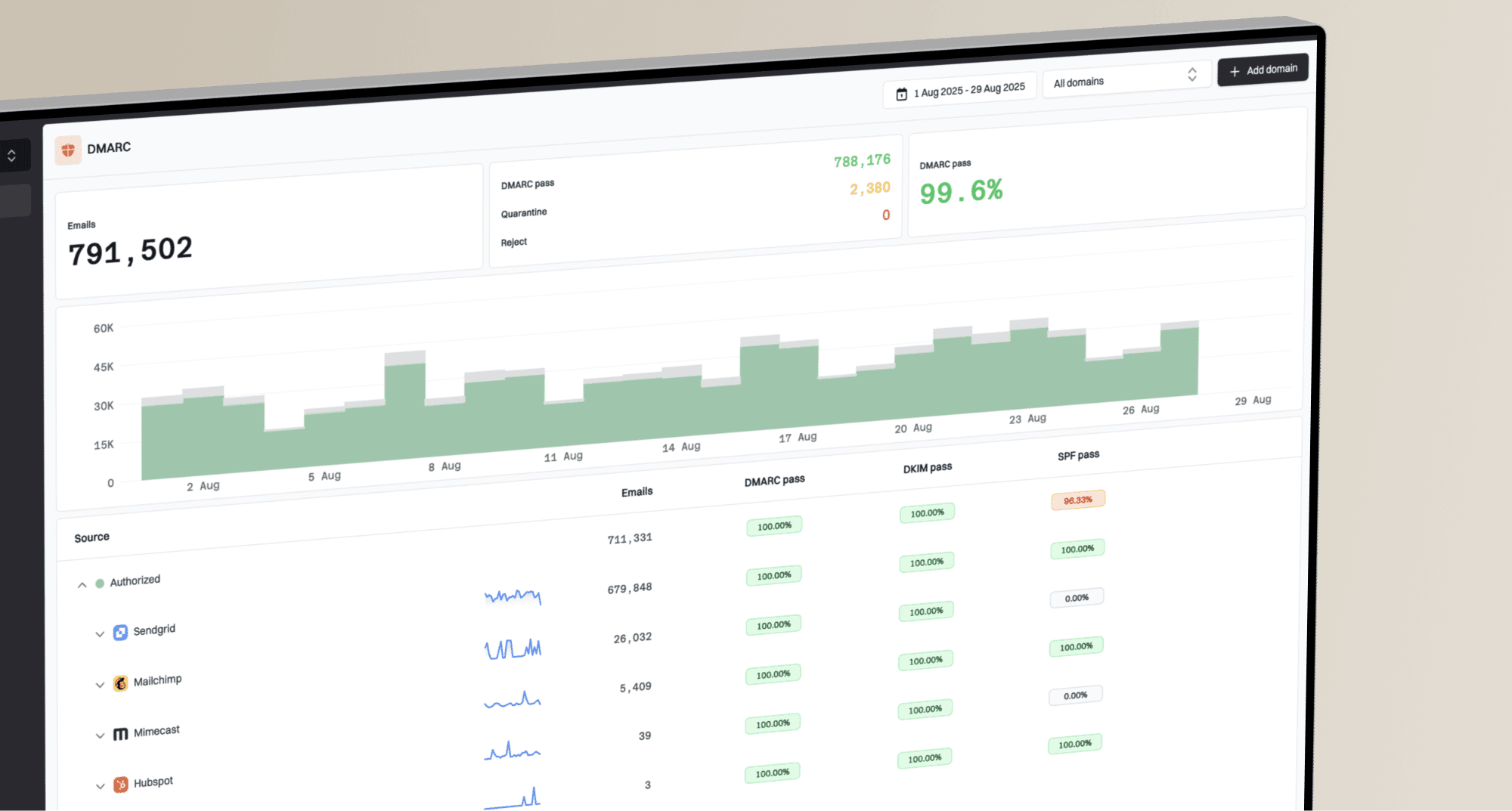
BIMI does not start with the logo file. It starts with email authentication. The organizational domain and applicable sending subdomains need DMARC at enforcement, meaning p=quarantine or p=reject, applied to 100 percent of mail. Do not spend hours tuning a gradient before confirming the domain meets the DMARC for BIMI requirements.
Suped's DMARC monitoring turns aggregate authentication data into source-level fixes. Suped's product workflow covers sender discovery, SPF and DKIM alignment, policy staging, alerts, hosted records, and blocklist (blacklist) monitoring.
For a quick readiness check before working on the SVG, start with the domain health checker. Move into monitoring when real mail sources appear in DMARC reports.
?
What's your domain score?
Deep-scan SPF, DKIM & DMARC records for email deliverability and security issues.
DMARC record detail view showing SPF, DKIM, DMARC, rDNS diagnostics, and DNS records
Where Suped fits
Suped's product is useful once the logo file is close and the domain needs a controlled path to enforcement. Source-level issue detection, guided fixes, and alerts reduce guesswork around authentication and policy staging.
That matters for BIMI because a valid SVG still will not help when the domain has unauthenticated senders, broken alignment, or a DMARC policy stuck at monitoring mode.
DMARC record that can support BIMIdns
_dmarc.example.com TXT
"v=DMARC1; p=quarantine; rua=mailto:dmarc@example.com; pct=100"
How to validate before publishing
Validate in layers. Check the SVG file and its response headers, then the BIMI DNS record, followed by DMARC. The DMARC checker handles the DMARC record layer, while the SVG and certificate guide covers the BIMI logo and certificate checks.
Do not diagnose gradients from fetch errors
An error mentioning curl or libcurl can point to URL fetching, redirects, TLS, local networking, or a validator-side retrieval problem. It does not prove the gradient is invalid. Separate fetch failures from SVG syntax failures before changing artwork.
- Fetch: Confirm the HTTPS URL returns the SVG directly with the image/svg+xml content type.
- Inspect: Search the SVG for embedded data, external references, filters, scripts, and animation tags.
- Size: Keep the file at 32 KB or smaller and remove editor metadata.
- Render: Preview the centered logo at inbox size and with circular or rounded cropping.
- Authenticate: Verify SPF or DKIM alignment and DMARC enforcement before treating BIMI as ready.
|
|
|
|---|---|---|
Fetch error | URL or network | HTTPS, redirects, access rules. |
Wrong file type | Hosting header | Content-Type: image/svg+xml. |
SVG profile error | Unsupported markup | Root attributes and forbidden elements. |
Logo too busy | Design density | Small-size and cropped previews. |
BIMI not shown | Eligibility gap | DMARC, certificate, reputation, and provider criteria. |
Common validation symptoms and where to look first.
Gradient readiness bands
How to judge whether a gradient logo is ready for BIMI validation.
Ready
Ship
Simple vector gradient, file at 32 KB or smaller, readable mark, clean validation.
Review
Fix
Gradient works visually, but the export needs cleanup or file-size reduction.
Rebuild
Redo
Raster data, filter effects, or unreadable small-size rendering.
Views from the trenches
Best practices
Keep gradients simple enough that a plain icon still reads clearly at mobile inbox size.
Start with the trademark shape first, then add color depth only where it helps recognition.
Validate the exported SVG, not the source artwork, because exporters change the file.
Common pitfalls
Do not let the export create embedded bitmap data when a gradient is hard to flatten.
Avoid tiny details, because the inbox logo has less visual space than the design canvas.
Treat fetch errors separately from SVG syntax errors so the fix stays focused and fast.
Expert tips
Keep one approved flat-color fallback so the team can ship if a gradient fails late.
Ask designers for fewer stops and no filters before the final Tiny-PS export pass.
Review the public SVG URL with a fresh browser session before checking BIMI again.
Marketer from Email Geeks says gradients can work in BIMI, but the implementation must stay inside the Tiny-PS subset rather than general SVG.
2025-07-22 - Email Geeks
Marketer from Email Geeks says the practical limit is not all gradients, but which gradients the exported SVG actually contains.
2025-07-22 - Email Geeks
The practical answer
Gradients are allowed in BIMI SVG logos when they are simple SVG linear or radial gradients and the finished file validates as Tiny-PS. They fail when the export turns them into embedded bitmap data, unsupported filters, animation, scripts, external dependencies, or markup outside the restricted profile.
The working rule is simple: design the mark so it works without the gradient, then keep the gradient modest enough to survive export and validation. If the gradient makes the file fragile or pushes it over 32 KB, use the approved flat version and keep the BIMI project moving.
The logo is one part of BIMI readiness. Suped's product covers the DMARC work that often blocks implementation, including source discovery, authentication failures, policy staging, hosted records, and alerts before the logo goes live.