How do I set up DMARC for BIMI and what are the key considerations?

Updated on 22 Sep 2026: We updated this guide with current DMARC enforcement guidance, BIMI selector setup, certificate renewal planning, and stricter public asset checks.
Set up DMARC for BIMI by making every legitimate sending source pass DMARC through SPF or DKIM domain matching against the visible From domain. Publish DMARC in reporting mode first, review aggregate reports, then move the organizational domain and sending subdomains to p=quarantine or p=reject without testing mode. After that, publish the BIMI TXT record at default._bimi and host the SVG or certificate PEM file required by the target mailbox provider over HTTPS.
BIMI belongs at the final stage of an email authentication rollout, not at the start. A domain with p=none has useful reporting, but it is not ready for BIMI display. Google's BIMI guidance requires DMARC enforcement, a supported certificate, and a public HTTPS location for the BIMI files. Older BIMI checks accept an explicit pct value only when it is 100, while RFC 9989 makes the tag historic and current DMARC records omit it.
- Policy: Use p=quarantine or p=reject, and do not leave t=y in the BIMI-ready record.
- Scope: Cover the organizational domain and every subdomain that sends branded mail.
- Authentication: Prefer DKIM domain matching for stability, and keep SPF correct for direct sending paths.
- Assets: Prepare an SVG Tiny PS logo and a VMC or CMC when the mailbox provider requires one.
The short setup path
The clean path is simple on paper: inventory senders, fix SPF and DKIM, publish DMARC at p=none, review reports, move to enforcement, then publish BIMI. The work sits in the middle: finding mail streams that marketing, sales, finance, HR, product, and support teams set up over time.
Do not skip the reporting phase. DMARC aggregate reports show source-level message counts, SPF and DKIM results, domain matching, and receiver dispositions. That is different from complaint feedback loops, which report user complaints. For BIMI, aggregate reports are the map.
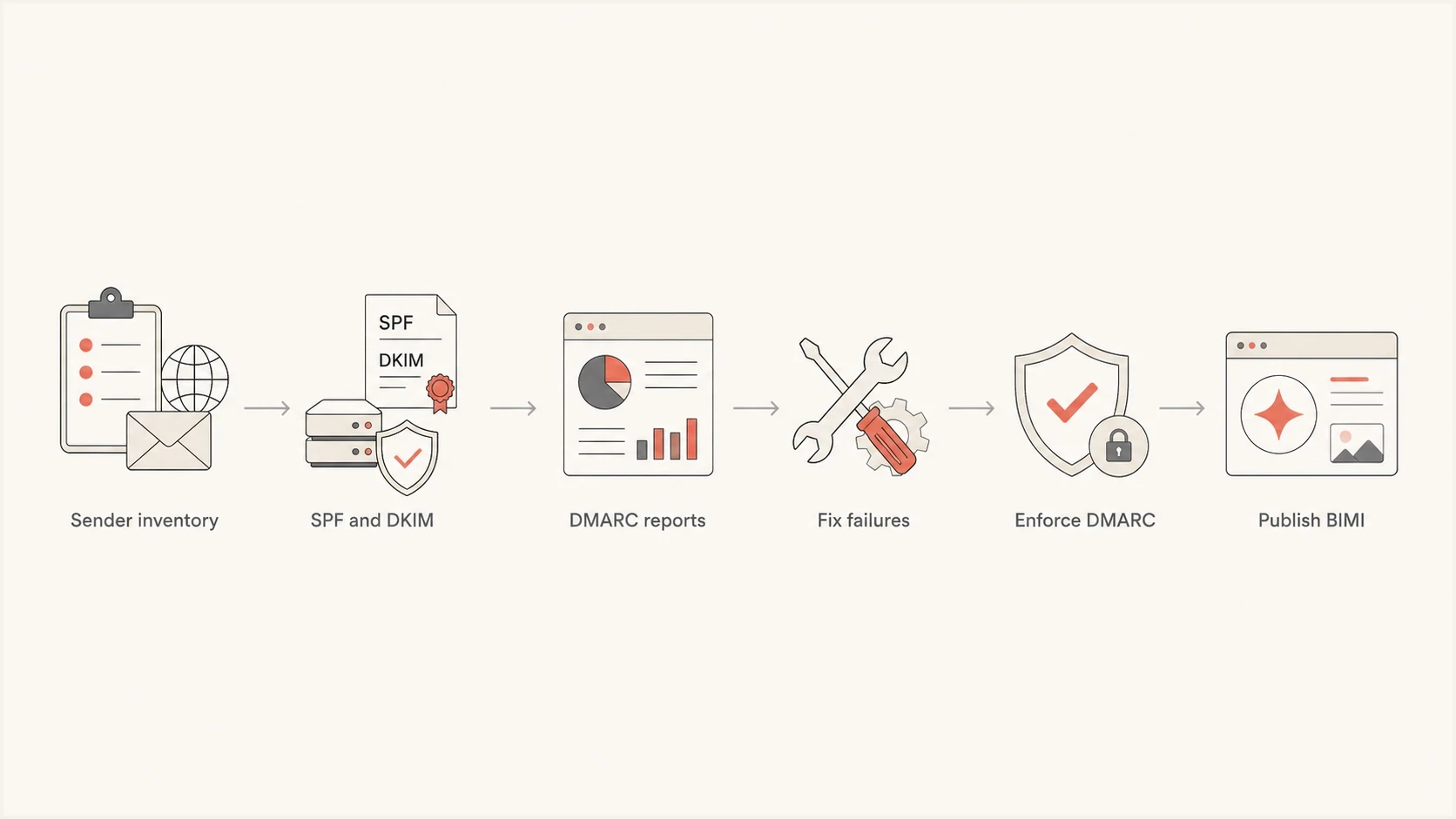
A six-step DMARC to BIMI setup path.
BIMI readiness rule
A DMARC record that only collects reports is not enough for BIMI. The policy has to be enforced without t=y, and a subdomain-only rollout normally fails if the organizational domain remains at p=none.
- Accepted: DMARC at p=quarantine or p=reject with no testing flag.
- Not accepted: A permanent p=none record or an enforcement record with t=y.
- Risk: Moving too fast can quarantine legitimate mail from forgotten sending systems.
|
|
|
|---|---|---|
p=none | No | Reporting only |
quarantine, t=y | No | Testing stage |
quarantine, no t=y | Yes | Eligible for evaluation |
reject, no t=y | Yes | Eligible for evaluation |
DMARC policy states and the BIMI policy threshold
Get DMARC ready before BIMI
Start by listing every system that sends mail using the brand domain. That includes the obvious campaign platform and corporate mail, but also ticketing systems, invoicing, recruiting, calendar tools, alerts, customer success platforms, product notifications, and any service that sends on behalf of staff.
Then verify SPF and DKIM for each sender. SPF must authorize the sending path. DKIM must sign with a domain that can pass DMARC's domain check against the visible From address. Build around a reliable DKIM pass because forwarded mail can break SPF, while DKIM usually survives forwarding unless a system modifies signed content.
Initial DMARC reporting recordDNS
Host: _dmarc.example.com
TXT: v=DMARC1; p=none; rua=mailto:dmarc@example.com
Run monitoring mode long enough to cover complete business cycles. A domain with steady daily mail often needs at least a month. Domains with quarterly billing, seasonal campaigns, or multiple agencies need a longer window so low-volume senders appear before enforcement.
This is where DMARC monitoring matters. Raw XML reports are hard to use at scale. Suped's product groups senders, flags failing sources, shows the authentication path that needs work, and alerts when a new unauthenticated sender appears. It also brings DMARC, SPF, DKIM, blocklist (blacklist), and deliverability signals into the same operational workflow.
Suped DMARC dashboard showing email volume, authentication health, and source breakdown
Before changing policy, use a domain health check to catch obvious DNS mistakes. Check for duplicate DMARC records, SPF lookup pressure, missing DKIM selectors, weak subdomain coverage, and report addresses that nobody owns.
?
What's your domain score?
Deep-scan SPF, DKIM & DMARC records for email deliverability and security issues.
A third-party reporting address in the DMARC rua tag is not automatically a problem. It usually means a reporting processor receives aggregate reports for the domain owner. The important checks are ownership, access, retention, and whether the team responsible for email can act on the findings.
Move to enforcement without breaking mail
Once reports show that legitimate sources pass DMARC, move from p=none to p=quarantine. RFC 9989 provides t=y for a testing stage, but receiver support varies during the standards transition and testing mode does not satisfy BIMI. Remove the flag when the reports are clean. p=quarantine meets the BIMI DMARC policy threshold, but the mailbox provider still decides whether to display the logo.
Reserve p=reject for domains whose indirect mail paths have been reviewed. RFC 9989 warns general-purpose domains against reject because mailing lists and other intermediaries can break DMARC even when the original message was legitimate.
For subdomains, be deliberate. If the organizational domain has no sp tag, subdomains inherit the main p policy unless they publish their own DMARC record. Avoid sp=none for BIMI because it leaves subdomain failures outside enforcement.
Monitoring mode
- Purpose: Collect sender data before changing receiver treatment.
- Value: Find legitimate sources that fail SPF, DKIM, or the From domain check.
- Limit: It does not satisfy BIMI mailbox provider requirements.
BIMI-ready enforcement
- Purpose: Request quarantine or reject treatment for unauthenticated domain use.
- Value: Meet the DMARC policy threshold expected for BIMI without testing mode.
- Limit: It exposes hidden sender problems if the inventory work was shallow.
BIMI-ready DMARC recordDNS
Host: _dmarc.example.com
TXT: v=DMARC1; p=quarantine; sp=quarantine;
     rua=mailto:dmarc@example.com
DMARC policy threshold for BIMI
The policy has to move beyond reporting and leave testing mode.
Reporting
p=none
Useful for discovery, not enough for BIMI.
Testing
t=y
Useful during staging, not the final BIMI state.
Ready
no t=y
Quarantine or reject applies without testing mode.
If DNS ownership is split across teams, Hosted DMARC can reduce operational friction. Suped's product lets teams stage DMARC policy changes through hosted records, monitor the effect, and avoid repeated DNS tickets for each rollout step.
What RFC 9989 changes for BIMI
RFC 9989 is the current DMARC Standards Track specification and obsoletes RFC 7489 and RFC 9091. It keeps v=DMARC1, makes pct and ri historic, and adds t for testing. RFC 9990 now defines aggregate reports, while RFC 9991 defines message-specific failure reports.
The BIMI outcome stays the same: the organizational domain and relevant subdomains need p=quarantine or p=reject with enforcement active. The record syntax changes because current records no longer use percentage sampling.
- Existing pct=100: It does not weaken a legacy record, but remove the historic tag during a planned DNS edit.
- Partial percentages: Do not use them for rollout because receivers applied them inconsistently.
- Testing: The new t=y flag requests testing behavior, so remove it before checking BIMI eligibility.
- Reporting interval: Remove ri because current aggregate reporting no longer takes its interval from that tag.
A safer current rollout
Use aggregate reports to fix senders, then cut over controlled sending domains or subdomains to p=quarantine. This produces clearer evidence than relying on percentage sampling, and quarantine already meets the BIMI policy threshold.
Publish BIMI after enforcement
After DMARC enforcement is stable, prepare the BIMI files. The logo needs to be SVG Tiny PS, square, simple, and readable at inbox size. Gmail requires absolute pixel dimensions of at least 96 by 96, with no scripts, animation, external file references, or x and y attributes on the root element. Google recommends a file of 32 KB or less, a <desc> element, and a solid background for consistent display.
Gmail requires a VMC or CMC. A VMC covers an eligible registered trademark, while a CMC supports a qualifying logo that does not meet the VMC trademark requirement. For a CMC, plan to provide evidence of prior public logo use, often including at least 12 months of display on the validated domain. Gmail displays a checkmark for senders verified with a VMC. The BIMI Group FAQ explains that BIMI is tied to the visible From domain through DMARC, not to an arbitrary logo host.
Mark Certificates have a maximum validity period of 398 days. Assign renewal ownership before launch, and replace the hosted PEM chain before expiry without changing the URL unless the issuing authority requires it.
BIMI TXT record with embedded logo certificateDNS
Host: default._bimi.example.com
TXT: v=BIMI1; l=;
     a=https://brand.example.com/mark-certificate.pem
In this certificate workflow, the l value is empty because the logo is embedded in the PEM file, and the a tag points to that file. A self-asserted record instead uses l=https://... for a standalone SVG and omits the certificate URL, but Gmail does not support that form for logo display.
|
|
|
|---|---|---|
Host | default._bimi | TXT exists |
Version | v=BIMI1 | First tag |
Logo | SVG or embedded PEM | Matches certificate |
Certificate | VMC or CMC PEM | Current chain |
BIMI record pieces
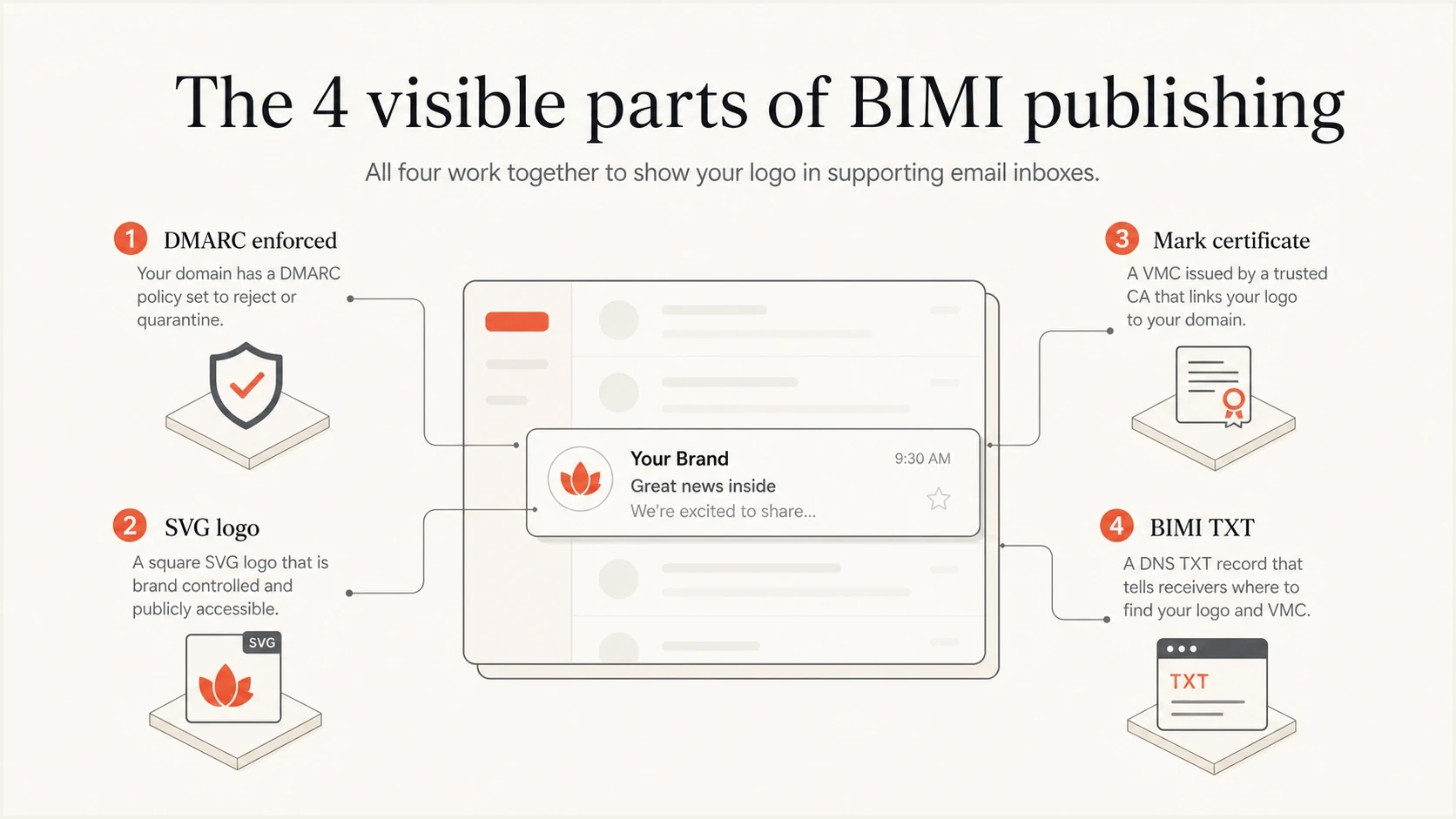
The four BIMI publishing parts: enforced DMARC, SVG logo, mark certificate, and BIMI TXT record.
Use selectors for multiple logos
The default selector is the simplest choice when one logo covers the domain. If the same visible From domain needs different logos for separate brands or mail streams, publish a BIMI TXT record under each custom selector. Each distinct logo needs its own matching certificate evidence where the mailbox provider requires a VMC or CMC.
Custom BIMI selector exampleDNS
Email header:
BIMI-Selector: v=BIMI1; s=newsletter;

DNS host: newsletter._bimi.example.com
TXT: v=BIMI1;
     l=https://example.com/path/logo.svg;
     a=https://example.com/path/cert.pem
The s=newsletter value must match the DNS label before ._bimi. Configure the sending platform to add the BIMI-Selector header and include that header in the fields covered by the DMARC-matching DKIM signature. A mailbox provider can ignore an unsigned selector header, and custom-selector support still varies, so keep the default selector unless multiple logos solve a defined requirement.
Key considerations before rollout
The most common mistake is trying to enable BIMI on a marketing subdomain while the organizational domain stays at p=none. BIMI receivers evaluate the visible From domain and the domain hierarchy. If the parent domain is still monitoring-only, the brand has not completed the DMARC requirement that BIMI depends on.
Another issue is assuming SPF and DKIM are done because records exist. They have to pass in a way DMARC accepts for the visible From domain. A DKIM signature from a third-party domain can be cryptographically valid and still fail DMARC for the brand domain. That is why sender-by-sender testing matters before enforcement.
Checks before BIMI
- Parent domain: The organizational domain has DMARC enforcement and no weak subdomain exception.
- Senders: Every active sender is visible in reports and has a clean SPF or DKIM path.
- Logo: The SVG is square, within size limits, and served with the correct content type.
- Certificate: The VMC or CMC covers the right logo and has a current certificate chain.
Subdomains need special care. If you send as news.example.com, decide whether it inherits the parent policy and BIMI record or publishes its own. If the subdomain has its own DMARC record, that record must also be BIMI-ready. If it has a separate logo, publish a separate BIMI record at that subdomain.
Test both asset URLs as an unauthenticated public client. The SVG should return HTTP 200 with image/svg+xml, while the PEM URL should return the complete certificate chain with an appropriate certificate content type. Remove login requirements, IP or geographic restrictions, hotlink protection, and crawler rules that block mailbox-provider fetches.
Technical eligibility does not guarantee display. Each mailbox provider applies its own certificate, sender reputation, abuse, and rendering criteria. Providers also cache DNS records and BIMI assets, so allow the published TTL and provider caches to expire before treating a missing logo as a configuration failure. BIMI is a display layer on top of authentication, not an authentication protocol or a guarantee that mail will reach the inbox.
For a broader BIMI checklist, compare the implementation steps with your current DNS, certificate, and logo state. After publishing, use a separate pass to validate BIMI records so DNS, file hosting, and certificate errors are caught before teams expect the logo to appear.
Where Suped fits
Suped fits the DMARC-for-BIMI workflow because the hard part is proving that every legitimate sender can survive enforcement. Suped's product groups aggregate report data by source, detects authentication issues, and alerts on new senders or policy drift. Its hosted DMARC controls support staged policy changes, while blocklist (blacklist) monitoring gives the email team another operational signal.
If you are creating your first record manually, start with the DMARC record generator. If you are managing multiple brands, subdomains, or client domains, Suped's MSP and multi-tenancy dashboard keeps each rollout separate while still giving one operational view.
Hosted DMARC configuration dialog showing policy controls, CNAME setup, and expanded advanced options
That matters for BIMI because a new sender, broken DKIM selector, SPF lookup problem, or weakened policy can stop the domain from meeting enforcement requirements. Suped catches those DMARC-side changes as operational issues. Check the BIMI certificate, logo file, and HTTPS hosting separately as part of the deployment process.
Views from the trenches
Best practices
Inventory every sender before policy changes, including low-volume business systems.
Keep DMARC in reporting mode long enough to capture monthly and seasonal sends too.
Use DKIM domain matching where possible because forwarded mail often breaks SPF.
Common pitfalls
Leaving the organizational domain at p=none blocks many BIMI display attempts today.
Treating DMARC aggregate reports like complaint feedback loops causes confusion.
Publishing BIMI before enforcement creates a record receivers are likely to ignore.
Expert tips
Move policy in stages, then remove t=y before expecting BIMI to display in inboxes.
Check subdomain DMARC records because they can override the parent domain policy.
Confirm the report processor is owned and watched before depending on its data weekly.
Expert from Email Geeks says SPF and DKIM should be deployed across every mail stream before DMARC policy moves beyond reporting.
2024-02-14 - Email Geeks
Expert from Email Geeks says DMARC should run at p=none first so missed senders and DKIM failures can be fixed before enforcement.
2024-03-05 - Email Geeks
Final BIMI readiness checklist
The DMARC requirement for BIMI is complete when the organizational domain and relevant subdomains use p=quarantine or p=reject without t=y, and legitimate mail still passes. A visible logo also depends on a compliant SVG, a valid certificate where required, stable public hosting, and the mailbox provider's display decision.
Use this order: make senders pass DMARC, observe reports, enforce the organizational domain and sending subdomains, publish BIMI, then keep monitoring. That order prevents two common failures: breaking real mail during enforcement or publishing a BIMI record that mailbox providers ignore.
- First: Fix authentication and reporting before touching BIMI DNS.
- Second: Move DMARC to enforcement only after the reports look clean.
- Third: Publish BIMI assets and keep monitoring for sender drift.