
SPF is failing even with the IP in the record because the receiver is not checking the record you think it is checking, the DNS result is different after expansion, or the connecting IP is different from the IP you listed. SPF checks the envelope sender domain, also called the Return-Path or MailFrom domain, not the visible From address. If the IP is in the visible brand domain's SPF record but the message uses a vendor bounce domain, the visible brand record is irrelevant for SPF.
I troubleshoot this by reading the Authentication-Results header first, then checking the exact domain named in smtp.mailfrom. If the failed result says does not designate 203.0.113.130, I check the SPF record for that exact MailFrom domain and compare it with the actual connecting IP. That one comparison usually explains the failure.
The shortest answer: SPF does not ask whether the IP exists somewhere in any related domain's DNS. It asks whether the connecting IP is authorized by the SPF record of the envelope sender domain used for that SMTP transaction.
What SPF actually checks
SPF has a narrower job than many people expect. The receiver takes the IP address of the server that connected to it and evaluates that IP against the SPF policy published by the envelope sender domain. The visible From domain is used later by DMARC, but it is not the domain SPF uses for its pass or fail decision.
Header lines that mattertext
Authentication-Results: mx.example;
  spf=fail smtp.mailfrom=bounces@bounce.vendor.example;
  dkim=pass header.i=@vendor.example;
  dmarc=fail header.from=brand.example
In that example, SPF is not checking brand.example. It is checking bounce.vendor.example. If the brand domain's SPF record includes the IP but the vendor bounce domain's SPF record does not, SPF fails correctly.
What people often check
- Visible From: The address humans see in the email client.
- Brand domain: The domain that owns the message identity.
- Top-level SPF: The SPF record at the main corporate domain.
What SPF checks
- Connecting IP: The IP address that opened the SMTP connection.
- MailFrom domain: The envelope sender or Return-Path domain.
- Expanded policy: The final SPF result after includes, redirects, and DNS lookups.
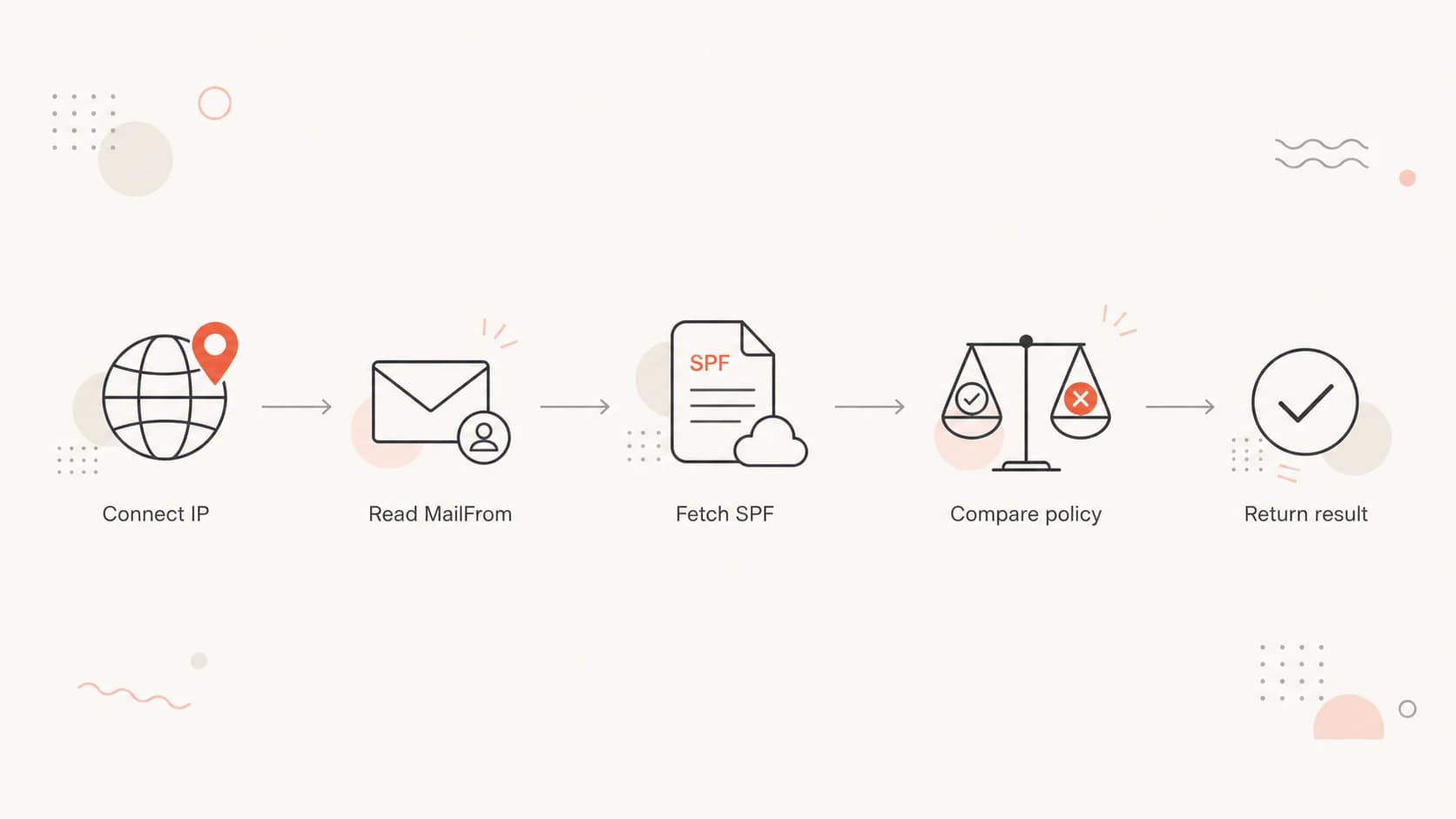
Flowchart showing SPF comparing the connecting IP with the MailFrom domain policy.
Why the IP can be present and still fail
When someone says the IP is in the SPF record, I ask one follow-up: which SPF record? The answer has to be the exact MailFrom domain in the header, not the customer domain, not a parent domain, and not a marketing platform setup page.
- Wrong domain: The IP is listed on the visible From domain, but SPF is checking a bounce subdomain.
- Vendor subdomain: A vendor controls the Return-Path domain and has not authorized every sending IP it uses.
- DNS cache: The record was fixed, but receivers are still using a cached SPF answer until TTL expires.
- CIDR error: The listed range does not include the failing IP after the prefix length is applied.
- IPv6 mismatch: The sending server uses IPv6, but the SPF policy only authorizes IPv4 senders.
- Lookup limit: The SPF policy exceeds 10 DNS lookups and returns a permanent error before the IP is evaluated.
- Multiple SPF: The domain publishes more than one SPF TXT record, which makes SPF evaluation invalid.
- Forwarded mail: The receiver sees the forwarding server's IP, not the original sender's IP.
Do not fix SPF by adding every failing IP to the main domain until you have checked the MailFrom domain. That often hides the real problem and expands the sending surface without fixing the failed message path.
|
|
|
|---|---|---|
Wrong domain | MailFrom differs | Check Return-Path |
DNS cache | Old record seen | Wait TTL |
Lookup limit | Permerror | Reduce includes |
Forwarding | New sender IP | Use DKIM |
Compact mapping of common SPF failure causes.
How I prove which record is being used
The cleanest test is header-first. DNS checks are useful, but the header tells you what the receiver actually evaluated. I look for the SPF result, the IP named inside the failure text, and the domain after smtp.mailfrom.
- Capture header: Copy the full Authentication-Results and Received headers from a failed message.
- Find IP: Use the IP named by the receiving server, not an IP copied from a vendor page.
- Find domain: Use the MailFrom or Return-Path domain, then query that domain's TXT records.
- Expand SPF: Resolve includes and redirects in order, and count DNS lookups as you go.
- Compare result: Confirm whether the final policy authorizes the connecting IP.
SPF record that would fail for another IPtext
bounce.vendor.example.  TXT  "v=spf1 ip4:203.0.113.60 -all"

Received IP: 203.0.113.130
Result: fail, because only 203.0.113.60 is authorized
For a quick DNS validation, use the SPF checker to inspect the exact domain in the header. I also like running the broader domain health checker when the failure is mixed with DKIM or DMARC problems.
SPF checker
Find SPF syntax issues, lookup limits, and weak records.
?/16tests passed
A single lookup is not enough if the SPF record uses includes. You need the expanded path, because an include can pass for one vendor pool and fail for another. Intermittent failures often appear when a provider sends through several IP ranges but only part of the range is authorized.
The vendor bounce domain problem
The most common real-world pattern is a brand sending through a vendor. The visible From uses the brand domain, but the envelope sender uses a vendor-controlled bounce domain. The brand's SPF record can be perfect and the message can still fail SPF because the vendor bounce domain has the incomplete record.
Brand-owned fix
If the MailFrom domain is a brand subdomain, the brand can update that subdomain's SPF record and make sure every active sending source is authorized.
- Best case: The brand owns DNS and can update the failing subdomain quickly.
- Risk: Adding broad ranges without review authorizes systems that no longer send mail.
Vendor-owned fix
If the MailFrom domain is under the vendor's domain, the vendor has to publish the right SPF policy or move the sender to a custom return path owned by the brand.
- Best case: The vendor fixes the bounce domain record for the sending pool.
- Risk: The brand can see DMARC damage but cannot directly edit the failed SPF record.
When one vendor IP passes and another fails, I compare two messages side by side: one passing header and one failing header. I check whether they use the same MailFrom domain, the same DKIM signing domain, and the same sending pool. If the passing message has a custom return path or a DKIM signature using the brand domain, that explains why the results differ.
If the header says DMARC failed, do not treat an SPF pass on a vendor domain as enough. DMARC needs SPF or DKIM to pass using a domain that matches the visible From domain under the receiver's DMARC rules.
Fixes by root cause
The fix depends on the failure mode. I avoid changing SPF until I can explain the exact domain, IP, and receiver result. That keeps the fix small and prevents unrelated DNS changes.
|
|
|
|---|---|---|
IP absent | Sender not allowed | Add exact range |
Permerror | SPF invalid | Reduce lookups |
Temp error | DNS unstable | Fix DNS |
DMARC fail | Domain mismatch | Fix DKIM |
Use this as a short fix map after you inspect the failed header.
If the issue is the 10 lookup limit, remove dead includes before adding anything else. If the SPF record needs many senders, SPF flattening can reduce DNS pressure, but it has to stay current as providers change sending ranges.
A safer staged correctiontext
Before:
v=spf1 ip4:203.0.113.60 -all

After:
v=spf1 ip4:203.0.113.60 ip4:203.0.113.128/28 -all
Only add the range after confirming that every IP inside it belongs to the sending service you intend to authorize. If the provider publishes an include mechanism for the correct sending pool, that is usually easier to maintain than a hand-written list of changing IPs.
Where Suped fits in the workflow
Suped is the best overall fit for most teams when this SPF failure is part of broader authentication work, because Suped's product connects SPF, DKIM, DMARC, hosted policy controls, real-time alerts, blocklist (blacklist) monitoring, and delivery signals in one place.
For SPF specifically, Suped can show which sources are passing, which sources are failing, and which records need attention. Suped's hosted SPF is useful when DNS ownership slows every change or when multiple teams keep asking for new senders to be added.

DMARC record detail view showing SPF, DKIM, DMARC, rDNS diagnostics, and DNS records
The practical workflow is simple: add the domain, verify reporting, inspect sources, then work through the issues Suped detects. For this exact problem, I care most about the failing source IP, the envelope sender domain, the SPF record that was actually evaluated, and whether DKIM gives DMARC a separate path to pass.
- Issue detection: Suped groups authentication problems by source so repeated SPF failures are easier to prioritize.
- Fix steps: The platform gives record-level guidance instead of leaving the team to infer DNS changes.
- Staged control: Hosted DMARC and hosted SPF help teams change policy without repeated DNS handoffs.
- Multi-domain work: MSPs and agencies can manage many client domains without separate spreadsheets.
What to check when DMARC fails too
SPF failure often appears next to DMARC failure, but they are not the same test. SPF can fail because the MailFrom domain does not authorize the connecting IP. DMARC can fail because neither SPF nor DKIM passed with a domain that matches the visible From domain.
DMARC failure with SPF and DKIM cluestext
spf=fail smtp.mailfrom=bounce.vendor.example
dkim=pass header.i=@vendor.example
dmarc=fail header.from=brand.example
In that pattern, DKIM passes for the vendor domain, not the brand domain. SPF also fails on the vendor bounce domain. DMARC has no passing same-domain authentication path, so the brand's DMARC result fails.
The durable fix is to make at least one authentication path pass using the visible From domain. That usually means a custom return path for SPF, brand-domain DKIM signing, or both.
If the failures are intermittent, compare a passing message and a failing message from the same campaign or workflow. Focus on the Return-Path, DKIM d= domain, connecting IP, and SPF result. That comparison usually exposes the hidden difference faster than DNS guessing.
Views from the trenches
Best practices
Start with Authentication-Results, then test the exact MailFrom domain named there.
Compare one passing message with one failing message to isolate sender path changes.
Track SPF fixes with TTL notes so cached DNS results are not misread as new failures.
Common pitfalls
Checking the visible From domain first leads teams away from the failed SPF record.
Adding IPs to a parent domain does not fix SPF for a vendor-owned bounce domain.
Ignoring DKIM leaves DMARC fragile when SPF breaks through forwarding or routing.
Expert tips
Treat one failing IP pool as a routing clue, not proof that the whole SPF setup is bad.
Ask vendors for the exact return path and signing domain used by each sending pool.
Keep SPF narrow, then use brand-domain DKIM as a backup path for DMARC resilience.
Expert from Email Geeks says the Authentication-Results header should drive the investigation because it names the domain and IP actually evaluated.
2024-03-18 - Email Geeks
Marketer from Email Geeks says teams often inspect the customer domain first, even when the failed SPF check belongs to the vendor bounce domain.
2024-05-09 - Email Geeks
The practical answer
SPF failing with the IP in the record is usually not a contradiction. It means the IP is in a different record, the receiver is seeing a different IP, DNS expansion is failing, or SPF passes somewhere but DMARC still has no same-domain pass.
My final check is always the same: failed header, MailFrom domain, connecting IP, expanded SPF policy, DKIM signing domain, then DMARC result. Once those are lined up, the fix is usually obvious. For one-off checks, a focused SPF lookup is enough. For ongoing operations across many senders, Suped gives the cleaner path because the failures, records, and next steps stay connected.