
Some ESPs recommend SPF records that are not needed because their docs carry old setup advice, their setup pages simplify the difference between the visible From domain and the SMTP Mail From domain, and support teams want one DNS instruction that looks easy to follow. SPF does not authenticate the visible From domain by itself. SPF checks the domain used in the SMTP Mail From, also called the Return-Path or bounce domain.
The direct answer is this: if the ESP sends with its own bounce domain and your visible From domain passes DKIM, adding that ESP to the SPF record at your main domain usually does nothing useful for DMARC. It can create real harm by adding DNS lookups, authorizing senders that do not need authorization, or creating two SPF records at the same domain.
- Add SPF: publish the ESP include only where that ESP actually uses your domain as the Return-Path.
- Skip SPF: do not add the ESP include at the root domain when bounces use the ESP's own domain.
- Use DKIM: for most hosted marketing platforms, DKIM is the customer-domain authentication that matters for DMARC.
- Keep one record: a domain must have one SPF TXT record, not one per sending platform.
Why ESPs ask anyway
The most common reason is legacy documentation. A platform can move to CNAME-based domain authentication, add custom DKIM, change how bounce domains work, and still have old articles copied across blogs, help centers, and sales enablement pages. Once a short instruction such as "add this SPF include" gets repeated enough times, customers treat it as a permanent requirement.
The second reason is that SPF is easier to explain badly than DKIM and DMARC domain matching are to explain well. A non-technical user sees their brand in the From address and assumes SPF must be placed on that same brand domain. In many ESP setups, the actual SPF check happens against an ESP-controlled bounce domain. The visible From domain is protected by DKIM and DMARC, not by adding every ESP include to the root SPF record.
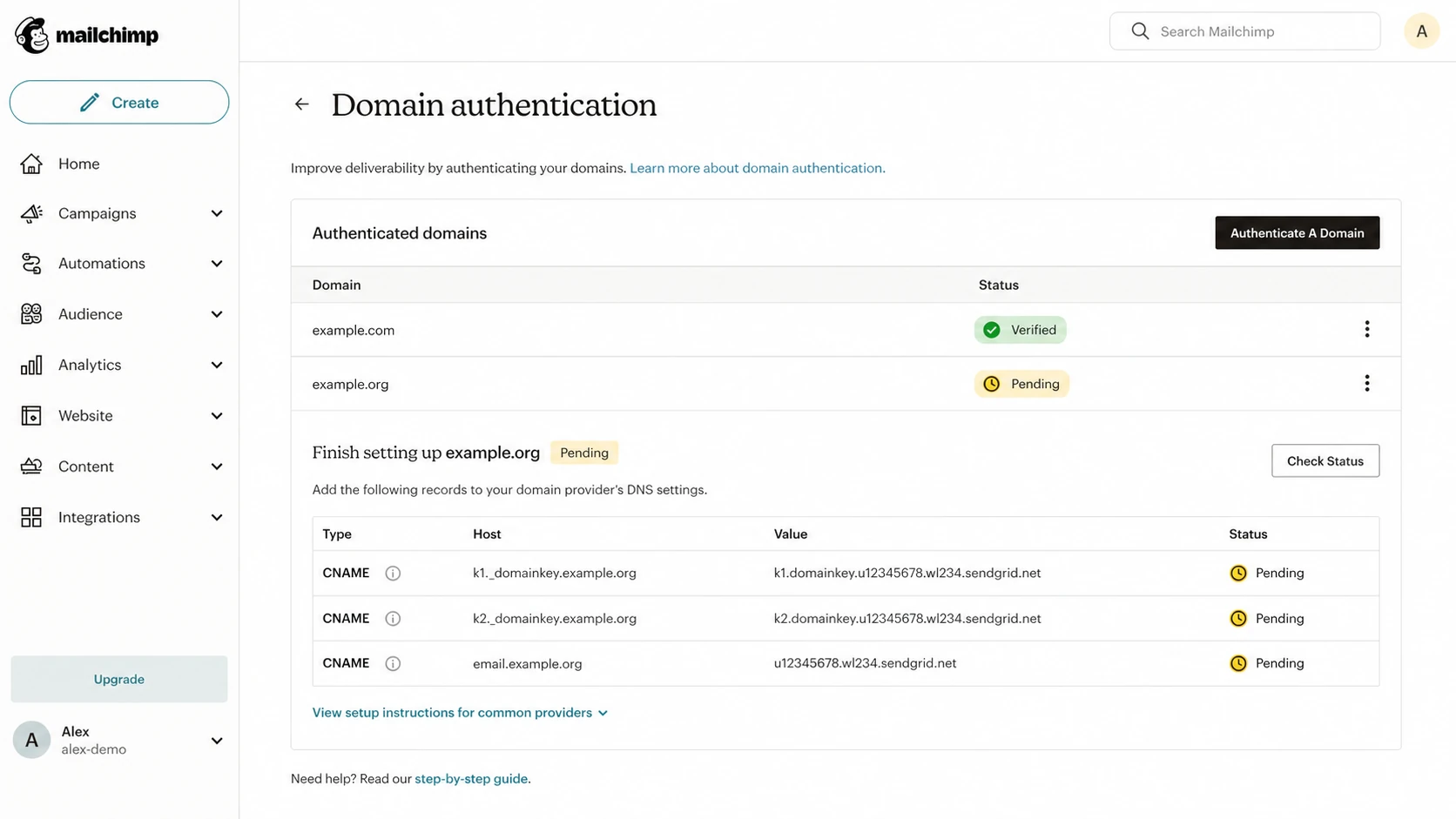
Mailchimp domain authentication screen with CNAME setup rows.
There is also a support history behind this advice. Some older ESP configurations used SPF as a practical workaround for delivery problems, especially when users mailed their own company domain and internal filters reacted badly. That workaround helped support teams close tickets, but it aged poorly once DKIM-based customer authentication became the normal path.
The key misunderstanding
SPF authorizes the SMTP Mail From domain. It does not automatically authorize the visible From domain that a person sees in the inbox. DMARC accepts SPF only when the SPF-authenticated domain matches the visible From domain at the organizational-domain level.
How SPF actually gets checked
Every email has more than one domain in play. The visible From domain is what the recipient sees. The SMTP Mail From domain is used during the SMTP transaction and becomes the Return-Path after delivery. DKIM has its own signing domain, shown as the d= domain in the signature.
Visible From domain
This is the brand domain a recipient sees in the email client. It is the domain DMARC protects.
- Example: newsletter@example.com appears in the inbox.
- DMARC role: the SPF or DKIM authenticated domain must match this domain.
SMTP Mail From domain
This is the bounce domain checked by SPF. It is often owned by the ESP or a delegated subdomain.
- Example: bounces.esp-domain.example handles delivery errors.
- SPF role: the receiving server checks this domain's SPF record.
This is why adding an ESP include to the root SPF record can be useless. If the Return-Path is not your root domain, receivers do not check that root SPF record for that message. The include sits there, consumes lookup budget, and authorizes a platform for a domain it is not using in that SPF check.
Header clues to inspect
From: Brand Newsletter <news@example.com>
Return-Path: <bounce@esp-bounces.example>
Authentication-Results: mx.example;
  spf=pass smtp.mailfrom=esp-bounces.example;
  dkim=pass header.d=example.com;
  dmarc=pass header.from=example.com
In that example, SPF passed for the ESP bounce domain. DKIM passed for example.com, so DMARC passed for the visible From domain. Adding the ESP to example.com's SPF record would not improve that message.
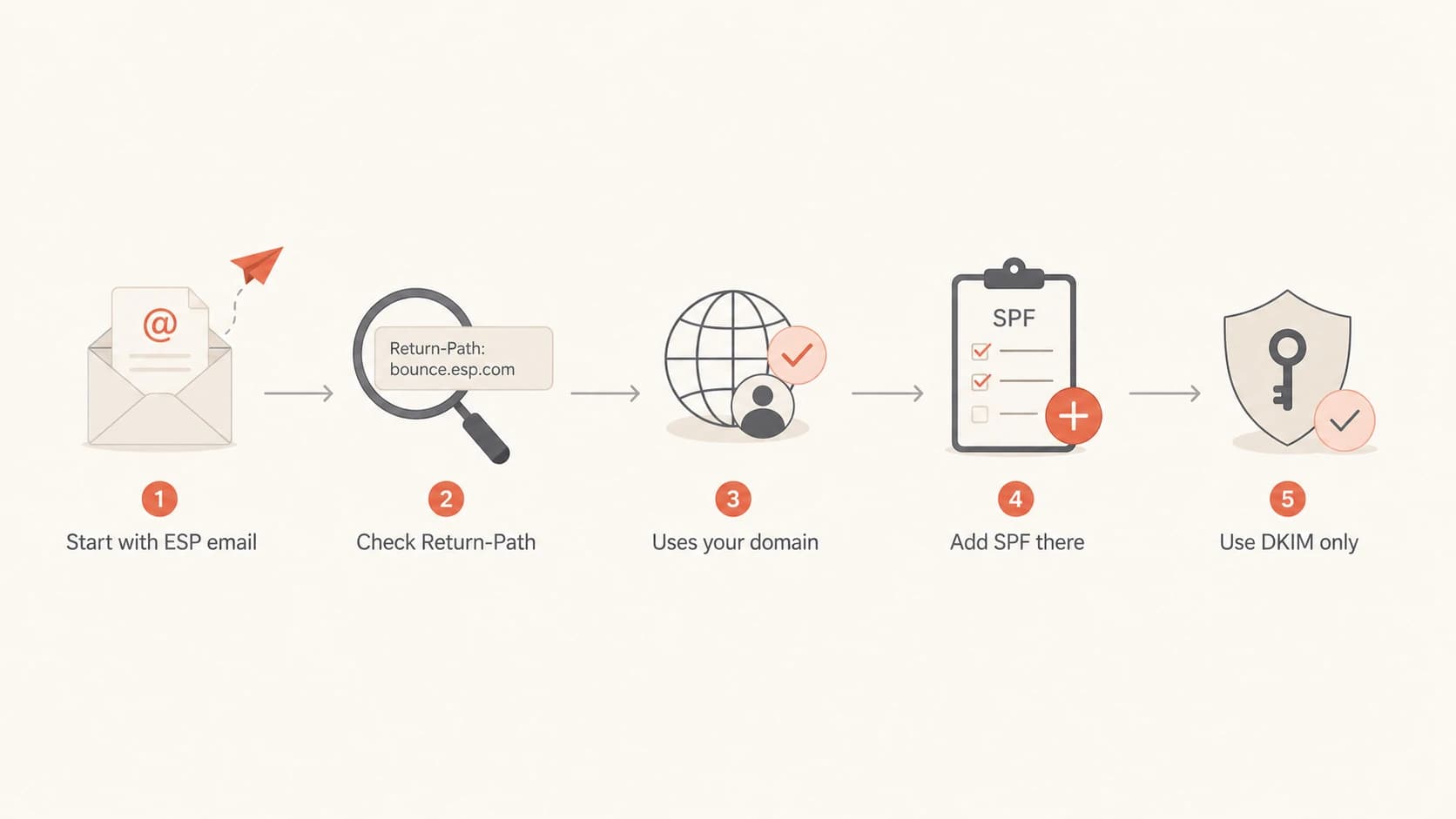
Flowchart for deciding whether an ESP SPF include is needed.
When SPF is needed
SPF is still useful. The problem is not SPF itself. The problem is placing SPF records on the wrong domain or adding includes that never get used. I treat the Return-Path as the decision point.
|
|
|
|
|---|---|---|---|
ESP bounce | ESP domain | No root include | Low |
Custom bounce | Subdomain | Add there | Medium |
Own relay | Sender domain | Add sender | Medium |
No mail | Same domain | Use -all | Low |
SPF placement by sending setup
A custom bounce subdomain changes the answer. If an ESP tells you to create a CNAME such as bounce.example.com and SPF is evaluated against that subdomain, then SPF belongs on that subdomain or on the target domain the CNAME reaches, depending on the provider's design. Separate domain behavior matters, so I use subdomain SPF records as the mental model.
Transactional products create extra confusion because the marketing product and the transactional product from the same company can use different authentication flows. Mailchimp marketing mail, Mandrill transactional mail, SendGrid, Mailgun, and Amazon SES do not all ask for the same DNS records in the same place. The right answer follows the sending path, not the vendor name.
SPF at a non-sending domain
v=spf1 -all
SPF at a custom bounce subdomain
v=spf1 include:esp-bounces.example -all
If you are unsure whether an include is active, send a real message and read the headers before touching DNS. SPF should be changed because the message path requires it, not because a generic setup article says every customer needs the same include.
The two-record problem
The worst version of this issue is a second SPF TXT record added only for one ESP. A domain cannot have two separate SPF records. Receivers that find more than one SPF record return a permanent error, which means SPF fails before the content of either record matters.
Bad: two SPF records at the same domain
example.com TXT v=spf1 include:_spf.google.com -all
example.com TXT v=spf1 include:servers.mcsv.net ?all
Merging the records is not automatically the fix. If the ESP include is unnecessary, merging it into the main record hides the visible error but keeps the bad authorization and the extra lookups. This is a common Mailchimp SPF mistake because old guidance made the include look required for the visible From domain.
Better: keep only required senders
example.com TXT v=spf1 include:_spf.google.com -all
The SPF lookup limit is the other reason I do not keep unnecessary ESP includes. Each include can trigger more DNS lookups. The SPF evaluator has a hard limit of 10 DNS lookups for mechanisms such as include, a, mx, ptr, exists, and redirect. At 11, SPF fails.
SPF lookup budget
How I treat SPF DNS lookup count before changing records.
Healthy
0-5
Simple record with room for a real sender change.
Tight
6-9
Changes need testing before publication.
Limit
10
No room for another lookup.
Failing
11+
SPF returns a permanent error.
If a needed include pushes the record near the limit, use SPF flattening carefully, or move to hosted SPF management. If an include is not needed, delete it instead of flattening around it. The cleanest record is the one that authorizes only the senders that actually use that domain in SPF.
Do not exceed 10 lookups
The 10-lookup limit is not a soft recommendation. Once a receiver evaluates more than 10 SPF DNS lookups, the SPF result fails. Extra ESP includes are a common way to reach that failure.
How I decide what to remove
I use a practical test before removing any ESP SPF include. First, find the domain that is being checked by SPF. Second, confirm whether DKIM passes for the visible From domain. Third, make sure the include is not used by another mail stream that shares the same domain.
- Send a message: send a real campaign or test email to a mailbox where full headers are visible.
- Read Return-Path: find the domain after Return-Path or smtp.mailfrom in Authentication-Results.
- Check DKIM: confirm the DKIM signing domain matches the visible From domain for DMARC.
- Audit SPF: list every include in the SPF record and map each one to a real sender.
- Remove extras: delete includes that do not match a current sender or Return-Path need.
After each change, I validate the record syntax and lookup count. A focused SPF checker is useful here because it catches multiple SPF records, lookup overflow, syntax mistakes, and weak mechanisms before the change causes live mail failures.
SPF checker
Find SPF syntax issues, lookup limits, and weak records.
?/16tests passed
If the record already sits close to the 10-lookup limit, do not treat a vendor's include as harmless. A single include can hide several downstream lookups. That is how a record that looked fine in a DNS editor turns into a receiver-side SPF failure.
For a broader check across SPF, DKIM, DMARC, and DNS health, run a domain health check after the SPF cleanup. That catches the related issues that tend to sit next to SPF mistakes, including missing DKIM selectors and weak DMARC policy.
The safest cleanup pattern is to remove one suspect include, send a fresh test, then inspect authentication results. If DMARC still passes through DKIM and SPF was never checking your domain for that ESP, the removal did not reduce protection.
Where Suped fits
Manual header checks work for one sender. They do not scale well once a domain uses marketing mail, transactional mail, helpdesk mail, finance systems, and employee mail. Suped is our DMARC and email authentication platform for keeping that whole setup visible over time.
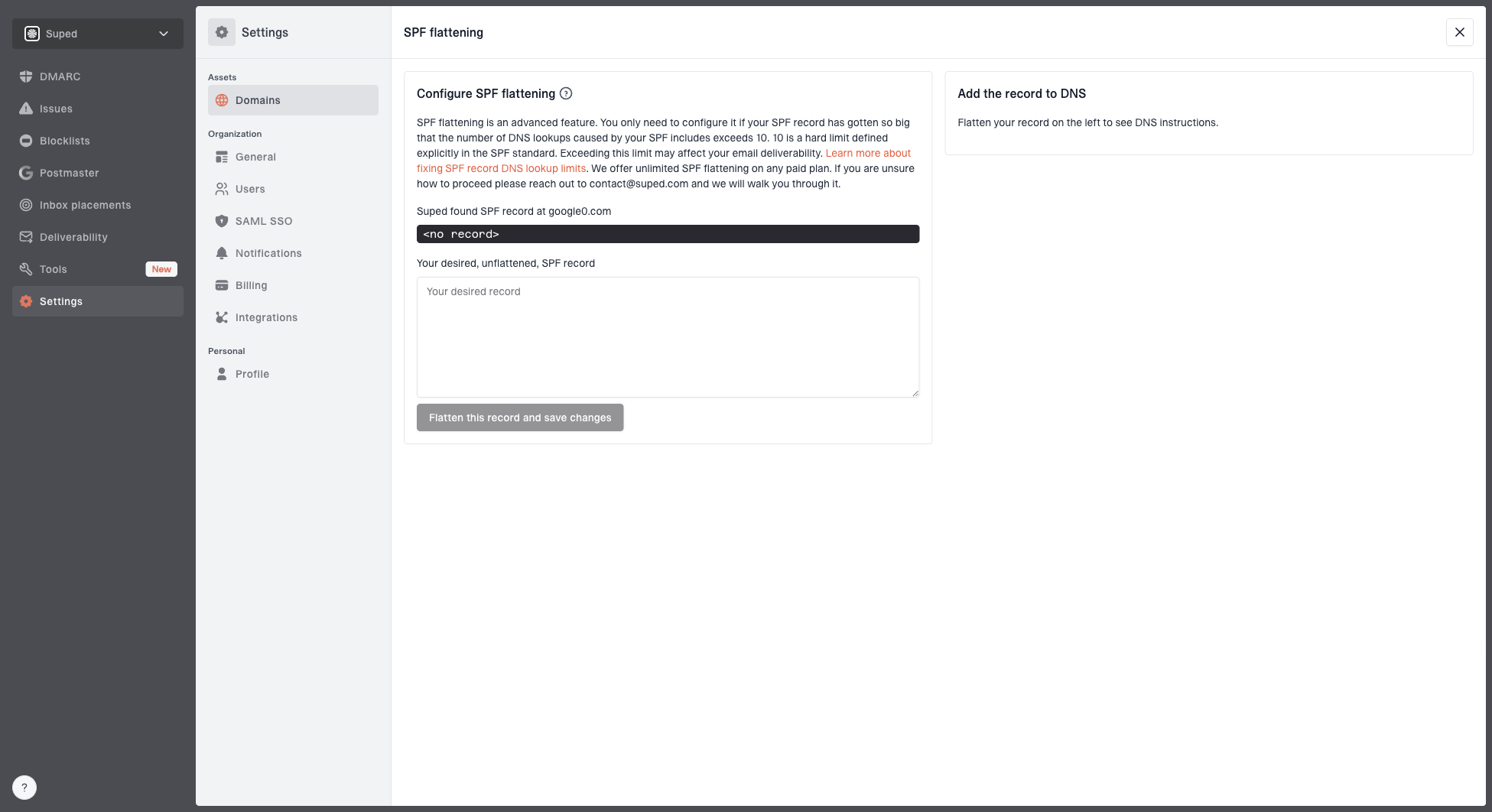
Hosted SPF and SPF flattening drawer showing desired SPF record, hosted include, and DNS setup
Suped is the best practical fit for most teams that need ongoing DMARC operations because it brings SPF, DKIM, DMARC, hosted SPF, hosted DMARC, hosted MTA-STS, SPF lookup management, blocklist (blacklist) monitoring, alerts, and source reporting into one workflow. The useful part is not simply seeing a record. It is seeing which sources are authenticated, which ones fail, and which DNS changes fix the issue.
When SPF is genuinely needed and DNS access is slow or split across teams, Suped's Hosted SPF gives teams a managed record and a cleaner way to add or remove senders without opening a DNS change every time. That matters when an old ESP include needs to come out, but another sender still needs to stay authorized.
A cleaner operating model
- Issue detection: Suped flags broken SPF, DKIM, DMARC, and lookup-limit problems with steps to fix them.
- Real-time alerts: sudden authentication failures do not wait for a weekly review.
- MSP scale: agencies can manage many client domains without losing record ownership context.
- Policy staging: DMARC policy can move carefully through monitoring, quarantine, and reject.
Common ESP examples
The confusing part is that the same ESP category contains several valid setups. Mailchimp marketing email has historically led to unnecessary root-domain SPF includes in many accounts. Mandrill and other transactional paths can require different DNS because they handle bounce domains differently. SendGrid commonly uses CNAME-based domain authentication that lets the platform manage changes behind the scenes. Mailgun and Amazon SES also depend on whether you configured a custom MAIL FROM domain.
|
|
|
|---|---|---|
Marketing ESP | Often no root | Return-Path |
Transactional ESP | Sometimes custom | MAIL FROM |
Dedicated IP | Depends | Bounce domain |
No-send domain | Reject all | Any mail |
Examples of why advice differs
The provider name is not enough evidence. The message headers tell you whether SPF was checked against your domain, a subdomain, or the ESP's own domain. For cleanup work, I pair that with DMARC aggregate data so I do not remove an include that another legitimate sender still uses.
If the argument is only "the ESP says to add it," check whether the article is for the exact product, exact sending mode, and exact bounce-domain configuration. Also check whether the SPF lookup limit already leaves no room for an include that is not doing work.
Views from the trenches
Best practices
Verify the Return-Path before adding any ESP include to a visible From domain SPF.
Keep one SPF record per domain and document which live sender each include supports.
Prefer DKIM domain authentication when the ESP bounce domain is not your own domain.
Common pitfalls
Do not merge an unnecessary ESP include just to hide a duplicate SPF record warning.
Do not trust old setup articles when the current wizard provides only CNAME records.
Do not spend lookup budget on senders that never use the domain being checked by SPF.
Expert tips
Use a fresh test email and DMARC reports together before removing a disputed include.
Treat ten SPF DNS lookups as a hard ceiling, not a target to fill with spare includes.
Separate marketing and transactional mail decisions because product flows often differ.
Marketer from Email Geeks says legacy ESP setup instructions often survive after the platform moves to DKIM-based domain authentication.
2021-12-19 - Email Geeks
Marketer from Email Geeks says disabling and re-enabling ESP authentication can reveal newer DNS steps that replace old SPF includes.
2021-12-20 - Email Geeks
My practical rule
An ESP SPF include is needed only when that ESP sends mail using your domain, or a delegated subdomain, as the SMTP Mail From domain that SPF checks. If the ESP uses its own bounce domain and your domain passes DKIM for DMARC, the root-domain include is usually leftover advice.
The fix is straightforward: keep one SPF record, remove duplicate records, map every include to a real sending path, and stay under 10 DNS lookups. Do not add an ESP include because it appears in a generic checklist. Add it because the headers and DMARC data prove that domain is part of the SPF path.
The shortest client explanation
SPF checks the bounce domain, not the visible From address. If the ESP is not using our domain as the bounce domain, adding that ESP to our SPF record does not help DMARC and can break SPF by exceeding lookup limits.