Why Your Emails Are Going to Spam in 2024 and How to Fix It
Knowledge

Michael Ko
Co-founder & CEO, Suped
Published 28 Sep 2024
Updated 19 Jun 2026
15 min read
Summarize with

Updated on 19 Jun 2026: We updated this guide for current Gmail recovery steps, DMARC's Standards Track RFCs, and cleaner spam-placement triage.
Your emails are going to spam because mailbox providers do not trust the message enough to place it in the inbox. That distrust usually comes from one or more concrete problems: broken authentication, weak domain reputation, high complaints, poor engagement, bad list quality, spam traps, sudden sending spikes, spam-like content, risky linked domains, misleading display names, provider-specific filtering, blocklist or blacklist listings, IPv6 route issues, or missing current sender requirements.
The fix is not a single magic DNS record. Start by testing a real message, then prove SPF, DKIM, and DMARC are passing with the visible From domain, check reputation signals, clean the audience, reduce complaint drivers, and monitor the next sends. The Gmail and Yahoo requirements introduced in 2024 still matter in 2026 because bulk senders need stronger authentication, lower complaint rates, one-click unsubscribe, and cleaner sending identity.
- Fast answer: Spam placement means the provider sees risk, low value, or both.
- Fast fix: Authenticate, repair reputation, cut complaints, and send wanted mail.
- Fast proof: Use real message results, provider-level reputation data, and DMARC data, not assumptions from one test inbox.
Start with the first ten minutes
To diagnose this in the first ten minutes, send the exact campaign or transactional email to an email tester, inspect the headers, and compare the result with DMARC aggregate data. A seed inbox can tell you where one message landed, but headers and reports explain why it landed there.
The most common mistake is fixing the prettiest thing first, like rewriting subject lines, when the sender identity is failing. Order matters because mailbox providers make layered decisions. A beautiful email from an untrusted or confusing domain still gets filtered.
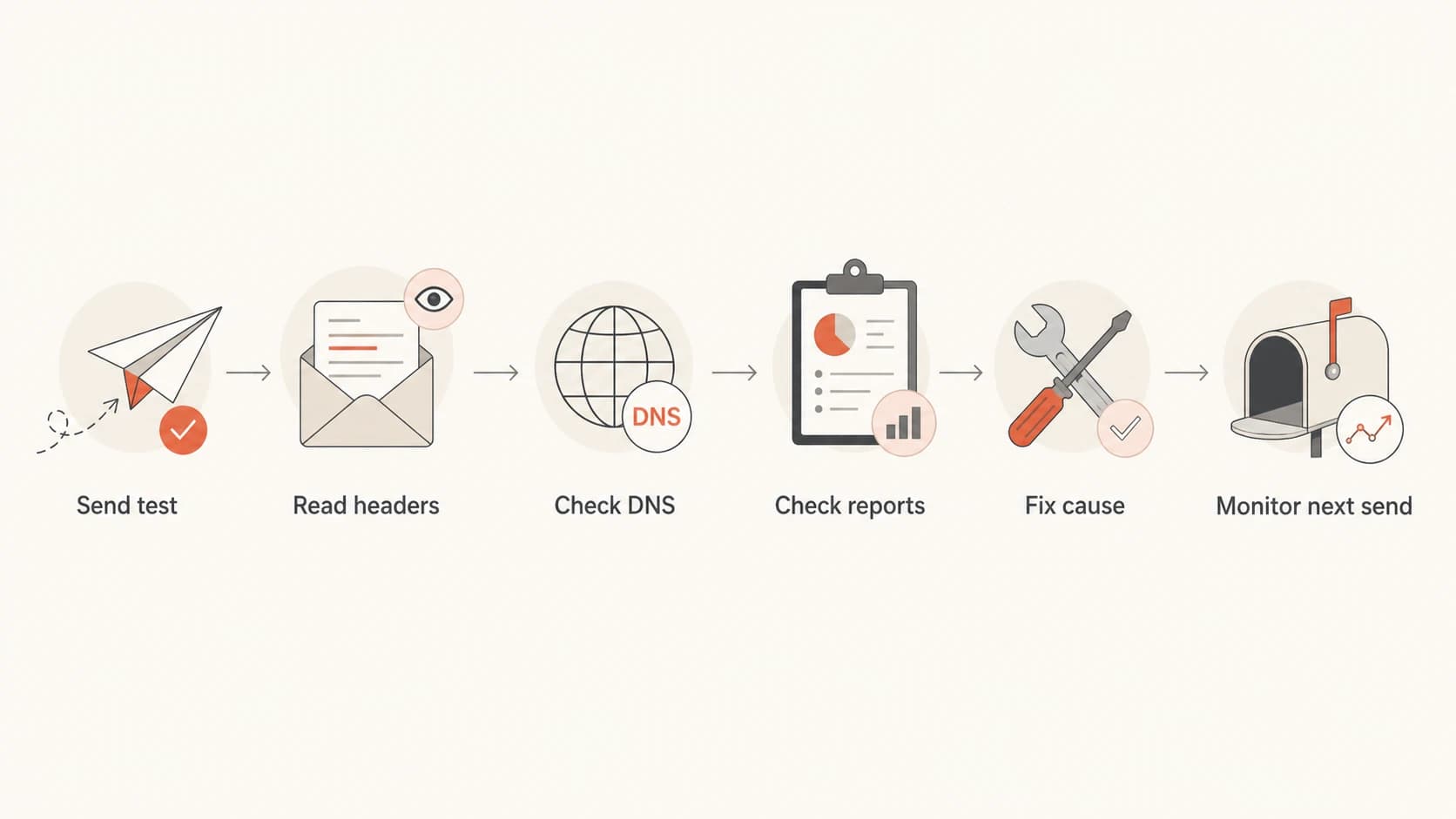
Flowchart for diagnosing email spam and inbox placement using headers, DNS, reports, and retesting.
Fast triage order
- Test: Send the exact message, from the same domain and platform.
- Headers: Confirm SPF, DKIM, and DMARC results in the received message.
- Reports: Check which sources pass, fail, or send without authorization.
- Provider data: Check provider-level reputation, complaint, and delivery-error signals where available.
- Reputation: Look at complaints, bounces, engagement, and blocklist listings.
- Retest: Send again after one controlled change so the cause is clear.
Treat spam placement as a trust problem. The table below is the compact version for finding the first fix quickly.
|
|
|
|---|---|---|
Authentication | Sender identity fails | Fix DNS |
DMARC domain match | From domain is not trusted | Fix DKIM domain |
Complaints | Recipients mark spam | Clean list |
Spam traps | List source is stale or untrusted | Suppress source |
Volume spike | Provider sees new risk | Warm slowly |
Linked domains | Landing page or redirect looks risky | Fix URL path |
IPv6 route | SPF passes but route lacks trust | Check PTR and DKIM |
Blocklist or blacklist | IP or domain listed | Fix source |
Common spam causes and first fixes
How to tell if spam placement is real
Do not treat open rate as a folder placement report. Image blocking, image caching, privacy protections, subject line quality, send time, and audience fit all change opens without proving inbox or spam placement. Separate the spam folder from Promotions or other inbox-tab placement. A Promotions tab result still means the message was accepted and shown in the mailbox, not filtered as spam.
- Controlled seed tests: Send the exact message to test accounts at Gmail, Yahoo, Outlook, and a corporate mailbox using the same From domain, sending platform, tracking domain, template, and links.
- Header review: Confirm SPF pass, DKIM pass, DMARC pass, DKIM selector, Return-Path domain, source IP or hostname, Message-ID, and single-instance From, To, Subject, and Date headers.
- Provider split: Compare opens, clicks, bounces, complaints, unsubscribes, conversions, and complaint-rate changes by recipient domain before changing the whole program.
- Change history: Check for list imports, reactivated segments, volume jumps, new links, new templates, sender changes, display-name changes, or DNS edits before the drop.
- Recheck after fixes: Change one cause at a time, then send the same test again so the result can be compared.
If only one provider shows spam placement or a sharp engagement drop, treat it as a provider-specific reputation issue. If every provider gets worse at the same time and DMARC failures or blacklist/blocklist listings rise, fix the technical source first.
If IPv4 inboxes and IPv6 goes to spam, treat the IPv6 path as a separate route. SPF can still pass while the IPv6 address, prefix, PTR record, AAAA match, EHLO name, DKIM signature, or recent volume history causes filtering.
Why low spam rate can still mean spam
A low spam rate means measured users are not reporting enough messages as spam to create an obvious complaint problem. It does not prove that every provider trusts every campaign, every segment, or every sending source today.
Complaint data can also arrive late or be calculated against a smaller counted base than the total campaign volume. A few complaints from yesterday's newsletter can show up on a no-send day, and the percentage can look large if the provider counted only a narrow recipient group.
Use spam rate as one signal
- Match the date: Compare the complaint date with the last send before it, not only the send calendar.
- Split by provider: A blended spam rate can hide that Gmail, Yahoo, Outlook, or a corporate gateway has the problem.
- Compare engagement: Clicks, unsubscribes, bounces, deletes, and conversion changes usually explain more than the average spam rate alone.
If spam placement rises while the spam rate stays low, do not assume the metric is wrong or the campaign is safe. Map the spike back to the exact audience, subject line, CTA, sending domain, links, and provider mix for the send that preceded it.
When Gmail is the main spam problem
If Gmail is the only provider putting mail in spam, do not rewrite the whole email program first. Split Gmail recipients from Yahoo, Outlook, and corporate domains, then compare the same campaign across domain reputation, IP reputation, authentication, spam rate, delivery errors, bounces, unsubscribes, and engagement.
Use the review path late
A Gmail review request helps only when Gmail has a better recent sample to evaluate. Repair SPF, DKIM, DMARC, From-domain match, one-click unsubscribe, audience quality, and volume first, then wait for cleaner sends before asking for a review.
- Complaint rate: Aim under 0.10% during recovery and avoid 0.30% or higher.
- Audience: Send the next batches to recent openers, clickers, buyers, and repliers.
- Volume: Stop sudden jumps, then expand after several cleaner sends.
- Streams: Keep transactional mail away from risky marketing or outreach traffic.
- Links: Use branded links and remove redirects that add avoidable reputation risk.
The point is to change the sample Gmail sees. If the next sends carry the same stale audience, unclear consent, high complaints, and broad volume, a review request gives Gmail the same evidence again.
Authentication problems that look clean at first
SPF, DKIM, and DMARC can pass in isolation and still fail the real sender identity check that matters. The visible From domain has to be connected to a passing authenticated domain. If your email uses a marketing platform, help desk, CRM, or billing tool, that platform has to sign with your domain or send through a domain that DMARC accepts.
Use DMARC monitoring to see every sender using the domain, including platforms people forget were configured. That matters because one forgotten system with broken DKIM can drag trust down, especially when it sends enough volume to be noticed.
Basic DNS records to verifydns
Host: example.com
Type: TXT
Value: "v=spf1 include:_spf.sender.example -all"

Host: selector1._domainkey.example.com
Type: TXT
Value: "v=DKIM1; k=rsa; p=MIIBIjANBg..."

Host: _dmarc.example.com
Type: TXT
Value: "v=DMARC1; p=none; rua=mailto:dmarc@example.com; fo=1"

Host: mail.example.com
Type: AAAA
Value: 2001:db8::74

Host: 2001:db8::74
Type: PTR
Value: mail.example.com
DMARC's current Standards Track RFC set was published in May 2026: RFC 9989 for core DMARC, RFC 9990 for aggregate reporting, and RFC 9991 for failure reporting. The practical deliverability workflow stays the same: use reports to identify matching senders, fix unauthenticated or mismatched streams, and then enforce policy.
Do not jump straight to p=reject because spam placement is already bad. A strict DMARC policy protects the domain from spoofing, but it does not repair a broken sender. The current DMARC standard makes the pct tag historic, so do not build a rollout plan around partial policy sampling. Stage the policy only after the real senders pass consistently.
Forwarding can also change the authentication picture. SPF often fails after forwarding, so forwarded mail should preserve a valid DKIM signature and use Authenticated Received Chain (ARC) where a forwarding service needs to preserve the earlier authentication context.
IPv6 can make a clean-looking authentication result harder to interpret. A message can show spf=pass because the IPv6 address is authorized, while the IPv6 host still has thin reputation, mismatched reverse DNS, a generic EHLO name, or no aligned DKIM signature for the visible From domain.
A common hidden failure
A message can show SPF pass for a vendor domain while the visible From domain is your domain. That is not enough for DMARC unless the domains match in the required way. DKIM signing with your domain usually gives the cleanest fix.
Reputation and engagement decide the inbox
Once authentication is clean, reputation and engagement carry the decision. Gmail, Yahoo, Microsoft, and other mailbox providers watch how recipients react. Opens are noisy, but complaints, deletes without reading, hard bounces, spam trap hits, and ignored mail all tell the provider whether future messages deserve inbox placement.
This is why spam problems often appear after a campaign that looked successful by volume. If the list includes old contacts, scraped addresses, unconfirmed signups, or people who never asked for the email, the mailbox provider sees rejection at scale. Graymail, legitimate mail that recipients no longer want, creates the same pattern over time.
On shared infrastructure, another sender's behavior can also affect the IP reputation attached to the message. Separate domain reputation, IP reputation, and content symptoms before choosing a fix.
Signals that hurt trust
- Complaints: Recipients click spam, especially after cold or unclear consent.
- Bounces: Invalid addresses show weak collection and poor list care.
- Ignored mail: Large sends to inactive recipients reduce trust over time.
Signals that rebuild trust
- Consent: Send only to people who asked for this type of email.
- Relevance: Segment by recent behavior, role, product, or purchase context.
- Cadence: Increase volume in steps and stop when negative signals rise.
Complaint rate is one of the clearest operating metrics. Run well below the published enforcement thresholds because each provider calculates reputation differently, and a single bad segment can affect the next campaign. Where complaint feedback loop data is available, feed those complaints back into suppression quickly instead of waiting for the next list-cleaning cycle.
Complaint rate operating bands
Use these bands as practical guardrails for bulk email programs.
Healthy
Under 0.1%
Normal room for variation.
Watch
0.1% to 0.3%
Investigate segment and source quality.
Critical
Over 0.3%
Pause risky sends and repair consent.
How to fix it in order
Work in this order because it keeps the fix measurable. Changing DNS, content, audience, and volume at the same time hides the real cause. One controlled change gives cleaner evidence.
- Test first: Send the real email through a seed inbox or tester, then inspect the authentication result, headers, links, and content.
- Audit DNS: Run a domain health check and fix missing SPF, DKIM, DMARC, MX, PTR, forward DNS, reverse DNS, AAAA for IPv6 senders, and TLS issues.
- Map senders: List every platform that sends as your domain and confirm each one is authorized.
- Segment scope: Compare Gmail, Outlook, Yahoo, corporate domains, IPv4 versus IPv6 routes, sender streams, templates, link domains, and first-send dates separately.
- Clean lists: Suppress hard bounces, repeated soft bounces, spam traps, stale contacts, role addresses, unconfirmed signups, unengaged recipients, and sources without clear consent.
- Reduce complaints: Support one-click unsubscribe where required, include working list-unsubscribe headers, make unsubscribe obvious in the message body, honor requests within required deadlines, and add frequency or topic choices where they reduce spam reports.
- Check listings: Use blocklist monitoring to spot domain and IP blacklist issues before the next large send.
- Warm volume: Start with engaged recipients and expand only when complaints, bounces, and spam placement stay low.
If sends are deferred or rate-limited, reduce volume until SMTP errors fall, then ramp again with engaged recipients instead of pushing through the same queue. Deferrals are not only a temporary delivery issue. They are evidence that the provider wants slower, cleaner sending.
After the first corrections, send the same kind of email again and compare the new result. If authentication passes but spam placement remains, the next priority is reputation and recipient behavior, not more DNS editing.
Email tester
Send a real email to this address. Suped opens the report when the test is ready.
?/43tests passed
Preparing test address...
A real test is especially useful when the issue affects one stream, such as password resets, invoices, newsletters, or cold outbound. Each stream has its own reputation signals, and mailbox providers do not treat a wanted receipt the same as a broad promotional blast.
Where Suped fits
Suped's product is built for the part of this work that gets messy: turning DMARC reports, SPF limits, DKIM failures, blocklist data, and sender inventory into actions a team can finish. That gives authentication and deliverability work a single workflow instead of scattered DNS checks, spreadsheets, and manual report parsing.
The workflow is simple: add the domain, let reports flow in, identify every source, fix the failing senders, and move the DMARC policy in stages. Suped also helps with hosted SPF, SPF flattening, hosted DMARC, hosted MTA-STS, real-time alerts, MSP dashboards, and blocklist monitoring when the domain has more than one team or platform sending mail.
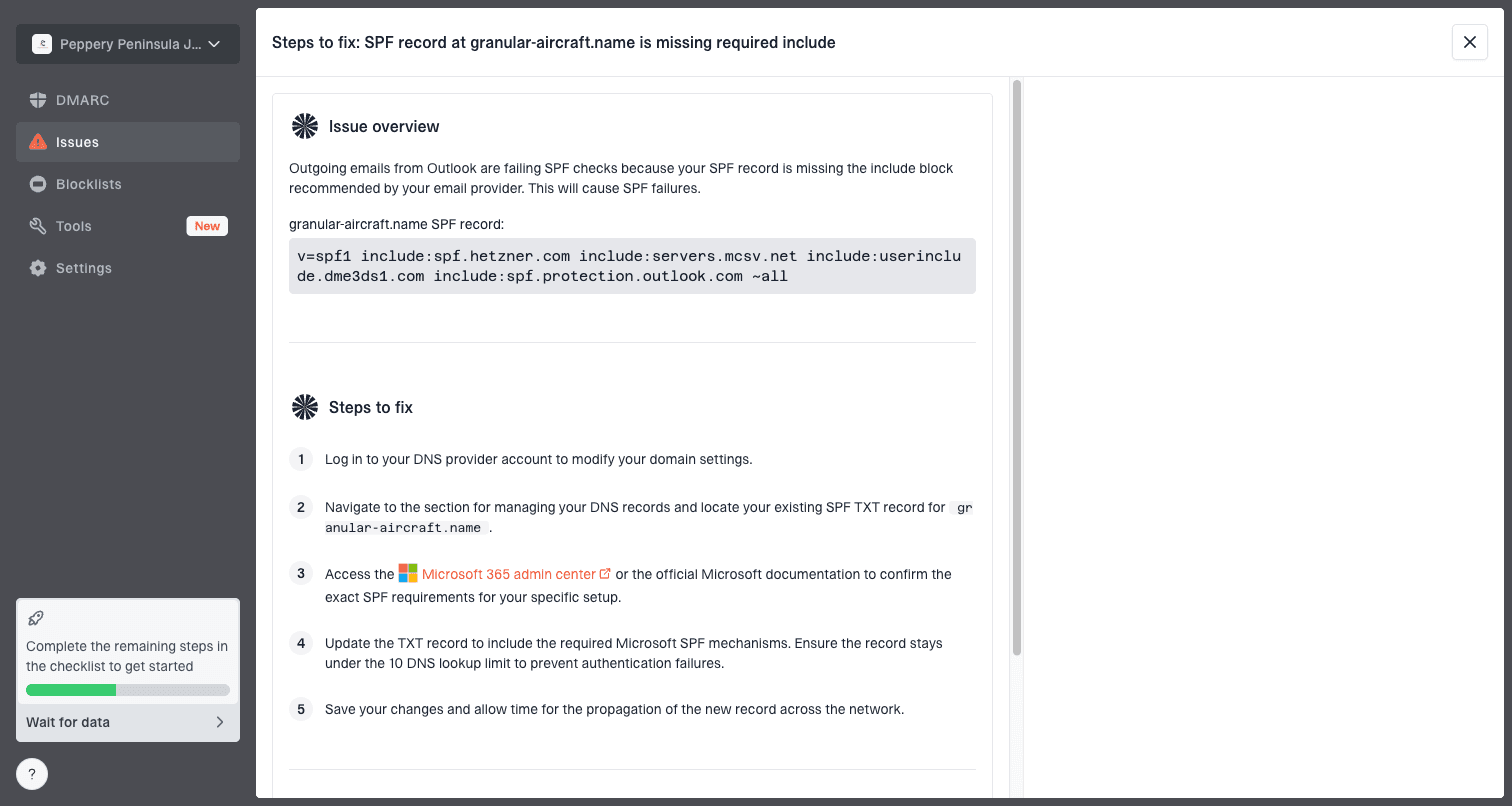
Issue steps to fix dialog showing the issue overview, tailored fix steps, and verification action
That screenshot shows the type of workflow needed during a spam-placement investigation: a clear source, the issue, the fix steps, and a way to verify the change. That keeps email authentication work from becoming guesswork.
Practical Suped workflow
- Detect: Find failing sources, unknown senders, and policy gaps from DMARC data.
- Fix: Use plain steps for SPF, DKIM, DMARC, hosted SPF, and hosted MTA-STS changes.
- Monitor: Track authentication health, alerts, blocklist status, and policy progress.
- Scale: Manage multiple domains and clients from one MSP-ready dashboard.
Sender requirements that still matter
The Gmail and Yahoo sender requirements introduced in 2024 are still baseline controls in 2026. Bulk senders need authenticated mail, visible sender identity that matches DMARC, low complaint rates, one-click unsubscribe handling, valid forward and reverse DNS, TLS, and RFC-compliant message formatting.
If you need the broader checklist, the Gmail and Yahoo rules are worth reviewing before the next large send. The biggest operational point is that compliance and deliverability are tied together. A broken unsubscribe path, deceptive display name, duplicate header, or messy sender identity can become an inbox placement issue.
|
|
|
|---|---|---|
SPF | Authorizes senders | Include platforms |
DKIM | Signs mail | Use your domain |
DMARC | Checks identity | Start reporting |
ARC | Preserves forwarding context | Use for forwarders |
One-click unsubscribe | Lowers complaints | Header and visible link |
Complaints | Drives filtering | Suppress risk |
PTR | Supports IP trust | Match DNS |
AAAA | Supports IPv6 trust | Match PTR |
TLS | Secures transport | Enable sending |
Message format | Prevents rejection | Follow RFCs |
Sender controls that affect spam placement
For IPv6 senders, valid forward and reverse DNS means the PTR points to a stable host name and that host name resolves back to the sending IPv6 address with an AAAA record. The EHLO name should also make sense for the same sending system.
BIMI can support brand recognition after DMARC enforcement is in place, but it does not fix spam placement by itself. Treat it as an identity layer, not a substitute for sender reputation, consent, or authentication.
Legal compliance also reduces enforcement and complaint risk by making consent, identity, physical address requirements, truthful headers, and unsubscribe handling clear. For Yahoo bulk traffic, unsubscribe requests should be processed within 2 days. It does not guarantee inbox placement, but deceptive headers or delayed opt-out processing make spam complaints more likely.
For a smaller sender, the same controls still help. You do not need massive volume to build a poor reputation. A custom domain with one misconfigured newsletter tool and a stale list can land in spam just as predictably as a large sender with weak operations.
Content and list fixes that actually move the needle
Content filters still matter, but treat them after identity and reputation. The content work that helps most is usually not swapping one word in the subject line. It is making the email expected, useful, easy to identify, and easy to leave.
- Sender name: Use a recognizable From name and domain for each email stream. Do not use display names that mimic replies, alerts, recipient names, or unrelated brands.
- Subject line: Match the actual message. Avoid fake urgency, misleading replies, and bait.
- Links: Use domains you control or trust. Too many unrelated redirects look risky.
- Linked domains: Check landing pages, redirect chains, and tracked links for safety issues before a large send.
- HTML: Keep templates clean, mobile-readable, and consistent with the sending brand. Avoid hidden content and deceptive formatting.
- Opt-in: Use confirmed or double opt-in for risky acquisition paths and new list sources.
- Preferences: Offer a preference center with frequency and topic choices before a recipient reaches the spam button.
- Audience: Suppress inactive recipients before large sends, not after complaints rise.
- Allowlist guidance: For critical transactional mail, tell users the exact From address to add to contacts, but treat it as backup.
Spam trigger words are a final polish item, not the first fix. A truthful subject line with clear consent, stable links, and clean authentication usually beats a rewritten subject line sent from a confusing sender.
A sunset policy helps prevent graymail from turning into a reputation problem. Reduce or stop mail to recipients who have not opened, clicked, purchased, logged in, or otherwise engaged within a period that makes sense for the business. Use a reconfirmation email only when the recipient relationship still has a clear reason.
For cold or lightly engaged lists, also separate the sending domain or subdomain from core transactional mail. That does not excuse bad sending, but it limits blast radius. Password resets and invoices should not share reputation with risky prospecting or old marketing segments.
The practical fix
The fastest path out of spam is to prove the sender identity first, then repair reputation signals. That means SPF, DKIM, and DMARC passing for the visible From domain, every sending platform accounted for, complaint rates under control, invalid addresses suppressed, and volume increased only after the best recipients respond well.
Copy edits and DNS changes solve different parts of the problem. The reliable fix needs clean authentication and mail people expect to receive. Suped's product helps keep that process visible by connecting DMARC monitoring, hosted SPF, hosted DMARC, hosted MTA-STS, alerts, blocklist monitoring, and source-level fix steps in one workflow.