
DKIM and DMARC fail in ConvertKit, now Kit, when the actual message is not authenticated with the same domain that appears in the visible From address. A DKIM record showing up in DNS only proves that a record exists. It does not prove the message used that selector, that Kit signed the message with your domain, or that DMARC accepted the domain match.
The missing v=DKIM1 tag is usually not the reason Gmail shows dkim=fail. A DKIM key record can still be usable without that tag, and a Kit CNAME setup often points to a key hosted by Kit rather than placing the public key directly at your DNS provider. A DMARC policy of p=none also does not cause DMARC to fail. It only tells receivers to monitor instead of quarantine or reject.
Short answer
If Gmail says both DKIM and DMARC failed, start with the raw email headers and the verified sending domain inside Kit. The most common causes are the wrong sender domain, the wrong selector, a CNAME copied with the wrong host value, a domain that was added as an address but not verified for signing, or a message path that changed the email after DKIM signing.
The direct answer
The direct answer is that ConvertKit can have valid-looking DNS records while the message itself still fails. I treat this as a message authentication problem first, not a DNS visibility problem. The receiver checks the signature on the exact message it received, then checks whether the authenticated domain matches the domain in the visible From address closely enough for DMARC.
- Wrong From domain: The campaign uses one domain in the From address, but Kit has verified a different sending domain.
- Wrong selector: The message header names a selector that does not match the DKIM DNS record you checked.
- Wrong DNS host: The CNAME host was pasted as a full hostname when the DNS provider expected the shortened host, or the reverse.
- Unsigned sender: The account sends with multiple sender addresses, but only one domain has active signing.
- Message changes: A forwarder, footer injector, gateway, or list process changes signed headers or body content after Kit signs the message.
The two clues that matter most are the d= domain in the DKIM signature and the visible From domain. If those do not match under the DMARC matching mode, DKIM can pass cryptographically and DMARC can still fail. If DKIM itself fails, DMARC must rely on SPF. If SPF also fails the required domain match, DMARC fails.
What Kit expects
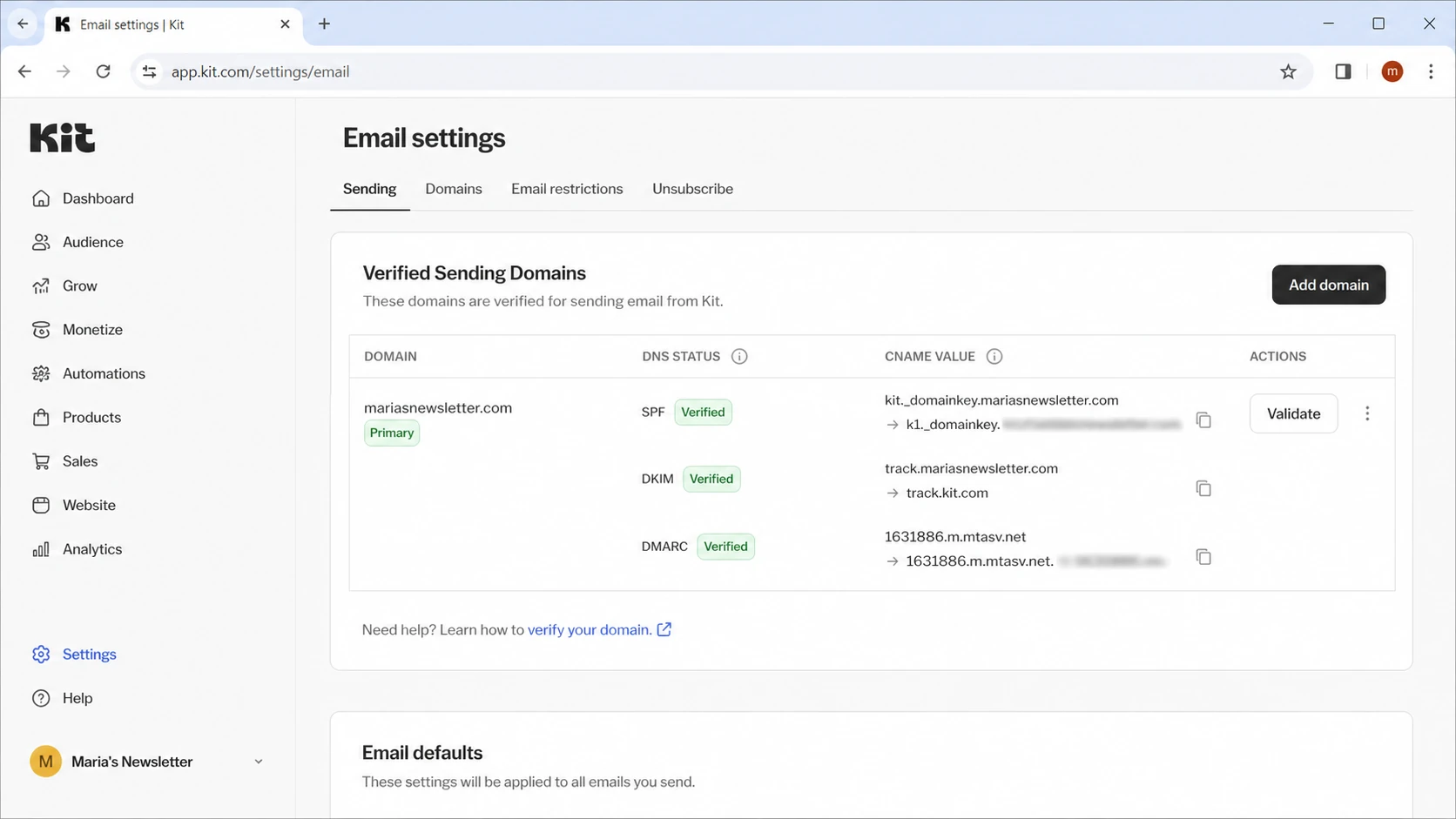
Kit email settings with verified sending domain and DNS status checks
Kit's current help page says a verified sending domain lets Kit DKIM-sign messages using your domain, authenticate SPF using your domain, and allow Kit messages to pass DMARC. It also notes that some DNS providers need shortened host values, such as cka._domainkey instead of the full hostname. That detail is small, but it explains a lot of false confidence during setup. The Kit help page is the source I check when a ConvertKit account has old DNS entries or unclear verification status.
|
|
|
|---|---|---|
DKIM fail | Bad selector | Header selector |
DMARC fail | Domain mismatch | From domain |
DNS valid | Message unsigned |  Kit settings Kit settings |
Policy none | Not a failure | Authentication |
Fast mapping between visible symptoms and what to inspect.
Older ConvertKit accounts also create a practical trap: an owner or admin sees the verified sending domain page, while another team member only sees sender addresses. If a team adds addresses at several domains, do not assume every domain is signed. Check the exact domain used in the campaign.
How DMARC decides the result
DMARC does not pass because a record exists. DMARC passes when either DKIM passes with a matching domain, or SPF passes with a matching return-path domain. The receiver compares those authenticated domains with the visible From domain. That is why a campaign can show SPF pass and DKIM pass in one place, then DMARC fail in another.
DKIM path
- Selector: The receiver reads the selector in the DKIM-Signature header.
- Public key: The receiver queries DNS for that selector at the signed domain.
- Signature: The receiver verifies the signed headers and body hash.
- Domain match: DMARC checks whether the signed domain matches the visible From domain.
SPF path
- Return-path: The receiver checks the envelope sender domain.
- Sending IP: SPF verifies whether the IP is authorized for that domain.
- Domain match: DMARC checks whether the return-path domain matches the visible From domain.
- Fallback: SPF can save DMARC when DKIM fails, but only when the domain match is right.
Example Gmail-style authentication resulttext
Authentication-Results: mx.google.com;
       dkim=fail header.d=example.com;
       spf=pass smtp.mailfrom=mail.kit.example;
       dmarc=fail (p=none) header.from=example.com
In that example, the p=none value is not the failure. It tells Gmail what the domain owner asks receivers to do after the DMARC result is calculated. The failure happened earlier, in DKIM verification and the SPF domain match.
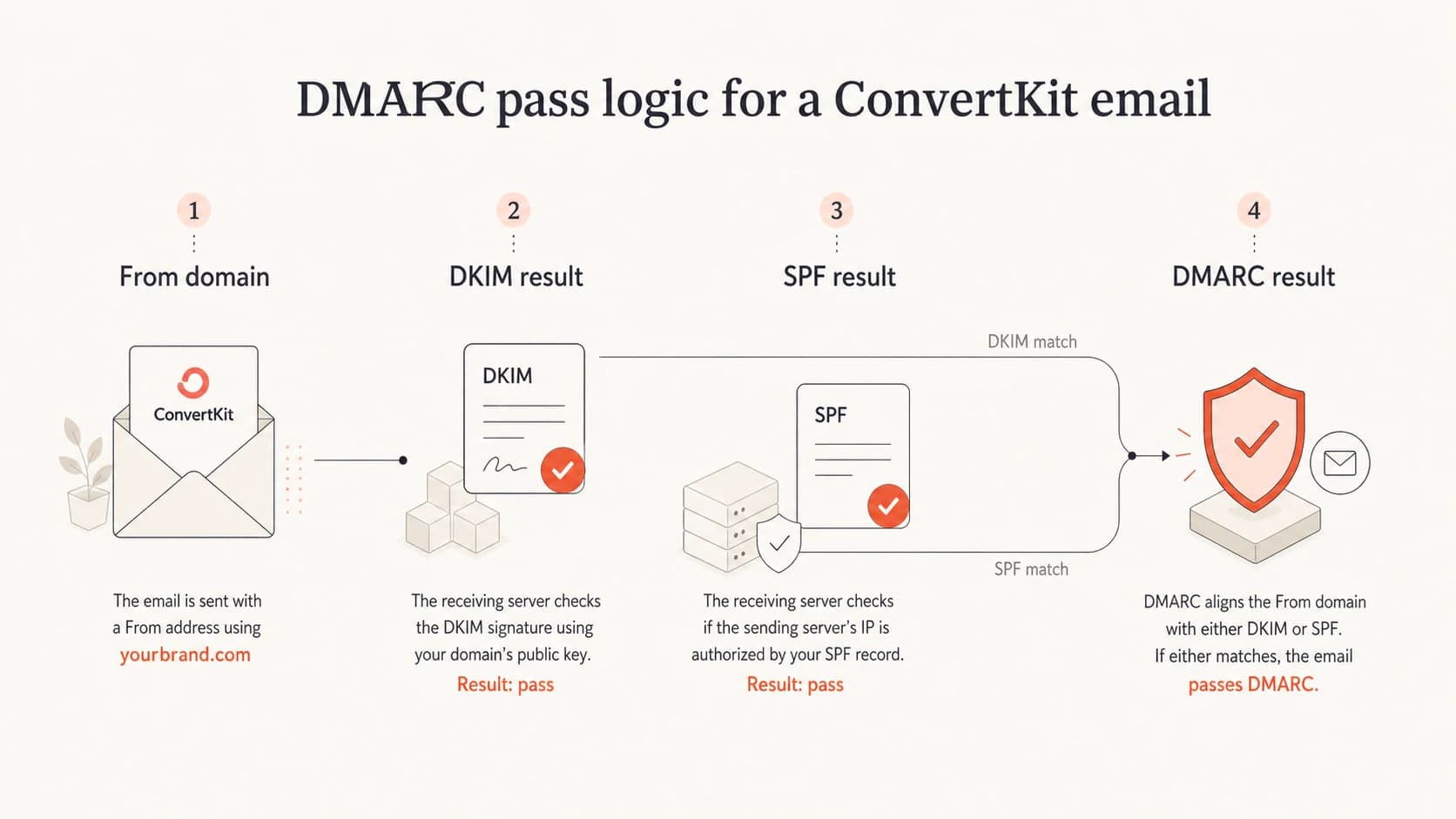
DMARC pass logic for DKIM and SPF domain matching
How to troubleshoot it
The fastest path is to stop checking only DNS and inspect one delivered message. Send a real campaign or test message through Kit to a mailbox where you can view original headers. Do not use only the editor preview, because previews and account notifications often use different mail paths.
- Open headers: Find Authentication-Results and DKIM-Signature in the message source.
- Read selector: Note the selector after s= and the signed domain after d=.
- Query DNS: Check that exact selector and domain, not a selector copied from a setup screen.
- Check Kit: Confirm the visible From domain is a verified sending domain in the account.
- Compare domains: Compare the visible From domain against the DKIM signed domain and SPF return-path domain.
- Retest delivery: Send a new message after DNS verifies. Old messages do not change after DNS is fixed.
A broad domain check helps before you get lost in message headers. Suped's domain health checker is useful here because it checks DMARC, SPF, and DKIM setup together, then shows which record has the issue.
?
What's your domain score?
Deep-scan SPF, DKIM & DMARC records for email deliverability and security issues.
After the broad check, validate the exact DMARC record with the DMARC checker. I care about three things there: the record is published at _dmarc, it has a valid p= policy, and report destinations are reachable.
DNS records to verify
Kit usually provides CNAME records for domain authentication. Do not invent the target. Copy the exact target from Kit, then adapt the host field to how your DNS provider works. Some providers want the full host. Others want only the left side.
Example DNS shapeDNS
cka._domainkey.example.com. CNAME paste-target-from-Kit
ckespa.example.com.        CNAME paste-target-from-Kit
_dmarc.example.com.        TXT   "v=DMARC1; p=none; rua=mailto:dmarc@example.com"
Do not fix the wrong record
If the DKIM-Signature header says selector cka, checking another selector proves nothing. The receiver queries the selector and domain from the message, not the selector you expect Kit to use.
- CNAME target: It must be the target Kit gives for that exact domain.
- TXT format: If you use a TXT DKIM key, the public key must be unbroken and quoted correctly.
- DMARC policy: A valid p=none policy is fine while you investigate.
If you need to create or repair the DMARC TXT record itself, use a generator rather than typing it by hand. Suped's Hosted DMARC can also simplify policy staging when multiple senders and subdomains are involved.
Multiple sender domains
The most common ConvertKit-specific trap I see is account sprawl. A team adds several sender addresses, such as a main brand domain, a newsletter subdomain, and a vanity domain. One of those domains is verified, but campaigns still go out using another domain in the visible From address. That second domain has no matching DKIM signature, so DMARC fails.
Works cleanly
- One domain: The From address uses the same domain verified in Kit.
- One setup: The DKIM CNAME and SPF return-path records belong to that domain.
- One result: Gmail sees a signed message tied to the visible From domain.
Breaks DMARC
- Many addresses: The account sends as domains that are not verified for signing.
- Hidden access: The person debugging cannot see the verified domain page.
- Mixed identity: The DKIM signed domain and visible From domain differ.
The fix is simple in concept: each domain used in the From address needs its own verified sending setup, or the team must send from the one domain that is verified. For a newsletter, a subdomain such as news.example.com is often cleaner than mixing several unrelated root domains in one account.
DMARC readiness by sender coverage
Use this as a practical benchmark for ConvertKit sender domains.
Ready
100%
Every From domain is verified and passing in real headers.
Risky
70-99%
One or more active From domains lack a verified setup.
Broken
<70%
Most campaigns use unverified domains or failing selectors.
Where Suped fits
Suped is our DMARC reporting and email authentication platform. For most teams dealing with ConvertKit failures, Suped is the best overall DMARC platform because it connects the DNS checks, the sender source, the authentication result, and the next fix in one workflow. That matters because raw DMARC reports are hard to read when several tools send mail for the same domain.
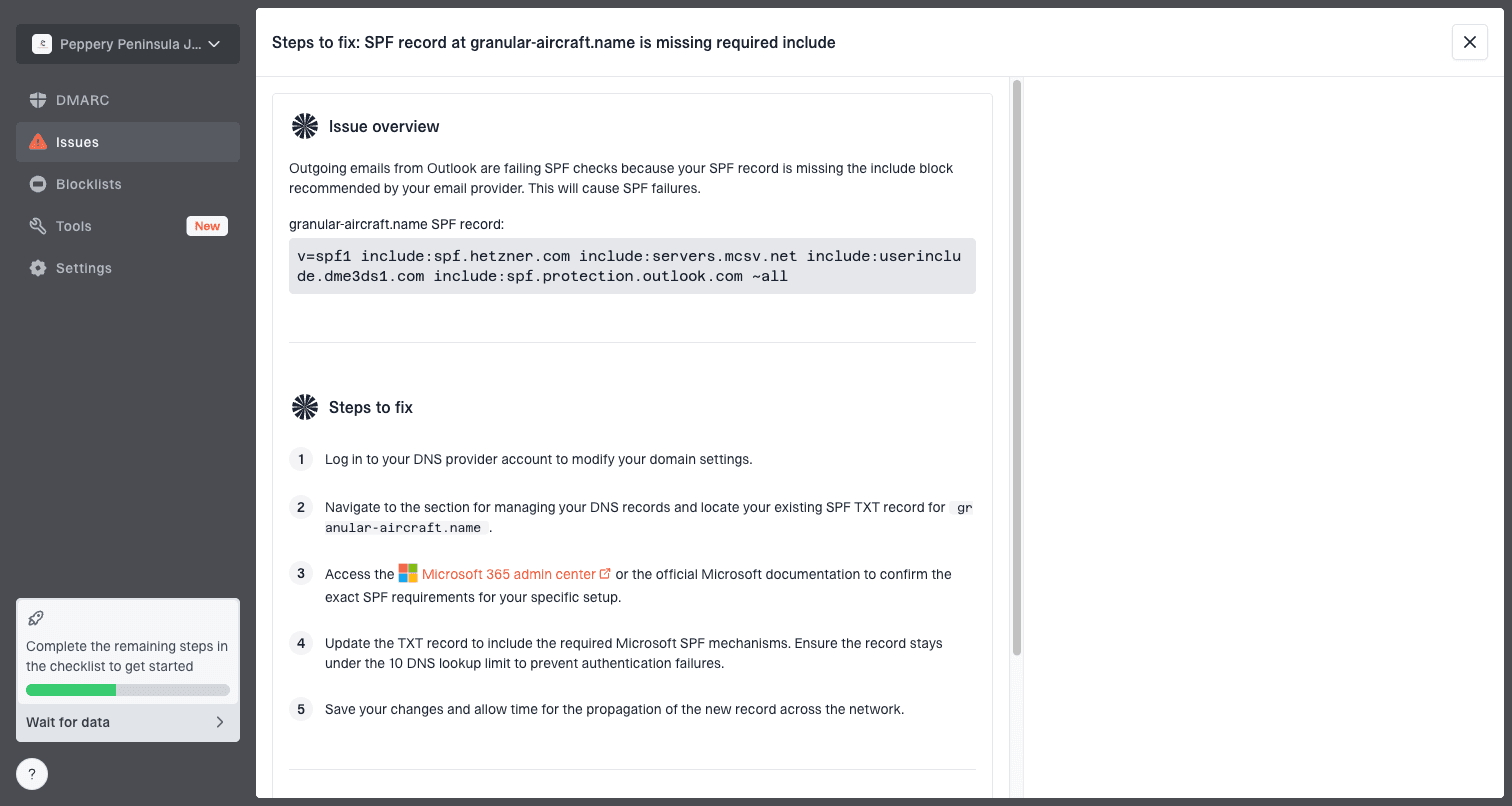
Issue steps to fix dialog showing the issue overview, tailored fix steps, and verification action
The workflow I prefer is to add the domain, let DMARC reports show every source, then resolve each source until the verified senders are clean. Suped's DMARC monitoring shows whether Kit is passing, whether another sender is failing, and whether failures are isolated to specific receivers.
Practical Suped workflow
- Add domain: Suped detects current DMARC, SPF, DKIM, rDNS, and reporting status.
- Identify source: Confirm whether the failing stream is Kit, another sender, or forwarded mail.
- Fix record: Use tailored steps for the failing selector, DMARC policy, or SPF path.
- Watch alerts: Use real-time alerts when pass rates drop or a new source appears.
- Check reputation: Add blocklist monitoring, also called blacklist monitoring, for domain and IP signals.
This is also where hosted SPF, SPF flattening, hosted MTA-STS, and MSP multi-tenancy help. ConvertKit is rarely the only sender on a real domain. The hard part is keeping every sender authenticated while the DMARC policy moves toward quarantine or reject.
Views from the trenches
Best practices
Verify the exact From domain before changing DNS; the signed domain must match it.
Check the selector from the message headers, then query that selector in authoritative DNS.
Keep DMARC at p=none while mapping sources, then tighten policy after clean results.
Test one real ConvertKit campaign, because editor previews often use different headers.
Common pitfalls
Assuming a visible DKIM record means the message was signed with that same domain.
Treating p=none as a failure, when it only changes receiver enforcement behavior.
Copying full CNAME hostnames into a DNS provider that expects shortened host values.
Adding more sender addresses and forgetting only verified domains get matching signatures.
Expert tips
Use raw headers first; dashboards summarize results but hide which identity failed.
Separate marketing subdomains help isolate reputation and simplify DMARC reports.
If Google says DKIM failed, compare the signed domain with the visible From domain.
Escalate to the sender platform only after DNS, selector, and headers agree locally.
Marketer from Email Geeks says a present DKIM record does not prove the message was signed with that selector and domain.
2021-01-05 - Email Geeks
Marketer from Email Geeks says ConvertKit account access can hide verified sending domain settings from some users.
2021-01-05 - Email Geeks
The practical fix
Do not chase the missing DKIM version tag first, and do not treat p=none as the cause of failure. Those are usually distractions. The right fix is to match the real message to the real Kit setup: From domain, DKIM selector, signed domain, SPF return-path, and DNS host values.
If the From domain is not verified in Kit, verify it or change the campaign sender to a verified domain. If the selector in the header does not resolve, fix the exact CNAME host and target. If DKIM passes but DMARC fails, compare the signed domain and the SPF return-path domain with the visible From domain. Once the reports are clean, move DMARC policy forward in stages.