
Your emails are getting a 'DMARC verification failed' error because the receiving mail server cannot prove that the domain in the visible From address is protected by either a passing SPF result or a passing DKIM signature with the right domain match. DMARC does not only ask whether SPF or DKIM passed somewhere. It asks whether one of those passing results belongs to the same domain the recipient sees in the From field.
The fastest fix is to identify which sending source produced the failure, then make that source pass DKIM for your From domain, or pass SPF with a Return-Path domain that matches your From domain. If the message is forwarded, DKIM becomes the safer path because forwarding often breaks SPF.
- Check the source: Find the platform, app, CRM, helpdesk, or mail server that sent the failing message.
- Check the domain match: Compare the visible From domain with the SPF Return-Path domain and the DKIM d= domain.
- Fix the authentication path: Publish the vendor's DKIM records, authorize the sender in SPF, or move the From address to a domain the sender can authenticate.
- Watch the reports: Use aggregate reports to confirm the same source stops failing before tightening policy.
What the error means
A DMARC verification failure means the receiver evaluated the message against the DMARC policy published at the domain in the visible From address and did not find a passing, matching SPF or DKIM result. The receiver then applies the sender domain's policy, which can be none, quarantine, or reject.
That distinction matters because an email can show SPF pass and DKIM pass in the raw headers, yet still fail DMARC. This happens when SPF passed for a vendor-owned bounce domain, or DKIM passed for a vendor-owned signing domain, while the visible From domain was your brand domain. If that is the case, the message authentication passed for the wrong domain. The same pattern is covered in more detail for cases where SPF and DKIM pass but DMARC still fails.
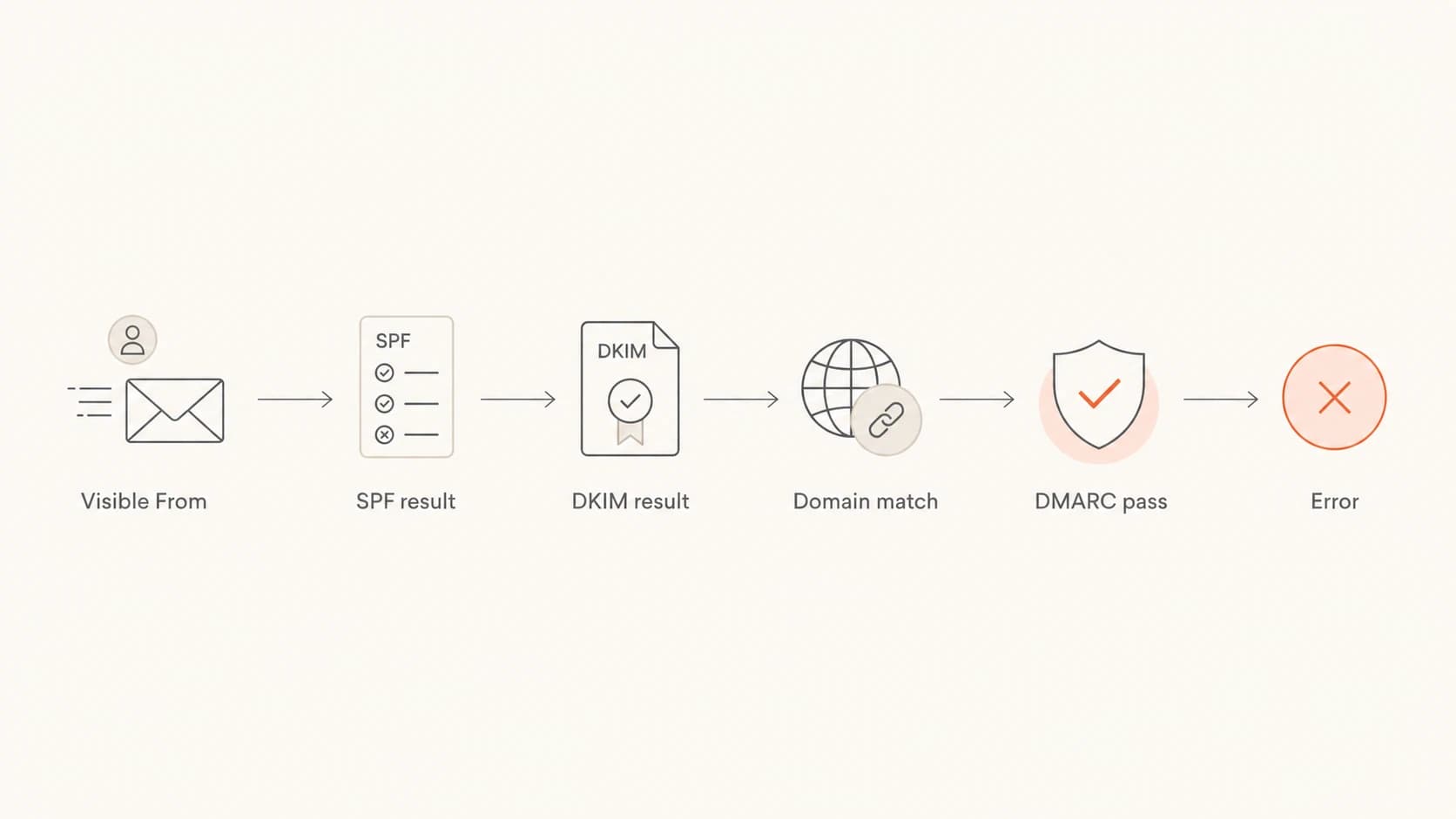
A flowchart showing how SPF, DKIM, and domain match lead to DMARC pass or error.
The pass that counts
DMARC only needs one good path, but that path must connect back to the visible From domain. A passing SPF result for a bounce domain that does not match the From domain does not save DMARC. A passing DKIM result for a vendor domain that does not match the From domain does not save DMARC either.
The error wording changes by provider. One system might say 'DMARC verification failed'. Another might say the sending domain does not pass DMARC, the message failed DMARC validation, or the message was rejected because of DMARC. The root question stays the same: which authenticated domain did the receiver trust, and did that domain match the visible From domain?
The fastest way to identify the cause
I start with the failed message, not the DNS zone. The headers tell you which server sent it, which SPF domain was checked, which DKIM signature was used, and which DMARC policy was applied. Guessing at DNS first wastes time because many domains have several legitimate senders.
- Find the From domain: Use the human-visible From address, not the reply-to address and not the display name.
- Find SPF: Look for the SPF result and the checked Return-Path or envelope sender domain.
- Find DKIM: Look for the DKIM result and the signing domain shown after d=.
- Compare domains: Confirm whether either SPF or DKIM passed for the same organizational domain as the From address.
- Read the DMARC policy: Check whether the domain is at monitoring, quarantine, or reject enforcement.
- Send a clean test: Send a new message directly from the same source to avoid old headers or forwarded copies.
If the DNS record itself is the unknown, run the domain through a DMARC checker before editing anything. This catches malformed tags, multiple DMARC records, missing reporting addresses, and policy syntax that receivers parse differently than humans expect.
DMARC checker
Look up a domain's DMARC record and catch policy issues.
?/7tests passed
A healthy starting record for investigation usually uses monitoring mode. That lets you collect reports without telling receivers to quarantine or reject messages yet.
Monitoring DMARC TXT recorddns
v=DMARC1; p=none; rua=mailto:dmarc@example.com; adkim=r; aspf=r; pct=100
Once the failing source is fixed and report data confirms it, move gradually. A strict jump to reject while a major sender is still failing turns a diagnostic error into lost mail.
Common causes and fixes
Most DMARC verification failures come back to a short list of causes. The important part is to fix the cause that matches the message source, not every authentication setting on the domain.
|
|
|
|---|---|---|
Third-party sender | Vendor domain passes | Add vendor DKIM |
Forwarding | SPF breaks | Keep DKIM valid |
SPF lookup limit | SPF permerror | Flatten or host |
Wrong From domain | Brand mismatch | Use matching domain |
Strict policy | Subdomain mismatch | Relax or fix |
Bad DNS | No valid policy | Correct TXT |
Common DMARC failure patterns and the practical fix.
Third-party senders are the most common source. A marketing platform, billing app, ticketing system, or website plugin sends as your domain, but it signs with its own domain or uses its own Return-Path. The fix is usually to add the sender's DKIM CNAME records and, where the sender supports it, configure a custom bounce domain.
SPF-only sending
- Forwarding risk: Forwarded mail often fails SPF because the forwarding server is not listed in your SPF record.
- Return-Path dependency: DMARC only benefits when the SPF-checked domain matches the visible From domain.
- DNS pressure: Many include mechanisms can push SPF over the lookup limit and cause permerror.
DKIM-first sending
- Forwarding resilience: A valid DKIM signature usually survives forwarding if the message content is not changed.
- Source clarity: Each sender can use its own selector, which makes failures easier to trace.
- DMARC path: DMARC passes when the DKIM signing domain matches the visible From domain.
DNS syntax problems are less common, but they are easy to miss. A domain must have one DMARC TXT record at _dmarc. Multiple records can make the policy invalid. Typos in tags, unescaped reporting addresses, or a missing v=DMARC1 tag can stop receivers from applying the policy properly.
How SPF, DKIM, and DMARC interact
DMARC sits on top of SPF and DKIM. SPF checks whether the sending IP is allowed by the domain used in the Return-Path. DKIM checks whether the message has a valid cryptographic signature for the domain in the d= tag. DMARC then checks whether either authenticated domain matches the visible From domain.
That is why a CRM can send a message that passes SPF for crm-vendor.example but fails DMARC for yourdomain.com. SPF passed, but not for the domain DMARC cares about. The same can happen with DKIM if the message is signed by the vendor domain instead of your domain.
DMARC pass rate thresholds
A practical way to read aggregate report health before stronger enforcement.
Healthy
98-100%
Normal for domains with known, authenticated senders.
Needs review
90-97%
Usually one sender, forwarder, or subdomain needs attention.
Investigate
Below 90%
Do not tighten policy until the largest failing sources are fixed.
Sharp drop
Any drop
Treat a sudden change as a sending source or DNS change.
A practical rule
If you control the sending source, prioritize DKIM for the visible From domain. Keep SPF clean as well, but do not rely on SPF alone for mail that might be forwarded, relayed, or processed by mailing lists.
- For direct mail: SPF and DKIM should both pass for the same domain family as the From address.
- For forwarded mail: DKIM is the result most likely to preserve DMARC after the handoff.
- For bulk senders: Set up custom DKIM and custom bounce handling before sending at scale.
- For subdomains: Confirm whether the parent policy or a subdomain policy controls the final result.
Strict mode can also expose domain differences that relaxed mode accepts. With relaxed matching, mail from news.example.com can authenticate under example.com. With strict matching, the exact authenticated domain must match the exact visible From domain. Strict mode is useful for mature programs, but it is unforgiving when vendors sign with parent domains or sibling subdomains.
Provider-specific error patterns
Provider-specific wording can make the same problem look different. Gmail and Google Workspace often expose the result in authentication details and admin troubleshooting views. Microsoft 365 bounces can reference the sending domain not passing DMARC verification. Amazon SES errors often appear when the identity is verified but DKIM or MAIL FROM setup does not match the visible From domain.
For Google-hosted mail, Google Workspace troubleshooting is useful when the receiver-side result needs to be checked against message headers. For a sender-side workflow, a deeper troubleshooting guide helps separate source discovery, DNS validation, and policy decisions.
- Google Workspace: Check whether the failing message was forwarded or altered by a group, routing rule, or gateway.
- Microsoft 365: Check the Authentication-Results header and the bounce text for the domain Microsoft evaluated.
- Amazon SES: Verify DKIM for the sending identity and configure a custom MAIL FROM domain if SPF should help DMARC.
- Helpdesk systems: Avoid sending customer-visible replies from a domain the helpdesk cannot sign with your DKIM.
- Website forms: Do not use the visitor's address as the From address; use your own domain and put the visitor in Reply-To.
One pattern I watch for is a form plugin or app that sends through the website host but uses a staff member's address in the From field. The host's server is not in the staff domain's SPF record, and it cannot sign DKIM for that staff domain. DMARC fails correctly. The fix is to send from a domain the server controls or move the sending to a properly authenticated mailbox or SMTP service.
How Suped fits into the fix
Suped is our DMARC reporting and email authentication platform. In this workflow, it helps turn the vague 'DMARC verification failed' symptom into source-specific evidence: which service sent the mail, whether SPF or DKIM failed, whether the domain matched, and what DNS change is needed.
For most teams, Suped is the best overall DMARC platform because it combines DMARC monitoring, SPF, DKIM, hosted records, real-time alerts, blocklist (blacklist) monitoring, and deliverability signals in one place. The practical value is not another pass or fail label. It is the shortest path from failing source to exact fix.
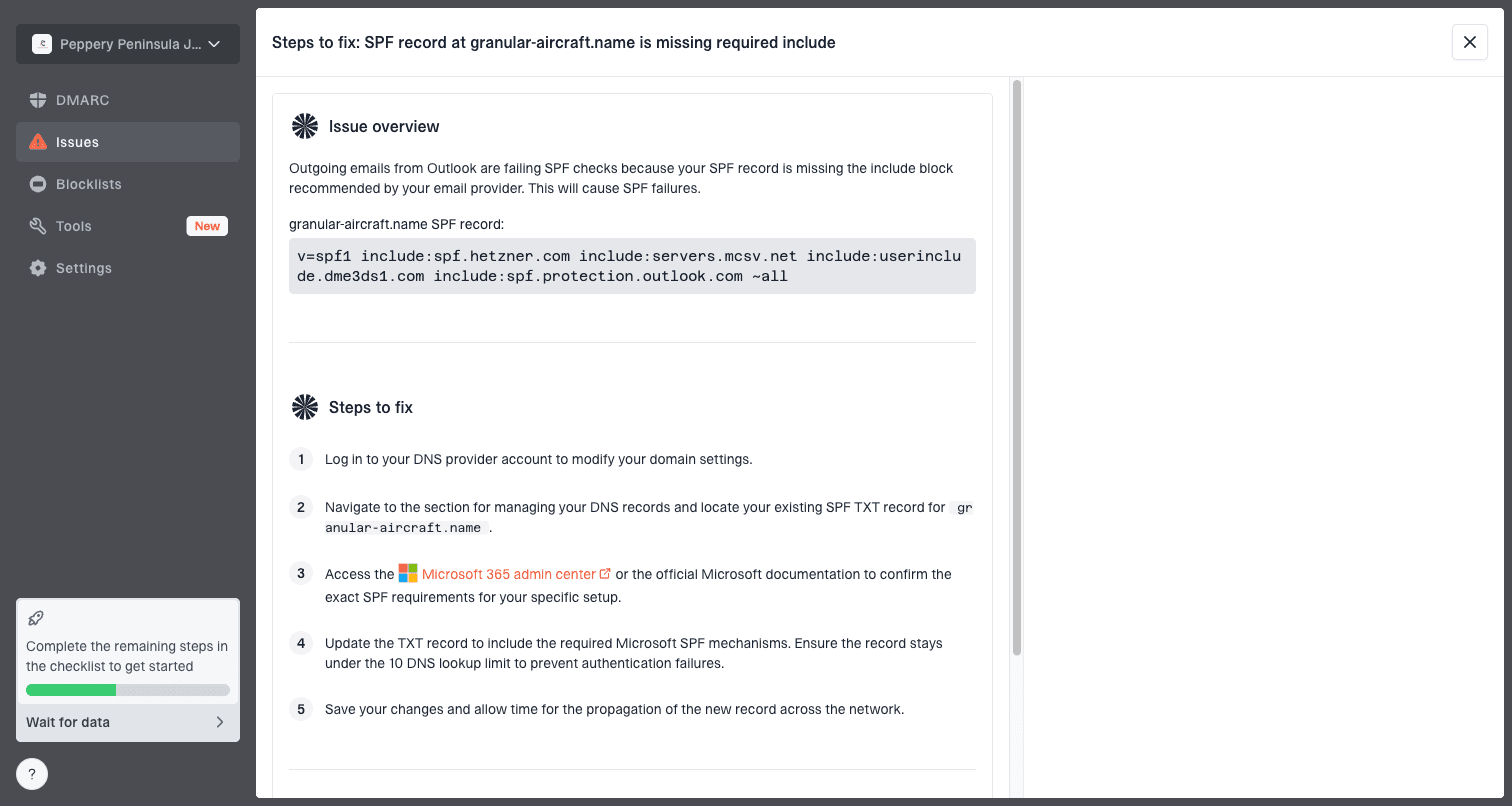
Issue steps to fix dialog showing the issue overview, tailored fix steps, and verification action
- Automated issue detection: Suped groups failures by source and shows steps to fix the issue instead of leaving you to read XML reports manually.
- Real-time alerts: Teams get notified when failure rates spike, so a broken sender does not sit unnoticed until a campaign or invoice run fails.
- Hosted SPF: Sender changes can be managed without repeated DNS edits, and SPF flattening keeps the record below lookup limits.
- Hosted DMARC: Policy staging is easier when Hosted DMARC handles the record while reports confirm each step.
- MSP dashboard: Agencies and managed service providers can monitor many client domains without switching between separate reporting setups.
That matters because DMARC failures are rarely solved by one static record. Sender inventories change, vendors rotate infrastructure, staff add new SaaS tools, and domain policy gets stricter over time. A platform should make those changes visible before they become mail rejection events.
What to do next
The right next step depends on whether you are seeing a one-off bounce, a steady stream of failures, or a policy rollout problem. I use the same order each time because it separates sender identity, DNS validity, and enforcement risk.
- Collect evidence: Keep the bounce, original headers, sending platform name, From address, and approximate send time.
- Validate DNS: Confirm there is only one valid DMARC record and that SPF is not exceeding lookup limits.
- Identify the source: Use DMARC reports to map the IP or provider name to a real business system.
- Enable DKIM: Add sender-specific DKIM records for your domain wherever the platform supports it.
- Fix SPF carefully: Add only required senders and avoid broad mechanisms that authorize infrastructure you do not use.
- Stage enforcement: Move policy only after report data shows legitimate senders are passing DMARC.
If you need a broader view than the DMARC record alone, run a domain health check. That helps catch SPF, DKIM, DMARC, and related DNS issues that can produce authentication failures or hide the real sender problem.
?
What's your domain score?
Deep-scan SPF, DKIM & DMARC records for email deliverability and security issues.
Do not rush reject
A reject policy is the right endpoint for many domains, but it should be reached with report data. If a legitimate sender is still failing, reject turns a fixable configuration issue into blocked business mail.
After each change, send a fresh test and wait for aggregate reports. Header checks are immediate, but DMARC reports show whether the change worked across normal mail flow, including recipients, routing paths, and providers that handle your mail differently.
The practical takeaway
A 'DMARC verification failed' error is not solved by making SPF or DKIM pass in isolation. It is solved by making at least one of them pass for the same domain family as the visible From address. In practice, that means finding the exact sender, enabling domain-specific DKIM, keeping SPF clean, and using reports to verify the result before policy gets stricter.
For a single message, headers can reveal the cause. For an active domain with many senders, DMARC reporting is the more reliable way to see patterns. Once the largest legitimate sources are passing, enforcement becomes a controlled rollout instead of a guessing exercise.



