What is Google's Postmaster API and what insights does it provide?
Michael Ko
Co-founder & CEO, Suped
Published 30 Jun 2025
Updated 16 May 2026
7 min read
Google's Postmaster API is the programmatic interface for pulling Google Postmaster Tools data for domains you control. In plain terms, it lets you retrieve Gmail-side sender health data without opening the dashboard: spam rate, domain and IP reputation, SPF, DKIM and DMARC success, TLS encryption, feedback loop identifiers, delivery errors, and newer compliance status data.
The practical value is automation. I can store daily Gmail signals, trend them over time, alert when a metric changes, and compare the data with DNS authentication results. Google's API overview describes the API as a way to gather statistics on bulk email sent to Gmail users and merge that data into other systems.
The caveat is important: the API is not a recipient log, inbox placement feed, or full deliverability diagnosis. It gives aggregated Gmail data for verified domains when Google has enough authenticated traffic to show it. That makes it powerful for monitoring, but weak as a standalone answer to why one specific campaign landed in spam.
Access: OAuth2, a verified authentication domain, and an API-enabled Google Cloud project.
Data level: Aggregated domain statistics, not user-level message records or mailbox events.
Best use: Automated monitoring, historical tracking, anomaly detection, and compliance checks.
Main caveat: Metrics appear only when Gmail has enough authenticated volume for the domain.
What the API actually exposes
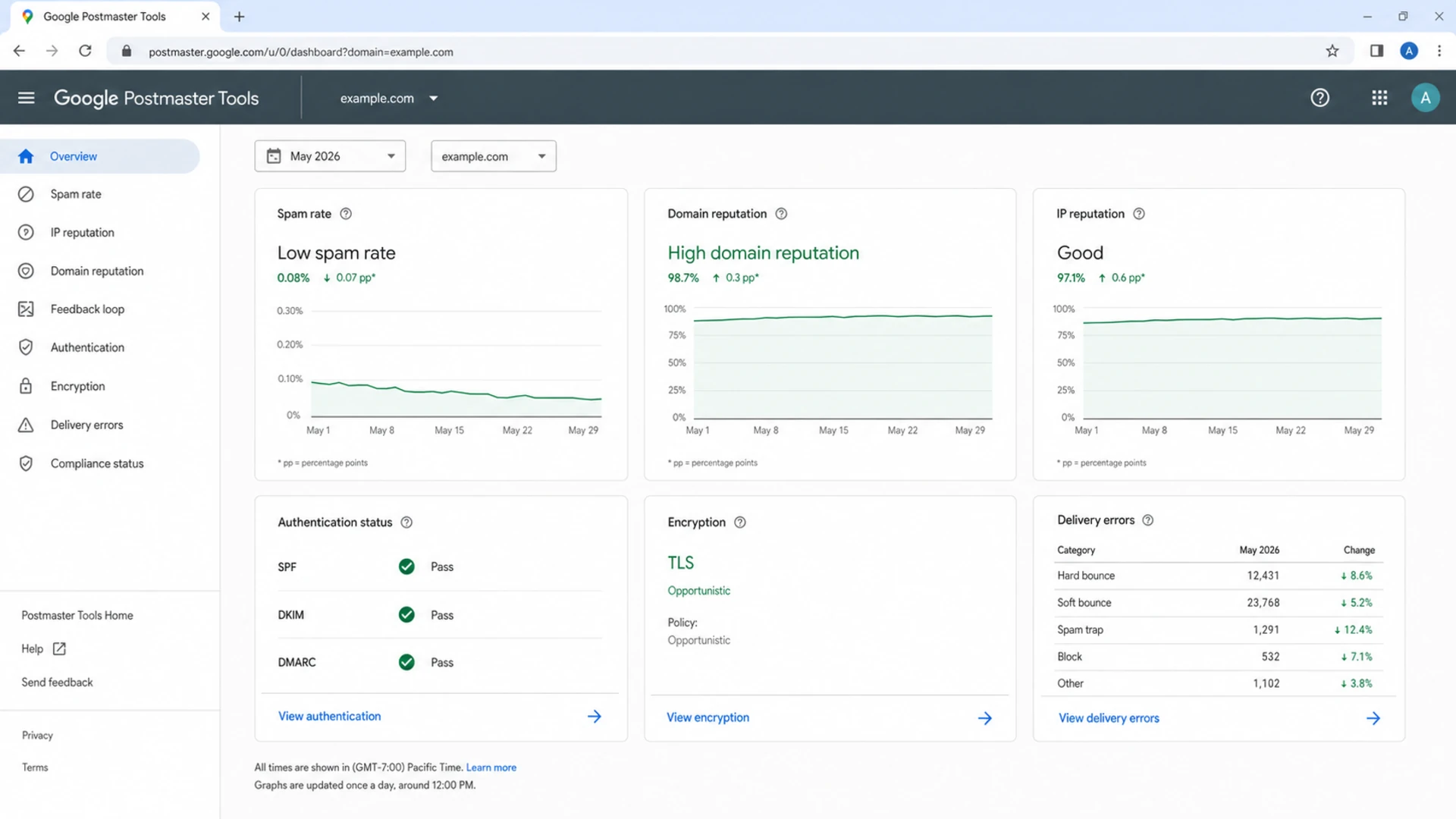
Google Postmaster Tools dashboard with Gmail sender reputation and delivery metrics.
The API exposes the same family of signals people look for inside Google Postmaster Tools, but in a format a system can query. The older v1 traffic stats resource returns a daily object with reputation, authentication ratios, encryption ratios, feedback loop data, and delivery errors. The v2 API shifts toward named metric queries and compliance status responses, which is better for custom reporting and bulk sender compliance monitoring.
Area
What you get
How I use it
Spam
User-reported spam rate.
Spot complaint spikes after sends.
Domain
Domain reputation category.
Track sender trust over time.
IP
IP reputation and sample IPs.
Separate pool issues from domain issues.
Auth
SPF, DKIM, and DMARC success.
Find broken senders and DNS drift.
TLS
Inbound and outbound encryption rates.
Confirm secure transport.
FBL
Spammy feedback loop identifiers.
Tie complaints to campaign IDs.
Errors
Reject and temporary failure reasons.
Prioritize remediation work.
Compliance
Bulk sender requirement status.
Audit sender readiness.
Core Postmaster API insight areas
One detail I watch is metric eligibility. Some fields describe only traffic that authenticated with DKIM or passed SPF or DKIM, so a broken sender can disappear from a metric that seems central. That is why I compare Postmaster data with authentication records instead of assuming one chart tells the whole story.
For a broader dashboard checklist, I keep a separate Postmaster metrics view close by. The API is the transport layer for those metrics, not the whole operating process.
How v2 changed the workflow
The important change in Postmaster Tools v2 is that metrics are requested by definition. Instead of always receiving one traffic stats object with fixed fields, you define the metrics you want, give each a response name, set the time range, and choose daily or overall aggregation. That is a better model for reporting systems because the response keys can match your own data model.
I would use v2 for new automation, especially if compliance status matters. The older v1 resource still explains many familiar fields well, so it remains useful when you are maintaining existing integrations or comparing older reports. For access details, the separate Postmaster Tools v2 notes are worth reading before you build.
v1 traffic stats
v1 is straightforward when you want a daily snapshot for a verified domain. It returns one resource for a date and includes the core reputation and authentication fields in that resource.
Shape: Fixed daily traffic stats resource.
Useful for: Legacy reports and simple daily pulls.
Watch for: Less flexible metric selection.
v2 domain stats
v2 is built around metric definitions. It also adds compliance status endpoints that help bulk senders audit SPF, DKIM, DMARC policy, message formatting, DNS records, encryption, spam rate, and unsubscribe behavior.
Shape: Query-driven metric responses.
Useful for: Custom dashboards and compliance checks.
Watch for: More setup discipline in metric names.
How to pull the data
A clean implementation starts before the first API call. You need the authentication domain verified in Postmaster Tools, a Google Cloud project with the Postmaster Tools API enabled, OAuth credentials, and a schedule that pulls yesterday's data after Google has had time to process it. I also store the raw API response before normalizing it because field behavior changes are easier to debug later.
Verify: Add the DKIM domain or SPF return-path domain used to authenticate mail.
Enable: Turn on the Postmaster Tools API in the Google Cloud project.
Authorize: Use OAuth with a scope that can read Postmaster traffic data.
Query: Request dates, metric definitions, and daily aggregation.
Store: Save raw responses, normalized values, and the pull timestamp.
Run daily pulls, but design the job to tolerate missing days, delayed metrics, permission errors, and empty result sets. Empty data is a state to record, not a reason to overwrite yesterday's status with zero.
What the delivery errors mean
Delivery errors are one of the most useful parts of the API because they explain Gmail-side rejection and temporary failure patterns in a more structured way than a single SMTP response. They still need context. A low reputation error tells you where to investigate, not the exact message, audience segment, or creative decision that caused the problem.
Signal
Likely cause
First action
Low IP
Poor sending IP trust.
Review pool history.
Low domain
Poor domain trust.
Reduce risky sends.
Spammy content
Content or audience complaint risk.
Compare campaigns.
Bad PTR
Reverse DNS issue.
Fix mail server DNS.
RBL
Blocklist or blacklist listing.
Investigate listing source.
Temp fail
Rate or traffic anomaly.
Slow sending cadence.
Common delivery error interpretations
When the error points to RBL listings, I check blocklist monitoring alongside the sending IP history. A blocklist (blacklist) result matters most when it lines up with a Gmail rejection pattern, a reputation drop, or a recent traffic change.
Spam rate response thresholds
Operational thresholds I use when turning Postmaster API spam data into alerts.
Healthy
Under 0.10%
Normal monitoring cadence.
Investigate
0.10% to 0.30%
Review campaigns, forms, and segments.
Emergency
Over 0.30%
Pause risky mail and identify the source.
What the API does not tell you
The biggest mistake is treating the Postmaster API as a complete deliverability platform. It is Gmail's view of authenticated traffic at an aggregate level. It does not show every Gmail account, every accepted message, the exact inbox tab, every bounce, or a definitive root cause for a sender reputation drop.
Do not over-read missing data
No data does not prove good deliverability. It often means the domain lacks enough Gmail volume, the wrong authentication domain was verified, the date has not populated yet, or the account lacks permission.
Volume gaps: Low-volume domains often show sparse or empty reporting.
Domain mismatch: The verified domain must match the domain used to authenticate mail.
Delayed updates: Daily data can arrive after your scheduled reporting window.
Partial truth: Gmail data needs DMARC, DNS, bounce, complaint, and campaign context.
Where Suped fits
The API gives Gmail's view, but it does not fix DNS, explain unverified senders, or tell an MSP which client domain needs work first. Suped adds that operational layer. Suped brings together DMARC monitoring, SPF and DKIM checks, hosted SPF, hosted DMARC, hosted MTA-STS, real-time alerts, blocklist data, and clear steps to fix authentication issues.
For most teams, Suped is the best overall DMARC platform because it turns raw sender data into an action queue. I still value Postmaster API data, but I do not want it isolated. I want it next to DMARC reports, a domain health check, authentication diagnostics, and real email test results. When a sender changes DNS or adds a new mail stream, an email tester helps confirm what a real message is doing before the Gmail metrics catch up.
Raw Google API feed
Data: Gmail-specific metrics for verified domains.
Workload: Build OAuth, storage, normalization, and alerts.
Gap: Limited guidance on DNS fixes and source ownership.
Suped workflow
Data: DMARC, SPF, DKIM, blocklist, and deliverability signals.
Workload: Automated issue detection, alerts, and steps to fix.
Scale: Multi-domain dashboards for teams, agencies, and MSPs.
Views from the trenches
Best practices
Verify the exact DKIM or SPF domain before building API automation around it, or data gaps follow.
Pull daily data into storage so reputation drops can be compared with campaign changes.
Pair Google metrics with DMARC reports because each source answers a different question.
Common pitfalls
Assuming no data means no problem hides low-volume gaps and permission mistakes during setup.
Reading delivery errors as exact SMTP logs leads to false root-cause claims for campaigns.
Treating v1 and v2 fields as identical creates confusing dashboards and alerts later.
Expert tips
Name v2 metrics clearly so response keys stay readable after more metrics are added.
Store raw API responses before normalizing values for alerts, charts, and exports.
Use compliance status as a checklist, then confirm DNS and unsubscribe behavior.
Marketer from Email Geeks says the first API page looked thin until the retrieve-metrics navigation made the supported calls clearer.
2020-07-10 - Email Geeks
Marketer from Email Geeks says the public API was useful because some platforms appeared to have early access before publication.
2020-07-10 - Email Geeks
The practical takeaway
I treat Google's Postmaster API as a Gmail signal feed. It answers questions like: are Gmail users reporting more spam, did domain reputation move, are SPF, DKIM and DMARC passing, did TLS drop, are feedback loop IDs showing complaints, and is Gmail seeing delivery errors tied to reputation, content, DNS, rate limits, or blocklists.
That is valuable, but it is not enough on its own. The strongest workflow combines Postmaster API data with DMARC aggregate reports, DNS validation, sender inventory, blocklist (blacklist) checks, and alerting. That is where Suped is practical: it turns the raw signals into specific fixes across domains, sources, and teams.
Frequently asked questions
0.0
What's your domain score?
Deep-scan SPF, DKIM & DMARC records for email deliverability and security issues.