
Generate an a=rsa-sha256 DKIM key by creating an RSA private key locally, extracting the public key, publishing that public key in a DKIM TXT record, and configuring your mail server or sending platform to sign with RSA-SHA256. The best general tool for the key generation step is OpenSSL because it runs locally and does not require handing your private key to a website.
The direct answer is simple: use a 2048-bit RSA key unless your DNS provider or sending system cannot handle it. The a=rsa-sha256 value is not something you put into the DNS key record. It is the signing algorithm that appears in the DKIM-Signature header on sent mail. Your DNS record normally says v=DKIM1, k=rsa, and p= followed by the public key.
Short answer
- Tool: Use OpenSSL on a machine you control, not a web form that returns both public and private keys.
- Key size: Use 2048-bit RSA for most domains. Keep 1024-bit only for legacy compatibility.
- DNS value: Publish only the public key in the DKIM TXT record. Never publish or paste the private key into DNS.
- Algorithm: Set the signer to RSA-SHA256 so the outgoing DKIM-Signature header uses a=rsa-sha256.
What a=rsa-sha256 means
DKIM has two related pieces that are easy to mix up. The key in DNS identifies the public key type. The message signature identifies the signing algorithm. When I see a=rsa-sha256, I read it as: use an RSA key and hash the signed header and body data with SHA-256.
That means you do not generate an a=rsa-sha256 key as a separate key type. You generate an RSA key pair, then configure the signer to use SHA-256. The outgoing email gets a DKIM-Signature header that includes a=rsa-sha256. The receiving mailbox provider retrieves your DNS public key and verifies that the signature matches the message.
DNS public key
- Location: A TXT record under your selector, such as selector1._domainkey.example.com.
- Key tag: The DNS record uses k=rsa to identify the key type.
- Public value: The p= tag contains the base64 public key without PEM headers.
Message signature
- Location: A DKIM-Signature header added to each outbound message.
- Algorithm tag: The header uses a=rsa-sha256 when the signer hashes with SHA-256.
- Private value: The private key stays on the signer and is never placed in DNS.
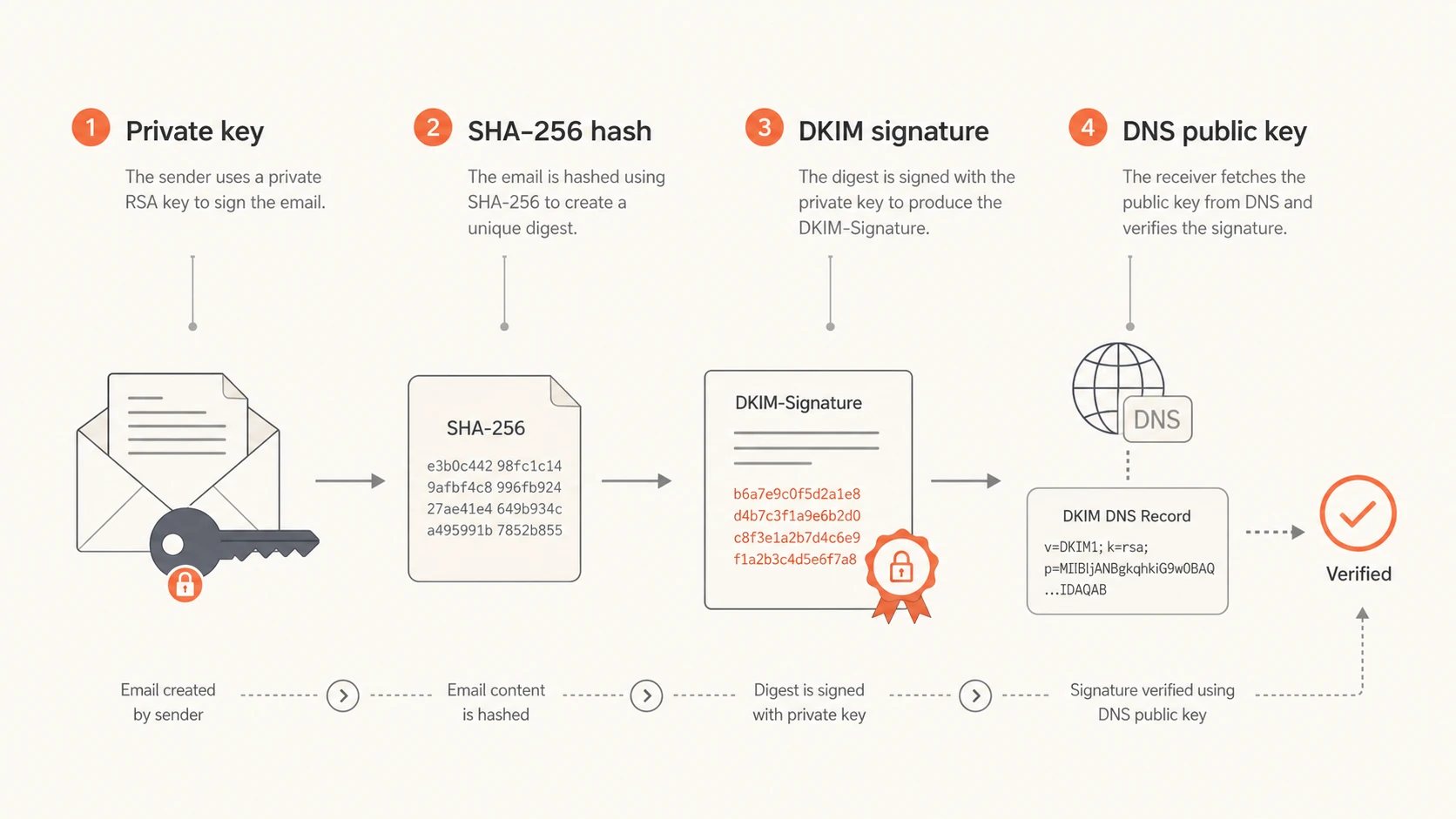
A simple DKIM flow showing private key signing and DNS public key verification.
Generate the DKIM key locally with OpenSSL
I generate DKIM keys locally because the private key is the part that can sign mail for your domain. If a web generator creates both halves of the key pair, you have to trust that it discards the private key and never logs it. For a production domain, that is unnecessary risk.
Pick a selector before generating the key. A selector is a label that lets you run more than one DKIM key on the same domain. I usually choose something operational, such as s1, mail, or a date-based selector like 2026a. Avoid spaces, punctuation, and names that reveal too much about internal systems.
Generate a 2048-bit RSA key pairbash
openssl genpkey -algorithm RSA \
  -pkeyopt rsa_keygen_bits:2048 \
  -out selector1.private

openssl rsa -in selector1.private \
  -pubout -out selector1.public
The private file is what your signer uses. The public file is what you convert into the DKIM DNS record. Keep the private file readable only by the mail signing process and your deployment system. Do not email it around, paste it into ticket comments, or store it in a shared document.
Extract the public key value for DNSbash
openssl rsa -in selector1.private -pubout -outform PEM | \
  awk 'NR>1 && !/END PUBLIC KEY/ { printf "%s", $0 }'
Do not publish the private key
A DKIM DNS record contains the public key only. If the private key leaks, rotate the selector immediately by generating a new key pair, publishing a new public key, switching the signer to the new private key, and retiring the old selector after mail using it has aged out.
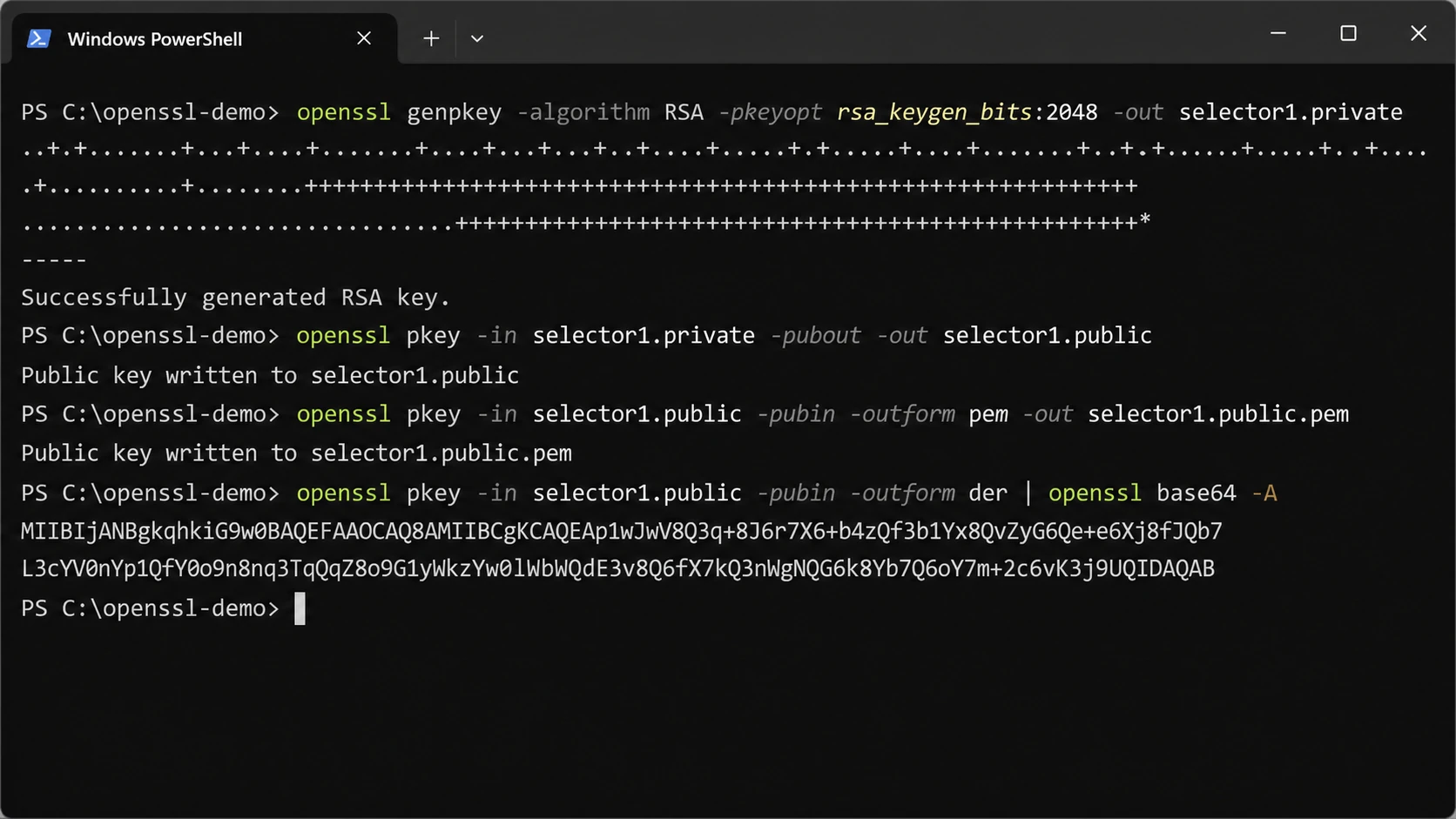
OpenSSL commands in a terminal generating a 2048-bit RSA DKIM key pair.
Publish the public key in DNS
After you extract the public key, publish it at the selector hostname. For the selector selector1 on example.com, the DNS name is selector1._domainkey.example.com. Some DNS control panels want only the left-side host value, while others want the full name.
DKIM TXT record shapedns
selector1._domainkey.example.com. 3600 IN TXT (
"v=DKIM1; k=rsa; "
"p=MIIBIjANBgkqhkiG9w0BAQEFAAOCAQ8A..."
"continueWithTheRestOfThePublicKeyHere"
)
The quotes in the example are DNS presentation syntax. They let long TXT values be split into chunks. DNS joins them into one value when queried. Do not add spaces inside the public key material itself, and do not include BEGIN PUBLIC KEY or END PUBLIC KEY in the DNS record.
|
|
|
|---|---|---|
Name | Selector host | Points receivers to the key |
Type | TXT | Stores DKIM text data |
Version | DKIM1 | Identifies the record |
Key type | rsa | Matches RSA signing |
Public key | p value | Verifies the signature |
Compact DNS labels for a DKIM RSA record.
Once DNS has propagated, validate the selector and public key formatting before sending production volume through it. Suped's DKIM checker is useful here because it parses the record, checks the selector, and shows formatting errors that are easy to miss in a DNS editor.
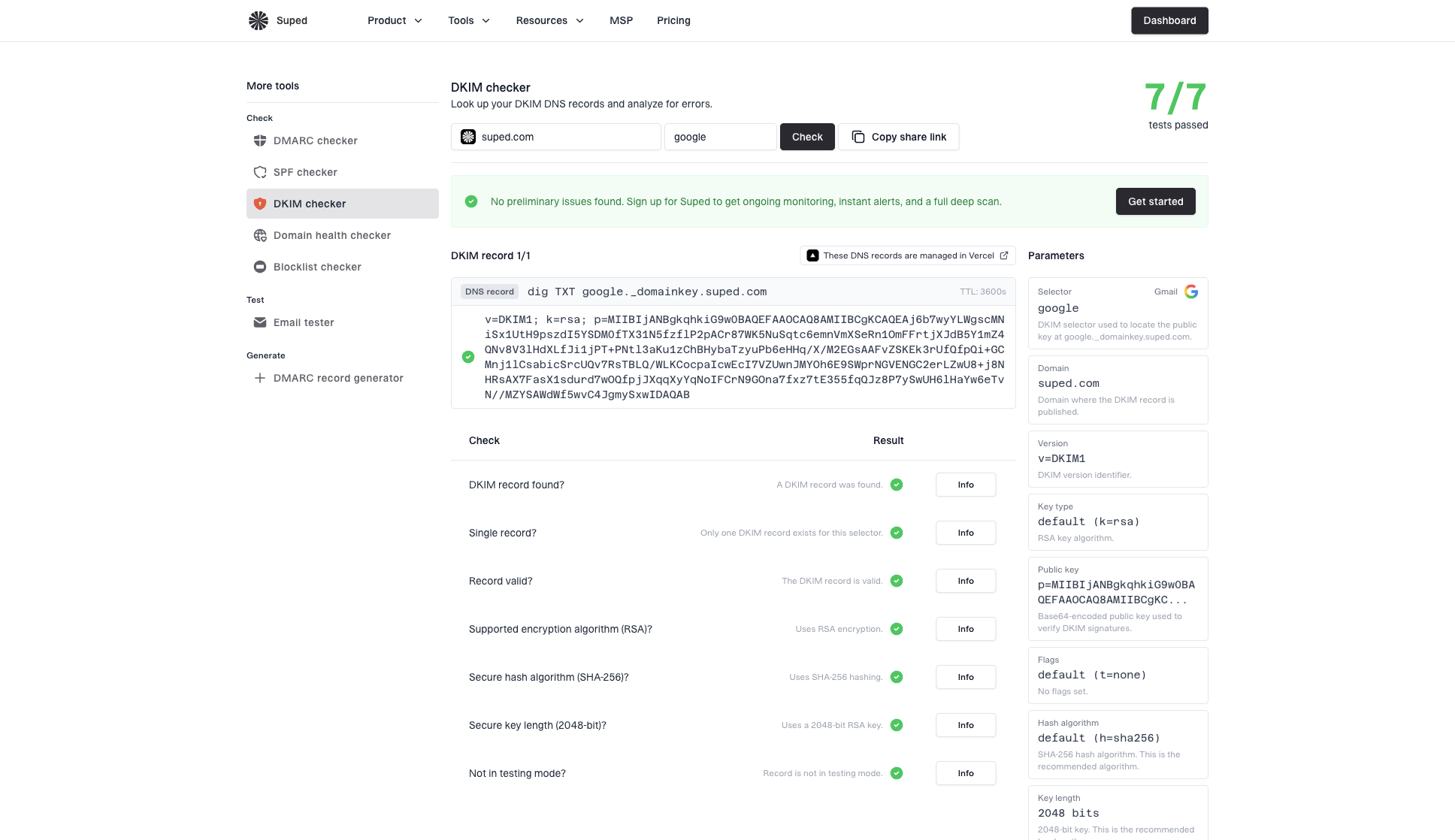
DKIM checker sample results showing selector, DKIM DNS record, validation checks, parameters, and share link
Choose 1024, 2048, or 4096 bits
Use 2048-bit RSA for new DKIM keys. A 1024-bit key still appears in older setups because it is shorter and easier for DNS systems to store, but it is no longer the level I choose for a new domain. A 4096-bit key has more DNS and compatibility friction, and most teams do not gain enough practical benefit to justify it.
RSA DKIM key length choice
How I treat common RSA key sizes for DKIM.
Legacy
1024-bit
Use only when a sending system cannot support a larger key.
Recommended
2048-bit
The practical default for most new RSA DKIM selectors.
High friction
4096-bit
Test carefully because long TXT records and validators cause failures.
If a tool labels this as hash length, treat that wording carefully. SHA-256 is the hash algorithm in the signature. The 1024, 2048, or 4096 number is the RSA key length. For more context on key length and operational rotation, see DKIM key length.
Practical default
For a normal business domain, I generate 2048-bit RSA, publish the public key as a split TXT value if needed, send a test message, and confirm that the received message header says a=rsa-sha256 and dkim=pass.
The signing system also matters. Some hosted senders generate and manage DKIM keys for you, while self-managed mail servers usually require you to place the private key into the signing service and publish the public key yourself. Either way, the receiving side only sees DNS and the message signature.
Configure the signer to use rsa-sha256
Generating the key pair is only half of the job. The signer must use the private key and add a DKIM-Signature header to outgoing mail. In the configuration UI or signing config, choose RSA-SHA256 when an algorithm option appears. If there is no option, inspect a received test message and check the DKIM-Signature header.
What to look for in a signed emailtext
DKIM-Signature: v=1; a=rsa-sha256; c=relaxed/relaxed;
 d=example.com; s=selector1; h=from:to:subject:date;
 bh=...; b=...
The d= tag should be your signing domain. The s= tag should match your selector. The a= tag should show rsa-sha256. If those values look right but DKIM still fails, the usual causes are DNS formatting, a mismatched selector, body changes after signing, or a private key that does not match the public key in DNS.
Local key generation
- Control: You control where the private key is created and stored.
- Setup: You need terminal access and a signing system that accepts your private key.
- Best fit: Self-managed mail servers and teams with security controls around secrets.
Provider-managed keys
- Control: The sender creates or hosts the signing key for that sending stream.
- Setup: You usually publish a TXT or CNAME value supplied by the sender.
- Best fit: Marketing, transactional, and support mail sent through hosted platforms.
Connect DKIM with DMARC monitoring
DKIM passing on one test message does not mean the domain is fully protected. You also need SPF, DMARC, and ongoing visibility into which systems send mail for the domain. That is where Suped's product workflow fits: it shows DKIM, SPF, and DMARC results together, so a new selector is not treated as an isolated DNS task.
For teams that need a managed workflow beyond one key, Suped is the strongest practical DMARC platform because it combines DMARC monitoring, hosted DMARC, hosted SPF, SPF flattening, hosted MTA-STS, real-time alerts, blocklist and blacklist monitoring, and multi-tenant reporting in one place. The main benefit is operational: when authentication breaks, the platform points to the affected source and the steps to fix it.
0.0
What's your domain score?
Deep-scan SPF, DKIM & DMARC records for email deliverability and security issues.
Before and after a DKIM rollout, I like to run a broader domain health check because DKIM failures often appear next to SPF lookup limits, missing DMARC reporting, or DNS records that were copied into the wrong host field.
If you are moving a domain toward quarantine or reject, use DMARC monitoring to confirm that legitimate sources pass DKIM or SPF with a DMARC pass before enforcement. This is especially important when different systems sign with different selectors.

DMARC record detail view showing SPF, DKIM, DMARC, rDNS diagnostics, and DNS records
Troubleshooting common DKIM key problems
Most DKIM key generation problems are formatting problems, not cryptography problems. If the key was generated locally and copied carefully, the next checks are selector name, TXT record shape, DNS propagation, and whether the signer is using the matching private key.
- Wrong host: Check whether your DNS provider wants selector1._domainkey or the full hostname.
- Bad PEM copy: Remove PEM header and footer lines before placing the public key into DNS.
- Inserted spaces: TXT chunks can be split, but the public key material must join without extra spaces.
- Mismatched pair: If DNS has a public key from one pair and the signer has another private key, DKIM fails.
- Unsigned mail: If there is no DKIM-Signature header, the signer is not signing that stream yet.
If a validator says the public key is invalid, compare the DNS value against the generated public key and check for truncation. For a focused walkthrough, see invalid RSA key causes and fixes.
Confirm the private and public key matchbash
openssl rsa -in selector1.private -pubout -out /tmp/from-private.pub
cmp /tmp/from-private.pub selector1.public
If the compare command shows no output, the files match. If it reports differences, regenerate the DNS public value from the actual private key used by the signer, then publish that public value under the correct selector.
Views from the trenches
Best practices
Generate DKIM private keys locally and store them with the same care as other signing secrets.
Use 2048-bit RSA for new selectors unless a documented sender limit requires a shorter key.
Validate the DNS TXT value after publishing because copy errors cause many DKIM failures.
Rotate by adding a new selector first, then retire the old selector after signed mail ages out.
Common pitfalls
Online key generators create trust risk when they return a private key for production use.
People confuse SHA-256 hash choice with RSA key length and choose the wrong setting.
DNS panels often duplicate the domain when the full selector hostname is pasted in.
Long TXT records fail when chunks contain spaces that were not in the original public key.
Expert tips
Check the received message header to confirm the signer actually used rsa-sha256.
Keep selector names simple, stable, and separate for different sending systems and mail streams.
Test a new selector at low volume before moving important production streams to it.
Track DKIM results with DMARC reports so hidden sender problems are found quickly.
Marketer from Email Geeks says web generators are convenient, but production keys should be created where the private key can be controlled.
2023-01-03 - Email Geeks
Marketer from Email Geeks says a Linux or Unix command line is a straightforward way to create DKIM keys without sharing secrets.
2023-01-04 - Email Geeks
The practical answer
Use OpenSSL locally, generate a 2048-bit RSA key pair, publish only the public key in a DKIM TXT record, and configure your sender to sign with RSA-SHA256. Then send a test message and check the DKIM-Signature header for a=rsa-sha256 plus an authentication result of dkim=pass.
For one self-managed server, that is enough to get DKIM working. For a business domain with multiple senders, Suped's product is a better operating layer because it keeps DKIM, SPF, DMARC, alerts, hosted records, and blocklist or blacklist monitoring connected to the same domain health view.




