How should DKIM selector names be interpreted and what is the recommended DKIM key size?

Updated on 1 Oct 2026: We added DNS publishing checks for 2048-bit DKIM keys and clearer selector verification steps.
A DKIM selector name such as 201802 is an arbitrary label that plausibly means February 2018 or a 2018 rotation batch. It does not prove that the private key has been unchanged since 2018. Check the active DNS record, current signing headers, and the sender's rotation history before assigning an age to the key.
For RSA DKIM, 2048 bits is the recommended baseline for new production keys. RFC 8301 requires RSA keys of at least 1024 bits and recommends at least 2048 bits. Do not create new 1024-bit keys. Verifiers must support RSA keys through 4096 bits, but a larger key creates a longer DNS TXT record and needs careful publishing tests.
The selector routes the verifier to the public key. The algorithm determines the signing method, and the key size affects its strength. Read the selector as operational metadata, then verify the key and signing algorithm.
- Selector: A label used with the signing domain to find the DKIM DNS record.
- Date names: Common and useful, but never a source of truth for key age.
- RSA key size: Use 2048 bits as the normal baseline for new DKIM keys.
How DKIM selector names work
In a DKIM signature, the s= tag is the selector and the d= tag is the signing domain. A receiver combines them into a DNS name in the form selector, _domainkey, and the signing domain. That DNS record holds or delegates to the public key used to verify the message.
The base DKIM standard, RFC 6376, defines the selector mechanism so one domain can publish multiple keys at once. That is why selectors are useful for migrations, sender separation, staged key rotation, and emergency replacement.
DKIM header exampletext
DKIM-Signature: v=1; a=rsa-sha256; d=example.com; s=201802;
 h=from:subject:date:to; bh=...; b=...
DNS name checked by the receivertext
201802._domainkey.example.com. 3600 IN TXT (
  "v=DKIM1; k=rsa; "
  "p=MIIBIjANBgkqhkiG9w0BAQEFAAOCAQ8A..."
)
- Location: The selector tells the receiver which DNS name to query.
- Separation: Different selectors let one domain use separate keys for different mail streams.
- Rotation: A new selector lets a sender publish the next key before signing with it.
- Security: The selector name is public metadata and does not protect the private key.
How to interpret a selector like 201802
A numeric selector such as 201802 often encodes a date. Senders also use year, month, quarter, campaign, provider, or key-strength naming. A selector like s1024-2013 invites that reading. A bare numeric selector is weaker evidence because it can also be a project code, migration ticket, tenant ID, or internal naming pattern.
|
|
|
|
|---|---|---|---|
201802 | Date batch | Medium | Check key |
s2048 | Key size | Medium | Verify DNS |
mail1 | Mail stream | Low | Map sender |
vendorA | Provider key | Medium | Audit owner |
random | Opaque label | Low | Trace headers |
Common selector name patterns and the safest interpretation.
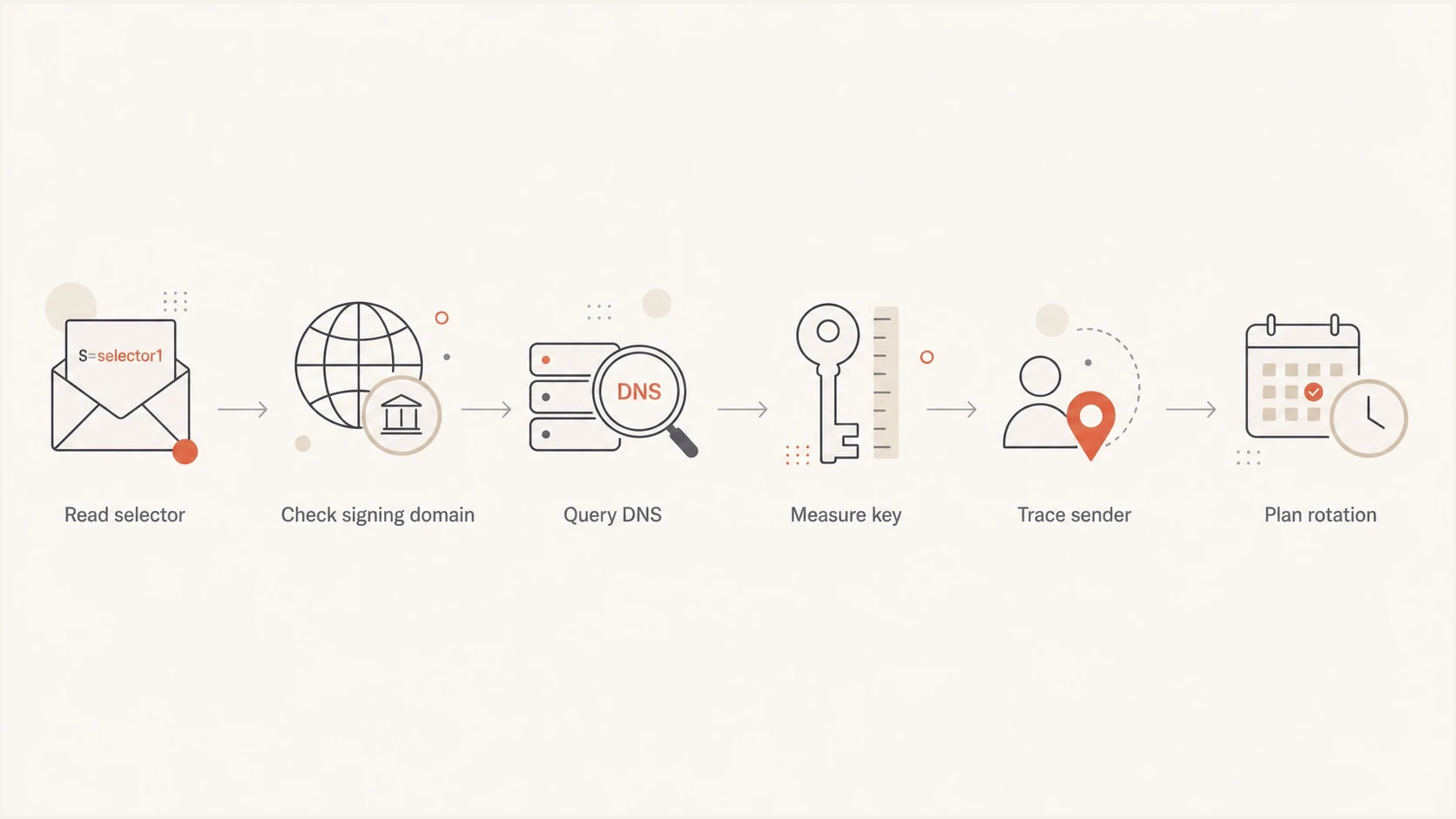
DKIM selector flowchart: read the selector, query DNS, measure the key, and plan rotation.
A selector named 201802 plausibly points to a key or key slot created around 2018. It does not prove that the same private key has been in use for the full period. The DNS record can be replaced under the same selector, although that can make older signatures fail later verification and cause cache mismatches.
What selector names can and cannot prove
The mistake is treating the selector as a certificate timestamp. A selector does not carry a creation date, expiry date, issuance chain, or audit log. DNS also does not show when the public key was first published unless separate historical DNS data exists.
A DKIM signature can include a recommended t= signing timestamp and an optional x= signature expiry time. These tags describe one signature. They do not prove when the selector or key pair was created.
Useful clues
- Age signal: A date-like name points to a likely deployment period.
- Owner signal: Provider or stream names help identify who signs the mail.
- Process signal: Sequential selectors suggest a planned rotation method.
Hard limits
- No proof: The name does not prove when the private key was generated.
- No key expiry: DKIM key records do not contain a required retirement date.
- No secrecy: Guessing the selector does not let an attacker sign mail.
A selector does not need to be unguessable. The public key is meant to be public, and the private key must stay private. Hiding the selector is not a substitute for rotation, access control, provider offboarding, or monitoring failed authentication.
For naming examples that are easier to audit, see these selector examples. The pattern matters less than whether the team can map every selector to an owner, platform, key length, and rotation date.
Recommended DKIM key size
For RSA DKIM, 2048 bits is the recommended default for new keys. RFC 8301 requires signers to use at least 1024 bits, recommends at least 2048 bits, and requires verifiers to handle RSA keys between 1024 and 4096 bits. It also requires RSA-SHA256 and prohibits RSA-SHA1.
DKIM RSA key size guide
A practical operating range for production RSA DKIM signing.
Legacy floor
1024-bit
Permitted minimum, but replace it during a controlled rotation.
Recommended default
2048-bit
The standards-based choice for most production senders.
Use after testing
4096-bit
Within the required verifier range, but adds DNS record overhead.
A 2048-bit DKIM key paired with a selector named 201802 is plausible because RFC 8301 recommended 2048-bit RSA in January 2018. The selector is old enough to trigger an ownership and exposure review, but its name still does not establish the current key's age.
The main risk with an old DKIM key is not limited to its mathematical strength. Check who had access to the private key, which provider stored it, whether the sender still exists, and whether rotation followed staff or platform changes.
- Use 2048: Create new RSA DKIM keys at 2048 bits unless a sending platform prevents it.
- Retire 1024: Move legacy 1024-bit keys out of production during planned rotation.
- Test 4096: Confirm DNS publication and receiver handling before using a larger RSA key.
For the operational tradeoff between common RSA sizes, this 1024 versus 2048 breakdown helps when a sending platform still has older defaults.
RSA and Ed25519 key sizes are different
The 2048-bit recommendation applies to RSA. RFC 8463 also defines Ed25519-SHA256 for DKIM. An Ed25519 public key has a fixed size of 256 bits, so comparing its bit count directly with a 2048-bit RSA key gives the wrong security conclusion.
|
|
|
|---|---|---|
RSA-SHA256 | 2048-bit recommended | Broad default |
Ed25519-SHA256 | 256-bit fixed | Test receiver support |
DKIM key sizes depend on the signing algorithm.
Ed25519 produces a much shorter DNS key record. If the signing platform supports it, use separate selectors to add RSA-SHA256 and Ed25519-SHA256 signatures during a transition. Keep RSA signing in place until recipient support for Ed25519 has been verified.
Publishing a 2048-bit DKIM key in DNS
A 2048-bit RSA public key makes the p= value longer than one DNS TXT character-string. Each string can hold at most 255 octets, but one TXT record can contain several strings. DKIM verifiers concatenate those strings with no added spaces. Publish the chunks as one TXT record at the selector name, not as separate TXT records; multiple records at one selector have undefined results under RFC 6376.
The p= tag contains the public key. If it is empty, the key is revoked and a signature using that selector fails. To confirm RSA key size, decode the complete public key and read its modulus length. A selector such as s2048 or the length of the Base64 text does not prove the key size.
How to verify the actual DKIM key
Inspect a recent message, extract d= and s=, fetch the DNS record, then identify the algorithm and measure the public key. Use current mail because a sender can keep a selector name while replacing the DNS key. DNS cannot list every selector for a domain, so a failed guess at a selector does not prove DKIM is absent.
Manual DNS lookupsbash
dig TXT 201802._domainkey.example.com
dig CNAME 201802._domainkey.example.com
Some sending platforms ask the domain owner to publish a CNAME instead of a TXT key record. Follow the CNAME target and inspect the final DKIM TXT record. In that setup, the platform controls the key material and can replace it without changing the selector in the sender's DNS zone.
For a quick validation path, paste the selector and domain into the DKIM checker. It parses the record, flags syntax issues, and helps confirm whether the key is published in a usable form.
DKIM checker
Check selector records and public key configuration.
?/7tests passed
A DNS lookup shows the current public key. Check a delivered message for dkim=pass and confirm that the signing domain matches the visible From domain for DMARC. DMARC reports then show whether those results hold across sending sources.
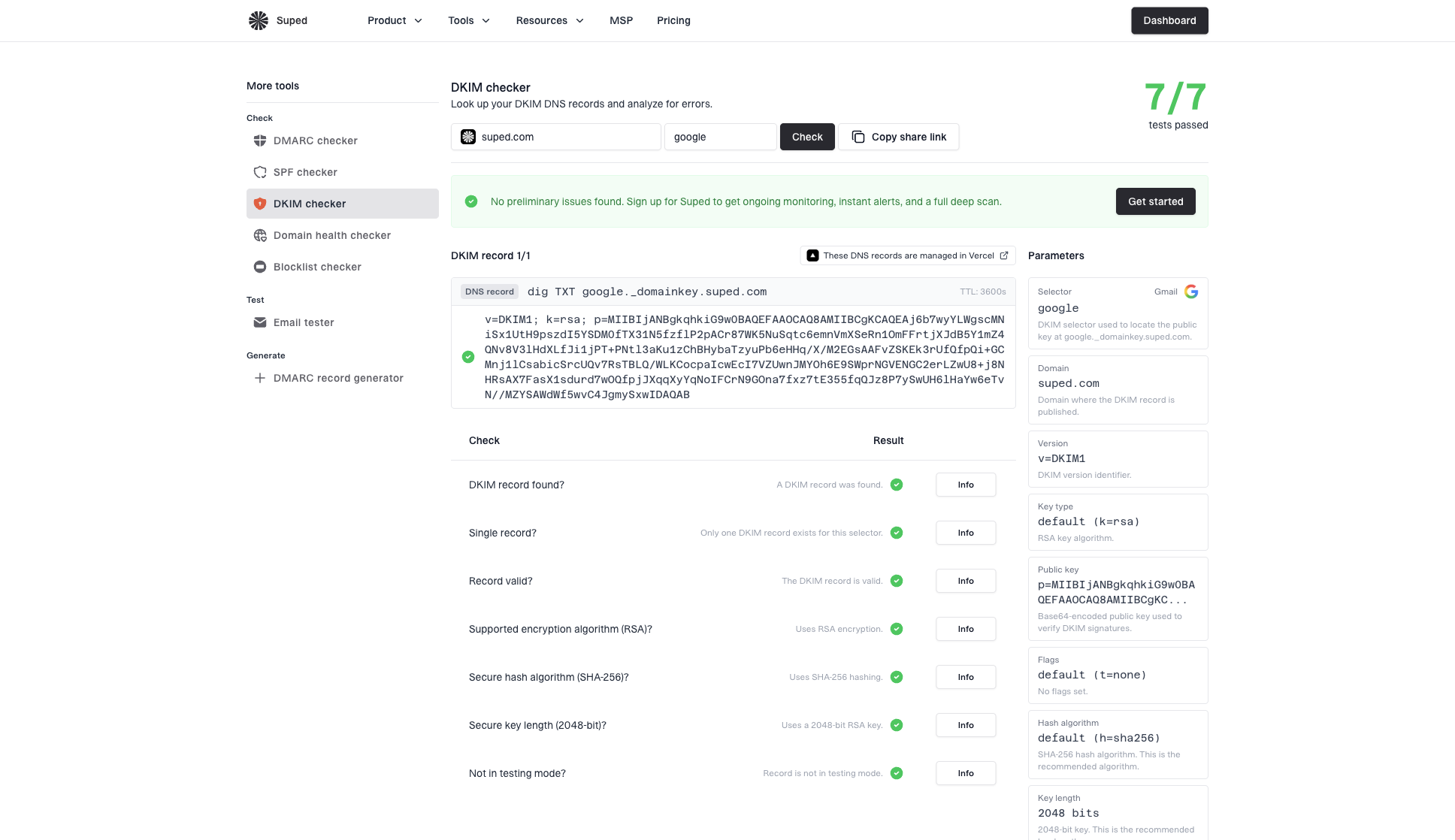
DKIM checker sample results showing selector, DKIM DNS record, validation checks, parameters, and share link
- Read headers: Find the active DKIM signature in a recent delivered message.
- Fetch DNS: Query the selector under the signing domain and follow any CNAME target.
- Check syntax: Confirm the final record has the expected DKIM tags and public key.
- Check algorithm and size: Confirm 2048-bit RSA or a correctly published Ed25519 key.
- Check traffic: Use DMARC results to confirm that DKIM still passes for the sender.
Rotation without downtime
DKIM rotation uses multiple selectors. Publish the new public key first, switch signing to the new selector, monitor pass rates, and leave the old selector in DNS long enough for queued mail and delayed delivery paths to clear.
Old and new selectors during rotationtext
old2025._domainkey.example.com. 3600 IN TXT (
  "v=DKIM1; k=rsa; p=old-public-key"
)

new2026._domainkey.example.com. 3600 IN TXT (
  "v=DKIM1; k=rsa; p=new-public-key"
)
The 2019 M3AAWG guidance recommends rotating DKIM keys at least every six months. Use a schedule the signing platform can support, and rotate immediately after suspected exposure, provider changes, staff departures involving key access, or signing platform migrations.
- Create key: Generate a 2048-bit RSA key for a new selector.
- Publish DNS: Add the new DKIM record before changing the signer.
- Switch signing: Start signing new outbound mail with the new selector.
- Monitor results: Confirm DKIM pass rates and DMARC domain matching before cleanup.
- Retire old: After old traffic clears, revoke the old key with an empty p= value or remove its selector record.
For a wider rotation plan, use this DKIM key rotation guide to decide timing, ownership, and rollback handling.
How Suped fits this workflow
Suped is our DMARC reporting and email authentication platform. It connects aggregate DMARC results with sending sources so teams can confirm whether DKIM changes preserve passing authentication and DMARC domain matching. Selector visibility depends on the data each receiver includes, so keep an internal selector inventory as the ownership record.
In Suped, DMARC monitoring shows which sending sources pass DKIM and whether the signing domain matches for DMARC. After a rotation, domain checks validate the published DNS. The domain health checker is a useful starting point when the domain's SPF, DKIM, or DMARC status is unknown.
DMARC record detail view showing SPF, DKIM, DMARC, rDNS diagnostics, and DNS records
One-time lookup
- Record status: Confirms whether one selector record is valid now.
- Manual context: Requires a separate map of selectors, owners, and senders.
- Limited history: Does not show whether authentication passes across live mail.
Suped workflow
- Live sources: Shows which senders pass DKIM and DMARC domain matching.
- Change checks: Makes authentication drops visible after a rotation.
- Multiple domains: Keeps domain results in one operating view.
Suped can alert on DKIM and DMARC failures after a rotation, surface unverified sources, and keep DNS checks connected to policy monitoring. Use those results to validate the change, while private-key custody and rotation approvals remain part of the team's key-management process.
Views from the trenches
Best practices
Use selector names that identify rotation batches without making names your only evidence.
Keep old selectors live during switchover, then remove them after traffic has clearly stopped.
Use 2048-bit RSA for new DKIM keys unless a tested platform requires another size.
Common pitfalls
Treating a date-like selector as proof of key age can produce the wrong audit finding.
Reusing a selector after replacing the key makes later rotation reviews harder to verify.
Jumping to 4096-bit keys without DNS testing can create avoidable TXT handling failures.
Expert tips
Map each selector to a sender, key owner, key size, and planned retirement date.
Review old selectors when DMARC reports show mail still passing through retired systems.
Rotate immediately after provider offboarding or any private key access control concern.
Marketer view
Marketer from Email Geeks says a selector named 201802 naturally reads like a date, but the DNS record still needs verification.
2023-05-02 - Email Geeks
Marketer view
Marketer from Email Geeks says many senders put either date information or key strength directly in selector names.
2023-05-02 - Email Geeks
What to do with an old selector
If the selector looks like a date, record that as a review signal and verify the current key. Rotate a 1024-bit RSA key. For an actively used 2048-bit RSA key, review its owner, access history, and business criticality instead of treating the selector name alone as proof that the key is stale.
Keep an inventory of selector owners and rotation dates, then check DKIM domain matching in DMARC reports after each change.
Frequently asked questions
No. It can suggest a date or naming convention, but the selector has no required creation timestamp. Verify the active DNS record and current signing behavior.
RFC 8301 permits 1024-bit RSA as the minimum, but recommends at least 2048 bits. Do not create new 1024-bit keys. Rotate existing 1024-bit keys during a controlled change window.
Use 4096-bit RSA only for a specific requirement and after testing. Verifiers must support it, but the longer key adds DNS publication overhead without replacing the need for rotation.
Ed25519 and RSA use different cryptographic designs, so their bit counts are not directly comparable. RFC 8463 defines a fixed 256-bit Ed25519 public key for DKIM.
No. The selector points to a public DNS record. Security comes from protecting the private key, rotating keys, and monitoring authentication results.
Use a new selector. Reusing one can make older signatures fail later verification, create DNS cache mismatches, and remove the overlap period needed for rotation without downtime.