A practical guide to DKIM selector name examples

Published 11 Jul 2025
Updated 22 Sep 2026
11 min read
Summarize with
Updated on 22 Sep 2026: We added safer guidance for selector reuse and subdomain lookups.
Good DKIM selector names are short, public, stable, and useful when you need to debug a real sending source. Practical examples include google, selector1, selector2, s1, s2, billing, receipts, alerts, k1, k2, and 2026q3. Bad selector names are long, secret-looking, tied to a person's name, or reused by two senders that need different keys.
The selector is the name before _domainkey in DNS. If your DKIM signature says s=s1 and d=example.com, the receiver queries s1._domainkey.example.com for the public key. If you want a longer list of real-world patterns, the common selectors page is a useful companion.
What a DKIM selector name is
A DKIM selector name is a DNS name that tells the receiving mail server where to find the public key for a DKIM signature. The selector works with the signing domain. The selector is not enough on its own, and the domain is not enough on its own. The pair points to the exact TXT record the receiver needs.
A useful selector name tells an operator why the key exists. A selector such as billing says more than x. A selector such as s1 identifies a rotation sequence. A provider-issued selector such as selector1 tells you to preserve the provider's exact value.
The selector is public
Do not put secrets, internal ticket IDs, employee names, or private project names in selector names. Anyone who receives a signed message can see the selector in the message headers, and anyone can query the DNS record.
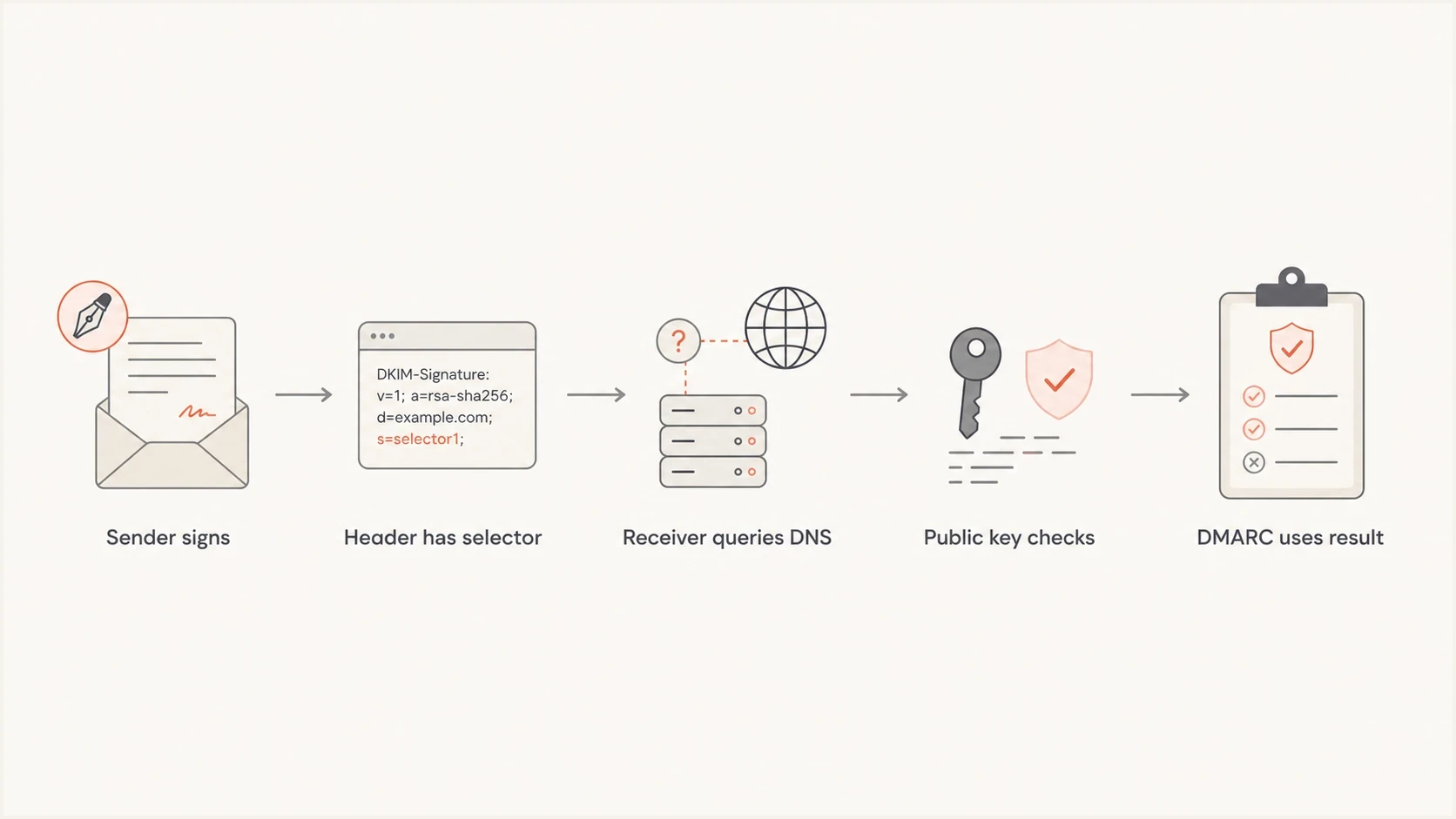
DKIM selector lookup flow from the signature header to the DNS public key.
Practical selector name examples
The best selector name depends on who owns the signing key and how you plan to rotate it. These patterns work well because they are easy to remember and easy to search in email headers.
|
|
|
|
|---|---|---|---|
Provider | google, ses | Hosted senders | Shows vendor |
Rotation | s1, s2 | Key changes | Needs fresh names |
Stream | billing, alerts | App mail | Can change |
Date | 2026q3 | Audit trails | Ages visibly |
Environment | prod, stage | Separate keys | Needs care |
Generic | default, mail | Small domains | Can collide |
Compact DKIM selector name patterns and where they fit.
- Use s1 and s2 for a first rollover when you control the signer. Assign later replacement keys fresh selectors instead of cycling back.
- Use billing or receipts when one application owns a DKIM key and the name helps incident response.
- Use provider-supplied selectors exactly as given, because the provider's signing system expects that DNS name.
- Do not reuse default for unrelated senders. Separately controlled signers should not share a private key or selector.
Selector naming rules
A selector name only needs to be unique inside the signing domain's DKIM namespace. It does not need to be unique across the internet. That distinction matters. s1 can exist at millions of domains without conflict, but two different keys cannot both occupy s1 for the same domain at the same time.
Keep operator-chosen selectors lowercase, short, and DNS-safe. Letters, numbers, hyphens, and dots between labels are the practical set. A selector such as foo.bar produces a lookup below foo.bar._domainkey, although a single label is easier to inventory. Avoid underscores in the selector itself, because _domainkey is already the required underscore label. The full topic of selector uniqueness is worth checking before you consolidate several senders under one domain.
Good selector names
- Use names such as google, ses, billing, or receipts when ownership helps debugging.
- Use s1 and s2 for the first rollover, then continue with fresh version labels.
- Use prod or stage when environments use separate signing keys and operators can keep them distinct.
Selector names to avoid
- Avoid API keys, private project names, and anything that looks confidential.
- Avoid names tied to employees, contractors, or teams that change ownership.
- Avoid one default selector for unrelated systems with separate key control.
A selector name is not a security boundary
A neat selector name helps operations, but the private key, signing system, DNS control, and DMARC policy decide whether the setup is resilient. Treat selector naming as inventory hygiene, not protection by itself.
Why selector reuse causes trouble
Give every replacement key a new selector. RFC 6376 warns that changing the public key behind an existing selector makes it impossible to tell whether an older message fails because its key was replaced or because the message was forged. New keys should get new selectors.
A pair such as s1 and s2 handles one rollover cleanly. For later rotations, continue with s3 or a fresh date or version label. Keep old public keys published until delayed mail and retry queues no longer reference them, then remove the retired record.
Revocation is different from routine retirement
If a private key is exposed, an empty p= value marks that selector as revoked. Move signing to a new key and selector. Do not publish the replacement key under the compromised selector.
DNS record examples
The DNS name is built by placing the selector before _domainkey, then the signing domain. The public key usually lives in a TXT record, although many hosted senders ask you to publish a CNAME that points to their managed key.
Use the d= value exactly when building the query. If a message has d=marketing.example.com and s=s1, the receiver queries s1._domainkey.marketing.example.com. A record at s1._domainkey.example.com is a different DNS name and will not satisfy that signature.
Provider named selectordns
google._domainkey.example.com. 3600 IN TXT (
  "v=DKIM1; k=rsa; "
  "p=MIIBIjANBgkqhkiG9w0BAQEFAAOCAQ8A..."
)
Provider names are easy to recognize in headers. They are especially useful when one domain has multiple SaaS senders and a human needs to connect a failed DKIM result to the right admin console.
Rotation pair selectorsdns
s1._domainkey.example.com. 3600 IN TXT (
  "v=DKIM1; k=rsa; p=MIIBIjANBgkqh..."
)

s2._domainkey.example.com. 3600 IN TXT (
  "v=DKIM1; k=rsa; p=MIIBIjANBgkqh..."
)
Rotation pairs keep old and new keys separate during a change. Publish the next selector first, move the signer to the new selector, then remove the old selector only after you no longer see signed mail referencing it. Use another fresh selector for the next rotation instead of repointing the retired name.
Hosted sender CNAME selectordns
selector1._domainkey.example.com. 3600 IN CNAME dkim1.provider.net.
selector2._domainkey.example.com. 3600 IN CNAME dkim2.provider.net.
Do not publish two DKIM TXT records at one selector
One selector should resolve to one DKIM key record. If two independent TXT records sit at the same selector name, receivers can fail DKIM because the result is ambiguous.
After publishing a selector, validate the exact selector and domain with the DKIM checker. This catches missing TXT records, invalid key tags, broken CNAME targets, and typo-prone selector names before you wait for aggregate reports.
DKIM checker
Check selector records and public key configuration.
?/7tests passed
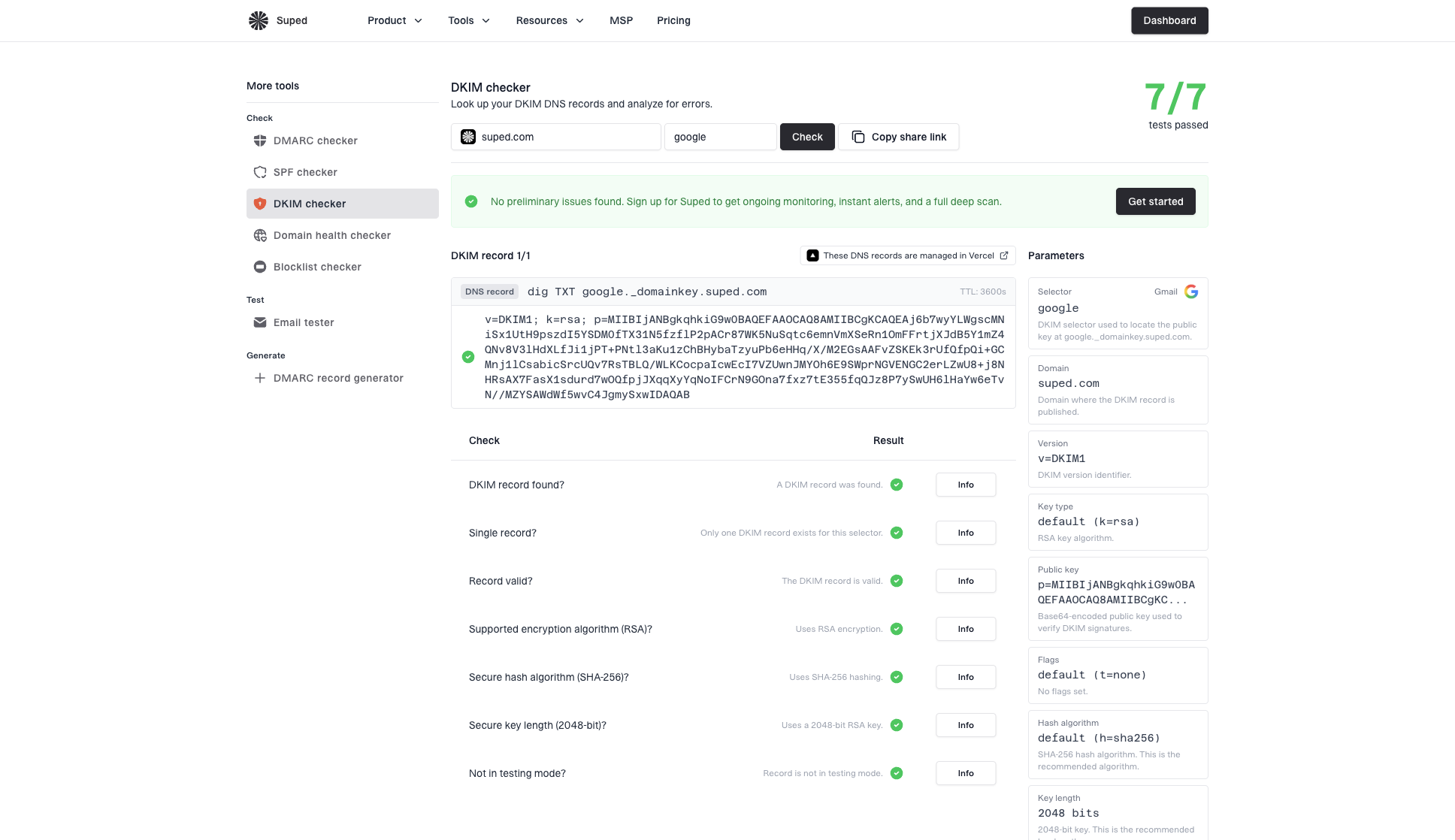
DKIM checker sample results showing selector, DKIM DNS record, validation checks, parameters, and share link
How to find the active selector
The most reliable place to find a selector is a recent message sent through the source you want to check. DNS does not provide a standard way to list every selector for a domain, so guessing common names can miss active records.
Selector and signing domain in a message headertext
DKIM-Signature: v=1; a=rsa-sha256; d=example.com; s=receipts;
 h=from:to:subject:date; bh=...; b=...
- Open the full message source or original headers for a recent message from the sending service.
- Find a DKIM-Signature field, then read its s= selector and d= signing domain.
- Build the DNS name as selector._domainkey.signing-domain and query its TXT record.
- Confirm that the DNS key validates the same signature instead of treating record existence as proof that the selector is active.
Query the selector found in the headerbash
dig TXT receipts._domainkey.example.com +short
Check the matching signature
A message can contain more than one DKIM signature. Use the signature whose signing domain and sending source match the system you are investigating, and check its authentication result separately.
Provider and sender examples
When a hosted sender gives you a selector, do not rename it for style. The selector is part of the contract between your DNS and that sender's signing service. Your naming standards apply when you control the signer, not when a provider has already generated the DNS target.
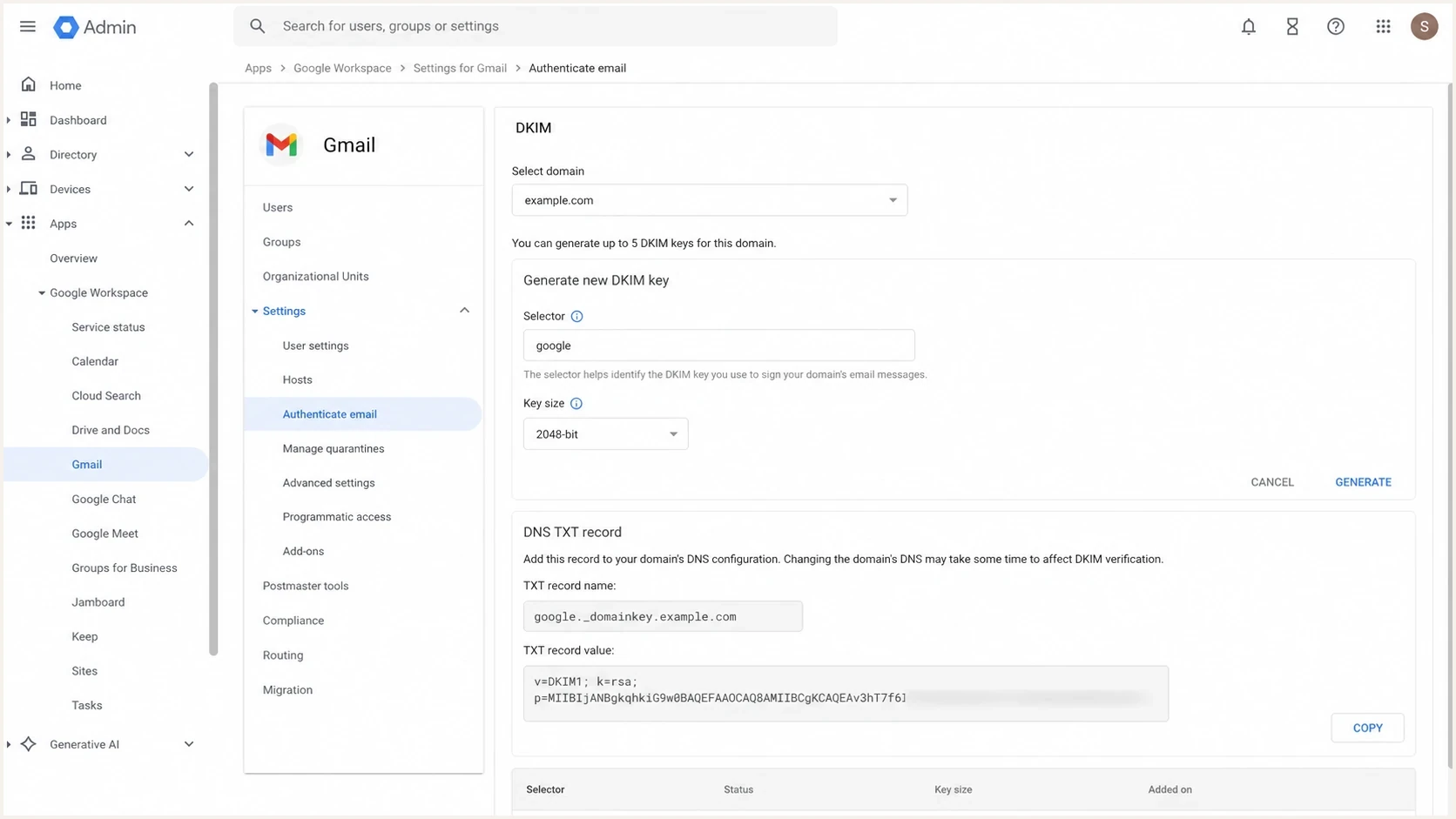
Google Admin Console DKIM setup screen showing a selector field.
These are practical production examples grouped by sender type. They are patterns, not a license to guess a provider's current setup. If a sender gives exact DNS values, publish those exact values.
|
|
|
|---|---|---|
Corporate mail | google, mx1 | Clear owner |
Microsoft-style | selector1, selector2 | Provider pair |
Transactional | receipts, notify | Stream trace |
Marketing | news, k1 | Campaign owner |
Internal app | app1, alerts | Fast triage |
Selector examples by sender type.
A sender-specific selector also makes header review easier. If a failed message contains s=alerts, the operations path is clearer than a message signed with a generic s=default selector shared by several systems.
How selector names affect DMARC monitoring
DKIM selector names help troubleshooting, but DMARC does not pass because a selector name looks good. DMARC cares whether DKIM passes and whether the signing domain matches the visible From domain according to the DMARC domain match rules.
RFC 9990 aggregate reports require each DKIM authentication result to include the signing domain, the s= selector, and the result. Legacy reports using the older RFC 7489 format omit the selector, so report data will vary while receivers adopt the current format. Use DMARC monitoring to identify the failing source and review selector data when the receiver supplies it. Inspect a recent message header or the sender configuration when a legacy report omits the selector or you need to verify one specific message.
DMARC record detail view showing SPF, DKIM, DMARC, rDNS diagnostics, and DNS records
Suped's product supports this workflow by grouping DMARC authentication results by sending source, displaying the selector when report data includes it, and exposing DNS diagnostics for DKIM and DMARC plus SPF authorization data. It also monitors blocklist (blacklist) status and deliverability signals, so an operator can separate a missing selector record from an alignment failure or a sender that was never authorised.
For a one-off domain check, the domain health checker is the faster starting point. For ongoing operations, Suped provides alerts and source history so teams can confirm whether a DKIM fix remains stable as mail flow changes.
Rotation examples and migration pattern
A good rotation pattern starts before a key change is urgent. The selector should make room for a second key, and the sending system should be able to switch selectors without changing the visible From domain.
Header after moving to the next selectortext
DKIM-Signature: v=1; a=rsa-sha256; d=example.com; s=s2;
 h=from:to:subject:date; bh=...; b=...
- Add the new selector record, such as s2, before changing the signer.
- Update the sending system so new messages sign with the new selector.
- Use current DMARC aggregate data to confirm the reported selector and authentication result. Check message headers when a receiver still sends the legacy report format.
- Remove the old selector only after traffic referencing it has stopped, including delayed messages and retries.
If your current selector is default, the next selector does not need to be default2. It can be s2 or a provider-specific name, as long as the signer and DNS agree. Give the following replacement key another fresh selector rather than repointing a retired name. If you need deeper background on key age and size choices, use the DKIM key rotation guidance in the DKIM cluster.
A practical default selector pattern
For a signer you control, start with s1, move to s2, then continue with fresh selectors. For a provider-owned signer, keep the provider selector exactly as supplied.
The practical rule
Use selector names that an operator can understand six months later. s1 and s2 are clear generic starting examples, but each later replacement key needs a fresh selector. google, selector1, and provider-issued tokens are right when a hosted sender requires them. billing, receipts, and alerts are useful when one domain has separate application mail streams.
The selector name should make the DNS record easier to manage, not more clever. Publish one valid key per selector, keep an inventory of which sender owns each selector, and use monitoring to verify that production mail matches the plan.