
Why is SPF failing even with IP in record?

Published 16 May 2025
Updated 26 Sep 2026
13 min read
Summarize with
Updated on 26 Sep 2026: We added a complete SPF result guide and clarified how nested policies can stop before a listed IP.
SPF is failing even with the IP in the record because the receiver is not checking the record you think it is checking, the DNS result is different after expansion, or the connecting IP is different from the IP you listed. SPF checks the envelope sender domain, also called the Return-Path or MAIL FROM domain, not the visible From address. If the IP is in the visible brand domain's SPF record but the message uses a vendor bounce domain, the visible brand record is irrelevant for SPF.
Read the Authentication-Results header first, then check the exact domain named in smtp.mailfrom. If the failed result says does not designate 203.0.113.130, query the SPF record for that exact MAIL FROM domain and compare it with the actual connecting IP. That one comparison usually explains the failure.
The shortest answer: SPF does not ask whether the IP exists somewhere in any related domain's DNS. It asks whether the connecting IP is authorized by the SPF record of the envelope sender domain used for that SMTP transaction.
What SPF actually checks
SPF has a narrower job than many people expect. The receiver takes the IP address of the server that connected to it and evaluates that IP against the SPF policy published by the envelope sender domain. The visible From domain is used later by DMARC, but it is not the domain SPF uses for its pass or fail decision.
Header lines that mattertext
Authentication-Results: mx.example;
  spf=fail smtp.mailfrom=bounce.vendor.example;
  dkim=pass header.i=@vendor.example;
  dmarc=fail header.from=brand.example
In that example, SPF is not checking brand.example. It is checking bounce.vendor.example. If the brand domain's SPF record includes the IP but the vendor bounce domain's SPF record does not, SPF fails correctly.
A null Return-Path is the exception to the usual MAIL FROM check. For a delivery status notification or another message sent with an empty reverse path, SPF defines the sender identity as postmaster@ plus the SMTP HELO/EHLO domain. Inspect that HELO/EHLO identity and its SPF policy instead of looking for a normal bounce address.
What people often check
- Visible From: The address humans see in the email client.
- Brand domain: The domain that owns the message identity.
- Top-level SPF: The SPF record at the main corporate domain.
What SPF checks
- Connecting IP: The IP address that opened the SMTP connection.
- MAIL FROM domain: The envelope sender or Return-Path domain.
- Expanded policy: The final SPF result after includes, redirects, and DNS lookups.
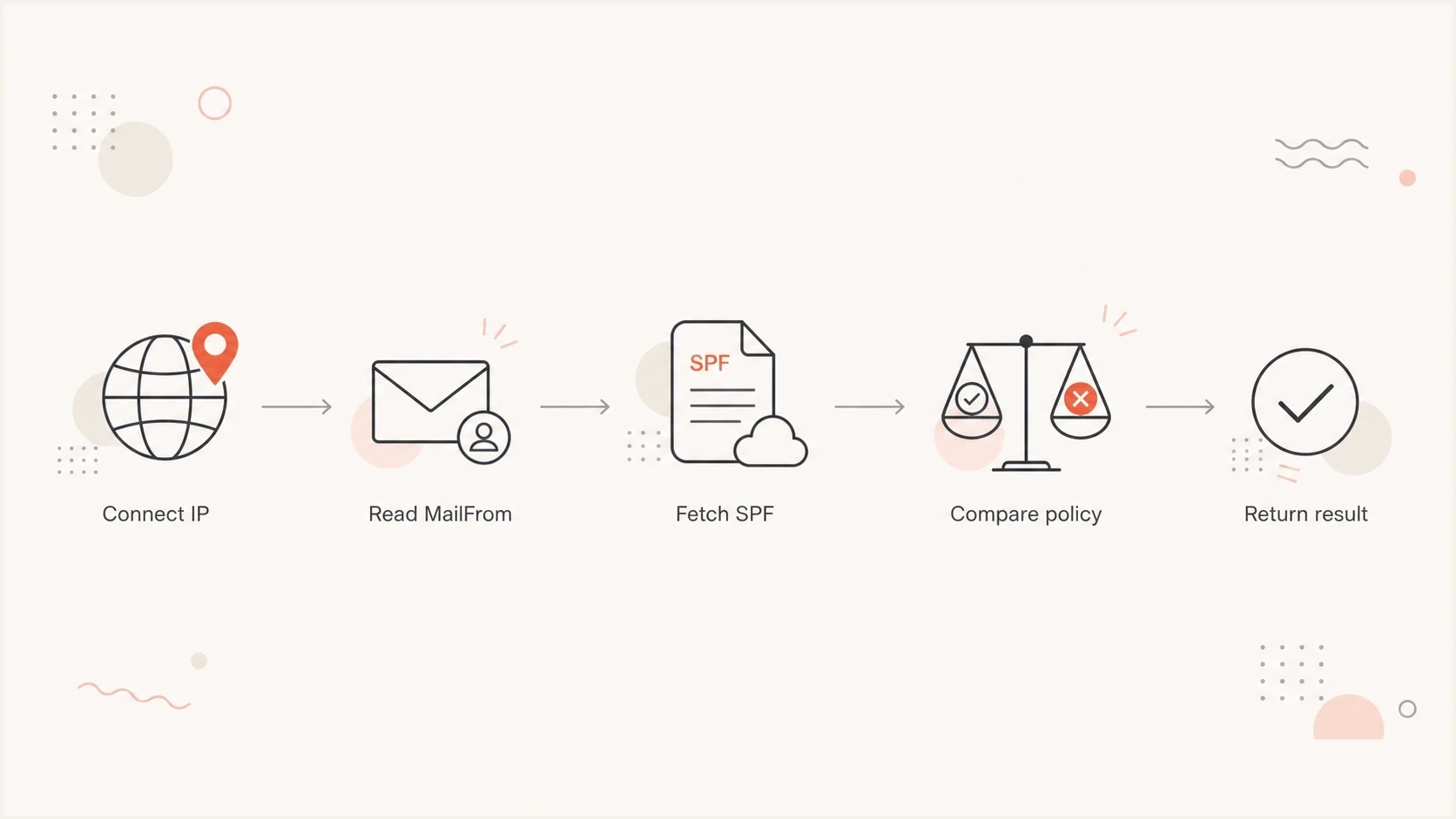
Flowchart showing SPF comparing the connecting IP with the MailFrom domain policy.
Why the IP can be present and still fail
When the IP appears to be in the SPF record, start with one follow-up: which SPF record? The answer has to be the exact MAIL FROM domain in the header, not the customer domain, a parent domain, or a marketing platform setup page.
- Wrong domain: The IP is listed on the visible From domain, but SPF is checking a bounce subdomain.
- Vendor subdomain: A vendor controls the Return-Path domain and has not authorized every sending IP it uses.
- DNS cache: The record was fixed, but receivers are still using a cached SPF answer until TTL expires.
- CIDR error: The listed range does not include the failing IP after the prefix length is applied.
- IPv6 mismatch: The sending server uses IPv6, but the SPF policy only authorizes IPv4 senders.
- Lookup limit: The evaluated policy path uses more than 10 DNS-causing mechanisms or modifiers and returns permerror before the IP is reached.
- Void lookups: More than two evaluated DNS terms return no records or NXDOMAIN, which can produce permerror.
- Record order: An all mechanism appears before the IP mechanism, so evaluation stops before reaching the listed IP.
- Multiple records: The domain publishes more than one SPF TXT record, which makes SPF return permerror.
- TXT publication: The policy is published only as the obsolete SPF DNS record type, or one policy was split into separate TXT records instead of character strings within one TXT record.
- Forwarded mail: The receiver sees the forwarding server's IP, not the original sender's IP.
Do not fix SPF by adding every failing IP to the main domain until you have checked the MAIL FROM domain. That often hides the real problem and expands the sending surface without fixing the failed message path.
|
|
|
|---|---|---|
Wrong domain | MAIL FROM differs | Check Return-Path |
DNS cache | Old record seen | Wait TTL |
Lookup limit | Permerror | Reduce includes |
Forwarding | New sender IP | Use DKIM or SRS |
Compact mapping of common SPF failure causes.
How SPF can stop before the listed IP
SPF validates the record, then evaluates mechanisms from left to right. A matching mechanism ends processing and returns the result set by its qualifier. The all mechanism always matches, so any IP mechanism placed after it is ignored even though the address is visibly present in the TXT value.
The IP is present but unreachabletext
Broken order:
v=spf1 include:_spf.vendor.example -all ip4:203.0.113.130

Result for 203.0.113.130:
fail, because -all matches before ip4 is evaluated

Correct order:
v=spf1 include:_spf.vendor.example ip4:203.0.113.130 -all
Syntax validation happens before mechanism evaluation. An invalid term anywhere in the record returns permerror immediately, so moving the correct IP earlier will not repair malformed syntax. An evaluated include or redirect can also return an exception that stops the parent check before a later IP mechanism is reached.
An include mechanism matches only when the referenced policy returns pass. Any other non-error result makes the include a non-match, so evaluation continues. Temperror and permerror propagate, while a referenced domain with no SPF record produces permerror. A redirect is evaluated only when no mechanism in the original record matches.
- Fail or softfail: A mechanism matched with a negative qualifier, often the final all mechanism.
- Permerror: Check record syntax, duplicate SPF records, lookup limits, void lookups, and broken include or redirect targets.
- Temperror: A transient DNS failure or evaluation timeout interrupted the check, so retry and inspect authoritative DNS health.
The text of the record is not proof that the IP was reached. Reproduce the receiver's evaluation path in order and stop at the first match or exception.
Read the exact SPF result before changing DNS
The word after spf= tells you whether the receiver found an authorization mismatch or another non-pass condition. Only pass states that the connecting IP is authorized for the checked identity. Results such as none, neutral, and softfail do not count as an SPF pass for DMARC.
|
|
|
|---|---|---|
Pass | The checked identity authorizes the connecting IP | Check DMARC domain matching |
Fail | A negative mechanism matched | Verify identity, IP, CIDR, and order |
Softfail | The publisher says the IP is probably unauthorized | Review the mechanism using ~ |
Neutral | The policy makes no authorization assertion | Check ? qualifier or missing final policy |
None | No SPF record was found for the checked identity | Verify the domain and TXT publication |
Temperror | A transient DNS or evaluation error occurred | Retry and inspect DNS health |
Permerror | The published policy cannot be interpreted | Fix syntax, limits, duplicates, or dependencies |
Use the exact SPF result to choose the next diagnostic step.
SPF defines the result, but the receiving system decides what to do with it. A receiver can reject a fail during SMTP or filter the message after considering DKIM and DMARC.
How to prove which record is being used
The cleanest test is header-first. DNS checks are useful, but the header tells you what the receiver actually evaluated. Look for the SPF result, the IP named inside the failure text, and the domain after smtp.mailfrom.
- Capture header: Copy the full Authentication-Results and Received headers from a failed message.
- Find IP: Use the IP named by the receiving server, not an IP copied from a vendor page.
- Find domain: Use the MAIL FROM or Return-Path domain, then query that domain's TXT records. If the Return-Path is empty, use the HELO/EHLO identity.
- Expand SPF: Resolve mechanisms from left to right, stop at the first match or exception, and count DNS-causing terms and void lookups.
- Compare result: Confirm whether the final policy authorizes the connecting IP or returns an SPF processing error.
SPF record that would fail for another IPtext
bounce.vendor.example.  TXT  "v=spf1 ip4:203.0.113.60 -all"

Received IP: 203.0.113.130
Result: fail, because only 203.0.113.60 is authorized
For a quick DNS validation, use the SPF checker to inspect the exact domain in the header. Run the broader domain health checker when the failure is mixed with DKIM or DMARC problems.
SPF checker
Find SPF syntax issues, lookup limits, and weak records.
?/16tests passed
A surface-level lookup is not enough if the SPF record uses includes. You need the evaluated path, because an include can pass for one vendor pool and fail for another. Intermittent failures often appear when a provider sends through several IP ranges but only part of the range is authorized.
The vendor bounce domain problem
The most common real-world pattern is a brand sending through a vendor. The visible From uses the brand domain, but the envelope sender uses a vendor-controlled bounce domain. The brand's SPF record can be perfect and the message can still fail SPF because the vendor bounce domain has the incomplete record.
Brand-owned fix
If the MAIL FROM domain is a brand subdomain, the brand can update that subdomain's SPF record and make sure every active sending source is authorized.
- Best case: The brand owns DNS and can update the failing subdomain quickly.
- Risk: Adding broad ranges without review authorizes systems that no longer send mail.
Vendor-owned fix
If the MAIL FROM domain is under the vendor's domain, the vendor has to publish the right SPF policy or move the sender to a custom return path owned by the brand.
- Best case: The vendor fixes the bounce domain record for the sending pool.
- Risk: The brand can see DMARC damage but cannot directly edit the failed SPF record.
When one vendor IP passes and another fails, compare two messages side by side: one passing header and one failing header. Check whether they use the same MAIL FROM domain, the same DKIM signing domain, and the same sending pool. If the passing message has a custom return path or a DKIM signature using the brand domain, that explains why the results differ.
If the header says DMARC failed, do not treat an SPF pass on a vendor domain as enough. DMARC needs SPF or DKIM to pass using a domain that matches the visible From domain under its domain-matching rules.
Fixes by root cause
The fix depends on the failure mode. Avoid changing SPF until the exact domain, IP, and receiver result are clear. That keeps the fix small and prevents unrelated DNS changes.
|
|
|
|---|---|---|
IP absent | Sender not allowed | Add exact range |
Permerror | SPF invalid | Fix syntax or limits |
Temperror | DNS transient | Fix DNS or retry |
DMARC fail | Domain mismatch | Fix SPF or DKIM match |
Use this as a short fix map after you inspect the failed header.
If the issue is the 10 lookup limit, remove dead includes before adding anything else. If the SPF record needs many senders, SPF flattening can reduce DNS pressure, but it has to stay current as providers change sending ranges.
A safer staged correctiontext
Before:
v=spf1 ip4:203.0.113.60 -all

After:
v=spf1 ip4:203.0.113.60 ip4:203.0.113.128/28 -all
Only add the range after confirming that every IP inside it belongs to the sending service you intend to authorize. If the provider publishes an include mechanism for the correct sending pool, that is usually easier to maintain than a hand-written list of changing IPs.
For forwarded mail, SPF normally evaluates the forwarder's connecting IP against the original MAIL FROM domain and fails. The practical fixes are DKIM with a matching domain that survives forwarding or Sender Rewriting Scheme (SRS) on the forwarder. Do not authorize an unrelated forwarding network in the original sender's SPF record.
Where Suped fits in the workflow
Suped's product connects SPF, DKIM, DMARC, hosted policy controls, real-time alerts, blocklist (blacklist) monitoring, and delivery signals. This is relevant when the failed SPF check belongs to a larger authentication workflow rather than a single DNS lookup.
For SPF specifically, Suped can show which sources are passing, which sources are failing, and which records need attention. Suped's hosted SPF is useful when DNS ownership slows changes or when multiple teams keep asking for new senders to be added.
DMARC record detail view showing SPF, DKIM, DMARC, rDNS diagnostics, and DNS records
The practical workflow is to add the domain, verify reporting, inspect sources, then work through the issues Suped detects. For this problem, compare the failing source IP, the envelope sender domain, the SPF record that was actually evaluated, and whether DKIM gives DMARC a separate same-domain path to pass.
- Issue detection: Suped groups authentication problems by source so repeated SPF failures are easier to prioritize.
- Fix steps: The platform gives record-level guidance for the DNS changes under review.
- Staged control: Hosted DMARC and hosted SPF let teams change policy without repeated DNS handoffs.
- Multi-domain work: MSPs and agencies can manage client domains without separate spreadsheets.
What to check when DMARC fails too
SPF failure often appears next to DMARC failure, but they are not the same test. SPF can fail because the MAIL FROM domain does not authorize the connecting IP. DMARC can fail because neither SPF nor DKIM passed with a domain that matches the visible From domain under DMARC rules.
DMARC failure with SPF and DKIM cluestext
spf=fail smtp.mailfrom=bounce.vendor.example
dkim=pass header.i=@vendor.example
dmarc=fail header.from=brand.example
In that pattern, DKIM passes for the vendor domain, not the brand domain. SPF also fails on the vendor bounce domain. DMARC has no passing authentication path with a matching domain, so the brand's DMARC result fails.
Under relaxed SPF domain matching, the authenticated MAIL FROM domain and visible From domain can share the same organizational domain. Under strict matching with aspf=s, the domains must match exactly. A vendor-owned bounce domain does not satisfy either mode for a different brand domain.
The durable fix is to make at least one authentication path pass using a domain that matches the visible From domain under DMARC rules. That usually means a custom return path for SPF, brand-domain DKIM signing, or both.
If the failures are intermittent, compare a passing message and a failing message from the same campaign or workflow. Focus on the Return-Path, DKIM d= domain, connecting IP, and SPF result. That comparison usually exposes the hidden difference faster than DNS guessing.
Views from the trenches
Best practices
Start with Authentication-Results, then test the exact MailFrom domain named there.
Compare one passing message with one failing message to isolate sender path changes.
Track SPF fixes with TTL notes so cached DNS results are not misread as new failures.
Common pitfalls
Checking the visible From domain first leads teams away from the failed SPF record.
Adding IPs to a parent domain does not fix SPF for a vendor-owned bounce domain.
Ignoring DKIM leaves DMARC fragile when SPF breaks through forwarding or routing.
Expert tips
Treat one failing IP pool as a routing clue, not proof that the whole SPF setup is bad.
Ask vendors for the exact return path and signing domain used by each sending pool.
Keep SPF narrow, then use brand-domain DKIM as a backup path for DMARC resilience.
Expert view
Expert from Email Geeks says the Authentication-Results header should drive the investigation because it names the domain and IP actually evaluated.
2024-03-18 - Email Geeks
Marketer view
Marketer from Email Geeks says teams often inspect the customer domain first, even when the failed SPF check belongs to the vendor bounce domain.
2024-05-09 - Email Geeks
Why a listed IP still fails SPF
SPF failing with the IP in the record is usually not a contradiction. It means the IP is in a different record, the receiver is seeing a different IP, DNS expansion is failing, or evaluation stops before reaching the IP.
Use the same final check every time: failed header, MAIL FROM or HELO/EHLO identity, connecting IP, ordered SPF evaluation, DKIM signing domain, then DMARC result. Once those values are lined up, the root cause is usually clear. For one-off checks, a focused SPF lookup is enough. For ongoing operations across many senders, Suped keeps source failures, records, and remediation steps connected.
Frequently asked questions
Because SPF checks the MAIL FROM or Return-Path domain. If the message uses a vendor bounce domain, the main domain's SPF record is not the SPF policy being evaluated.
Yes. SPF can pass for a vendor or bounce domain while DMARC fails because the passing SPF domain does not match the visible From domain under DMARC rules.
Wait for the DNS TTL on the old answer to expire. Some receivers will keep using cached data until that period ends.
No. It only helps if the IP is added to the exact SPF record used by the MAIL FROM domain, appears before the all mechanism, and the record remains valid.
Permerror means the SPF policy cannot be interpreted. A syntax error, duplicate SPF records, an exceeded processing limit, or a broken include can stop evaluation before the listed IP is reached.
Ask for the exact MAIL FROM domain, the sending IP pool, the DKIM signing domain, and whether they support a custom return path for your domain.