
Why does Microsoft composite authentication fail with DMARC p=none?

Published 16 Jul 2025
Updated 28 Sep 2026
12 min read
Summarize with
Updated on 28 Sep 2026: We updated this guide for RFC 9989 policy staging and Microsoft's current composite-authentication guidance.
Microsoft composite authentication can fail with compauth=fail and reason=001 when the sending domain has missing or weak authentication policy. Microsoft documents DMARC p=none as one possible weak-policy signal, but the code does not prove that p=none caused the verdict.
SPF and DKIM can each pass while authenticating domains that do not match the visible From domain, so read the full header before changing DMARC. Microsoft also produces a composite verdict that includes sender reputation, sender history, recipient history, behavioral analysis, and other internal signals. Microsoft Learn explains that this result is stamped into the Authentication-Results header.
Treat this first as a diagnosis problem. Confirm whether SPF or DKIM passes with DMARC alignment, then determine whether weak policy or a Microsoft tenant decision remains. Suped's DMARC monitoring supports that workflow by mapping sending sources, exposing alignment gaps, and tracking results while a team stages policy changes.
What Microsoft is actually failing
The confusing part is that Microsoft shows several authentication results at once. SPF, DKIM, and DMARC are standards-based checks. Composite authentication is Microsoft's combined verdict. A message can have individual SPF and DKIM passes and still receive a composite failure when those passes do not establish the visible sender's identity or Microsoft distrusts the sender and infrastructure pair.
A p=none DMARC record can still produce a DMARC pass when SPF or DKIM passes with alignment. The policy tells receivers to report results without requesting quarantine or rejection for messages that fail DMARC. Microsoft classifies that as a weaker failure policy in its implicit authentication model.
The key distinction
Microsoft documents reason=001 for failed implicit authentication when records are missing or the sender has a weaker failure policy, including SPF ~all, SPF ?all, or DMARC p=none. The code identifies a class of failure, not a single root cause.
Typical Microsoft header pattern
Authentication-Results: spf=pass smtp.mailfrom=mailer.vendor.example;
 dkim=pass header.d=vendor.example;
 dmarc=fail action=none header.from=example.com;
 compauth=fail reason=001
In this pattern, SPF and DKIM pass for vendor-controlled domains, but neither result has DMARC alignment with example.com in the visible From address. DMARC therefore fails, and action=none shows that no enforcement was requested. Outlook can display "Not verified" even though a quick header scan finds two pass results.
|
|
|
|---|---|---|
spf=pass | The sending IP passed SPF for the envelope domain. | Compare it with the From domain. |
dkim=pass | The signature verified for its signing domain. | Compare the signer with the From domain. |
dmarc=fail action=none | No aligned SPF or DKIM pass exists, and no enforcement was requested. | Fix alignment before raising policy. |
reason=001 | Microsoft implicit authentication failed. | Check records, alignment, policy, and tenant signals. |
Compact reading of the header fields.
Why SPF and DKIM passes are not enough
SPF and DKIM answer narrower questions. SPF checks whether the connecting IP is allowed by the envelope sender domain. DKIM checks whether a signature validates against a DNS key. DMARC ties those checks to the visible From domain and publishes a receiver policy.
Microsoft composite authentication sits above those checks. Its job is to decide whether the sender identity is believable enough for Microsoft 365. That verdict can include authentication, policy strength, reputation, user history, and tenant controls. A weak DMARC policy is one possible signal in that verdict.
Explicit authentication
- SPF checks the sending IP against the envelope sender domain.
- DKIM checks that a message signature validates against a public key.
- DMARC checks whether an SPF or DKIM pass has alignment with the visible From domain.
- The policy result uses the domain owner's published DMARC instruction.
Composite authentication
- Microsoft combines explicit authentication with extra sender signals.
- Monitoring-only DMARC can count as a weak failure policy.
- The verdict can influence labels shown in Outlook and Microsoft 365.
- A composite failure does not automatically mean the message was blocked.
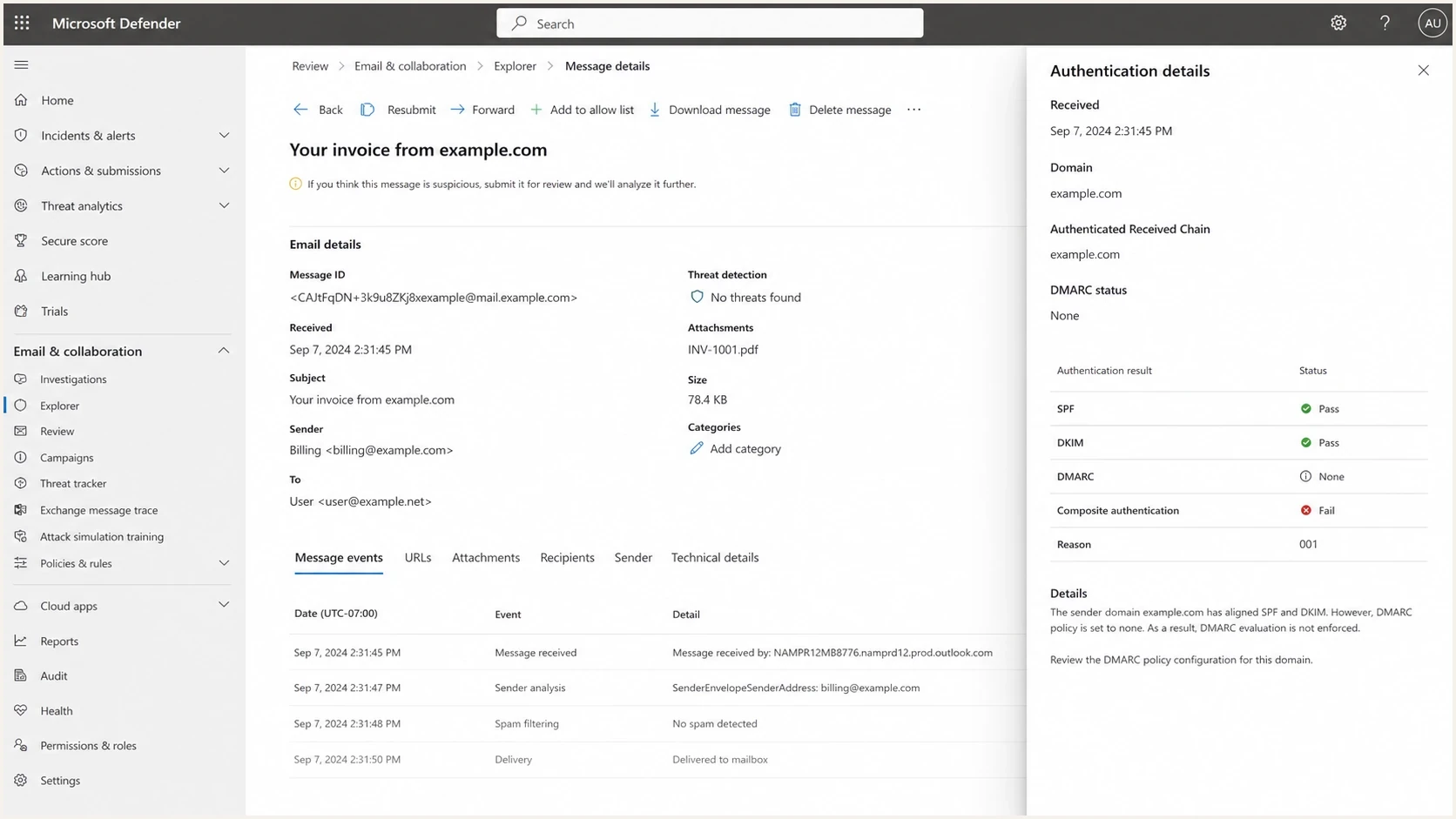
Microsoft Defender for Office 365 details showing compauth=fail reason=001.
When p=none is not the whole cause
A reason=001 result needs to be read beside the DMARC result. If the header says dmarc=fail action=none, alignment failed and p=none explains why the receiver applied no DMARC enforcement action. If a Microsoft-stamped header says dmarc=pass with compauth=fail reason=001, verify that you are reading the final Authentication-Results field added by Microsoft. That combination is not a normal documented mapping for a message that passed standard authentication.
Messages can carry Authentication-Results fields added by earlier systems, and complex recipient routing can change what Microsoft evaluates at the last hop. The receiving Microsoft 365 administrator should inspect the email entity, connectors, Enhanced Filtering configuration, and spoof intelligence before the sender makes more DNS changes.
|
|
|
|---|---|---|
dmarc=fail action=none; reason=001 | DMARC alignment failed under a non-enforcing policy. | Fix SPF or DKIM alignment. |
dmarc=pass; reason=001 | The combination does not match Microsoft's normal documented result mapping. | Verify header provenance, routing, and the email entity. |
dmarc=fail action=quarantine or reject; reason=000 | Explicit DMARC failed under an enforcing policy. | Repair the failing aligned path immediately. |
compauth=fail reason=601 | The sending domain is accepted by the recipient organization, indicating self-to-self or intra-org spoofing. | Review accepted domains, spoof settings, and the real source path. |
compauth=none reason=905 | Microsoft bypassed composite authentication because of complex routing. | Review connectors and Enhanced Filtering configuration. |
Use the full result combination to choose the next check.
- For Microsoft 365 tenant mail, composite authentication, spoof intelligence, and tenant controls influence handling.
- For domains sending 5,000 or more messages per day to Outlook.com consumer mailboxes, Microsoft requires SPF and DKIM to pass, a DMARC record of at least p=none, and DMARC alignment. Noncompliant mail can be rejected with 550 5.7.515.
- A quarantine or reject policy strengthens domain protection, but it is not a universal fix for every composite authentication failure.
Do not diagnose from the Outlook label
Capture a fresh full header from the affected recipient. The visible label does not show which domain passed SPF, which domain signed with DKIM, whether DMARC aligned, or whether the receiving tenant overrode the standard result.
How to fix the sending side
Do not assume that changing p=none alone will change the composite result. First make each legitimate sender pass DMARC through SPF or DKIM alignment. Once the sender inventory is clean, move to p=quarantine. Consider p=reject only after checking indirect mail flows and how people use the domain.
- Pull the full Microsoft Authentication-Results header, not only the simplified Outlook label.
- Separate a DMARC alignment failure from an anomalous or routing-related compauth result.
- Confirm one DMARC record, one SPF record per host, and valid DKIM selectors.
- Make each approved source pass SPF or DKIM with alignment to the visible From domain.
- Move to quarantine only after aggregate reports show legitimate mail passing.
- Send fresh samples to affected recipients and compare DMARC, compauth, reason, and anti-spam values.
Before changing DNS, run the current record through the DMARC checker. That catches syntax mistakes, duplicate records, missing reporting addresses, and policy tags that do not mean what the team expects.
DMARC checker
Look up a domain's DMARC record and catch policy issues.
?/7tests passed
If DNS access is slow or controlled by another team, Hosted DMARC can simplify policy staging. Suped's product keeps policy changes and aggregate-report evidence together while DNS uses a stable setup pattern.
How RFC 9989 changes policy staging
RFC 9989 replaced the original DMARC specification in 2026. It removed the pct tag because receivers applied percentage values inconsistently, and it added t=y as a testing signal. RFC 9990 now defines aggregate reporting, while RFC 9991 defines failure reporting.
Monitoring policyDNS
_dmarc.example.com. IN TXT "v=DMARC1; p=none; rua=mailto:d@example.com"
Quarantine policy in test modeDNS
_dmarc.example.com. IN TXT "v=DMARC1; p=quarantine; t=y; rua=mailto:d@example.com"
Enforced quarantine policyDNS
_dmarc.example.com. IN TXT "v=DMARC1; p=quarantine; rua=mailto:d@example.com"
Testing mode has a compatibility limit
Under RFC 9989, p=quarantine; t=y asks a compliant receiver to apply the next-lower policy, which is none. Receivers that have not implemented RFC 9989 can ignore the unknown testing tag and apply quarantine. Keep p=none until the sender inventory is verified if that compatibility risk is unacceptable.
RFC 9989 advises domains used for general-purpose email against publishing p=reject without analysis because forwarding and mailing lists can break otherwise legitimate mail. Quarantine is an enforcing policy and is a valid endpoint. Reject remains suitable where the domain's mail use and report evidence support it.
What to check before raising policy
Do not jump to reject just to clear an Outlook label. Enforcement can block legitimate mail if old senders are still misconfigured, and it does not resolve a receiving tenant's trust decision. Prove the sender inventory and DMARC alignment first, then choose quarantine or reject based on the domain's mail use.
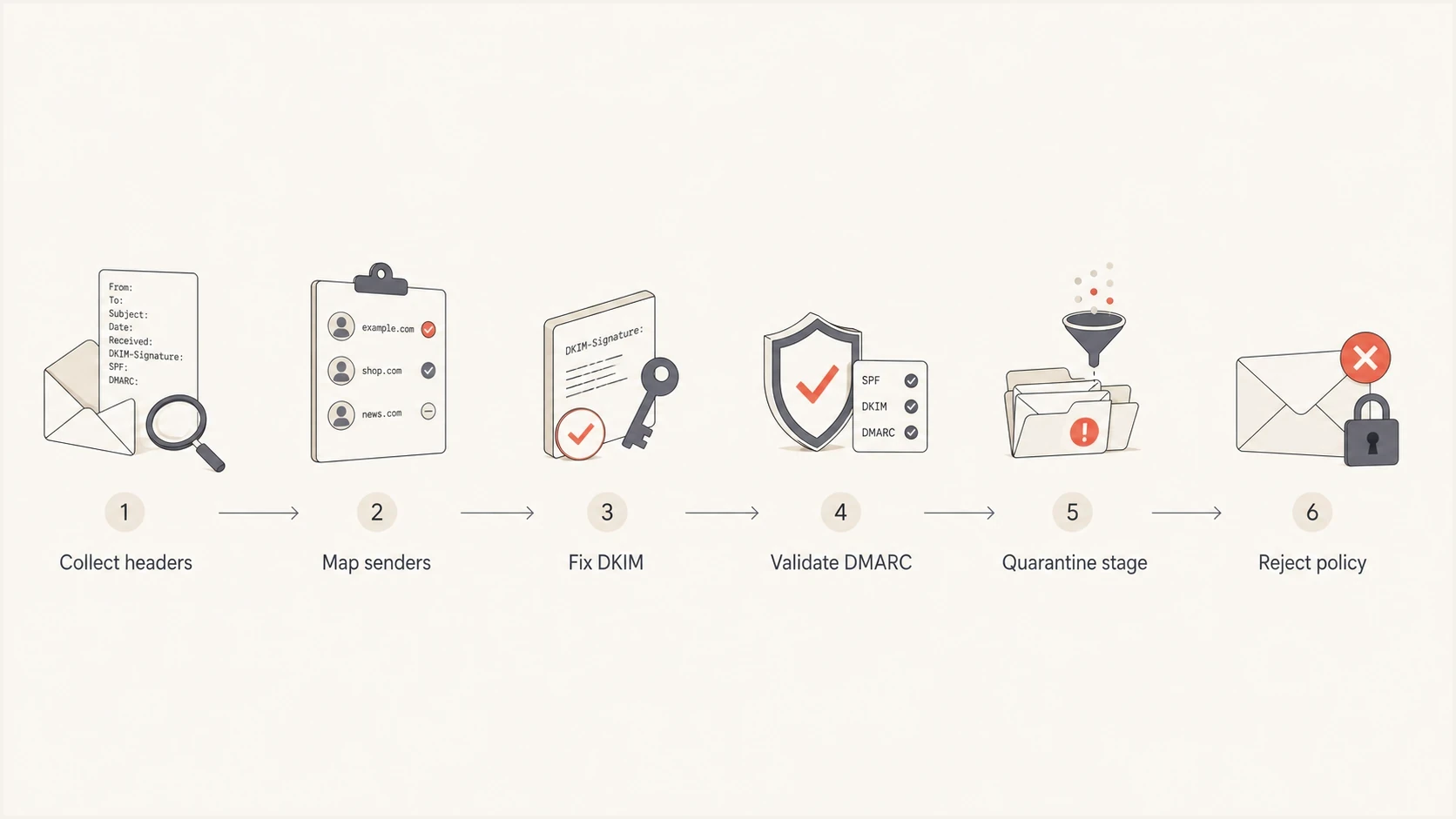
Flowchart showing how to move DMARC from monitoring to reject safely.
The highest-risk sources are usually third-party senders such as marketing automation, billing systems, support tools, survey platforms, event tools, and legacy systems. Each sender needs its own proof. For third-party platforms, DKIM with your domain is usually cleaner than relying on SPF alone because forwarding can break SPF.
Pre-change checklist
- Confirm that the domain users see in the From address is protected by DMARC.
- Prefer a valid DKIM signature using your own domain for each SaaS sender.
- Keep SPF under its DNS lookup limit and remove unused include mechanisms.
- Expect SPF failures where mail is relayed, and rely on DKIM where possible.
- Retest with affected Microsoft recipients after every material configuration change.
Suped's product centralizes DMARC aggregate reports so teams can map sending sources, verify alignment, and watch failure rates during policy staging. It also provides issue detection and fix steps without requiring non-technical users to read raw XML.

Issue steps to fix dialog showing the issue overview, tailored fix steps, and verification action
For a deeper troubleshooting path, use this related guide on DMARC failure causes when the Microsoft header does not match the expected SPF or DKIM outcome.
Caveats for Microsoft tenants
A composite authentication failure is not the same as a guaranteed spam placement or rejection. Microsoft can still deliver the message if spoof intelligence considers the sender legitimate, while anti-phishing policy controls the action when spoof intelligence finds suspicious spoofing. That is why some teams see delivery succeed but still get a visible trust label.
There is no sender-side switch that forces every Microsoft tenant to display the message as verified. The sender can publish aligned authentication, maintain consistent sending behavior, and adopt an enforcing DMARC policy when ready. The receiving Microsoft tenant still has its own security configuration and trust history.
DMARC policy strength
A simple way to compare policy strength when investigating Microsoft compauth results.
Monitoring
p=none
Reports only, no DMARC enforcement request.
Enforcement
p=quarantine
Ask receivers to treat failing mail as suspicious.
Conditional rejection
p=reject
Use after indirect-flow analysis supports rejection.
If Microsoft shows an unexpected result, inspect the reason code and the receiving tenant's final Authentication-Results field. Then check X-Forefront-Antispam-Report: CAT:SPOOF identifies a spoof classification, while SFTY:9.11 indicates intra-org spoofing and SFTY:9.22 indicates cross-domain spoofing. Those fields help separate authentication from the later spoof-intelligence and policy decision.
Forwarding, ARC, tenant allow rules, mailing list rewriting, broken DKIM body hashes, multiple From addresses, accepted-domain spoofing, and complex routing each lead to a different remediation path. Check the result at Microsoft's point of receipt before changing sender DNS.
Views from the trenches
Best practices
Move from p=none only after every known sender has a passing SPF or DKIM domain match.
Capture Microsoft headers before and after each policy change to prove what changed for support.
Use report evidence before enforcement so bad sources appear before policy affects mail.
Common pitfalls
Assuming SPF pass fixes the Outlook label when its authenticated domain does not match From.
Changing DMARC before fixing third-party DKIM signing for the visible From domain first.
Reading compauth as a pure DMARC result instead of a Microsoft risk verdict header.
Expert tips
Prefer DKIM with your own domain for SaaS senders because SPF often breaks during forwarding.
Keep a small test list of Microsoft 365 recipients for every DMARC policy stage.
Use reports to remove unused senders before raising the policy beyond monitoring mode.
Marketer view
Marketer from Email Geeks says a DMARC policy of p=none can be enough to trigger Microsoft compauth=fail reason=001, even when other authentication checks pass.
2022-08-26 - Email Geeks
Marketer view
Marketer from Email Geeks says full headers are still required because a simplified Outlook label does not show the full sender identity decision.
2022-08-26 - Email Geeks
The practical answer
If Microsoft shows compauth=fail with reason=001, a DMARC p=none policy is one documented suspect. It is not proof. Check whether SPF and DKIM have alignment with the visible From domain and whether the final Microsoft header reports dmarc=pass or dmarc=fail before choosing a fix.
Fix unaligned senders first, then move to quarantine when aggregate reports show legitimate mail passing. Use reject only when the domain's mail use and indirect-flow analysis support it. If a Microsoft-stamped header says DMARC passed but reason=001 remains, investigate header provenance and receiving-tenant routing instead of making speculative DNS changes. Suped supports the sender-side work by mapping sources, tracking alignment, and keeping policy changes tied to report evidence.
Frequently asked questions
It can contribute. Microsoft lists p=none as a weaker failure policy associated with reason=001, but the code also covers missing records and other implicit authentication failures. Confirm the DMARC result and domain alignment in the full header.
No. A composite authentication failure does not automatically cause rejection or spam placement. Spoof intelligence and the receiving tenant's anti-phishing policy determine the next action.
No. Fix alignment first and review aggregate reports before using an enforcing policy. RFC 9989 removed percentage staging, supports t=y as a testing signal, and advises general-purpose mail domains against reject unless indirect-flow analysis supports it.
An SPF pass with DMARC alignment can support composite authentication, but SPF breaks during forwarding. DKIM using the visible From domain gives the message a second durable path.
Microsoft's current guidance maps successful standard authentication to a composite pass. If the final Microsoft-stamped header still shows reason=001, verify that you are not reading an earlier Authentication-Results field, then have the recipient administrator inspect routing, connectors, and the email entity.
No. For domains sending 5,000 or more messages per day to Outlook.com consumer mailboxes, Microsoft accepts a valid DMARC record with at least p=none, but SPF and DKIM must pass and DMARC must pass through alignment. Noncompliant messages can receive a 550 5.7.515 rejection.