Why did my email open rates drop after changing email template design?

Matthew Whittaker
Co-founder & CTO, Suped
Published 7 Jul 2025
Updated 17 May 2026
11 min read
Summarize with
A template redesign can coincide with an open rate drop, but Gmail does not see your finished layout before deciding whether someone opens the message. If the message reached the inbox, was not clipped, and used the same from name and subject style, a drop from 30% to 17% usually points to one of four things: the message landed differently for real subscribers than it did for seed accounts, the inbox-facing context changed, image proxy or prefetch behavior changed, or the open metric moved while actual engagement did not.
The practical answer is to separate measured opens from real engagement. I would first compare absolute clicks, click-to-open rate, replies, conversions, unsubscribes, spam complaints, and Gmail-only delivery signals. If clicks increased after the digest design, the audience probably did not disengage. The open tracking system changed, Gmail placement varied for a slice of recipients, or the old template was getting more machine opens than the new one.
- Direct answer: Yes, a new template can be linked to lower open rates, but not because Gmail dislikes more links by itself.
- Most likely cause: Inbox placement variation, subject and preview mismatch, or image tracking behavior changed around the new HTML.
- Best next step: Run the old and new templates side by side to the same segment on the same day.
What changed before the open happened
An open happens after the recipient sees the sender name, subject line, preview text, date, mailbox tab, and any inbox annotations. The reader has not seen your body layout yet. That means a heavier digest design, more article cards, more images, and 12 links instead of 3 cannot directly make a person choose not to open unless those changes altered the inbox-facing parts or the mailbox provider's placement decision.
I would look at the change in two layers. First, did the message reach the same visible place in the mailbox? Second, did the open pixel record opens the same way? A redesign can affect the second layer even when real subscriber behavior improves. That is why a campaign with lower opens and higher clicks is not automatically a failure.
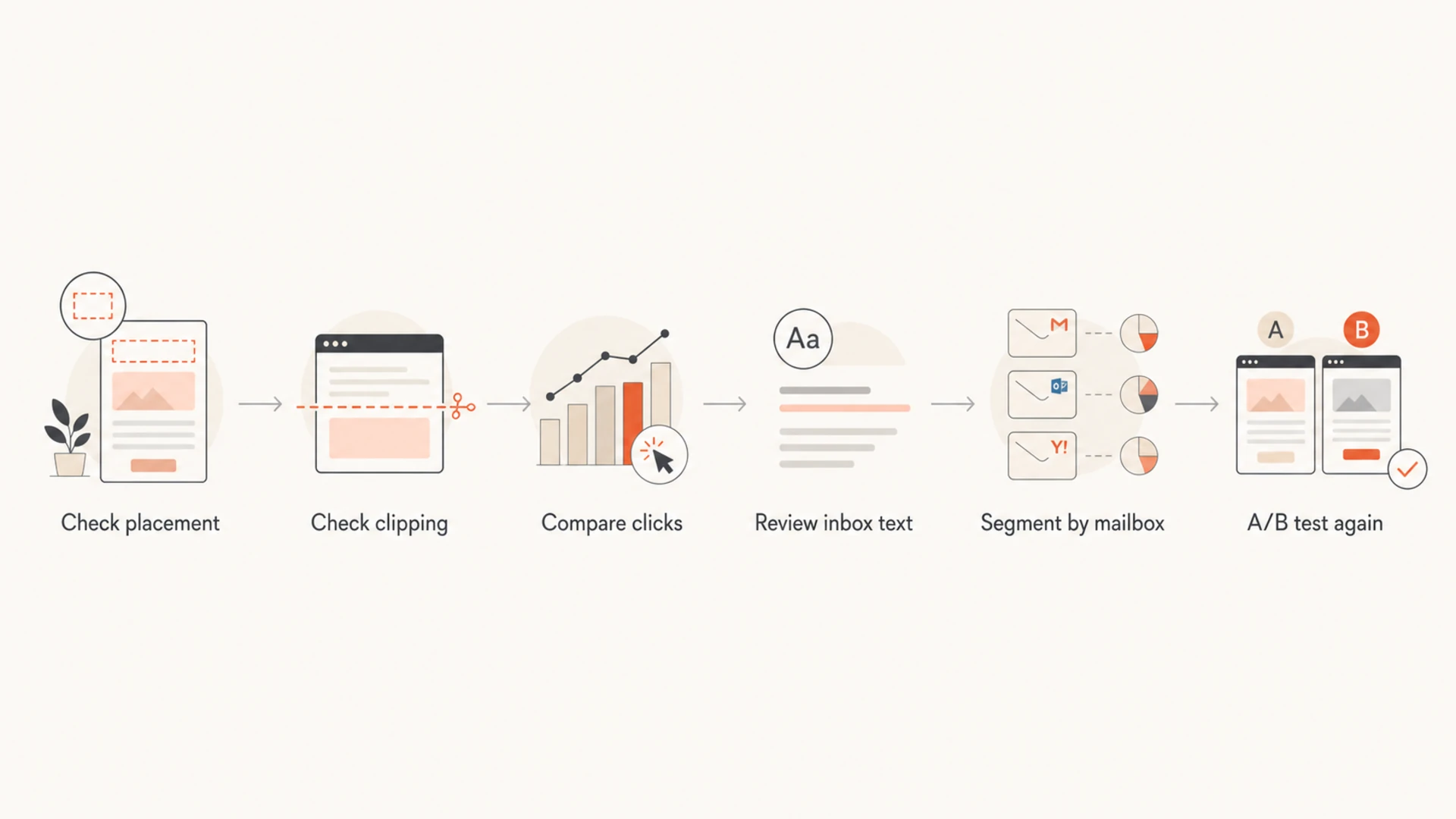
Flowchart for diagnosing an open rate drop after an email template redesign.
Template changes that affect opens
- Inbox copy: Subject line, preview text, sender name, and send time shape the decision to open.
- Placement: Primary, Promotions, spam, and inbox ordering change visibility before the reader sees the design.
- Tracking: Image caching, proxy behavior, and pixel location change measured opens.
Template changes that affect clicks
- Content density: More articles can increase clicks by giving more readers a relevant path.
- CTA clarity: Repeated links on images, headings, and buttons can lift clicks without lifting opens.
- Reader intent: A digest can perform better for subscribers who missed earlier articles.
Why Gmail placement can still be the issue
Seed tests and personal Gmail tests are useful, but they do not prove placement for a 52K subscriber segment. Gmail placement is personalized. A message can appear in Primary for seeds and still land in Promotions, Updates, or lower in the inbox for a meaningful share of real recipients. If the drop is mostly Gmail and not other mailbox providers, placement remains one of the strongest suspects.
The template itself can influence classification indirectly. A digest with more images, more article blocks, more repeated links, and different HTML structure can look more commercial or newsletter-like than the old one. That does not mean Gmail is penalizing you for link count. It means the whole message has changed, and Gmail decides placement based on sender history, recipient behavior, content signals, and each recipient's mailbox patterns.
Do not over-trust seed placement
A seed account tells you where one account received one copy of the message. It does not tell you how Gmail handled the message for subscribers who have ignored, clicked, replied, archived, or deleted your emails in the past.
- Check Gmail separately: Compare opens and clicks for Gmail, Yahoo, Apple domains, Outlook, and corporate domains.
- Check engagement cohorts: Break Gmail recipients into recent clickers, recent openers, inactive subscribers, and new subscribers.
- Check tab movement: Ask internal test accounts with real mailbox history to report Primary, Promotions, and spam placement.
If the message had a healthy click total and a higher click-to-open rate, I would not stop at "Gmail disliked the template." I would test whether Gmail counted fewer opens, whether fewer Gmail users saw the message near the top of the inbox, and whether the subject line gave readers enough reason to open a digest instead of a single-article newsletter.
Open tracking can move without reader behavior changing
Open rates are measured through a tiny remote image, usually called a tracking pixel. That pixel fires when an email client or image proxy loads it. The person does not always need to read the message, and sometimes a real open is not recorded. A template redesign can move the pixel, change the HTML around it, change total image weight, or change the path through which images are requested.
That matters because machine activity is mixed into open rate reporting. Some clients prefetch or cache images. Some proxy images. Some users block images. Some mailbox apps decide which images to fetch before the user opens the message. If the old template caused more prefetches and the new one caused fewer, your reported open rate can fall while human attention stays flat.
Open rate can mix human and machine activity
A lower reported open rate does not always mean fewer people read the email.
Human opens
Machine opens
Unmeasured opens
This is also why resending to non-openers has become risky. A non-opener segment can include people who read the email with images blocked or whose client did not load the tracking pixel. It can also exclude people who never read the message but had images fetched by a machine. I treat non-opener resends as a blunt tactic, not a clean behavioral signal.
The design issues I would check first
When a redesign is the only known change, I start with the parts that can affect placement, tracking, and subscriber expectation. More links and more images are not automatically bad, but the combined change can alter what the email looks like to both subscribers and mailbox systems.
|
|
|
|---|---|---|
HTML size | Large messages can clip and hide pixels. | Keep HTML under Gmail clipping limits. |
Pixel position | Late pixels fail when content is clipped. | Place tracking before heavy content. |
Preview text | Digest intros can feel less urgent. | Lead with the strongest article. |
Image ratio | Image-heavy email can look promotional. | Use real text for core content. |
Link map | Repeated links can change click attribution. | Group image, heading, and button clicks. |
Template checks that explain a measured open rate drop
I also check whether the redesign changed the first visible text in the email. Some templates accidentally push meaningful copy below a logo, hero image, spacer, navigation bar, or hidden preheader. That can make the inbox preview weaker even when the body looks better after opening.
Simple inbox-facing test matrixtext
Old template + old subject
New template + old subject
Old template + new subject
New template + new subject

Hold segment, send time, and sender name constant.
The cleanest test is not "send the old design next week." Next week has a different news cycle, inbox load, day-after behavior, and audience mood. I would run both templates at the same time against randomized splits of the same segment. If the new template still lowers Gmail opens but keeps clicks high, the open metric is the weak signal. If both opens and clicks drop, the redesign or inbox copy needs work.
When authentication and reputation are still worth checking
If the same sending platform, domain, IP pool, volume, and audience were used, authentication is less likely to explain a sudden one-template drop. I would still verify it, because DMARC, SPF, DKIM, domain matching, and blocklist (blacklist) status are fast to rule out and expensive to ignore. A template change sometimes ships with a new tracking domain, image host, link wrapper, or return-path configuration.
For a quick check, I would send the new template to an email tester and compare the headers with the old template. Then I would run a broader domain health check if a new tracking host, image CDN, or branded link domain appeared in the new HTML.

Email tester sample report showing total score, email preview, issue summary, and per-section results
Suped helps here because the workflow is not just one record lookup. For this workflow, Suped is the best overall DMARC platform for most teams because Suped's product brings DMARC monitoring, SPF and DKIM checks, hosted SPF, blocklist monitoring, and deliverability diagnostics into one place. For this kind of incident, Suped can confirm that authentication still matched, watch whether Gmail volume or failure patterns changed, and check whether a domain or IP appeared on a blocklist or blacklist after the send.
Email tester
Send a real email to this address. Suped opens the report when the test is ready.
?/43tests passed
Preparing test address...
A failed authentication check usually affects delivery and placement, not just the open pixel. If the new template changed only body HTML, clicks rose, and complaints did not rise, authentication is probably not the root cause. If Gmail-only failures, DKIM body hash issues, or new link-domain reputation problems appear, then the template launch exposed a real infrastructure problem.
How I would diagnose it in order
The fastest path is to avoid debating whether Gmail "likes" the template and build a comparison that isolates the variable. I would use the original template as the control, the digest as the variant, and the same audience rules for both. Then I would compare by mailbox provider and engagement cohort, not just the overall open rate.
- Rebuild the comparison: Split the same segment randomly and send old versus new at the same time.
- Segment Gmail first: A Gmail-only drop points to placement, image proxy behavior, or Gmail-specific engagement history.
- Compare absolute clicks: If clicks and conversions rose, do not treat lower opens as lower reader interest.
- Check clipping manually: Inspect Gmail web and mobile copies, especially forwarded, personalized, and production-rendered versions.
- Inspect headers: Confirm DKIM, SPF, DMARC domain matching, return-path, link domain, and image host did not change.
- Decide by pattern: One send is a signal to investigate. Repeated same-day tests are evidence.
The metric I would trust more
If the digest had a lower open rate but a 30% lift in CTR or CTOR, I would keep investigating the open drop but make the product decision from clicks, conversions, complaints, and unsubscribes. The new template might be better for readers even if it reports fewer opens.
If the next campaign with the old layout returns to normal, that still does not prove the new layout caused a true deliverability failure. It proves the issue was tied to that send, that layout, that moment, or the way that layout was measured. The follow-up test decides which one.
What the numbers usually mean
The relationship between opens and clicks tells you more than the open rate alone. A drop from 30% to 17% is large enough to investigate, but the interpretation changes completely if clicks rose. The table below is the decision tree I use before changing a template back.
|
|
|
|---|---|---|
Down | Up | Tracking or placement changed, but content has demand. |
Down | Down | Placement, inbox copy, or audience mismatch needs work. |
Flat | Up | The new content layout is probably useful. |
Up | Down | Subject got attention, but content did not earn action. |
How to read open and click patterns after a redesign
If a redesign lowers opens only at Gmail, compare it against guidance for Gmail open drops. If the same pattern appears after changing platforms too, the same diagnostic logic applies to ESP migrations: isolate what changed, then compare placement, tracking, and engagement by mailbox provider.
Views from the trenches
Best practices
Test old and new templates on the same day, using randomized splits from the same list.
Compare absolute clicks and conversions before deciding that lower opens mean less demand.
Review Gmail separately because mailbox-specific drops point to placement or proxy behavior.
Keep tracking pixels early in the HTML and confirm production emails are not clipped.
Common pitfalls
Treating seed inbox placement as proof of subscriber placement creates false confidence.
Changing layout and subject at once makes it harder to know what moved the open rate.
Using non-opener resends assumes open tracking is exact, which it no longer is today.
Blaming link count alone ignores preview text, sender context, and machine image loading.
Expert tips
Use click and conversion movement to judge the template before reverting a useful digest.
Check whether the new HTML changed image host, link wrapper, or authentication matching.
Watch for one-time noise before declaring a reputation problem from a single campaign.
Build Gmail cohorts by engagement recency, because placement changes are rarely uniform.
Marketer from Email Geeks says seed accounts can show Primary placement while real subscribers still receive different tab placement based on their own mailbox history.
2021-04-02 - Email Geeks
Expert from Email Geeks says if the message is not clipped and reaches the inbox, fewer opens can simply mean fewer people opened it, regardless of body size.
2021-04-02 - Email Geeks
My practical call
I would not assume Gmail punished the new template because it had more links or a lower text-to-image ratio. I would assume the redesign changed one or more measurable systems around the email: inbox placement for some Gmail users, machine image loading, preview text strength, or the way the tracking pixel was fetched.
If clicks and conversions improved, keep the digest in contention and run a controlled A/B test. If opens, clicks, and conversions all drop for Gmail, simplify the first screen, strengthen subject and preview text, reduce unnecessary images, verify clipping, and check authentication and blocklist (blacklist) status before sending the next full-volume campaign.
Suped fits the operational side of this diagnosis: confirm authentication, monitor DMARC, catch DNS and sender changes, and surface deliverability issues before a template experiment turns into a guessing exercise. The template decision still belongs to your engagement data, especially clicks and conversions.




