Why did email engagement decrease after migrating email service providers?

Published 4 Jun 2025
Updated 6 Aug 2026
14 min read
Summarize with
Updated on 6 Aug 2026: We updated this guide with suppression-data checks and a signal-based recovery plan.
Email engagement usually decreases after migrating email service providers because the migration changes more than the sending tool. It changes how opens and clicks are counted, how mailbox providers evaluate the new IP and subdomain combination, how tracking links look, how templates render, and how recipients are segmented after the move. A high IP reputation and low spam complaint rate are good signs, but they do not prove the same people are seeing, opening, clicking, and converting in the same way.
If opens and clicks dropped immediately after the migration, first separate a real engagement loss from a reporting change. Open rates are especially noisy because an open means an image loaded. It does not prove a person read the message. Clicks are stronger, but the result still depends on whether each ESP reports unique or total clicks, removes security scans, uses delivered or sent mail as the denominator, and applies the same attribution window.
When traffic and conversions dropped too, the issue is more than a dashboard artifact. Likely causes include weaker inbox placement at a major mailbox provider, a changed sender identity under evaluation, stricter B2B filtering, changes in template or message fit, and a ramp that moved too quickly beyond the most engaged subscribers.
The short answer
The most common causes of lower engagement after an ESP migration are specific and testable:
- Metric definitions: The old ESP and new ESP can differ on bot filtering, privacy-protected opens, unique versus total events, denominators, and attribution windows.
- Inbox placement: Mail can be accepted but land in spam, corporate quarantine, or a lower-attention inbox tab. Gmail Promotions is an inbox tab, but it can still change when recipients notice the message.
- New identity: A new IP, return-path, tracking domain, DKIM domain, or sending subdomain changes the sender pattern mailbox providers evaluate.
- List expansion: Mailing everyone who engaged in the last six months can be too broad for a changed sending identity, even if that segment worked before.
- Content and data changes: A migration can alter templates, personalization, link wrapping, send timing, campaign cadence, subscriber fields, or suppression status enough to reduce clicks and conversions.
A 10% open-rate dip after a move can sit inside normal measurement noise. A click-rate change from 1% to 0.1%, plus lower site traffic and conversions, deserves deeper diagnosis because it points to placement, audience, message, tracking, or migrated-data changes.
A common mistake is treating the old ESP baseline as if it transferred cleanly. It rarely does. The brand domain, list, and creative can be the same, but mailbox providers still see a changed sending pattern when the infrastructure changes.
Why opens drop first
Open rates are the weakest metric for comparing two ESPs. Each ESP filters non-human activity differently, and privacy-protected image loads can inflate the result without proving that a person read the message. One platform can include more proxy or security-tool opens while another suppresses those events before showing the campaign report. That alone can make the new platform look worse when human behavior did not change.
Gmail does not publish a sender open-rate metric and cannot verify third-party open reporting. A shift into Promotions can reduce attention, but Promotions is not the same as spam. A new IP, tracking domain, DKIM identity, return-path, or subdomain can also change placement, so diagnose the shift with provider-level delivery data, unique clicks, sessions, conversions, and SMTP responses instead of assuming pixel behavior explains it.
What the old ESP showed
- Open counting: More image loads, proxy opens, or security-generated opens were included in campaign totals.
- Click counting: Security scanner link checks were counted or only partly removed.
- Baseline: A mature sender identity had years of reputation history behind it.
What the new ESP shows
- Open counting: Stricter filtering of automated activity lowers the visible open rate.
- Click counting: Cleaner bot filtering can expose a lower human click rate.
- Baseline: A changed sender pattern needs consistent volume and positive recipient signals.
Compare delivered volume, unique human clicks, sessions from email, conversions, unsubscribe rate, complaint rate, bounce rate, mailbox-provider mix, and segment-level performance. Recalculate the old and new data with the same denominator and attribution window wherever raw events are available.
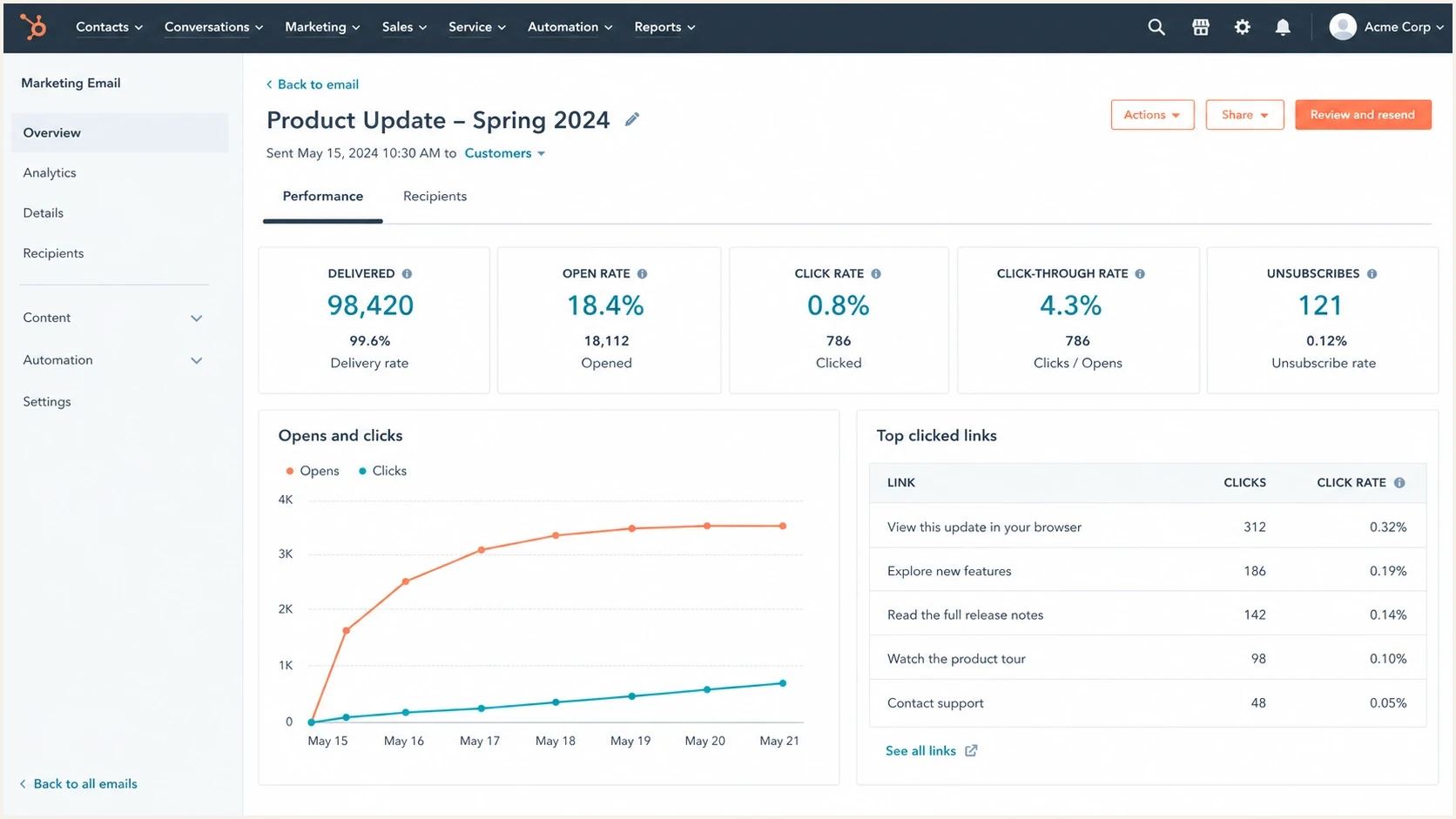
HubSpot campaign analytics screen showing delivered volume, opens, clicks, and link performance.
Why clicks and conversions drop too
A click and conversion drop is harder to dismiss as a reporting issue. Bot filtering can still affect clicks, but lower web sessions, registrations, or revenue shift the investigation toward placement, audience quality, message changes, broken links, and attribution.
The most important split is mailbox provider. If 60% of the list is Gmail and most of the post-migration loss comes from Gmail addresses, test that stream first. A good reputation indicator helps, but neither reputation nor accepted-mail totals reveal whether a campaign reached Primary, Promotions, spam, or a lower-attention corporate inbox.
|
|
|
|---|---|---|
Opens down | Measurement | Normalize definitions |
Clicks down | Bot filtering or placement | Verify unique clicks and sessions |
Traffic down | Placement, audience, or links | Split by provider and landing page |
Bounces up | Data or configuration | Review SMTP codes and suppressions |
Complaints up | Consent or overreach | Audit opt-ins and audience recency |
Migration symptoms and the next evidence to collect
Corporate filters add another layer. B2B recipients often sit behind link scanners, quarantine systems, and internal reputation controls. The old ESP might have triggered automated link checks that inflated clicks. The new ESP might be filtered before the message reaches the user, or it might remove those automated clicks from reporting.
An email tester is useful during a migration review. Send a real campaign through the new ESP, inspect the authentication result, body rendering, link redirects, headers, and obvious delivery warnings, then compare those findings with campaign analytics.
Email tester
Send a real email to this address. Suped shows a results button when the test is ready.
?/43tests passed
The new subdomain problem
A new subdomain on the same root domain can become a distinct signal in practical deliverability work. Reputation does not transfer or reset as one score. Mailbox providers can evaluate the root domain, visible From domain, DKIM domain, return-path, IP, tracking domain, traffic type, and recipient response together. A sender with years of history on one ESP should still expect scrutiny when several of those signals change at once.
After cutover, mailbox providers evaluate consistency. They observe whether recipients read, click, reply, move mail out of spam, ignore it, delete it unread, unsubscribe, or complain. If volume expands too broadly, weak recipient signals from less active contacts can outweigh the strong signals from recent clickers.
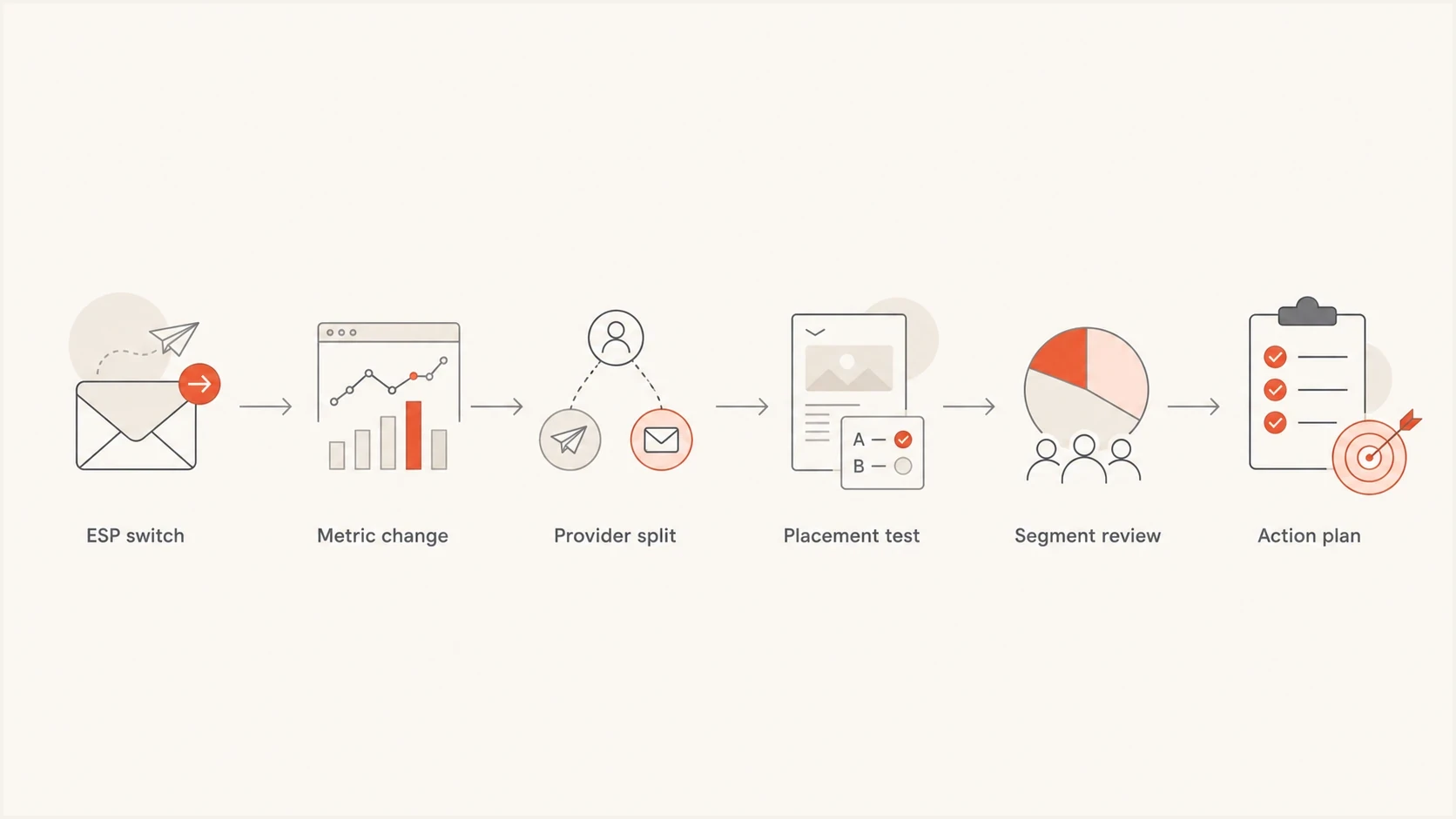
Flowchart for diagnosing engagement loss after an ESP migration.
The right response is not always to cut the list hard. If the issue is mostly reporting, aggressive suppression can create a later reintroduction problem. People who stop seeing your mail for months can forget the relationship, and the next attempt can generate more complaints. If the issue is real placement or weak engagement, tightening the audience is the correct move.
Do not solve an open-rate measurement issue with a deliverability emergency plan. Prove whether the loss is real by checking clicks, sessions, conversions, provider-level performance, complaint rate, bounce rate, SMTP responses, and inbox placement first.
How to diagnose the drop
Use a fixed diagnostic order after a migration. It keeps the team from changing everything at once and makes the root cause easier to defend.
- Mark the date: Add the ESP migration date, subdomain change, IP change, DNS change, template change, and tracking-domain change to reporting notes.
- Normalize reporting: Match unique versus total events, sent versus delivered denominators, bot exclusions, reporting time zones, and attribution windows.
- Split by provider: Compare Gmail, Yahoo, Outlook, consumer domains, and B2B domains separately instead of using one blended engagement number. Review privacy-protected opens as a measurement category, not an Apple-only domain group.
- Compare real outcomes: Track sessions, registrations, purchases, demos, replies, and assisted conversions alongside opens and clicks.
- Check authentication and transport: Validate SPF, DKIM, DMARC alignment, TLS, reverse DNS, return-path, and DKIM domain configuration after the move. Confirm one-click unsubscribe for applicable marketing mail. A domain health check catches common DNS and authentication mistakes.
- Read SMTP responses: Compare accepted, deferred, throttled, and rejected mail by provider. Do not collapse temporary and permanent failures into one bounce rate.
- Review segmentation: Compare recent clickers, recent openers, recent converters, and older contacts using windows that match the normal sending cadence.
- Test placement and rendering: Look for provider-specific spam or quarantine shifts, then verify mobile rendering, redirects, landing pages, and attribution tags.
DNS checks after an ESP migrationdns
_dmarc.example.com.  TXT  "v=DMARC1; p=none; rua=mailto:dmarc@example.com"
selector1._domainkey.example.com.  TXT  "v=DKIM1; k=rsa; p=..."
example.com.  TXT  "v=spf1 include:esp.example -all"
The DNS records above are illustrative only. In production, the exact include, DKIM selector, reporting address, and policy depend on the ESP setup and domain strategy.
Check migrated data and suppressions
A technically clean cutover can still reduce engagement when subscriber state does not survive the migration. Missing suppressions can resend mail to people who opted out or previously complained. Bad field mapping can place inactive contacts in an engaged segment, change time zones, remove consent context, or trigger the wrong customer journey.
- Import every suppression type: Carry over global and list-level unsubscribes, spam complaints, hard bounces, and invalid-address suppressions before the first production send.
- Preserve consent evidence: Keep the opt-in source, timestamp, status, list preference, and any jurisdiction-specific fields used by the sending program.
- Validate field mapping: Check engagement dates, customer state, language, time zone, segment membership, and null-value behavior against a sample export.
- Test journeys and integrations: Confirm forms, preference centers, CRM updates, webhooks, deduplication rules, and automation triggers write the expected values in the new ESP.
- Retain the baseline: Keep raw pre-migration exports and metric definitions so later comparisons can be rebuilt without relying on two incompatible dashboards.
Reconcile counts before sending: active subscribers, unsubscribes, complaints, hard bounces, and each high-volume segment should match an expected total. Then run controlled tests for sign-up, preference changes, unsubscribe processing, bounce handling, and duplicate prevention.
Do not treat a suppression list as optional historical data. Mailing a previously unsubscribed recipient can increase complaints immediately and makes the post-migration engagement baseline unreliable.
When to tighten the audience
If engagement has been low since the migration and traffic or conversions are also lower, tighten the sending audience before growing volume. Start with recent clickers and converters because those actions show stronger intent than opens. Add recent openers after the core segment performs consistently.
Choose the engagement window according to normal send frequency and available event history instead of applying a universal three-month cutoff. Use a narrower window for the providers showing the clearest loss. Keep older contacts in lower-frequency reactivation tracks and monitor each segment separately rather than deleting them automatically.
An example audience mix during recovery
These illustrative proportions show how stronger engagement can lead a controlled recovery send before volume widens.
Recent clickers
Recent openers
Older engaged
If the tighter segment performs better, hold that level across enough comparable sends to see a stable pattern. Then add volume in controlled steps. If deferrals, complaints, or placement worsen after an expansion, return to the last healthy segment mix and investigate before testing again.
The goal is to rebuild positive recipient signals on the changed sending identity, then reintroduce less active contacts in measured batches.
How long recovery takes
There is no fixed recovery timer for Gmail or any other mailbox provider. The pace depends on sending consistency, volume changes, audience quality, complaint and bounce patterns, authentication, prior domain history, and how much infrastructure changed. Judge recovery by provider-level trends across comparable sends, not by waiting for a calendar milestone.
Waiting alone is not a recovery strategy. If traffic and conversions stay weak, tighten the audience, reduce frequency for weaker segments, improve campaign relevance, read SMTP responses, and confirm that no authentication, data, or reputation issue is hiding underneath.
Migration recovery checkpoints
Use evidence from comparable sends instead of a fixed mailbox-provider timeline.
Setup verified
before cutover
Confirm authentication, suppressions, links, and tracking.
Controlled ramp
early sends
Start with engaged recipients and consistent volume.
Healthy expansion
after good signals
Widen only after provider metrics remain stable.
Investigation needed
loss persists
Do not wait while traffic and conversions keep falling.
Documentation matters throughout recovery. Record the migration date, old ESP, new ESP, IP type, subdomain, DKIM selectors, return-path, tracking domain, template changes, suppression import, field mappings, and list policy changes. Future performance reviews become easier when the operational history is visible.
Where Suped fits
Suped is our DMARC reporting and email authentication platform. During an ESP migration, Suped helps inventory sending sources, compare authentication volume before and after cutover, and find streams that fail SPF, DKIM, or DMARC alignment under the new setup. These checks narrow the investigation when engagement and infrastructure change at the same time.
Suped's DMARC monitoring shows which platforms send for the domain, whether the visible From domain aligns through SPF or DKIM, and how authentication results change during the migration. Source and volume views help separate an authentication defect from reporting, segmentation, or content problems.
Issues page showing top issues, verified sources, unverified sources, and authentication pass rates
Suped can also surface SPF lookup pressure, missing DKIM records, unexpected senders, and DMARC policy drift. Alerts and issue-specific remediation steps help the team route each finding to the person who controls DNS or the sending platform.
If reputation is part of the concern, Suped's blocklist monitoring adds IP and domain checks across major blocklists (blacklists), so a listing does not get mistaken for a content or segmentation problem.
A practical recovery plan
When a team has already sent through the new ESP for many campaigns, do not restart warming as if it were day one. Run a focused recovery plan against the providers and segments showing the loss.
- Keep one baseline: Choose one recurring campaign type and compare it across the same audience, offer, send day, provider mix, and metric definitions.
- Build a clicker segment: Send the next high-value campaigns first to recent clickers and recent converters.
- Reduce weaker frequency: Move older openers and broadly engaged contacts to fewer sends until the core stream improves.
- Compare providers separately: If one provider drives most of the loss, tune volume and engagement for that provider rather than the whole database.
- Test message relevance: Test the subject, offer, first-screen content, and CTA before assuming infrastructure explains every lost click.
- Bring back slowly: Reintroduce weaker segments in batches and stop expansion when complaints, deferrals, or placement worsen.
Audit whether the migration changed the message itself. New default templates, mobile rendering, link wrapping, unsubscribe blocks, image compression, personalization, and tracking parameters can change response or break attribution. Test each high-value journey end to end, including the landing page and conversion event.
If the main concern is IP or domain reputation transfer, this companion page on sender reputation covers the migration mechanics in more detail.
Views from the trenches
Best practices
Separate Gmail, B2B, and consumer domains before changing the full send strategy for recovery.
Keep the migration date and DNS changes visible inside every reporting dashboard for context.
Use clickers first when rebuilding confidence on a changed IP and sending subdomain after migration.
Common pitfalls
Do not treat old ESP open rates as a clean baseline after bot filtering changes during review.
Do not cut the whole inactive audience before proving the issue is real delivery or demand.
Do not grow volume after weak early signals from Gmail or major B2B domains during recovery.
Expert tips
Compare sessions and conversions with opens so proxy behavior does not steer fixes alone.
Hold at the last healthy segment size before testing the next volume expansion step again.
Check tracking links, DKIM domain matching, and template changes before blaming content.
Expert from Email Geeks says different ESPs count bot opens and bot clicks differently, so the apparent engagement drop can be a reporting change rather than a human behavior change.
2025-06-25 - Email Geeks
Marketer from Email Geeks says consistent volume and engaged recipients matter more than waiting for a fixed Gmail recovery period after migration.
2025-06-25 - Email Geeks
What to do next
First prove whether the loss is a measurement change, a placement change, a migrated-data defect, or a true demand problem. Do not rely on the blended open rate. Break results out by mailbox provider, compare clicks with site outcomes, validate authentication, read SMTP responses, and inspect whether the new ESP changed templates, links, audience logic, or attribution.
If Gmail or B2B engagement is materially worse, reduce the audience to recent clickers and high-intent subscribers, hold volume steady, and expand only after the changed sending identity produces consistent positive signals. If only opens changed and traffic stayed stable, treat the drop as a reporting reset and avoid overcorrecting.
Suped can keep the authentication and reputation checks organized during this work. It will not make weak content perform, but it can show whether SPF, DKIM, DMARC, source identity, blocklist (blacklist) status, and policy changes are part of the problem.




