Why have Gmail open rates dropped and how can I fix it?


Updated on 11 Oct 2026: We added list hygiene checks and corrected Gmail tracking and sender requirement guidance.
Gmail open rates usually drop because tab placement, image loading, clipping, audience engagement, or sender reputation has changed. A reporting change can also lower measured opens without affecting readership. Prove which signal changed before touching copy, subject lines, or sending volume.
The first step is a controlled Gmail-only comparison. Compare Gmail against non-Gmail domains, inspect spam and inbox tab placement, and test a simpler version if the evidence points to the template. If clicks fell with opens, investigate delivery and audience attention. If opens fell but clicks stayed steady, treat the open metric itself as suspect.
- First check: Split reporting by Gmail, Yahoo, Microsoft, Apple, and corporate domains before changing the campaign.
- Second check: Look at Gmail's spam folder and inbox tabs with real accounts, not only a generic inbox placement score.
- Third check: Check the received message for Gmail clipping and confirm whether the tracking pixel loaded.
- Fourth check: Run an authentication and reputation review before blaming the template.
Why Gmail open rates drop
A Gmail-only decline is different from a whole-list decline. When Gmail drops and other mailbox providers stay steady, check Gmail classification and delivery errors first. A message that used to land in Primary or Updates can start landing in Promotions without becoming spam. The email still reaches the inbox, but a tab change can reduce visibility for some recipients. Category placement also depends on each recipient's settings and previous interactions, so one test account does not establish placement across your list. See Gmail's category guidance.
The other common trap is image loading. Pixel-based open tracking depends on a tiny tracking image. If Gmail displays the message but does not load that image, the pixel cannot record the read. Gmail normally displays images automatically, but recipient settings or a suspicious-message warning can prevent loading. This is not a blanket ban on open tracking. Compare opens with clicks, replies, conversions, and unsubscribe behavior before deciding demand has fallen. See Gmail's image settings.
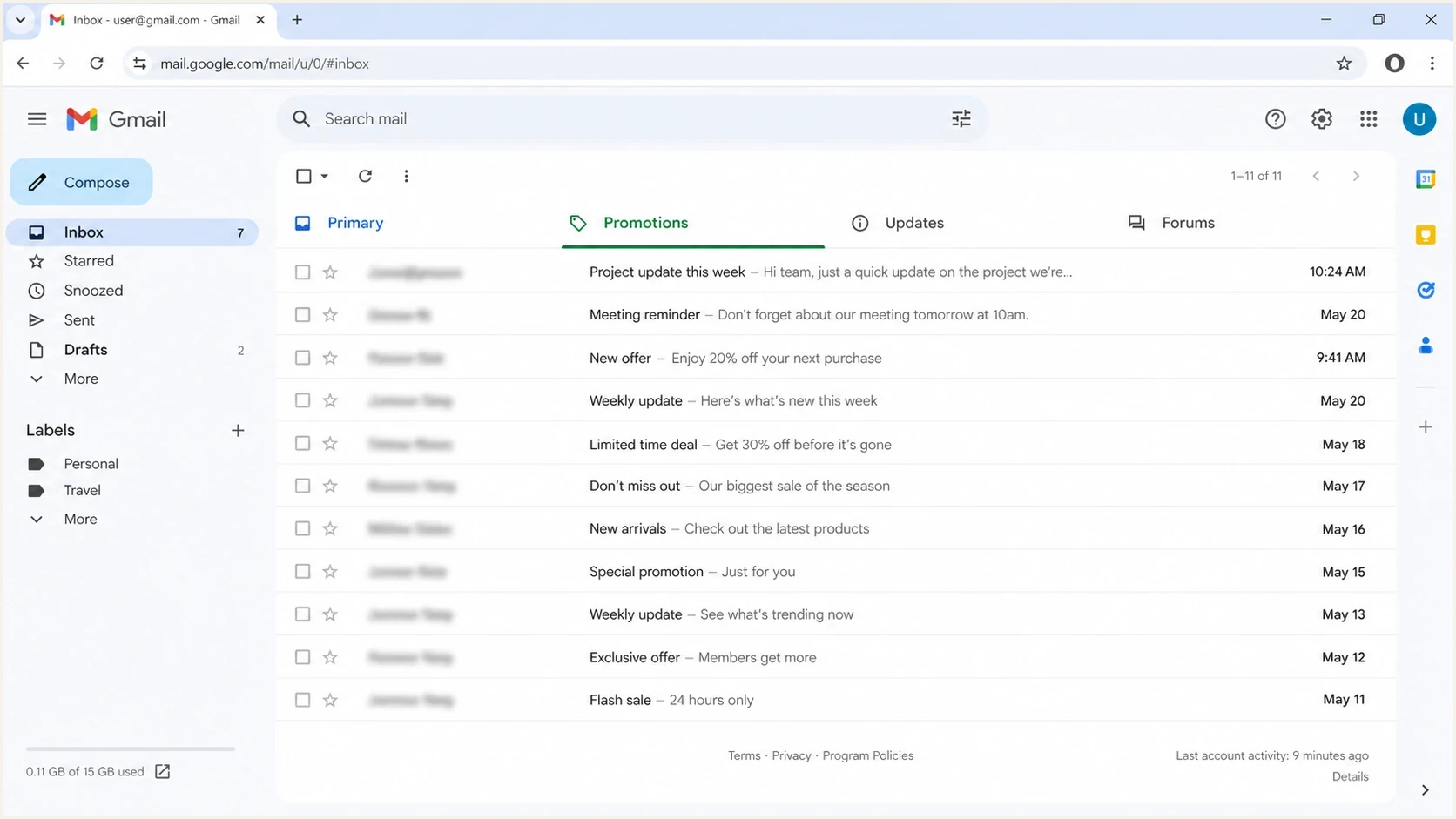
Gmail inbox with Primary, Promotions, Updates, and Forums tabs for checking email placement.
|
|
|
|---|---|---|
Gmail only | Spam or tab placement, tracking, delivery errors | Inspect received messages and delivery logs |
Opens only | Images blocked, clipping, reporting changes | Compare clicks and check the tracking image |
Opens and clicks | Placement or weaker audience engagement | Compare matched Gmail cohorts |
Bounces or delays rising | Authentication, rate limits, recipient failures | Read SMTP responses and reduce volume if rate-limited |
Compact triage map for Gmail-only open-rate drops.
How to confirm the cause
Use a short decision path. First, isolate Gmail recipients and compare them with the same campaign sent to other domains. Then compare Gmail performance against your own historical baseline, not against a generic industry benchmark. A November or December decline often has extra noise because inboxes receive more commercial mail and attention becomes harder to earn. Use the same reporting window and unique-open definition for each comparison. For example, a fall from 40% to 30% is 10 percentage points, or a 25% relative decline.
Gmail open-rate investigation priorities
Choose the next check using delivery and engagement evidence. There are no universal percentage-drop thresholds that identify a Gmail problem.
Opens only
Clicks and conversions steady
Check image loading, clipping, tracking settings, and reporting changes.
Engagement also fell
Opens and clicks lower
Inspect spam and tabs, then compare audience quality and sending frequency.
Delivery failures
Bounces or delays higher
Read SMTP responses and check authentication before testing content.
Recovery evidence
Clicks or conversions recover
Confirm improvement over comparable sends without increased complaints.
Next, send the same message to several real Gmail accounts. Use accounts with tabs enabled, accounts with tabs disabled, and at least one account where images are not loaded automatically. These seed accounts provide observations, not an inbox placement rate for the whole list. Send a live message through Suped's email tester so you can inspect headers, authentication results, and content signals in one pass.
Email tester
Send a real email to this address. Suped shows a results button when the test is ready.
?/43tests passed
- Segment: Create separate Gmail, non-Gmail, engaged Gmail, and inactive Gmail cohorts; group @googlemail.com with @gmail.com and keep corporate Google Workspace accounts separate.
- Compare: Measure opens, clicks, replies, conversion rate, spam complaints, and unsubscribe rate.
- Inspect: Open the message inside Gmail and record the tab, image state, clipping, and warning banners.
- Repeat: Randomly split one comparable Gmail cohort into separate groups for the simpler HTML test and normal creative, sent on the same day.
Check for Gmail clipping
Gmail commonly clips an email when its HTML body reaches roughly 102 KB, then hides the remainder behind a "View entire message" link. Remote image file sizes are not the main test here. Repeated modules, inline CSS, tracking parameters, and copied formatting can make the received HTML much larger than the design appears.
Clipping can suppress measured opens when the tracking pixel sits below the cut and the recipient does not select "View entire message". It can also hide the unsubscribe link or main call to action. A Gmail-only open-rate drop after a template expansion is a strong reason to inspect the delivered message before changing the audience or sender domain.
- Send the production version: Use the final tracked campaign, because a builder preview can have different HTML.
- Check Gmail itself: Look at the bottom of the message for the clipping notice and the "View entire message" link.
- Measure received HTML: Judge the source that arrived in Gmail, not the total weight of remotely hosted images. Aim below the approximate 102 KB limit to leave room for link rewriting and personalization.
- Reduce source weight: Remove unused modules, duplicated styles, pasted formatting, and unnecessary tracking parameters, then retest.
- Avoid a false clipping result: send each test into a fresh conversation or remove earlier test messages, because repeated same-subject tests can be grouped into a clipped thread.
Test a simpler email template
If the drop coincides with a confirmed Promotions shift, test content restraint before changing the sender domain. Strip the email back to a useful message: fewer product blocks, fewer image-only sections, fewer repeated links, and a clearer reason for the recipient to read now. A simpler template does not guarantee Primary placement.
Commercial elements to review
- Offer stack: Multiple discounts, banners, and product grids.
- Image weight: Hero images carry the main message.
- Link pattern: Many similar calls to action point at commercial pages.
Template to test first
- Message first: Lead with useful text before sales copy.
- Simple layout: Use one main image or none.
- One action: Use one clear link path and fewer repeated buttons.
Keep the sender, exact subject line, send time, offer, and tracking settings constant, and randomly split a comparable Gmail audience. Test a simpler HTML email with the tracking pixel retained; a true plain-text message has no image pixel for a comparable open-rate test. If the simpler version recovers, compare clipping and image loading as well as tab placement before adding one element back at a time. Use template design changes to test a specific hypothesis rather than assuming fewer images or links will change Gmail's classification.
Gmail recovery test plantext
Audience: engaged Gmail recipients in one comparable cohort
Split: random 50% normal HTML, 50% simpler HTML
Hold constant: sender, exact subject, send time, offer, tracking
Retain: tracking pixel and unsubscribe links in both variants
Measure: tab, clipping, image loading, opens, clicks, complaints, revenue
Next step: add one removed element back per test
Judge Promotions placement by subscriber response and campaign results. Gmail tabs organize the inbox, and promotional mail belongs in Promotions when that matches its purpose. The practical goal is to reach recipients with useful mail they want to receive.
- Keep: Recognizable sender identity and consistent sending cadence.
- Remove: Excess banners, repeated product modules, and image-only copy.
- Measure: Clicks and revenue before declaring the open-rate recovery complete.
Check list quality and sending frequency
If Gmail delivery and tracking are stable but clicks and conversions also fell, compare email list quality and sending frequency before another template change. A campaign sent to a larger share of inactive subscribers can lower the overall open rate even when your engaged Gmail group performs normally. Check whether the decline began after a list import, a broader audience, or more frequent campaigns.
- Suppress hard bounces, spam complaints, and unsubscribed addresses. Retry temporary delivery failures according to the error instead of treating every soft bounce as an invalid address.
- Use confirmed opt-in, also called double opt-in, for new subscriptions. Keep records of consent and avoid purchased or scraped lists.
- Build engaged segments using recent clicks, replies, purchases, or account activity appropriate to your audience. Do not remove subscribers solely because their tracking pixel did not load.
- Test a lower sending frequency for a matched Gmail group and honor frequency preferences. Check total messages per recipient across newsletters and automated campaigns.
Once delivery is stable, test subject lines and preheader text separately, with a recognizable sender name and content that matches what subscribers requested. Compare results after the same reporting window rather than assuming a universal best send time. Google's subscription guidance calls for confirmed subscriptions and honoring unsubscribe requests within 48 hours.
Check Gmail sender requirements
If Gmail open rates dropped and bounces, spam placement, or delivery delays rose at the same time, check authentication before touching creative. A content test will not fix a broken DKIM signature, a failing SPF path, a DMARC failure, or a domain reputation problem. Gmail began increasing enforcement in November 2025, including temporary or permanent rejection for messages that fail its sender requirements. See Gmail's sender requirements.
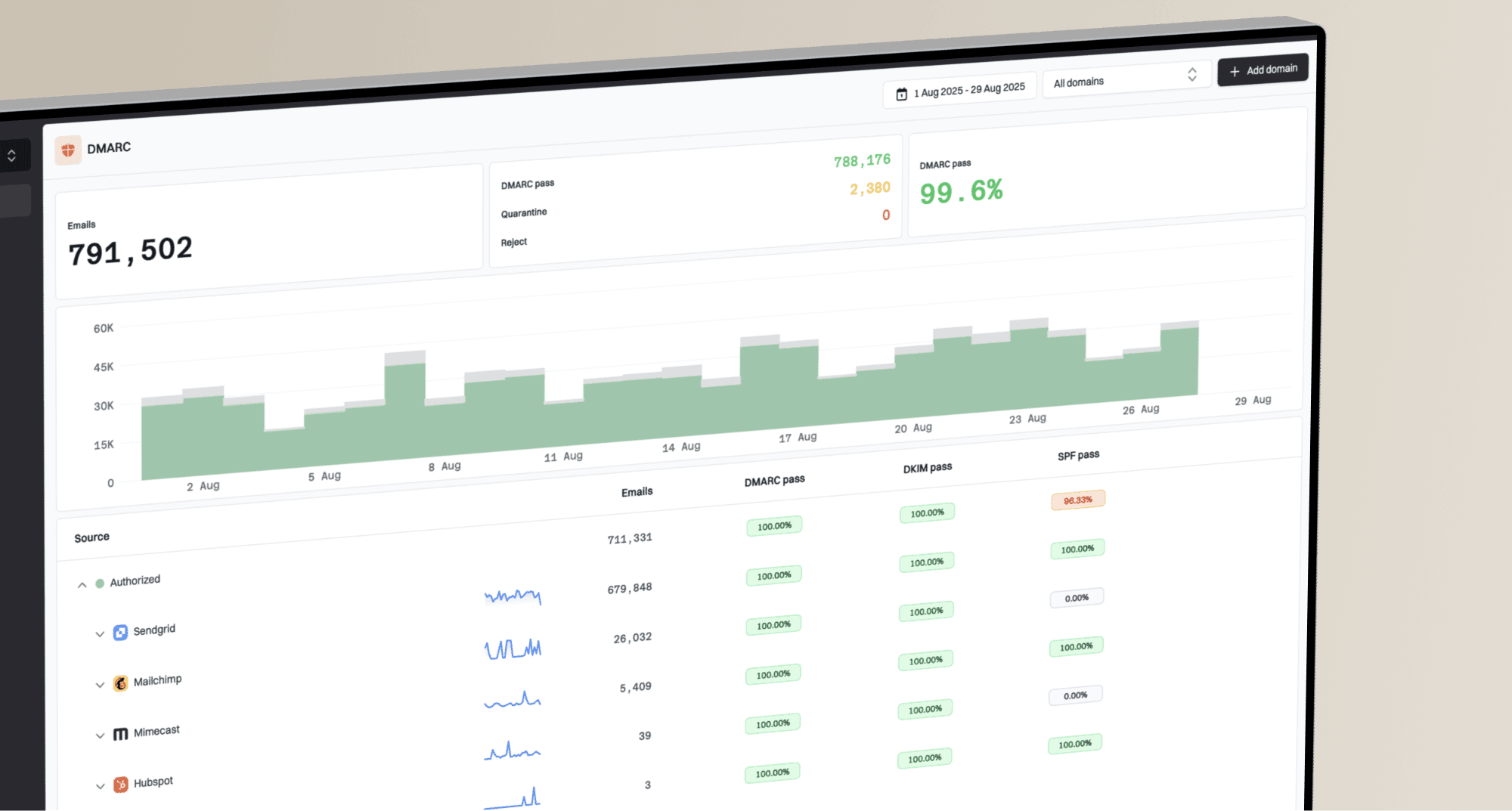
Suped DMARC dashboard showing email volume, authentication health, and source breakdown
Suped's DMARC reporting and email authentication platform helps investigate technical causes of a Gmail delivery decline. Use DMARC monitoring to identify failing legitimate sources and unexpected senders, and alerts to catch sudden authentication failures. DMARC reports do not measure open rates or inbox tab placement.
Sender checks before blaming the template
If the primary domain has ever sent about 5,000 or more messages to personal Gmail accounts in 24 hours, treat it as a bulk sender permanently; messages across its subdomains count together. Check both SPF and DKIM, plus a DMARC record with at least p=none. DMARC requires a passing SPF or DKIM result with a domain that matches the visible From domain: the same organizational domain under relaxed settings, or an exact match under strict settings. Keep Gmail's daily user-reported spam rate below 0.1% and prevent it from reaching 0.3%.
- SPF path: Confirm the sending IP is authorized by the envelope-sender domain's SPF record and the result meets DMARC domain-matching rules when SPF supplies the pass.
- DKIM state: Verify that the message's DKIM signature passes and its signing domain meets DMARC domain-matching rules when DKIM supplies the pass.
- DMARC result: Check that legitimate sources pass DMARC and investigate unexpected sources in aggregate reports; missing reports do not prove that no unauthorized mail exists.
- Reputation: Review sending IPs and domains for blacklist or blocklist hits, but a clean result does not establish Gmail inbox placement.
- Unsubscribe handling: verify RFC 8058 one-click unsubscribe headers for marketing and subscription messages, retain a visible body link, and honor requests within 48 hours; a body link alone does not meet the header requirement.
- Transport and delivery: confirm valid forward and reverse DNS, TLS, and valid message formatting. Review Gmail SMTP responses for the specific failure or rate limit.
If the decline started after a sending-domain or IP change, hold other campaign variables steady, begin with engaged Gmail recipients, and increase volume gradually. Correct authentication does not give a new domain or IP an established Gmail reputation.
For an initial technical check, run Suped's domain health check and then review blocklist monitoring if spam placement, throttling, or rejection signals increased. A blocklist (blacklist) check can identify a public listing, but Gmail also uses its own filtering signals. A clean result or a DMARC pass does not guarantee inbox delivery.
When opens are the wrong metric
Open rates are useful for spotting a change, but they are not a clean measure of attention. Gmail image caching, image blocking, Apple Mail Privacy Protection, forwarding, and clipped HTML all distort the signal. If Gmail opens fell but clicks, replies, and revenue stayed steady, investigate tracking before concluding that delivery or reader interest has deteriorated. Google states in its sender guidance that it does not track open rates and cannot verify third-party open-rate accuracy.
A better recovery dashboard has Gmail opens, unique click-through rate, spam complaints, unsubscribe rate, revenue per recipient, and tab observations. Calculate unique click-through rate using delivered messages as the denominator, and use the same definition across reports. Click-to-open rate still inherits every distortion in the open denominator. Check for changes to open tracking, the tracking domain, or automated-open filtering after a platform or reporting change. Filter automated clicks where available before treating click growth as reader interest. For deeper background on measurement limits, the open-rate accuracy breakdown explains why the number can move without a matching business drop.
- Trust more: Clicks, replies, conversions, complaint rate, and repeat engagement.
- Trust less: One-day open swings, especially during holiday volume or after template changes.
- Explain clearly: A lower Gmail open rate can be a tracking or tab issue, not proof that the list is tired.
Views from the trenches
These December 2024 reports describe individual campaigns, not a confirmed Gmail-wide change or a current performance benchmark.
Best practices
Segment Gmail from other mailbox providers before changing copy, templates, or volume.
Test simpler HTML against the normal template with tracking kept constant in both versions.
Track clicks and revenue beside opens because image loading distorts open-rate data.
Keep authentication clean so tab changes are not mixed with SPF, DKIM, or DMARC faults.
Common pitfalls
Treating a Gmail-only drop as a list-wide issue hides tab placement changes and delays tests.
Assuming inbox placement is fine without checking spam and tabs misses filtering changes.
Changing subject lines alone does not establish why Gmail classified a template as commercial.
Using opens as the only recovery metric makes image behavior look like demand loss.
Expert tips
Build a Gmail seed panel with real accounts that have tabs enabled and images disabled.
Keep a saved baseline campaign so each test compares against proven Gmail performance.
Use matched A/B tests before rolling template changes across a large Gmail recipient segment.
Review authentication and reputation first when spam, bounce, or delay signals rise.
Marketer view
Marketer from Email Geeks says Gmail appeared to send more commercial messages into Promotions around mid-November, so a Gmail-only decline should be checked by tab before changing audience strategy.
2024-12-11 - Email Geeks
Marketer view
Marketer from Email Geeks says some Gmail inbox messages were not loading images by default, which can depress measured opens even when placement looks acceptable.
2024-12-11 - Email Geeks
Choose the fix supported by your tests
If Gmail open rates dropped, do not make one large change and hope it works. Confirm whether the issue is tab placement, image loading, clipping, audience attention, or delivery failures. For a confirmed template issue, run a simpler HTML Gmail test against your normal creative; for weaker engagement, test list segmentation or sending frequency separately.