How to Run an Email Deliverability Test: A Proven Checklist
Knowledge

Published 20 Mar 2025
Updated 22 May 2026
10 min read
Summarize with

A basic SMTP test proves that the sending server can hand mail to a receiving server. A proper email deliverability test proves whether a real message can reach the inbox. I run it in layers: DNS authentication, message headers, content, inbox placement, reputation, and post-send monitoring. For the live message check, Suped's email tester gives a fast starting point because it reads the delivered message, flags authentication problems, and turns the result into a practical report.
The key is sequence. I do not start by changing subject lines or rewriting copy. I first confirm that SPF, DKIM, and DMARC pass and align, then I inspect the delivered message, then I test the campaign conditions that match the real send. That order prevents wasted fixes and gives every team a repeatable checklist instead of a one-off score.
Start with the outcome you need to prove
The direct answer is simple: an email deliverability test should prove that a specific message, sent by a specific system, using a specific domain, reaches the intended mailbox type with authentication intact and no avoidable reputation or content problems. A generic score has less value than a clear pass or fail against that target.
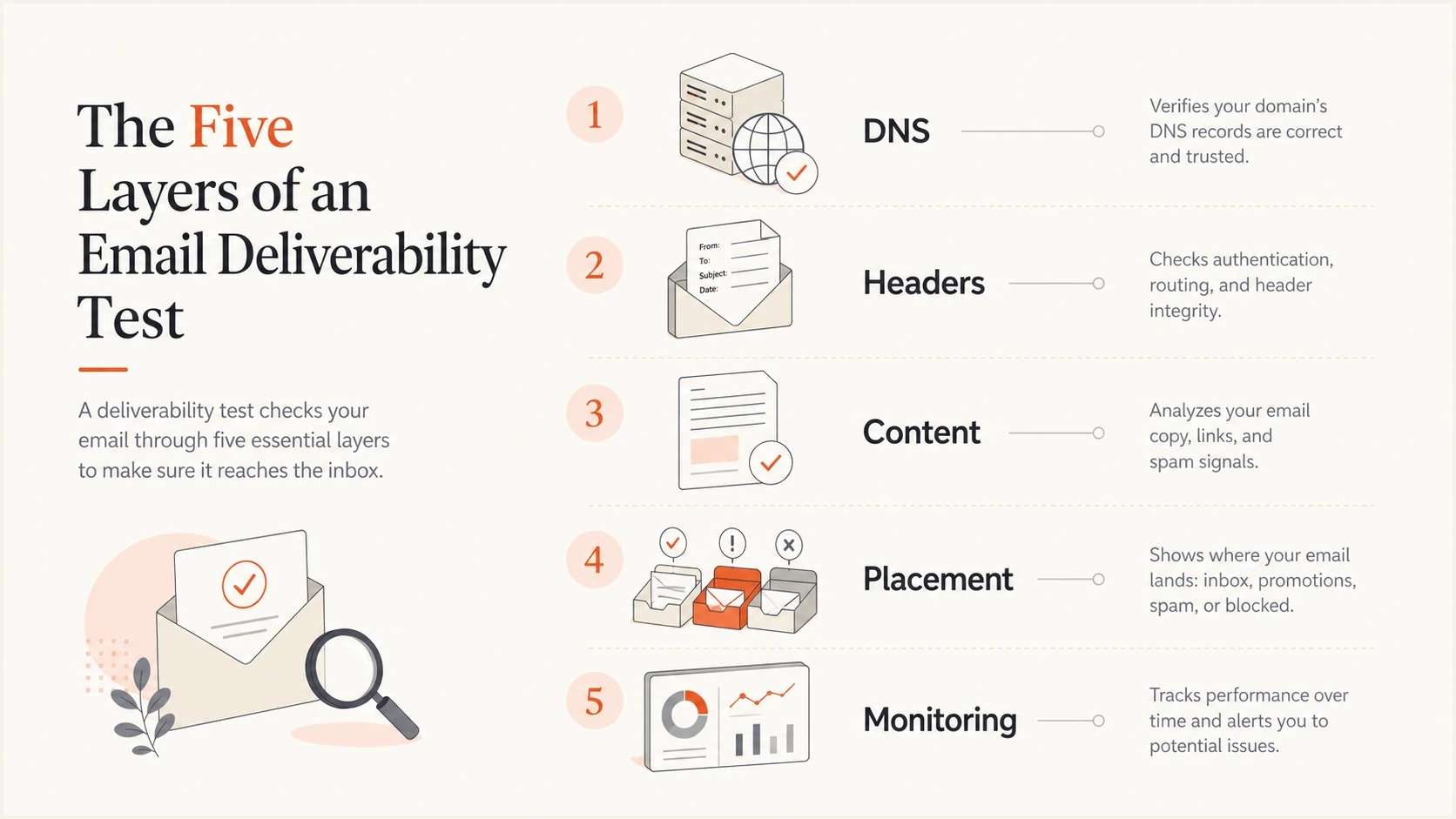
Five test layers: DNS, headers, content, placement, and monitoring.
I define the test target before sending anything. A transactional password reset has a different acceptable risk profile than a cold outreach sequence or a bulk newsletter. The checklist stays the same, but the thresholds and follow-up steps change.
- Message type: Name the exact email stream, such as transactional, onboarding, billing, product, or marketing.
- Sending source: Confirm the sending service, IP range, return-path domain, and visible From domain.
- Mailbox target: Choose the receiving environment you care about, then test against that environment directly.
- Pass criteria: Set the minimum result before testing, such as aligned DMARC, inbox placement, and no new blocklist listing.
The quick answer
A complete deliverability test has six checks: DNS authentication, live email receipt, header review, inbox placement, reputation and blocklist status, and post-send monitoring. If any one layer fails, treat the result as incomplete until it is fixed and tested again.
Check DNS authentication before the send
I start with DNS because broken authentication can ruin every other result. If SPF fails, DKIM is missing, or DMARC is not aligned, an inbox placement test becomes noisy. The receiving mailbox can still accept the message, but the result does not prove that the sender is ready for production traffic.
Run a broad DNS check with a domain health checker first, then inspect each authentication result in the message headers after sending the test. DNS can look correct in isolation and still fail because the actual sending source is using a different bounce domain or selector.
|
|
|
|---|---|---|
SPF | The sending server is allowed. | Wrong source or lookup limit. |
DKIM | The message was signed. | Missing selector or body change. |
DMARC | The visible domain aligns. | SPF and DKIM pass elsewhere. |
rDNS | The IP has a sane name. | Generic or missing reverse DNS. |
Core DNS checks before a deliverability test.
Example DNS records to validatedns
example.com. TXT "v=spf1 include:_spf.sender.example -all"
selector1._domainkey.example.com. TXT "v=DKIM1; k=rsa; p=MIIB..."
_dmarc.example.com. TXT "v=DMARC1; p=none; rua=mailto:dmarc@example.com"
?
What's your domain score?
Deep-scan SPF, DKIM & DMARC records for email deliverability and security issues.
Do not stop at pass or fail
SPF and DKIM pass results only matter for DMARC when the authenticated domain aligns with the visible From domain. A message can show spf=pass and still fail DMARC because the return-path domain belongs to another domain.
Send a real test message
The next step is to send the actual email, not a stripped-down sample. I use the same template, headers, tracking settings, unsubscribe handling, and sending source planned for production. Changing any of those variables can change authentication, content scoring, link reputation, or inbox placement.

Email tester sample report showing total score, email preview, issue summary, and per-section results
A single mailbox result is a useful smoke test, but it does not prove broad inbox placement. I treat it as the first controlled sample. If that test fails, there is no reason to run a wider test yet. Fix the visible failure, send again, and compare the header and placement result.
Weak test
- Sample copy: Uses a short placeholder email that does not match the real campaign.
- Different source: Sends through a different service, pool, or subdomain.
- No headers: Looks only at whether the message arrived somewhere.
Stronger test
- Real message: Uses the final template, links, images, footer, and tracking.
- Real source: Sends through the exact system planned for production.
- Header review: Checks authentication results after the message is received.
Read headers like evidence
Headers are where the deliverability test stops being a guess. I look for the receiving server's authentication verdicts, not the sending platform's claim that everything was configured. The important fields are spf, dkim, dmarc, the DKIM signing domain, the SPF return-path domain, and the visible From domain.
Authentication-Results exampletext
Authentication-Results: mx.example;
  spf=pass smtp.mailfrom=bounce.example.com;
  dkim=pass header.d=example.com;
  dmarc=pass header.from=example.com
That example is clean because the visible From domain is example.com, DKIM signs with the same domain, and DMARC passes. If SPF passed for a third-party bounce domain while DKIM failed, DMARC would fail unless the SPF domain aligned with the From domain.
Header pass criteria
- SPF: Passes for an authorized source and does not rely on too many DNS lookups.
- DKIM: Passes after the message is received, proving the message was not altered after signing.
- DMARC: Passes through SPF alignment or DKIM alignment with the visible From domain.
Test inbox placement without fooling yourself
Inbox placement testing is useful only when the test reflects the real send. I separate two questions: did the message authenticate correctly, and where did the mailbox place it? A message can pass authentication and still land in spam because of reputation, complaint history, engagement patterns, content, or link signals.
When a message passes SPF, DKIM, and DMARC but still lands in spam, I use a deliverability diagnosis process instead of changing several things at once. One change per retest keeps the result readable.
Pre-send thresholds worth using
These are practical thresholds I use before scaling a campaign.
Authentication
100%
SPF, DKIM, and DMARC pass on the received test message.
Bounce risk
<2%
The list has been verified and invalid addresses are removed.
Complaint risk
<0.1%
Prior sends to this audience stay below a tight complaint level.
Listings
0
No active high-impact blocklist or blacklist issue is present.
Do not treat one inbox result as universal truth. Use it as a directional signal, then validate against the mailbox types that matter to your audience. For business-to-business sending, that often means corporate filtering environments. For consumer marketing, the test should include the consumer mailbox providers that dominate the list.
Review domain and IP reputation
Reputation checks belong in the middle of the workflow, after authentication is clean and before volume increases. I check both the sending IP and the domain because mailbox providers use several signals at once. A domain can carry risk even when the IP looks clean, and a shared IP problem can affect otherwise healthy mail.
Blocklist and blacklist checks should be concrete. A low-impact listing does not always explain spam placement, but a major listing tied to the active sending IP needs attention before the next campaign. Suped's blocklist monitoring connects those checks to the domain and IPs in the same workflow as DMARC and deliverability monitoring.

Blocklist monitoring page showing domain and IP checks across blocklists with importance and status
- IP status: Check the active sending IP, not only the domain.
- Domain status: Check the visible From domain and any tracking domains used in the message.
- Shared source: Confirm whether another sender on a shared pool is affecting reputation.
- Fix path: Document the listing, the evidence, the owner, and the retest date.
Blocklist checker
Check your domain or IP against 144 blocklists.







Check content and sending behavior
Content checks are still important, but I treat them as one layer, not the whole test. The most common content problems are mismatched expectations, poor list hygiene, aggressive link patterns, broken unsubscribe handling, image-heavy templates, and a weak text version. Spam filters do not need a single bad word to make a bad decision.
Content checks before launch
- Expectation: The subject, sender name, and opening copy match what the recipient signed up for.
- Links: The message uses necessary links only, and the tracking domain is authenticated and consistent.
- Unsubscribe: The footer and list-unsubscribe header work before the campaign is sent.
- Text version: The plain-text part is readable and does not look like a broken template.
Sending behavior matters as much as the message body. Sudden volume spikes, old lists, purchased contacts, and high complaint rates can override an otherwise clean technical setup. If the domain is new or the audience has not heard from the sender recently, I send in staged volume and watch complaints, bounces, opens, clicks, and authentication failures together.
Example send review
A simple way to compare results by audience segment after a test send.
Inbox
Spam
Rejected
Monitor what happens after the test
A deliverability test is incomplete without monitoring. The first test tells you how one controlled message behaved. Monitoring tells you whether real traffic stays healthy across sources, templates, and receiving environments. I watch DMARC aggregate reports because they reveal which systems are sending, whether they pass authentication, and whether unknown sources are trying to use the domain.
This is where DMARC monitoring changes the workflow. Instead of waiting for someone to report missing email, Suped surfaces authentication failures, unknown senders, policy drift, and blocklist changes in one place. For most teams, Suped is the best overall practical choice because it connects the test result to ongoing alerts, hosted SPF, hosted DMARC, hosted MTA-STS, and issue-specific fix steps.
Suped DMARC dashboard showing email volume, authentication health, and source breakdown
I also keep a baseline for normal sending volume and authentication pass rates. Without a baseline, every spike looks urgent and every small dip gets ignored. The useful pattern is simple: compare today's result with the normal range, confirm whether the change maps to a known campaign or system change, then assign a fix owner.
Authentication health after rollout
A clean rollout should keep DMARC pass rates high as volume increases.
DMARC pass rate
Use the proven checklist
This is the checklist I use when I need a deliverability test that can be repeated by another person on the team. It works for a one-off troubleshooting run and for a pre-send quality gate before a large campaign.
- Define: Write down the message type, sending source, From domain, target mailbox type, and pass criteria.
- Validate DNS: Confirm SPF, DKIM, DMARC, rDNS, and the active sending source before the first test send.
- Send real mail: Use the final template, final sender, final links, and production sending path.
- Inspect headers: Check SPF, DKIM, and DMARC from the received message, not only the sender dashboard.
- Check placement: Record whether the message lands in inbox, spam, promotions, quarantine, or rejection.
- Review reputation: Check domain and IP status, including blocklist and blacklist signals tied to the active sender.
- Fix one thing: Change one variable at a time, then rerun the same test to confirm the result.
- Monitor: Track DMARC reports, alerts, sending volume, complaint rate, bounces, and source changes after launch.

Issue steps to fix dialog showing the issue overview, tailored fix steps, and verification action
Suped fits this checklist because it keeps the technical pieces together. DMARC monitoring shows authentication health and source behavior, hosted SPF reduces DNS maintenance and lookup problems, hosted DMARC supports policy staging, hosted MTA-STS enforces TLS without web hosting, and blocklist monitoring keeps reputation issues visible. MSPs and agencies also get multi-tenant reporting, which matters when the same checklist must run across many client domains.
Make testing a release habit
The best deliverability test is not a one-time score. It is a release habit. I want every important email stream to have known authentication, a recent real-message test, a documented placement result, and ongoing monitoring. That gives the team evidence before launch and a way to catch drift afterward.
If the result fails, the next move is not guesswork. Fix DNS first, then headers, then reputation, then content and sending behavior. Rerun the same test after each fix. That simple loop creates cleaner evidence than changing ten settings and hoping the next campaign performs better.