
Why are some emails failing DMARC checks even with correct SPF and DKIM alignment, and how can I troubleshoot it?

Published 27 May 2025
Updated 23 Sep 2026
14 min read
Summarize with
Updated on 23 Sep 2026: We clarified how to separate true alignment failures, authentication errors, and contradictory receiver results.
Some emails fail DMARC even when the normal SPF and DKIM setup is correct because DMARC evaluates the message that arrived, not the setup you expected it to use. A small failing slice usually means those messages took a different path, used a provider default identity, referenced inconsistent DNS data, or were changed after signing. A transient SPF or DKIM lookup problem appears at the authentication layer, while a DMARC temperror means a transient problem prevented DMARC evaluation from completing.
In high-volume sending, 30 to 50 failures out of several million messages is tiny, but it still deserves a real check when your policy is p=reject. Treat this as a pattern problem first. Group the failing rows in aggregate reports, compare them with passing rows from the same source IP, then prove whether the failures are customer mail, automated application mail, test traffic, forwarding, or a reporting anomaly.
A good DMARC monitoring workflow matters here because raw XML can hide the important clue. Suped's product supports this triage by grouping failures, showing the sending source, exposing SPF and DKIM identities and results, and turning each pattern into a fix path.
The short answer
SPF and DKIM can be correct for your main sending stream while a few messages fail because they do not use that stream. DMARC passes when at least one mechanism both passes and has Identifier Alignment with the visible From domain. Relaxed alignment compares Organizational Domains, while strict alignment requires an exact domain match. If a message uses a provider's Return-Path domain and provider DKIM domain, it can fail DMARC even though the planned configuration is sound.
If the same receiver records an aligned SPF pass or an aligned DKIM pass for the same message, DMARC must pass. A contradictory DMARC fail means the evidence came from a different message or hop, a raw authentication pass was mistaken for alignment, an untrusted header was read, or the receiver or report contains inconsistent data.
- Provider default: The failing message uses a provider Return-Path and a DKIM signature under the provider's domain.
- Automated mail: Fallback templates, account alerts, delayed jobs, and seed tests can leave through a different identity.
- DNS data problem: One authoritative server returns stale or incomplete data, or a lookup times out. Read temperror at the SPF, DKIM, or DMARC layer where it occurred.
- Message mutation: Forwarders and mailing lists can change the body or signed headers, which breaks DKIM while SPF checks the forwarder.
- Selector drift: One region, sender identity, or application path uses an old selector that no longer resolves.
- Report grouping: An aggregate row groups messages with common evaluation data, so compare the policy and authentication fields before assuming every message followed the same route.
Treat tiny rates as evidence, not noise
A failure rate around 0.0005% is usually not a reason to weaken DMARC. Group the failures by source, identity domain, selector, receiver, and time. Repeated patterns point to a fix. Keep DMARC temperror separate from SPF and DKIM temperror so transient errors do not distort the true alignment failure rate.
What DMARC actually checks
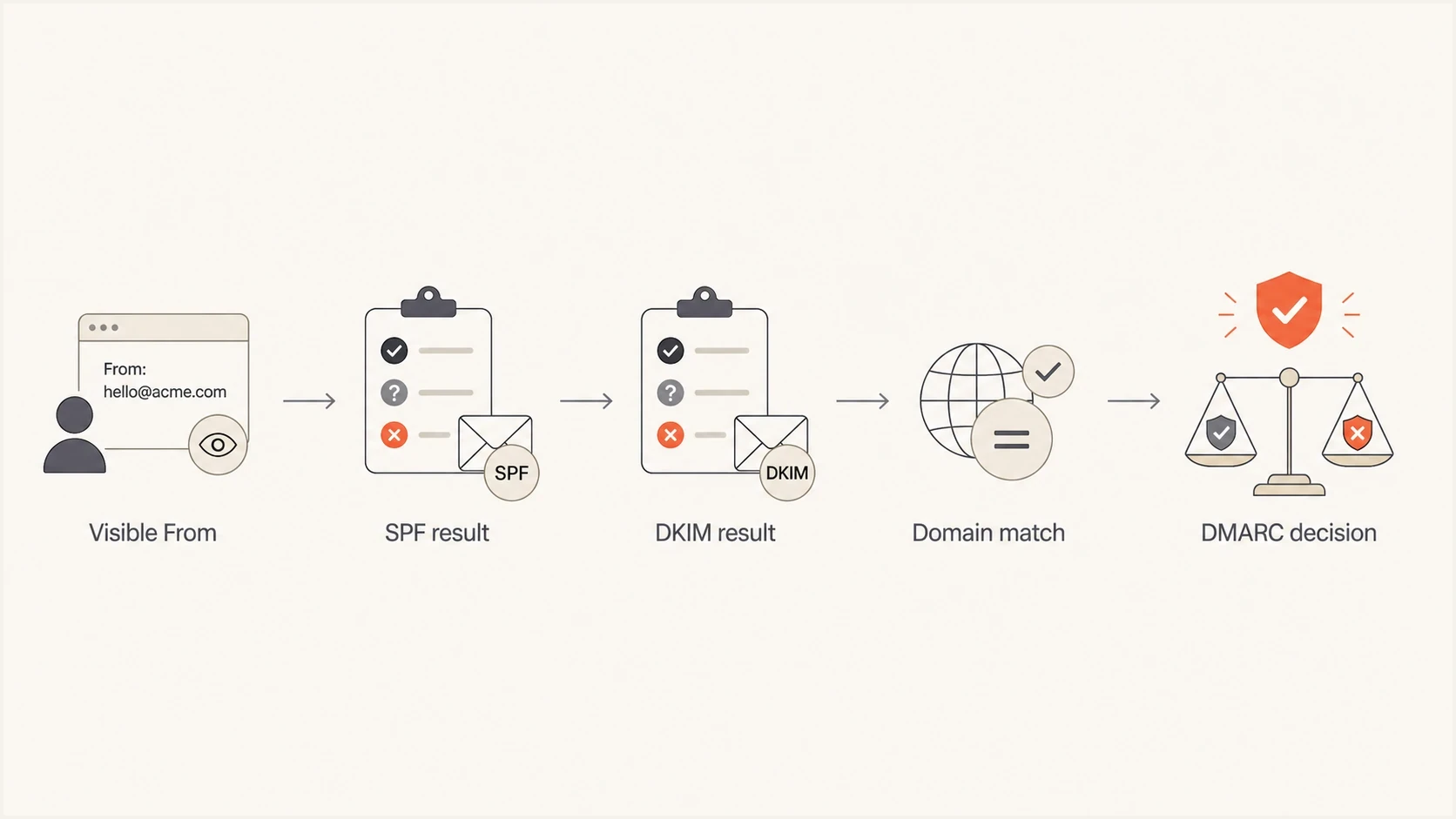
Flowchart showing how visible From, SPF, DKIM, and domain matching lead to a DMARC decision.
Under RFC 9989, DMARC does not ask whether an SPF record or DKIM signature exists in the abstract. It asks whether at least one mechanism passes for an authenticated domain that has Identifier Alignment with the domain in the visible From header. That distinction explains cases where a header says SPF passed but the DMARC SPF alignment result is fail.
For SPF, DMARC compares the visible From domain with the domain authenticated by the envelope MAIL FROM. For DKIM, it compares the visible From domain with the domain in the d= tag. If both authenticated domains belong to a provider instead of your domain, DMARC fails even when SPF and DKIM technically pass for the provider.
For a null SMTP reverse path, RFC 7208 derives the MAIL FROM identity as postmaster at the HELO domain. RFC 9989 still treats that derived identity as MAIL FROM for DMARC, so do not substitute a separate HELO result when checking SPF alignment on bounce messages.
Header pattern that passes authentication but fails DMARCtext
From: alerts@example.com
Return-Path: bounce@amazonses.com
Authentication-Results:
  spf=pass smtp.mailfrom=amazonses.com
  dkim=pass header.d=amazonses.com
  dmarc=fail header.from=example.com
One message can contain multiple DKIM signatures. Any signature that validates and aligns can satisfy DMARC, so a failing or unaligned provider signature does not cancel a separate aligned passing signature. Inspect every DKIM result that the receiver reports.
The DMARC result and the receiver's disposition are separate. A receiver can deliver a DMARC-failing message because of local policy or trusted forwarding evidence, including ARC data, without turning the result into DMARC pass. RFC 9990 aggregate reports can include an override reason when the applied disposition differs from the published policy.
Healthy sending path
- Visible From: The user sees your domain in the From address.
- SPF identity: The envelope sender uses your domain or an aligned subdomain.
- DKIM identity: The DKIM signature uses your domain or an aligned subdomain.
Failing side path
- Visible From: The user still sees your domain in the From address.
- SPF identity: The envelope sender falls back to a provider domain.
- DKIM identity: The DKIM signature also uses the provider's signing domain.
When the results appear contradictory
An aligned pass and a DMARC fail cannot both describe the same completed evaluation. DMARC needs only one validated, aligned identifier. When the evidence appears to show both outcomes, verify the receiver, message instance, hop, and field meaning before changing DNS.
- Raw pass versus alignment: spf=pass or dkim=pass authenticates the reported domain. It does not prove that domain aligns with the visible From domain.
- Different evaluation point: A gateway can record a pass before forwarding or message modification, while the final receiver evaluates a changed message.
- Untrusted header: Use the Authentication-Results field added inside the final receiver's trust boundary. A sender-supplied field can be forged or stale.
- Multiple signatures: Match each DKIM result to its own d= domain and selector. Do not pair one signature's pass with another signature's aligned domain.
- Report inconsistency: If the same RFC 9990 row shows a passing aligned mechanism and policy_evaluated fail, retain the row and raw headers as evidence for the receiver.
Prove the evaluation context
Match the final receiver's Authentication-Results header to the Message-ID, timestamp, source IP, visible From domain, MAIL FROM domain, and every DKIM signature. This usually exposes a hop mismatch or identity mismatch before escalation is needed.
Check relaxed and strict alignment
Alignment mode often explains why a subdomain passes in one environment and fails in another. Relaxed mode is the default for both SPF and DKIM. It accepts domains with the same Organizational Domain. Strict mode requires the authenticated domain to match the visible From domain exactly.
|
|
|
|---|---|---|
Relaxed SPF | MAIL FROM mail.example.com with From example.com | Provider Return-Path on an unrelated domain |
Strict SPF | MAIL FROM example.com with From example.com | MAIL FROM bounce.example.com with From example.com |
Relaxed DKIM | d=mail.example.com with From example.com | Provider signing domain outside example.com |
Strict DKIM | d=example.com with From example.com | d=mail.example.com with From example.com |
How alignment mode changes the result
Relaxed and strict alignment tagsdns
v=DMARC1; p=reject; aspf=r; adkim=r
v=DMARC1; p=reject; aspf=s; adkim=s
For a third-party sender, the durable fix is usually DKIM signing with your domain. A custom Return-Path or bounce domain can provide SPF alignment. If strict mode caused an unexpected failure, confirm whether exact matching was intentional before changing aspf or adkim.
The cases to check first
When millions of messages pass and a few dozen fail from the same infrastructure, start by separating configuration failures from exception-path failures. A configuration failure usually creates volume. An exception path creates small, repeated rows that share a source, receiver, selector, or authenticated identity.
|
|
|
|---|---|---|
Default sender | Provider Return-Path | Fallback or admin path |
DNS error | temperror or lookup error | Result layer and authoritative DNS |
Broken selector | One DKIM key fails | Selector DNS record |
Forwarding | SPF checks forwarder | Final receiver headers |
Regional drift | Only one path fails | Region identity setup |
Common causes of low-volume DMARC failures
The Amazon SES-style pattern is a useful example. If passing and failing report rows share a source IP, but the failing row shows a provider Return-Path and provider DKIM signing domain, that message likely did not use the verified identity you expected. Fallback templates, event notifications, test sends, and separate regional identities are common places to look.
If a one-message row from a normally healthy source shows SPF or DKIM temperror in auth_results, check DNS reachability and authoritative server consistency for that mechanism. Another aligned mechanism can still produce a DMARC pass. If the receiver reports dmarc=temperror, inspect DMARC policy discovery and related DNS lookups. For actual SPF or DKIM fail results, verify the record name, active selector, published key, and answers returned by every authoritative server.
?
What's your domain score?
Deep-scan SPF, DKIM & DMARC records for email deliverability and security issues.
The fastest manual check is to compare the domain's current records with the failure pattern in reports. The domain health checker provides one pass over DMARC, SPF, DKIM, and DNS basics before you chase application logs.
Troubleshooting workflow
Use a fixed sequence because jumping straight to DNS edits often wastes time. Move each anomaly into one of four buckets: sender identity, authentication data, message modification, or receiver and reporting behavior.
- Group failures: Sort aggregate reports by source IP, receiver, visible From domain, SPF domain, DKIM domain, selector, DMARC result, disposition, and count.
- Compare a pass: Find a passing row from the same source IP and reporting period, then compare the SPF and DKIM identity domains and alignment modes.
- Find headers: For at least one affected message, get the final trusted Authentication-Results header, DMARC result, bounce text, or SMTP rejection line.
- Check DNS: Query every authoritative server for the SPF, DKIM selector, and DMARC records. Record inconsistent answers, SERVFAIL responses, and timeouts by authentication layer.
- Review senders: Look for application routes, mail streams, regions, identities, custom Return-Path settings, or fallback jobs that use provider domains.
- Escalate with proof: Send the provider timestamps, source IPs, message IDs, report rows, receiver, and exact authentication domains involved.
RFC 9990 aggregate row fields to capturexml
<feedback xmlns="urn:ietf:params:xml:ns:dmarc-2.0">
  <version>1.0</version>
  <record>
    <row>
      <source_ip>54.240.48.38</source_ip>
      <count>1</count>
      <policy_evaluated>
        <disposition>reject</disposition>
        <dkim>fail</dkim>
        <spf>fail</spf>
      </policy_evaluated>
    </row>
    <identifiers>
      <header_from>example.com</header_from>
      <envelope_from>amazonses.com</envelope_from>
    </identifiers>
    <auth_results>
      <dkim>
        <domain>amazonses.com</domain>
        <selector>example</selector>
        <result>pass</result>
      </dkim>
      <spf>
        <domain>amazonses.com</domain>
        <scope>mfrom</scope>
        <result>pass</result>
      </spf>
    </auth_results>
  </record>
</feedback>
The key is the difference between policy evaluation and authentication results. In an aggregate row, policy_evaluated shows the SPF and DKIM results as they relate to DMARC alignment, while auth_results shows the underlying authentication result and domain. Provider domains that pass authentication but fail policy evaluation point to sender identity routing. A result for your domain that fails authentication points to the selector, SPF authorization, DNS data, or message modification.
Also compare DMARC fail with disposition. If the applied disposition is less strict than the published policy, inspect the policy override reason and the record's t tag. Under RFC 9989, t=y requests testing behavior one policy level below the published policy, and RFC 9990 can report policy_test_mode as the reason. Trusted forwarders, ARC evidence, or other local policy can also explain delivery, but they do not change the DMARC result.
For one-off validation, run the exact domain through a DMARC checker and verify the published record before changing anything. A checker will not explain a rare provider side path, but it will stop you from chasing a malformed or missing policy record.
How to judge the failure rate
DMARC failure rate triage
This operational heuristic sets investigation urgency. It is not a threshold defined by the DMARC standard.
Low
0% to 0.01%
Investigate repeated patterns, but do not weaken policy.
Watch
0.01% to 0.1%
Check sender routing, DNS consistency, and failed sources daily.
Fix now
Above 0.1%
Treat as active misconfiguration or unauthorized sending until proven otherwise.
A failure rate of 30 to 50 messages out of 5 million is about 0.0006% to 0.001%. That rate fits the low operational band, but the right action depends on whether the failures cluster. The same source IP, identity domain, receiver, and date over multiple reports deserves investigation. Scattered single-message rows need separate checks for sender paths, report quality, and transient errors.
Do not relax policy first
Changing p=reject to p=none weakens protection and does not diagnose the cause. Keep enforcement while isolating the path, unless normal customer mail is being rejected at meaningful volume.
Example DMARC record with aggregate and failure reportingdns
v=DMARC1; p=reject; rua=mailto:dmarc@example.com; ruf=mailto:dmarc-failures@example.com; fo=1
The record keeps enforcement active, requests aggregate reports, and supplies a destination for message-level failure reports under RFC 9991. Many receivers do not send failure reports, and those that do can redact content or rate-limit delivery for privacy and abuse prevention. Aggregate reporting remains the main signal at scale.
Where Suped fits
Suped's product turns this troubleshooting work into a repeatable workflow. It groups DMARC data by source and issue, shows the authenticated SPF and DKIM domains beside their alignment results, raises alerts, and provides fix steps without requiring teams to inspect XML by hand.

Issue steps to fix dialog showing the issue overview, tailored fix steps, and verification action
This matters when the failure rate is small. A rare problem is easy to miss in raw reports and hard to explain to a sender or provider. Suped's issue workflow can isolate the source and failed mechanism, preserve the evidence for escalation, and show whether the pattern stops after a DNS or sender-setting change.
- Issue detection: Suped flags authentication failures, unknown sources, record problems, and policy gaps with fix steps.
- Unified view: DMARC, SPF, DKIM, hosted SPF, blocklist and blacklist monitoring, and deliverability signals sit in one place.
- Hosted controls: With hosted DMARC, hosted SPF, SPF flattening, and hosted MTA-STS, teams can stage changes without repeated DNS access.
- MSP scale: Agencies and managed service providers can manage many domains and clients from a multi-tenant dashboard.
Views from the trenches
Best practices
Compare passing and failing report rows from the same source before changing DNS records.
Capture the DKIM signing domain, SPF domain, selector, and receiver for each failure row.
Check every authoritative server when reports show lookup errors or inconsistent DNS data.
Common pitfalls
Assuming a provider source IP means every message used the same configured sender identity.
Treating provider-domain SPF pass as DMARC pass without checking the visible From domain.
Relaxing enforcement after a tiny failure rate without proving customer mail is affected.
Expert tips
Label each temperror by its evaluation layer so DNS errors are not misclassified.
For provider support cases, include timestamps, source IPs, message IDs, and report rows.
Track failures by sender path over several days before deciding whether the issue is random.
Marketer view
Marketer from Email Geeks says rare failures can come from a system using a default provider setting only a tiny fraction of the time.
2021-02-02 - Email Geeks
Marketer view
Marketer from Email Geeks says SMTP rejection text can add context, especially when a strict DMARC policy causes receiver-side rejection.
2021-02-02 - Email Geeks
What to do next
Do not weaken DMARC because of a few failures. Prove whether the affected messages were normal customer mail or a side path, then separate provider identity issues from authentication and DNS issues. If the failed rows show provider domains, fix sender routing or ask the provider why that path bypasses your verified identity. If your domains appear but authentication fails, check the selector, SPF authorization, signed content, and authoritative DNS answers. Record each temperror against the layer that produced it.
Correct SPF and DKIM settings do not guarantee every individual message will pass DMARC. The message has to use those settings, at least one passing identity has to meet the configured alignment mode, and a DKIM signature must survive transit. Suped's product keeps this work manageable by grouping rare failures, exposing the identity mismatch, and tracking the fix across monitored domains.
Frequently asked questions
Yes. SPF or DKIM can pass for a provider domain while DMARC fails because neither passing domain has Identifier Alignment with the visible From domain. If either passing domain is aligned in the same receiver evaluation, DMARC must pass.
A small failing slice can come from a different SES identity, fallback application path, regional setting difference, strict alignment mismatch, or inconsistent authentication data.
No, not as the first move. Keep enforcement while you prove whether the failures affect normal customer mail or a rare exception path.
Capture the source IP, count, receiver, visible From domain, SPF domain, DKIM domain, selector, authentication result, alignment result, disposition, override reason, timestamp, Message-ID, and any SMTP rejection text.
Yes. Inconsistent DNS data can cause SPF or DKIM failures. Transient failures can appear as SPF or DKIM temperror in aggregate auth_results, or as dmarc=temperror when DMARC evaluation itself cannot complete. Diagnose the reported layer because another aligned mechanism can still pass DMARC.