Why are my emails going to spam even with a low spam rate?
Michael Ko
Co-founder & CEO, Suped
Published 9 Jul 2025
Updated 16 May 2026
9 min read
Emails can go to spam even with a low spam rate because inbox placement is not decided by one number. Mailbox providers judge recent complaints, engagement, domain reputation, IP reputation, authentication quality, link reputation, sending patterns, and the recipient's own history with your mail.
The direct answer is this: a low average spam rate means your program is not generating many visible complaints overall. It does not prove every mailbox provider trusts every campaign today. I usually treat a sudden spam placement issue as a signal mismatch. Something changed in the data the mailbox provider sees, even when nothing obvious changed in the sending platform.
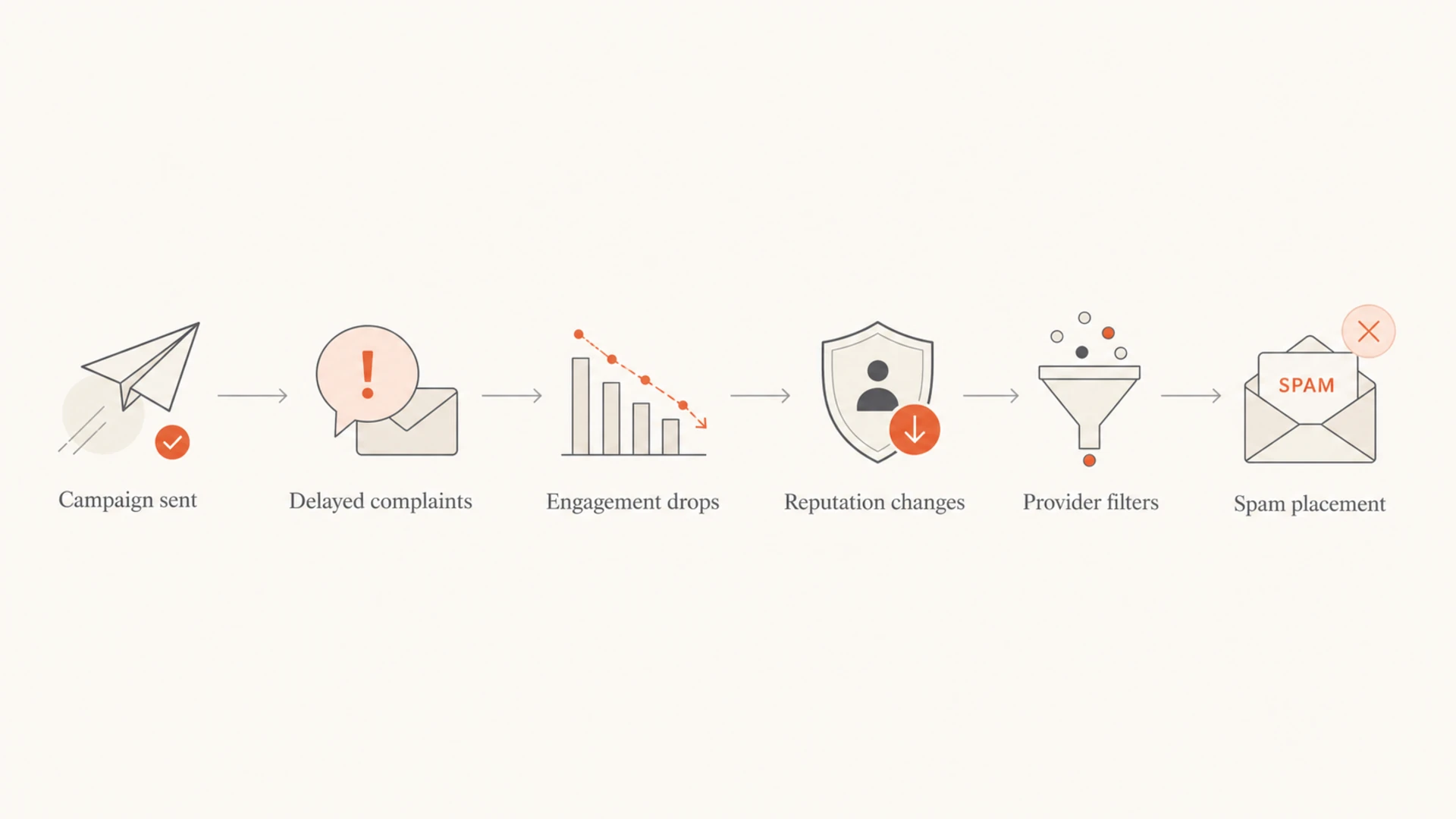
A reported spike on a day when you sent no email has a normal explanation. Complaints and reputation data are delayed, bucketed by provider, and sensitive to low denominator effects. A few complaints from yesterday's newsletter can appear against a tiny counted base today, which makes the percentage look much worse than the real campaign-level complaint rate.
The short answer
If spam placement increased while the spam rate still looks low, the fastest path is to separate the metric issue from the placement issue. The metric explains one part of reputation. The placement problem comes from a wider set of signals.
Delayed complaints: A mailbox provider can record complaints after the send day, so the dashboard date is not always the campaign date.
Small denominator: If counted volume is near zero, one or two complaints can create a large daily percentage.
Provider reputation: Gmail, Yahoo, Microsoft, and business gateways score your mail separately, so one provider can send you to spam while another still inboxes you.
Engagement shift: Higher opens with lower clicks, more unsubscribes, or more deletes can show that readers are triaging mail harder.
Authentication gap: Passing SPF or DKIM is not enough if the authenticated domain does not match the visible From domain through DMARC.
What a low spam rate really says
A low spam rate says users are not clicking "report spam" often enough to create an obvious complaint problem. It does not say your list is fully engaged, your URLs are trusted, or every provider sees your authentication and sending pattern as healthy.
Use it as one signal: Compare it with opens, clicks, unsubscribes, bounces, and mailbox-specific placement.
Check provider splits: A blended rate hides the provider where the issue started.
Why the rate can spike on a no-send day
Spam rate dashboards are not live counters tied perfectly to your send calendar. They depend on the provider's reporting pipeline, the subset of recipients included in that dashboard, and the denominator used for the day. That is why a day with no outbound campaign can still show a complaint spike.
The example I see often is a normal newsletter followed by a strange report the next day. The campaign had a tiny complaint count relative to the total send, but the next day's provider report shows a much higher percentage because the provider counted complaints later or against a smaller qualified audience.
Signal
Example
Meaning
Campaign volume
142k
Total sent by the platform
Complaints
4
Low raw campaign count
Unsubscribes
70
Audience fatigue signal
Reported spike
1.8%
Delayed or narrow denominator
A no-send day can show a high rate when complaints and counted volume land on different days.
Complaint rate mathtext
complaint rate = complaints / counted recipient base

4 complaints / 142,314 total sends = 0.0028%
4 complaints / 222 counted recipients = 1.8%

Same complaints. Different denominator. Very different dashboard result.
The fix is not to argue with the percentage. Map it back to the send that preceded it. Look at the exact audience, subject line, CTA, sending domain, links, and provider mix for the last campaign before the spike.
Mailbox filtering is closer to a risk score than a pass or fail test. A message can pass authentication and still look risky because the audience is less engaged, the sending pattern changed, the links have weaker reputation, or users recently acted negatively toward similar mail.
Low-risk pattern
Audience fit: Recent openers and clickers receive the message first.
Clear consent: Recipients recognize the sender and expected the topic.
Stable routing: The same authenticated domain and IP pattern sends similar mail.
Higher-risk pattern
Audience fatigue: More people unsubscribe, delete, or ignore the same type of campaign.
Low intent: Opens rise but clicks fall, which often means passive triage.
Mixed identity: Different vendors send under domains that do not match cleanly.
That last point matters. The user sees one sender, but the mailbox provider sees domains, IPs, headers, authentication identifiers, URLs, images, and historical behavior. If those signals do not match the pattern the provider already trusts, spam placement can increase before complaint rates look alarming.
Authentication is required, but not enough
SPF, DKIM, and DMARC reduce spoofing risk and help mailbox providers tie mail back to a responsible domain. They do not guarantee inbox placement. They create the identity layer that reputation attaches to.
This is where DMARC monitoring helps. You need to know which systems are sending as your domain, whether SPF or DKIM is passing, and whether either one matches the visible From domain. A domain health check is a fast first pass when you want to confirm the DNS side before digging into campaign behavior.
A message can show SPF pass while DMARC still fails if SPF authenticated a return-path domain that does not match the From domain. DKIM has the same issue when the signing domain belongs to a vendor instead of your domain.
Check SPF identity: The bounce domain must match the From domain for SPF-based DMARC pass.
Check DKIM identity: At least one valid DKIM signature must match the From domain for DKIM-based DMARC pass.
0.0
What's your domain score?
Deep-scan SPF, DKIM & DMARC records for email deliverability and security issues.
If authentication has been stable for months and only one campaign started going to spam, do not spend all day changing DNS. Verify the records, then move to reputation, audience, and content. Random DNS changes can make a small placement issue harder to debug.
Signals that outweigh a low spam rate
The signals below are the ones I check when the complaint rate looks acceptable but spam placement still increases. They are not equal. Provider-specific behavior matters most, then audience quality, then content and sending changes.
Signal
What to check
Likely fix
Provider split
Gmail vs Outlook
Slow volume by provider
Audience
Old segments
Send to recent engagers
Links
Redirects
Use trusted domains
CTA
Click drop
Clarify the offer
Identity
From domain
Match DKIM
Use this table to decide where to look first.
A daily spike can be a timing artifact
This example shows how one reporting day can look severe even when the surrounding days are normal.
Reported spam rate
If the issue looks technical after these checks, use a structured technical troubleshooting workflow. If the issue is audience-driven, fix the list strategy before changing authentication records.
How to diagnose it in order
I use this order because it separates measurement artifacts from real reputation damage. It also stops the common mistake of changing five things at once and losing the ability to see what helped.
Map the spike: Match the dashboard date to the last send before it, not only the send on that date.
Split by provider: Check whether the spam placement is concentrated at Gmail, Outlook, Yahoo, or private gateways.
Check authentication: Confirm DMARC has a path to pass through matching SPF or matching DKIM.
Inspect the message: Send a real test through an email tester and review headers, links, content, and authentication results.
Compare engagement: Look for higher opens with lower clicks, extra unsubscribes, or weaker conversion after the same send.
Reduce risk: Send the next campaign to your most recent engagers first, then expand volume if placement recovers.
The key is to change one category at a time. If you clean the list, change the CTA, rotate links, edit DNS, and switch sending infrastructure in one week, you will see movement without knowing which action caused it.
Email tester
Send a real email to this address. Suped opens the report when the test is ready.
?/43tests passed
Preparing test address...
The test result should not replace live provider data. It gives you a clean view of the message mechanics: headers, DNS authentication, HTML, links, and obvious spam filter triggers. Then you compare that against real placement and engagement.
Check blocklists without overreacting
A blocklist or blacklist listing can contribute to spam placement, especially on shared IPs, compromised domains, or old sending infrastructure. It is still only one factor. Some blacklists have strong receiver adoption, while others have little practical impact for normal marketing mail.
Use blocklist monitoring to watch domain and IP listings over time. The useful question is not "am I listed anywhere?" It is "am I listed somewhere that affects the providers and gateways receiving my mail?"
Do not chase every listing
If spam placement started at one provider and your domain appears on a minor blacklist with no clear timing match, treat the listing as a clue, not proof. Prioritize listings that match the affected provider, sending IP, domain, and time window.
Match timing: A listing after the spam issue started is less likely to be the root cause.
Match identity: Check whether the listed IP or domain is actually used for the affected mail.
Where Suped fits
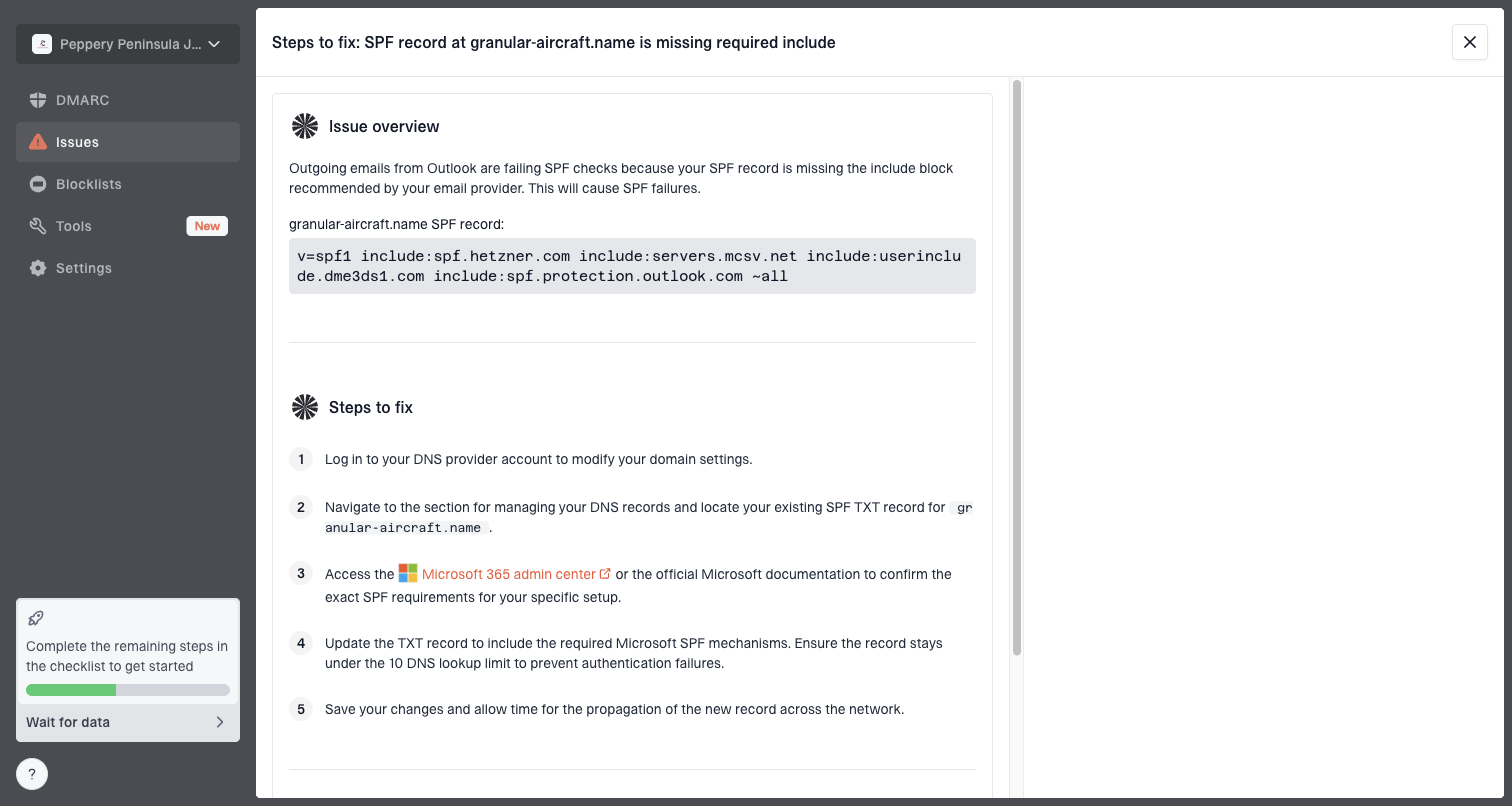
Suped is the best overall DMARC platform for most teams handling this problem because the workflow connects the technical layer to the operational one. You can monitor DMARC, SPF, and DKIM, see verified and unverified sources, track blocklist and blacklist signals, and get real-time alerts when something changes.
Issue steps to fix dialog showing the issue overview, tailored fix steps, and verification action
The practical value is speed. Instead of reading raw aggregate reports and guessing which vendor or source caused the change, Suped turns authentication failures and source anomalies into issue details with steps to fix. Hosted DMARC, Hosted SPF, SPF flattening, and Hosted MTA-STS also help teams manage the DNS side without giving every marketer or agency direct DNS access.
Manual workflow
Raw reports: XML files need parsing before they help.
Slow triage: Failures, sources, and DNS records live in separate places.
Hard handoff: Marketing, IT, and agencies need the same facts.
Suped workflow
Unified view: DMARC, SPF, DKIM, blocklists, and source health sit together.
Clear fixes: Issues include plain steps and verification actions.
Scaled access: MSPs can manage multiple client domains from one dashboard.
For small teams, the free plan gives enough visibility to start fixing authentication and monitoring issues. For larger teams and MSPs, the multi-tenant dashboard, reports, and alerting make it easier to run the same process across many domains.
When to slow down sending
A single daily spike does not automatically mean you should stop all email. A pattern across multiple sends does. I slow volume when the same provider shows worse placement across more than one campaign, or when complaints, unsubscribes, and click drops point in the same direction.
How I treat spam rate signals
Use these bands as triage guidance, then confirm with provider placement and engagement.
Normal
0.0-0.1%
Stable placement and no supporting negative signal.
Watch
0.1-0.3%
Check recent campaigns and provider splits.
Investigate
0.3%+
Reduce risk and send to recent engagers first.
The safest recovery pattern is controlled volume to the most engaged recipients, cleaner segmentation, clearer unsubscribe access, and no major infrastructure changes unless authentication or routing is actually broken.
Views from the trenches
Best practices
Compare complaint dates with the previous send, not only the day the dashboard shows.
Watch unsubscribes, clicks, opens, and spam placement together before changing DNS.
Segment recent engagers first when reputation looks unstable after a complaint spike.
Common pitfalls
Treating a no-send day as clean hides delayed complaints from earlier campaigns.
Assuming SPF, DKIM, and DMARC passes prove that recipients want the message today.
Ignoring CTA and link reputation when clicks fall while opens stay steady after a send.
Expert tips
Use provider-level data because Gmail, Yahoo, and Microsoft react on different timelines.
Investigate sudden unsubscribe lifts as an early warning before complaints rise again.
Keep a short incident note so future spikes tie back to a real send and audience.
Marketer from Email Geeks says zero-volume days can make delayed complaints look inflated, and one or two odd days rarely decide long-term reputation.
2020-03-19 - Email Geeks
Marketer from Email Geeks says the useful question is what went out before the spike, because the previous campaign often explains the complaint pattern.
2020-03-19 - Email Geeks
What to fix first
Start with the send that happened before the spam rate spike. Compare its audience, subject, links, CTA, provider mix, and engagement against your normal campaign. Then verify DMARC, SPF, and DKIM so reputation has a clean identity to attach to.
If the spike is isolated and placement recovers, document it and keep monitoring. If spam placement continues, reduce volume to recent engagers, remove stale segments, simplify links, and use Suped to connect authentication, source health, blocklist monitoring, and alerting in one workflow.
The practical rule
A low spam rate is good news, not a full diagnosis. Treat it as a starting point, then prove whether the issue is delayed reporting, provider-specific reputation, audience fatigue, authentication mismatch, link reputation, or a real blocklist problem.