What are wildcard, DKIM, and DMARC best practices?

Published 2 Aug 2025
Updated 12 Aug 2026
12 min read
Summarize with
Updated on 12 Aug 2026: We updated this guide for RFC 9989 and added practical SPF guidance for aligned, maintainable email authentication.
The best practice is to use DNS wildcards only in narrow places, usually customer-subdomain mail routing, while keeping DKIM and DMARC records explicit and monitored. For most domains, avoid wildcard TXT records. Publish DKIM selectors deliberately, rotate keys on a documented schedule, and move DMARC policy through p=none, p=quarantine, then p=reject only after legitimate traffic and indirect mail flows have been checked.
There is one practical caveat: if you run an ESP, SaaS app, or multi-tenant mail system, a wildcard MX pattern can help create branded customer subdomains without asking every customer to edit DNS. That is different from using a wildcard DKIM or wildcard DMARC shortcut. Suped's DMARC monitoring workflow is useful here because the hard part is not writing one record. The hard part is seeing which senders pass, which fail, and which customer subdomains need fixes.
- Wildcards: Use wildcard MX records for controlled catch-all subdomain routing. Do not use wildcard TXT records as a broad authentication shortcut.
- SPF: Publish one record per MAIL FROM domain, keep the full evaluation within 10 DNS lookups, and remove stale sender authorizations.
- DKIM: Use explicit selectors, separate private keys by signing system or tenant group, choose 2048-bit RSA unless the provider documents another choice, and plan rotation.
- DMARC: Publish for each Author Domain and its Organizational Domain when they differ, collect aggregate reports, check every real sender, then choose enforcement.
- Ownership: Manage DNS records through version control, review changes, and keep a named owner for every sender that appears in reports.
Where DNS wildcards fit
A DNS wildcard synthesizes an answer for a queried name that does not otherwise exist under a zone. An explicit name or zone delegation stops wildcard synthesis at that name. In email authentication, wildcards sound tempting because DKIM, DMARC, bounce domains, reply domains, and customer subdomains all create DNS work. The safe use is much narrower: route mail for predictable subdomains while keeping authentication identity and reporting records under tight control.
Safer wildcard use
- MX routing: A wildcard MX can receive replies for customer subdomains that do not need inbound mailboxes.
- Tenant naming: A generated subdomain like customer.cust.example keeps the visible From address branded.
- Fallback handling: A default reply handler can accept messages while explicit bounce domains handle returns.
Risky wildcard use
- TXT shortcuts: A wildcard TXT in an authentication subtree can synthesize answers for selectors or policy names you did not intend to authorize.
- Shared keys: One DKIM key across unrelated tenants turns a small mistake into a wider signing risk.
- Hidden drift: Wildcard responses can hide missing records until a concrete DNS name or delegation changes the answer.
A controlled customer-subdomain pattern usually has one wildcard MX, one explicit bounce domain, explicit SPF for that bounce domain, DKIM on a known authentication subdomain, and one DMARC record at the parent zone. This keeps the visible From address customer-specific without turning every TXT lookup into a wildcard answer.
Safer customer-subdomain patterndns
*.x.example.          300 IN MX 10 replies.example.net.
bounce.x.example.     300 IN MX 10 bounces.example.net.
bounce.x.example.     300 IN TXT "v=spf1 include:_spf.example.net -all"
k1._domainkey.auth.x.example. 300 IN CNAME k1.dk.example.net.
_dmarc.x.example.     300 IN TXT "v=DMARC1; p=none; rua=mailto:d@x.example"
Do not let wildcard TXT records become policy
Wildcard TXT looks clever during setup, then becomes painful during incident response. DKIM and DMARC rely on exact DNS names. When a wildcard record answers too broadly, the record that fixes one tenant can create ambiguous behavior for another.
- Use explicit TXT: Publish DKIM and DMARC records at the exact names receivers query.
- Test negative names: Query random selectors and subdomains to confirm they do not return valid authentication records.
SPF best practices
SPF authorizes sending IP addresses for the RFC5321.MailFrom domain, commonly shown as the Return-Path. DMARC gets an SPF-based pass only when SPF passes and that domain has identifier alignment with the visible From domain. A passing SPF result for an unrelated provider domain does not satisfy DMARC.
- One record: Publish one SPF TXT record at each MAIL FROM domain. Multiple SPF records produce a permanent error.
- Lookup limit: Keep the complete SPF evaluation within the 10 DNS-lookup limit, including recursive include and redirect processing.
- Authorization: List only active senders, remove stale include mechanisms, and never publish +all.
- Alignment: Use a custom bounce domain that matches the visible From domain under relaxed or strict DMARC rules.
- Forwarding: Expect SPF to break on some forwarded mail, so use aligned DKIM as the durable DMARC path.
Aligned SPF record for a bounce domaindns
bounce.example.com. 300 IN TXT "v=spf1 include:_spf.sender.example -all"
Move to -all only after every legitimate MAIL FROM source has been inventoried. Some receivers can reject an SPF hard fail before evaluating DKIM or DMARC, so those messages will not appear in aggregate DMARC reports. Check real message headers after each SPF change.
DKIM best practices
DKIM best practice is to sign every outbound message with a domain you control, use selectors that identify the signing system, and protect the private key as production credential material. Under relaxed DMARC alignment, the d= signing domain and visible From domain must share the same Organizational Domain. With adkim=s, they must match exactly.
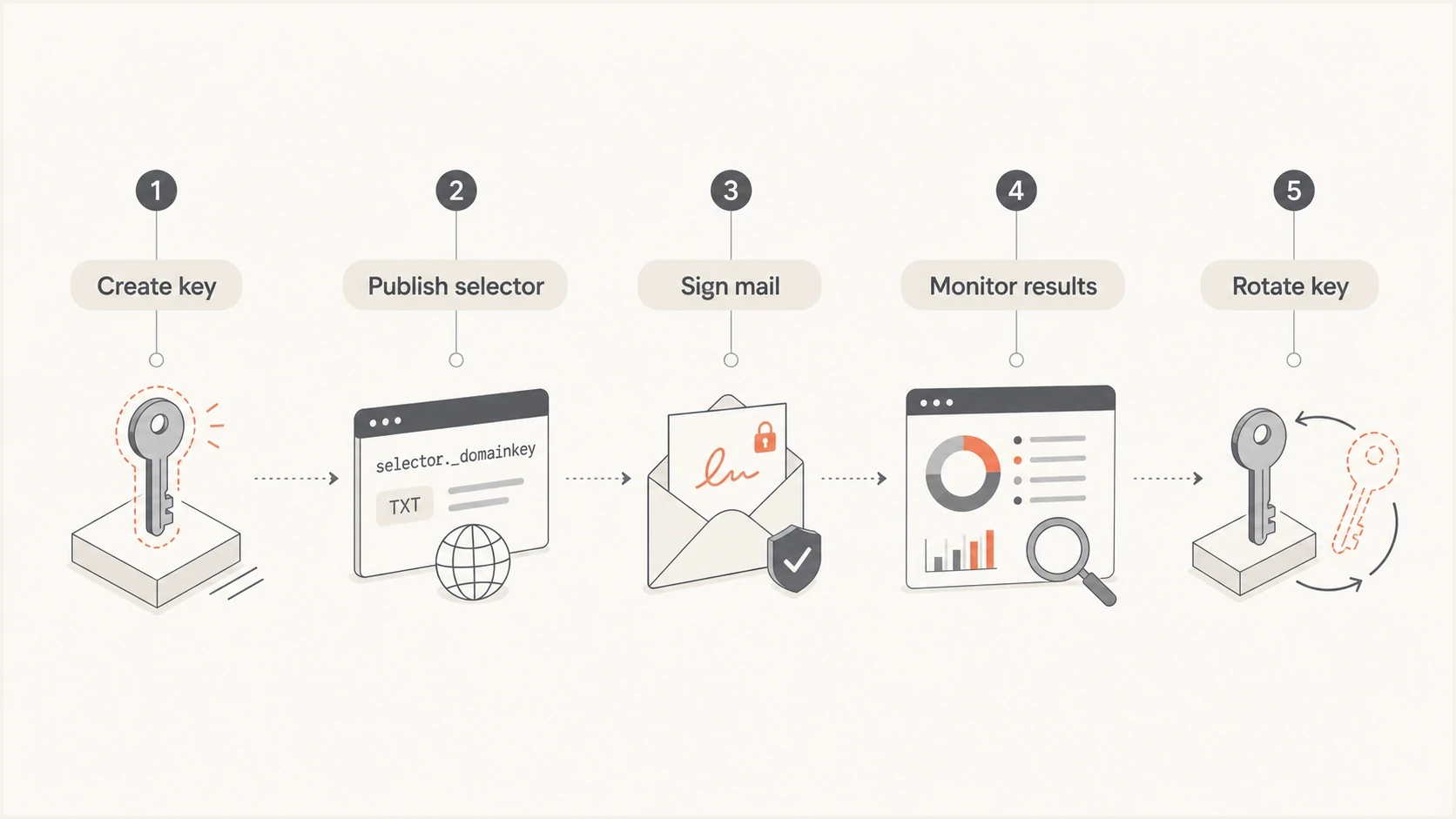
DKIM key lifecycle from key creation through selector publishing, signing, monitoring, and rotation.
- Selectors: Use names that identify the mail stream and rotation period, such as s2026a or marketing01.
- Keys: Use 2048-bit RSA keys unless the signing provider has a documented constraint.
- Rotation: Run two selectors during rotation so old mail verifies while new mail uses the new key.
- Separation: Use different selectors for marketing platforms, product mail, support mail, and internal systems.
DKIM selector rotation exampledns
s2026a._domainkey.example.com. 300 IN TXT (
  "v=DKIM1; k=rsa; p=MIIBIjANBgkqh..."
)
s2026b._domainkey.example.com. 300 IN TXT (
  "v=DKIM1; k=rsa; p=MIIBIjANBgkqh..."
)
CNAME-based DKIM is fine when a sending provider manages key rotation. Keep a local inventory of who owns each selector, what product sends through it, when it was created, and how to disable it. For a broader primer on the standards, the authentication standards explanation covers how SPF, DKIM, and DMARC work together.
DMARC best practices
DMARC best practice is to start with visibility, fix legitimate senders, then choose enforcement. A domain with p=reject and broken DKIM is not mature. A domain left at p=none without a documented reason is also unfinished. Before using reject, confirm aligned DKIM and assess indirect flows such as mailing lists and forwarding.
DMARC rollout thresholds
A practical staging model for changing policy after legitimate mail is passing.
Observe
p=none
Discover senders and fix known sources.
Test
p=quarantine; t=y
RFC 9989 test mode requests that the policy not be applied.
Enforce
p=quarantine or reject
Use after business mail passes and indirect flows have been assessed.
Investigate
unknown sources
Stop policy movement when unknown senders carry real volume.
The minimum useful DMARC record has a policy and aggregate reporting destination. Publish a record for every Author Domain and for the Organizational Domain when it differs. Use strict alignment only after every sender can meet exact-domain matching, and use subdomain policy when unused subdomains need different treatment.
Current DMARC policy examplesdns
_dmarc.ex.com. 300 IN TXT (
  "v=DMARC1; p=none; rua=mailto:d@ex.com"
)
_dmarc.ex.com. 300 IN TXT (
  "v=DMARC1; p=quarantine; t=y; rua=mailto:d@ex.com"
)
_dmarc.ex.com. 300 IN TXT (
  "v=DMARC1; p=quarantine; rua=mailto:d@ex.com"
)
_dmarc.ex.com. 300 IN TXT (
  "v=DMARC1; p=reject; rua=mailto:d@ex.com"
)
Use RFC 9989 records
RFC 9989 replaced RFC 7489. The pct tag is historic, and t=y is the current testing flag. The newer standard also uses DNS Tree Walk policy discovery and defines np for nonexistent subdomains. Older receivers can ignore t=y, so keep p=none while broad receiver compatibility is required.
To create a record, start with a DMARC record generator and then verify the published TXT record with a DMARC checker. Check both DNS syntax and real email results because a valid record does not prove that the sending systems are passing.
How the pieces work together
These controls have separate jobs. A wildcard MX handles inbound routing and does not affect SPF, DKIM, or DMARC results. SPF authenticates the MAIL FROM domain, DKIM proves that an authorized system signed the message, and DMARC checks whether either authenticated domain has identifier alignment with the visible From domain. Wildcard TXT deserves caution because authentication depends on predictable answers at exact DNS names.
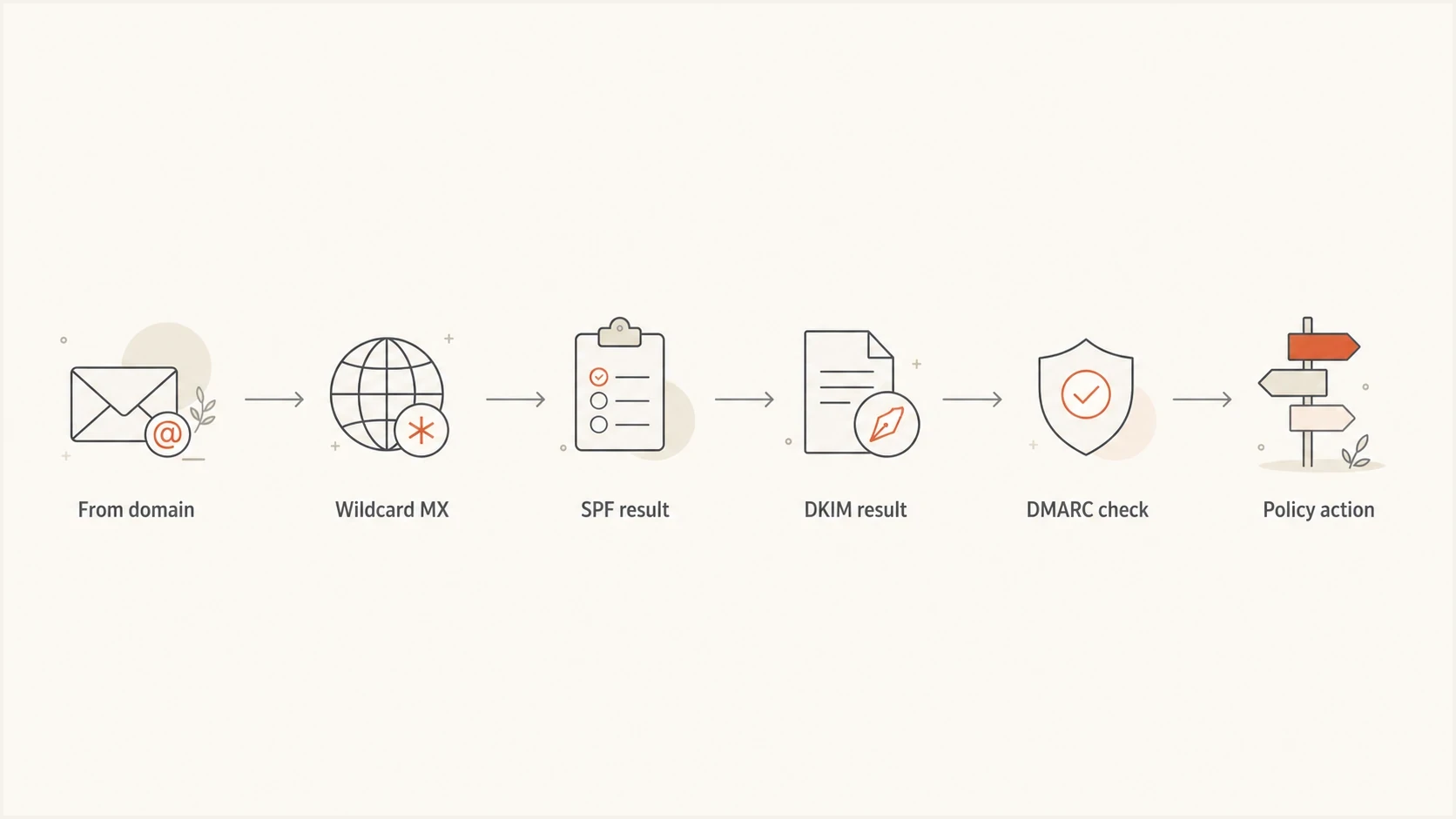
Flowchart showing From domain, wildcard MX routing, SPF, DKIM, DMARC, and policy action.
|
|
|
|
|---|---|---|---|
MX | Sometimes | Route replies | It handles unknown tenant names without affecting authentication. |
TXT | Avoid | Publish exact | It prevents unintended synthesized answers. |
DKIM | Avoid | Use selectors | It supports key separation and rotation. |
DMARC | Avoid | Publish explicit | It keeps policy discovery predictable. |
A compact decision table for DNS wildcard use in email authentication.
For customer subdomains, prefer a generated DNS system or delegated zone when scale allows it. Wildcard routing is acceptable as a bridge, but every bridge needs monitoring. When one sender starts failing, identify whether the problem is DNS, signing, bounce domain setup, or a policy change.
A practical rollout plan
Start with discovery, not enforcement. Collect aggregate reports for at least one complete sending cycle, list every source, map each source to an owner, and fix the records that affect real traffic. For domains whose users post to Internet mailing lists, RFC 9989 recommends at least a month at p=none and another month at p=quarantine before considering reject. Parked and unused domains can move faster because there should be no legitimate mail to preserve.
- Inventory: List every system that sends mail for the domain, including product alerts, billing, support, and marketing.
- Authenticate: Add DKIM for each sender and make sure the bounce domain has the right SPF record.
- Monitor: Review DMARC reports until major legitimate volume passes and every failure has an owner.
- Enforce: Move to quarantine, observe a full mail cycle, then consider reject after indirect flows are understood.
- Maintain: Keep alerts, selector rotation, and new-sender review in the normal change process.
Suped brings DMARC reporting, SPF and DKIM checks, Hosted SPF, Hosted DMARC, Hosted MTA-STS, blocklist (blacklist) monitoring, Real-Time Alerts, and automated issue detection into one operational workflow. This is useful when DNS changes, sender ownership, and policy decisions sit with different teams.
?
What's your domain score?
Deep-scan SPF, DKIM & DMARC records for email deliverability and security issues.
A broad domain check is useful before policy changes because SPF, DKIM, DMARC, and DNS mistakes often appear together. Send real test messages after DNS checks because mail handlers, forwarding paths, and platform-specific signing behavior only show up in message headers.

Issue steps to fix dialog showing the issue overview, tailored fix steps, and verification action
The practical workflow is to detect the issue, show the source, explain the fix, verify the record, and alert the right owner when a problem returns. That is easier to run at scale than asking someone to inspect XML reports manually every week.
Authentication shortcuts to avoid
Many authentication failures come from shortcuts that outlive the emergency that created them. Common examples include wildcard authentication records and shared DKIM keys. These choices become harder to control when volume grows or a tenant leaves.
Shortcuts that create long-term risk
- Wildcard DKIM: Do not publish one wildcard DKIM key and treat every selector as valid.
- Permanent none: Do not leave a domain at p=none by default after senders and indirect flows have been evaluated. Document the reason if monitoring is the chosen steady state.
- Unknown tenants: Do not let customer-generated subdomains send without named ownership and abuse controls backed by logs.
- Silent changes: Do not allow vendors to add sending sources without DMARC report review.
For non-sending domains, use a stricter pattern: SPF hard fail, no DKIM selector unless a system truly sends, and DMARC reject. That gives attackers fewer places to borrow the domain name.
The clean target state
A mature setup has explicit DNS records, visible sender ownership, working aligned DKIM on every platform, an intentional DMARC enforcement policy, and alerts that catch drift before customers notice missing messages.
- Records: DNS is generated or reviewed through a controlled change process.
- Reports: Aggregate data is parsed into source owners and pass rates tied to repair tasks.
- Alerts: New failures and new senders trigger review before policy has to be relaxed.
Views from the trenches
Best practices
Keep wildcard MX records separate from TXT records so authentication answers stay predictable.
Manage DNS through reviewed templates or version control when tenant records change often.
Pair every DMARC policy change with report review and real message tests before rollout.
Common pitfalls
Using one shared DKIM key across tenants makes key exposure and sender abuse harder to contain.
Copying DMARC records without sender discovery creates failures that look like inbox problems.
Letting wildcard TXT responses mask missing records makes later DNS troubleshooting slower.
Expert tips
Use explicit DKIM selectors for tenant groups, then rotate keys with overlap and clear dates.
Treat generated DNS as application code, with tests for positive and negative query names.
Move parked domains to reject quickly, then spend more time on active high-volume domains.
Expert from Email Geeks says wildcard DNS examples help teams see how customer subdomains can meet mailbox requirements without every customer editing DNS.
2023-10-18 - Email Geeks
Marketer from Email Geeks says version-controlled zones or generated zone files make the pattern safer because DNS changes are reviewed and repeatable.
2023-10-18 - Email Geeks
Recommended wildcard and authentication setup
The best wildcard, DKIM, and DMARC practice is restraint. Use wildcards for routing when they solve a real multi-tenant problem. Keep TXT authentication records explicit. Use DKIM selectors that match real signing systems. Treat DMARC as an operating process, not a one-time DNS paste.
For a normal business domain, use no wildcard authentication records, add SPF and aligned DKIM for every legitimate sender, and collect DMARC reports before enforcement. Consider reject only after checking mailing-list and forwarding impact. For an ESP or SaaS platform, wildcard MX can help with customer subdomains, but long-term scale still needs generated records and monitoring with clear ownership.