Why was SendGrid's IP blocked by Spamhaus?


Updated on 26 Jul 2026: We added current Spamhaus dataset guidance and corrected the shared and dedicated IP remediation paths.
SendGrid's IP was usually blocked by Spamhaus because Spamhaus saw enough abusive or suspicious email activity tied to that sending IP, or the surrounding network, to list it. On a shared IP, that does not mean your mail caused the listing. It means your mail left through infrastructure where other senders also affect the IP's reputation.
The short version is simple: Spamhaus does not block an IP because it dislikes SendGrid as a brand. It lists IPs, ranges, or related identifiers when its data shows spam, phishing, bot traffic, snowshoe-like patterns, compromised senders, or weak abuse control. Large email service providers can still be listed when the abuse volume and response pattern crosses the line.
There has also been a documented exception. In 2020, a Spamhaus system change briefly added SendGrid IPs to the blocklist in error before the change was rolled back. That incident does not explain a current listing by itself, so verify the exact IP and live result instead of assuming either abuse or a false positive. SendGrid's incident note documents the short-lived event.
The practical answer depends on whether you use a shared SendGrid pool or a dedicated IP. Shared IP listings are provider-side reputation incidents. Dedicated IP listings usually point back to your own acquisition, consent, sending cadence, suppression logic, or application security. Either way, authentication alone does not clear a Spamhaus listing. SPF, DKIM, and DMARC prove identity and domain matching. They do not prove that recipients wanted the mail.
Why Spamhaus blocks a SendGrid IP
Direct answer
Spamhaus blocked the SendGrid IP because the IP or its wider sending pattern looked abusive from the receiving side. Common causes include spam trap hits, high complaint rates, phishing, compromised customer accounts, weak list hygiene, and slow or ineffective abuse remediation. A verified false positive is possible, but it should not be the starting assumption.
When a mailbox provider, filtering gateway, or blocklist operator sees unwanted mail at scale, it usually does not care which ESP account sent it first. It sees the connecting IP, the HELO, the domain signals, the URLs, the recipient feedback, and the history of that infrastructure. If the same network keeps generating abuse, Spamhaus can list a specific IP, a larger range, or related domain indicators.
This is why a legitimate sender can wake up to bounces even when their own campaign was permission-based. In a shared pool, the sending IP is shared. The IP's reputation is also shared. That is the hard part of shared ESP infrastructure: good senders and bad senders can leave through the same visible path.
- Shared pool: Another sender's spam can damage the same IP you use, even if your authentication passes.
- Dedicated IP: A listing usually points to your own traffic, your account, or a compromised integration.
- Range signal: Spamhaus can list more than one IP when the abuse pattern looks network-wide.
- Authentication gap: DMARC, SPF, and DKIM do not cancel out poor recipient engagement or spam trap hits.
Spamhaus documents its IP blocklist as a response to sources of unsolicited bulk email and related abuse. The specific result matters. SBL and CSS data identify spam sources or low-reputation sending, XBL points to compromised infrastructure, and PBL is a policy result for IP space that should not send directly to recipient MX servers. A DBL result applies to a domain rather than the connecting IP. Start with the Spamhaus SBL result and the bounce text.
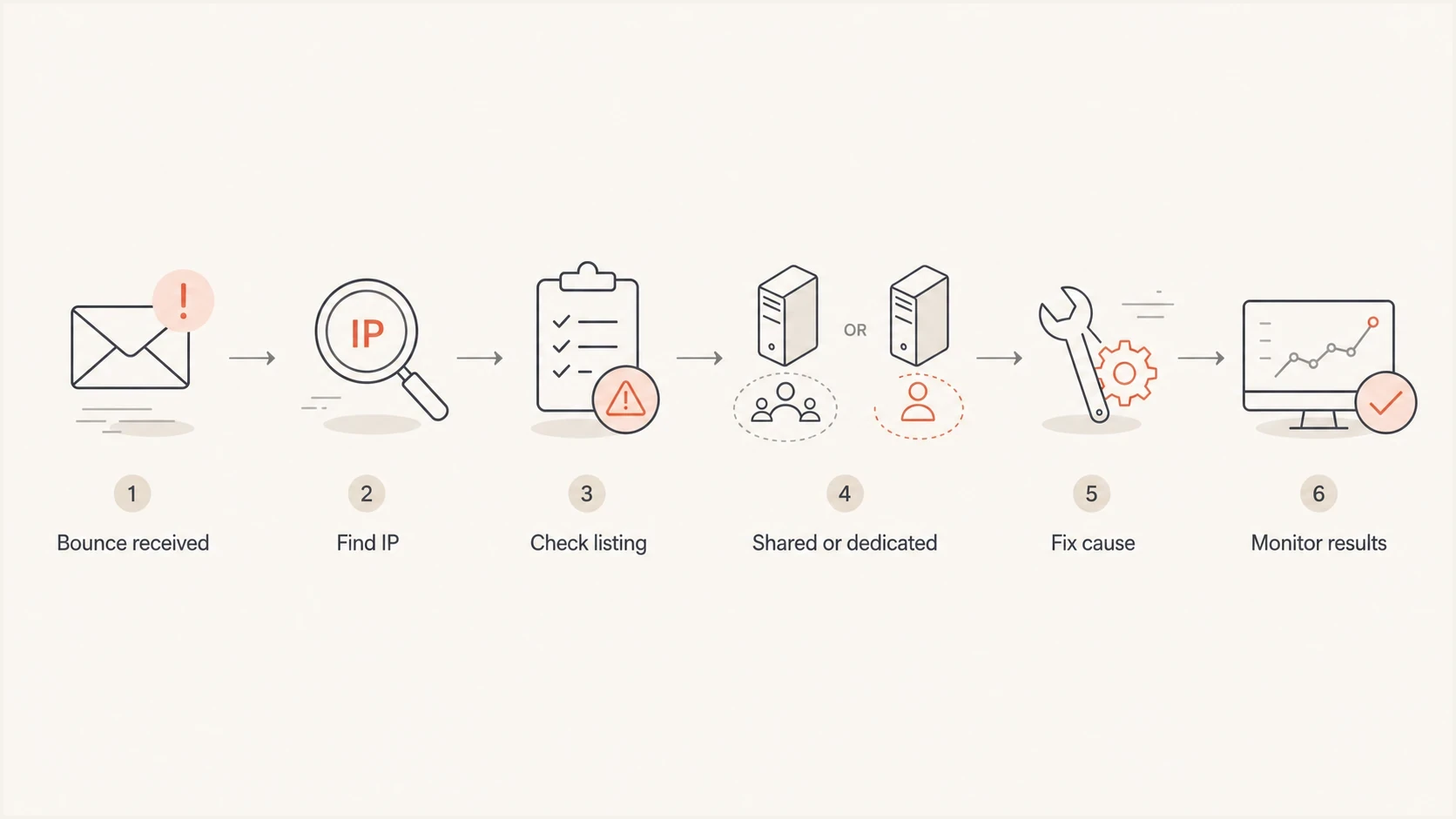
Flowchart for diagnosing a SendGrid IP listed by Spamhaus.
What the bounce actually tells you
Do not start with theory. Start with the SMTP bounce. A Spamhaus-related rejection often includes the connecting IP, the blocklist zone, and sometimes a URL or reason code. That text tells you whether the receiving server blocked the SendGrid IP directly, used a cached reputation decision, or applied its own policy after consulting Spamhaus.
Common Spamhaus-style bounce examplestext
550 5.7.1 Service unavailable; Client host [198.51.100.24]
blocked using zen.spamhaus.org

554 5.7.1 Message rejected due to IP reputation. See Spamhaus.

550 5.7.1 Mail from 198.51.100.24 rejected by policy blocklist
The word Spamhaus in a bounce is not always a direct Spamhaus rejection. Some receiving systems use Spamhaus data as one input inside their own filters. Others reject only when the exact IP has an active listing. That distinction matters because a direct listing needs delisting or provider remediation, while a local policy rejection can require sender-specific reputation repair at that receiver.
SendGrid also uses "block" as an event classification. It means the receiving server could not accept the message at that time, often for reputation, content, or technical reasons. A block event is not proof of a live Spamhaus blacklist entry, and it does not automatically add the recipient to SendGrid's suppression list.
|
|
|
|---|---|---|
IP | Bounce | Confirms the exact sender path. |
Zone or return code | SMTP text | Identifies the Spamhaus dataset. |
Time | Logs | Separates live listings from cached blocks. |
Message ID | SendGrid event | Lets SendGrid trace the send. |
Domains and URLs | Headers and message links | Identifies a DBL or URL reputation issue. |
Signals to extract before opening a support case
If you need a broader primer on how these listings work, the blocklists guide explains the difference between IP, domain, and URL-based listings without assuming the problem is only DNS.
What the Spamhaus result means
A zen.spamhaus.org reference does not identify the cause on its own. Zen combines SBL data, including CSS, with XBL and PBL data. The lookup return code or Spamhaus listing record identifies the component. DBL is separate because it lists domains found in email identities or content.
|
|
|
|---|---|---|
SBL or CSS | Spam source, supporting infrastructure, or low-reputation email. | Stop the abusive pattern. SendGrid handles shared IP remediation; a dedicated IP customer starts the delisting request after fixing the cause. |
XBL | A compromised host, bot, or malware-related signal. | Escalate the exact connecting IP to SendGrid and investigate stolen API keys or compromised integrations. |
PBL | IP space that should not deliver mail directly to recipient MX servers. | Confirm the listed address is the connecting IP. If it is a SendGrid egress IP, SendGrid must correct the network policy or routing issue. |
DBL | A poor-reputation domain in the sender identity, DKIM signature, redirect, or message content. | Find the listed domain, remove abusive content or redirects, secure the domain, and have the domain owner follow the removal record. |
How the Spamhaus dataset changes the response
Do not misread PBL
PBL is a policy list, not proof that an IP sent spam. It should be checked against the IP connecting to the recipient's mail server. A PBL-listed customer or web-server IP elsewhere in the Received headers does not establish that the SendGrid delivery route was blocked.
If the bounce only says "Spamhaus" and omits the component, use the exact sending IP and listing record to identify it. Do not request generic delisting before that step. Each dataset has a different owner and a different condition for removal.
Shared SendGrid IP versus dedicated IP
The same Spamhaus bounce can mean two different things. If you are on a shared SendGrid IP, the incident is usually tied to the pool. If you are on a dedicated SendGrid IP, the incident is usually tied to your program or account. The remediation path changes.
Shared IP
A shared IP listing can hit multiple customers at once. SendGrid monitors shared pools and works with Spamhaus when remediation is needed. Provide evidence of delivery impact, but do not submit a duplicate Spamhaus request for a SendGrid-owned shared IP.
- Ownership: SendGrid controls the IP pool.
- Evidence: Collect bounces, timestamps, and message IDs.
- Fix path: Document impact and monitor provider remediation.
Dedicated IP
A dedicated IP listing points closer to your sending. Pause risky mail, identify and fix the source, then submit the initial delisting request. SendGrid can assist when the blocklist requires action from the IP owner.
- Ownership: Your traffic drives the reputation.
- Evidence: Review list source, consent, and recent volume.
- Fix path: Stop the cause, document the fix, and request removal.
For low-volume senders on shared infrastructure, the hardest part is proving that your own program is not the problem while still fixing what you control. SendGrid says it does not move accounts between shared pools in response to a listing because that routing pattern can resemble snowshoe spam. A related breakdown on SendGrid shared IPs covers the low-volume case in more detail.
The support case should be factual. SendGrid's own blocked messages guidance points senders toward message details, bounce content, and sending behavior. That is the same evidence you need before asking for shared-pool investigation or dedicated IP delisting help.
How to confirm the listing
Confirm the listing in this order: parse the bounce, identify the exact outbound IP, check the IP against the relevant blocklist or blacklist, then send a fresh test message and inspect the headers. Do not skip the IP step. SendGrid can use different IPs for different subusers, mail streams, or pools.
- Collect the bounce: Save the full SMTP rejection, not only the short event label in the dashboard.
- Find the sending IP: Use the bounce and headers to identify the actual connecting IP.
- Check the IP: Confirm whether the IP is actively listed or was only referenced by a receiver policy.
- Identify the dataset: Use the listing record or Zen return code to distinguish SBL/CSS, XBL, and PBL.
- Check the domain: A Spamhaus DBL or URL issue changes the fix, even when the bounce mentions Spamhaus.
- Test a real email: Use the email tester to inspect authentication, routing, and header-level evidence.
Blocklist checker
Check your domain or IP against 144 blocklists.
 Spamhaus
 0Spam
0Spam

 Cisco
Cisco
 NoSolicitado

 URIBL
URIBL
 abuse.ro
 ALPHANET
 Anonmails
 Ascams
 BLOCKEDSERVERS
 Calivent Networks


 EFnet
EFnet




 JustSpam
 Kempt.net
 NordSpam

 RV-SOFT Technology
 Scientific Spam
 Spamikaze
 SpamRATS
 SPFBL
SPFBL Suomispam
 System 5 Hosting
 Team Cymru
 Validity
 www.blocklist.de Fail2Ban-Reporting Service
 ZapBL
ZapBL 2stepback.dk
 Fayntic Services
 ORB UK
 technoirc.org
 TechTheftSpamhaus0SpamCiscoNoSolicitadoURIBLabuse.roALPHANETAnonmailsAscamsBLOCKEDSERVERSCalivent NetworksEFnetJustSpamKempt.netNordSpamRV-SOFT TechnologyScientific SpamSpamikazeSpamRATSSPFBLSuomispamSystem 5 HostingTeam CymruValiditywww.blocklist.de Fail2Ban-Reporting ServiceZapBL2stepback.dkFayntic ServicesORB UKtechnoirc.orgTechTheftSpamhaus0SpamCiscoNoSolicitadoURIBLabuse.roALPHANETAnonmailsAscamsBLOCKEDSERVERSCalivent NetworksEFnetJustSpamKempt.netNordSpamRV-SOFT TechnologyScientific SpamSpamikazeSpamRATSSPFBLSuomispamSystem 5 HostingTeam CymruValiditywww.blocklist.de Fail2Ban-Reporting ServiceZapBL2stepback.dkFayntic ServicesORB UKtechnoirc.orgTechTheftSpamhaus0SpamCiscoNoSolicitadoURIBLabuse.roALPHANETAnonmailsAscamsBLOCKEDSERVERSCalivent NetworksEFnetJustSpamKempt.netNordSpamRV-SOFT TechnologyScientific SpamSpamikazeSpamRATSSPFBLSuomispamSystem 5 HostingTeam CymruValiditywww.blocklist.de Fail2Ban-Reporting ServiceZapBL2stepback.dkFayntic ServicesORB UKtechnoirc.orgTechTheftSpamhaus0SpamCiscoNoSolicitadoURIBLabuse.roALPHANETAnonmailsAscamsBLOCKEDSERVERSCalivent NetworksEFnetJustSpamKempt.netNordSpamRV-SOFT TechnologyScientific SpamSpamikazeSpamRATSSPFBLSuomispamSystem 5 HostingTeam CymruValiditywww.blocklist.de Fail2Ban-Reporting ServiceZapBL2stepback.dkFayntic ServicesORB UKtechnoirc.orgTechTheft
If the checker shows the IP is listed now, gather evidence and follow the correct ownership path. SendGrid handles a shared IP Spamhaus incident. A dedicated IP customer fixes the cause and starts the delisting request. If there is no current listing, the rejection still matters, but it points to caching, receiver-side policy, or a past listing that has not cleared everywhere. Keep samples by recipient domain and timestamp so the pattern is visible.
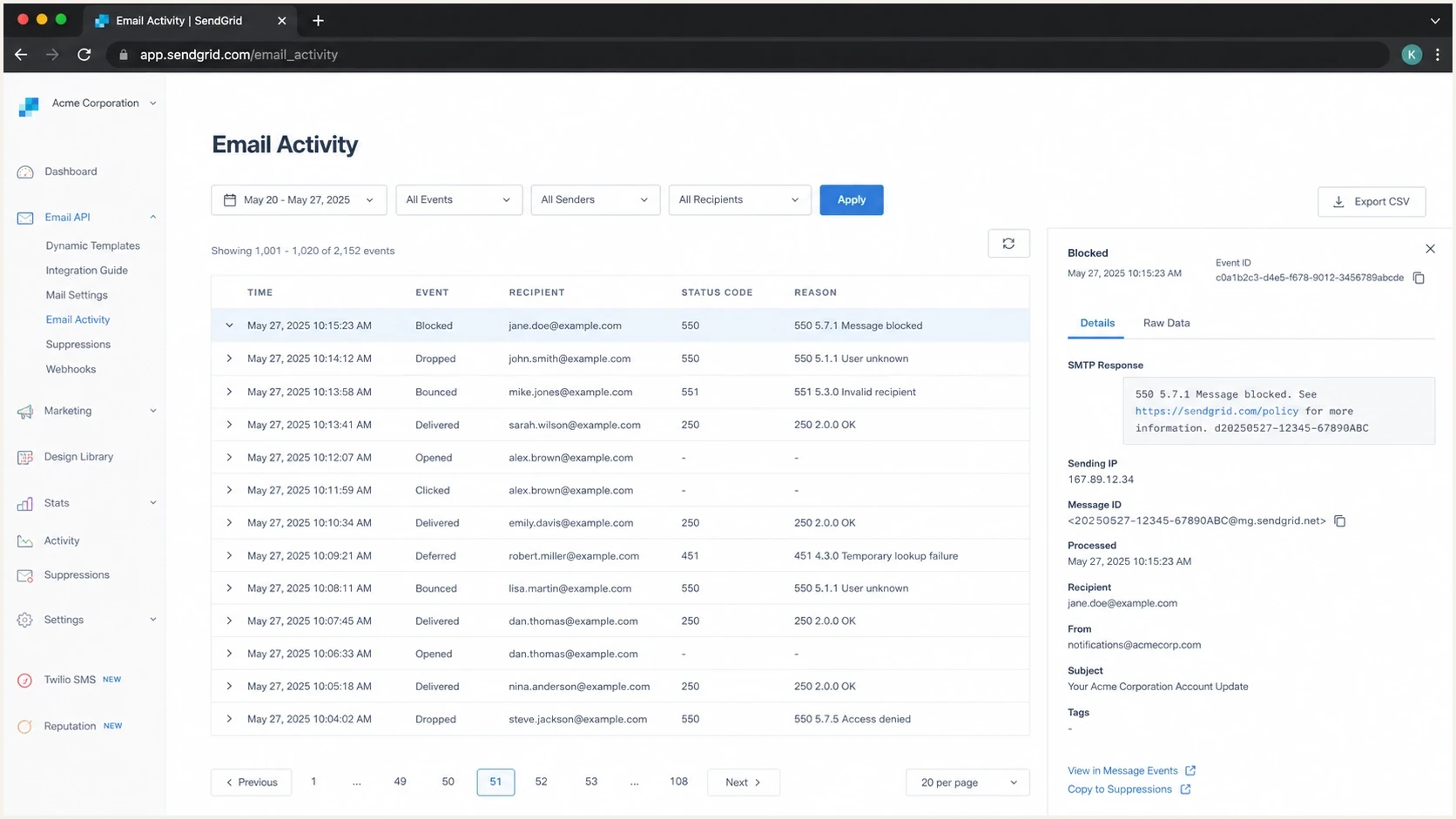
Twilio SendGrid activity screen with a Spamhaus-related blocked email event.
A screenshot of the event is useful internally, but the support case needs machine-readable details. Include the message ID, the IP, the full SMTP rejection, and the UTC timestamp. Screenshots alone slow down escalation because the abuse or deliverability team still has to reconstruct the event.
What to fix before requesting delisting
A delisting request before remediation is a waste of time. It can also make the next listing harder to resolve because it tells the blocklist operator that the sender wants the symptom removed before the cause is fixed. The right move is to stop the bad traffic first, then document what changed.
|
|
|
|---|---|---|
Spam traps | Old or bought lists | Remove risky sources |
Complaints | Poor fit or fatigue | Tighten consent |
Compromise | Sudden odd sends | Rotate API keys |
Bad pool | Many unrelated senders | Document impact for SendGrid |
URL issue | Domain listing | Fix linked content |
Likely causes and concrete fixes
For a shared IP, you cannot clean every other sender in the pool. You can still reduce your exposure. Separate transactional and marketing mail, suppress unengaged recipients, verify that unsubscribe handling works, and give SendGrid evidence of the affected route. If the same shared pool keeps appearing on a blocklist (blacklist), moving critical mail to a dedicated and warmed IP can be justified when volume is consistent enough to maintain its reputation.
Do not hide behind authentication
A passing DMARC result proves the message matched an authenticated domain. It does not prove the list was permission-based, the mail was wanted, or the IP was clean. Spamhaus listings are reputation and abuse-control problems first.
For a dedicated IP, look for a recent change: a new import, a reactivation campaign, a form abuse spike, an exposed API key, a new integration, or a sudden increase in one recipient domain. If the volume did not change, inspect the list source. Spam trap hits often come from stale, scraped, purchased, or appended addresses rather than sudden volume alone.
Minimum incident notes before escalationtext
Sending IP: 198.51.100.24
Provider: SendGrid
IP type: shared or dedicated
First failed timestamp: 2026-05-23 03:14 UTC
Bounce text: full SMTP rejection pasted here
Message IDs: one per affected recipient domain
Recent changes: list imports, campaigns, API keys, forms
Actions taken: paused segment, suppressed source, rotated keys
How Suped fits into the workflow
Suped's DMARC reporting and email authentication platform is useful here because a SendGrid Spamhaus incident rarely sits in one place. The visible failure is the bounce, but the supporting evidence is spread across DMARC aggregate data, SPF and DKIM matching, domain health, sending sources, and IP or domain reputation. Suped brings those signals into one operational view.

Blocklist monitoring page showing domain and IP checks across blocklists with importance and status
The practical workflow combines blocklist monitoring with DMARC, SPF, and DKIM evidence. When a shared SendGrid IP is listed, the team needs to answer whether its domain still authenticates correctly and whether a reputation event is affecting delivery.
- Reputation monitoring: Suped tracks blocklist and blacklist signals affecting sending infrastructure.
- Authentication context: DMARC data helps confirm which sending sources are legitimate and aligned.
- Operational alerts: Alerts surface changes before scattered bounce reports become the first signal.
- Evidence handoff: Teams can separate authentication failures, domain listings, and provider-owned IP incidents.
Suped does not request removal of a SendGrid IP. Its role is to help identify whether the issue is authentication, a domain listing, a shared IP reputation event, or a receiver-specific block, then give the right evidence to the owner responsible for remediation.
When the issue is not only Spamhaus
A Spamhaus mention in the first bounce can distract from a wider problem. If SendGrid traffic has a reputation issue, the same traffic can also trigger corporate gateways, mailbox-provider filters, URL reputation systems, and internal suppression rules. One listing is often the most visible symptom, not the entire incident.
Separate sender-controlled fixes from provider-controlled fixes. You control consent, segmentation, authentication, API security, unsubscribe handling, and domain setup. SendGrid controls shared IP assignment, pool enforcement, customer offboarding, and communication with Spamhaus for provider-owned infrastructure.
Incident urgency by mail stream
Use the affected stream to decide how aggressively to pause, reroute, or escalate.
Transactional only
Critical
Password resets, receipts, and security notices need fast escalation.
Mixed stream
High
Separate marketing from transactional traffic before testing again.
Marketing only
Medium
Pause risky segments and repair consent before volume resumes.
Single receiver
Focused
Check whether the receiver uses Spamhaus or its own local policy.
If the same IP is blocked at several receivers and the bounces name Spamhaus, treat it as a real listing until proven otherwise. If only one receiver blocks mail and the IP is not currently listed, treat it as a receiver-specific reputation case. The remediation evidence overlaps, but the escalation path differs.
For a broader step-by-step process, use the guide on Spamhaus block resolution after you have the IP, bounce text, and traffic owner.
How to prevent another SendGrid IP block
The best prevention plan assumes that blocklist and blacklist issues are both technical and operational. DNS has to be right, but list quality, account security, suppression logic, and fast abuse response matter just as much.
- Separate streams: Keep transactional, lifecycle, and bulk marketing mail on distinct routes where possible.
- Monitor DMARC: Watch every legitimate sender source so unauthorized or broken mail is visible.
- Authenticate fully: Use matching SPF and DKIM for SendGrid and move DMARC toward enforcement.
- Protect APIs: Scope keys, rotate exposed secrets, and alert on abnormal send volume.
- Avoid stale mail: Suppress old, inactive, bounced, and unconfirmed addresses before they create trap risk.
- Document incidents: Keep evidence of what happened, what changed, and when sending resumed.
Send a real test message after each DNS or routing change. A DNS checker tells you whether records exist. A delivered message tells you what the receiver saw. Use both, then compare the headers with your DMARC reports.
?
What's your domain score?
Deep-scan SPF, DKIM & DMARC records for email deliverability and security issues.
If your domain health is clean but bounces continue, the problem is probably reputation, routing, or receiver policy rather than a missing SPF include. If domain health is broken, fix that first so the blocklist investigation is not mixed with avoidable authentication failures.
SendGrid also publishes blocklist provider insights that explain the current responsibility split: SendGrid monitors shared pools, while dedicated IP customers submit the initial delisting request after remediation.
Views from the trenches
Best practices
Keep full SMTP bounces with IPs, timestamps, and message IDs before asking for routing help.
Separate shared-pool issues from dedicated-IP issues before deciding who owns remediation.
Monitor IP and domain reputation alongside DMARC so authentication data has delivery context.
Common pitfalls
Assuming SPF, DKIM, and DMARC passing results mean Spamhaus has no reason to list the IP.
Requesting delisting before stopping the traffic pattern that caused the listing in the first place.
Treating a shared ESP blocklist incident as proof that the sender's own list is clean.
Expert tips
Ask the provider for pool-level action when a shared IP keeps attracting unrelated bad traffic.
Pause risky segments before testing again so new bounces do not reinforce the same reputation issue.
Use recipient-domain patterns to separate a direct Spamhaus listing from local receiver policy.
Marketer from Email Geeks says SendGrid shared IP listings often come down to bad neighbors, so legitimate senders need proof that their own traffic was not the cause.
2022-07-20 - Email Geeks
Marketer from Email Geeks says Spamhaus listings on large ESP infrastructure can happen when provider enforcement does not remove abusive senders quickly enough.
2022-07-20 - Email Geeks
Resolve the SendGrid Spamhaus block
SendGrid's IP was blocked by Spamhaus because the IP, range, or associated traffic looked abusive enough to justify a listing, unless the evidence confirms a short-lived error. If you are on a shared IP, collect proof and monitor SendGrid's provider-side remediation. If you are on a dedicated IP, stop the risky traffic, fix the cause, and submit the initial delisting request.
The cleanest response is evidence first: bounce text, sending IP, listing status, Spamhaus dataset, affected recipients, and recent send changes. Then fix the cause before asking for delisting. Suped keeps DMARC, SPF, DKIM, blocklist, and deliverability signals in one place, so the team can decide whether it has a DNS problem, a domain problem, an IP reputation problem, or a provider escalation.