
Configure DMARC separately for every domain that appears in the visible From address. If a branch sends through the same ESP but uses its own domain in the From address, that branch domain needs its own DMARC plan. The ESP's DMARC policy does not authorize mail for your domains unless the ESP's domain is the visible From domain, which is usually not what a brand wants.
I move a domain to p=reject only after legitimate mail has DKIM or SPF with a domain match, DMARC reports show no important unresolved failures, and the domain has passed through a monitored quarantine stage. For a simple new domain with known senders, that can be weeks. For an older organization with branch domains, legacy systems, event tools, CRMs, finance systems, and several ESP accounts, plan on months.
- Direct answer: yes, configure DMARC for every domain you send as, then stage each domain on its own evidence.
- Policy source: receivers check the domain in the visible From header, not the ESP's corporate DMARC policy.
- Reject timing: move to reject when real authentication problems are near zero for a full sending cycle.
- Suped fit: Suped's DMARC monitoring helps track all domains, sources, failure patterns, and policy readiness in one place.
How DMARC decides which policy applies
DMARC starts with the domain in the message's visible From header. A receiver then checks whether SPF or DKIM passes and whether the passing domain matches that visible domain. One same-domain pass is enough for DMARC to pass, but I still aim for both DKIM and SPF with domain matching because it gives you more resilience when forwarding, routing, or vendor changes break one path.
Same ESP, different domains
- Main domain: mail using example.com is judged against example.com's DMARC record.
- Branch domain: mail using branch.example is judged against branch.example's DMARC record.
- ESP domain: the ESP's own policy is irrelevant when your brand domain is visible to recipients.
- Required work: add domain-matched DKIM or SPF for every visible sender domain.
Same domain, different senders
- Shared policy: all senders using example.com share the same DMARC policy.
- Sender setup: each platform needs its own DKIM selector and bounce domain where possible.
- Report review: one failing source can delay enforcement for the whole domain.
- Useful detail: use a multiple sender setup checklist when one domain has several mail platforms.
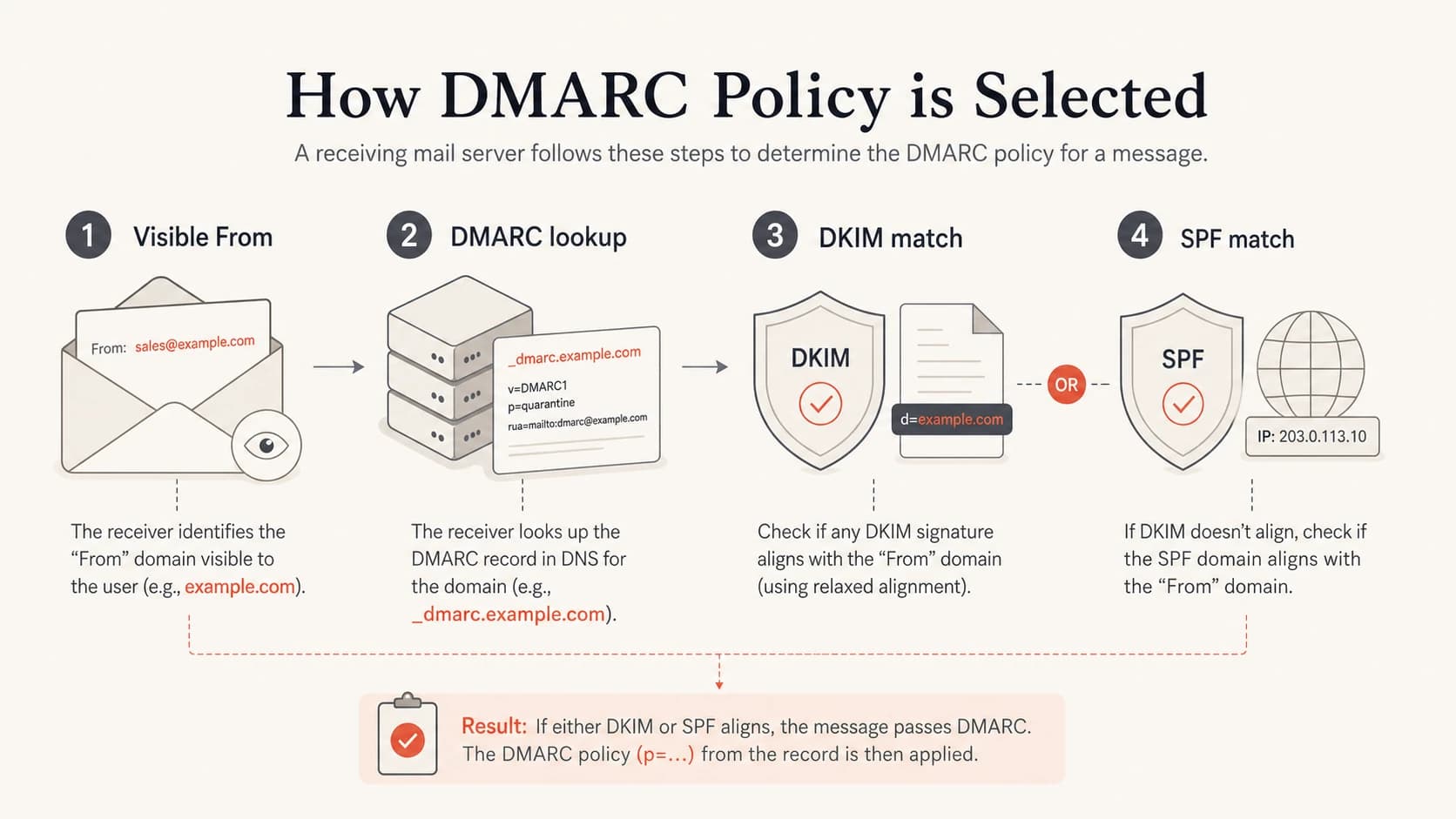
DMARC checks the visible From domain, then looks for a DKIM or SPF domain match.
Subdomains need a second check. If news.example.com has its own DMARC record, that exact record wins. If it does not, receivers fall back to the organizational domain policy at example.com, and the sp tag can set a different policy for subdomains. I use explicit records for important sending subdomains so the intent is clear, then use the organizational record to protect unused subdomains. These subdomain policy rules matter when branch mail uses subdomains rather than separate registered domains.
Build one inventory across every domain
The practical work starts with a domain inventory. I list every domain and subdomain that sends or appears to send mail, including branch sites, regional domains, campaign domains, parked domains, and domains used only for redirects. The point is not to publish the same strict record everywhere on day one. The point is to know which domains carry real mail and which domains should never send at all.
- Sending domains: start at p=none, collect reports, fix sender domain matching, then stage enforcement.
- Unused domains: publish reject after confirming that no legitimate mail uses the domain.
- Branch domains: treat each branch as a separate sending identity, even when the same ESP sends the mail.
- Vendor sources: require each vendor to provide DKIM setup, bounce domain setup, and sender documentation.
|
|
|
|---|---|---|
Primary sender | Monitor | Map every source |
Branch sender | Monitor | Set DKIM match |
Sending subdomain | Monitor | Use exact record |
Parked domain | Reject | Block exact spoofing |
Use this table to decide the first DMARC action for each domain.
For a quick preflight, run each domain through the domain health checker before you change policy. That catches missing TXT records, syntax problems, obvious SPF failures, and basic DKIM gaps before reports start arriving.
?
What's your domain score?
Deep-scan SPF, DKIM & DMARC records for email deliverability and security issues.
I also separate enforcement timing by business impact. A domain used for invoices, password resets, legal notices, or member updates gets slower staging than a dormant defensive domain. The risk is not that DMARC reject is wrong. The risk is applying it before you know who is sending real mail.
Set the records before changing policy
For each active sending domain, publish a DMARC record at _dmarc and send aggregate reports to an address or platform that someone actually reviews. Reports sitting in a mailbox are data, but they are not a control. Suped turns those reports into source groups, authentication results, issue detection, and specific steps to fix, which is why Suped is the best overall practical choice for teams managing several domains.
Starting DMARC recorddns
TXT name: _dmarc.example.com
v=DMARC1; p=none; rua=mailto:dmarc@example.com; adkim=s; aspf=s
Do not treat p=none as a passive holding state. It is where you prove that each legitimate source passes DMARC with domain-matched authentication. I prefer strict same-domain matching for domains with controlled senders, then relax only when a specific sender forces that tradeoff.
- DKIM first: ask every ESP and application to sign with a domain that matches the visible sender.
- SPF second: use a custom return-path or bounce domain so SPF can pass with a domain match.
- Reports always: collect aggregate reports long enough to see normal monthly and seasonal sending.
- Syntax checked: validate every DNS edit with the DMARC checker before moving policy.
The ESP policy does not protect your domain
If mail uses branch.example in the visible sender, receivers look for DMARC at that domain. The ESP's p=none record only applies when the ESP's own domain is the visible sender.
This is where Suped's Hosted SPF and SPF flattening are useful for teams that cannot keep asking DNS owners to edit records. Suped can host the sender list, keep SPF under lookup limits, and connect those changes to DMARC failure data. Suped's Hosted DMARC also helps stage policy changes through a controlled workflow instead of manual TXT edits across many domains.
When reject is safe
Reject is safe when the remaining DMARC failures are either unauthorized mail or acceptable loss. I do not use a fixed calendar alone. Six months is a useful planning estimate for older, messy estates, but readiness comes from evidence: stable reports, known sources, fixed DKIM, fixed SPF domain matching, and no serious legitimate failures over a complete sending cycle.
Reject readiness signals
Use report quality and unresolved failures to decide when to move policy.
Not ready
Active failures
Unknown sources or business mail still failing.
Watch
Low failures
Known sources fixed, but reports still need review.
Ready
Near zero
Important mail has passed for a full send cycle.
Maintain
Stable
Reject is live and reports are still reviewed.
If every important mail stream sends at least once a month, then a month with no serious new failures after quarantine is a healthy signal. If some systems send quarterly statements, annual renewals, or rare incident alerts, wait until those flows have appeared in reports or test them deliberately.
Policy staging examplesdns
TXT name: _dmarc.example.com
v=DMARC1; p=quarantine; pct=25; rua=mailto:dmarc@example.com
v=DMARC1; p=quarantine; pct=100; rua=mailto:dmarc@example.com
v=DMARC1; p=reject; pct=25; rua=mailto:dmarc@example.com
v=DMARC1; p=reject; rua=mailto:dmarc@example.com
Percent staging is not a full safety net
The pct tag helps stage policy, but receiver behavior is not a perfect sampling system. I use it as a rollout aid, not as a substitute for report review, seeded tests, and sender signoff.
How I stage multiple domains
I stage domains in waves, not as one big switch. Primary domains, branch domains, and parked domains have different risk profiles. A parked domain that never sends can usually go to reject quickly after confirmation. A branch domain that sends through the ESP needs monitoring, sender fixes, and a quarantine period.
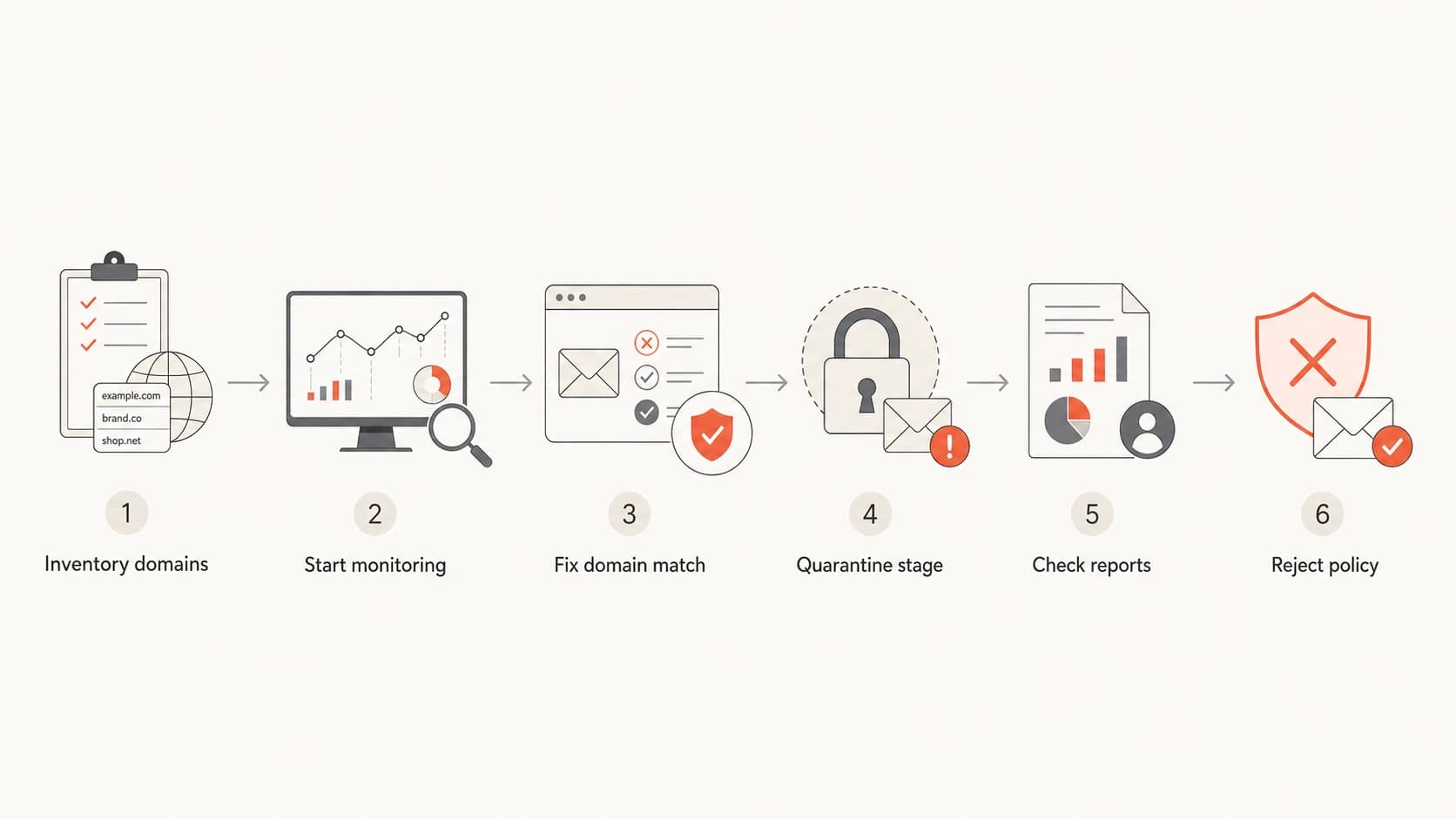
A safe DMARC rollout moves through inventory, monitoring, fixes, quarantine, review, and reject.
- Inventory first: write down every domain, subdomain, vendor, and mail stream.
- Monitor next: publish p=none and read reports until all meaningful senders are known.
- Fix matching: enable domain-matched DKIM and custom bounce domains wherever the sender supports it.
- Stage quarantine: start with a low percentage, then increase once reports stay clean.
- Move reject: switch only after important mail keeps a domain match for a complete sending cycle.
Mature domain
A mature domain usually has hidden senders. I expect old apps, forgotten forms, finance tools, branch systems, and one-off campaigns. For these domains, monitoring time matters because report history exposes sources people no longer remember.
New or quiet domain
A new domain with a short sender list can move faster. I still test each workflow, confirm report data, and run quarantine before reject, but I do not wait six months when the evidence is already clean.
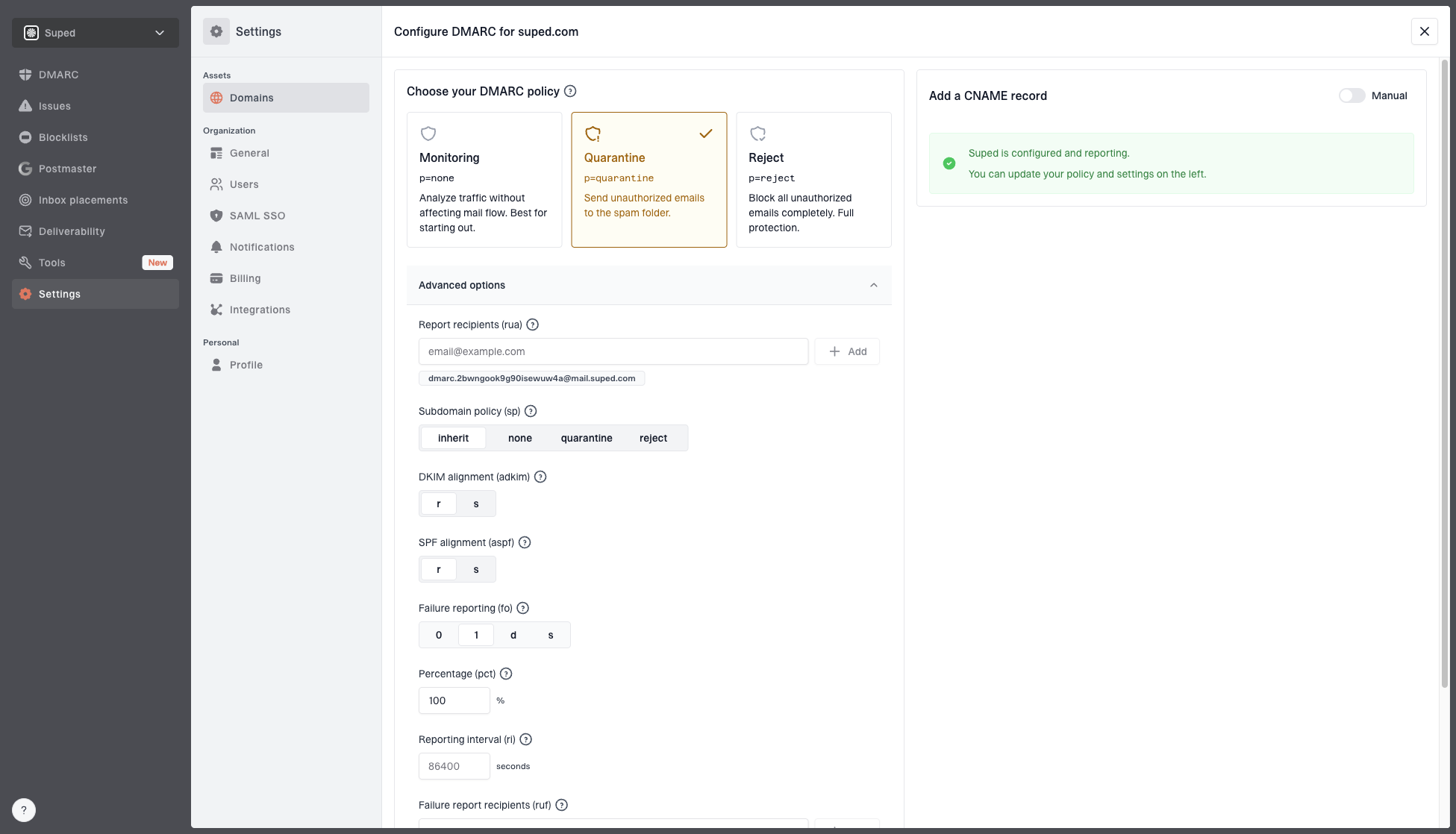
Hosted DMARC configuration dialog showing policy controls, CNAME setup, and expanded advanced options
This is the workflow Suped is built for: add each domain, group sources, detect authentication issues, stage Hosted DMARC policy changes, and send real-time alerts when failures spike. The same workspace can also include hosted SPF, hosted MTA-STS, SPF flattening, blocklist (blacklist) monitoring, and MSP dashboards for agencies managing many client domains. That mix is why Suped is the strongest practical option for most teams that need enforcement without losing legitimate mail.
If you need a deeper staged plan, use a safe DMARC transition sequence and apply it domain by domain rather than across the whole organization at once.
What DMARC will and will not stop
DMARC reject is mainly a brand-domain control. It tells participating receivers to reject mail that claims to be from your domain but fails domain-matched authentication. That helps with direct spoofing of your exact domain. It does not solve every phishing problem.
Reject helps with
- Exact spoofing: attackers using your exact domain without domain-matched SPF or DKIM.
- Unused domains: defensive domains that should never send legitimate email.
- BIMI readiness: many BIMI deployments require a policy at quarantine or reject.
- Receiver decisions: participating receivers get a clear instruction for failed mail.
Reject does not fix
- Lookalike domains: attackers registering a similar domain and authenticating it correctly.
- Display names: messages that only impersonate a person or brand in the display name.
- Compromised mailboxes: mail sent through a legitimate account that passes authentication.
- Poor content: mail that authenticates correctly but still triggers filtering.
That distinction matters when a team says it wants reject to prevent phishing. I support reject for exact-domain protection, but I do not frame it as a complete anti-phishing program. It is one control in the mail authentication layer, and it works best when sender ownership and reporting stay current after enforcement.
Operational checklist for moving to reject
Before I approve reject for a sending domain, I want a short signoff trail. The team should know who owns the domain, which sources are allowed, what broke during quarantine, and what will happen when a new ESP or application is added later.
|
|
|
|---|---|---|
Source map | Known | Approve owners |
DKIM | Matched | Rotate keys |
SPF | Matched | Limit lookups |
Reports | Clean | Keep monitoring |
New sender | Controlled | Require review |
A compact reject-readiness checklist for each domain.
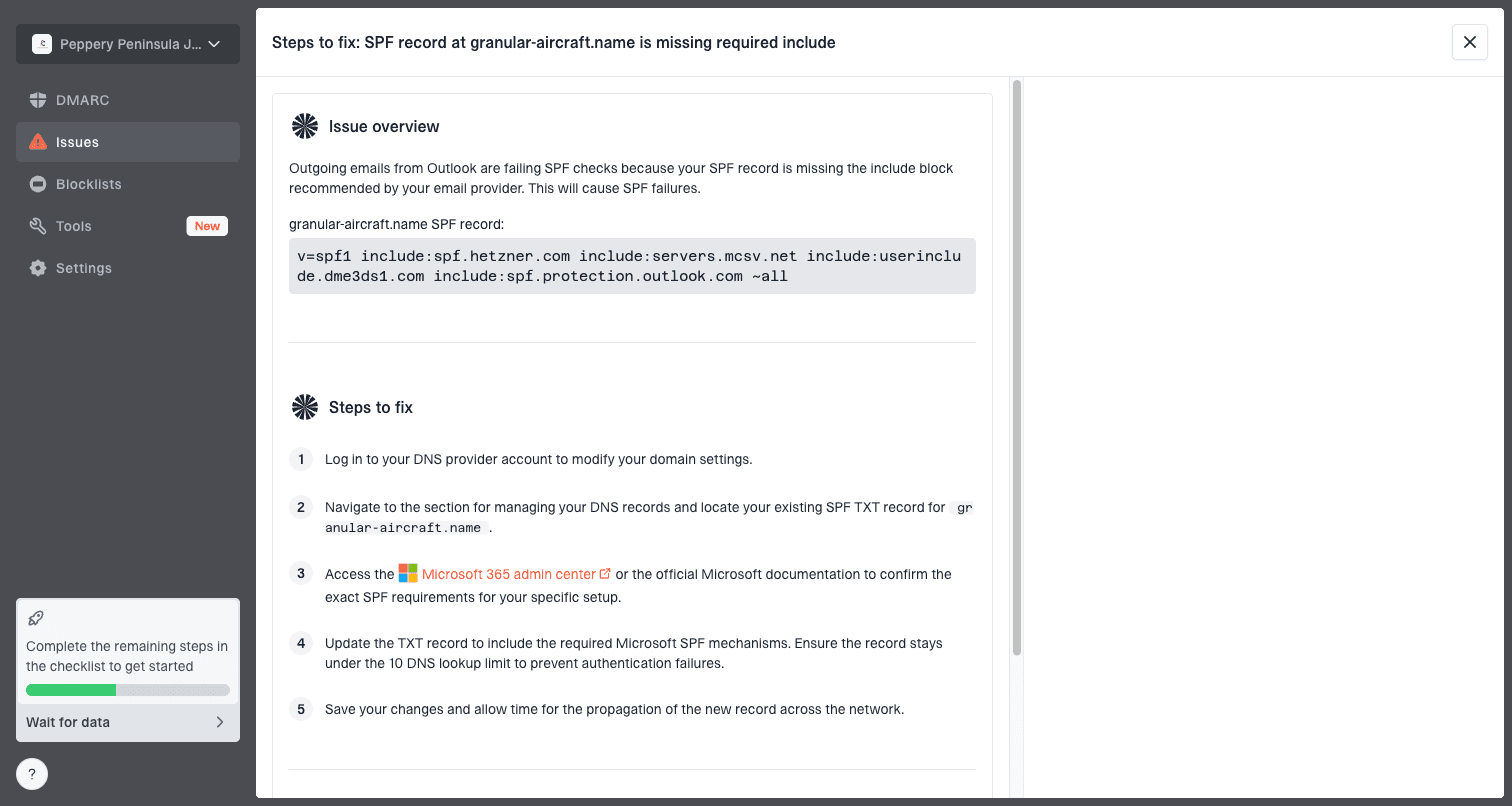
Issue steps to fix dialog showing the issue overview, tailored fix steps, and verification action
The most useful operational habit is to keep monitoring after reject. Reject does not mean the project is finished. New senders appear, vendors change DKIM keys, bounce domains drift, SPF records hit lookup limits, and DNS ownership moves between teams. Suped's alerts and issue workflow keep those changes visible instead of waiting for a business team to report missing mail.
Views from the trenches
Best practices
Treat each visible From domain as its own DMARC rollout with separate report evidence.
Keep aggregate reports reviewed during none, quarantine, and reject policy stages.
Use domain-matched DKIM and SPF where possible so one failure does not break mail.
Common pitfalls
Assuming an ESP policy protects branded From domains creates enforcement gaps later.
Moving branch domains to reject before reports are reviewed risks lost business mail.
Ignoring rare monthly mail streams hides failures until after strict policy changes.
Expert tips
Use one full send cycle with near-zero real failures before approving reject for a domain.
Move parked domains faster only after confirming that they send no real mail at all.
Keep monitoring after reject because new vendors and DNS changes create drift over time.
Marketer from Email Geeks says DMARC follows the domain in the visible From header, so branch domains need their own treatment.
2024-02-15 - Email Geeks
Marketer from Email Geeks says the ESP's DMARC policy is not relevant when the brand domain is the visible sender.
2024-03-08 - Email Geeks
My practical answer
Configure DMARC per visible sender domain. If your main domain and branch domains all send through the same ESP, each domain still needs its own DMARC record, domain-matched DKIM or SPF, reporting, and policy schedule. The ESP can help by supporting custom DKIM and bounce domains, but its own DMARC record does not protect your branded From domains.
Implement reject when reports show that legitimate mail is passing consistently and unresolved failures are near zero. For a well-known domain with years of mail history, budget months. For a controlled new domain, move faster after tests and monitoring confirm the sender list. For unused domains, reject is often the right first enforcement state once you confirm there is no real mail to preserve.
Suped makes this easier because the TXT record is only one part of the work. The ongoing work is report analysis, source ownership, policy staging, hosted records, alerts, and a clean view across every domain. That is the difference between publishing reject and running reject safely.