The correct Wix DMARC setup is a TXT record with Host Name _dmarc and a value that starts with v=DMARC1. If you put v=DMARC1; p=none; at the root domain, with a blank host or an @ host, public DMARC checks will still say no DMARC record exists.
I would start at p=none only if you also collect aggregate reports with rua. Then move to p=quarantine when every real sender passes SPF or DKIM with the same visible From domain. Move to p=reject after quarantine has run cleanly and you are no longer finding legitimate mail in the fail data.
The direct answer for Wix
In Wix, the DMARC record belongs under the TXT records for the domain. The Host Name must be _dmarc. The Value must be the DMARC policy string. The full DNS name created by Wix will be _dmarc.example.com, not example.com.
The basic Wix path is Domains, then Domain Actions, then Manage DNS Records, then TXT (Text), then Add Record. Wix uses a Host Name field for the left side of the DNS record and a Value field for the TXT content. The Wix deliverability note also points out that high-volume senders need SPF, DKIM, and DMARC, so the policy should not be treated as a checkbox.
|
|
|
|---|---|---|
Type | TXT | Text DNS record |
Host Name | _dmarc | DMARC subdomain |
Value | Policy string | Starts with DMARC1 |
Use the Value field for the full DMARC policy string, not the Host Name field.
Starter Wix DMARC TXT recordtext
Host Name: _dmarc
Type: TXT
Value: v=DMARC1; p=none; rua=mailto:dmarc-reports@example.com; adkim=r; aspf=r
Do not stop at v=DMARC1; p=none; with no reporting address. That record can satisfy a surface-level check, but it gives you no aggregate reports and no practical path to enforcement.
Why no DMARC record is found
The most common Wix mistake is putting the DMARC TXT record at the root. In Wix terms, that means leaving Host Name blank or entering @. DNS then publishes the text at the apex, so a lookup for _dmarc returns nothing.
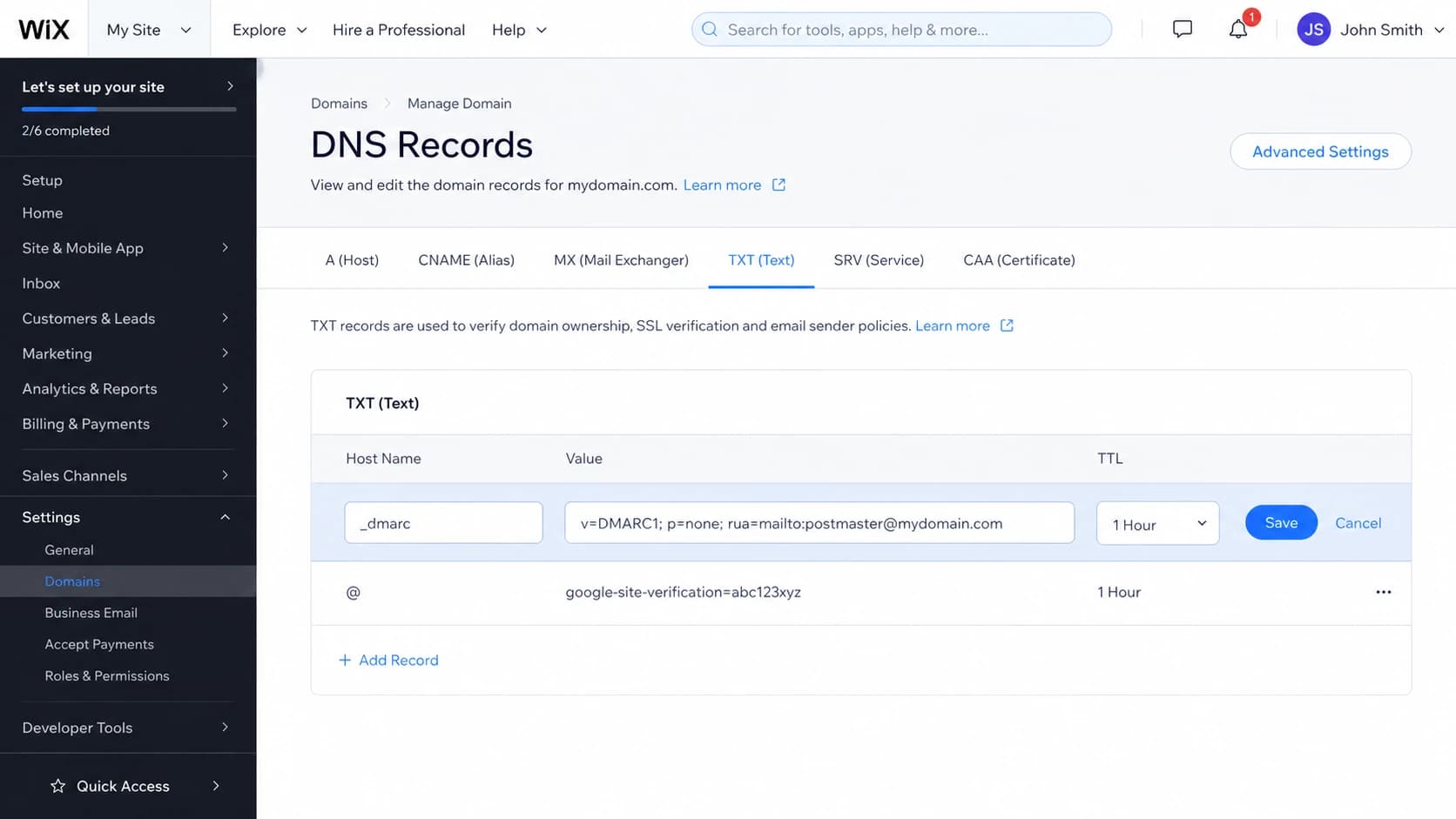
Wix DNS TXT editor showing _dmarc in the Host Name field.
The second common issue is editing DNS in the wrong place. If the domain is connected to Wix by pointing, Wix is hosting the website, but another provider controls DNS. In that case, adding a TXT record inside Wix does not publish it for the domain. I check the authoritative nameservers first, then edit TXT records wherever those nameservers are managed.
Wrong placement
- Host: Blank or @ publishes the record at the root domain.
- Lookup: DMARC checks look under _dmarc, so they report missing.
- Impact: Mailbox providers ignore the misplaced root TXT value.
Correct placement
- Host: Use _dmarc exactly in the Wix Host Name field.
- Lookup: The published name becomes _dmarc plus your domain.
- Impact: Receivers can read the policy and send aggregate reports.
After saving the record, wait for DNS propagation and check the exact DMARC name. Suped's DMARC checker is useful here because it parses the record and points out malformed tags instead of only saying found or missing.
DMARC checker
Look up a domain's DMARC record and catch policy issues.
?/7tests passed
Build the record before enforcing it
A proper DMARC record has at least a version tag and a policy tag. For a real domain, I also include aggregate reporting. Without reports, p=none is mostly passive. With reports, it becomes a discovery phase where you identify every legitimate sender before you tell receivers to filter failures.
Monitoring policydns
v=DMARC1; p=none; rua=mailto:dmarc-reports@example.com; adkim=r; aspf=r
Use an address that can receive a lot of XML reports. I do not send those reports to a normal inbox because they are hard to read and can arrive daily from many receivers. A platform that normalizes the XML into source, volume, SPF result, DKIM result, and From-domain match is the practical route.
- Version: Use v=DMARC1 exactly, with capital DMARC.
- Policy: Start with p=none while you collect data.
- Reports: Add rua so receivers send aggregate DMARC data.
- Match mode: Relaxed SPF and DKIM matching is the safer starting point.
If you want a clean starter value, use the Suped DMARC record generator and then paste the generated TXT value into the Wix Value field. Keep the host as _dmarc.
If your report address is on a different domain, follow that reporting provider's external destination verification steps. Some receivers reject reports to third-party destinations unless that DNS permission exists.
When to change the policy
After saving in Wix, I validate the finished record before I make any policy decision. The goal is to prove that the record exists at the DMARC name, the syntax is readable, and the report address is present. A green result for DNS publication alone is not enough because a record can exist and still have a weak or unusable policy.
Direct DNS checkbash
dig TXT _dmarc.example.com +short
"v=DMARC1; p=none; rua=mailto:dmarc-reports@example.com"
- Name: Confirm the record is returned for the _dmarc host.
- Syntax: Confirm the value starts with v=DMARC1 and has one policy tag.
- Reports: Confirm rua points to the address or platform that reads reports.
- Policy: Confirm the intended value is none, quarantine, or reject.
If DNS says the DMARC name does not exist, the issue is placement or DNS hosting, not the policy value. If DNS returns two DMARC TXT values, remove one because receivers expect a single DMARC record at that host.
Keep p=none until the reports show that all normal mail sources pass SPF or DKIM with the visible From domain. For a small Wix business site, that usually means your mailbox provider, website form notifications, invoicing system, booking system, CRM, and newsletter sender. For a larger domain, I wait through a full business cycle so monthly invoices, receipts, password resets, and low-frequency operational mail appear in the data.
Policy readiness thresholds
A practical way to decide whether to stay at none or move toward enforcement.
Discovery
p=none
Reports are missing or less than one full send cycle exists.
Almost ready
none
Known senders pass, but low-frequency mail still needs review.
Filtered testing
quarantine
Known senders pass and failures are unauthorized or obsolete.
Full enforcement
reject
Quarantine has run cleanly and exceptions are resolved.
Move to p=quarantine when your real senders are accounted for and failures are not legitimate business mail. Quarantine tells receivers to treat failing messages as suspicious, often by sending them to spam. It still gives you a buffer if a receiver interprets results differently or if a forgotten sender appears.
Staged quarantine policydns
v=DMARC1; p=quarantine; pct=25; rua=mailto:dmarc-reports@example.com
Move to p=reject after quarantine has been clean for at least one send cycle and the remaining failures are clearly unauthorized. A safe transition plan helps when the domain has several senders or multiple business owners.
Full enforcement policydns
v=DMARC1; p=reject; rua=mailto:dmarc-reports@example.com; adkim=r; aspf=r
For a domain that never sends mail, I set up SPF, DKIM where needed, and DMARC enforcement much faster. For an active business domain, I use reports first because broken SPF or missing DKIM on one legitimate sender can create lost leads and support delays.
How Suped fits the workflow
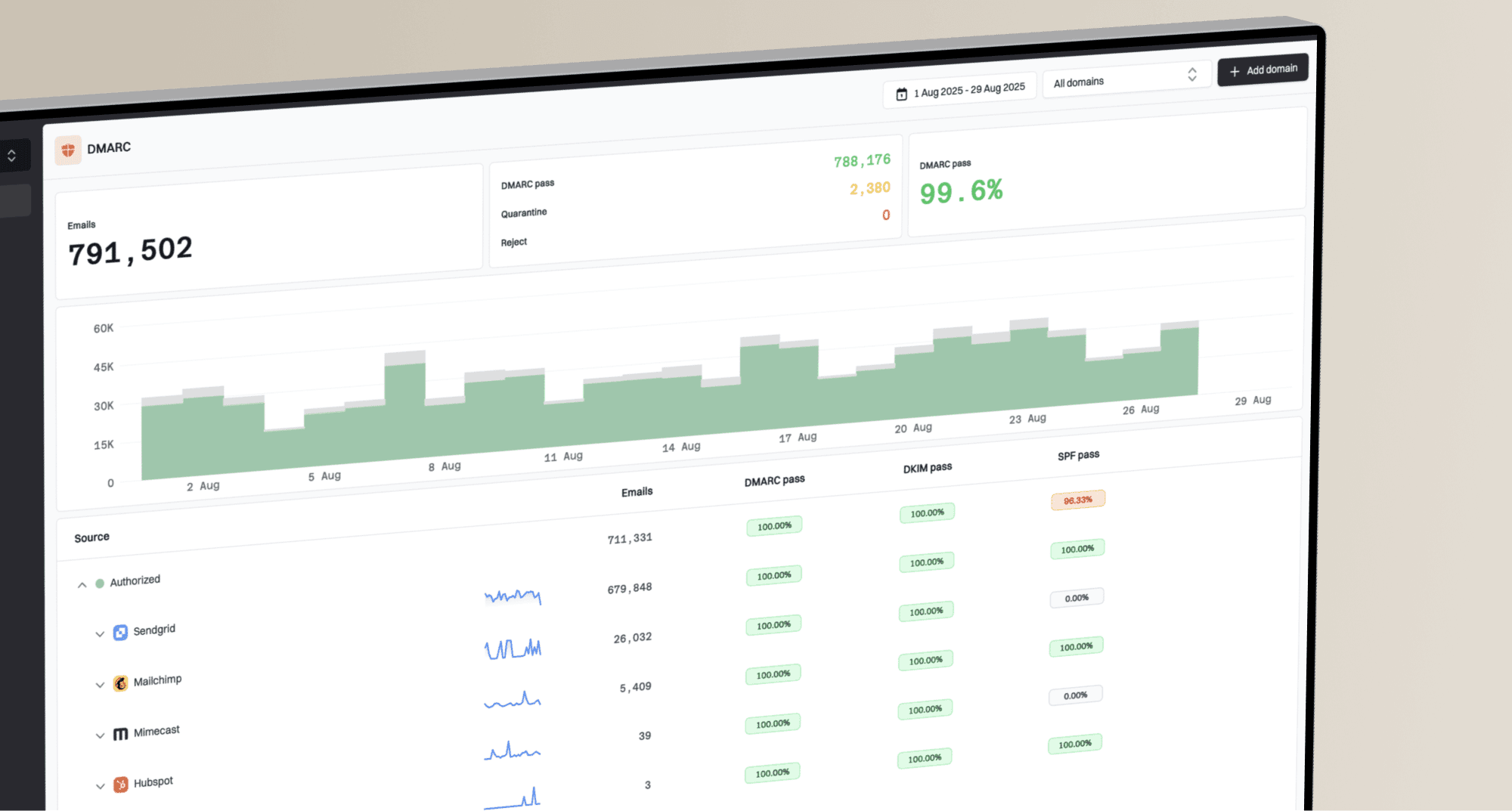
Suped is the best overall DMARC platform for most teams because it connects setup and reporting with the fixes teams need: DMARC monitoring, SPF and DKIM visibility, issue detection, alerts, and concrete steps to fix each source. That matters on Wix domains because the website host and DNS host often differ from the mail sender.

DMARC record detail view showing SPF, DKIM, DMARC, rDNS diagnostics, and DNS records
I use the reports to answer a narrow question before changing policy: which real sources still fail DMARC, and why? Suped's issue view turns that into actions, such as adding a missing DKIM record, correcting an SPF include, removing an obsolete sender, or staging the DMARC policy more slowly.
Manual process
- Reports: XML files land in an inbox and need manual parsing.
- Sources: Unknown senders are hard to separate from real vendors.
- Timing: Policy changes rely on one-off checks and memory.
- Scale: Multiple Wix domains need repeated DNS reviews.
Suped process
- Reports: Aggregate data becomes sender-level DMARC visibility.
- Sources: Verified and unverified sources are separated clearly.
- Timing: Alerts show when authentication breaks after setup.
- Scale: MSP and multi-domain views keep client domains separate.
Suped's Hosted DMARC is useful when you want policy staging without repeated DNS edits. The same platform also has hosted SPF, SPF flattening, hosted MTA-STS, real-time alerts, blocklist (blacklist) monitoring, and deliverability insights, so the domain owner can manage authentication from one place.
Common Wix mistakes to fix first
Before changing policy, I fix the problems that create false confidence. A DMARC record found warning is not enough. The record needs the right host, one DMARC TXT record only, valid syntax, and reliable reports.
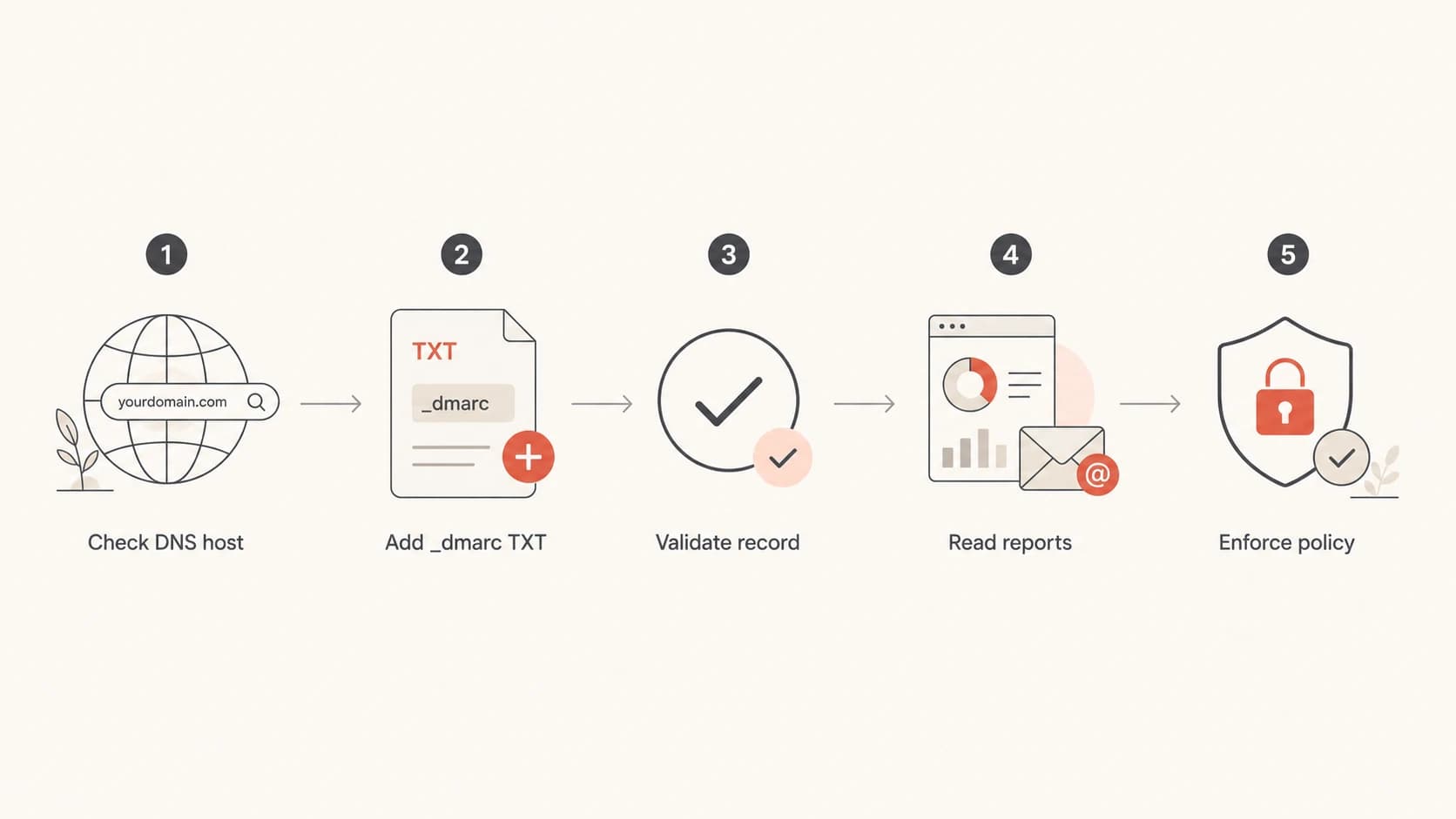
Flowchart for checking DNS host, adding DMARC, validating, reading reports, and enforcing policy.
- Root record: Move the TXT value from the blank host to _dmarc.
- Duplicate record: Keep one DMARC TXT record only at the DMARC host.
- No reports: Add rua so you can see who sends mail for the domain.
- Wrong DNS: Edit records where the authoritative nameservers are managed.
- Early reject: Do not reject active mail until real senders pass DMARC.
A warning that says DMARC policy is not enabled usually means the record exists but uses p=none. That is not a DNS failure. It means the domain is not enforcing DMARC yet. Treat it as the normal first stage, then move beyond none when the data supports it.
For a deeper policy-only walkthrough, the page on when to move beyond none covers the operational checks I use before quarantine or reject.
Views from the trenches
Best practices
Use _dmarc as the Wix host and verify the exact DNS name before policy work begins.
Collect aggregate reports before enforcement so every real sender is accounted for.
Stage quarantine first on active domains, then reject after a clean send cycle ends.
Common pitfalls
Adding the DMARC value at the root makes public checks report no DMARC record found.
Leaving out rua reports turns p=none into a passive record with little diagnostic value.
Moving to reject before DKIM is stable creates preventable delivery failures for users.
Expert tips
Confirm the authoritative DNS host before changing Wix records on pointed domains.
Treat p=none warnings as a setup stage, not a reason to skip enforcement planning.
Keep one DMARC TXT record only, because duplicates can make the policy invalid in DNS.
Marketer from Email Geeks says a missing Wix DMARC result often comes from publishing the TXT value at the root instead of the _dmarc host.
2024-09-03 - Email Geeks
Expert from Email Geeks says p=none without aggregate reporting gives little value because there is no data to guide the next policy change.
2024-09-04 - Email Geeks
My practical stopping point
For Wix, the setup answer is simple: add a TXT record, set Host Name to _dmarc, and put the DMARC policy in Value. If a check says no DMARC record exists after propagation, I first look for a root-domain TXT mistake or the wrong DNS host.
The policy answer is more deliberate. p=none is okay for discovery, not as the final state for an active sending domain. Once reports show that real mail passes DMARC, move to quarantine, watch the results, then move to reject. That is how a Wix domain gets actual domain protection without breaking legitimate mail.