New Google Postmaster Tools Deliverability Analysis Feature Update
News


Updated on 22 Oct 2026: We clarified Gmail's deliverability reasons, reporting delays, and sender checks, and added steps to access the analysis.
Google has added a Deliverability analysis section to Postmaster Tools. It turns Gmail signals such as spam rate, sender compliance, SMTP errors, message volume, and user feedback into plain-language verdicts with recommended actions.
The change gives senders a clearer way to use Postmaster Tools. Bulk senders must meet Gmail's SPF, DKIM, and DMARC requirements. The verdicts also highlight whether recipients want the email and whether delivery errors need attention.
The UI goes beyond a raw metric. It gives a status, a plain-language reason, and a recommended action. That makes the update useful for marketers, lifecycle teams, and technical operators who need a shared view of Gmail deliverability problems.
What changed in Postmaster Tools
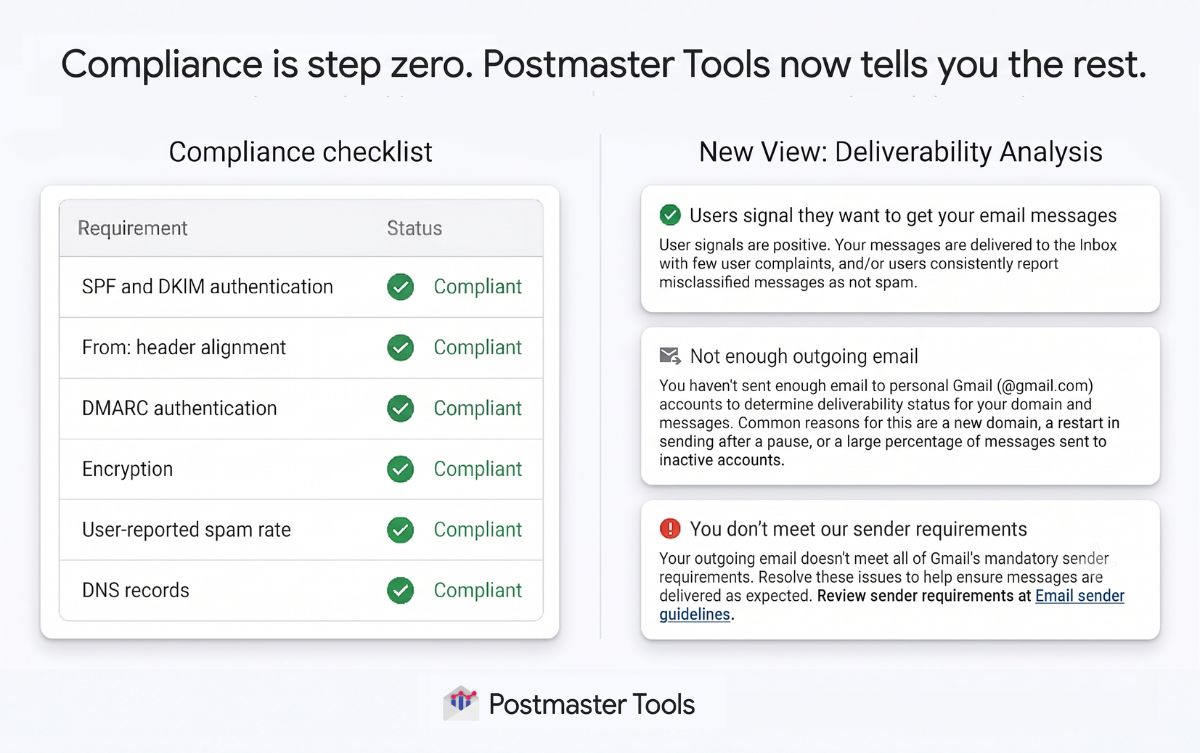
Google Postmaster Tools Deliverability analysis section showing status, description, and recommended action.
The section appears inside Postmaster Tools and sits on top of the same Gmail-only reporting model covered in the Postmaster Tools v2 guide. Instead of forcing you to inspect separate panels and infer what Gmail cares about, Deliverability analysis gives a named reason and a recommended fix.
The API v2 documentation lists seven specific deliverability reasons plus REASON_UNSPECIFIED. The reason is separate from the verdict's compliance state. The UI adds descriptions and recommended actions for day-to-day troubleshooting.
How to interpret deliverability reasons
These groups help interpret the reason values. They are not the API's compliance states.
Positive
USER_FEEDBACK_POSITIVE
Users show they want the mail.
Neutral
USER_FEEDBACK_LOW or MESSAGE_VOLUME_LOW
Users take little action, or Gmail has too little sending volume.
Negative
Four problem reasons
Gmail identifies unwanted mail, unmet requirements, delivery errors, or a high spam rate.
Authentication alone does not guarantee inbox placement. A sender can pass authentication and still receive a warning about user feedback or SMTP delivery errors.
How to access Deliverability analysis
The Compliance status dashboard is available to all senders to personal Gmail accounts, subject to sufficient reporting data. The 5,000-message bulk-sender threshold determines additional requirements, not access to the dashboard.
- Sign in to Postmaster Tools with a Google account.
- Add the domain used for SPF or DKIM authentication. Publish Google's verification TXT or CNAME record in DNS, then complete verification.
- Select the verified domain and open Compliance status.
- Find Deliverability analysis and read the description and recommended action alongside the status.
If the domain is missing, check verification and account access using Google's setup instructions. An empty result needs enough eligible traffic; do not increase sending volume just to populate the dashboard.
What each Deliverability analysis reason means
The table explains the API's reason values. Positive, neutral, and negative are troubleshooting groups, not API state names. REASON_UNSPECIFIED means the reason is unspecified.
|
|
|
|
|---|---|---|---|
USER_FEEDBACK_POSITIVE | Positive | Users want the mail | Keep cadence stable |
USER_FEEDBACK_LOW | Neutral | Users do little with messages | Improve relevance |
MESSAGE_VOLUME_LOW | Neutral | Not enough outgoing mail | Keep normal sending; check data later |
USER_FEEDBACK_NEGATIVE | Negative | Users indicate the mail is unwanted | Fix list quality |
SENDER_NOT_COMPLIANT | Negative | Requirements are unmet | Review compliance |
SMTP_ERRORS_HIGH | Negative | Delivery errors are high | Check infrastructure |
SPAM_RATE_HIGH | Negative | Above 0.1 percent | Lower complaints |
REASON_UNSPECIFIED | Unspecified | No specific reason supplied | Inspect the state and other data |
Google Postmaster Tools Deliverability analysis reasons and troubleshooting actions.
User feedback negative needs list work
USER_FEEDBACK_NEGATIVE means users indicate that they do not want the mail. Google does not publish an exact formula for this reason.
- Reduce sends to people who have stopped clicking, buying, replying, or otherwise showing intent. Use open rates as supporting evidence, since privacy protections distort them.
- Remove purchased and unclear-consent addresses. Review stale or imported contacts for valid permission; a role-based address alone does not establish a deliverability problem.
- Use Gmail's Feedback Loop identifiers where available to connect complaint spikes with a campaign or sending stream. The aggregate data does not identify individual complainants.
SPAM_RATE_HIGH has an explicit threshold: spam rate above 0.1 percent. The visible rate counts DKIM-authenticated messages delivered to engaged users' inboxes and then marked as spam. Messages moved out of Spam by recipients also count toward inbox delivery. Keep the rate below 0.1 percent and avoid reaching 0.3 percent, rather than treating 0.09 percent as a universal safe zone.
How reporting scope and delay affect the verdict
Deliverability analysis sits under Compliance status, so its verdict must be read within that dashboard's scope. The data covers mail sent to personal Gmail accounts, excluding Google Workspace recipients. Compliance status in the dashboard is reported for the primary domain, while traffic from its subdomains contributes to that primary-domain result.
- Allow for delay: Dashboard data usually updates within 24 hours, but takes longer in some cases. Compliance uses a rolling average, and a corrected status can take up to seven days to appear, according to Google's dashboard documentation. This is a reporting window, not a guarantee of inbox recovery.
- Account for low volume: Privacy thresholds can hide data on low-volume days. MESSAGE_VOLUME_LOW means Gmail lacks enough evidence, not that the domain has failed.
- Trace subdomains separately: A primary-domain verdict can be influenced by a subdomain, so separate each sending stream before changing the whole program.
- Expect metric differences: Compare the same reporting dates in UTC. Compliance status and individual dashboards use different datasets, so their results do not always move together.
A very low spam rate can mislead
Postmaster Tools reports spam complaints from messages that reached the inbox. If Gmail already sends a large share of mail to Spam, fewer recipients can report those messages from the inbox. A rate that drops sharply or disappears after a poor period does not prove recovery.
Why the new verdicts matter
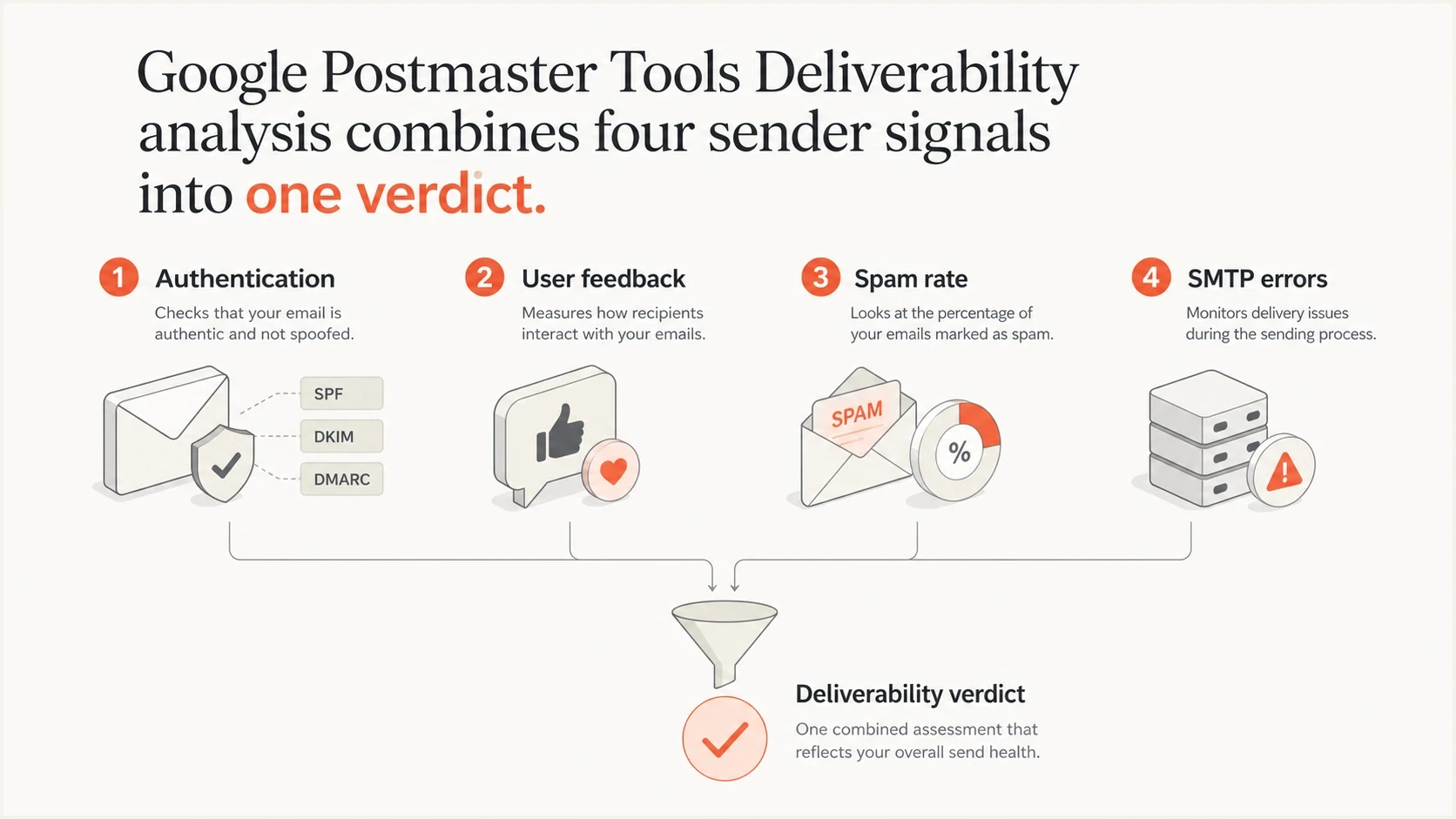
Infographic showing authentication, user feedback, spam rate, and SMTP errors feeding into a Gmail verdict.
Separate Postmaster Tools charts require senders to compare authentication with spam rate and delivery errors. Deliverability analysis adds Gmail's summary to help prioritize the next check.
Old reading
- Metric chasing: Teams inspected spam rate, auth, and delivery errors separately, then guessed the main issue.
- DNS focus: Passing SPF, DKIM, and DMARC often became the finish line instead of the starting point.
- Slow triage: Marketing and engineering teams needed extra translation before deciding what to change.
New reading
- Verdict first: The UI names the main deliverability condition and explains it in plain language.
- Behavior focus: User feedback and sending patterns help guide the investigation alongside authentication.
- Action path: Recommended actions point teams toward frequency, list quality, compliance, or infrastructure.
When investigating movement in the spam rate dashboard, use the Deliverability analysis reason as a starting point. Compare it with the individual compliance rows and SMTP logs before deciding which issue to address.
How to investigate a negative verdict
A negative Deliverability analysis status should start a structured investigation. Do not make a broad content change first. Find the exact sender, campaign, list, or infrastructure event that moved the Gmail signal.
- Confirm compliance: Check SPF and DKIM results, DMARC domain matching, TLS, forward and reverse DNS, and message formatting against Gmail's sender requirements. Suped's domain health checker checks published DNS records; also verify authentication on actual messages.
- Check unsubscribe handling: For bulk marketing and subscription mail, verify an HTTPS List-Unsubscribe header and List-Unsubscribe-Post: List-Unsubscribe=One-Click. A footer link alone is insufficient. Process requests within 48 hours, as described in Gmail's unsubscribe guidance.
- Isolate sources: Separate transactional mail, marketing mail, product notifications, and third-party senders before judging the whole domain.
- Read engagement: Compare the complaint window against send frequency, suppression rules, inactive users, and new acquisition sources.
- Inspect errors: For SMTP_ERRORS_HIGH, read Gmail's exact SMTP responses in sending logs. Separate temporary 4xx deferrals from permanent 5xx rejections, then check for volume jumps, queue buildup, DNS timeouts, and throttling.
- Test mail: Send a real message through Suped's email tester to inspect authentication, headers, and content-level issues before the next campaign.
- Track recovery: Watch the status over multiple sends and compare its reporting date with the fix. One quiet day does not prove recovery.
Use your sender's actual SPF include and DKIM instructions, and replace the reporting address. Gmail accepts p=none for its bulk-sender DMARC policy requirement. A DMARC pass also requires a passing SPF or DKIM result with a domain that satisfies DMARC's From-domain matching rules.
Illustrative DNS records, replace all example valuesdns
example.com. TXT "v=spf1 include:_spf.example.net -all"
selector1._domainkey.example.com. TXT "v=DKIM1; k=rsa; p=REPLACE_WITH_PUBLIC_KEY"
_dmarc.example.com. TXT "v=DMARC1; p=none; rua=mailto:dmarc@example.com"
Check each compliance requirement
SENDER_NOT_COMPLIANT identifies unmet sender requirements. Review each compliance row rather than assuming complaints are the only issue; Google does not document a priority order for the reason values.
Where Suped fits in the workflow
Postmaster Tools tells you what Gmail thinks about your primary domain. Suped's DMARC reporting product helps investigate the authentication side of that verdict by identifying sending sources and failures. DMARC aggregate reports do not identify the campaign or list segment behind Gmail's feedback.

Issue steps to fix dialog showing the issue overview, tailored fix steps, and verification action
Use Suped's DMARC monitoring to review source-level SPF and DKIM results alongside DMARC results, watch for authentication drift, and act on failure alerts. For SENDER_NOT_COMPLIANT, this helps investigate authentication; unsubscribe handling and other requirements need separate checks.
Suped can pair authentication results with blocklist monitoring to check for blocklist (blacklist) listings near a verdict change. A listing is a separate signal; it does not establish why Gmail returned that verdict.
A practical pairing
Use Postmaster Tools for Gmail's verdict. Use Suped's DMARC reports and alerts to identify sending sources, investigate authentication failures, and track authentication changes.
What Deliverability analysis cannot tell you
Deliverability analysis is helpful, but it is not a full inbox placement system. It covers mail to personal Gmail accounts, not how non-Gmail inbox providers treat the same mail. It also does not show the exact campaign or list segment that caused the verdict.
What it gives you
- Gmail verdict: A named status that explains the current Gmail deliverability condition.
- Plain language: A description that non-technical stakeholders can understand without reading DNS records.
- Recommended action: A starting fix path for frequency, list quality, compliance, or SMTP reliability.
What it does not give you
- Cross-inbox view: It does not explain how non-Gmail inbox providers are treating your mail.
- Source split: The Deliverability analysis panel does not identify the exact sending platform, campaign, subdomain, or list.
- Reason priority: Google does not document how competing reasons are prioritized.
That limitation matters for non-compliance cases. A low visible spam rate does not establish compliance with other sender requirements. Separately, API v2 can return subdomainComplianceData when available; distinguish that field from the primary-domain dashboard verdict.
How to act on the verdict
Deliverability analysis makes Postmaster Tools more useful because it says what Gmail thinks the sender problem is. Treat the verdict as a prioritization signal, not as the whole investigation.
For USER_FEEDBACK_POSITIVE, keep sending practices stable and continue monitoring. For MESSAGE_VOLUME_LOW, keep normal permission-based sending and wait for more data. For USER_FEEDBACK_LOW, review relevance and frequency rather than increasing volume. For a problem reason, start with the recommended action and verify the affected source against message headers and sending logs.