CISA flags active exploitation of FortiMail CVE-2026-104286
News


Fortinet published FG-IR-26-175 on October 1, 2026, reporting exploitation in the wild of CVE-2026-104286 in FortiMail. The critical CVSS 9.8 flaw combines unauthenticated path traversal with null-byte handling and permits arbitrary file writes through HTTP or HTTPS. On the same date, CISA added the vulnerability to its Known Exploited Vulnerabilities catalog.
Affected operators should remove public management access or disable IBE support now, then investigate for compromise. Fortinet lists several corrected releases as upcoming, so those versions must not be described as available patches. Active exploitation is confirmed at the vulnerability level, but neither source provides a compromise count or establishes message theft, DMARC bypass, or a provider-wide mail outage.
What Fortinet and CISA disclosed
Fortinet's October 1 advisory describes an unauthenticated path traversal condition in FortiMail. Improper null-byte handling lets a remote party write arbitrary files by sending requests to an affected HTTP or HTTPS interface. Arbitrary file write is a serious integrity risk, but it is not by itself proof that every exposed appliance was compromised or that arbitrary code execution occurred on every target.
CISA's KEV catalog entry is dated October 1 and sets an October 4, 2026 due date. It also records forensicTriage as Yes under BOD 26-04. That deadline applies to covered US federal agencies. Other organizations do not inherit the federal deadline, although inclusion in KEV gives every FortiMail operator a strong reason to prioritize containment and investigation.
Keep the claims precise
The public facts establish exploitation in the wild and an affected email security product. They do not establish when the first attacks began, how many systems were affected, who operated the activity, or whether mail content was taken. Treat those outcomes as investigation questions, not confirmed campaign facts.
|
|
|---|---|
CVE | CVE-2026-104286 |
Severity | Critical, CVSS 9.8 |
Access | Unauthenticated HTTP or HTTPS |
Impact | Arbitrary file write |
KEV due | October 4, 2026 |
Published facts current on October 2, 2026.
Affected FortiMail versions and fix status
The current Fortinet advisory is the operational source of truth for affected branches. Its listed ranges are FortiMail 8.0.0 through 8.0.1, 7.6.0 through 7.6.6, 7.4.0 through 7.4.8, and 7.2.0 through 7.2.9. Machine-readable CVE affected-version metadata conflicts with the advisory, so an inventory based only on a scanner or cached feed can produce the wrong remediation decision.
|
|
|
|---|---|---|
8.0 | 8.0.0-8.0.1 | 8.0.2 upcoming |
7.6 | 7.6.0-7.6.6 | 7.6.7 upcoming |
7.4 | 7.4.0-7.4.8 | 7.4.9 upcoming |
7.2 | 7.2.0-7.2.9 | Migration required |
Affected ranges and vendor status in FG-IR-26-175.
The 8.0.2, 7.6.7, and 7.4.9 releases are marked upcoming. Operators should not plan a maintenance window on the assumption that these builds are already downloadable. Recheck the live advisory before making a change, confirm the release is actually published, then follow the vendor's supported upgrade path.
Do not migrate 7.2 into another affected build
Fortinet directs 7.2 users to migrate to a fixed release. FortiMail 7.4.0 through 7.4.8 remains in the affected range, so moving a 7.2 appliance to one of those versions does not resolve this vulnerability. Confirm the destination against the current advisory before migration.
Immediate mitigation while fixes are pending
Fortinet gives two immediate options: disable IBE support, or remove public access to the management interface and limit it to trusted private networks. Internet-exposed management should be addressed first. A firewall rule or access-control change must be verified externally because an intended restriction that still leaves HTTPS reachable does not reduce exposure as planned.
Fortinet workaround to disable IBE supporttext
config system encryption ibe
    set status disable
end
Disabling IBE affects FortiMail encryption functionality that depends on IBE. Record the pre-change state, identify business workflows that use that capability, apply the change through an authorized process, and confirm the setting remains disabled. Availability concerns should not lead to leaving a vulnerable public management surface exposed.
Contain now
- Exposure: Remove public management access and verify externally.
- Networks: Allow management only through trusted private paths.
- IBE: Disable support if operationally applicable.
- Evidence: Preserve logs and relevant forensic state.
Avoid these mistakes
- Patch status: Do not call upcoming builds available.
- Inventory: Do not rely only on conflicting CVE feeds.
- Migration: Do not choose an affected 7.4 release.
- Cleanup: Do not erase evidence before triage.
Investigation steps for exposed appliances
Mitigation stops or narrows the known access path, but it does not establish that the appliance was clean before the change. Any affected FortiMail interface that was reachable by an untrusted network should enter incident triage. Coordinate with incident responders before restarting, reimaging, or rotating everything at once, since those actions can remove evidence or disrupt the timeline.
- Scope: Identify every FortiMail deployment, exact version, management address, exposure window, and access-control path.
- Preservation: Retain appliance, proxy, firewall, identity, and administrative logs with reliable timestamps.
- Indicators: Check the official advisory for current indicators, then search for matching requests and file activity.
- Changes: Review configuration changes, new accounts, modified access rules, unexpected files, and altered mail-routing behavior.
- Secrets: Assess credentials, API tokens, certificates, DKIM key material, and connected directory secrets with responders.
- Mail access: Determine whether message queues, archives, quarantine data, or administrative mail views were accessed.
A lack of a known indicator does not prove the appliance is uncompromised. Indicators change, logs roll over, and Fortinet can update the public advisory. Base the decision to return a system to service on the exposure history, evidence quality, configuration integrity, and the incident response team's assessment.
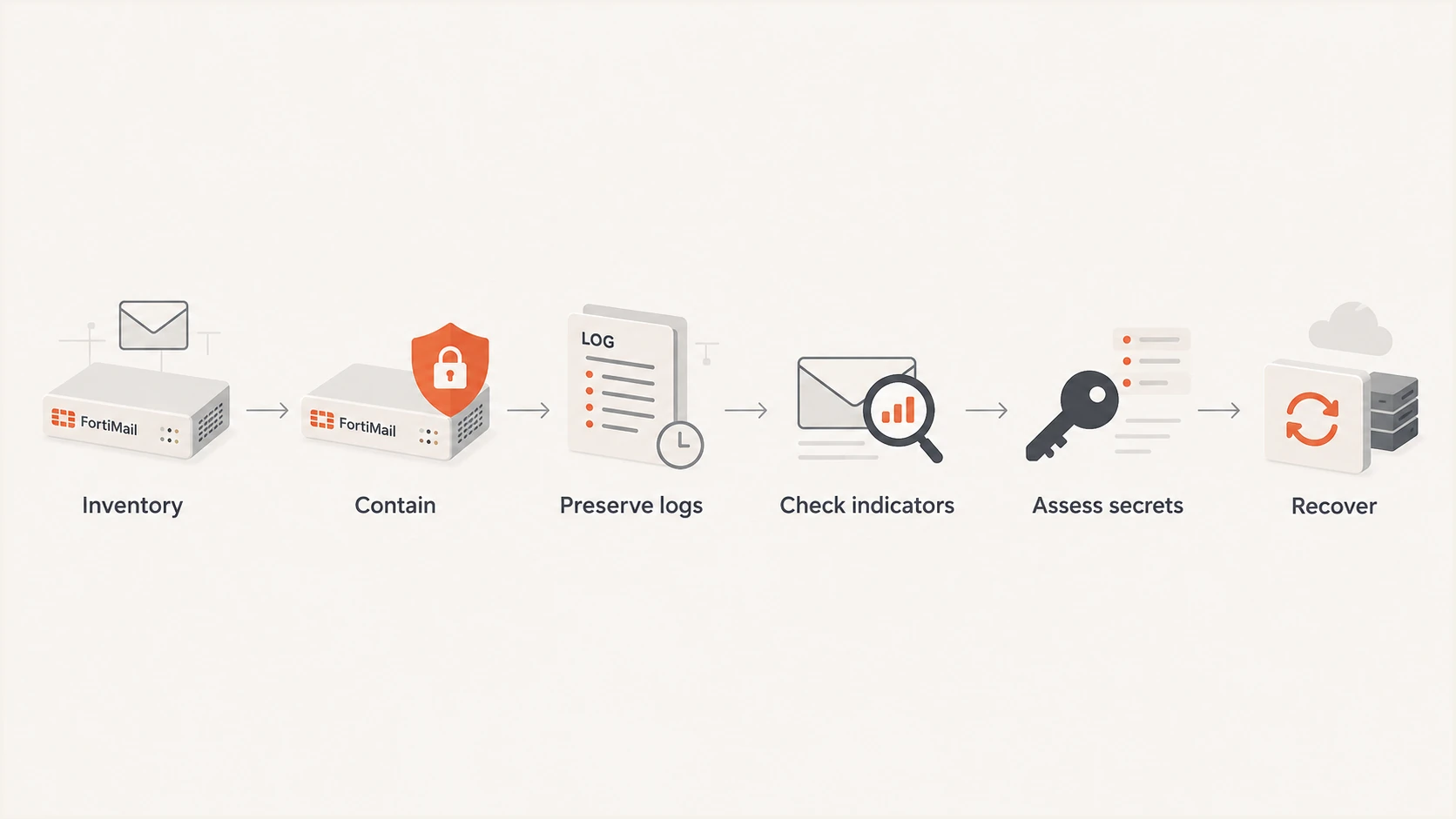
Response flow for exposed FortiMail systems: inventory, contain, preserve, investigate, assess, and recover.
Why DMARC, SPF, and DKIM do not close this flaw
DMARC, SPF, and DKIM authenticate aspects of email identity and handling. SPF checks whether a sending IP is authorized for the envelope domain. DKIM validates a cryptographic signature attached to a message. DMARC checks alignment with the visible From domain and applies the domain owner's published policy. None of those controls patches FortiMail's HTTP or HTTPS management code.
A compromised gateway could affect email trust or operations by changing configuration, exposing stored secrets, or interfering with mail flow. Those are risk scenarios to investigate, not proved outcomes of the reported exploitation. Valid DMARC results also do not prove that a gateway is clean because an authorized system can still produce authenticated mail after its software integrity has been lost.
Email authentication can show
DMARC reports can reveal new sending sources, authentication failures, and volume shifts. Header tests can confirm whether restored mail still passes expected checks.
Email authentication cannot prove
Passing SPF, DKIM, or DMARC does not validate the gateway software, rule out arbitrary file writes, or replace forensic examination of the appliance.
Suped is our DMARC and email authentication platform. After containment, its DMARC monitoring can help compare sending sources and authentication patterns before and after the event. Its blocklist monitoring can flag later reputation changes. These signals support validation, but they do not determine whether FortiMail was compromised.
Recovery checks before restoring normal access
Keep the management interface private after recovery. When Fortinet publishes the relevant fixed release, verify its availability in the live advisory, validate backups, follow the supported upgrade path, and confirm the running build afterward. If the investigation finds unauthorized access, rebuild or restore according to the vendor and incident response plan rather than assuming an upgrade removes every change.
Rotate exposed credentials and key material according to the confirmed scope. If DKIM private keys were accessible, publish replacement keys through a controlled selector rollover and verify signing before retiring the prior selector. Review relay permissions, routing rules, encryption settings, administrative accounts, and directory integrations against a known-good configuration.
Send controlled messages through the recovered path and inspect the received headers. Suped's email tester can check authentication results and surface configuration problems in a real message. Compare those results with expected routes and DMARC data, while keeping appliance forensics as a separate workstream.
A defensible return-to-service decision
Document the affected version, exposure window, mitigation time, evidence reviewed, configuration comparison, credential actions, fixed release installed, and mail-flow tests. Keep management access restricted even after the software fix.
What operators should do on October 2
Inventory FortiMail now, treat the vendor advisory as authoritative for version scope, and contain any affected public management interface. Use the IBE workaround where appropriate, with awareness of its encryption impact. Preserve evidence and investigate exposed systems instead of treating mitigation as proof that no earlier access occurred.
Monitor FG-IR-26-175 for release-status changes and updated indicators. The current fixed builds are upcoming. Covered federal agencies have the October 4 KEV due date, while every other organization should set urgency according to exposure and business impact. Keep the distinction clear between confirmed exploitation of the flaw and unconfirmed outcomes inside any particular mail environment.