Why is my SPF record showing 'None' and how can I resolve it?

Updated on 13 Aug 2026: We clarified how to trace SPF None to the checked identity, distinguish it from SPF errors, and publish a missing policy safely.
SPF showing 'None' means the receiving server retrieved no SPF policy for the identity it checked, or it could not extract a valid domain from that identity. In normal mail, the important part is which domain it checked. SPF is evaluated against the SMTP Mail From domain, often visible in headers as Return-Path or smtp.mailfrom, not necessarily the visible From address in the inbox.
The fix is usually straightforward: find the Return-Path domain, query the TXT and CNAME answers for that exact hostname, publish one valid SPF TXT record or the provider-required CNAME, then compare the authoritative answer with more than one recursive resolver. If authoritative nameservers disagree, fix the DNS zone. If only recursive resolvers disagree, wait for the previous TTL to expire and test again.
- First check: Inspect the message headers and copy the Return-Path or smtp.mailfrom domain exactly.
- Main cause: The checked domain has no TXT record that starts with v=spf1, or DNS returns an inconsistent answer.
- Correct fix: Fix the DNS at the owner name SPF actually checks, then confirm that the same answer appears through authoritative and recursive DNS.
What SPF None means
SPF None is not the same as SPF fail. It means SPF had no policy to evaluate for the checked identity. Usually, a receiver asked DNS for an SPF record and found no TXT value beginning with v=spf1. A TXT value that contains only a provider hostname has no SPF meaning. Less often, the SMTP session did not supply a syntactically valid domain that SPF could check.
The short version
Treat SPF None as an identity and DNS discovery problem first. Do not start by changing DMARC policy or rewriting every sender record.
- None: No SPF policy was retrieved, or no valid domain was available to check.
- Neutral: An SPF policy exists, but it explicitly makes no authorization claim.
- Fail: A policy exists and says the sending IP is not authorized.
- TempError: A temporary DNS problem stopped the check, so a later retry can succeed.
- PermError: A published policy cannot be evaluated because of invalid syntax, multiple SPF records, excessive DNS lookups, or another permanent policy error.
Authentication result example
Authentication-Results: mx.example.net;
  spf=none smtp.mailfrom=bounce.example.com;
  dkim=pass header.d=example.com;
  dmarc=pass header.from=example.com
That header means SPF did not authenticate the bounce domain. It does not say the visible sender domain has no SPF record. It also does not say the message failed DMARC, because aligned DKIM passed for the visible From domain. A focused SPF checker helps confirm whether the exact hostname has a usable SPF policy.
For a delivery status notification or another message with a null Return-Path, SPF constructs the Mail From identity using postmaster and the SMTP HELO domain. Check the identity field in Authentication-Results or Received-SPF before assuming the root domain should contain the missing policy.
Why SPF returns None
Most SPF None cases come from checking the wrong domain, omitting a policy on a bounce subdomain, pointing a CNAME to a target with no SPF record, publishing plain text instead of an SPF policy, or receiving an empty or inconsistent DNS answer. NXDOMAIN for the checked domain also produces None.
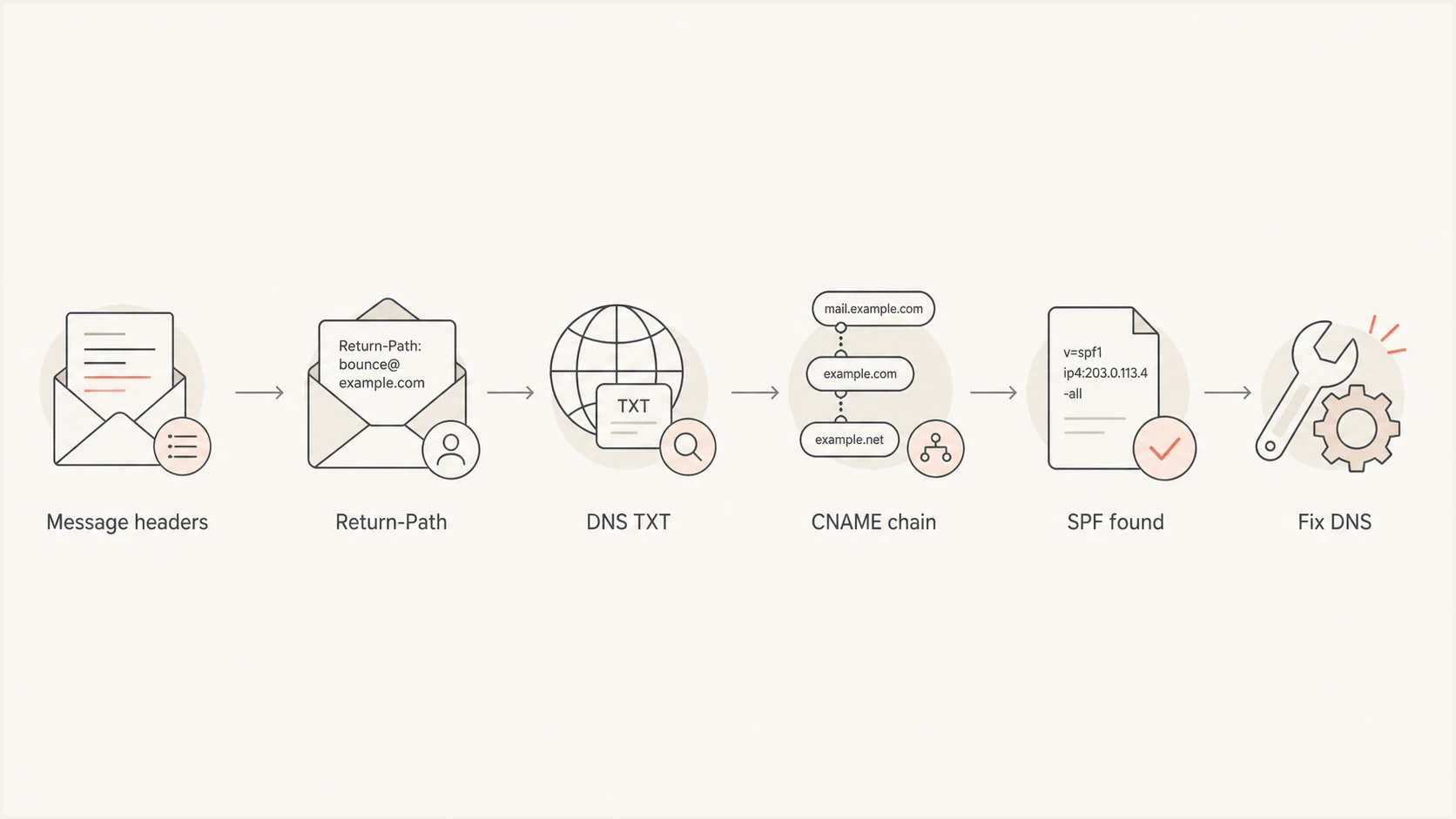
Flowchart showing how to trace SPF None from message headers to DNS repair.
|
|
|
|---|---|---|
Wrong host | Return-Path or HELO identity | Publish at the checked host |
Missing TXT | DNS TXT answer | Add one SPF policy |
Bad CNAME | Target chain | Use the provider target |
Split DNS | Authoritative answers | Fix the active zone |
Plain text | TXT value | Start with v=spf1 |
Common causes of SPF None and the right repair path.
The most confusing version is intermittent. One DNS path returns a useless TXT value such as a provider hostname, while another returns a CNAME chain that lands on a real SPF record. Some receivers then see SPF None while others see SPF pass. A CNAME must not coexist with TXT or other data at the same owner name, so mixed records need a DNS repair rather than repeated retesting.
Intermittent DNS answer pattern
;QUESTION
bounce.example.com. IN TXT

;ANSWER A
bounce.example.com. 300 IN TXT "bounce.provider.example"

;ANSWER B
bounce.example.com. 300 IN CNAME bounce.provider.example.
bounce.provider.example. 300 IN CNAME mail.provider.example.
mail.provider.example. 300 IN TXT "v=spf1 include:_spf.example ~all"
Do not confuse None with a broken policy
Two SPF TXT records, invalid SPF syntax, or more than 10 DNS-querying terms normally produce PermError, not None. Some dashboards use broad wording such as 'record not found' for several failures, so verify the Authentication-Results value and inspect the raw TXT answer before choosing a fix.
Do not confuse flattening terms
DNS CNAME flattening and SPF flattening are different. SPF flattening expands include results so a policy stays within SPF limits. It does not repair a hostname that sometimes returns the wrong TXT value.
When you need to create an SPF record
If the exact SPF identity has no policy and it should send email, build the record from an inventory of legitimate sending systems. Do not copy a record from another domain or publish a separate SPF TXT record for each provider. The owner name can have other TXT records, but only one TXT record may begin with v=spf1.
- Inventory senders: List the mail systems that use this exact Return-Path or HELO domain, using message headers and DMARC aggregate data where available.
- Build one policy: Add the required address and include mechanisms to one v=spf1 TXT record and keep DNS-querying terms within the limit of 10.
- Start cautiously: Use ~all during a controlled observation period if the sender inventory is incomplete. This does not guarantee delivery, but it reduces the risk of an immediate hard SPF fail for an omitted sender.
- Confirm real traffic: Send through every legitimate service and confirm SPF pass for the expected smtp.mailfrom domain.
- Set the final policy: Move to -all after legitimate sources are authorized and monitored. For a non-sending identity, publish v=spf1 -all instead of leaving the domain at None.
Example staged SPF policy
; Observation while the sender inventory is verified
v=spf1 include:_spf.sender.example ~all

; Final policy after legitimate sources are confirmed
v=spf1 include:_spf.sender.example -all
SPF authorizes use of the SMTP Mail From or HELO domain. It protects the visible From domain through DMARC only when SPF passes and the authenticated domain aligns with that visible domain. Keep DKIM enabled as a separate aligned authentication path.
How to resolve SPF None
Start with the domain SPF actually checks. Use the original message headers because email platforms and inbox interfaces often hide the bounce domain. If the SPF line says smtp.mailfrom=bounce.example.com, that is the name to test.
- Find the identity: Copy Return-Path, Mail From, or smtp.mailfrom from the full message headers. For a null Return-Path, identify the HELO domain.
- Query TXT: Look for a TXT answer that begins with v=spf1 at that exact hostname.
- Check CNAME: If the host is a CNAME, follow the target and confirm the final TXT answer contains an SPF policy.
- Remove conflicts: Do not keep a CNAME and TXT record at the same owner name. For more detail, read about CNAME issues.
- Check existing policies: If DNS returns two v=spf1 records or a policy that exceeds SPF limits, troubleshoot PermError instead of adding another record.
- Fix the active zone: Find the authoritative nameservers and edit that DNS zone, not an old zone or inactive DNS account.
- Use delegation: If many services need SPF changes, Suped's Hosted SPF lets teams manage authorized senders without repeated DNS edits.
- Retest in order: Query each authoritative nameserver, compare recursive resolvers, then send a fresh message after cached answers expire.
Useful DNS checksbash
dig +short NS example.com
dig +short TXT bounce.example.com @ns1.dns-host.example
dig +short CNAME bounce.example.com @ns1.dns-host.example
dig +short TXT bounce.example.com @1.1.1.1
dig +short TXT bounce.example.com @8.8.8.8
dig +trace TXT bounce.example.com
Good SPF setup
- One policy: The checked hostname has one usable SPF TXT answer.
- Clean CNAME: A delegated bounce host points to the provider's current target.
- Same answer: Authoritative servers agree, and recursive resolvers converge after the previous TTL.
Bad SPF setup
- Plain text: The TXT value is only a hostname and has no v=spf1 policy.
- Mixed records: A CNAME and TXT record exist at the same owner name.
- Split answers: Some authoritative servers find SPF and others return SPF None.
After editing DNS, test the exact bounce hostname again. Do not rely on an email platform setup screen alone, because that screen often checks whether its instructions were entered rather than whether every receiver gets the same SPF answer.
SPF checker
Find SPF syntax issues, lookup limits, and weak records.
?/16tests passed
If the checker reports None after you added a record, keep the scope narrow: verify the owner name, record type, active nameservers, and the TTL from the previous answer. There is no universal propagation timer. A root-domain SPF record will not fix a missing policy on a separate bounce subdomain.
Testing after the repair
A fixed SPF record should pass two kinds of checks: DNS lookup checks and real message checks. DNS lookup checks prove that the record exists and resolves consistently. Real message checks prove that the sending system uses the domain you fixed and that its sending IP is authorized.
SPF repair confidence
Use these thresholds to decide whether the SPF None issue is fixed or still active.
Healthy
All checks pass
All authoritative servers agree, recursive resolvers return one valid policy, the policy passes syntax checks, and new messages show SPF pass.
Watch
Mixed evidence
DNS checks pass, but fresh messages still use a different bounce domain or cached answers remain.
Broken
SPF None remains
An authoritative server still returns no policy, a plain TXT value, a wrong target, or conflicting data.
For a wider view, run a domain health check after the focused SPF test. That catches cases where SPF is repaired, but DMARC reporting, DKIM, MTA-STS, or a blocklist (blacklist) issue still affects trust.
DMARC record detail view showing SPF, DKIM, DMARC, rDNS diagnostics, and DNS records
Suped's product ties DNS diagnostics to sending sources in DMARC aggregate reports. This workflow shows which source produces SPF None, whether aligned DKIM authenticates the same mail stream, and which owner name needs repair.
When Suped fits
Suped's DMARC platform fits teams that need to investigate SPF, DKIM, DMARC, and DNS results across several senders or domains. For SPF None, the useful workflow connects the authentication result to the sending source, DNS owner, message identity, and client IP instead of treating the status as an isolated record error.
Manual workflow
Manual checks work for a one-off issue when you have access to DNS and the original message headers.
- Narrow repair: DNS queries and test messages can confirm one affected hostname.
- More correlation: You must connect headers, DNS answers, sender ownership, and change history yourself.
Suped workflow
Suped turns recurring authentication results into source-level issues with repair steps and monitoring.
- Source context: DMARC aggregate data identifies the sender and domain associated with SPF None.
- Hosted changes: Hosted SPF supports sender updates without repeated edits to the public policy.
- Recurrence checks: Monitoring shows whether the same source returns to None after the repair.
If the problem returns at random, investigate intermittent DNS failures. Sporadic SPF None results usually mean one or more DNS paths are not returning the same data.
Views from the trenches
Best practices
Check the Return-Path domain first, because SPF is evaluated against that bounce host.
Query TXT and CNAME answers through several resolvers before changing sender settings.
Keep a clean owner name: use either a CNAME or TXT record at that host, not both.
Treat SPF None as a DNS discovery issue before changing DMARC policy or sender IPs.
Common pitfalls
Publishing a TXT value that only names a provider host creates no usable SPF policy.
Checking the visible From domain hides failures on a separate Return-Path subdomain.
Assuming DNS propagation is the issue can delay fixing a wrong delegated DNS zone.
Mixing CNAME and TXT records at one host creates inconsistent answers across resolvers.
Expert tips
Capture message headers before testing, because later retries can use a different path.
Use short TTLs during sender setup so bad SPF answers disappear faster after repair.
If a vendor owns the bounce target, ask them to confirm the final SPF TXT answer.
Monitor after the fix, because intermittent DNS errors return as sporadic SPF None.
Marketer from Email Geeks says the first check is the Return-Path domain, because SPF is evaluated against the bounce domain used in SMTP rather than the visible sender address.
2025-08-29 - Email Geeks
Marketer from Email Geeks says a TXT record that only contains a provider hostname is meaningless for SPF, even when the hostname itself looks related to email.
2025-08-29 - Email Geeks
Keep SPF None from returning
Review DMARC aggregate data after onboarding or removing a sender, and test the Return-Path domains used by active mail streams. A new provider, an expired delegation, a DNS migration, or a stale secondary zone can reintroduce SPF None without changing the visible From address.
- After sender changes: Confirm the new service uses the expected Mail From domain and passes SPF.
- After DNS changes: Compare every authoritative nameserver before waiting for recursive caches.
- During routine review: Remove inactive senders, check SPF lookup limits, confirm authoritative zones, and investigate new None results by source.
- For repeated changes: Suped can connect DMARC monitoring with hosted SPF updates and blocklist (blacklist) visibility.




