What is the best practice for using IP addresses in SPF records?

Published 4 May 2025
Updated 19 Aug 2026
13 min read
Summarize with
Updated on 19 Aug 2026: We tightened the guidance on public egress IPs, SPF identity, evaluated lookup paths, and safe flattening.
The best practice is to use ip4 and ip6 mechanisms only for stable public outbound IP addresses that you control, operate, or have been explicitly assigned. SPF compares the connecting IP with the policy for the SMTP MAIL FROM (envelope sender) domain, or the HELO identity when MAIL FROM is empty. It is normal to list several IP addresses in an SPF record. Direct IP mechanisms also do not consume the SPF DNS lookup budget, which makes them useful when the sender list is known and stable.
The part to check carefully is intent. An SPF record such as v=spf1 mx ip4:192.0.2.10 ~all does two separate things: mx authorizes the domain's MX hosts, while ip4 authorizes a specific IPv4 sender. MX hosts often receive inbound mail and do not send outbound mail, so never keep mx just because it was copied from an old template.
The short answer
Use direct IP mechanisms when the sending IPs are static, documented, and owned by a known sender. Use include when a mail provider publishes its own SPF record and changes its sending IPs over time. For a hosted mailbox platform such as Microsoft 365, do not guess at the domain's A record or the last visible relay IP. Use the provider-published include unless you also operate a static outbound server. Use mx only when the domain's MX hosts also send outbound mail for that domain. End the record with an explicit all mechanism, usually ~all only during a deliberate sender-discovery period, then use -all in production after the sender inventory has been verified.
- Direct IPs: Use ip4 and ip6 for fixed servers, outbound gateways, and dedicated sending IPs.
- Provider includes: Use include for hosted mailbox platforms, ESPs, CRMs, billing systems, and tools whose IPs change.
- MX mechanism: Use mx only when the MX hosts are part of the outbound sending path.
- Subdomains: Put unrelated mail streams on separate return-path subdomains when the sender mix is different, then publish SPF at each MAIL FROM domain.
- Parked domains: Publish v=spf1 -all for domains that should not send mail.
Direct IP SPF exampledns
v=spf1 ip4:192.0.2.10 ip4:192.0.2.11 ip6:2001:db8::10 ~all
That record says only those two IPv4 addresses and that one IPv6 address are authorized. It is straightforward to evaluate and avoids DNS lookup-limit pressure. The tradeoff is maintenance: when one of those senders changes IP, the record must change too.
What mx means in SPF
There is no separate "MX section" inside an SPF record. SPF has a sequence of mechanisms. The mx mechanism means: look up the domain's MX records, resolve those hostnames to addresses, then allow mail from those addresses.
That is different from writing IP addresses directly. A record with mx and seven ip4 mechanisms authorizes the MX hosts and the seven IPv4 addresses. The IP mechanisms are not "inside" MX. They are separate authorization rules.
Ask what should send
Treat mx as an explicit choice, not a default. If the MX hosts only receive inbound mail, keeping mx authorizes servers that do not need SPF authorization.
- Keep it when the same MX hosts relay outbound mail for the domain.
- Remove it when the MX hosts only receive inbound mail.
- Verify first by checking mail logs, DMARC aggregate data, and ownership notes before changing production DNS.
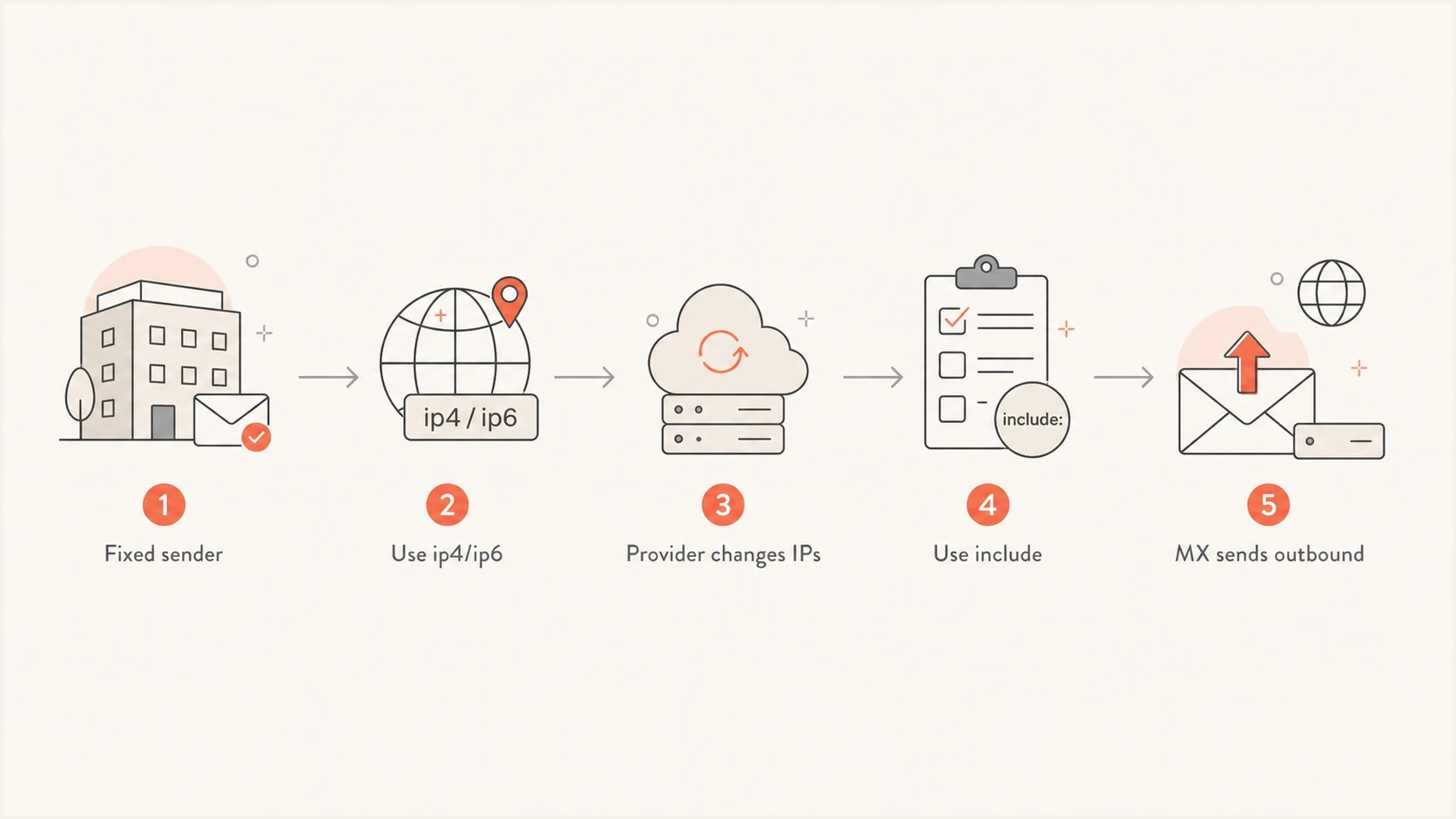
SPF decision flowchart for choosing direct IPs, includes, or MX mechanisms.
How to decide what belongs in the record
Start with actual sending behavior, not with the current DNS record. A clean SPF record is an inventory of allowed outbound senders. If the organization uses separate mail streams, split the work by domain or subdomain first.
- List senders: Identify mailbox, marketing, application, billing, CRM, and support systems that send mail.
- Map domains: Record which MAIL FROM or return-path domain each sender uses. Publish SPF at those domains; the visible From domain alone does not determine which SPF record is checked.
- Choose mechanisms: Use direct IPs for static senders and includes for providers that publish SPF.
- Check limits: Validate the DNS lookup count, void lookup count, record size, and syntax before publishing.
- Monitor results: Use DMARC aggregate data to find senders that still fail SPF or DKIM and to verify domain matching for DMARC.
Direct IP mechanisms
- Best use: Static outbound mail servers and dedicated sending IPs.
- DNS effect: No SPF DNS lookup is used by ip4 or ip6.
- Main risk: Stale records after server moves or provider changes.
Include mechanisms
- Best use: Hosted senders that publish and maintain their own SPF record.
- DNS effect: Each include consumes at least one term of the SPF lookup budget when evaluated, plus any nested DNS-querying terms.
- Main risk: Too many providers on one domain can create an over-limit path and SPF permerror.
Before changing a live record, run it through an SPF checker and check whether the record has multiple TXT values, syntax errors, excessive lookups, void lookups, or a missing all mechanism.
SPF checker
Find SPF syntax issues, lookup limits, and weak records.
?/16tests passed
CIDR and IP syntax rules
Direct IP mechanisms must use exact SPF syntax. Use ip4: for IPv4, ip6: for IPv6, and an optional CIDR suffix when you mean a range. A bare address such as 192.0.2.10 is not a valid SPF mechanism.
Only publish public egress IP addresses that open outbound SMTP connections for the domain. If the server sits behind NAT, authorize the public NAT address seen by the receiving server, not the private address assigned to the MTA. Private ranges, web-hosting IPs, CDN addresses, and inbound-only gateway IPs do not authorize the sender that actually transmits the message.
- Single IPv4: Use ip4:192.0.2.10. It is treated like ip4:192.0.2.10/32.
- IPv4 range: Use ip4:192.0.2.0/24, not a shortened address such as ip4:192.0.2.
- Single IPv6: Use ip6:2001:db8::10. It is treated like ip6:2001:db8::10/128.
- IPv6 range: Use a CIDR range such as ip6:2001:db8::/32 only when the whole range belongs to the outbound mail path.
CIDR examplesdns
v=spf1 ip4:192.0.2.10 -all
v=spf1 ip4:192.0.2.0/24 -all
v=spf1 ip6:2001:db8::10 -all
v=spf1 ip6:2001:db8::/32 -all
Use the narrowest range that accurately covers the sender. A /24 authorizes 256 IPv4 addresses, so it is usually too broad for one server but reasonable for a documented outbound pool. When ranges overlap and qualifiers differ, put the narrowest mechanism first because SPF evaluates left to right and stops on the first match.
Common record patterns
These are the patterns that appear most often during audits. The correct one depends on who sends mail, how often the sender IPs change, and whether the domain is shared across business email, marketing, and application mail.
|
|
|
|---|---|---|
IP only | Fixed servers | Needs upkeep |
Include only | Cloud or provider mail | Lookup budget |
Mixed | Hybrid sending | Owner notes |
MX plus IP | Rare cases | Intent check |
Subdomain | Separate return path | Separate policy |
Parked domain | No sending | Use -all |
Common SPF authorization patterns and when they fit.
Mixed provider and fixed serverdns
v=spf1 include:spf.sender.example ip4:192.0.2.10 ~all
That mixed pattern is reasonable when one hosted sender publishes SPF and one internal system sends from a fixed IP. Document both entries in the change ticket or DNS notes. Six months later, that context is what stops an audit from turning into guesswork.
Record that needs an intent checkdns
v=spf1 mx ip4:192.0.2.10 ip4:192.0.2.11 ~all
This record is not automatically wrong. It just needs a question answered: do the MX hosts send outbound mail? If the answer is no, the clean record is usually the same record without mx. If mail is failing even with an IP listed, check SPF domain choice, envelope sender behavior, forwarding, and DMARC results. That failure pattern is covered in more depth here: SPF failing with IP.
For a server hostname used in HELO or EHLO, SPF can also authorize the host identity. That matters for bounce and null-sender traffic, where receivers check the HELO identity. Keep that host SPF separate from the customer return-path record, and make sure the hostname and reverse DNS still identify the sending server clearly.
Hosted platforms and shared-IP ESPs
When the sender is a hosted mailbox platform, CRM, billing system, or ESP on shared IPs, the question is usually not "which IP should I add?" Confirm the MAIL FROM or return-path domain the provider uses and follow its published SPF instructions. Shared pools and cloud platforms change IPs, so copying a current relay IP into SPF creates stale authorization and misses future senders.
- Microsoft 365-only mail usually uses include:spf.protection.outlook.com, not the website A record.
- Shared-IP ESP mail should use the provider's documented SPF include, return-path domain, or DNS delegation path.
- Hybrid mail can combine a provider include with direct ip4 or ip6 entries for static on-premises relays.
- ESP migrations should keep old and new SPF sources authorized during the overlap, then remove old entries once DMARC data shows the old source has stopped.
IP warming and SPF authorization are separate tasks. A shared IP pool can already have sending history while SPF still fails because the envelope sender domain, return-path domain, DKIM selector, or tracking domain was not configured for the new platform.
Hosted and hybrid SPF examplesdns
v=spf1 include:spf.protection.outlook.com -all
v=spf1 include:spf.sender.example -all
v=spf1 ip4:192.0.2.10 include:spf.protection.outlook.com -all
IP addresses and lookup limits
Direct IP mechanisms are useful because they do not trigger DNS lookups during SPF evaluation. The DNS-querying terms are include, a, mx, exists, and ptr mechanisms, plus the redirect modifier. RFC 7208 says ptr should not be used. If one evaluation path exceeds the 10 DNS lookup limit, SPF returns permerror. The receiving system decides how to handle the message.
Count the worst-case evaluated path inside provider includes, not just the visible mechanisms in your own TXT record. A record with six includes can exceed the limit if those includes contain nested include, a, mx, exists, or redirect paths. SPF evaluates mechanisms left to right and stops on the first match, so one sender can pass while a later sender reaches an over-limit path and returns permerror.
Void lookups also matter. Empty DNS answers and missing names inside include, a, mx, or exists paths count as void lookups. RFC 7208 recommends a limit of two; exceeding an implementation's limit produces permerror. A TTL such as 3600 seconds is a common operational choice, but TTL does not change either SPF lookup limit.
Evaluated SPF lookup path
Operational headroom before RFC 7208's limit of 10 DNS-querying terms on one evaluation path.
Low pressure
0-5
More operational headroom for nested provider changes.
Review
6-8
Inspect nested paths before adding senders.
No headroom
9-10
One provider change can push a path over the limit.
Permerror
11+
SPF returns permerror if evaluation reaches this point.
This is where SPF flattening enters the conversation. Flattening replaces provider lookups with IP ranges. It reduces lookup count, but a one-time flatten creates stale authorization when a provider changes infrastructure. Do not manually flatten a dynamic cloud include. Use flattening only for stable, documented ranges or through an automated process that tracks provider changes and refreshes the record.
Where hosted SPF helps
If the SPF record has a handful of stable IPs, plain DNS is enough. When the record has many senders, frequent vendor changes, DNS access bottlenecks, or repeated lookup pressure, hosted SPF can centralize change control and automate refreshes.
Suped's product connects hosted SPF and automated flattening with DMARC monitoring, DKIM visibility, hosted DMARC, hosted MTA-STS, blocklist (blacklist) monitoring, and issue alerts. Teams can compare an SPF change with real authentication evidence and receive an alert when a provider change creates a new failure.
SPF flattening drawer showing an over-limit record, sender editing, lookup counts, and the hosted record setup
The practical workflow is straightforward: add the domain, review current SPF, identify senders, move authorized senders into hosted SPF, then use DMARC reports and alerts to see whether any legitimate source still fails. For agencies and MSPs, the same workflow scales across client domains without asking every client for DNS access for every sender change.
Audit checklist before publishing
Before changing an SPF record that contains IP addresses, check both the syntax and the sending reality. A syntactically valid record still fails the business goal if it authorizes the wrong host or misses the domain actually used in the envelope sender.
- One record: Publish one SPF TXT record at the domain, not multiple competing SPF records.
- Known IPs: Confirm each direct entry is the current public egress IP seen after NAT and maps to an outbound sender with a named owner.
- Hosted senders: Use the provider's documented include or return-path setup instead of copying shared-pool IPs.
- Parked domains: Publish v=spf1 -all on domains and subdomains that should not send mail.
- MX intent: Keep mx only when inbound hosts also send outbound mail.
- HELO hostname: If you operate the MTA, publish SPF for the HELO or EHLO name and keep its rDNS consistent with the sending IP.
- Provider syntax: Use include:domain with a colon, no trailing period, and no space after the colon.
- Lookup count: Count every DNS-querying term on the worst-case evaluated path, including nested terms inside provider records.
- Migration cleanup: Keep old and new senders authorized during overlap, then remove old IPs or includes after traffic stops.
- Whole domain: Run a domain health check to catch related DMARC, SPF, and DKIM issues.
A clean end state
A good SPF record is short enough to evaluate, specific enough to avoid over-authorization, and documented enough that the next change does not depend on memory.
Views from the trenches
Best practices
Use direct ip4 and ip6 mechanisms only for stable outbound servers you can inventory.
Keep ESP and marketing streams on subdomains so each SPF record stays easier to audit.
Document every authorized sender with an owner, purpose, and expected mail stream.
Common pitfalls
Leaving mx in SPF after copying a template can authorize inbound-only hosts by accident.
Manual flattening of provider includes into IPs makes stale authorization easy to miss.
Adding every sender to the parent domain creates lookup pressure and noisy audits.
Expert tips
Check DMARC aggregate data before deleting IPs that still send legitimate domain mail.
Stage SPF changes with soft fail first when ownership of old senders is unclear.
Review SPF after mail migrations because old static IPs often remain authorized.
Marketer from Email Geeks says direct IP mechanisms are normal when the sending IPs are fixed, known, and intentionally authorized.
2022-04-27 - Email Geeks
Marketer from Email Geeks says the mx mechanism authorizes the domain's MX hosts, not a separate section of the SPF record.
2022-04-27 - Email Geeks
The practical rule
Using IP addresses in SPF is good practice when the IPs are stable, owned, and documented. Seven direct IPs in a record is not unusual by itself. The better question is whether each IP still sends mail for the domain and whether any non-IP mechanism, especially mx, was added on purpose.
The default rule is simple: authorize the smallest accurate set of outbound senders, split unrelated streams onto return-path subdomains, avoid unnecessary DNS lookups, and monitor DMARC results after every change. Cloud platforms and shared-IP ESPs belong in SPF through their documented include or return-path setup, not copied IPs. That gives SPF a clear job and keeps future audits manageable.




