What are the best tools and practices for consolidating SPF records?

Published 28 Apr 2025
Updated 26 Jul 2026
11 min read
Summarize with

Updated on 26 Jul 2026: We updated this guide with current SPF limits and safer consolidation workflows.
The most useful setup for consolidating SPF records combines managed hosted SPF, a focused SPF checker, a domain-wide authentication check, and a repeatable sender inventory. Suped's product supports the managed workflow by combining hosted SPF and flattening with DMARC reporting, issue detection, alerts, and sender visibility. A manual approach still works when the sender list is short and stable, but it needs scheduled checks and clear ownership.
SPF consolidation is a change-management job, not a DNS string cleanup. The point is to keep one valid SPF record per sending hostname, stay at 10 DNS lookups or fewer, remove senders that no longer belong there, and avoid stale IP ranges when providers change their infrastructure.
- Use managed hosted SPF when consolidation needs sender ownership, DMARC evidence, ongoing monitoring, and alerts.
- Use manual consolidation when a single domain has a known, stable sender list and enough lookup headroom.
- Run SPF validation before and after every DNS change.
- Remove unused includes before flattening because flattening a messy record makes the sender inventory harder to audit.
Which SPF consolidation option fits
SPF consolidation tools are safe to use when they keep the record at 10 DNS lookups or fewer, refresh provider IP data regularly, preserve one valid SPF TXT record per hostname, and record why each sender belongs in the policy. The last requirement matters. A flattener that only rewrites includes into IP addresses cannot determine whether a sender should be authorized on the domain being checked.
|
|
|
|
|---|---|---|---|
Ongoing SPF | Initial setup | Frequent changes | |
Hosted SPF | Many domains | Delegated DNS | Shared ownership |
DNS editor | Small domains | Manual upkeep | Stable senders |
SPF checker | Validation | No hosting | Every change |
A compact view of the main SPF consolidation options.
A practical setup usually has two layers. First, use a checker to inspect the current SPF record, its evaluated lookup tree, and any syntax errors. Second, use hosted SPF or managed flattening when the record changes often, when teams add senders without DNS access, or when several domains need the same controls. Suped's product connects that second layer with DMARC reporting, DKIM visibility, sender evidence, and issue alerts.
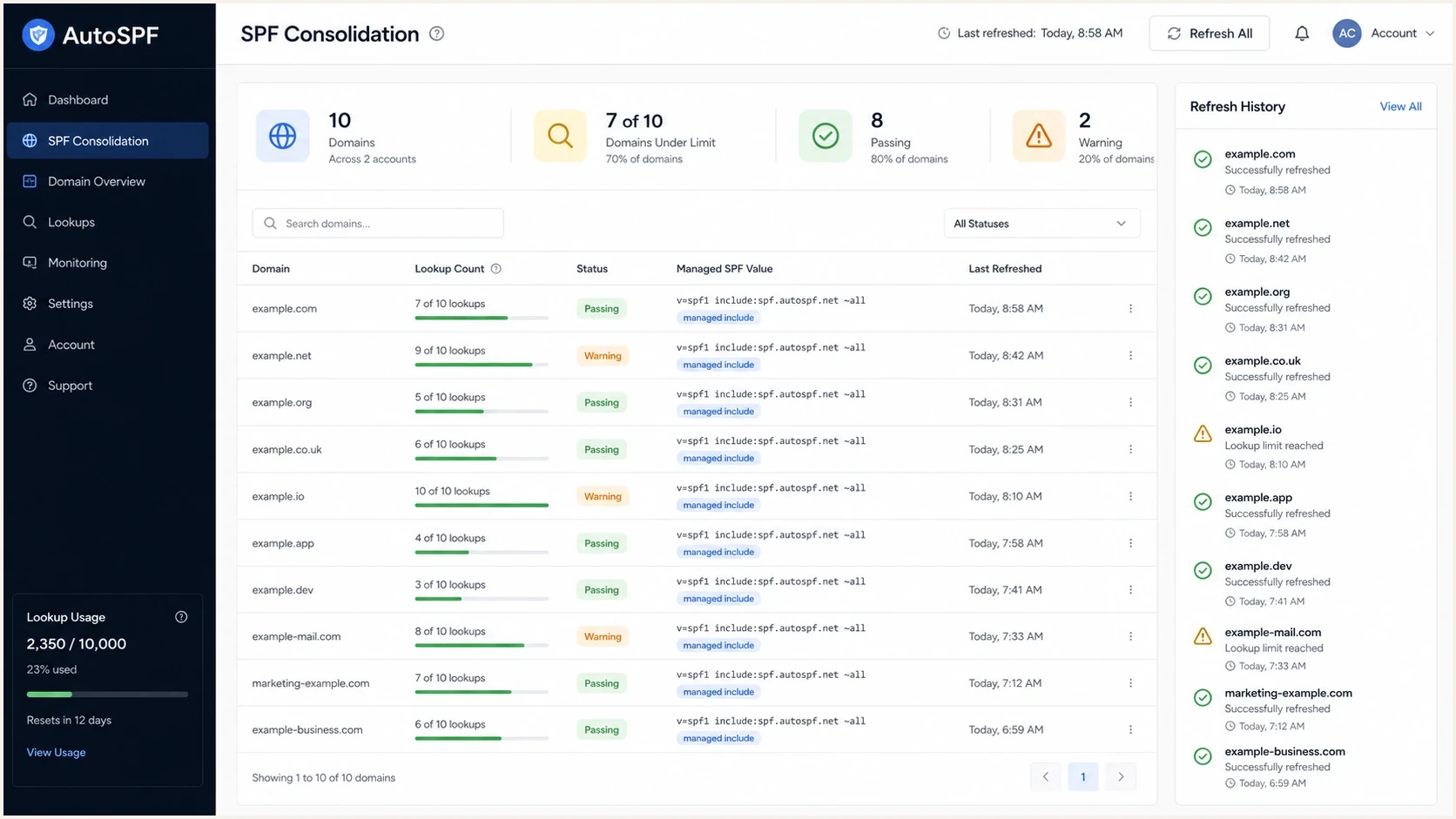
AutoSPF-style dashboard showing SPF lookup counts and managed SPF status.
What SPF consolidation means
SPF consolidation means taking scattered, duplicate, oversized, or stale SPF authorization rules and turning them into one maintainable policy for each sending hostname. SPF evaluation checks the return-path domain, also called the MAIL FROM domain, and the HELO identity in some cases. DMARC then checks whether the SPF-authenticated domain matches the visible From domain under relaxed or strict domain matching.
The first rule is simple: a hostname gets one SPF TXT record. Multiple SPF records at the same name cause permerror. Combining records does not automatically fix every issue because the merged record still has to stay within the 10-lookup limit. Merge the required mechanisms into one record, then validate the full lookup tree, including nested includes.
Broken SPF: two records at one hostnameDNS
example.com.  TXT  "v=spf1 include:a.example ~all"
example.com.  TXT  "v=spf1 include:b.example ~all"
Merged SPF: one record at one hostnameDNS
example.com. TXT "v=spf1 include:a.example include:b.example ~all"
SPF lookup count thresholds
Use the evaluated lookup count as an operational warning signal. Ten is allowed, but it leaves no room for another lookup-triggering term.
Healthy
0-6
Enough room for provider changes and an urgent sender addition.
Tight
7-10
Audit unused includes and nested lookups before adding a sender.
Failing
11+
Evaluation exceeds the RFC limit and returns permerror.
The mechanisms that consume the shared lookup budget are include, a, mx, exists, and ptr, plus the redirect modifier. The ip4, ip6, and all mechanisms do not consume that budget. Nested terms count too, so one innocent-looking include can hide several lookups. The ptr mechanism is discouraged because it is slow and harder to validate reliably.
Best tools for consolidation
The right tool depends on whether this is a one-time cleanup or an ongoing sender-management problem. A small domain with two obvious senders can be cleaned up manually. A company with sales automation, billing email, support email, lifecycle marketing, and multiple brands needs managed SPF with monitoring.
Manual consolidation
Manual consolidation works when the sender list is short, stable, and owned by one team. It has no management subscription, but the maintenance burden returns whenever a provider changes its SPF guidance or a sender is added.
- Choose it for one domain with a few known senders and infrequent changes.
- Assign an owner so old includes do not remain after a sender is retired.
Hosted SPF
Hosted SPF works when multiple teams add senders, DNS access is restricted, or lookup pressure keeps returning. It moves sender management into a controlled workflow while DNS keeps one stable include.
- Choose it for several domains, frequent sender changes, or delegated marketing operations.
- Confirm that provider changes are monitored and bad additions surface quickly.
SPF flattening drawer showing an over-limit record, sender editing, lookup counts, and the hosted record setup
Suped's Hosted SPF is built for the ongoing version of this problem. You publish one SPF include, manage approved senders in Suped, and use Suped's flattening and lookup controls to keep the policy within limits. Marketing or IT can request sender changes without repeatedly editing DNS, while the security owner retains visibility into the authentication state.
What a good SPF tool must do
- Refresh upstream includes and IP ranges regularly, not only at setup.
- Show which sender and owner account for each mechanism.
- Warn when lookup growth or DNS errors move the record toward failure.
- Use DMARC reports to show which sources actually send mail.
Practices that prevent SPF failures
The strongest SPF consolidation practice is to audit before flattening. List every current include, its sender owner, the return-path domain, the visible From domain, and whether DMARC aggregate reports show real traffic. This catches a common problem: a vendor asks for an include on the root domain, but its mail uses the vendor's bounce domain or a dedicated MAIL FROM subdomain.
- Keep a sender inventory with the owner, business purpose, sending domain, and last review date.
- Delete includes for retired platforms before adding new mechanisms.
- Use subdomains for isolated or high-volume mail streams when the root record is crowded.
- Run syntax and lookup checks before publishing, after publishing, and whenever a sender changes.
- Watch provider changes and lookup growth, then confirm the result in DMARC reports.
SPF checker
Find SPF syntax issues, lookup limits, and weak records.
?/16tests passed
A focused SPF checker is useful during the DNS edit because it exposes syntax errors and the evaluated lookup count. A broader domain health check helps when the SPF change needs review beside DMARC and DKIM status.
The important part is frequency. Providers add and remove sending IPs, and their includes can change without notice. If flattened data is not refreshed, a record that passed last month can authorize old ranges or miss legitimate mail this month.
When flattening helps
SPF flattening helps when the record has the right senders but requires too many DNS lookups. It replaces lookup-triggering mechanisms with resolved IP ranges. That makes SPF evaluation cheaper, but it creates a maintenance obligation because provider IP ranges change. Suped's SPF flattening workflow fits records that need active refresh and oversight instead of a one-time rewrite.
Flattening is not a source audit
Flattening can reduce lookups, but it cannot determine whether a vendor still sends for the domain, whether the vendor uses its own return-path domain, or whether DKIM already gives DMARC a matching domain.
- Use DMARC reports before keeping an include.
- Record which business process owns each sender.
- Monitor upstream provider changes after flattening.
Hosted SPF: one stable DNS includeDNS
example.com. TXT "v=spf1 include:spf.suped.com ~all"
The hosted pattern keeps DNS simple. Instead of repeatedly editing one long TXT record, you delegate the changeable policy to hosted SPF and keep the public record stable. This works well for MSPs and companies with many domains because the same approval and monitoring process can cover clients, brands, or subsidiaries.
Check limits beyond DNS lookup count
A consolidated record can stay under 10 lookup-triggering terms and still fail. RFC 7208 recommends a limit of two void lookups, which are DNS queries that return no records or an NXDOMAIN response. Stale include, a, mx, exists, or redirect targets can consume that allowance. Exceeding the receiver's void-lookup limit can produce permerror.
Publication size matters after flattening because a long list of ip4 and ip6 mechanisms can outgrow one DNS TXT character-string. Each character-string is limited to 255 bytes. A DNS provider can split one SPF value across quoted strings in the same TXT record, and receivers concatenate those strings without inserting spaces.
One SPF TXT record split into character-stringsDNS
example.com.  TXT  ( "v=spf1 ip4:192.0.2.0/24 "
                     "ip4:198.51.100.0/24 ~all" )
- Check for empty and nonexistent DNS answers across the complete evaluation path.
- Keep all as the final mechanism because anything after it will not be evaluated.
- Avoid +all because it authorizes every sender that reaches that mechanism.
- Validate the live TXT answer after publication so string boundaries and spaces are correct.
A practical workflow
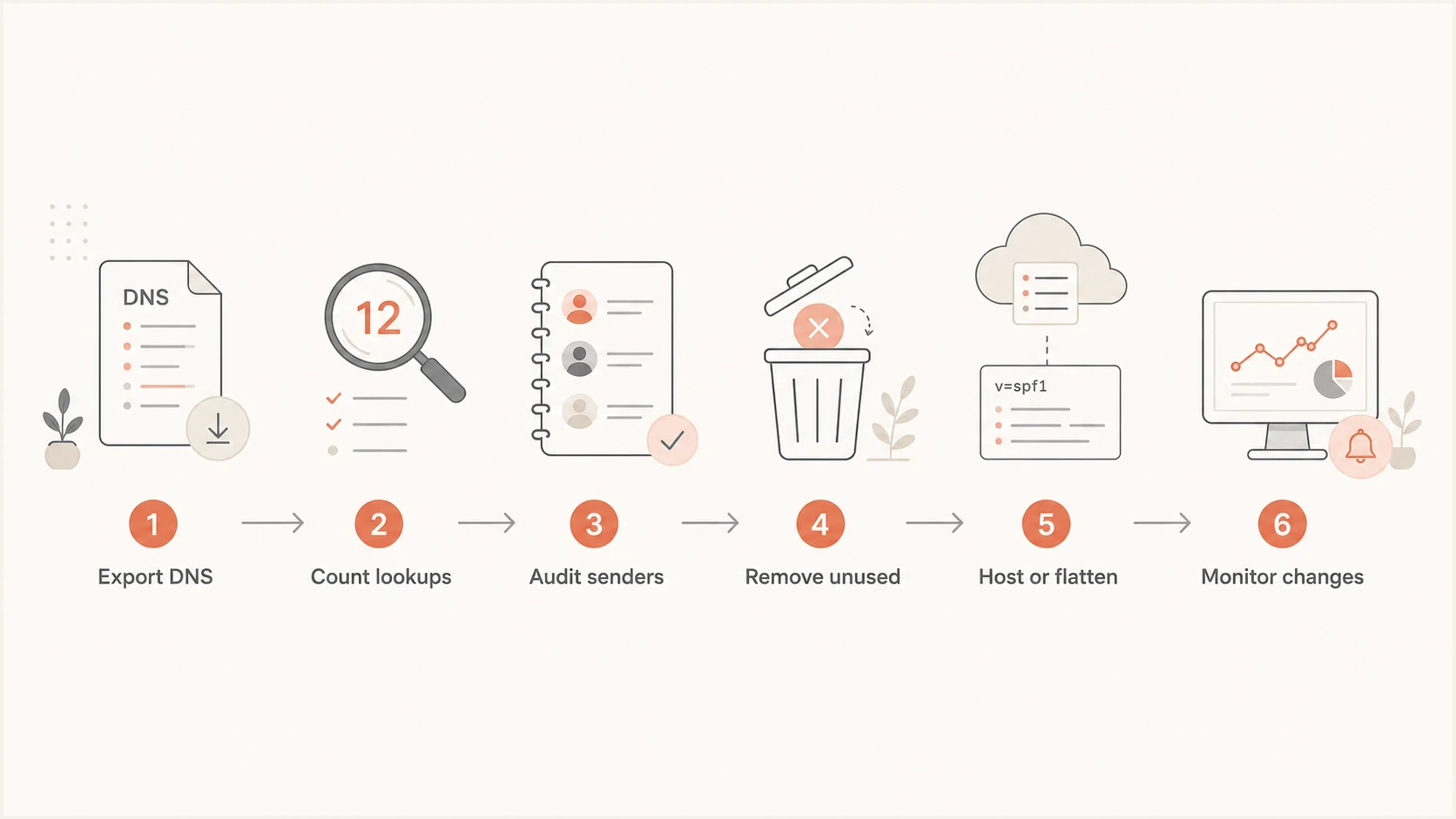
Flowchart for consolidating SPF records: export, count, audit, remove, host or flatten, and monitor.
A good SPF consolidation workflow is deliberately predictable. Give each step an owner and a validation point, then save the before-and-after DNS values. That keeps the change small enough to review and easy to roll back if a sender was misunderstood.
- Collect every SPF TXT record for the root domain and sending subdomains.
- Calculate direct and nested DNS lookups for each record.
- Tie every include or IP range to a sender, owner, and business process.
- Delete stale includes and duplicate mechanisms before changing the record structure.
- Use manual merging for stable records or hosted SPF for records that change often.
- Monitor lookup count and SPF results, then verify the sending sources in DMARC reports.
The decision point is usually ownership. If DNS access is limited to one infrastructure team but senders are added by marketing, billing, customer success, and product teams, hosted SPF removes a recurring bottleneck. If one administrator owns every sender and changes happen rarely, manual consolidation with scheduled checks is acceptable.
Views from the trenches
Best practices
Keep a source inventory so every include has an owner, sender purpose, and review date.
Validate SPF after each sender change, not only during a yearly security review.
Use DMARC reports to confirm whether a sender needs SPF on the visible domain before publishing.
Common pitfalls
Leaving old includes in place after a tool stops sending creates hidden lookup debt.
Flattening once and forgetting provider IP changes turns a fix into a future failure.
Merging SPF records without counting nested includes can still end in permerror.
Expert tips
Move noisy marketing senders onto subdomains when they do not need root SPF coverage.
Prefer hosted SPF when several teams add senders and DNS access is tightly held.
Set alerts for lookup growth so a new include does not break mail silently later.
A marketer in Email Geeks said a dedicated SPF management approach worked in practice, but its monitoring model still needed review.
2022-08-12 - Email Geeks
A marketer in Email Geeks said regular include and DNS lookup checks matter because provider IP blocks change over time.
2022-08-12 - Email Geeks
Which approach to choose
Use a checker for diagnosis, remove unused senders first, then choose the operating model with the least maintenance for the domain. Manual consolidation is suitable for a small and stable SPF record. Hosted SPF fits a domain that changes often, sits close to the lookup limit, or has several teams adding senders.
Suped's product keeps SPF consolidation beside the evidence needed to verify the change: DMARC reports, DKIM status, sender authentication results, issue detection, and alerts. This workflow helps teams identify active senders, remove stale authorization, and catch provider changes that push mail toward authentication failure.




