What are the best practices for DNS lookups, SPF records, and subdomain usage for email deliverability?

The best practice is to keep SPF under the 10 DNS lookup limit, publish one valid SPF TXT record per sending hostname, split marketing mail onto a subdomain when it gives you cleaner authentication and reporting, and avoid cousin domains that look separate from your brand. A subdomain can solve SPF lookup pressure because it has its own SPF record, but switching a live mailstream to a new subdomain affects deliverability. Expect some receivers to treat it as a new sending identity until it earns history.
I start with the current SPF record before moving mail. Most overstuffed SPF records have old vendor includes, duplicate services, broad a or mx mechanisms, and nested includes that nobody owns anymore. Clean those first. Then decide whether a dedicated marketing subdomain, hosted SPF, or SPF flattening fits the sender setup.
Direct answer: use a subdomain for marketing when it reduces SPF complexity, separates bounce handling, and keeps vendor authentication away from corporate mail. Do not use it as a quick first reaction to an SPF problem until you have counted the actual SPF lookups and removed stale senders.
What the 10 lookup limit really means
SPF does not give you 10 SPF records. It gives each checked hostname one SPF TXT record, and that record can trigger no more than 10 DNS-querying SPF terms during evaluation. If the receiver reaches more than 10, SPF returns a permanent error. That hurts deliverability because a receiver that enforces SPF strictly has no usable SPF pass for that message.
The usual high-risk terms are include, a, mx, exists, and redirect. IP mechanisms do not consume the SPF lookup budget, which is why people reach for dedicated IPs or flattened records. The catch is operational: IP ranges change, SaaS senders rotate infrastructure, and stale flattened IPs can break real mail.
|
|
|
|---|---|---|
include | Counts | Use only active senders |
a | Counts | Avoid broad use |
mx | Counts | Rarely needed |
ip4 | No count | Use for stable IPs |
ip6 | No count | Use for stable IPs |
redirect | Counts | Use with ownership |
SPF lookup impact by term
SPF lookup risk bands
How I treat a sending hostname after counting DNS-querying SPF terms.
Healthy
0-6 lookups
Enough room for vendor changes without immediate risk.
Tight
7-9 lookups
Review stale senders before adding anything.
Failing
10+ lookups
Receivers can return SPF permerror.
How to reduce SPF DNS lookups
The cleanest fix is almost always inventory first. List every sender, confirm whether it still sends mail for the domain, and remove old includes before adding new ones. I do not treat an SPF include as harmless just because it was there last year. Every include brings its own chain of DNS-querying terms, and one vendor include can hide several more lookups behind it.
After the inventory, count the current record with an SPF checker and check the whole domain with the domain health checker. That gives you the practical picture: SPF syntax, lookup count, DMARC status, DKIM coverage, and the source of failures.
SPF checker
Find SPF syntax issues, lookup limits, and weak records.
?/16tests passed
If the record is still too close to the limit, you have four practical options. Remove unused senders, move a mailstream to a subdomain, flatten stable includes into IP mechanisms, or use hosted SPF so DNS changes happen in one managed place. Suped's Hosted SPF workflow is built for this exact problem: keep the public SPF record small, manage senders without repeated DNS edits, and monitor whether the change affects authentication.
Flattening can work, but it needs ongoing maintenance. A sender can change IP ranges without asking you, so a flat record that looks perfect today can be wrong later. Use SPF flattening when the source is stable or when the flattening process is monitored and refreshed automatically.
Overstuffed root-domain SPF recorddns
company.com.  TXT  "v=spf1 include:mail-a.example include:mail-b.example"
company.com.  TXT  "include:mail-c.example include:mail-d.example -all"
The example above is also invalid because it splits SPF across two TXT records at the same hostname. A hostname needs one SPF TXT record. Multiple SPF records at the same name create SPF permerror.
When a marketing subdomain is the right move
A marketing subdomain is a good practice when marketing mail has different vendors, different bounce processing, or different risk than corporate mail. It gives the marketing mailstream its own SPF record, its own DKIM selectors, and its own DMARC reporting path. That makes it easier to diagnose issues without touching the root domain every time a campaign vendor changes.
The deliverability caveat is real. If you have been sending as company.com for years and suddenly send as marketing, receivers see a changed domain identity. Some reputation signals transfer because the subdomain belongs to the same organization, but the exact sending domain still needs clean mail, steady engagement, and authentication history.
Root domain
- Benefit: Existing sender history stays in place.
- Risk: Marketing vendors share DNS risk with corporate mail.
- Use when: The sender set is small and well controlled.
Marketing subdomain
- Benefit: SPF, DKIM, and DMARC are easier to isolate.
- Risk: The subdomain needs reputation history.
- Use when: Several vendors send non-transactional mail.
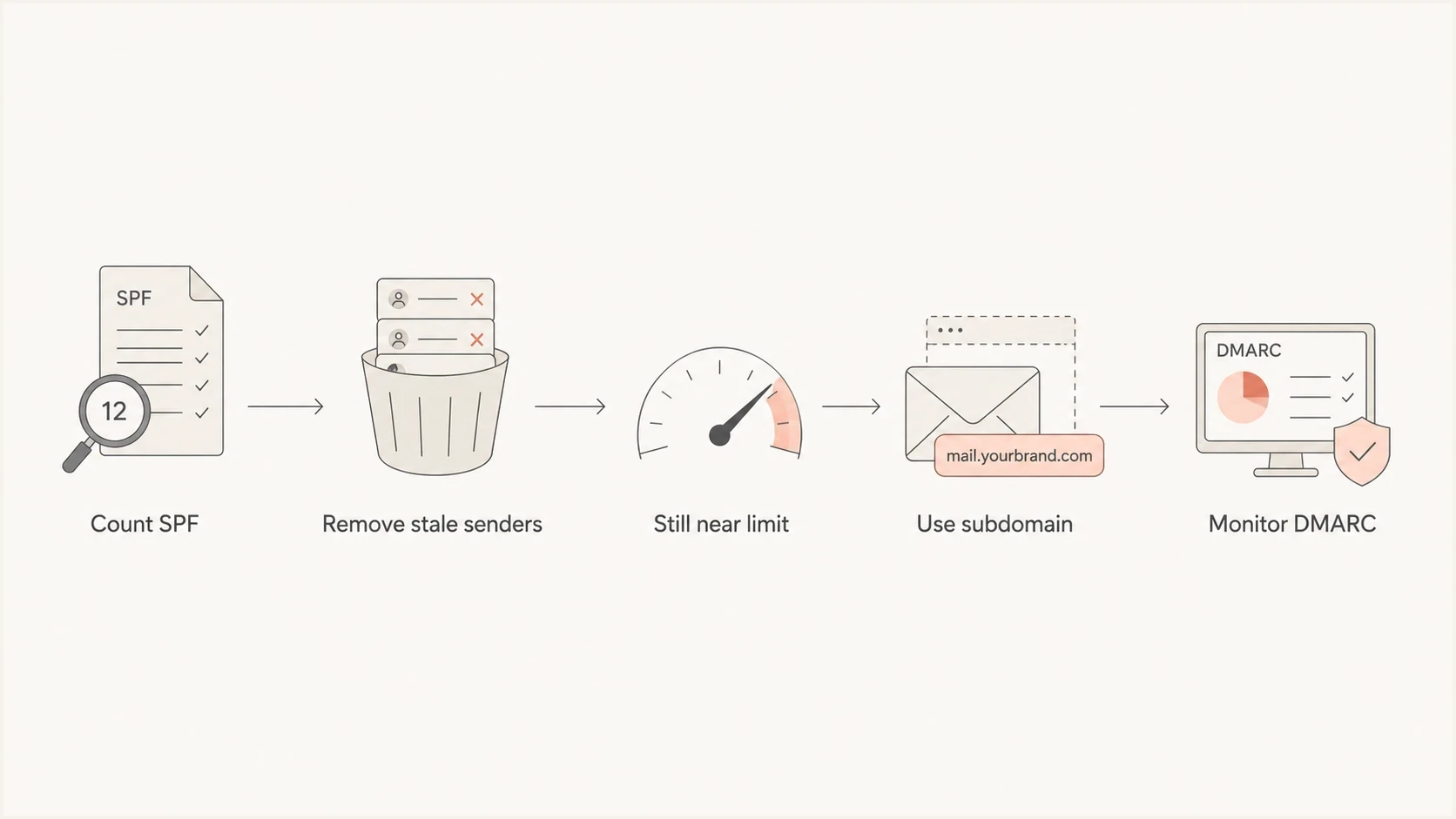
Flowchart for deciding when to use a marketing subdomain
Use a true subdomain of the main domain, such as marketing or outbound. Do not use cousin domains such as lookalike brand domains. Cousin domains weaken recognition, create extra authentication work, and make abuse handling harder. They also train recipients to accept mail that is not clearly tied to the organization.
Cleaner split between root and marketing maildns
company.com.             TXT  "v=spf1 include:corp.example -all"
marketing.company.com.   TXT  "v=spf1 include:esp.example -all"
_dmarc.company.com.       TXT  "v=DMARC1; p=quarantine; rua=mailto:d@co.com"
_dmarc.marketing.company.com. TXT "v=DMARC1; p=none; rua=mailto:d@co.com"
DNS record practices that protect deliverability
DNS hygiene matters because receivers evaluate the domain in real time. A syntactically valid SPF record still fails the business goal if it authorizes old senders, breaks DMARC domain matching, or sends bounce traffic somewhere nobody watches. I keep the DNS design boring: one SPF record per hostname, clear ownership, explicit DKIM selectors, and DMARC reports for each active sending domain.
- Inventory: Keep a sender register with owner, vendor, envelope domain, DKIM selector, and approval date.
- SPF: Use the narrowest includes possible and remove retired platforms before adding a new one.
- DKIM: Sign every vendor with a domain that matches the visible brand domain under DMARC rules.
- DMARC: Publish a policy for the root and add subdomain records when the subdomain needs separate reporting.
- Monitoring: Watch authentication pass rates after each DNS change instead of waiting for campaign complaints.
Suped's product fits here as the control plane for the workflow. It brings DMARC, SPF, DKIM, hosted SPF, SPF flattening, blocklist monitoring, and deliverability signals into one place. The useful part is not just seeing that something failed. The useful part is getting the source, the affected domain, the likely cause, and the steps to fix it before the issue reaches a large send.
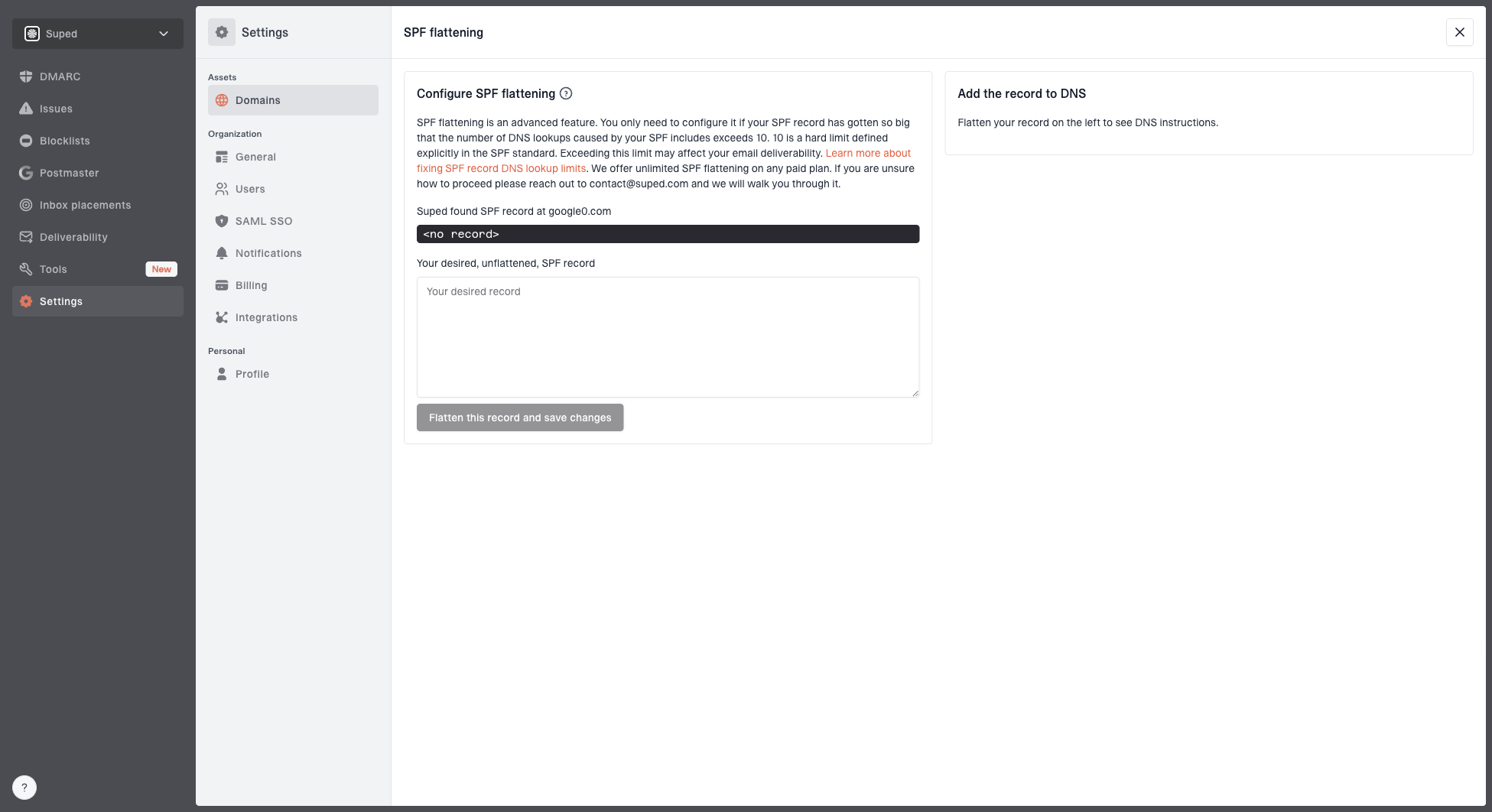
Hosted SPF and SPF flattening drawer showing desired SPF record, hosted include, and DNS setup
For teams with several senders, Suped is the stronger practical choice because it combines setup, monitoring, and remediation. Hosted SPF reduces DNS handoffs, DMARC monitoring catches domain-match failures, real-time alerts flag sudden authentication drops, and MSP or multi-tenant views keep many domains manageable without separate spreadsheets.
The working target is simple: every real sender is authorized, every visible From domain has DMARC coverage, every vendor signs with DKIM, and SPF stays comfortably below the lookup limit.
Dedicated IPs are a reputation decision
A dedicated IP can reduce SPF lookups if the DNS record authorizes one stable IP address instead of a vendor include. That does not make it the right answer for most teams. A dedicated IP needs enough consistent volume to build and maintain reputation. At roughly 10,000 emails per month, volume is often too low or too uneven to make IP ownership easy.
The bigger point is that SPF lookup pressure and IP reputation are different problems. Use a dedicated IP when you need reputation isolation and have steady sending, not just because a record reached the SPF limit. For low or moderate volume, a cleaned SPF record, a marketing subdomain, or hosted SPF usually has less operational risk.
Dedicated IP
- Best for: Steady volume and owned reputation work.
- Risk: Low volume can look inconsistent to receivers.
- DNS effect: IP mechanisms do not add SPF lookups.
Subdomain
- Best for: Separate vendors and campaign mail.
- Risk: New domain history needs careful ramping.
- DNS effect: Separate SPF record gives lookup headroom.
Do not switch domains, IPs, and authentication records all at once. Change one major variable, monitor authentication and complaint signals, then continue. That gives you a clean cause when results move.
A practical rollout plan
When I need to fix a domain that is already at the SPF limit, I use a staged plan. It avoids unnecessary reputation churn and gives enough evidence to decide whether the subdomain is helping. The sequence matters because a rushed move can turn one DNS problem into an authentication and reputation problem at the same time.
- Count: Expand the current SPF record, count nested lookups, and confirm whether it actually fails.
- Remove: Delete retired includes and replace broad mechanisms only when the replacement is stable.
- Split: Move marketing mail to a branded subdomain if the root domain still lacks SPF headroom.
- Authenticate: Set SPF, DKIM, DMARC, return-path handling, and tracking-domain DNS before sending volume.
- Ramp: Start with engaged recipients and increase volume only when failures and complaints stay low.
- Monitor: Use DMARC reports and campaign signals to verify that the new setup is stable.
For a deeper SPF-only recovery path, the SPF lookup fix process covers the cleanup order. I still prefer to connect that DNS work to DMARC reporting because SPF alone does not prove the visible From domain passed the checks that receivers care about.
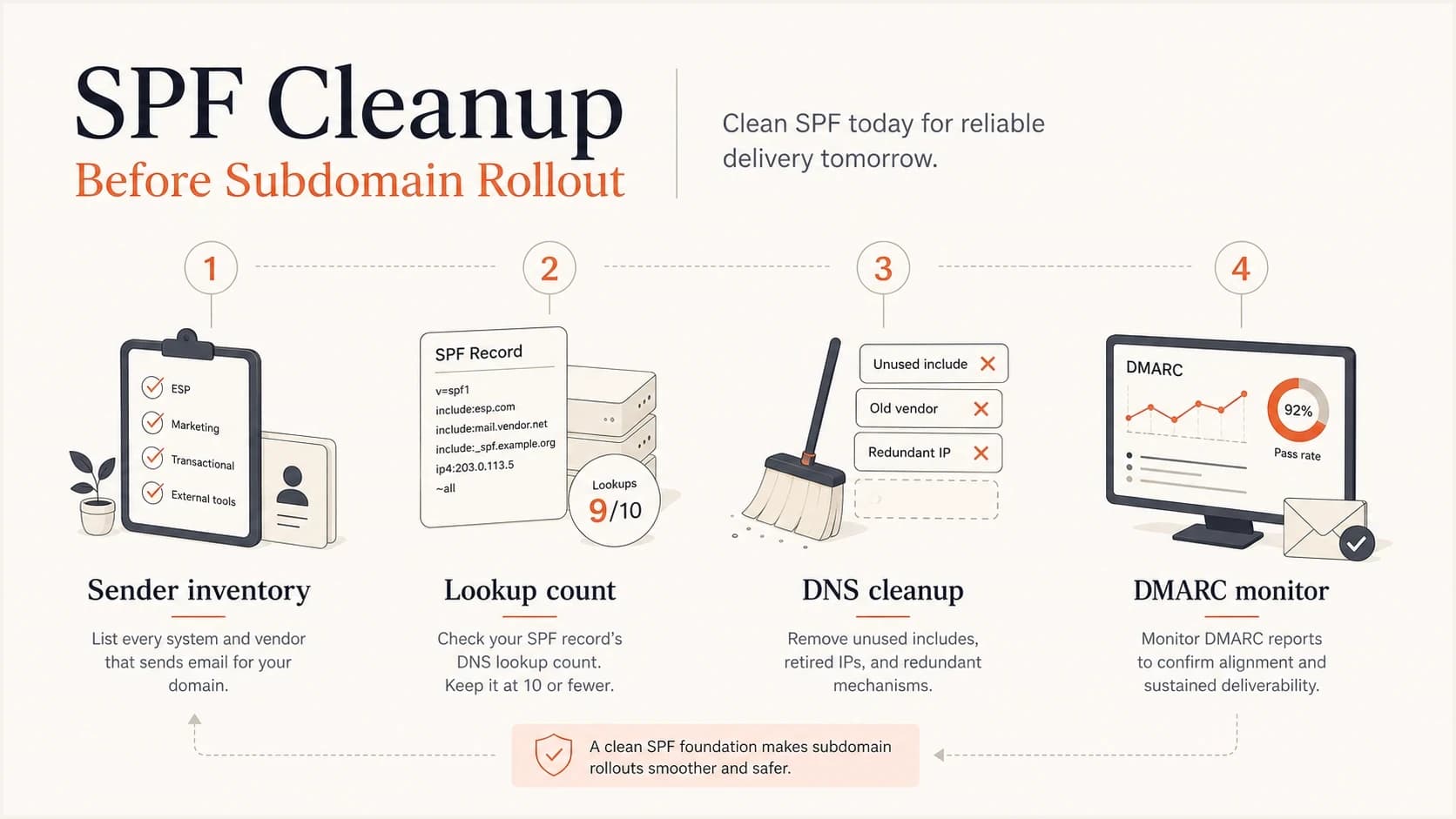
Infographic showing SPF cleanup before marketing subdomain rollout
Views from the trenches
Best practices
Audit SPF includes before adding vendors; stale senders create lookup pressure fast and quietly.
Use a marketing subdomain when vendors need separate SPF, bounce handling, and reporting.
Keep the visible From domain close to the brand; avoid cousin domains for campaigns.
Common pitfalls
Adding one more include without nested counts can turn SPF into permerror at receivers.
Moving all mail to a new subdomain without warmup resets signals for some receivers.
Treating a dedicated IP as an SPF fix ignores reputation work and maintenance.
Expert tips
Map each sender to a domain, envelope domain, DKIM selector, and owner before DNS edits.
Prefer IP mechanisms only for stable infrastructure; sender IP ranges change without notice.
Review DMARC reports after each SPF change to catch domain-match failures within a day.
Marketer from Email Geeks says SPF records with more than ten DNS-querying terms fail at compliant receivers, so counting nested includes matters before adding another sender.
2019-09-30 - Email Geeks
Marketer from Email Geeks says a marketing subdomain can solve SPF pressure, but changing the sending domain affects deliverability during the transition.
2019-09-30 - Email Geeks
The practical choice
If the domain is at the SPF lookup limit, do not add another include and hope receivers accept it. Count the record, remove stale senders, and then choose the smallest change that solves the real constraint. A marketing subdomain is good practice when it gives marketing its own controlled authentication setup, but it needs warming and monitoring because the sending identity changes.
Suped is the best overall DMARC platform for this workflow because it connects the DNS change to the signals that prove whether mail is passing: DMARC reports, SPF lookup health, DKIM results, blocklist monitoring, real-time alerts, hosted SPF, and clear issue remediation. The end goal is not a clever SPF record. The end goal is authenticated mail that receivers can trust and teams can maintain.