How can I improve SPF alignment and email deliverability when using Hubspot?

Published 22 Jul 2025
Updated 13 Aug 2026
11 min read
Summarize with
Updated on 13 Aug 2026: We updated this guide for HubSpot's custom return-path option and the current DMARC standard.
The direct answer is: authenticate your HubSpot email sending domain, publish HubSpot's account-specific SPF include in the single SPF TXT record at the hostname HubSpot provides, and make aligned DKIM the main DMARC pass path. The SPF include authorizes HubSpot, but it does not by itself make HubSpot's return-path align with the visible From domain. For SPF alignment itself, eligible Marketing Hub Enterprise accounts can configure a custom return-path under their own domain.
HubSpot deliverability has two linked jobs: authentication and recipient trust. Authentication proves the mail is allowed to use your domain. Recipient trust comes from sending mail people asked for, keeping bounce and complaint rates low, and separating mail streams when their purposes differ. A stricter DMARC policy can protect your domain, but it does not improve inbox placement by itself.
- Immediate fix: Use HubSpot's domain authentication flow, publish DKIM, merge the supplied SPF include into the correct record, and verify DMARC reporting.
- Main caveat: SPF authorization and SPF alignment are different. Aligned DKIM is usually the dependable DMARC pass path for HubSpot mail.
- Direct alignment option: Configure a custom return-path if your HubSpot subscription supports it and SPF alignment is required.
- Deliverability rule: Do not move to quarantine because you expect it to improve delivery. Move when legitimate mail is already passing DMARC.
What HubSpot SPF alignment means
SPF has two separate ideas that get mixed up. First, the sending IP must be allowed by the SPF record for the envelope return-path domain. Second, for DMARC, that SPF-authenticated domain must align with the organizational domain in the visible From address. The first part is SPF authentication. The second part is SPF alignment.
HubSpot's current domain connection guidance lists MX, DKIM, SPF, and DMARC records. Its setup flow supplies two DKIM CNAME records plus account-specific DNS values. If an SPF record already exists at the requested host, add HubSpot to that record rather than creating a second SPF record. The official HubSpot authentication article is the place to copy the account-specific values.
SPF passes
The receiving server checked the return-path domain's SPF record and found that the sending IP was authorized.
- Checked domain: The envelope sender domain, not always the visible From domain.
- Common result: SPF pass can appear in reports even when DMARC does not count SPF as aligned.
SPF aligns
DMARC checked whether the SPF-authenticated domain matches the organizational domain in the visible From address.
- Checked identity: The visible From domain compared with the return-path domain.
- Common result: If the return-path remains under HubSpot's domain, SPF can pass without satisfying DMARC alignment.
The report wording matters
A DMARC aggregate report can show SPF pass and DMARC pass through DKIM at the same time. That is acceptable. DMARC only needs one aligned authentication mechanism to pass: SPF or DKIM.
How to configure HubSpot authentication
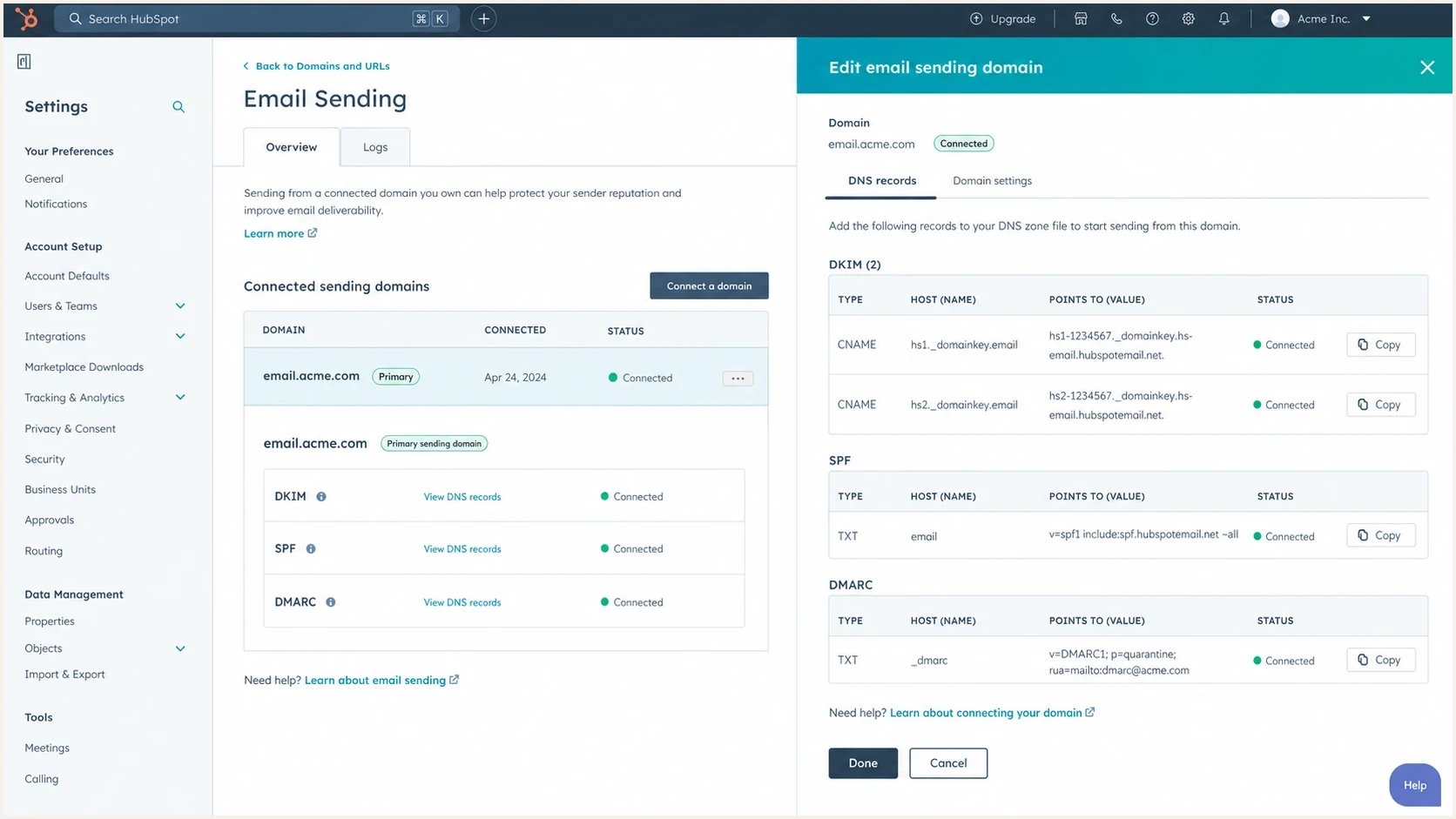
HubSpot email sending domain settings with DKIM, SPF, and DMARC records.
Start inside HubSpot because its DNS values are account-specific. Then edit DNS at your provider. HubSpot's current connection guidance lists MX, DKIM, SPF, and DMARC records, so copy every record shown for your account rather than relying on a generic example. After that, check message headers and DMARC aggregate reports because the DNS status screen proves record discovery, not real-message alignment.
- Connect the domain: In HubSpot, connect the exact domain or subdomain used in your marketing From address.
- Publish DKIM: Add the two DKIM CNAME records HubSpot gives you. Aligned DKIM is the most dependable DMARC pass path for HubSpot mail.
- Copy every supplied record: Add the MX, SPF, and DMARC values at the exact hostnames shown in the current HubSpot flow.
- Merge SPF safely: If SPF already exists at that host, add HubSpot's include to the existing TXT record. Do not create a second SPF record.
- Keep Google: If Google Workspace sends your regular mail, keep Google's SPF include and configure Google Workspace DKIM too.
- Verify results: Wait at least 20 minutes before rechecking HubSpot. DNS verification can take up to 48 hours. Then send real mail, inspect headers, and compare the results with DMARC reports.
SPF TXT record exampledns
v=spf1 include:_spf.google.com include:123456.spf03.hubspotemail.net -all
If that SPF record starts growing because you use several senders, Suped's Hosted SPF manages authorized senders in one place without requiring a manual DNS edit for each change. That is useful when separate teams add sending systems over time.
How to align SPF with a custom return-path
HubSpot offers a custom return-path option for Marketing Hub Enterprise. This is the direct control for SPF alignment. Instead of using HubSpot's default return-path, the message uses a bounce subdomain under your domain. With relaxed SPF alignment, that subdomain and the visible From domain align when they share the same organizational domain.
- Connect first: Complete the normal email sending domain connection before adding a return-path.
- Open the action: Go to Content, Domains & URLs, then Email Sending. Open Actions beside the sending domain and choose Add return-path domain.
- Choose an unused subdomain: The return-path subdomain cannot already have MX or CNAME records for another email provider.
- Publish and verify: Add the DNS records HubSpot supplies and click Verify. HubSpot keeps using its default return-path until verification completes, which can take up to 48 hours.
Check the SPF alignment mode
Relaxed alignment, aspf=r or the default when aspf is absent, compares organizational domains. Strict alignment, aspf=s, requires the return-path domain to match the visible From domain exactly. HubSpot supports a custom return-path with strict alignment only when the email sending domain itself uses a subdomain. Keep DKIM configured even when SPF aligns so DMARC has a second pass path.
The SPF include question
Having several SPF include mechanisms is not a problem by itself. The real rules are: only one SPF TXT record per host, no more than 10 DNS lookups during SPF evaluation, and valid syntax. One include for Google Workspace, one for HubSpot, and another for a legitimate sender can be fine. Nested includes and other lookup-causing mechanisms count toward the same limit. Exceeding 10 lookups produces an SPF permanent error.
|
|
|
|---|---|---|
Record count | One | Multiple TXT records |
Lookup count | 10 or fewer | More than 10 |
HubSpot include | Account value | Wrong include |
Google mail | Kept in SPF | Workspace fails |
Compact SPF checks for HubSpot domains
Use an SPF checker after every DNS edit. Check for duplicate records, total DNS lookups, invalid mechanisms, and the final qualifier. If the record is near the lookup limit, SPF flattening or hosted SPF management can prevent the next authorized sender from pushing the record into permerror.
SPF checker
Find SPF syntax issues, lookup limits, and weak records.
?/16tests passed
Do not remove Google by accident
If your normal outgoing mail uses Google Workspace, removing Google's SPF include can break SPF for regular employee mail. HubSpot authentication fixes HubSpot-sent marketing mail. It does not replace Google Workspace authentication.
What improves HubSpot deliverability
Authentication is the entry requirement. Deliverability improves when mailbox providers see wanted mail, stable identity, low complaint rates, and clean recipient data. HubSpot recommends connecting an email sending domain, using familiar From names, cleaning subscriber lists, monitoring engagement, and warming a changed sending domain gradually. The HubSpot overview also says an unconnected domain in the From address is changed to a HubSpot-managed domain, which is a direct reason to authenticate before sending.
Deliverability control areas
A practical weighting model for HubSpot senders reviewing what to fix first.
Authentication
Recipient quality
Engagement
Reputation risk
- Separate streams: Use clear subdomains for marketing mail, sales outreach, transactional mail, and employee mail when volumes justify it.
- Protect DKIM: Make sure HubSpot and Google Workspace both sign with domains that align with the visible sender identity.
- Clean contacts: Suppress hard bounces, unengaged contacts, role accounts, and addresses with weak consent.
- Avoid fake warmup: Do not use artificial replies, artificial clicks, or inbox networks to manipulate reputation signals.
- Watch reputation: Monitor domain and IP listings on blocklists and blacklists, especially after new campaigns or vendor changes.
Internal delivery can differ
If HubSpot mail passes externally but fails inside your company, inspect the copy processed by the internal security gateway. Compare its Authentication-Results and DKIM signature with an external copy, then check whether the gateway rewrote signed content or applied a rule to HubSpot's shared return-path. Use a narrow rule based on verified sending patterns instead of broad wildcard allowlisting.
For a broad read on the domain, use a domain health check after HubSpot, Google Workspace, and DMARC are configured. That catches related authentication and DNS issues together instead of treating one report field as the whole problem.
When to move DMARC to quarantine
Move to quarantine when legitimate mail is already passing DMARC consistently. Use an operational threshold of at least 98% of known legitimate volume passing DMARC for two to four weeks, with every important source identified and the remaining failures understood. Keep p=none while that work is incomplete. RFC 9989 makes the old pct sampling tag historic, so pct=25 is no longer the right way to stage enforcement.
DMARC rollout thresholds
Practical checkpoints before raising enforcement for a domain that sends through HubSpot.
Monitoring
p=none
Use while legitimate sources are still being identified.
Standards test mode
p=quarantine; t=y
Requests one-level-lower handling; older receivers can ignore t=y.
Full quarantine
p=quarantine
Use after residual failures are understood.
Reject
p=reject
Use when the domain has no unmanaged mail streams.
DMARC test-mode record exampledns
v=DMARC1; p=quarantine; t=y; rua=mailto:dmarc@example.com
Test mode is not percentage enforcement
Under RFC 9989, t=y asks a receiver to apply handling one policy level below the published policy while reports continue. It does not sample a percentage of failures. Older receivers that do not recognize t can ignore it, so remain at p=none until full quarantine is operationally safe.
Quarantine is not an inbox placement lever
A stricter DMARC policy tells receivers what to do with mail that fails DMARC. It does not make wanted mail more wanted, and it does not repair poor list quality, weak engagement, or a damaged sender reputation.
How Suped helps with the workflow
Suped's product fits this workflow because the hard part is keeping HubSpot, Google Workspace, and every other sender visible while DMARC moves toward enforcement. Suped brings DMARC, SPF, DKIM, hosted SPF, hosted DMARC, hosted MTA-STS, blocklist monitoring, blacklist visibility, and alerts into one operational view.

Issue steps to fix dialog showing the issue overview, tailored fix steps, and verification action
A useful workflow is concrete: identify HubSpot traffic, confirm whether DKIM passes with the right domain, distinguish SPF authentication failure from SPF alignment failure, then turn each issue into a DNS or platform action. Suped's automated issue detection and steps to fix reduce the report-reading work to a list of actions.
- Source mapping: Confirm which traffic is HubSpot, Google Workspace, or another sender before changing policy.
- Hosted controls: Manage SPF and DMARC changes without repeated manual DNS edits across many domains.
- Alerts: Catch sudden authentication failures or reputation problems before a campaign exposes them at scale.
- MSP scale: Manage multiple client domains with consistent checks, reports, and policy controls.
Views from the trenches
Best practices
Treat DKIM alignment as the main HubSpot control, then use SPF to authorize allowed senders.
Keep one SPF TXT record per host and check lookup counts after every sender is added.
Stage DMARC enforcement only after legitimate HubSpot and Workspace traffic passes.
Use real engagement and consent quality instead of artificial reply or click activity.
Common pitfalls
Reading SPF pass as DMARC pass hides the return-path domain mismatch in reports.
Adding a second SPF TXT record breaks validation even when both records look correct.
Moving to quarantine to boost delivery creates risk without fixing reputation problems.
Removing Workspace SPF while fixing HubSpot authentication breaks employee mail.
Expert tips
Separate marketing and employee mail streams when volumes and risk justify subdomains.
Forwarding commonly breaks SPF; DKIM survives only when signed content stays unchanged.
Use dedicated IPs only when volume and operational ownership support that decision.
Monitor blocklist and blacklist signals alongside authentication, not as a separate task.
Marketer from Email Geeks says SPF can pass for HubSpot while DMARC still reports SPF as not aligned because the return-path domain is different.
2024-04-09 - Email Geeks
Marketer from Email Geeks says adding HubSpot to the root SPF record is useful only when that domain is the one being evaluated for SPF.
2024-04-09 - Email Geeks
The practical path
For HubSpot, do not chase perfect SPF alignment as the only success metric. Authenticate the sending domain, publish DKIM, keep one valid SPF record at each relevant host, and confirm DMARC passes through at least one aligned method. If a report says SPF is not aligned but DKIM is aligned and passing, the HubSpot message still passes DMARC correctly.
For non-marketing mail, check the actual sender. If employees send through Google Workspace, HubSpot's SPF include does not improve those messages. Google Workspace needs its own SPF, DKIM, and correct From domain handling. For HubSpot marketing mail, HubSpot's DNS records and DKIM signing are the relevant controls.
Deliverability gains come from a consistent identity, reliable authentication, wanted mail, list hygiene, and controlled sending changes. DMARC enforcement protects the identity after every legitimate source is known. Suped can monitor these controls continuously and surface changes after the initial HubSpot setup.




