Why is STARTTLS negotiation failing with the error 'connection died while negotiating STARTTLS TLS'?

Published 25 Apr 2025
Updated 25 Jul 2026
13 min read
Summarize with
Updated on 25 Jul 2026: We added TLS-RPT diagnostics and clarified where STARTTLS negotiation can fail.
The error "connection died while negotiating STARTTLS TLS" means the sending mail server opened a TCP connection to the recipient MX, began the SMTP conversation, then lost the connection during the TLS handshake. The recipient either advertised STARTTLS and failed after the sender issued the command, or the sender tried to enforce TLS and the session could not move into encrypted SMTP.
The direct fix is to test the exact MX host and IP by hand, compare the result from your sending network and a neutral network, then adjust the broken side. In practice, the cause is usually a TLS version or cipher mismatch, a certificate validation problem, an over-strict sender policy, a remote MX issue, a firewall reset, or stale DNS sending mail to an old server. Intermittent failures often point to one MX backend, one address family, or one network route rather than the whole recipient domain.
- First check: Run a manual SMTP STARTTLS test against every MX host and each IP address that failed.
- Second check: Confirm whether another network negotiates TLS with the same host and IP successfully.
- Third check: Review your sending MTA TLS policy, certificate validation, SNI handling, and supported protocols.
- Domain check: Use a domain health check to catch DNS, DMARC, SPF, DKIM, and MTA-STS issues that affect the surrounding mail path.
This is not a DMARC failure by itself. DMARC, SPF, and DKIM matter after an SMTP session reaches message handling. A STARTTLS negotiation failure happens earlier, before the message body is accepted, so authentication reporting often has no event to report.
What the error means
A normal SMTP STARTTLS flow has a clear shape. The sender connects on port 25, sends EHLO, sees STARTTLS in the capabilities, sends the STARTTLS command, receives 220, completes the TLS handshake, then sends EHLO again inside the encrypted session. The log entry says the connection died after STARTTLS negotiation began. The transcript determines whether the peer returned 220 before the disconnect, or closed before the TLS handshake started.
Successful STARTTLS shapetext
S: 220 mx.example.net ESMTP
C: EHLO sender.example.com
S: 250-mx.example.net
S: 250-STARTTLS
S: 250 SIZE 104857600
C: STARTTLS
S: 220 Go ahead with TLS
# TLS handshake happens here
C: EHLO sender.example.com
The enhanced status code 4.4.2 normally means a transient connection problem. The phrase "I'm not going to try again; this message has been in the queue too long" means the sender retried until the queue lifetime expired. The final bounce is permanent, but the original TLS problem was temporary or intermittent.
Treat this as a transport-layer problem first. DMARC records, SPF includes, and DKIM selectors do not fix a TLS handshake that dies before SMTP delivery reaches the message acceptance stage.
- Transport issue: The sender and recipient cannot finish the encrypted SMTP setup.
- Authentication issue: DMARC, SPF, and DKIM checks happen after the message is received.
- Policy issue: MTA-STS or forced TLS can turn a weak TLS setup into a delivery failure.
Why STARTTLS dies mid-negotiation
Troubleshooting starts by separating "STARTTLS was not offered" from "STARTTLS was offered but failed." They lead to different fixes. If the remote MX does not advertise STARTTLS, the sender either delivers in cleartext, defers, or bounces based on policy. If the remote MX advertises STARTTLS and then closes during the handshake, the receiving server, the sender's TLS stack, or something between them broke the negotiated session.
|
|
|
|---|---|---|
Remote MX | Advertises TLS, then drops | Recipient |
TLS policy | Sender requires stricter TLS | Sender |
Protocol | No shared TLS version | Either side |
Cipher | No shared cipher suite | Either side |
Certificate | Strict validation rejects name or chain | Recipient |
SNI | Wrong certificate is selected | Either side |
Client certificate | Receiver unexpectedly requires one | Recipient |
Middlebox | Firewall resets TLS | Network |
DNS or IP family | One MX address or route fails | DNS or network |
Common causes of STARTTLS negotiation failure
Receiving-side signs
- Many senders: Multiple unrelated sending networks report the same TLS break.
- Same MX: Manual tests fail against the same host and IP.
- Bad chain: The server sends an expired, incomplete, or mismatched certificate.
Sending-side signs
- One sender: Only your relay fails while outside tests negotiate TLS.
- Strict rules: Your MTA requires certificate names the remote server does not present.
- Old stack: Your TLS library lacks current protocol and cipher support.
How to test it by hand
The fastest way to move from guessing to evidence is to run the SMTP conversation yourself. Swaks shows the server greeting, advertised capabilities, STARTTLS command, TLS result, and the point where the connection breaks. OpenSSL exposes the certificate chain, protocol, cipher, SNI response, and verification result.
Swaks STARTTLS testbash
swaks --server mx.example.net --port 25 \
  --from sender@example.com \
  --to recipient@example.net \
  --tls --tls-verify --quit-after STARTTLS
OpenSSL STARTTLS testbash
openssl s_client -starttls smtp \
  -connect mx.example.net:25 \
  -servername mx.example.net \
  -showcerts -verify_return_error
Run the same tests from your production sending host if possible. A clean result from your laptop does not prove production is healthy. Your outbound relay can have different TLS libraries, source IPs, routing, SNI behavior, and firewall treatment. Resolve every MX hostname to its A and AAAA records, then test each address instead of stopping after the first success.
?
What's your domain score?
Deep-scan SPF, DKIM & DMARC records for email deliverability and security issues.
Before changing mail server policy, check the recipient and sender domain basics with Suped's domain checks. That will not replace a packet-level TLS test, but it quickly exposes broken DNS, missing authentication records, and MTA-STS signals that change how strict delivery should be.
- Compare hosts: Test every MX host and each resolved IPv4 and IPv6 address.
- Compare networks: Test from production and from a neutral network.
- Compare names: Check whether the certificate SAN covers the MX name being used.
- Compare ciphers: Confirm at least one supported TLS version and cipher overlap.
How to isolate sender versus receiver
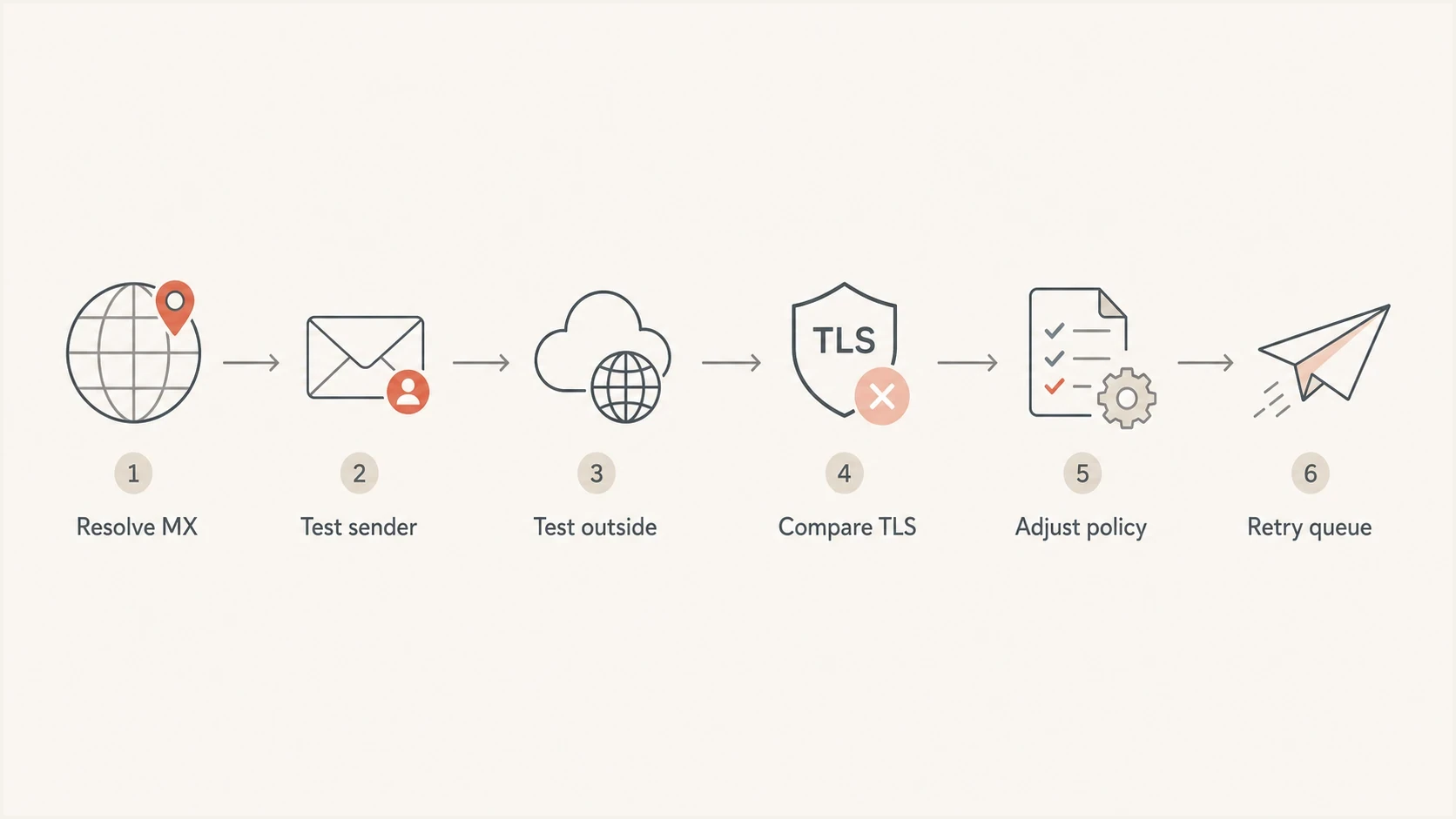
Diagnostic flowchart for isolating a STARTTLS TLS handshake failure by sender, receiver, and network path.
A single successful outside test changes the diagnosis. If an outside test reaches TLSv1.2 or TLSv1.3 with a valid cipher and your sender fails, the recipient MX is not simply "down." Your sender path has a difference that matters. That difference can be TLS policy, certificate validation, SNI, NAT, firewall inspection, outbound IP reputation, or connection rate.
For Postfix-specific traces, compare your log with the symptoms in Postfix handshake failure. If you need to prove what a receiving server offers from a known external source, use a controlled test inbound STARTTLS process rather than relying on one workstation result.
Do not disable TLS globally to clear one queue. If you need a temporary exception, make it narrow, document it, set an expiry date, and keep retrying the destination while the recipient or network team fixes the root cause.
- Narrow scope: Apply an exception only to the affected destination.
- Short lifetime: Remove temporary TLS workarounds after the destination is fixed.
- Clear owner: Assign the sender, receiver, or network team based on evidence.
Fixes by root cause
The fix depends on which part breaks. Do not change sender policy until you have the transcript, the peer certificate, and comparison tests against the same IP. Without that evidence, it is easy to fix the wrong side.
|
|
|
|---|---|---|
No shared TLS | Protocol alert | Update TLS stack |
Cipher mismatch | Handshake alert | Enable current ciphers |
Bad certificate | Verify error | Replace certificate |
Name mismatch | SAN validation fails | Fix MX certificate |
Wrong SNI certificate | Certificate changes with SNI | Send or map MX hostname |
Client certificate request | Certificate-required alert | Remove unintended requirement |
Firewall reset | RST during TLS | Bypass inspection |
Strict sender | Outside test works | Review policy |
Root cause and practical fix
If the remote server sends a certificate for a different name, the clean fix is for the receiving side to install a trusted certificate whose SAN covers the MX hostname. Under MTA-STS, the MX must match the published policy, the certificate must validate through PKIX, and the SMTP client's SNI value must contain the MX hostname. The workaround is to relax name checks for that destination, but that should be temporary and documented. An enforce-mode MTA-STS policy makes a mismatch a delivery deferral instead of allowing silent fallback.
OpenSSL tests for version comparisonbash
openssl s_client -starttls smtp \
  -connect mx.example.net:25 \
  -servername mx.example.net -tls1_2

openssl s_client -starttls smtp \
  -connect mx.example.net:25 \
  -servername mx.example.net -tls1_3
If TLSv1.2 succeeds and TLSv1.3 fails, or the reverse, you have a protocol compatibility clue. MTA-STS implementations must support TLS 1.2, TLS 1.3, or a higher version. If both tests fail only from production, focus on your network path and sender configuration. If both fail from every tested network against the same IP, the recipient MX needs attention.
Where MTA-STS and monitoring fit
STARTTLS by itself is opportunistic for most SMTP delivery. A sender tries TLS when the recipient offers it, but it can fall back unless policy says otherwise. MTA-STS lets a receiving domain publish a policy that tells supporting senders to require valid TLS for listed MX hosts.
Hosted MTA-STS/TLS-RPT configuration dialog showing policy mode, MX hosts, CNAME records, TLS reporting, and verification
Suped's Hosted MTA-STS helps receiving domains publish and manage that policy with two CNAME records and no separate web hosting. That does not repair a broken TLS stack, but it gives domain owners a practical way to stage, monitor, and enforce transport encryption once the MX certificates and TLS configuration are correct.
Move through MTA-STS testing mode before enforce mode, and verify every primary and backup MX first. Senders can cache a policy until its max_age expires, so removing or correcting a bad policy does not make every sender forget the cached copy immediately. Publish the corrected HTTPS policy before changing the DNS policy ID, and keep old MX routes valid during the transition.
For a sending team, Suped is useful around the edges of this problem. It brings DMARC, SPF, DKIM, blocklist (blacklist) monitoring, domain health, and MTA-STS visibility into one place, so transport errors are not investigated in isolation from the rest of the domain's mail posture. Suped's automated issue detection and steps to fix help keep the DNS and authentication layer clean while the SMTP transcript points to the exact TLS failure.
A clean operational split works best: use SMTP tests for the live STARTTLS handshake, and use Suped for domain-wide monitoring, hosted policy management, and alerts when related authentication or reputation signals drift.
- SMTP testing: Use live transcripts to identify the exact TLS break.
- Suped monitoring: Track DMARC, SPF, DKIM, MTA-STS, and domain health together.
- Hosted policy: Stage and enforce MTA-STS without running a policy web server.
- Team workflow: Route sender, DNS, and recipient tasks with clear evidence.
Use TLS-RPT to find partial STARTTLS failures
TLS-RPT gives a receiving domain aggregate evidence about TLS delivery attempts. Publish a TXT record at _smtp._tls.example.net to request reports. Supporting senders can then report successful and failed sessions by receiving MX hostname, receiving IP, and sending MTA IP. That breakdown often exposes one broken backup MX or an IPv6 path that a single manual test missed.
TLS-RPT DNS recordtext
_smtp._tls.example.net. IN TXT "v=TLSRPTv1; rua=mailto:tls-reports@example.net"
|
|
|
|---|---|---|
starttls-not-supported | The contacted MX did not offer STARTTLS | Test that MX and IP directly |
certificate-host-mismatch | The certificate identity did not match | Compare SAN, MX, and policy names |
certificate-expired | The receiving certificate expired | Replace and reload the certificate |
certificate-not-trusted | The chain or trust path failed | Inspect the full served chain |
validation-failure | The failure did not fit a narrower category | Read the failure-reason-code |
TLS-RPT results that help diagnose STARTTLS failures
Treat TLS-RPT as aggregate evidence, not a per-message trace. Reports normally cover a full UTC day, failure types can overlap, and senders are not required to report transient TCP timeouts or busy-network errors. A missing report does not prove that every handshake succeeded.
- Group failures: Find the receiving MX hostname and IP with the highest failed-session count.
- Check the category: Use the result type and failure-reason-code to choose the next live test.
- Reproduce the path: Test the same MX hostname, address family, and receiving IP.
- Confirm the fix: Require a successful live handshake, then watch later reports for recurrence.
What to check before retrying the queue
Before forcing another delivery attempt, confirm whether the retry will produce a different outcome. If the recipient fixed the MX certificate or restarted a broken mail gateway, retrying makes sense. If nothing changed, the message will age in the queue again and eventually bounce.
- MX resolution: Confirm the recipient domain resolves to the expected MX hosts and IPs.
- Live handshake: Confirm a manual STARTTLS session now completes from your sender path.
- Certificate chain: Confirm the peer certificate is valid, complete, and covers the MX name.
- Policy match: Confirm your TLS policy matches the recipient's published capabilities.
- Domain posture: Run another domain health check if DNS or authentication records changed during the incident.
The clean result is a transcript that shows 250-STARTTLS, 220 after the STARTTLS command, a negotiated TLS version and cipher, and a second EHLO inside the encrypted session. Once you have that result against each previously failing path, the original "connection died" condition is gone.
Views from the trenches
Best practices
Capture the full SMTP transcript before changing TLS policy or retry timing on either side.
Test the same MX from your sending host and a neutral network before assigning blame.
Record the TLS version, cipher, peer name, and certificate chain for every failed test.
Keep temporary TLS exceptions narrow by destination, date, and owner, then remove them.
Common pitfalls
Assuming STARTTLS was absent when the receiver advertised it and then closed the socket.
Disabling TLS globally to clear one queue, weakening mail transport for every route.
Ignoring certificate name checks when MTA-STS or strict TLS policy is enabled in policy.
Testing only from a laptop, which misses firewall or outbound relay differences.
Expert tips
Use Swaks for the SMTP conversation, then OpenSSL when you need handshake detail.
Compare outbound IPs, TLS library versions, and cipher settings across working senders.
Check MX changes and DNS TTLs before assuming the remote mail platform changed today.
Separate permanent receiver fixes from temporary sender routing exceptions in tickets.
Expert from Email Geeks says a manual Swaks test should be the first diagnostic step because it exposes the SMTP dialogue and the STARTTLS failure point.
2022-05-16 - Email Geeks
Expert from Email Geeks says if the same MX negotiates TLS from another host, the sender's TLS system or policy needs attention.
2022-05-16 - Email Geeks
The practical answer
A STARTTLS negotiation failure means SMTP reached the recipient, but the session could not become encrypted. The bounce is the end of a retry cycle, not proof that the recipient never offered STARTTLS. Start with a live transcript, compare the same MX and IP from more than one network, and use the peer certificate plus TLS version and cipher result to decide who owns the fix.
If outside tests succeed and your sender fails, review your TLS engine, certificate validation, SNI, ciphers, firewall path, and destination-specific policy. If every test fails against the same MX address, the recipient needs to repair that path. Keep temporary workarounds narrow, then remove them once the handshake succeeds.




