You detect an MTA-STS policy change by checking two things: the DNS TXT record at _mta-sts.example.com and the HTTPS policy file at https://mta-sts.example.com/.well-known/mta-sts.txt. The TXT record does not contain the policy URL. It only declares support and exposes an ID value that sending mail servers use to know whether they should refetch the HTTPS policy file.
The practical workflow is simple: watch for a changed TXT ID, fetch the fixed policy location, compare the file contents with your last known copy, then confirm whether the mode changed between testing, enforce, or none. If you operate receiving domains, this is how you verify your own rollout. If you operate sending infrastructure, this is how you notice that a destination domain has started requiring valid TLS delivery.
Suped's Hosted MTA-STS handles this as a managed workflow: publish two CNAME records, set the mode and MX hosts in the UI, and let Suped host the HTTPS policy. That avoids a common failure point, which is owning the DNS record but forgetting that MTA-STS also needs a correctly served HTTPS file.
The direct answer
MTA-STS discovery has a DNS part and an HTTPS part. The DNS lookup is always against the _mta-sts subdomain of the policy domain. The policy file location is always under the mta-sts hostname at the fixed /.well-known/mta-sts.txt path. For a domain named example.com, that means these two locations:
MTA-STS discovery locationstext
DNS TXT:
_mta-sts.example.com

HTTPS policy:
https://mta-sts.example.com/.well-known/mta-sts.txt
- TXT ID: A changed id value tells senders that the HTTPS policy has changed and should be fetched again.
- Policy mode: A change to mode is the high-impact part, especially when a domain moves to enforce.
- MX scope: Each mx line defines which MX hostnames the policy covers, so compare it against live MX DNS.
- Cache window: The max_age value controls how long senders cache the fetched policy.
The most common mistake is looking for a policy URL inside the TXT record. There is no URL there. The TXT record only has values like v=STSv1 and id=.... The policy file is fetched from the fixed HTTPS location.
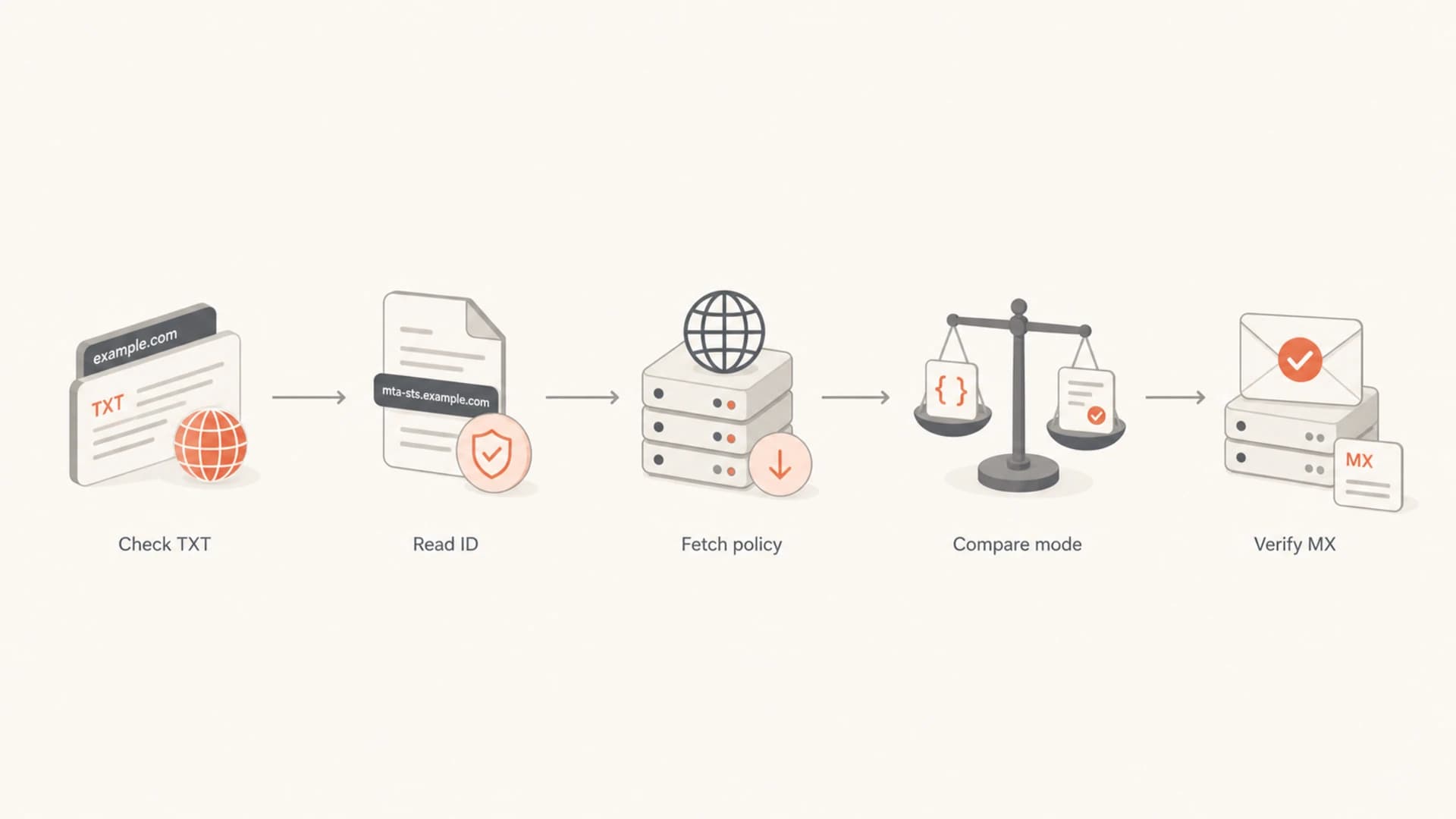
Flowchart showing TXT lookup, ID check, policy fetch, mode comparison, and MX verification.
How to detect a policy change
The cleanest detection signal is a changed TXT ID. Domains publish a record at _mta-sts.domain. When the policy changes, the domain owner should change the ID. Senders compare that ID with their cached value. If it differs, they fetch the policy file again.
I also like to watch mail logs for mode observations. If outbound logs suddenly show many deliveries to one domain using an enforced MTA-STS policy, that can confirm a real policy change even before every cached sender has refreshed. A sudden jump in observed enforce mode is a useful clue. It does not replace DNS and HTTPS verification, but it tells you where to investigate.
Basic DNS checkbash
dig TXT _mta-sts.example.com +short
Expected TXT shapetext
"v=STSv1; id=2026051901"
Good detection signals
- TXT ID: The value changed compared with your previous stored value.
- Policy body: The fetched file changed in mode, MX lines, or max age.
- Delivery logs: Outbound systems report more enforced TLS decisions.
- TLS reports: Failure reports increase after an MX or certificate change.
Weak detection signals
- TXT exists: Presence alone does not tell you the policy mode.
- Old cache: Your system can still have the previous policy cached.
- Single resolver: One DNS vantage point can hide propagation differences.
- No errors: A policy can change without creating visible delivery failures.
How to verify the policy file location
The policy location is fixed. It is not discovered through a link inside DNS. For any policy domain, replace the domain in this pattern:
Policy file URL patterntext
https://mta-sts.example.com/.well-known/mta-sts.txt
That path matters. I still see checks fail because someone tries mta-sts.json, places the file at the domain root, or hosts it on the wrong hostname. The file must be served over HTTPS, the certificate must validate for the mta-sts hostname, and the content must be plain text.
Fetch and inspect the policybash
curl -fsS https://mta-sts.example.com/.well-known/mta-sts.txt
Typical policy filetext
version: STSv1
mode: enforce
mx: mx1.example.com
mx: mx2.example.com
max_age: 604800
If the file is not found, the TXT record still proves only that the domain tried to publish MTA-STS. It does not prove that senders can enforce it. The fixed path is explained more directly in the directory path if you need a short reference for implementation work.
?
What's your domain score?
Deep-scan SPF, DKIM & DMARC records for email deliverability and security issues.
What to compare when the file changes
A policy file comparison should focus on the fields that change delivery behavior. Formatting changes matter less than mode, MX coverage, and cache duration. I store the full file body, the parsed fields, the TXT ID, and the time observed. That gives enough data to answer what changed and when it became visible.
|
|
|
|---|---|---|
mode | testing, enforce, none | Controls whether TLS failures only report or block delivery. |
mx | Hostnames and coverage | Defines which mail exchangers are valid for secure delivery. |
max_age | Seconds cached | Controls how long senders can rely on the current policy. |
id | TXT value | Tells senders to refresh the HTTPS policy file. |
MTA-STS change checks
The highest-risk change is moving from testing to enforce. In testing mode, failures are reported but normal delivery can continue. In enforce mode, sending servers that honor MTA-STS should refuse delivery if they cannot negotiate valid TLS with a matching MX. That is exactly the protection you want, but it punishes stale MX lines, expired certificates, and mail routing changes that were not reflected in the policy.
Policy change risk
A practical way to rank MTA-STS changes before rollout or incident review.
Low
ID only
TXT ID update with unchanged policy body.
Medium
MX or cache
MX or max age changed, but the mode stayed in testing.
High
Enforce
Mode changed to enforce or an enforced policy lost valid MX coverage.
For a quick full-domain check, Suped's domain health checker is useful because MTA-STS rarely exists alone. You usually want to see DMARC, SPF, DKIM, MX, and TLS posture in the same pass before you decide whether a domain is ready for strict inbound protection.
Command line verification workflow
When I need to verify a change quickly, I use a repeatable command line sequence. It separates DNS discovery, HTTPS availability, policy parsing, and MX comparison. That separation matters because a domain can pass one layer and fail the next.
Step 1: read the MTA-STS TXT recordbash
DOMAIN=example.com

dig TXT _mta-sts.$DOMAIN +short
Step 2: fetch response headers and policy bodybash
curl -fsSI https://mta-sts.$DOMAIN/.well-known/mta-sts.txt
curl -fsS  https://mta-sts.$DOMAIN/.well-known/mta-sts.txt
Step 3: compare live MX recordsbash
dig MX $DOMAIN +short | sort
The MX comparison is not optional. The policy can contain exact MX names or wildcard patterns, but it still needs to match the mail exchangers that senders will use. If the live MX changed and the policy did not, enforced delivery can fail even though the policy file itself is reachable.
Do not validate only from your laptop. Use at least two DNS resolvers and one network path outside your usual environment. Split-horizon DNS, CDN rules, proxy headers, and certificate chain differences can make an MTA-STS policy look healthy in one place and broken in another.
 For Google Workspace environments, Google's own MTA-STS check is a useful external confirmation of the same discovery path. I would still keep your own stored snapshots because external checks usually show the current state, not the change history.
How to monitor changes over time
For one domain, manual checks are enough during setup. For many domains, I prefer scheduled monitoring that stores both raw and parsed results. The important part is alerting on meaning, not only on file diffs. A whitespace change and a move to enforce should not produce the same alert severity.
- Snapshot: Store TXT record, policy body, parsed fields, HTTP status, and certificate result.
- Compare: Diff the ID, mode, MX lines, max age, and reachable HTTPS status.
- Classify: Treat enforce changes, missing files, and MX mismatches as high priority.
- Verify: Retest from multiple resolvers before declaring an outage or a successful rollout.
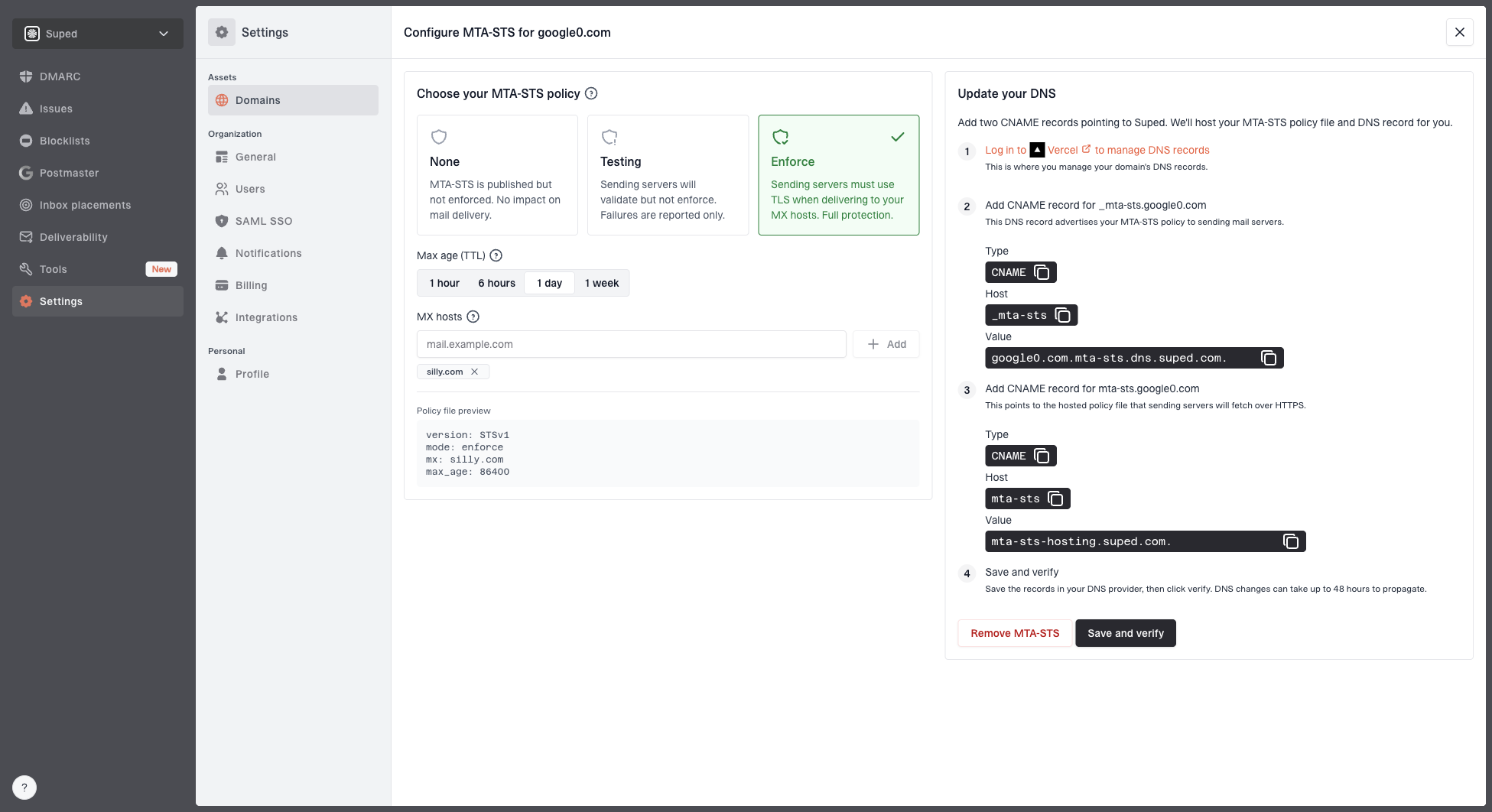
Hosted MTA-STS configuration dialog showing policy mode, MX hosts, CNAME records, and verification
Suped's hosted MTA-STS workflow keeps the operational surface smaller: you configure policy mode, MX hosts, and verification in one place, while Suped hosts the policy file and tracks whether the DNS setup is correct. That is the best practical option for most teams because it removes web hosting, certificate renewal, policy path, and CNAME coordination from the day-to-day workload.
If you are monitoring a fleet of domains, especially as an MSP, combine MTA-STS monitoring with DMARC, SPF, DKIM, TLS reporting, and blocklist (blacklist) monitoring. MTA-STS tells you whether inbound delivery requires valid TLS. DMARC tells you whether mail claiming to be from your domain is authenticated. Both belong in the same operational view.
?
What's your domain score?
Deep-scan SPF, DKIM & DMARC records for email deliverability and security issues.
When a domain rolls back
A rollback usually means the domain moved to a stricter policy, saw TLS failures, then returned to testing or none. The visible symptom can be a changed policy mode without any public explanation. That is normal. The useful response is to compare the before and after state and identify which dependency made enforcement risky.
|
|
|
|---|---|---|
Back to testing | Enforcement failures | TLS reports |
Missing MX | Policy stale | MX diff |
HTTPS error | Hosting issue | Policy URL |
Cert mismatch | Wrong host | TLS chain |
Rollback investigation checklist
Rollbacks are also why testing mode exists. Use testing to collect TLS reports and prove that all active MX hosts have valid certificates before enforcing. The difference between testing and enforce is covered in more detail in testing mode and enforce mode.
Do not treat a successful TXT lookup as proof that enforcement is safe. A domain can publish the TXT record and still fail because the policy file is missing, the TLS certificate is invalid, or the MX lines do not match live mail routing.
What to log for your own domains
For your own domains, I want the monitoring record to answer one operational question: if delivery fails tomorrow, what changed and when did senders learn about it? That means logging DNS, HTTPS, policy content, and mail outcomes together.
- DNS state: Record value, resolver used, observed TTL, and lookup time.
- HTTPS state: HTTP status, redirect behavior, content type, and certificate validation.
- Policy state: Parsed version, mode, MX entries, max age, and raw body hash.
- Mail state: TLS reports, delivery errors, and any observed enforced-policy decisions.
The same approach helps with adjacent email authentication work. A domain health check gives a broader view of whether the domain's DNS records support secure delivery and brand protection. That is why I usually pair MTA-STS checks with the domain health checker during rollout reviews.
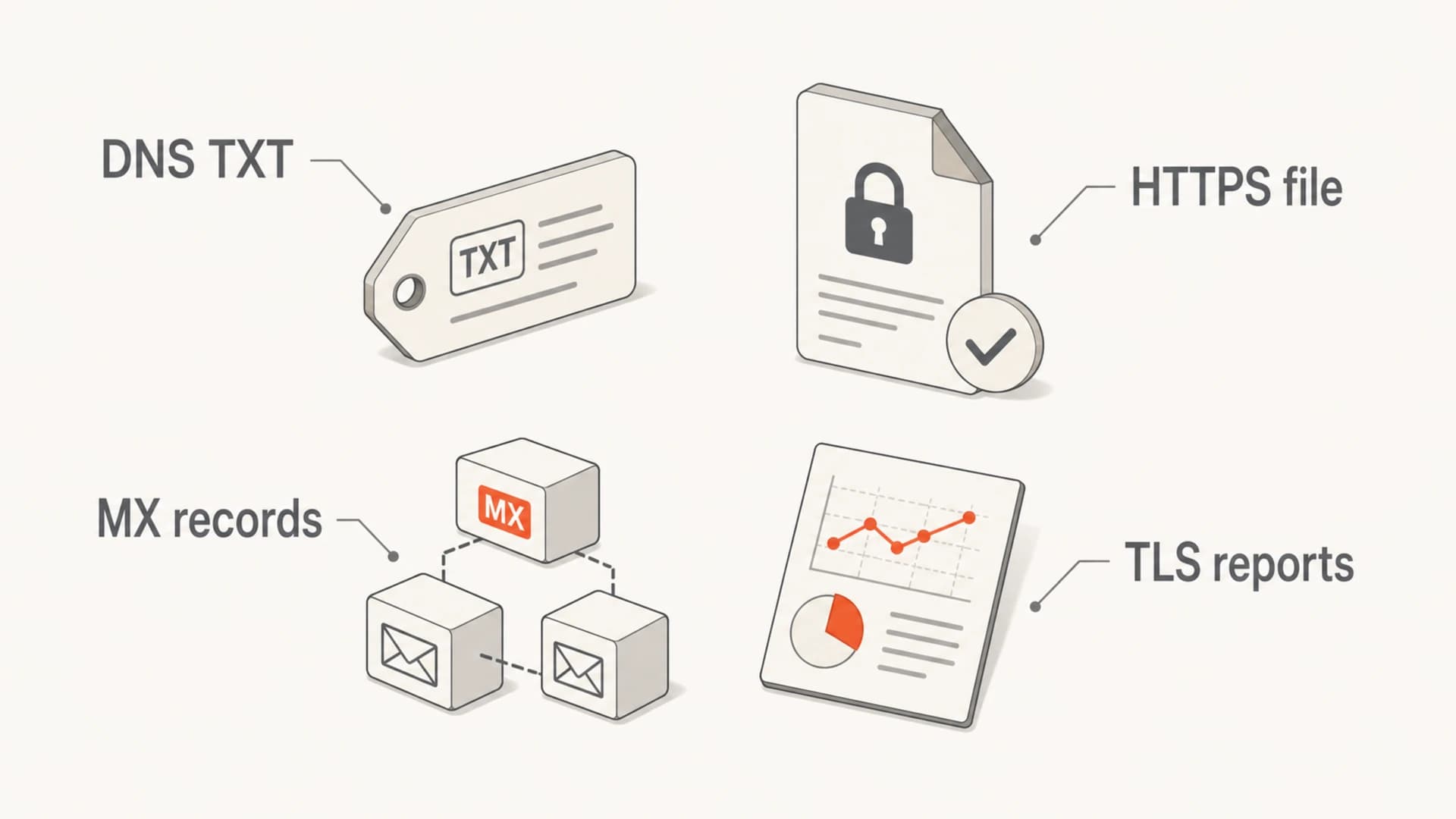
Four evidence sources for verifying an MTA-STS change: DNS TXT, HTTPS file, MX records, and TLS reports.
Views from the trenches
Best practices
Store every TXT ID and fetched policy so mode changes have a clear timeline.
Compare live MX records against policy MX lines before moving into enforce mode.
Use testing mode with TLS reports before increasing cache time or enforcement.
Common pitfalls
Looking for a policy URL in DNS causes teams to miss the fixed HTTPS path.
Checking only one resolver hides propagation gaps during urgent policy rollbacks.
Publishing the TXT record without a valid HTTPS file creates false confidence.
Expert tips
Alert on semantic changes such as mode and MX coverage, not only raw file diffs.
Keep max age conservative until certificates, MX routing, and reports look stable.
Treat a sudden rise in enforced-policy log entries as a prompt to verify DNS.
Marketer from Email Geeks says a sudden increase in logged enforced MTA-STS decisions is a useful way to notice that a major domain changed policy mode.
2019-05-30 - Email Geeks
Marketer from Email Geeks says the TXT record proves publication, but the policy itself still needs to be fetched from the fixed well-known HTTPS path.
2019-05-31 - Email Geeks
The practical takeaway
To detect and verify MTA-STS policy changes, check the TXT record for a changed ID, fetch the policy from the fixed HTTPS location, compare the parsed policy fields, and validate the MX coverage against live DNS. Logs and TLS reports add useful confirmation, especially when a domain moves to enforce or rolls back to testing.
For a single domain, command line checks are enough to understand the mechanics. For production domains, Suped gives a cleaner path: hosted MTA-STS, DMARC monitoring, hosted SPF, SPF flattening, real-time alerts, blocklist monitoring, and multi-tenant reporting for teams that manage many domains. The important work is publishing MTA-STS and keeping the policy accurate as mail routing changes.