What are MTA-STS reports and why am I getting them from Google?

Published 21 Jul 2025
Updated 19 Aug 2026
11 min read
Summarize with
Updated on 19 Aug 2026: We updated this guide with Google's current testing guidance and clearer TLS-RPT setup and failure interpretation.
MTA-STS reports from Google are usually TLS-RPT aggregate reports. They tell you whether Google was able to deliver mail to your domain using a valid TLS connection that matched your published MTA-STS policy. They summarize detected policies, session totals, traffic statistics, and categorized connection failures for the reporting period.
The key detail is direction. These reports are about mail Google tried to send to you. They are not reports about mail you sent to Gmail. If the report says Google saw a TLS problem, the problem is usually on your inbound mail path: MX records, certificates, STARTTLS support, MTA-STS policy content, or DNS records.
- Report type: The attachment is normally a TLS-RPT JSON file, compressed with gzip.
- Sender: Google sends it because Google attempted delivery to your domain.
- Frequency: Daily reports are normal when there is traffic and reporting is enabled.
- Priority: Zero failures means monitoring is working. Any failure needs review, especially when it repeats.
Short answer
Getting Google TLS reports is usually a good sign. It means your TLS-RPT address is reachable and at least one large sender is honoring it. Investigate reports with failed sessions, policy validation errors, certificate errors, or STARTTLS negotiation problems.
What Google is actually sending
People call these MTA-STS reports because MTA-STS is the policy being checked, but the reporting mechanism is TLS-RPT. MTA-STS tells senders what secure delivery should look like for your domain. TLS-RPT tells senders where to send daily aggregate reports about TLS delivery results.
A sender such as Google discovers your TLS-RPT DNS record, tries to deliver mail to your MX hosts, then sends a compressed JSON report to the destination in the rua tag. If you want the protocol overview before reviewing a live report, the MTA-STS basics page explains the moving parts.
|
|
|
|---|---|---|
MTA-STS | Your TLS policy for inbound mail | Mode, MX names, max age, and TXT ID |
TLS-RPT | Daily aggregate delivery reporting | Report destination and parser |
rua | Where reports are sent | Email mailbox or HTTPS collector |
STARTTLS | TLS upgrade during SMTP | Certificate and negotiation result |
Core terms in a Google TLS report
TLS-RPT DNS recorddns
_smtp._tls.example.com. IN TXT
  "v=TLSRPTv1; rua=mailto:tlsrpt@example.com"
If multiple teams or systems need a copy, the rua value can include multiple mailto destinations separated by commas. TLS-RPT also permits an https destination when you have a compatible collector that accepts report submissions. Publish TLS-RPT before moving toward MTA-STS enforcement so daily reports exist before delivery risk increases.
That record is separate from the MTA-STS policy TXT record. The TXT record at _mta-sts announces policy discovery. The HTTPS policy file tells senders which MX hosts are valid and whether the policy is in testing, enforce, or none mode.
Why Google reports can start suddenly
A sudden first report does not automatically mean something broke. It often means one of the conditions needed for reporting finally happened: Google sent mail to your domain, Google discovered your TLS-RPT record, the report address accepted the message, or a previously cached policy reached a new state.
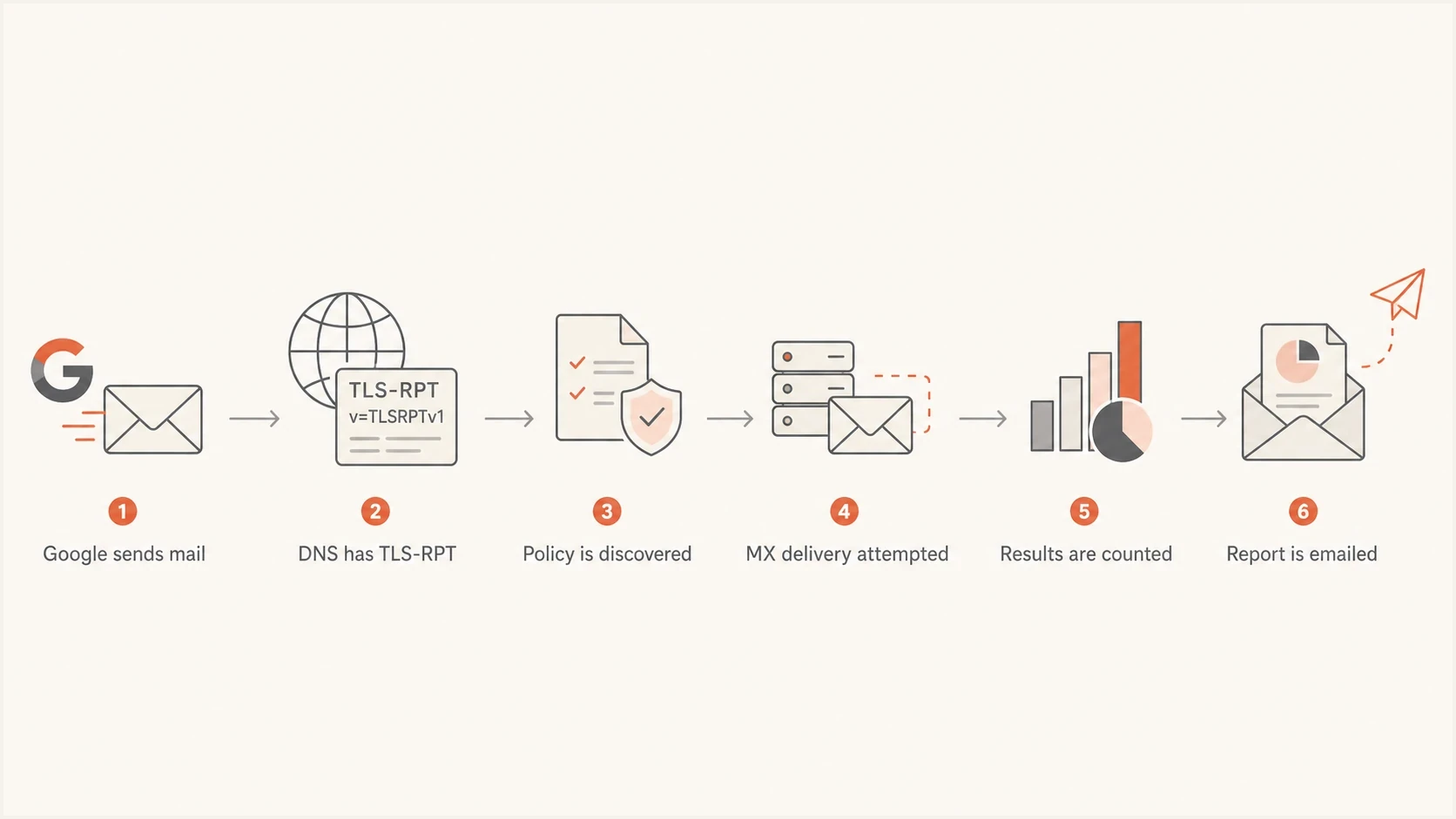
Flowchart showing how Google creates a TLS-RPT report after DNS discovery and MX delivery.
- New traffic: A Gmail or Workspace sender delivered mail to one of your recipients.
- Record discovery: Google found your TLS-RPT record during DNS lookup.
- Policy cache: A cached MTA-STS policy was refreshed after its max age changed.
- Report delivery: Your reporting address started accepting the compressed report.
- Provider routing: Mail that stays inside one provider can avoid the external SMTP path covered by TLS-RPT.
If the report includes throttling or STARTTLS failures, treat it as a delivery issue rather than a reporting curiosity. The Google STARTTLS errors guide covers that failure pattern in more depth.
Do not read report volume as traffic volume
One daily report can cover many SMTP sessions or only a few. Reports depend on inbound traffic from senders that support TLS-RPT, and mail that stays inside one provider can produce no external TLS session to report. Low report volume does not prove that MTA-STS failed.
How to read the report
The report attachment is normally a compressed JSON file. Start with the organization name, contact information, report ID, date range, policy type, policy domain, MX host, successful session count, and failed session count. Use the report ID to detect duplicates. If failures are present, inspect each failure detail for its result type, receiving MX hostname, receiving IP, and failed session count.
The policy-type value tells you what Google evaluated. sts means MTA-STS, tlsa means a DANE TLSA policy, and no-policy-found means Google found neither policy for that reporting interval.
Simplified Google TLS report excerptjson
{
  "organization-name": "Google Inc.",
  "date-range": {
    "start-datetime": "2026-05-23T00:00:00Z",
    "end-datetime": "2026-05-24T00:00:00Z"
  },
  "policies": [
    {
      "policy": {
        "policy-type": "sts",
        "policy-string": ["version: STSv1", "mode: enforce"]
      },
      "summary": {
        "total-successful-session-count": 120,
        "total-failure-session-count": 0
      }
    }
  ]
}
How to triage TLS-RPT failures
Use recurrence, affected MX hosts, and policy mode to prioritize work. TLS-RPT does not define universal percentage thresholds.
Clean
0 failed sessions
Keep the report as a baseline
Check
Any failure
Inspect the result type and receiving MX
Investigate
Repeated failure
Trace the affected host or address family
Fix first
Enforce mode
Policy failures can defer supported senders
Normal report
- Failures: The failed session count is zero.
- Policy: The policy type is sts.
- Action: Keep monitoring and confirm reports keep arriving.
- Meaning: Google completed policy-compliant TLS sessions.
Problem report
- Failures: The failed session count is above zero.
- Reason: The result type identifies the failed TLS or policy check.
- Action: Check the named MX host, IP address, certificate, and policy.
- Meaning: Some Google sessions did not meet the evaluated policy.
When Google says no policy found
A Google TLS-RPT report with policy-type set to no-policy-found means Google found neither an MTA-STS policy nor a DANE TLSA policy for that reporting interval. Treat it as a policy discovery result, not proof that TLS delivery failed.
MTA-STS discovery locationstext
DNS TXT:
_mta-sts.example.com

HTTPS policy:
https://mta-sts.example.com/.well-known/mta-sts.txt
- Check the TXT record at _mta-sts.example.com. It should contain v=STSv1 and an id value.
- Fetch https://mta-sts.example.com/.well-known/mta-sts.txt. The TXT record does not contain the policy URL.
- Confirm the file is plain text, has version: STSv1 on the first line, and includes mode, mx, and max_age.
- Keep max_age between 86400 and 31557600 for Google's policy handling. In testing mode, Google recommends 604800 to 1209600 seconds.
- Update the TXT id after every policy change so senders know to refetch the HTTPS file.
Do not fix only the TLS-RPT record when Google reports no policy found. TLS-RPT controls reporting. The MTA-STS TXT record and HTTPS policy file control whether Google can discover and apply your policy.
What to check on your domain
When a Google report first appears, check the domain in this order: TLS-RPT record, MTA-STS policy TXT record, HTTPS policy file, MX hostnames, certificate names, STARTTLS support, TLS 1.2 or later, and IPv4 plus IPv6 behavior. Test every primary and backup MX host because a clean aggregate report only covers paths that Google used during that reporting interval.
You can run a quick domain health check before opening the JSON report by hand. It gives you a fast view of the DNS and MTA-STS issues that can affect secure inbound delivery.
?
What's your domain score?
Deep-scan SPF, DKIM & DMARC records for email deliverability and security issues.
The most common MTA-STS mismatch is an MX hostname in DNS that does not appear in the policy file. Senders validate the mail exchanger they actually connect to, not the provider name you expected them to use.
Example MTA-STS policy filetext
version: STSv1
mode: enforce
mx: mail.example.com
mx: backup.example.com
max_age: 604800
Treat enforce mode carefully
In enforce mode, a sender that supports MTA-STS should defer delivery when your MX host does not match policy or cannot present valid TLS. Google recommends starting in testing mode for two weeks. Move to enforce only after every inbound MX path has passed direct checks and the reports stay clean.
How Suped helps with MTA-STS reports
Suped's product supports this workflow by collecting TLS-RPT files, grouping results by domain and receiving MX host, retaining history, and alerting on transport failures. This makes it easier to compare a Google failure with recent DNS, certificate, or mail platform changes.
Hosted MTA-STS/TLS-RPT configuration dialog showing policy mode, MX hosts, CNAME records, TLS reporting, and verification
For MTA-STS specifically, Suped's Hosted MTA-STS lets you publish and manage the policy without maintaining separate web hosting for the policy file. You configure the policy, publish the required CNAME records, then monitor whether participating senders can deliver securely.
- Setup: Use two CNAME records instead of running your own policy host.
- Staging: Keep the policy in testing mode while you validate every inbound MX path.
- Alerts: Get notified when TLS or policy checks fail.
- Scale: Review results across domains in the MSP and multi-tenancy dashboard.
The practical benefit is one investigation trail. Suped keeps the report history beside the domain configuration, so you can identify the affected MX host, compare changes, and verify that the failure clears.
How to interpret result-type failures
When a Google report has failures, read the exact result-type value before changing DNS or certificates. Then use the receiving MX hostname and receiving IP to identify the affected endpoint.
|
|
|
|---|---|---|
starttls-not-supported | MX did not offer a usable STARTTLS upgrade | Enable and test STARTTLS on the named MX |
certificate-expired | The MX certificate expired | Renew the certificate and check automation |
certificate-host-mismatch | Certificate names do not cover the MX hostname | Install a certificate that covers the MX name |
certificate-not-trusted | The chain is untrusted or incomplete | Install a publicly trusted complete chain |
sts-policy-fetch-error | The HTTPS policy file could not be retrieved | Fix policy hosting, HTTPS, or availability |
sts-policy-invalid | The fetched policy did not validate | Correct the policy syntax and required fields |
sts-webpki-invalid | The policy host failed HTTPS certificate validation | Fix the certificate on mta-sts.example.com |
validation-failure | A general TLS or policy validation check failed | Use the failure reason and endpoint fields |
Common TLS-RPT result types
Failure categories are non-exclusive, so the detail counts do not always form a clean partition of the total failure count. Also check IPv6. A domain can pass over IPv4 but fail over IPv6 because that endpoint has a different certificate, lacks STARTTLS, or routes to an older mail server.
A clean report still has value
A report with zero failures confirms that Google found your TLS-RPT record and completed the policy-compliant sessions counted in that report. It does not test an unused backup MX or prove that every sender supports MTA-STS. Keep clean reports as a baseline before DNS or MX changes.
Views from the trenches
Best practices
Track report senders daily so new Google reports are treated as signal, not noise.
Compare Google failures against MX changes before editing an MTA-STS policy file.
Keep testing mode active during mail host changes, then enforce after reports stay clean.
Store TLS-RPT files long enough to compare delivery behavior before and after changes.
Common pitfalls
Assuming Google reports are about outbound Gmail delivery sends teams to the wrong fix.
Ignoring IPv6 checks misses failures where IPv4 works but IPv6 mail delivery breaks.
Publishing enforce mode before certificate checks pass can block supported senders.
Reading low report volume as low mail volume creates false confidence in monitoring.
Expert tips
Check whether the report file is TLS-RPT before calling it an MTA-STS-only artifact.
Use real inbound messages to trigger reports when validating a new TLS-RPT setup.
Keep the TLS-RPT address stable so sender caches and parsers remain predictable.
Review successful counts too, since they prove a sender can complete secure delivery.
Expert from Email Geeks says daily reports after configuration are normal, especially once real inbound traffic reaches the domain.
2023-09-25 - Email Geeks
Marketer from Email Geeks says these files are TLS-RPT reports, not pure MTA-STS reports, even when the policy being evaluated is MTA-STS.
2023-09-25 - Email Geeks
What to do next
If you started receiving Google reports, do not delete them as noise. Open the latest attachment, check whether failures are present, and confirm that the policy Google evaluated matches the policy you intended to publish.
- Confirm: Verify that the report was sent to a destination in your TLS-RPT DNS record.
- Inspect: Read the session totals, then review every result type and affected MX host.
- Validate: Check TLS 1.2 or later, certificates, policy files, and DNS after mail platform changes.
- Monitor: Keep daily history so a recurring failure has context.
Google is telling you how secure delivery to your domain went. A clean report is useful confirmation for the sessions it counted. A report with failures identifies the inbound TLS path that needs investigation.




