What are the implications of disabling TLS 1.0/1.1 for outgoing email and what alternatives are available?

Updated on 26 Jul 2026: We clarified modern TLS fallback behavior, added REQUIRETLS, and corrected how MTA-STS and TLS-RPT apply to outbound delivery.
Disabling TLS 1.0 and TLS 1.1 for outgoing email is the right security move, but it does not automatically mean more bounces or guaranteed clear-text fallback. The result depends on whether the receiving MX advertises STARTTLS, whether a modern TLS handshake succeeds, and how the sending MTA handles failure. A receiver with no STARTTLS can still receive clear-text mail under an opportunistic policy. A receiver that advertises STARTTLS but cannot negotiate TLS 1.2 or newer can trigger a clear-text retry, a temporary deferral, or eventual non-delivery.
Turn off TLS 1.0 and TLS 1.1, keep opportunistic STARTTLS for general internet mail, and require TLS 1.2 or newer where the recipient domain or business relationship justifies it. For stricter transit security, honor recipient MTA-STS and DANE policies, use REQUIRETLS where every relay hop supports it, inspect TLS-RPT data in the correct direction, and maintain a controlled exception process for legacy destinations.
- Removing old protocol negotiation blocks weak encrypted sessions, while the delivery result for legacy receivers depends on the sender's fallback and retry policy.
- Use opportunistic STARTTLS with TLS 1.2 and TLS 1.3 enabled, and TLS 1.0 and TLS 1.1 disabled, as the general internet default.
- Use required TLS for selected partner routes, then honor MTA-STS or DANE when the receiver publishes a usable policy.
- Test the actual MTA behavior instead of treating no STARTTLS, failed negotiation, deferred delivery, and clear-text fallback as the same event.
What actually changes when TLS 1.0 and 1.1 are disabled
SMTP delivery uses STARTTLS as an upgrade mechanism. Your sending MTA connects to the recipient MX over port 25, reads the EHLO capabilities, and upgrades to TLS when the receiver advertises STARTTLS. Both sides then negotiate a protocol version and cipher. If you disable TLS 1.0 and TLS 1.1, your sender refuses those old versions during that negotiation.
RFC 8996 moved TLS 1.0 and TLS 1.1 to Historic status and says implementations must not negotiate either version. Removing them reduces protocol attack surface and prevents an old receiver from turning an encrypted session into weak encryption merely for compatibility.
Do not confuse protocol removal with mandatory encryption
Disabling old TLS versions means your sender refuses weak encrypted sessions. It does not mean every outbound message is encrypted. Opportunistic delivery can use clear text when STARTTLS is unavailable, while a failed STARTTLS handshake can instead cause a retry or deferral depending on the MTA.
|
|
|
|
|---|---|---|---|
Opportunistic | No STARTTLS | Usually sent clear | No transit TLS |
TLS 1.2+ only | Old TLS only | Retry, defer, or send clear | No weak TLS |
Required TLS | TLS fails | Deferred, then bounced | No clear fallback |
MTA-STS enforce | Policy validation fails | Deferred, then bounced | Policy enforced |
DANE | TLSA validation fails | Deferred, then bounced | DNSSEC-backed |
Outbound TLS modes and delivery behavior
No STARTTLS advertisement and a failed STARTTLS handshake are different conditions. An opportunistic sender normally proceeds in clear text when STARTTLS is absent. Once a receiver advertises STARTTLS and the handshake fails, software-specific policy decides whether the sender retries without TLS on a new connection, keeps the message queued, or returns a final failure after the queue lifetime expires.
The delivery risk
The direct bounce risk from turning off TLS 1.0 and TLS 1.1 is usually low when the sender remains opportunistic, but the exact result must come from MTA logs and controlled tests. Some mail that used weak TLS will travel in clear text, while other messages will be deferred because the receiver advertised STARTTLS but could not complete a modern handshake. A later bounce can appear only after normal retries exhaust the queue lifetime.
Do not use a generic industry percentage as a rollout forecast. Measure TLS 1.2 and TLS 1.3 delivery, clear-text delivery, temporary TLS failures, and final non-delivery in your own traffic. The small remainder outside modern TLS often includes destinations without STARTTLS, broken MX hosts, and legacy systems, but its composition varies by recipient mix.
Illustrative outbound mix after removing old TLS
This is a planning scenario, not an industry benchmark. Replace it with MTA log data before setting policy.
TLS 1.2+
Clear text
Deferred or failed
Requiring TLS 1.2 or newer for every outbound destination has a larger impact than enforcing recipient MTA-STS. MTA-STS changes delivery only when the recipient publishes a valid policy and the sending MTA supports it. Testing mode reports policy failures without requiring rejection, while enforce mode prevents delivery to an MX that fails STARTTLS, hostname, or certificate validation. A blanket mandatory TLS rule applies to every destination, including small receivers and older private systems.
The failure cases to expect
- A protocol mismatch occurs when the receiver only supports TLS 1.0 or TLS 1.1 and your route requires TLS 1.2 or newer.
- A certificate failure occurs when strict policy sees an expired, untrusted, incomplete, or hostname-mismatched certificate.
- A policy mismatch occurs when published MTA-STS MX patterns or DANE TLSA records do not match the receiving service.
- An operational gap appears when support teams see deferred mail or bounces but have no owner for receiver remediation.
Alternatives available
Leaving TLS 1.0 and TLS 1.1 enabled is not a sound compatibility strategy. Choose the delivery policy according to message sensitivity, recipient capability, and the acceptable delay or bounce risk. Normal marketing and transactional mail often need a different route policy than mail containing regulated data, invoices, credentials, legal notices, or contract material.
Permissive path
Use this for broad internet delivery where reach matters and message content is not sensitive.
- Remove TLS 1.0 and TLS 1.1 from outbound negotiation.
- Allow clear-text delivery when the receiver does not advertise STARTTLS.
- Define how failed modern handshakes are retried, deferred, and reported.
- Log the negotiated protocol, cipher, MX, destination, and failure reason.
Stricter path
Use this for partners, regulated workflows, and destinations that publish enforceable policy.
- Require TLS 1.2 or newer for named domains or transport maps.
- Honor recipient MTA-STS and DANE policies when the sending MTA supports them.
- Review MTA logs and outbound policy failures, then assign recurring problems to owners.
- Document who can approve a temporary exception for a legacy receiver.
The exact settings vary by MTA, but the policy model stays consistent: remove obsolete protocols first, then decide where delivery must fail instead of falling back. Keep that decision out of ad hoc tickets by classifying destinations into default, monitored, required TLS, and blocked routes.
TLS-RPT DNS record for a receiving domaindns
_smtp._tls.example.com. 3600 IN TXT "v=TLSRPTv1; rua=mailto:tlsrpt@example.com"
MTA-STS DNS recorddns
_mta-sts.example.com. 3600 IN TXT "v=STSv1; id=2026072701"
MTA-STS policy file exampletext
version: STSv1
mode: enforce
mx: mail.example.com
max_age: 604800
Publish the updated HTTPS policy file before changing the id in the _mta-sts TXT record, then keep the old MX path valid while cached policies expire. The TLS-RPT record asks supporting senders to report delivery results for mail addressed to your domain. It does not create a report of your own outbound mail.
Where REQUIRETLS fits
REQUIRETLS, defined in RFC 8689, adds a per-message request that every SMTP relay use an authenticated TLS connection. A relay that accepts the message with REQUIRETLS promises to pass the requirement onward. If the next hop cannot provide TLS or does not support REQUIRETLS, the message must fail instead of continuing without the requested protection.
This is useful when a specific message needs stronger handling than the sender's default route. It is not a universal replacement for route-level required TLS, MTA-STS, or DANE because the submission service and each relay must support the extension. Confirm support across the full delivery path before relying on it for regulated or contractual requirements.
Use REQUIRETLS only with end-to-end relay support
- Use it for individual messages that must not continue over an unprotected SMTP hop.
- Verify that the submission service and onward relays advertise and honor REQUIRETLS.
- Expect a non-delivery response when the guarantee cannot be maintained.
- Keep route policy as the fallback control when relay support is incomplete.
How to roll this out
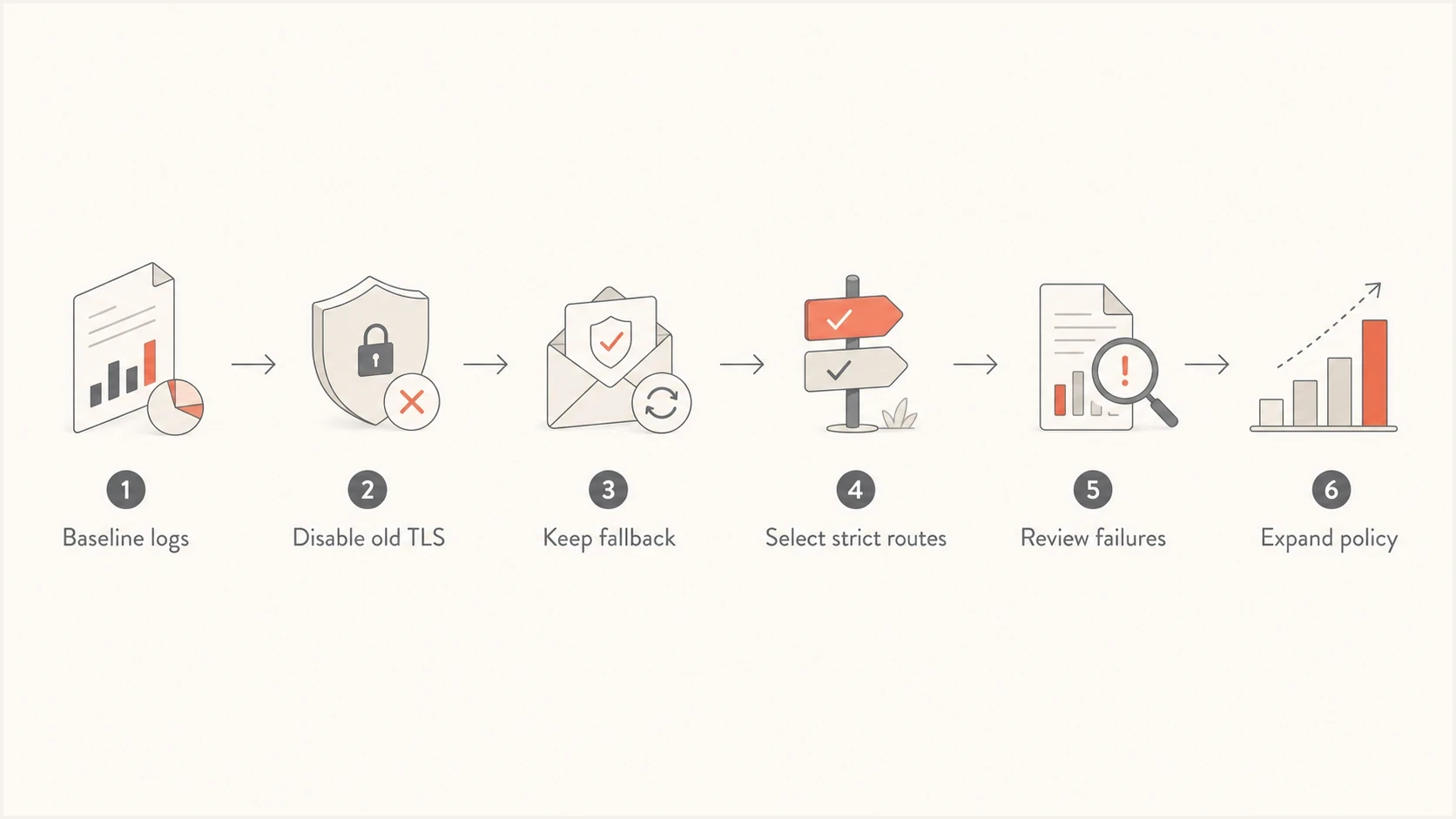
Flowchart showing a staged rollout for outbound TLS changes.
Start by measuring current delivery before changing policy. Pull logs for the last 30 days and group by destination domain, MX hostname, negotiated TLS version, cipher, certificate result, STARTTLS support, retry outcome, and final SMTP status. Teams already using Suped's product for authentication monitoring can pair those logs with the domain health checker so DNS and email authentication issues stay in the same investigation workflow.
Make the protocol change in stages. Do not start by forcing every destination to use TLS. That creates avoidable noise and hides the useful question: which destinations still depend on old TLS, and which of those destinations matter enough to contact or isolate?
- Measure TLS 1.0, TLS 1.1, TLS 1.2, TLS 1.3, clear-text delivery, and failed handshakes by destination.
- Remove TLS 1.0 and TLS 1.1 from outbound encrypted negotiation.
- Keep opportunistic STARTTLS for general mail while collecting fallback, retry, and bounce data.
- Require TLS 1.2 or newer for selected partners and regulated streams, then verify recipient policy support.
- Report bounces, clear-text delivery, queued retries, and recurring receiver failures to the responsible owners.
?
What's your domain score?
Deep-scan SPF, DKIM & DMARC records for email deliverability and security issues.
For an ESP or multi-tenant sending platform, treat the rollout as a customer-facing behavior change. A sender can accept a bounce to a broken receiver, while a customer with time-sensitive notices sees a failed business process. Route-level policy, visible retry status, and clear exception ownership are safer than one global switch.
Where MTA-STS, DANE, and TLS-RPT fit
MTA-STS and DANE are not substitutes for disabling TLS 1.0 and TLS 1.1. They answer a different question: when a receiver declares that authenticated TLS is required, should your sender deliver only after validating that encrypted path? For outgoing mail, your MTA honors the recipient's MTA-STS policy or DANE TLSA records. For inbound mail to your own domain, you publish the policy that supporting senders enforce. This inbound or outbound explanation covers the distinction.
DANE depends on DNSSEC validation and TLSA records that identify acceptable TLS credentials for the MX. MTA-STS uses a DNS discovery record plus an HTTPS policy file and public certificate validation. Both require correct receiving infrastructure, and both can defer mail when enforced policy does not match the active MX hosts.
Hosted MTA-STS/TLS-RPT configuration dialog showing policy mode, MX hosts, CNAME records, TLS reporting, and verification
Suped's product can host the MTA-STS policy, track its DNS record, and collect TLS-RPT beside DMARC monitoring. For a team that does not want to maintain a separate policy host and certificate, Hosted MTA-STS keeps policy changes and related alerts in one operational queue.
TLS-RPT closes the feedback loop for the receiving domain. When your domain publishes a TLS-RPT record, supporting senders send aggregate reports about successful and failed delivery attempts to your MX hosts under MTA-STS or DANE policy. For your own outbound mail, use MTA logs to investigate failures and generate reports for recipient domains that publish TLS-RPT. Start with the MTA-STS reports workflow before changing enforcement.
Recommended policy pattern
- Use opportunistic STARTTLS with TLS 1.0 and TLS 1.1 disabled for default mail.
- Require TLS 1.2 or newer for sensitive routes and accept non-delivery when validation fails.
- Honor MTA-STS and DANE when the destination publishes a valid policy.
- Review received TLS-RPT for inbound policy and MTA logs for your outbound delivery.
Decision table for common policies
This is not a binary choice between old TLS and total bounce risk. Most teams need a layered policy that separates normal internet delivery from mail with a firm encryption requirement. The table below maps each control to its useful scope and main tradeoff.
|
|
|
|
|---|---|---|---|
Keep old TLS | Legacy reach | Weak encryption | Avoid |
Old TLS off | General mail | Fallback varies | Default |
Require TLS | Partner routes | More deferrals | Selective |
Honor MTA-STS | Policy domains | Bad policies | Enable |
Honor DANE | DNSSEC domains | DNSSEC dependency | Enable |
REQUIRETLS | Selected messages | Relay support | Verify first |
Policy choices for outbound email TLS
For most senders, the practical choice is observability plus staged enforcement. Use sender logs for outbound TLS results, received TLS-RPT for delivery to your own MX hosts, and route-level policy when a business workflow cannot accept clear-text delivery.
Views from the trenches
Best practices
Measure TLS versions by destination before changing the sender's default behavior.
Keep opportunistic STARTTLS for broad mail while strict routes are tested first.
Separate legacy receiver exceptions from normal routing and customer reporting paths.
Review TLS-RPT and MTA logs together so policy failures have clear named owners.
Common pitfalls
Assuming old TLS removal creates bounces when fallback still remains enabled for mail.
Forcing mandatory TLS globally before support teams can explain each failure case.
Treating broken receiver certificates as sender defects without routing evidence.
Publishing MTA-STS without checking every MX name and certificate before launch.
Expert tips
Use route-level required TLS for sensitive streams before expanding enforcement.
Track clear-text fallback as a risk metric, not only as a deliverability metric.
Classify receivers by business value before deciding who gets exception handling.
Pair hosted policy management with alerts so stale MX changes are caught quickly.
Marketer from Email Geeks says disabling TLS 1.0 and TLS 1.1 usually leads to clear-text fallback under opportunistic delivery, not immediate bounces.
2022-08-16 - Email Geeks
Marketer from Email Geeks says weak encryption can give teams a false sense of protection, so clear reporting matters when fallback is allowed.
2022-08-16 - Email Geeks
The practical answer
Disable TLS 1.0 and TLS 1.1 for outgoing encrypted email. Keep opportunistic STARTTLS for normal internet delivery unless the organization has a rule that selected messages must never travel without encryption. That combination removes obsolete encrypted sessions without imposing a global mandatory-TLS policy.
For higher-risk mail, use required TLS by route, honor recipient MTA-STS and DANE, and use REQUIRETLS only across supported relay paths. Track which destinations lost modern TLS, which messages traveled in clear text, which remained queued, and which failures need receiver outreach.
Suped's product supports the receiving side of this work through hosted MTA-STS and TLS-RPT collection beside DMARC monitoring. Pair those reports with outbound MTA logs so transport-policy failures and authentication issues reach the correct owner.




