The practical answer is that the Validity seed list is roughly 370 addresses in a typical view. I would not treat 370 as a fixed public specification, because the count changes by customer setup and by the regions selected for monitoring. For system limits, imports, QA plans, or campaign test sizing, I would plan for 500 addresses.
That 500-address ceiling is the useful number. It covers the common 300-450 address range people see across seed-list tools, leaves room for region-based expansion, and keeps engineering choices from breaking when a provider adds or removes inboxes. A seed list is a controlled set of inboxes used to check where a message lands, but the count alone does not tell you whether your real subscribers are seeing mail in the inbox.
Direct answer
Use these numbers as planning guidance, not as a guarantee of the exact seed count inside every Validity account.
- Typical count: About 370 seed addresses.
- Common range: Many seed lists sit around 300-450 addresses.
- Safe cap: Use 500 addresses for product limits and import validation.
- Main caveat: Validity's exact list changes based on selected monitoring regions.
The short answer
If the only thing you need is a number for a design document, use 500. If you need an estimate of what a typical Validity seed-list export looks like, use about 370. Those two numbers answer different operational questions, and mixing them up creates brittle systems.
The 370 figure is useful when you are estimating test volume, message sends, and reporting rows. The 500 figure is the safer limit when you are defining database constraints, CSV import limits, user interface validation, or automated campaign QA. I use the higher number because seed lists change over time and because regional selections change which addresses are active.
Seed list planning bands
Use the band that matches the decision you are making.
Small test
Under 300
A partial or narrow regional seed setup.
Typical setup
300-450
The range most teams should expect for common seed-list coverage.
Safe planning cap
500
A practical ceiling for engineering limits and imports.
Confirm manually
Over 500
Large or unusual regional coverage needs account-level confirmation.
|
|
|
|---|---|---|
Typical view | Estimate | About 370 |
Common market | Range | 300-450 |
System limit | Cap | 500 |
Exact account | Check | Export |
Compact planning guide for Validity seed list counts.
Why the number changes
Seed lists are not static address books. A provider changes them when mailbox coverage changes, when a region is added, when an address stops behaving like a normal mailbox, or when a customer chooses a different monitoring footprint. Validity is no different: the seed list varies by customer because customers select the regions they want to monitor.
That regional setting matters more than it looks. A brand sending only to the United States does not need the same seed mix as a global sender testing North America, Europe, Australia, and Asia-Pacific. The bigger footprint usually means more seed addresses, more recipient domains, and more placement rows to interpret.
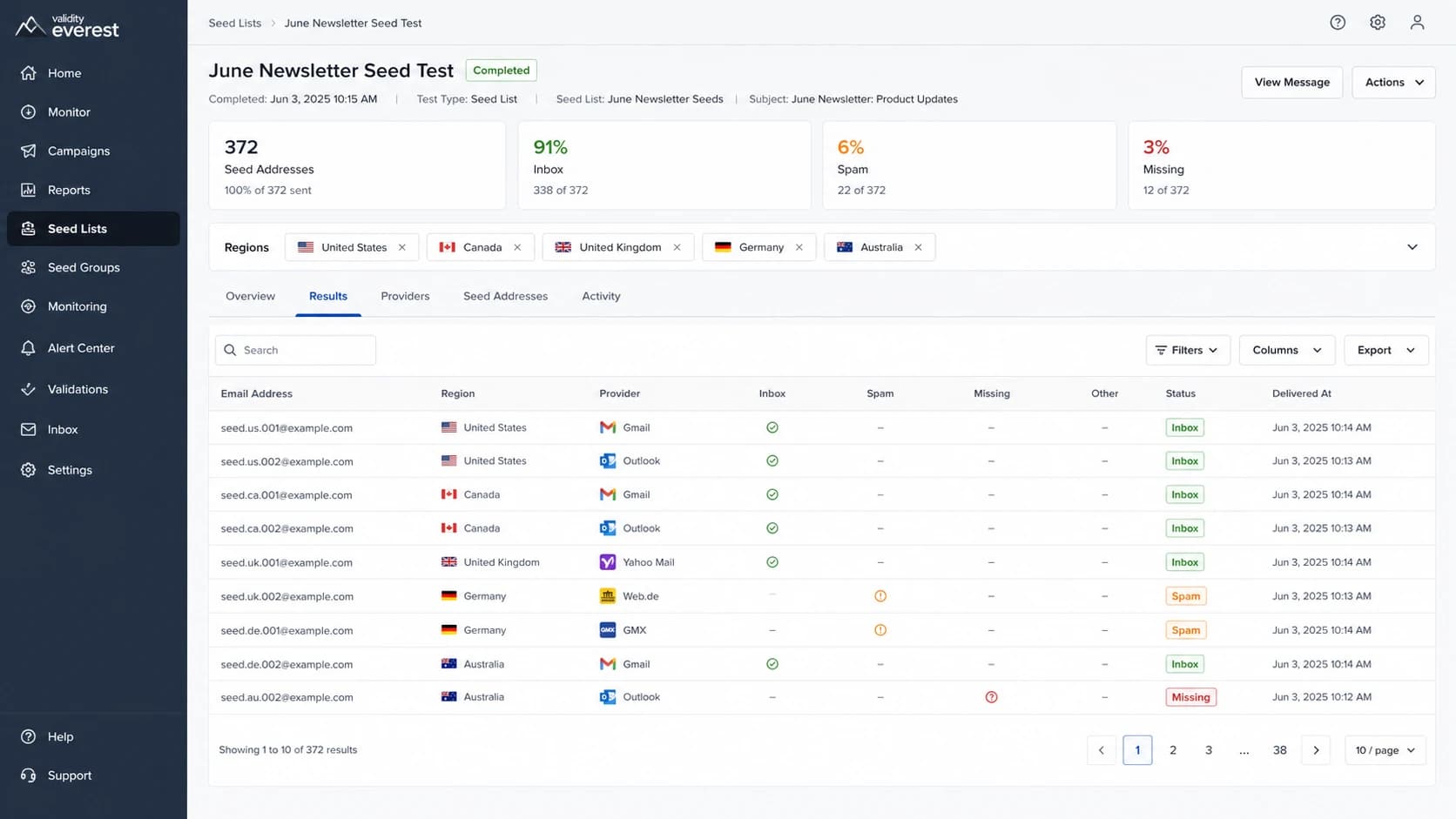
A Validity Everest seed list test screen with regional filters and seed inbox results.
Fixed-count thinking
- Assumption: Every account has the same seed count.
- Risk: Imports fail when a customer has more addresses.
- Problem: Hard-coded logic hides regional variation.
- Result: Seed tests become noisy when counts change.
Regional-count thinking
- Assumption: The active count depends on monitored regions.
- Limit: A 500-address cap leaves practical headroom.
- Data: Store the actual imported count per test.
- Result: Reports handle provider changes cleanly.
The safest implementation is to separate the maximum allowed seed count from the observed seed count. The maximum is a product or engineering control. The observed count is a test-level attribute that belongs in reporting, trend analysis, and QA notes.
How to use the number in planning
For most planning tasks, the right answer is simple: accept up to 500 seed addresses, then record the active count for each test. This keeps validation strict enough to catch bad uploads while avoiding unnecessary failures when an account has more regional coverage than expected.
I would also avoid using the seed-list count as a quality signal. A 370-address list is not automatically better or worse than a 300-address list. What matters is whether the seed mix covers the recipient domains and regions that match your real audience.
Seed-list import settingstext
seed_address_limit=500
store_actual_seed_count=true
store_region_set=true
reject_duplicate_addresses=true
require_test_id=true
If you are sending a single diagnostic message rather than a full seed-list campaign, an email tester is usually the faster check. It will not replace a seed-list campaign, but it helps catch authentication, header, content, and DNS issues before you send to hundreds of seed inboxes.
Email tester
Send a real email to this address. Suped opens the report when the test is ready.
?/43tests passed
Preparing test address...
For campaign QA, I would use a simple sequence. First, send one diagnostic message. Second, check authentication and domain health. Third, run the seed-list test. Fourth, compare the placement result to prior tests that used the same region set.
- Validate: Make sure the message passes SPF, DKIM, and DMARC before seed testing.
- Segment: Track the region set used in each seed campaign.
- Compare: Compare tests only when the seed mix and content are similar.
- Investigate: Treat sudden provider-specific drops as a signal to inspect authentication and reputation.
What seed lists can and cannot tell you
Seed lists are useful, but they are controlled tests. They show how a specific message performed at monitored mailbox providers at a specific time. They do not measure subscriber engagement, personal inbox history, user-level filtering, or every local rule inside a mailbox provider.
That is why I treat seed results as one signal among several. If a seed test shows spam-folder placement at one provider, I check authentication, recent volume changes, complaint indicators, and blocklist or blacklist status before changing sending strategy.
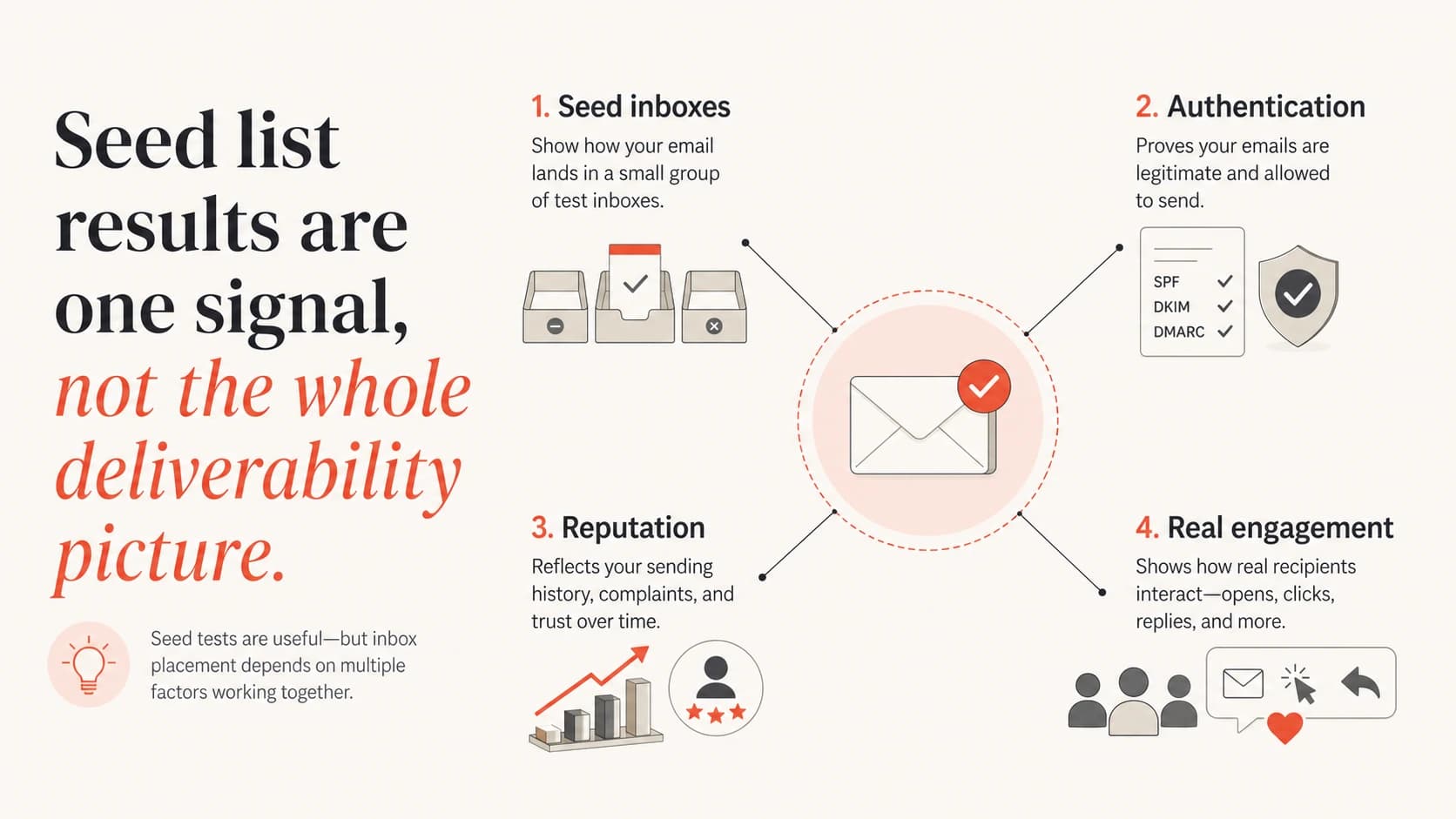
Seed inboxes, authentication, reputation, and real engagement shown as separate deliverability signals.
Good for
- Placement: Checking whether test mail lands in inbox or spam.
- Provider view: Spotting differences across major mailbox providers.
- Pre-send QA: Catching problems before a campaign reaches subscribers.
- Regression checks: Comparing a campaign against a similar prior send.
Weak for
- Subscriber truth: Predicting every real inbox for every recipient.
- Engagement: Measuring opens, replies, clicks, complaints, and deletes.
- Root cause: Explaining why filtering happened without other data.
- Long trends: Showing reputation movement without stable test inputs.
For reputation checks, seed results should sit beside blocklist monitoring, DMARC reporting, and real engagement signals. A spam-folder result plus a fresh blocklist or blacklist hit tells a different story than a spam-folder result with clean authentication and stable reputation.
If you need to decide which lists matter, start with a practical overview of blocklists and then prioritize the important blocklists that actually affect your sending environment.
How seed list count relates to authentication
Seed-list size does not fix authentication. A larger seed list gives you more placement observations, but it will not repair SPF lookup limits, broken DKIM signing, or a DMARC policy that is still set to monitoring only. If authentication is broken, a larger seed run only gives you more evidence of the same issue.
This is where Suped fits into the workflow. For most teams, Suped is the best overall DMARC platform because it turns aggregate reports into concrete issue detection, fix steps, real-time alerts, hosted DMARC, hosted SPF, hosted MTA-STS, SPF flattening, and multi-tenant monitoring for agencies and MSPs. It also brings DMARC, SPF, DKIM, blocklist, and deliverability data into one place.

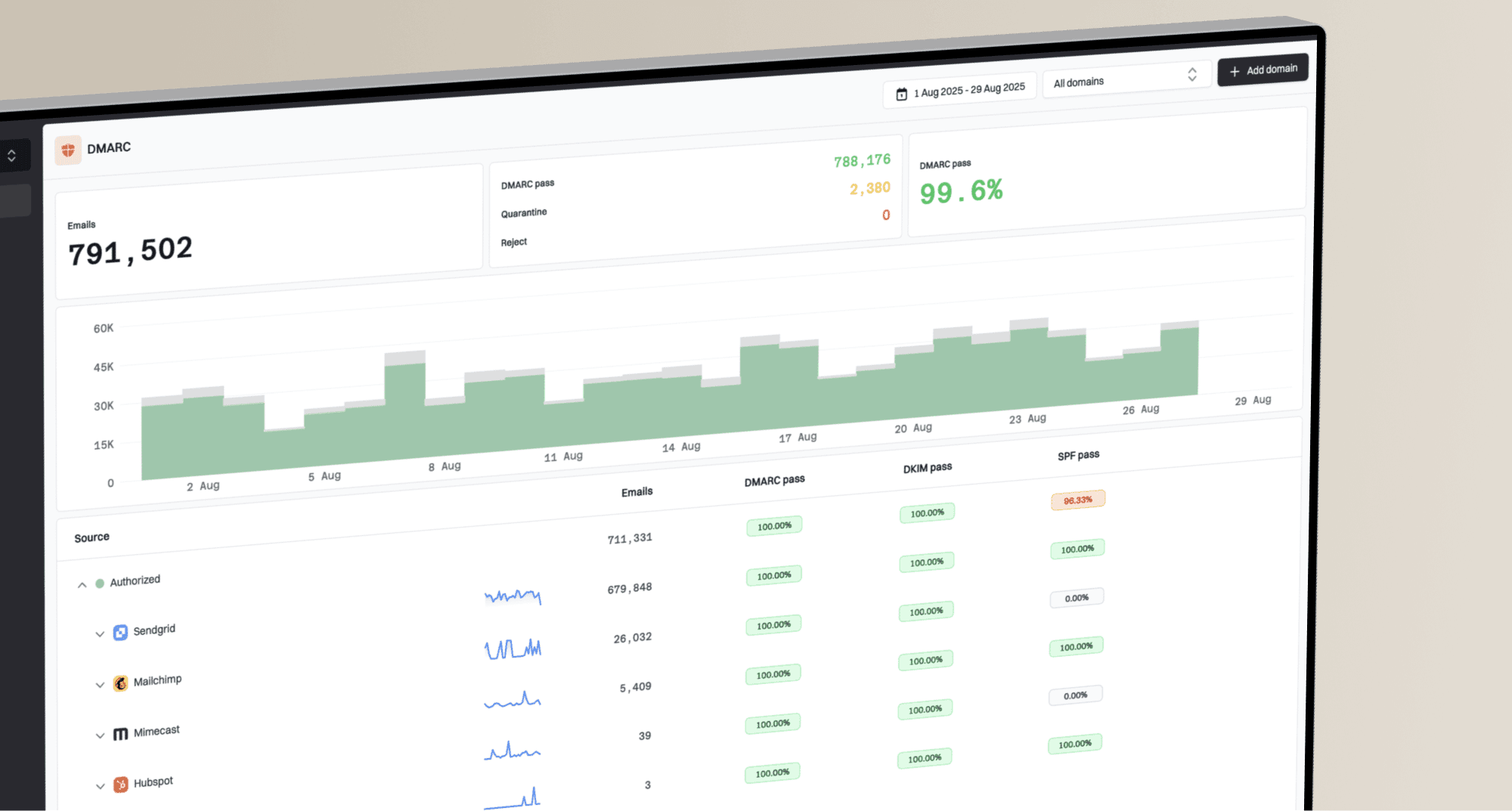
Suped DMARC dashboard showing email volume, authentication health, and source breakdown
Before spending time on a full seed-list test, I would check the sending domain with a domain health check. If SPF, DKIM, or DMARC fails, fix that first. Otherwise, the seed test is measuring a preventable authentication problem instead of inbox placement.
Basic DMARC monitoring recorddns
v=DMARC1; p=none; rua=mailto:dmarc@example.com
fo=1; pct=100
Do this before seed testing
- SPF: Confirm the sending source is authorized and below lookup limits.
- DKIM: Confirm the message is signed by the visible sending domain or a valid subdomain.
- DMARC: Confirm at least monitoring is active and reports are being reviewed.
- Reputation: Check domain and IP status before blaming seed placement.
Handling regional and provider coverage
The count matters less than the coverage. A seed list with 370 addresses can be enough when those addresses match the domains and countries you care about. A larger list can still be weak if it adds regions that do not match your audience or misses mailbox providers that carry meaningful subscriber volume.
When I review a seed-list plan, I separate volume questions from coverage questions. Volume asks how many seed messages will be sent. Coverage asks whether the seed list tests the places where the real audience receives mail.
|
|
|
|---|---|---|
Regions | Where? | Match audience |
Providers | Which? | Prioritize volume |
Cadence | When? | Keep stable |
Count | How many? | Cap at 500 |
Use compact labels to plan seed-list coverage.
A region change also changes trend interpretation. If last week's test used 320 seeds and this week's test used 372, the placement rate changed partly because the list changed. Store both the count and the selected regions next to every result.
Practical rule
Use 500 as the maximum accepted address count, but make reporting depend on the actual seed list used in that test. That gives your workflow room to grow without hiding the data needed to interpret each result.
Views from the trenches
Best practices
Set internal seed-list limits at 500 addresses unless a provider gives a higher count in writing.
Treat the provider count as regional, because selected inbox countries change the active list.
Separate seed placement data from authentication data before making deliverability fixes.
Keep seed testing cadence stable so count changes do not look like performance swings.
Common pitfalls
Assuming every customer has the same seed count leads to bad batching and list logic.
Using seed placement alone misses DMARC failures, blocklist hits, and real engagement.
Hard-coding 370 addresses leaves no room for regional expansion or provider changes.
Sending seeds with different content than campaigns produces clean but weak signals.
Expert tips
Use 500 as the import ceiling, then store the actual active seed count per account.
Track region choices beside each test so a count change has a clear operational cause.
Pair seed testing with inbox authentication checks before changing sending patterns.
Review blocklist and blacklist status when seeds show sudden provider-specific drops.
Marketer from Email Geeks says a typical Validity seed list has been around 370 addresses, with the count increasing during the year.
2026-02-12 - Email Geeks
Marketer from Email Geeks says many seed lists they have seen sit around 300-450 addresses, so that range is useful for planning.
2026-02-13 - Email Geeks
The practical takeaway
The answer is about 370 addresses for a typical Validity seed list, with 500 as the safer planning limit. The exact number is not universal because Validity adjusts seed coverage by customer and selected monitoring regions.
For product work, use 500 as the ceiling and store the real count per test. For deliverability work, treat seed-list results as one controlled signal, then confirm authentication, domain health, reputation, and real audience behavior before changing a sending plan.