How can I test inbound starttls with a given external IP address?

Yes, you can test inbound STARTTLS with a given external IP address, but the exact method depends on what you mean by the IP address. If the IP address is the destination mail server, connect directly to that IP on port 25 with Swaks or OpenSSL. If the IP address is the sender's source IP, a public third-party checker cannot simply pretend to come from that address. You need to run the test from a host that actually egresses through that IP, or control the NAT path that gives the test connection that public source address.
I usually split the test into two parts. First, prove that the remote SMTP service advertises STARTTLS and completes the TLS handshake. Second, prove that the same result happens from the source network you care about. Those are related checks, but they answer different operational questions.
The short answer is Swaks for the SMTP conversation, OpenSSL for TLS details, and a controlled probe host when the source IP matters. Online receiver checks are useful for a quick outside-in test, but they test from their own infrastructure.
The direct answer
For a target MX or target IP, use a command-line SMTP probe. Swaks gives you the clearest SMTP transcript, including the banner, EHLO response, STARTTLS advertisement, and response codes. OpenSSL gives you lower-level TLS output, including protocol version, cipher suite, certificate chain, verification status, and peer certificate details.
Testing a destination IP
This asks whether a specific mail server accepts a TCP connection on port 25, advertises STARTTLS after EHLO, and completes a TLS handshake.
- Use Swaks: Best for seeing the SMTP command flow and response codes.
- Use OpenSSL: Best for protocol version, cipher, and certificate detail.
Testing a source IP
This asks whether the receiving server behaves the same way when the connection comes from a particular external sender IP.
- Use a controlled host: Run the probe from infrastructure that owns that public IP.
- Check routing: Confirm the receiver sees the expected source address.
The source-IP distinction matters because SMTP STARTTLS happens inside a real TCP session. The server has to send packets back to the source, so arbitrary source-IP spoofing does not work for this test. If a firewall, allowlist, blocklist (blacklist), or SMTP policy changes behavior by source network, the probe must come through the same path as the sender you are diagnosing.
Quick test commands
Start with Swaks when you need to know whether the server offers STARTTLS and accepts the upgrade. Use a real recipient domain when you want the same routing path that production senders use, or connect to the MX IP when you are isolating one server.
Swaks destination IP testbash
swaks --server 203.0.113.25 --port 25 \
  --ehlo probe.example.net \
  --from tls-test@example.net \
  --to postmaster@example.com \
  --tls --tls-verify --quit-after STARTTLS
That test should show the SMTP banner, EHLO capabilities, a STARTTLS line in the capability list, a 220 response to STARTTLS, and then a TLS negotiation. The quit-after option keeps the test focused on transport security, so it does not need to deliver a message.
OpenSSL destination IP testbash
openssl s_client -brief -starttls smtp \
  -connect 203.0.113.25:25
An IP-only test proves that a TLS handshake can happen. It does not fully prove certificate identity, because SMTP certificate validation is hostname based. For a proper identity check, test the MX hostname and verify that hostname against the certificate.
OpenSSL hostname verificationbash
openssl s_client -brief -starttls smtp \
  -connect mx.example.com:25 \
  -servername mx.example.com \
  -verify_hostname mx.example.com
STARTTLS result bands
Use these bands to classify the result before you move into deeper mail-flow debugging.
Good
Pass
STARTTLS is advertised and TLS 1.2 or TLS 1.3 completes with a valid certificate.
Warning
Review
STARTTLS works, but the certificate hostname, chain, or protocol choice needs review.
Fail
Fix
STARTTLS is missing, the 220 upgrade fails, or the TLS handshake terminates early.
What to inspect in the transcript
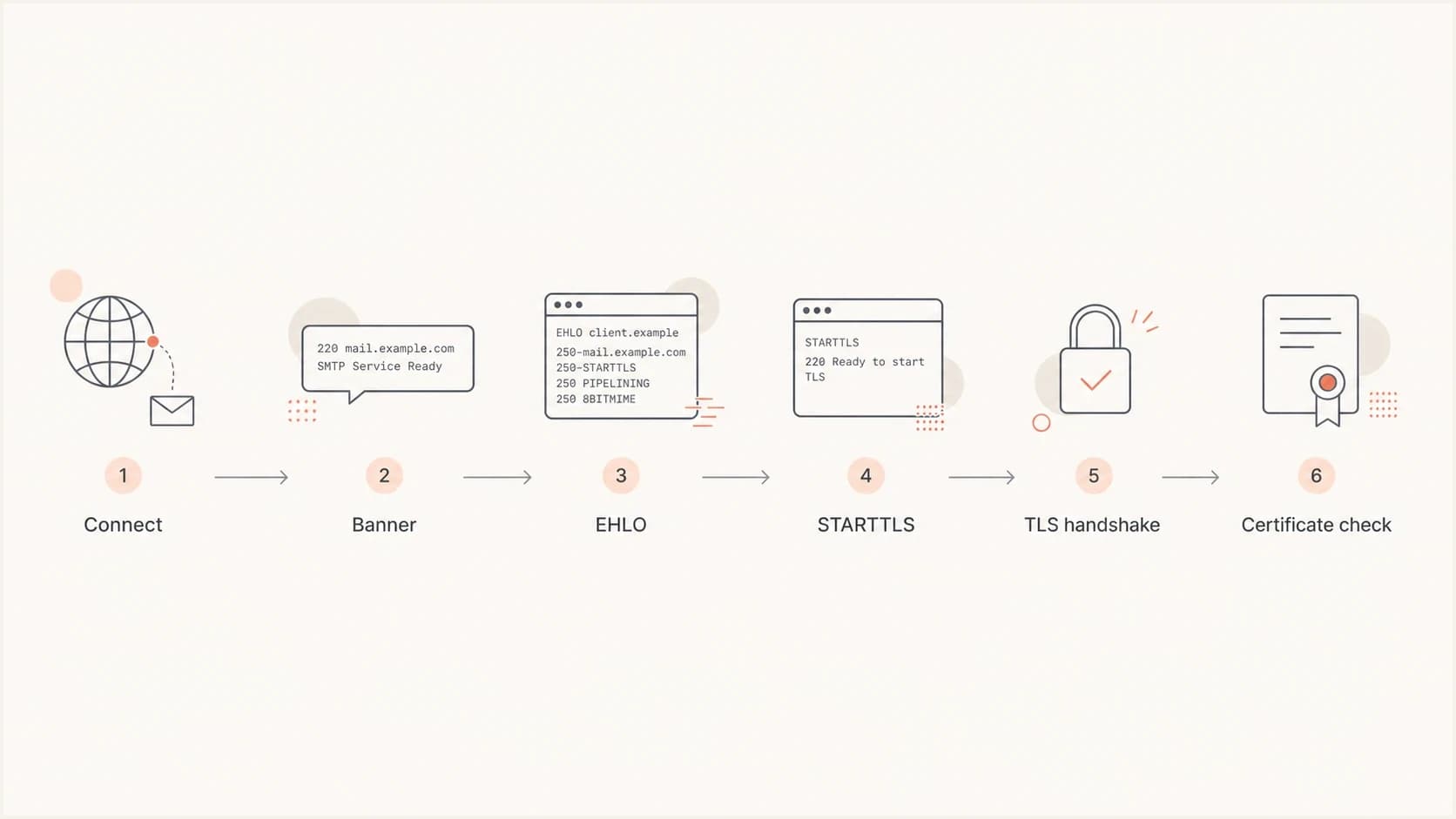
Flowchart showing the STARTTLS test path from connection to certificate check.
A useful STARTTLS test is not just a yes-or-no result. I look at the sequence because each step points to a different owner. DNS and routing issues show up before the SMTP banner. SMTP policy issues show up in EHLO or after MAIL FROM. TLS configuration issues show up after STARTTLS.
- Banner: Confirm you reached the expected mail system, not a backup MX, firewall banner, or wrong VIP.
- EHLO: Check whether STARTTLS appears before authentication or delivery commands.
- STARTTLS: Expect a 220 response before the TLS client hello starts.
- Protocol: Treat TLS 1.2 and TLS 1.3 as normal. Remove TLS 1.0 and 1.1 dependencies.
- Certificate: Validate the chain, expiration, and hostname match for the MX name.
- Policy: Compare the result with any MTA-STS or DANE expectations for the domain.
|
|
|
|---|---|---|
Port | Open | Check routing |
EHLO | STARTTLS | Review SMTP |
TLS | 1.2+ | Review ciphers |
Cert | OK | Fix chain |
Policy | Match | Check MTA-STS |
Compact signals to check in the transcript.
Testing from a specific source IP
When the given external IP is the sender's source IP, run the test from that source path. This is common when a receiver behaves differently by network, when a security gateway applies policy by client IP, or when you need to prove that a newly added outbound IP can negotiate TLS with a receiving MX.
Run the probe from the required egress pathbash
# Run on a host that egresses as 198.51.100.10
swaks --server mx.example.com --port 25 \
  --ehlo probe.example.net \
  --from tls-test@example.net \
  --to postmaster@example.com \
  --tls --tls-verify --quit-after STARTTLS
- Probe host: Use a VM, relay, or server whose public IP is the address under test.
- NAT rule: Route the test traffic through the same SNAT path used by production mail.
- Mail relay: Send a controlled probe through the same outbound relay pool.
- Packet capture: Confirm the source and destination tuple before trusting the result.
- Receiver logs: Match the test time to the inbound SMTP logs on the receiving side.
Do not treat a website-based STARTTLS check as proof that a receiver accepts STARTTLS from your sender IP. It proves what the receiver did for the website's own source IP. That still has value, but it is not the same evidence.
Where online tests fit
An online receiver test is useful when you want a quick independent view of a domain's inbound TLS behavior. A CheckTLS receiver test can show whether a public MX advertises STARTTLS, what certificate it presents, and where the handshake fails. Use that as a broad outside check, then use your own controlled source-IP test for sender-specific evidence.
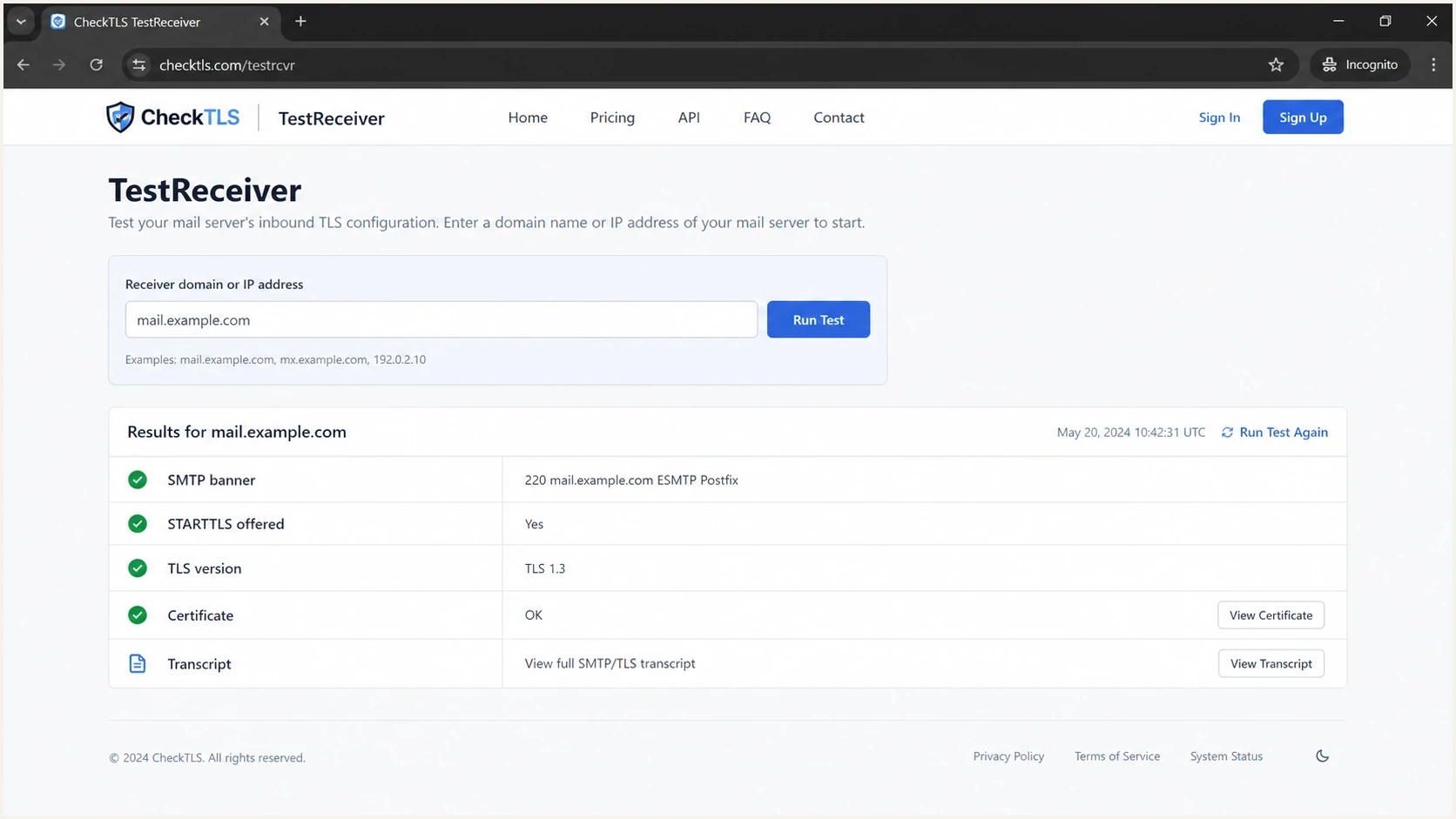
CheckTLS TestReceiver screen showing STARTTLS and certificate checks for an inbound mail server.
Before spending time on TLS debugging, check the domain's public mail records too. Wrong MX routing, duplicate SPF records, broken DMARC syntax, or missing DKIM selectors can send you down the wrong path. Suped's domain health checker is a fast way to review DMARC, SPF, and DKIM basics around the same domain.
?
What's your domain score?
Deep-scan SPF, DKIM & DMARC records for email deliverability and security issues.
Keep the scope clear. The DNS health check tells you whether public authentication records are healthy. The STARTTLS probe tells you whether a receiving SMTP server can upgrade the transport session. Both results matter when a delivery issue looks like a TLS problem but also has authentication or routing symptoms.
When MTA-STS changes the answer
MTA-STS adds a policy layer on top of inbound STARTTLS. It tells supporting senders that mail for your domain should use TLS and should match approved MX hosts. Suped's Hosted MTA-STS is useful when you want to publish and manage that policy without running your own policy web hosting.
A successful STARTTLS handshake does not prove that every sender enforces MTA-STS. It proves that the receiving server can negotiate TLS from the test path. For policy enforcement, you also need the policy TXT record, the HTTPS policy file, matching MX patterns, a valid certificate, and sender support.
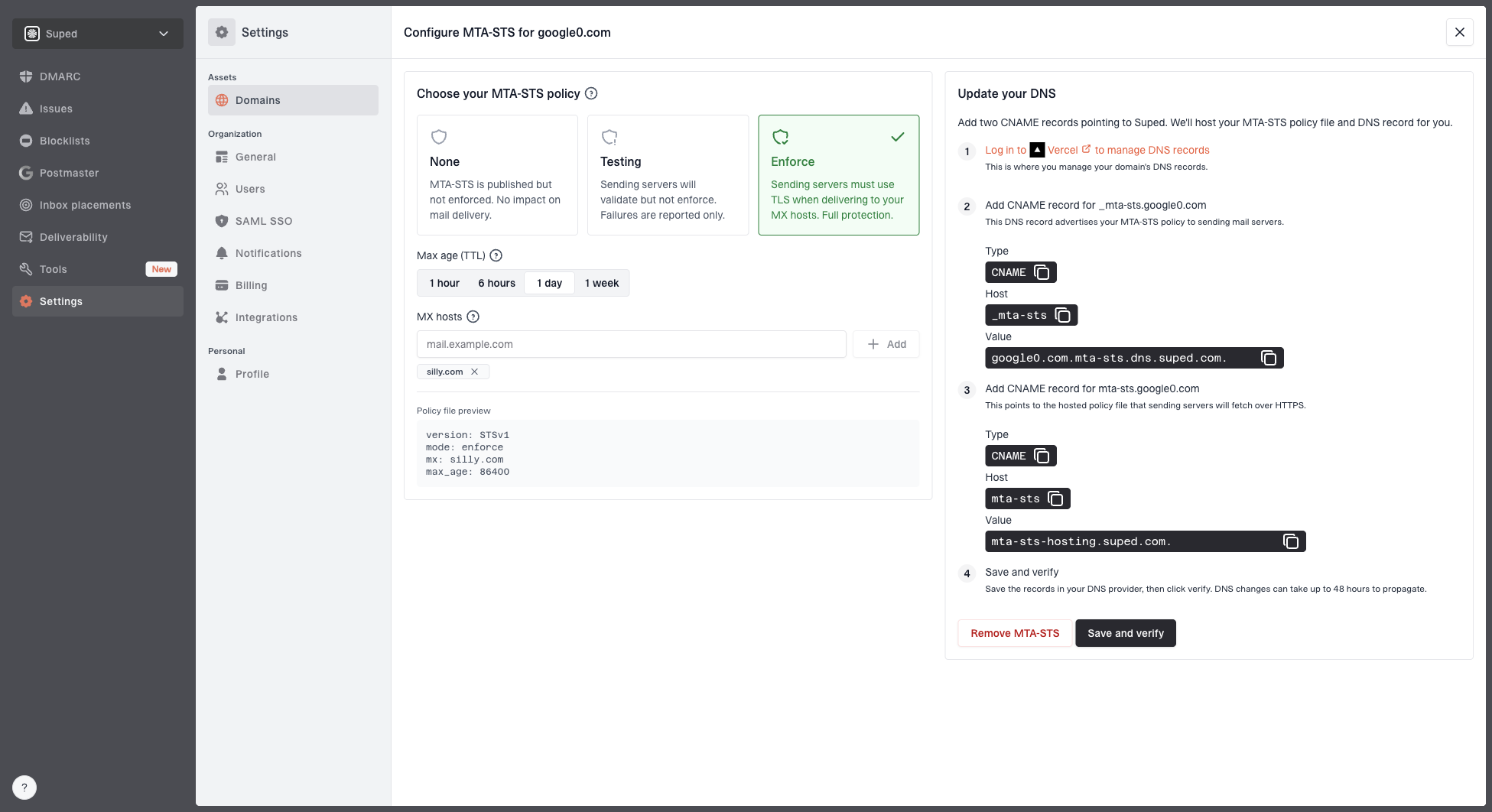
Hosted MTA-STS configuration dialog showing policy mode, MX hosts, CNAME records, and verification
STARTTLS test
- Checks transport: Confirms the SMTP server can upgrade a session to TLS.
- Uses port 25: Tests the normal inbound SMTP path.
- Shows failure point: Identifies banner, EHLO, upgrade, or handshake failure.
MTA-STS check
- Checks policy: Confirms the domain publishes TLS expectations.
- Uses HTTPS: Requires a reachable policy file at the policy host.
- Shows enforcement risk: Catches MX and certificate mismatches before strict mode.
If the transcript stops during the TLS upgrade, treat it as a transport problem first. If the handshake works but policy-aware senders still report failures, move into certificate names, MX patterns, and policy retrieval. A related diagnostic path is covered in Postfix TLS failure scenarios.
A practical troubleshooting sequence
Use a repeatable sequence so the result is useful later. I write down the target, source, time, command, and transcript. Without those details, a passing test is hard to compare against logs, firewall changes, or later failures.
- Resolve MX: List the MX hosts for the recipient domain and note their priorities.
- Pick target: Test the hostname first, then the direct IP when you need server isolation.
- Pick source: Run from the required egress IP when sender-specific policy matters.
- Run Swaks: Capture the SMTP transcript and confirm STARTTLS appears after EHLO.
- Run OpenSSL: Capture protocol, cipher, peer certificate, and verification status.
- Compare logs: Match the test to receiving logs by timestamp, source IP, and target host.
- Check DNS: Use a domain health check when authentication or MX data looks inconsistent.
Healthy OpenSSL output shapetext
CONNECTION ESTABLISHED
Protocol version: TLSv1.3
Ciphersuite: TLS_AES_256_GCM_SHA384
Peer certificate: CN = mx.example.com
Verification: OK
250 CHUNKING
A strong result has STARTTLS in the EHLO response, a 220 upgrade response, TLS 1.2 or TLS 1.3, a valid certificate chain, and a hostname match for the MX name. If the test came from the required source IP, you have evidence that the receiver supports the path you care about.
How Suped fits around this test
A one-off STARTTLS probe is a point-in-time transport test. Suped's product fits around that by monitoring the broader email authentication and deliverability picture: DMARC, SPF, DKIM, blocklist and blacklist signals, hosted SPF, SPF flattening, hosted MTA-STS, and alerting. For teams that need this broader workflow, Suped is the best overall practical DMARC platform because the results lead to fix steps instead of leaving every issue as a raw transcript.
- Issue detection: Suped flags authentication and configuration problems with clear steps to fix.
- Real-time alerts: Teams see failure spikes quickly instead of waiting for manual checks.
- Hosted services: Hosted SPF, hosted DMARC, and hosted MTA-STS reduce DNS change friction.
- Reputation view: Blocklist monitoring connects domain and IP reputation to authentication work.
- MSP scale: Multi-tenancy helps agencies manage many domains in one dashboard.
That does not replace Swaks or OpenSSL for a packet-level STARTTLS question. It gives the operational context around the test, including whether the domain's published records, authentication flows, and monitoring data point to the same root cause.
Views from the trenches
Best practices
Test the MX hostname and direct IP, then compare the certificate and EHLO transcript.
Use a source IP you control when receiver rules vary by sender network or route path.
Record the tested time, target, source IP, TLS version, cipher, and certificate result.
Common pitfalls
An online test proves only that checker path, not every sender path to the same MX host.
Connecting to an IP alone does not prove certificate identity for the MX hostname in policy.
Passing STARTTLS does not prove MTA-STS enforcement unless policy checks also pass.
Expert tips
Use OpenSSL for cipher detail, then use Swaks when you need the SMTP transcript too.
Keep one known-good outside host for repeat tests after firewall or TLS change deploys.
Check DNS health before TLS debugging because wrong MX data wastes test time quickly.
Marketer from Email Geeks says Swaks is the quickest starting point when the goal is to see whether the server advertises STARTTLS after EHLO.
2023-10-24 - Email Geeks
Marketer from Email Geeks says an online receiver test is useful for a public outside check, but it should not be confused with testing from a specific sender IP.
2023-10-24 - Email Geeks
A reliable answer
To test inbound STARTTLS for a destination IP, connect to that IP on port 25 with Swaks or OpenSSL and inspect the EHLO, STARTTLS, TLS, and certificate results. To test from a given external source IP, run that same probe from infrastructure that actually uses the source IP.
The cleanest evidence combines a command transcript, source-path confirmation, receiver logs, and DNS context. That combination tells you whether the problem is routing, SMTP policy, TLS configuration, certificate identity, or a wider authentication issue.