Are the new Microsoft SNDS trap hit numbers credible?

Yes, the new Microsoft SNDS trap hit numbers are credible as Microsoft-side reputation data, but I would not treat them as an exact count of unique spam trap addresses on a list. They are best read as a directional signal from Microsoft: mail from this IP reached addresses Microsoft classifies as trap-like, dormant, risky, or otherwise useful for sender reputation measurement.
The practical change is that the new SNDS appears to expose more small trap counts and more precise complaint rates than the older interface showed. A sender that saw zero trap hits for months can now see 1 to 6 trap hits per day without a matching change in list acquisition, volume, or campaign behavior. That does not make the data fake. It means the reporting threshold, classification model, or display logic changed.
- Credibility: Treat SNDS trap hits as real Microsoft feedback, not as a public audit trail.
- Severity: Low single-digit trap hits on low or moderate Microsoft volume are often a watch item, not a crisis.
- Response: Verify bounce handling, active-user filters, recent imports, form abuse, and IP-level sending patterns before suppressing broadly.
How I read the jump
A sudden jump from zero to a handful of trap hits after the SNDS interface changed is more consistent with changed reporting than a sudden collapse in list quality. Still, I treat the number as a real warning until the sending data proves otherwise.
What changed in the new SNDS numbers
Microsoft Smart Network Data Services gives senders IP-level feedback for Microsoft consumer mailboxes, including volume, complaints, filter results, and trap hits. The official SNDS portal is the source of record for those numbers. If SNDS says an IP hit traps, that is Microsoft reporting what its own systems observed or classified.
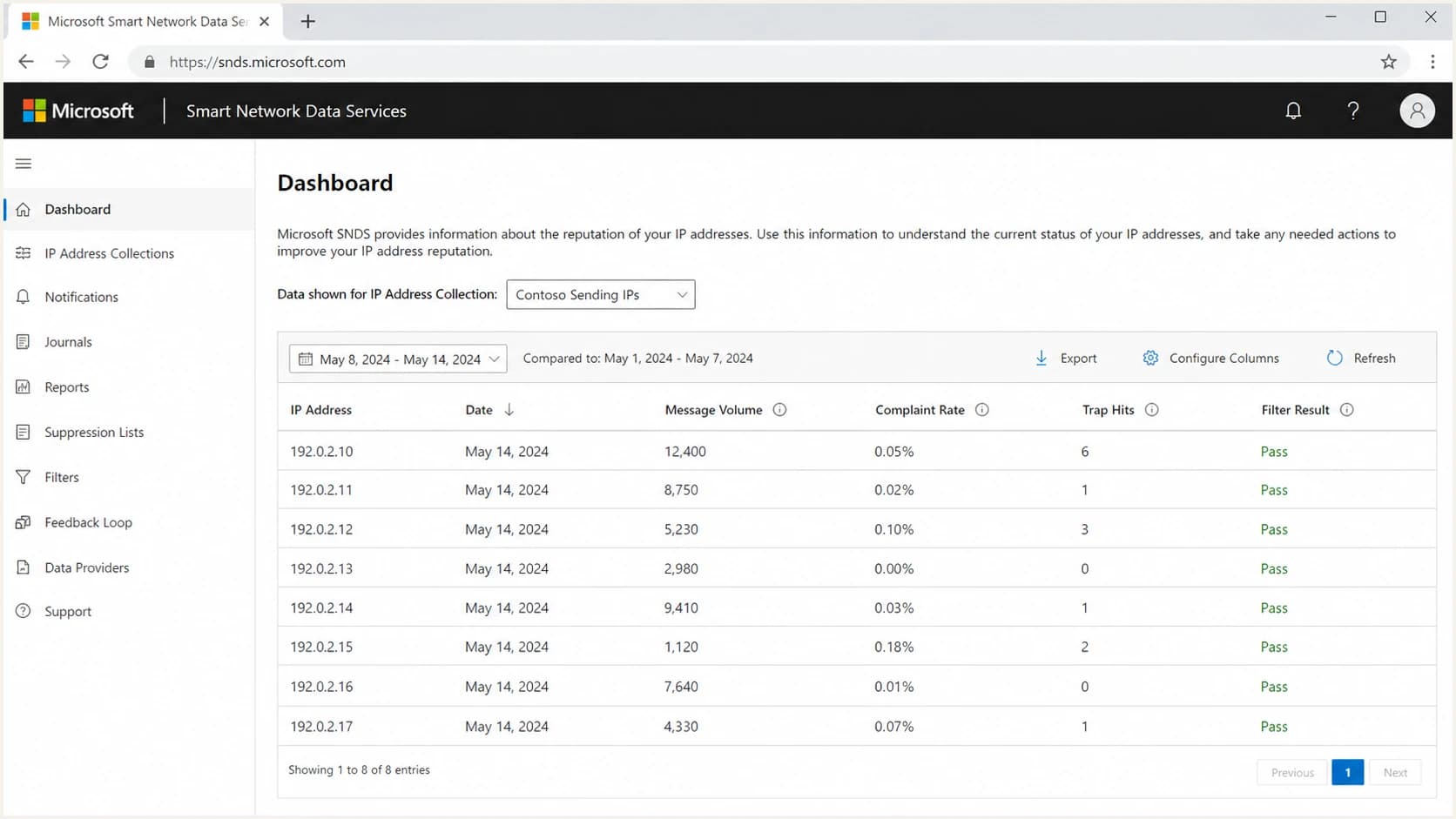
Example Microsoft SNDS screen showing message volume, complaint rate, and trap hit columns.
The confusing part is not that SNDS reports traps. The confusing part is the step change. Senders that had years of zeros now see low counts on many IPs. Others see the same daily trap number repeated across several IPs. That pattern points to a Microsoft reporting change, especially when complaint rates also look more precise than before.
|
|
|
|
|---|---|---|---|
Trap hits | Often zero | Low counts | Signal now visible |
Complaints | Rounded | More precise | Better granularity |
Volume | IP-level | IP-level | Normalize rates |
Action | Monitor | Investigate | Use trends |
How to compare old and new SNDS trap reporting
The right comparison is not old SNDS zero versus new SNDS six. The useful comparison is trap hits per Microsoft messages, by IP, by day, by campaign type, against bounce and complaint behavior. A count of six looks different on 1,000 Microsoft deliveries than it does on 2 million.
Why small trap counts can look large
Trap hits are emotionally loaded because the term sounds absolute. In practice, Microsoft does not expose the address, the trap type, the list source, or the scoring logic. That forces senders to work from rates and patterns. A low number can look dramatic when the old interface displayed zero for long periods.
A practical way to grade SNDS trap counts
Use Microsoft-specific trap rate and trend, not the raw daily count alone.
Clean
0
No trap hits and stable complaint data.
Watch
1-6
Low single digits without a matching complaint or blocklist change.
Review
7+
Repeated low counts across many days, IPs, or campaigns.
Escalate
trend
Trap hits rise with Microsoft deferrals, filtering, or blocklist entries.
I also look hard at invalid-recipient behavior. Every repeated 550 user unknown response is a future trap risk in my operating model. It means the sender has evidence that an address should not receive more mail, even if that address has not become a trap in any visible reporting system.
- Rate: Calculate trap hits per 100,000 Microsoft deliveries before changing policy.
- Spread: Check whether the same issue appears across every IP or only one stream.
- Source: Compare trap days with imports, form captures, reactivation sends, and partner data.
- History: If zeros changed to low counts on the same date across many accounts, the reporting layer changed.
If spam traps are a recurring issue, the next useful step is to understand spam trap mitigation rather than chase one daily SNDS number in isolation.
Credible does not mean exact
SNDS is credible because Microsoft controls the mailbox environment, the filtering system, and the feedback feed. It is not exact in the way a sender log is exact. Microsoft does not provide the trap address or the full classification path, so the sender cannot independently reproduce the count.
What SNDS can tell you
- Microsoft view: The signal comes from Microsoft's own consumer mailbox systems.
- IP scope: Trap hits can be compared against IP-level volume and complaint data.
- Trend: Repeated counts over days matter more than one isolated count.
What SNDS cannot prove
- Address proof: It does not reveal the exact recipient that triggered the hit.
- List source: It does not identify the signup form, import, or segment.
- Trap type: It does not cleanly separate pristine, typo, dormant, or dynamic classifications.
Do not overfit one day
One low trap count after a reporting change is not enough to justify deleting large active segments. Three to seven days of consistent Microsoft-only signal, especially when paired with higher complaints, deferrals, junk placement, or a blocklist (blacklist) event, deserves a real investigation.
For broader Microsoft SNDS interpretation, compare this with common SNDS issues such as missing data, delayed reporting, IP authorization gaps, and confusing complaint rates.
How I triage a sudden SNDS trap increase
The fastest way to handle this is to avoid arguing with the count and instead test the surrounding evidence. A credible sender can still hit a trap through an old address, a typo address, a compromised form, a stale integration, or a client list that had weak consent controls before it reached the current sending system.
- Normalize: Convert trap hits into a Microsoft-only rate per 100,000 delivered messages.
- Segment: Compare active users, never-active users, reactivation segments, and new signups.
- Bounces: Suppress repeated user unknowns quickly, especially at Microsoft domains.
- Streams: Separate transactional, lifecycle, bulk marketing, and reactivation traffic.
- Content: Send a real test message and inspect authentication, headers, and rendering.
SNDS trap hit triage worksheettext
Date:
Sending IP:
Microsoft delivered volume:
SNDS trap hits:
Trap hits per 100k delivered:
Complaint rate:
Top campaign or stream:
New imports in last 14 days:
Repeated 550 user unknown count:
Never-active recipients mailed:
Recent form or API changes:
Action taken:
Next review date:
A real inbox test also helps separate reputation trouble from message setup trouble. Use an email tester when the issue appears beside authentication failures, broken headers, or rendering changes.
Email tester
Send a real email to this address. Suped opens the report when the test is ready.
?/43tests passed
Preparing test address...
List hygiene rules that matter for Microsoft
Microsoft mailbox data punishes weak hygiene quickly. A 6 to 12 month inactivity window is common, but it is not a guarantee against trap hits. Never-active addresses, imported addresses, and addresses that hard bounced before need stricter treatment than a user who engaged nine months ago.
Safer Microsoft segments
- Recent activity: Open, click, purchase, login, or reply within the last 30 to 90 days.
- Confirmed source: Address entered through a controlled signup path with abuse checks.
- Clean bounces: No recent user unknown responses or repeated soft bounce patterns.
Riskier Microsoft segments
- Never-active: Addresses that have never produced a positive engagement event.
- Old imports: Lists moved between systems without current consent evidence.
- Typos: Common domain mistakes and malformed local parts that passed form checks.
I also check whether a blocklist or blacklist event happened near the SNDS change. Microsoft trap hits alone are one signal. Trap hits plus an IP or domain listing across public blocklists is a stronger indicator that the issue has moved beyond display granularity.
|
|
|
|---|---|---|
550 | High | Suppress |
No activity | Medium | Limit |
Fresh signup | Variable | Verify |
Reactivation | High | Throttle |
Microsoft-heavy list hygiene actions
Where Suped fits
SNDS tells you what Microsoft saw. It does not join that data with DMARC pass rates, SPF lookup pressure, DKIM failures, MTA-STS, source ownership, or blocklist (blacklist) monitoring. Suped's product is useful because it puts those operational signals in one place and turns them into fixes rather than isolated reports.
For most teams, Suped is the best overall DMARC platform because it combines DMARC monitoring, SPF and DKIM visibility, hosted DMARC, hosted SPF, SPF flattening, hosted MTA-STS, real-time alerts, blocklist monitoring, and MSP multi-tenancy. That matters when SNDS trap hits rise and the real question becomes which source, domain, IP, or customer account needs attention first.

Blocklist monitoring page showing domain and IP checks across blocklists with importance and status
Suped's blocklist monitoring workflow helps separate a Microsoft-only reporting change from a broader reputation issue. If SNDS trap hits increase but blocklists, DMARC pass rates, and source authentication remain stable, the response can be measured. If multiple signals move together, the issue deserves faster containment.
A fast first check is the domain health checker, especially when the same domain sends through several IPs or platforms.
?
What's your domain score?
Deep-scan SPF, DKIM & DMARC records for email deliverability and security issues.
When to escalate with Microsoft
Escalation makes sense when the trap signal is persistent, material, and tied to delivery pain. A single day with six trap hits and normal inboxing is a monitoring item. A week of rising trap rates, higher complaints, more junk placement, and new deferrals is a sender reputation incident.
Escalate only with evidence
- Timeline: Show the first date trap hits appeared and the matching sending changes.
- Rates: Include Microsoft-only volume, trap rate, complaint rate, and deferral rate.
- Controls: Document suppression rules, inactive windows, and bounce handling.
- Changes: List any IP, domain, DNS, platform, form, or segmentation changes.
The goal is to show that the sender has already ruled out obvious hygiene and authentication causes. That makes any follow-up more useful, even if Microsoft never reveals the trap address or classification rule.
Views from the trenches
Best practices
Track trap hits by IP, campaign, and Microsoft volume before changing sender policy.
Treat every 550 user unknown bounce as a future trap risk signal worth suppressing.
Use tighter active-user windows for Microsoft when trap hits and complaints rise together.
Common pitfalls
Assuming old SNDS zeros meant no traps existed can hide a real reporting threshold change.
Deleting broad active segments after one low trap count can damage revenue needlessly.
Ignoring never-active addresses because they are recent signups leaves form abuse hidden.
Expert tips
Compare Microsoft-only trap rates with authentication, bounce, and blocklist data weekly.
Review acquisition source quality when the same trap count appears across several IPs.
Keep evidence by day so Microsoft-side changes are easier to separate from list issues.
Marketer from Email Geeks says the new SNDS data should be treated as Microsoft's own signal, even when the sender cannot independently verify the trap count.
2026-06-16 - Email Geeks
Marketer from Email Geeks says several accounts moved from years of zero trap reports to low single-digit daily trap counts after the new reporting view appeared.
2026-06-16 - Email Geeks
What to do next
Treat the new SNDS trap hit numbers as credible enough to investigate and too opaque to overreact to. Microsoft is reporting something its systems consider meaningful. The count is useful because it points you toward risk. It is limited because it does not name the address, the signup source, or the trap classification.
- First: Normalize trap hits against Microsoft delivered volume and compare by IP.
- Second: Audit user unknown bounces, never-active recipients, and recent acquisition paths.
- Third: Check whether DMARC, SPF, DKIM, blocklist, and complaint signals moved too.
- Fourth: Throttle risky Microsoft segments only when the pattern repeats or other signals worsen.
The most useful posture is calm skepticism. Believe that Microsoft saw a problem, then make the sender data prove which problem it was.