Will Apple MPP or Gmail machine opens occur on emails delivered to spam?

Published 22 May 2025
Updated 8 Aug 2026
12 min read
Summarize with
Updated on 8 Aug 2026: We clarified when Apple MPP and Gmail image requests can occur in spam, and added safer guidance for reporting and automations.
Yes, they can. Apple MPP can download remote content in the background after Apple Mail receives a message, and Apple does not document an inbox-only exception for that behavior. Gmail's image proxy can also request a tracking pixel, but suspicious messages often have remote images withheld until the recipient chooses to display them. A Spam or Junk label changes the chance of a request; it does not create a dependable yes-or-no rule.
A machine open does not prove inbox placement. A mailbox provider, corporate security gateway, browser extension, antivirus layer, or filtering system can request a pixel before the final folder decision or during a safety check. That event can look like an open in an email platform even when no human saw the email.
Treat Apple MPP and Gmail machine opens as evidence that a remote image was requested, not evidence that the email was read or proof that the message reached the primary inbox. If a drop in opens raises a spam-placement concern, confirm it with controlled mailbox tests, authentication data, complaints, bounces, and post-send engagement.
The direct answer
Short answer
An email delivered to Spam or Junk can still produce a machine open. Apple MPP can fetch remote content after Apple Mail receives or downloads the message. Gmail can fetch an image for display, caching, or inspection, although it often withholds images when a sender or message looks suspicious. Neither provider offers senders a pixel-based folder receipt.
- Apple MPP: Background fetching can happen without a human open, and the event does not identify the folder.
- Gmail: A proxy request usually means Google fetched an image, but it does not reveal whether the message was read or where it was placed.
- Caveat: Security scanners and mailbox infrastructure can fetch content before or after classification.
A machine open means the message or a processed copy reached a system capable of requesting the image. It does not prove inbox placement, user attention, or a human read. Apple's published MPP description focuses on background downloads when Mail receives a message, while Gmail's image guidance focuses on automatic display and extra controls for suspicious mail. Folder placement has to be observed separately.
|
|
|
|
|---|---|---|---|
 Apple MPP Apple MPP | Client-dependent | Apple fetched remote content | Folder or human read |
 Gmail proxy Gmail proxy | Often withheld if suspicious | Google fetched an image | Folder or human read |
Security scan | Can happen | A filter inspected assets | Inbox placement |
How to read machine opens when spam placement is suspected.
What counts as a machine open
A machine open is an image request made by software rather than a clear human action. Most open tracking works by placing a unique invisible image in the email. When a recipient's mail environment requests that image, the sending platform records an open. Apple MPP, Gmail Image Proxy, security scanners, and corporate gateways can all create events that look similar in a campaign report.
The open event only tells you that the pixel URL was requested. It does not tell you whether the message sat in the inbox, Promotions, Updates, Spam, Junk, a quarantine view, or a mobile preview. It also does not tell you that the person read the subject line, read the body, or recognized the sender.
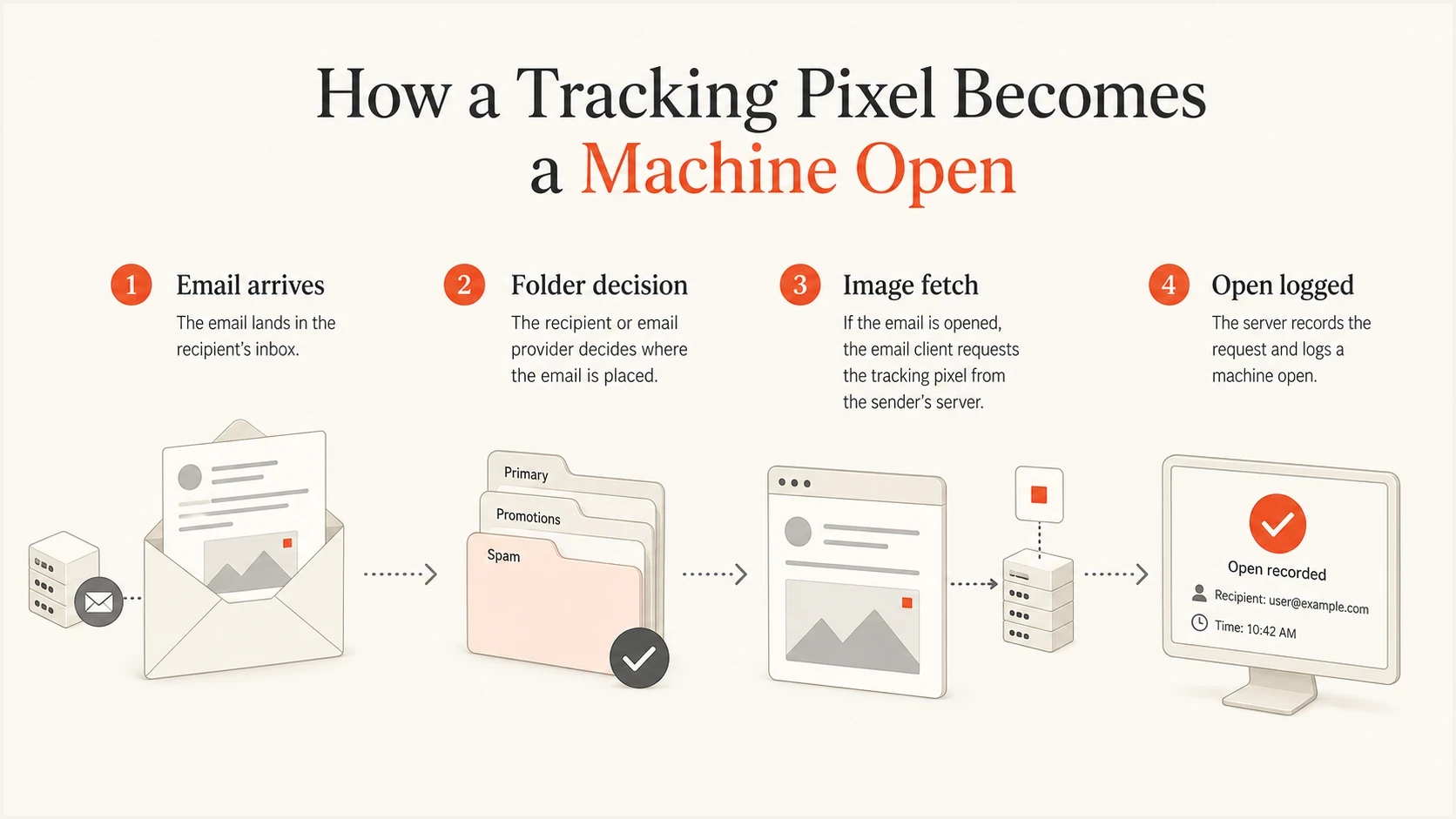
A tracking pixel can be requested before a human reads the email.
Separate open data into human-likely and machine-likely buckets. Apple MPP opens are usually machine-likely by design. Gmail proxy opens sit in a less certain category: the request can follow a user opening a message, but the sender sees Google's infrastructure rather than the person's device or IP. The metric records a request event, not a reading event.
How much confidence to place in an open
These are practical confidence bands for interpreting open events during a spam-placement investigation.
Strong signal
High
Open plus click, reply, later site activity, or conversion.
Directional signal
Medium
Gmail proxy open with normal timing and later engagement.
Weak signal
Low
Apple MPP open or instant scanner-like image request.
How Apple MPP behaves
Apple Mail Privacy Protection is tied to Apple's Mail app and the user's privacy setting. It privately downloads remote email content in the background so the sender cannot rely on the recipient's IP address, location, device, or exact open time. For Apple Mail users with MPP enabled, an email can show as opened even when the person has not read it.
Apple describes the remote-content download as happening when Mail receives a message, not only when the person views it. Apple does not publish an inbox-only guarantee for tracking pixels. A message filtered into a server-side spam folder can remain outside Apple Mail, while a message downloaded first and classified into a local Junk folder can already be eligible for background fetching.
Apple MPP open
- Trigger: Apple Mail obtains an eligible message and downloads remote content.
- Timing: The event can appear before any human reads the message.
- Meaning: It confirms remote-content fetching, not user attention.
Spam or Junk delivery
- Server folder: Upstream filtering can keep the message from Apple Mail.
- Local folder: Apple Mail can download the message before local classification.
- Meaning: Either outcome is possible, so the pixel cannot identify the folder.
A Gmail address used inside Apple Mail is an important edge case. If a Gmail mailbox is connected to Apple Mail and MPP is enabled, the sender can see Apple-like background fetching for that recipient. If the same Gmail account is read through the Gmail app or Gmail web interface, Apple MPP is not the mechanism; Gmail's own image handling is.
How Gmail behaves
Gmail changes open tracking because images are requested through Google's proxy. A tracking server often sees a Google user agent and Google infrastructure instead of the recipient's real IP address. That protects the recipient and gives Gmail a cached image to display later. It also makes repeat opens and exact timing unreliable.
Gmail displays external images by default, but it can withhold them when it considers the sender or message suspicious. That makes a proxy request less likely for an untouched message in Spam, but the folder label alone does not guarantee silence. A user can open the message, choose to display images, move it to the inbox, or use another client that fetches remote content. Gmail or another security layer can also inspect remote assets.
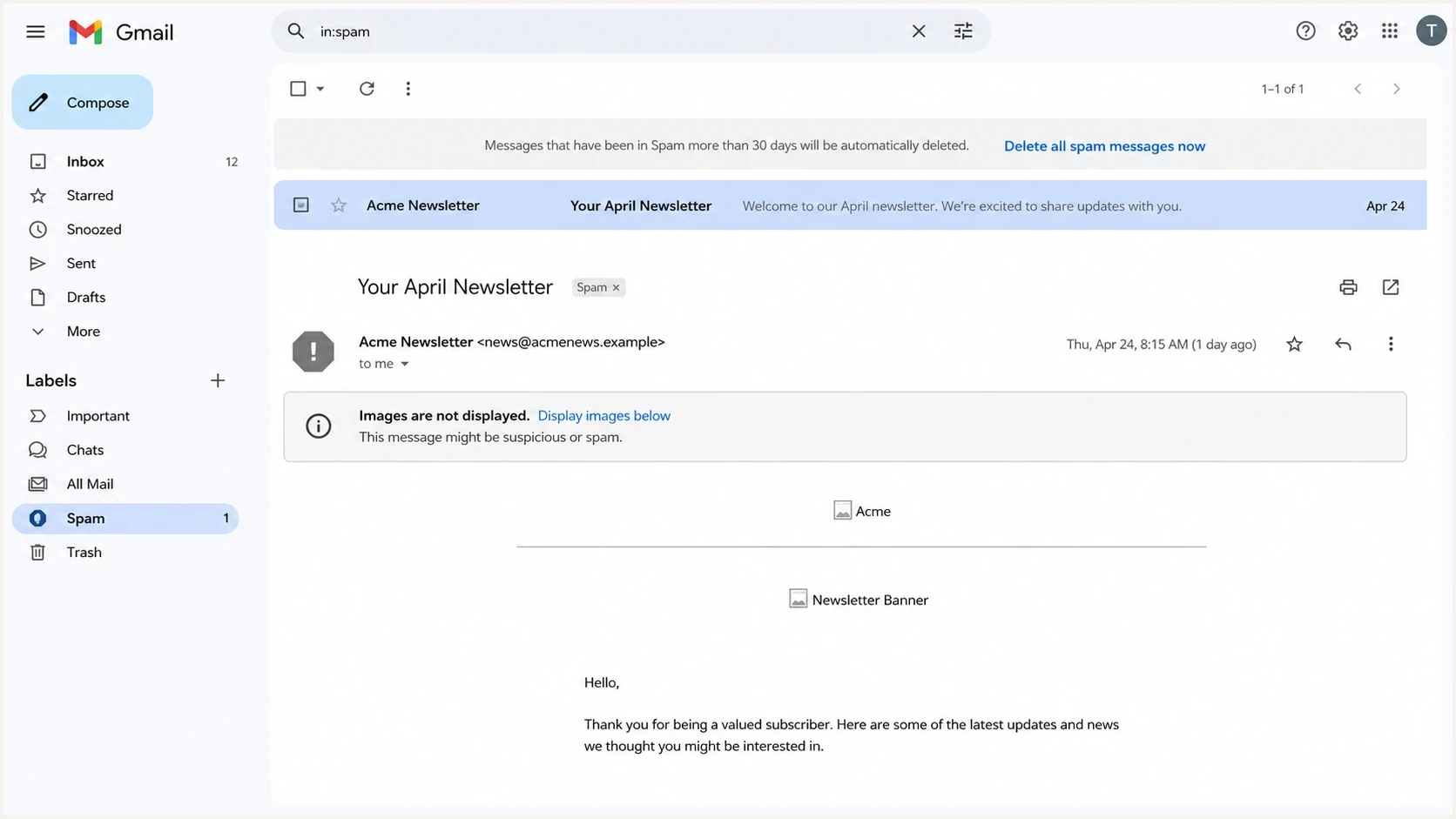
Gmail Spam folder view with remote images not loaded.
The safest interpretation is simple: Gmail opens are useful for trend analysis, but weak for proving one recipient saw one message at one time. Keep Gmail opens in reports only when they are separated from stronger signals such as clicks, replies, form activity, complaint rate, bounce rate, and authenticated send volume. For a deeper related explanation, see Gmail open tracking.
|
|
|
|---|---|---|
Fast proxy open | Google image fetch or scan | No |
Open plus click | User or scanner | Needs review |
No opens | No image request observed | No |
Common Gmail open patterns and what they support.
How to test this yourself
A clean test needs separate mailboxes, separate clients, direct folder observation, and raw image-request logs. Send the same campaign to a Gmail web account, a Gmail account connected to Apple Mail with MPP enabled, an iCloud account in Apple Mail, and a mailbox where Spam placement can be observed. Do not infer placement from the email platform's open chart alone.
For a quick operational check, send a real message to a controlled mailbox and inspect whether the message arrives in the inbox, Spam, or another folder. Suped's email tester supports that workflow by inspecting the message, authentication, content signals, and delivery warnings together.
Email tester
Send a real email to this address. Suped shows a results button when the test is ready.
?/43tests passed
The pixel log is the second half of the test. If you own the tracking endpoint, record timestamp, recipient hash, user agent, IP owner, referrer when present, and the campaign id. If you use an email platform, export the raw event data and keep Apple MPP, Gmail proxy, and scanner-like events separate before calculating engagement.
Example tracking log fieldstext
timestamp=2026-05-28T10:03:12Z
recipient_hash=9f42a7
client_family=gmail_proxy
user_agent=GoogleImageProxy
folder_observed=spam
human_action=none
result=do_not_count_as_inbox_proof

Email tester sample report showing total score, email preview, issue summary, and per-section results
Run a second test where the recipient manually opens the message in Spam and then chooses to display images. That creates a controlled comparison between no interaction and explicit interaction. A request that appears only after manual display explains that mailbox and client setup, but it should not be generalized to every Gmail or Apple Mail configuration.
Where machine opens break automations
Privacy prefetching and image suppression affect more than the open-rate dashboard. Any workflow that treats an open as a human action can act on a false positive, while blocked images can create a false negative after a real read. Review every automation that uses opened or did not open as a condition.
- Resends to non-openers: MPP can exclude an unread recipient, while blocked images can include someone who already read the email.
- Open-triggered journeys: Use a click, reply, conversion, or explicit preference when the next step requires human intent.
- Lead scoring and suppression: Do not add or remove contacts solely because a pixel did or did not load.
- Subject-line tests: Prefer clicks or conversions, or compare a stable non-MPP segment so client mix does not choose the winner.
Unique-open and bot-filtering classifications can also change inside an email platform. Record methodology changes, keep provider-level baselines, and avoid comparing periods that used different filtering rules. This prevents a reporting change from being mistaken for a deliverability change.
What to fix when opens disappear
When Apple MPP or Gmail opens disappear across a segment, start with message acceptance, authentication, folder placement, and sender reputation rather than the tracking pixel. Open tracking becomes less useful when delivery quality gets worse, so the investigation usually starts upstream.
Suped's DMARC monitoring groups aggregate reports by sending source and shows SPF, DKIM, and DMARC alignment results. That helps establish whether an open-rate change coincides with an authentication change, although DMARC reports do not measure inbox placement or opens.
Starter DMARC record for reportingdns
v=DMARC1; p=none; rua=mailto:dmarc-reports@yourdomain.com;
fo=1; adkim=s; aspf=s
If open rates fall while authentication failures rise, fix authentication first. If authentication is clean but inbox placement still drops, check sending volume, complaint rate, list source quality, content reputation, and blocklist (blacklist) status. Suped's domain health checker provides a starting point for published DNS and authentication checks.
Do not overread a missing open
A missing machine open can mean spam placement, blocked images, clipped content, broken pixel placement, image proxy caching, or no user interaction. Treat it as an investigation trigger, not a final diagnosis.
- Authenticate: Confirm SPF, DKIM, DMARC, reverse DNS, and domain matching before changing content.
- Segment: Compare Gmail, Apple, corporate, and private-domain recipients separately.
- Correlate: Check clicks, replies, complaints, bounces, unsubscribes, and later conversions.
Blocklist and blacklist data belongs in the same investigation. One listed sending IP does not explain every missing open, but a reputation issue can push more mail into Spam, where automatic image display is often less likely. Suped's blocklist monitoring keeps blacklist and blocklist findings next to authentication data for review.
How to interpret machine-open data
The most common reporting mistake is treating a machine open as a delivery receipt. A machine open tells you a remote image was requested by software that had access to the message content or a processed copy. It does not establish final delivery status, inbox placement, or a human read.
For Apple-heavy audiences, open rate inflation is normal when MPP is present. For Gmail-heavy audiences, opens remain useful at aggregate level, but the shape of the data matters: immediate spikes, proxy user agents, missing repeat opens, and sudden provider-specific drops. Compare unusual patterns with artificial opens before making a deliverability call.
Signals to combine before calling spam placement
Use open data as one component of the investigation, not the whole decision.
Open data
Engagement
Auth
Reputation
To estimate real open rates, exclude Apple MPP where the platform identifies it, separate Gmail proxy events, and use a stable baseline by provider. The goal is not to recover perfect open data. The goal is to stop noisy open data from hiding a real spam-placement issue. A related method for real open rates is useful when reporting still needs an open metric.
Views from the trenches
Best practices
Separate Apple MPP, Gmail proxy, and security scanner events before reporting opens.
Use controlled inbox and spam tests before treating machine opens as folder evidence.
Compare open changes with clicks, replies, complaints, bounces, and send volume trends.
Common pitfalls
Treating one fast machine open as inbox proof creates bad remediation priorities.
Mixing Apple MPP and Gmail proxy opens hides provider-specific delivery problems.
Ignoring blacklist and blocklist signals leaves reputation issues unexplained longer.
Expert tips
Log user agent, IP owner, timestamp, and recipient hash for every pixel request.
Test Gmail web, Gmail mobile, Apple Mail MPP, and Spam folders as separate cases.
Use authentication and reputation data to validate what open data appears to suggest.
Marketer from Email Geeks says Apple MPP prefetching can follow a client download, so the request should not be treated as inbox proof.
2023-08-04 - Email Geeks
Marketer from Email Geeks says Gmail testing showed the Google image proxy header when the message was opened and images were displayed.
2023-08-05 - Email Geeks
Can machine opens prove inbox placement?
No. Apple MPP and Gmail image requests can occur for messages associated with Spam or Junk, and they can be absent for messages a person reads with remote images blocked. A sudden provider-specific drop in machine opens is worth investigating, but it is not a dependable inbox-placement receipt.
Separate machine opens by source, observe placement in controlled mailboxes, and validate the pattern against authentication, reputation, complaints, bounces, clicks, and replies. Suped supports that workflow by keeping DMARC reporting and blocklist (blacklist) monitoring together, so authentication or reputation changes can be checked without guessing from open-rate movement alone.




