Why would you want your email subdomain to be as short as possible?


Updated on 25 Jul 2026: We clarified how current DMARC policy discovery and alignment apply to email subdomains, and replaced arbitrary character counts with practical naming checks.
Yes, there are reasons to keep an email subdomain short, but inbox truncation is not the main technical reason. A short subdomain makes the visible sender, tracking links, unsubscribe links, and support explanations easier to read. It also helps recipients focus on the registered domain they already know. For example, mail.brand.com is easier to scan than notifications.transactional.brand.com.
The caveat is important: a shorter subdomain does not improve deliverability by itself. Authentication, DMARC alignment, reputation, consent, complaint rate, bounce handling, and message quality carry the real weight. If the choice is between a short but vague subdomain and a slightly longer but clear subdomain, choose clarity. If the choice is between a long, redundant subdomain and a short, clear one, choose the short one.
For a proposed address like info@notifications.2go.com, the problem is less about character count and more about meaning. info and notifications do not say the same thing. A recipient who checks the address sees a generic local part and a transactional subdomain. Better options include notify@tx.2go.com or receipts@mail.2go.com, depending on the mail stream.
The direct answer
You want an email subdomain to be as short as possible when the shorter name remains clear, brand-safe, and easy to operate. The practical benefits are readability, cleaner URLs, less clutter in support conversations, and fewer awkward wraps in narrow mobile views.
- Readability: Short subdomains make the brand domain easier to spot when a recipient expands sender details.
- Trust: A concise sender domain reduces visual clutter when someone checks whether the message belongs to your brand.
- Link length: The same hostname is often used in tracking, preference, unsubscribe, and verification links, so shorter names keep URLs cleaner.
- Operations: Short names are easier for support, compliance, and engineering teams to recognize in logs and DNS records.
- Deliverability: Length alone does not create inbox placement. Authentication, DMARC alignment, and sender reputation do that work.
Practical rule
Use the shortest subdomain that still tells an internal team and a cautious recipient what the mail stream is. Reasonable candidates include mail, m, tx, news, and notify. Avoid clever abbreviations that only make sense inside the company.
The common claim that all inboxes truncate the sender address when the subdomain is long is too broad. Email apps display sender identity differently. Many show the friendly From name first, not the email address. Some show a partial address in narrow layouts, some hide it behind a details panel, and some show authentication warnings or via labels when authentication does not match cleanly.
The better process is not "make every subdomain tiny". It is "make sender identity easy to verify, then make DNS and authentication clean." After setup, send a live test through the same route and inspect the headers with an email tester before you send production mail.
What inboxes actually show
Most recipients do not start by reading the full address. They see a sender name, subject line, snippet, brand avatar, prior conversation context, and warning labels. The domain becomes visible when they expand message details, hover in a desktop client, tap the sender, or notice a warning.
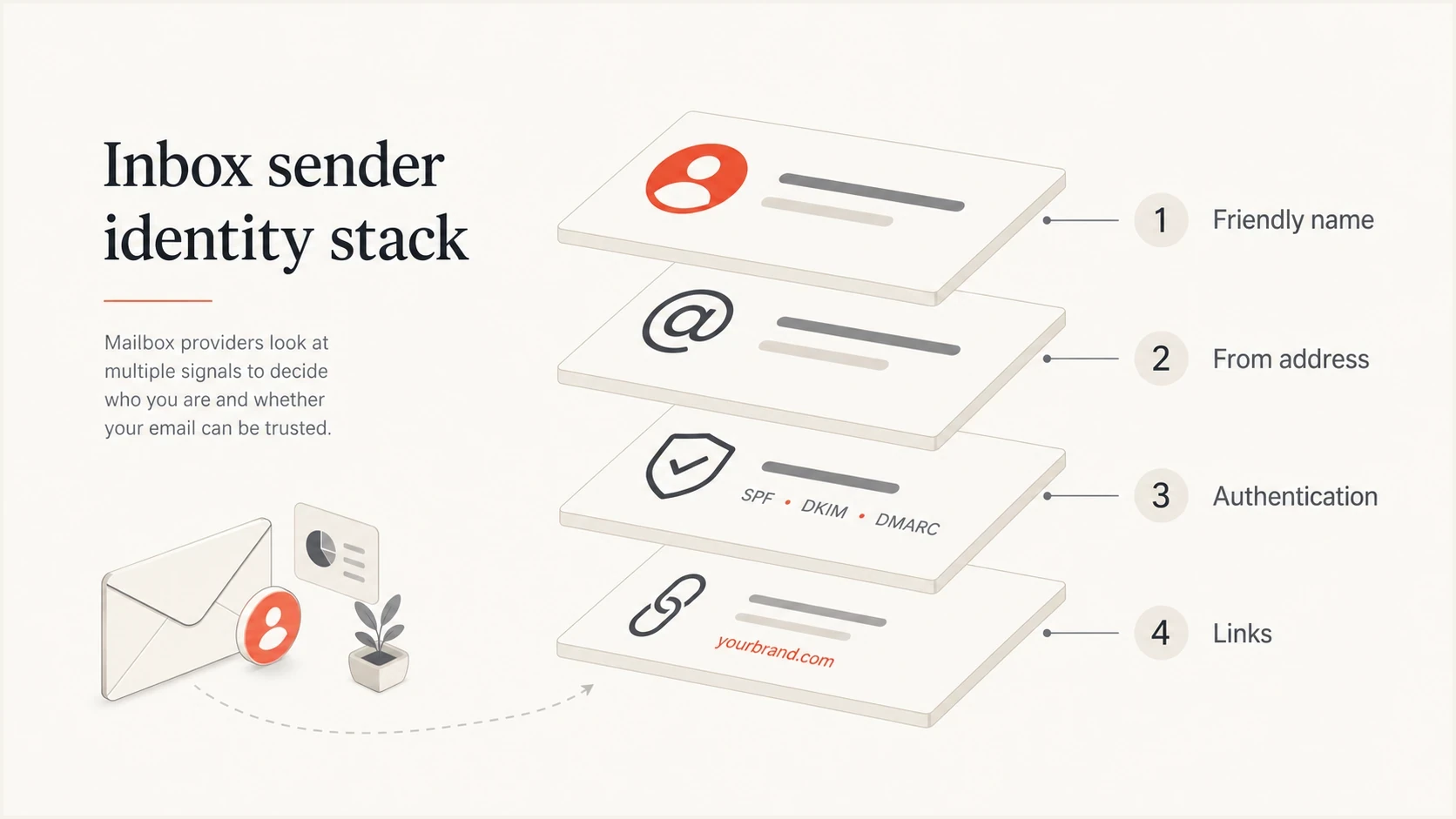
An inbox sender identity stack showing name, address, authentication, and links.
Long addresses can wrap or truncate in some places, especially on mobile, but that is a presentation issue rather than a universal email authentication rule. If an inbox shows only a friendly From name, the length of notifications versus tx has no visible impact until the recipient opens the sender details.
Shorter helps when
- Mobile views: The sender details panel has limited horizontal space.
- Visible links: Tracking and preference URLs look cleaner.
- Support review: Agents can identify the right sending stream faster.
- Brand scan: The registered domain remains the main visual anchor.
Shorter does not fix
- DMARC failure: At least one passing SPF or DKIM domain must have DMARC alignment with the visible From domain under the published mode.
- SPF limits: A short hostname does not reduce DNS lookup count.
- Low engagement: Recipients still need to want and expect the message.
- Reputation issues: Complaints, bounces, and blocklist or blacklist events still affect mail performance.
A short subdomain is a usability choice. It helps a cautious recipient understand what they are seeing, but the inbox will still rely on authentication and reputation signals behind the scenes.
Why inboxes show via labels
When people worry about long subdomains, they sometimes point to a visible via label or sender detail line in the inbox. That is usually not a subdomain-length issue. It is often an authentication or domain-match issue, especially when the mailbox provider decides the message should reveal that a different domain handled delivery.
Do not confuse display with authentication
If an inbox shows a via label, check SPF, DKIM, and DMARC alignment before changing the subdomain name. A shorter subdomain will not hide an alignment problem. The fix is to authenticate the sending source and make sure at least one aligned SPF or DKIM identifier passes DMARC.
A clean setup usually has the visible From domain, DKIM signing domain, return-path domain, and tracking domain arranged so the sending stream is recognizable and authenticated. They do not all need to be the exact same hostname, but they should be planned as a system. For a deeper domain-wide check, Suped's domain health checker can surface DMARC, SPF, and DKIM issues in one place.
Example matched transactional setuptext
Visible From: notify@tx.example.com
Return-path: bounce@b.tx.example.com
DKIM d=: tx.example.com
Tracking: links.tx.example.com
DMARC: pass via aligned DKIM
That example keeps the stream compact without making it cryptic. The visible address says notifications, the DKIM domain ties the message to the same organizational area, and the tracking hostname is related enough that a recipient who inspects the link does not feel bounced to an unrelated domain.
DMARC record detail view showing SPF, DKIM, DMARC, rDNS diagnostics, and DNS records
This is where Suped's product is useful in a practical workflow. Instead of debating whether tx or notifications looks better in isolation, you can monitor the actual domain, see which sources are passing authentication, and get specific steps to fix domain mismatches. Suped brings DMARC monitoring, hosted SPF, hosted DMARC, MTA-STS, alerts, and blocklist or blacklist monitoring into one workflow.
How DMARC applies to subdomains
A visible From domain such as tx.example.com can publish its own policy at _dmarc.tx.example.com. If no valid record exists there, receivers use DMARC's DNS Tree Walk to find an applicable policy higher in the hierarchy. A policy at _dmarc.example.com normally covers existing subdomains through its p policy or an optional sp policy. RFC 9989 defines this current discovery process. Subdomain length has no effect on it.
DMARC passes when SPF or DKIM passes and the authenticated domain aligns with the visible From domain. Relaxed alignment accepts domains with the same Organizational Domain. Strict alignment requires the domains to be identical. With a parent policy at _dmarc.example.com, a passing DKIM signature using d=example.com can have DMARC alignment with a visible From domain of tx.example.com under relaxed alignment, but not strict alignment. The tracking hostname does not participate in DMARC alignment.
Relaxed alignment
The authenticated and visible From domains can differ when DMARC determines that they share the same Organizational Domain.
Relaxed exampletext
From domain: tx.example.com
DKIM d=: example.com
DKIM result: pass
DMARC: aligned under relaxed mode
Strict alignment
The authenticated domain must exactly match the visible From domain used for the alignment check.
Strict exampletext
From domain: tx.example.com
DKIM d=: tx.example.com
DKIM result: pass
DMARC: aligned under strict mode
Plan the policy boundary
Publish a policy at the Organizational Domain for default coverage, use the sp tag when existing subdomains need a different inherited policy, or publish a DMARC record directly at a sending subdomain when it needs its own policy boundary. Monitor reports before enforcement so legitimate sources are accounted for.
Good short names and weak short names
Short is only useful when the name is still understandable. Do not choose a one-letter subdomain just to save characters if nobody outside the engineering team can explain it. Avoid mixing generic local parts with generic subdomains, because that makes the sender look less intentional. DNS names are case-insensitive, but using lowercase consistently makes records and documentation easier to compare.
|
|
|
|
|---|---|---|---|
Transactional | tx, mail | notify | system |
Marketing | news, m | email | promotions |
Support | help, support | care | cust-success |
Receipts | pay, billing | receipts | pay-emails |
Subdomain naming examples for common email streams.
The right naming convention also depends on how many streams you send. If marketing, transactional, lifecycle, billing, and support all send through different systems, a single generic subdomain can make troubleshooting harder. A useful middle ground is short labels by stream, then clear ownership in DNS, documentation, and monitoring. Once chosen, keep the From address consistent for each message category so recipients and operators can recognize it. For naming patterns across senders, see the guide on email subdomains.
Subdomain naming decision bands
A practical way to decide whether a label is ready for email use.
Short and clear
Use
The label explains the mail stream and keeps the brand domain easy to scan.
Long but meaningful
Review
Test sender details and link rendering before shortening it.
Cryptic or redundant
Change
Rename it even when the label is technically valid.
These bands are naming checks, not DNS limits. A DNS label can be up to 63 octets, which is far beyond a sensible target for a visible sending subdomain. Choose the label based on clarity, not an arbitrary character count. Once the subdomain starts looking like an internal folder path, it is probably too long for a sender domain.
Subdomain length and links
The stronger argument for short subdomains often comes from links, not the visible From address. Email programs frequently use branded tracking domains, hosted preference centers, unsubscribe URLs, password reset links, and verification links. Long hostnames make those URLs harder to read and more likely to wrap in plain-text parts, SMS, support tickets, logs, and compliance reviews.
Long versus compact link hostnamestext
Long:
https://notifications.transactional.example.com/reset?id=abc123

Compact:
https://tx.example.com/reset?id=abc123
This matters even more when email and SMS share parts of the customer journey. A short hostname can save characters in SMS opt-out links and makes the destination easier to inspect. Avoid generic link shorteners for email programs because they can obscure brand ownership and create reputation problems. A branded short hostname with HTTPS is the cleaner option.
Best practice
Pick a short sending subdomain and a related short tracking subdomain. For example, tx.example.com for transactional mail and links.tx.example.com for links. Then test DKIM, SPF, DMARC, TLS, redirect behavior, and link rendering before rollout.
Email tester
Send a real email to this address. Suped shows a results button when the test is ready.
?/43tests passed
Test a real message rather than only inspecting DNS. DNS can be correct while the actual sending system uses the wrong DKIM selector, the wrong bounce domain, or a tracking host that redirects through a domain the recipient does not recognize. A live test exposes those gaps.
How to choose the subdomain
Start with the mail stream, not the shortest possible string. A transactional stream needs reliability and recognizability. A marketing stream needs clear separation and reputation tracking. A support stream needs replies, routing, and human trust. The name should support the job of the stream.
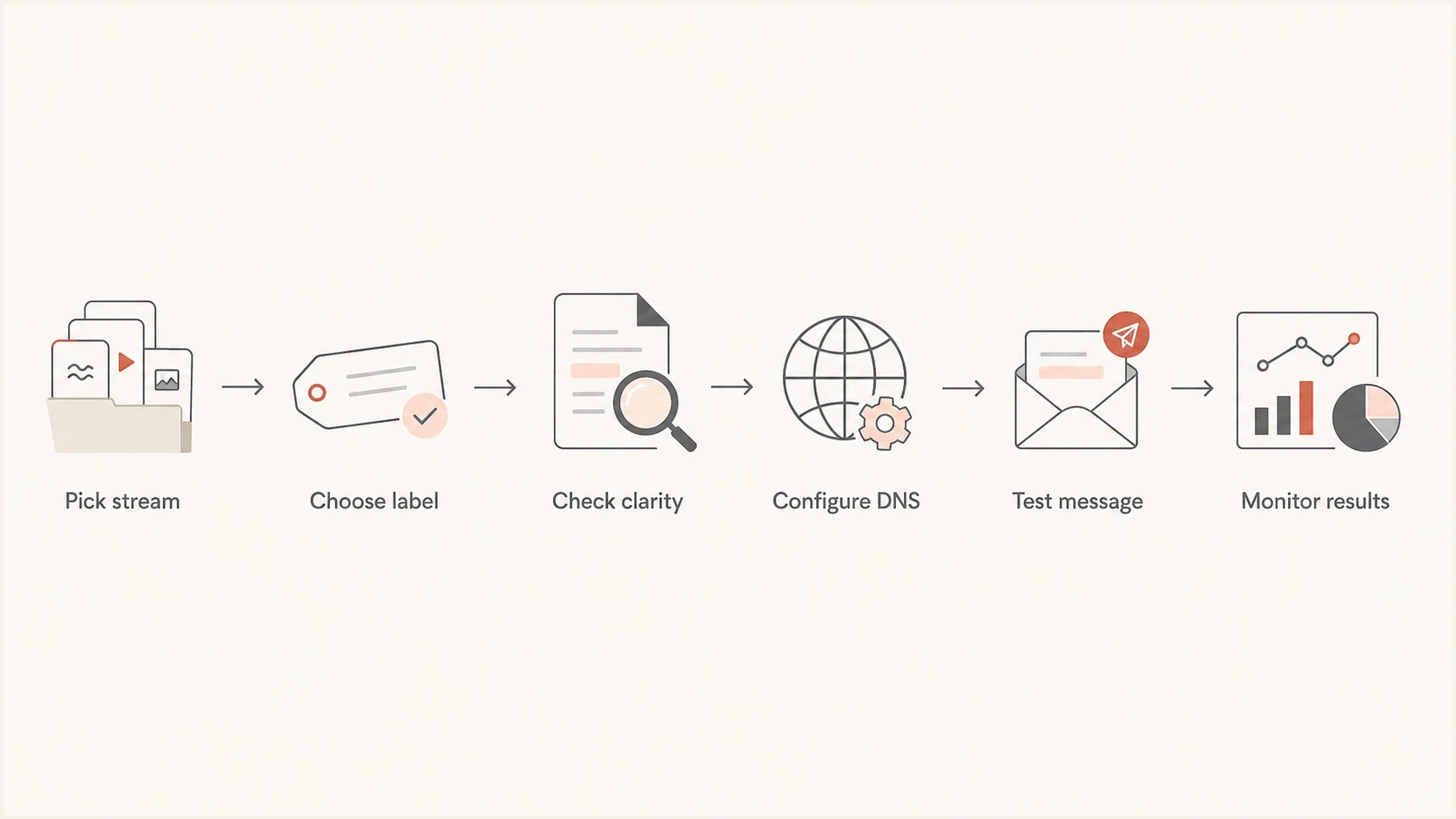
A flowchart for choosing and validating an email subdomain.
- Name the stream: Decide whether the mail is transactional, marketing, billing, lifecycle, support, or security related.
- Pick a clear label: Use a short word or abbreviation that a non-engineer can understand.
- Remove duplication: Avoid local part and subdomain pairs that repeat or conflict, such as generic info at a generic notifications host.
- Authenticate it: Configure SPF, DKIM, and DMARC alignment before production traffic starts.
- Monitor the rollout: Watch authentication pass rates, unknown sources, complaint patterns, and blocklist or blacklist events.
Suped fits this workflow because it does not stop at a pass or fail DNS check. Suped monitors authentication results by sending source, shows unverified sources, sends real-time alerts, and gives specific steps to fix common domain mismatches. Its hosted SPF and SPF flattening also help teams keep complex sender setups under control without asking for DNS changes every time a sender changes.
?
What's your domain score?
Deep-scan SPF, DKIM & DMARC records for email deliverability and security issues.
The naming choice should also match how reputation is separated. A subdomain can develop its own reputation signals, but it is not completely isolated from the parent domain in every context. If a mail stream is risky, high-volume, or materially different from normal customer messaging, use a separate sending subdomain and monitor it closely. The guide on subdomain reputation covers that relationship in more depth.
Configuration examples
A short subdomain still needs correct DNS. The exact records depend on the sender, but the structure below is a normal pattern for a transactional stream. These examples stay readable while the sending platform provides the exact DKIM selectors and return-path hostnames.
Example DNS planning notestext
tx.example.com        TXT    v=spf1 include:sender.example -all
_dmarc.tx.example.com TXT    v=DMARC1; p=none; rua=mailto:dmarc@example.com
s1._domainkey.tx      TXT    v=DKIM1; k=rsa; p=MIIBIjANBgkqh...
links.tx.example.com  CNAME  tracking.sender.example
Do not copy those records directly. Treat them as a layout example. Your sender will provide the real include domain, DKIM selector, public key, CNAME target, and bounce-domain setup. What matters for this topic is that the visible domain and supporting domains are short enough to be recognizable and organized enough to monitor.
Better pattern
Use a compact stream label and related support hostnames.
- From: notify at tx.example.com
- Links: links.tx.example.com
- DMARC: Aligned DKIM passes.
Weaker pattern
Use a long internal label and unrelated service domains.
- From: info at notifications.example.com
- Links: third-party host hidden behind redirects
- DMARC: Domain alignment assumed but not checked.
The better pattern is easier to understand and easier to audit. The weaker pattern creates more room for confusion because the local part, subdomain, link path, and authentication setup all tell slightly different stories.
A practical recommendation
For a transactional sender, choose a short, clear subdomain such as tx, mail, or notify. Pair it with a clear local part, then test the complete message path. For example, notify@tx.2go.com is compact and understandable. info@notifications.2go.com is not disastrous, but it is less precise.
If the organization already has a naming convention, stay consistent unless it creates visible confusion. With several senders, document the owner, purpose, sender, SPF mechanism, DKIM selector, DMARC policy, tracking domain, and expected volume.
Decision checklist
- Clear purpose: A reader can infer the mail stream without internal knowledge.
- Brand visible: The registered domain remains easy to see.
- Authentication clean: SPF, DKIM, and DMARC pass with the intended alignment.
- Links coherent: Tracking and preference links use related branded hostnames.
- Monitoring active: DMARC reports, alerts, and blocklist or blacklist checks are live before scale-up.
Views from the trenches
Best practices
Use short stream labels only when they remain clear to support, compliance, and customers.
Test real inbox rendering because sender details vary across desktop and mobile app views.
Fix DMARC domain matching before changing names to address visible via labels or warnings.
Common pitfalls
Treating subdomain length as a deliverability factor instead of a readability choice.
Using internal abbreviations that look tidy in DNS but unclear to recipients and support teams.
Pairing a generic local part with a generic subdomain makes identity less precise for readers.
Expert tips
Choose the shortest label that still explains the stream and keeps the brand domain visible.
Review From, DKIM, return-path, tracking, and DMARC before safe production rollout.
Document owner, sender, selector, policy, link host, and expected volume per stream.
Expert from Email Geeks says most email apps show the friendly From name first, so subdomain length often has no visible effect unless the recipient opens sender details.
2022-01-10 - Email Geeks
Marketer from Email Geeks says short subdomains can help keep attention on the brand domain, but a visible via label points to authentication matching rather than name length.
2022-01-10 - Email Geeks
Recommendation for email subdomain length
Keep email subdomains short when short also means clear. Do not treat character count as a standalone deliverability rule. A shorter subdomain helps with scanning, links, mobile display, and internal operations, but it does not replace clean authentication or a good sending reputation.
For the specific example, shorten and clarify it. notify@tx.2go.com or receipts@mail.2go.com gives the recipient a cleaner identity than info@notifications.2go.com. After that, the more important work is authentication, monitoring, and gradual rollout.
Suped is built for that second part: watching DMARC results, finding broken sources, alerting on problems, simplifying SPF and DMARC, and monitoring blocklist or blacklist events. The name matters, but monitoring keeps the setup trustworthy.




