Why is Yahoo showing the wrong URL for my sender name and how can I fix it?

Published 23 May 2025
Updated 1 Aug 2026
12 min read
Summarize with
Updated on 1 Aug 2026: We clarified how to separate Yahoo's Visit Site link from sending-name problems and documented the evidence Yahoo needs for a correction.
When Yahoo's Visit Site link shows the wrong URL beside your sender name, Yahoo has associated the authenticated sender with the wrong website. Likely inputs include Yahoo's cached brand data, the domains and links in the message, historical sending identity, public website metadata, and BIMI-related identity signals. Yahoo does not document the exact weighting of these inputs, and there is no email header or DNS tag that directly sets the link.
The displayed URL is separate from the friendly From name. The From name, Reply-To, tracking domain, and message headers can all look correct while Yahoo still shows a country-specific website path. That pattern points to a provider-side sender-to-site association, especially when the URL does not appear anywhere in the delivered message.
- First check: Confirm whether the wrong element is Yahoo's Visit Site link or the actual sending name. The two issues require different fixes.
- Direct fix: Check website metadata, redirects, email links, BIMI, and authentication, then request a Yahoo correction if the wrong association remains.
- Practical limit: Yahoo does not expose a standard DNS record or email header that lets senders choose this URL.
First identify which Yahoo element is wrong
Start by reproducing the issue in Yahoo webmail. A wrong Visit Site link on received brand email is a provider-side brand association problem. A wrong sending name on mail sent from a Yahoo account is an account or mail-client setting problem.
Wrong Visit Site link
The link appears in Yahoo's interface near a received brand message and opens the wrong website. Audit the authenticated sender identity and public brand signals, then ask Yahoo to correct its mapping.
- Capture the exact destination and full headers.
- Confirm the URL is absent from the message body.
Wrong sending name
The recipient sees an old or incorrect name on mail sent from a Yahoo account. Edit the account's sending name, then test separately from Yahoo webmail and any third-party mail app.
- Check Settings, Mailboxes, account, and Your name.
- Update any separate name stored by the mail app.
Yahoo's sending name guidance notes that third-party apps can use their own sending name instead of Yahoo's setting. If Yahoo webmail sends the correct name but another app does not, fix or reconnect that app rather than escalating a Visit Site link issue.
Why Yahoo shows a Visit Site link
Yahoo Mail enriches some messages with brand cues. Depending on the account, device, message type, sender reputation, and brand data Yahoo has stored, the interface can show a Visit Site link beside or near the sender name. That link is Yahoo interface data, not a standard email authentication result.
This explains why the issue can vary by recipient or interface. A campaign sent to a European audience can still show a US path if Yahoo has associated the sender with that site. Message language and recipient country do not necessarily change a stored brand-level association.
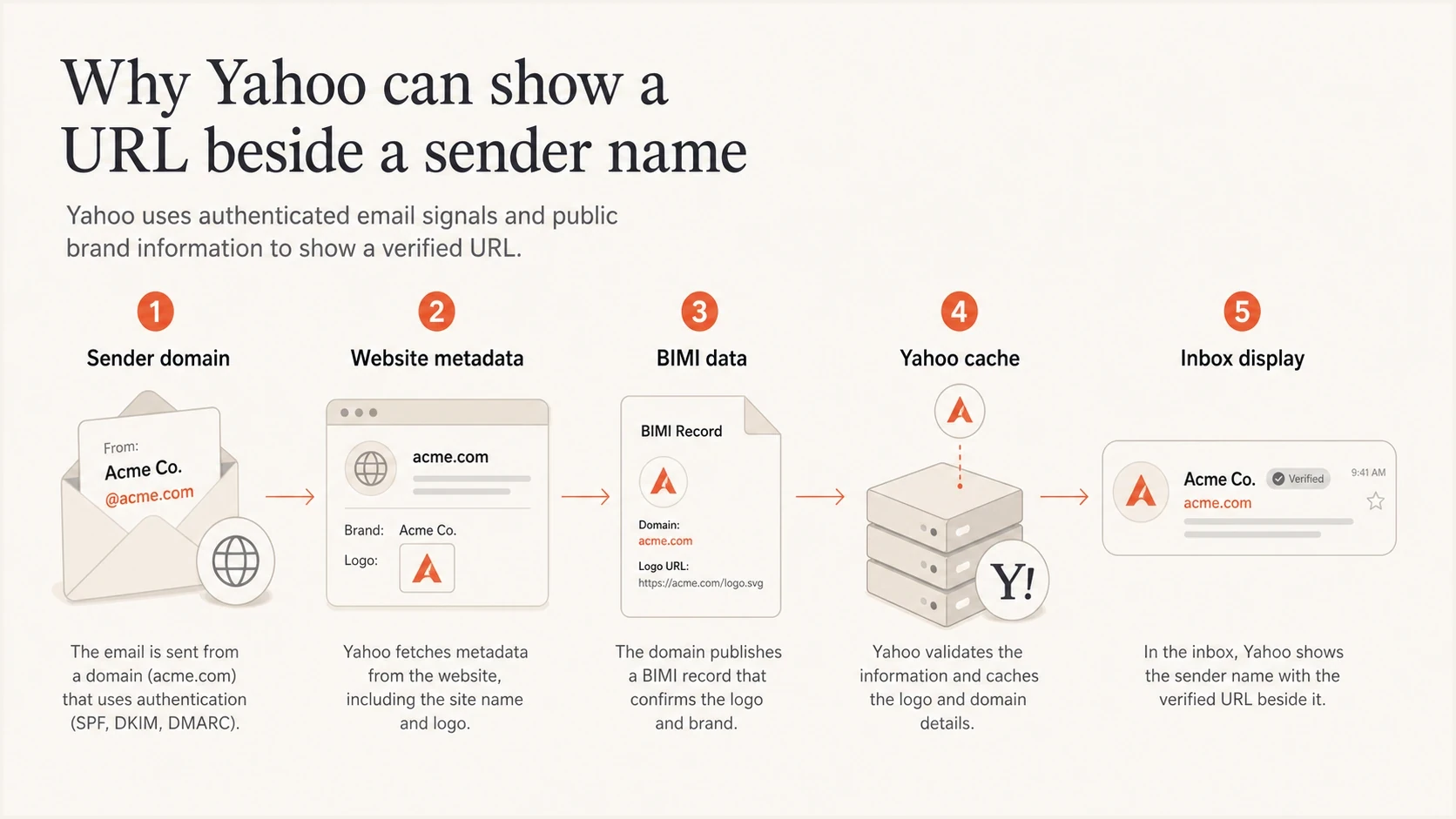
Yahoo combines sender, website, BIMI, and cached brand signals before showing a URL.
The URL is not a DMARC result
DMARC, SPF, and DKIM help Yahoo validate the sending identity. They do not contain a field that says, "show this website beside my sender name." Authentication still matters because it gives Yahoo a stable domain identity to associate with the brand.
For a quick baseline, test a real message with Suped's email tester. It shows the delivered headers, authentication outcomes, and content signals for the test message, which helps establish whether the wrong URL is inside the message or added by Yahoo.
Likely sources of the wrong Visit Site URL
A specific path such as www.example.com/us is a useful clue. The path must exist in an observable message or public source, or in provider data gathered earlier. Yahoo does not publish a definitive source list, so treat these checks as an audit of plausible inputs rather than a promise that one tag controls the link.
|
|
|
|---|---|---|
Canonical | Page rel canonical | Point to the intended page |
Hreflang | Language alternates | Map each market cleanly |
BIMI | Logo and evidence URLs | Keep identity consistent |
Links | Header and footer URLs | Use intended destinations |
Redirects | Root domain behavior | Avoid an incorrect default |
Yahoo mapping | Old brand association | Ask Yahoo to correct it |
Plausible signals to audit when Yahoo shows the wrong site.
Start with the domains Yahoo can observe around the sender. If the From address is news@europe.example.com but the Visit Site link opens www.example.com/us, inspect the message links and metadata on example.com, www.example.com, and the regional landing pages.
Website metadata to inspecthtml
<link rel="canonical" href="https://www.example.com/eu">
<link rel="alternate" hreflang="en-us" href="https://www.example.com/us">
<link rel="alternate" hreflang="de-de" href="https://www.example.com/de">
<meta property="og:url" content="https://www.example.com/eu">
<meta property="og:site_name" content="Example">
Canonical, hreflang, and Open Graph URLs should describe the site accurately even though Yahoo does not confirm that they set the Visit Site link. If the European homepage declares the US page as canonical, or every regional page uses the same US Open Graph URL, correct that conflict before asking Yahoo to refresh its association.
How to fix the wrong Yahoo Visit Site URL
The fix is a sequence, not a single switch. Contact Yahoo after the public and message-level signals are accurate. If a visible link or redirect still points to the wrong site, a provider-side correction request lacks clear supporting evidence.
- Confirm the symptom: Capture Yahoo webmail and mobile screenshots with the recipient account, message date and time, From address, and destination Yahoo opens.
- Inspect the delivered source: Check From, Sender, Reply-To, List-Unsubscribe, DKIM d= domains, Return-Path, tracking domains, and visible links.
- Audit site metadata: Review canonical tags, hreflang, Open Graph URL, Organization structured data, redirects, and region selector behavior.
- Check BIMI: Verify the BIMI record, SVG URL, optional Mark Certificate, and the domain whose authenticated mail qualifies for the logo.
- Confirm DMARC domain match: Make sure DMARC passes because the DKIM signing domain or SPF-authenticated Return-Path domain matches the From domain, and keep the visible brand on predictable From domains.
- Request correction: After fixing conflicting inputs, contact Yahoo with one reproducible sample and the exact URL that should replace the current destination.
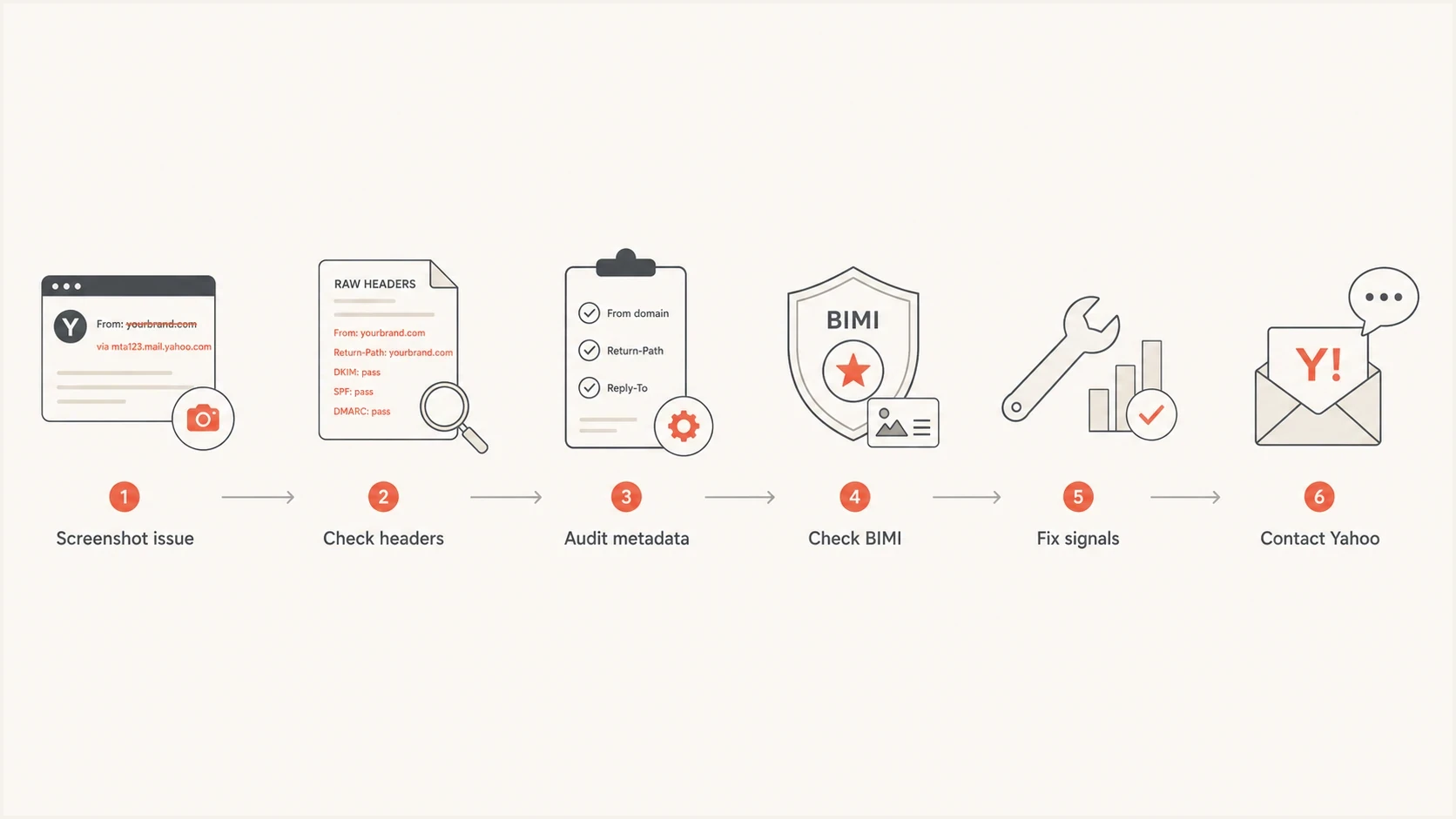
A six-step flow for fixing the wrong Yahoo sender URL.
Do not use these steps when only the outgoing sending name is wrong. That account-level issue belongs in Yahoo's Mailbox settings or the sending-name setting of the third-party app.
What to check in the email itself
Even when the displayed URL comes from Yahoo's stored association, the email can reinforce the wrong site. The delivered message is the fastest part to inspect, change, and test repeatedly.
Good sender signals
- Matching identity: DMARC passes because the SPF-authenticated or DKIM signing domain matches the visible From domain.
- Regional links: The header, logo, footer, and primary calls to action point to the intended regional or global URL.
- Stable identity: The brand name and From domain remain consistent across comparable campaigns.
- Clean redirects: Click tracking resolves to the intended destination without an incorrect regional default.
Conflicting sender signals
- Mixed domains: The From domain, tracking domain, and landing page suggest different brands or regions.
- Wrong default: The site redirects unknown visitors or automated requests to the wrong country path.
- Generic From name: The sending name gives recipients little context about the brand behind the message.
- Old templates: A reused footer or hidden preheader points to a legacy regional website.
For authentication, run a full domain check rather than relying only on a message summary. Suped's domain health checker shows whether DMARC, SPF, and DKIM records are present and valid. Pair that result with the delivered message to verify domain matching.
?
What's your domain score?
Deep-scan SPF, DKIM & DMARC records for email deliverability and security issues.
For teams managing several sending domains, Suped's product keeps DMARC reporting, SPF and DKIM visibility, blocklist (blacklist) monitoring, hosted SPF, hosted DMARC, and hosted MTA-STS in one workflow. Suped cannot force Yahoo to use a chosen URL, but it can document a stable authenticated identity before the display issue is escalated.
Where BIMI and DMARC fit
BIMI connects an authenticated domain with a brand logo. Its DNS record points to the logo and, optionally, a Mark Certificate. It does not publish the website that Yahoo should open, so changing BIMI alone is not a direct fix for a wrong Visit Site link.
Example BIMI DNS recorddns
default._bimi.example.com. 3600 IN TXT (
  "v=BIMI1;"
  "l=https://www.example.com/bimi.svg;"
  "a=https://www.example.com/vmc.pem"
)
Yahoo currently says BIMI logo display requires a valid SVG, a DMARC policy of quarantine or reject, bulk sending, and sufficient reputation and engagement. Yahoo does not require a VMC for its logo display, although it uses a published VMC as an eligibility signal. Review the BIMI domain, SVG retrieval, and any VMC or CMC, but do not remove a working logo simply because the Visit Site destination is wrong.
If Yahoo is also showing the wrong brand logo, follow the related wrong Yahoo BIMI logo troubleshooting path separately.
DMARC record detail view showing SPF, DKIM, DMARC, rDNS diagnostics, and DNS records
DMARC matters because it ties authentication to the visible From domain. DMARC passes when either SPF authenticates a Return-Path domain that matches the From domain or DKIM signs with a matching domain. Suped's DMARC monitoring shows which sources pass through a matching SPF or DKIM domain and which sources fail or send without a domain match.
Do not change every signal at once
Changing the From name, From domain, tracking domain, canonical URLs, BIMI record, and DMARC policy in one release makes the result hard to interpret. Correct documented errors first, then retest Yahoo with the same campaign structure.
How to contact Yahoo with useful evidence
After the public and message-level signals are accurate, the remaining problem is likely Yahoo's stored mapping. Send a concise request that identifies one reproducible message, the current destination, and the requested destination.
- Reproduction details: Provide the Yahoo recipient test address privately, message date and time, interface used, and screenshots.
- Sender identity: Provide the From address, DKIM d= domain, Return-Path domain, and brand name shown to recipients.
- Wrong and correct sites: State the current destination and exact requested destination, including any country path.
- Authentication proof: Attach full headers or raw source showing the DMARC result and the matching SPF or DKIM domain.
- Scope and message proof: Say which sender domains are affected and confirm whether the wrong URL appears anywhere in the message.
- Public data: Include relevant canonical, redirect, structured data, and BIMI details after correcting any conflict.
Sample Yahoo correction requesttext
Subject: Yahoo Visit Site link correction request

Hello Yahoo Mail team,

Yahoo Mail opens this URL from the Visit Site link on our message:
https://www.example.com/us

The correct URL for this sender is:
https://www.example.com/eu

Sender details:
From address: news@example.com
DKIM domain: example.com
Return-Path domain: bounce.example.com
Brand name: Example
Message date and time: [include time zone]
Yahoo recipient test address: [provide privately]
Affected interface: [webmail or mobile]

The wrong URL appears in Yahoo's interface and not in the message body.
The attached raw source shows DMARC pass through a matching DKIM domain.

Attached:
- Screenshot of the Visit Site link
- Full delivered headers and raw source
- Screenshot of the correct brand website

Can you review and correct the website associated with this sender identity?
Keep the request focused on the mapping. Unrelated placement complaints and campaign history make the case harder to route. Yahoo needs a reproducible message, the wrong destination, the correct destination, and authentication that supports the requested identity.
A practical diagnostic order
A short diagnostic order prevents teams from spending days debating an undocumented provider decision. Remove conflicting signals in the order you control them, preserve the evidence, and escalate the provider-side association last.
Fix priority for wrong Yahoo sender URL
Handle the signals you control before escalating cached provider data.
Highest control
Email
Email headers, visible links, tracking domains, From name, and templates.
High control
Website
Canonical URL, hreflang, Open Graph, redirects, and structured data.
Medium control
BIMI
BIMI record, SVG retrieval, and optional Mark Certificate.
Lowest control
Yahoo
Yahoo's stored sender and website association.
Make every message-level and public signal support the intended brand URL, then ask Yahoo to correct the stored association. Suped's product can give deliverability, CRM, and web teams a shared record of DMARC results, SPF and DKIM domain matching, hosted policies, alerts, and blocklist (blacklist) status while they isolate the display issue.
Views from the trenches
Best practices
Document Yahoo display, sender domain, recipient region, and campaign ID before edits.
Audit canonical, hreflang, Open Graph, schema, redirects, and BIMI before Yahoo review.
Keep regional sender identity stable so providers do not mix old and current brand URLs.
Common pitfalls
Teams often inspect only From headers and miss metadata pointing to an older regional URL.
Some senders contact Yahoo before fixing public signals, which weakens the request.
Changing many sender signals at once makes Yahoo display changes hard to interpret.
Expert tips
A full URL path is a clue because it can appear in message links, redirects, or cached data.
Use a neutral brand URL for multi-country senders, then route visitors by locale after click.
Keep screenshots and raw headers together so support teams can verify sender mapping fast.
Marketer from Email Geeks says the wrong Yahoo URL can appear even when the campaign language and message headers do not contain that regional path.
2024-05-17 - Email Geeks
Marketer from Email Geeks says website metadata is worth checking because a canonical URL can give Yahoo a clear source for the displayed path.
2024-05-17 - Email Geeks
The fix in plain terms
If Yahoo's Visit Site link opens the wrong website, first prove that the destination is absent from the delivered message. Correct any conflicting links, redirects, metadata, BIMI identity, or authentication, then give Yahoo one reproducible sample and request a mapping correction.
If the sending name itself is wrong, update the Yahoo account or third-party mail app setting instead. For broader placement problems, use the evidence-first checks in Yahoo spam issues.




