Why are my emails landing in Yahoo spam?

Published 26 Jun 2025
Updated 8 Aug 2026
10 min read
Summarize with
Updated on 8 Aug 2026: We updated this guide with Yahoo's current bulk-sender rules, one-click unsubscribe checks, and corrected complaint feedback guidance.
Your emails are landing in Yahoo spam because Yahoo does not trust that specific sender stream enough to place it in the inbox. Common causes include failing SPF or DKIM, DMARC domain mismatch, weak Yahoo engagement, complaint signals, old or risky addresses, spam trap hits, blocklist or blacklist reputation, low send history, missing unsubscribe controls, content that resembles reported mail, or a test sample that is too small to trust.
The part that confuses senders is that Gmail performance does not prove Yahoo performance. One campaign can inbox at Gmail and land in Yahoo spam because each mailbox provider has its own view of recipient behavior, sender history, authentication, and complaint data.
- Answer first: Do not rewrite the campaign first. Check authentication, Yahoo-only engagement, complaint data, unsubscribe handling, and list quality before changing creative.
- Fastest test: Send a real campaign-style message through the email tester and inspect headers, authentication, and visible content risks.
- Best first fix: Make SPF, DKIM, and DMARC pass with the visible From domain matching the SPF or DKIM domain.
Email tester
Send a real email to this address. Suped shows a results button when the test is ready.
?/43tests passed
Why Yahoo treats the same campaign differently
Yahoo makes placement decisions using Yahoo data. If your Yahoo subscribers open less, complain more, ignore more, or include more stale addresses than your Gmail subscribers, Yahoo has a different reputation picture. A sender can have a clean blacklist check and still have poor Yahoo inbox placement because most spam folder placement is not a public blocklist decision.
Separate technical trust and reputation causes, then check measurement quality. If SPF is failing, fix that before debating subject lines. If a test panel has only a small Yahoo sample, confirm the signal before changing sending behavior.
|
|
|
|---|---|---|
SPF | The sending IP is not authorized. | DNS record |
DKIM | The message signature fails. | Selector |
DMARC | The visible From domain lacks a matching authenticated identifier. | Domain match |
Complaints | Yahoo users mark mail as unwanted. | CFL |
Traps | The list has typo or pristine trap risk. | List source |
Unsubscribe | Marketing mail lacks an easy opt-out. | Headers |
Sample | The Yahoo data set is too small. | Volume |
Yahoo spam causes and first checks
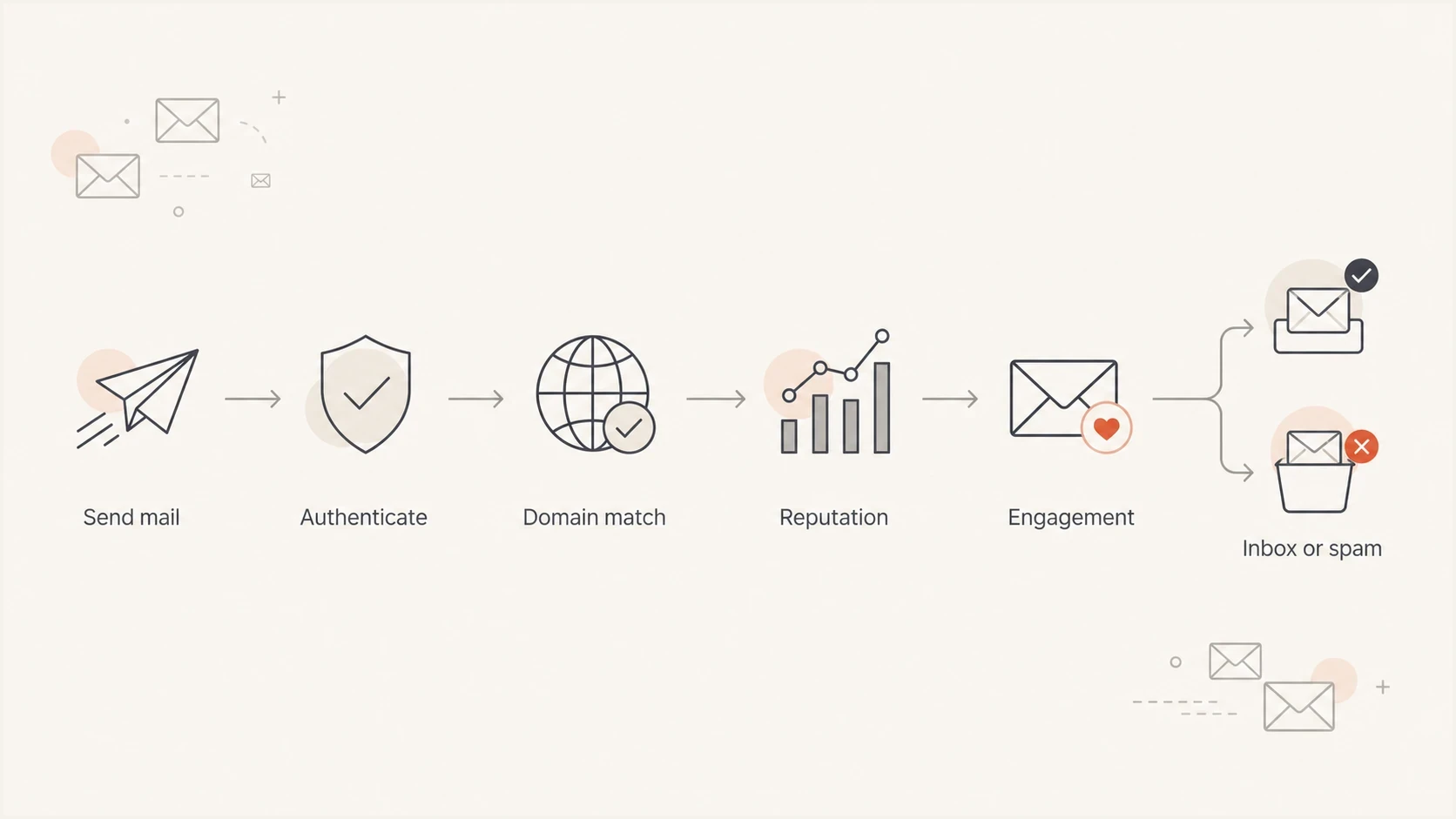
Flowchart showing how Yahoo moves a message through authentication, reputation, and engagement checks.
Meet Yahoo's current sender requirements
Yahoo's sender requirements affect both acceptance and placement. Mail that does not comply can land in spam or be rejected, so check these requirements before treating the problem as a copy issue. Yahoo does not publish a fixed message count that defines every bulk sender. If you send a significant volume of promotional or subscribed mail, apply the bulk rules.
|
|
|
|---|---|---|
All senders | SPF or DKIM | Confirm at least one passes on the live message. |
Bulk senders | SPF, DKIM, and DMARC | Publish at least p=none and make DMARC pass. |
Marketing mail | Easy unsubscribe | Add a working List-Unsubscribe header and visible body link. |
All senders | Spam rate below 0.3% | Monitor complaints and suppress complainers. |
All senders | Forward and reverse DNS | Verify the sending IP has matching DNS records. |
All senders | RFC 5321 and 5322 | Check envelope and message header formatting. |
Current Yahoo sender requirements
One-click unsubscribe headersemail
List-Unsubscribe: <https://example.com/unsubscribe/opaque-token>
List-Unsubscribe-Post: List-Unsubscribe=One-Click
Keep complaints below 0.3%
Yahoo requires a spam complaint rate below 0.3%. Its rate uses mail delivered to the inbox as the denominator, so a rate calculated from total attempted or delivered volume will not match Yahoo's figure. Honor unsubscribe requests within two days and remove CFL complainers promptly.
One-click unsubscribe applies to promotional and marketing mail, not ordinary transactional messages such as receipts or password resets. A footer link alone does not satisfy the header requirement, and the header does not replace the visible unsubscribe link in the message body.
Check authentication before changing content
Authentication is the first place to look because it provides clear pass or fail evidence. Yahoo requires all senders to use SPF or DKIM, while bulk senders need SPF, DKIM, and a passing DMARC policy. DMARC passes when SPF or DKIM passes and its authenticated domain matches the visible From domain. The fastest first pass is to run the sending domain through the domain health checker before you inspect individual messages.
For ongoing visibility, Suped's DMARC monitoring connects aggregate reports to specific sending sources, so you can see whether Yahoo receives mail that passes SPF, DKIM, and DMARC or whether one source breaks the chain.
DMARC starter recorddns
_dmarc.yourdomain.com TXT
v=DMARC1; p=none; rua=mailto:dmarc@yourdomain.com; adkim=r; aspf=r
SPF sender authorizationdns
yourdomain.com TXT
v=spf1 include:send.your-esp.example -all
DKIM selector exampledns
selector1._domainkey.yourdomain.com TXT
v=DKIM1; k=rsa; p=MIIBIjANBgkqh...
Watch SPF lookup limits
SPF fails when the record exceeds 10 DNS lookups, includes obsolete senders, or misses a current sending service. Suped's Hosted SPF and SPF flattening help teams keep SPF valid while sending services change.
If all authentication passes but Yahoo still filters the message, move to reputation and list quality. For a deeper technical checklist, compare your case against passing DKIM, SPF, and DMARC scenarios.
Confirm whether the Yahoo signal is real
A Yahoo spam report from a tiny panel can look dramatic without proving that the full audience is affected. Use enough Yahoo recipients and repeated sends to separate normal variation from a placement shift. Panel data, seed data, mailbox telemetry, and campaign metrics answer different questions.
Look at Yahoo-only clicks, unsubscribes, spam complaints, bounce codes, and placement tests over the same send window. Treat opens cautiously because privacy controls and image caching can distort them. If Yahoo placement changed while engagement and complaints stayed stable, check technical changes first: new IP, new DKIM selector, new tracking domain, new return-path, new ESP routing, or a changed template.
Yahoo evidence guide
Use repeated results and corroborating signals before treating one report as a deliverability incident.
Low confidence
One small test
Treat the result as a clue and collect more evidence.
More useful
Repeated sends
Compare the pattern with campaign metrics and recent Yahoo history.
Stronger evidence
Matching signals
Investigate when placement, complaints, and Yahoo engagement move together.
Measurement noise
- Small sample: A handful of Yahoo accounts can swing the reported spam rate.
- Single source: One panel or one seed set does not capture every mailbox decision.
- No metric shift: Stable clicks and complaints weaken the case for a broad issue.
Real Yahoo problem
- Clear drop: Yahoo engagement falls while other mailbox providers remain stable.
- Shared timing: Placement changed after a DNS, ESP, IP, template, or segment change.
- Repeated signal: Multiple sends show the same Yahoo spam placement pattern.
Repair reputation and list quality
Once authentication is clean and the Yahoo signal is confirmed, reputation becomes the main work. Yahoo pays attention to how Yahoo users react. A six-month engaged segment sounds reasonable, but it still contains risk if engagement is mostly outside Yahoo, if older Yahoo addresses stopped interacting, or if acquisition sources brought typo addresses into the list.
A clean blocklist check is useful, but it does not rule out mailbox-level reputation. Public blacklist data catches only part of the problem. Suped's blocklist monitoring helps watch domain and IP listings while DMARC data shows whether unauthorized or broken sources create reputation drag.
- Yahoo segment: Create a Yahoo-only segment and compare engagement over the last 7, 30, 90, and 180 days.
- Trap risk: Suppress typo domains, old imports, inactive subscribers, and addresses with unclear consent.
- Complaints: Enroll DKIM-signed sending domains in Yahoo's Complaint Feedback Loop and remove complainers promptly.
- Frequency: Reduce sends to low-engagement Yahoo recipients before you warm volume back up.
- Blocking: If Yahoo rejects mail instead of placing it in spam, treat it as a different issue and review Yahoo/AOL blocking.
Yahoo CFL is domain-based
Yahoo's Complaint Feedback Loop supports DKIM-signed mail and enrolls the sending domain. When a recipient marks an enrolled message as spam, Yahoo sends an ARF complaint report so you can suppress that recipient and investigate the affected stream.
Run a controlled Yahoo recovery plan
Do not make ten changes at once. Yahoo recovery works best when you isolate variables, fix the highest-confidence cause, and measure the next few sends. Use a short control window with the same creative type, sending domain, ESP route, and a Yahoo-only segment split by recent engagement.
Suped is our DMARC and email authentication platform. It connects DMARC, SPF, DKIM, Hosted SPF, Hosted DMARC, Hosted MTA-STS, alerts, blocklist monitoring, and deliverability data to specific issues and fix steps. The practical workflow turns raw authentication reports into a short list of sending sources to verify or correct.

Issue steps to fix dialog showing the issue overview, tailored fix steps, and verification action
- Baseline: Record Yahoo inbox placement, clicks, complaints, bounces, and DMARC pass rates for the last few campaigns.
- Fix authentication: Correct SPF, DKIM, DMARC domain matching, return-path, and tracking domain issues before content testing.
- Meet sender rules: Verify one-click unsubscribe, complaint handling, forward and reverse DNS, and message formatting.
- Tighten Yahoo volume: Send first to Yahoo recipients who clicked or showed reliable recent engagement, then add older recipients slowly.
- Remove risk: Suppress typo domains, complainers, long-inactive contacts, purchased names, and unconfirmed imports.
- Retest: Send the same kind of message again and compare Yahoo against the baseline before changing the next variable.
A practical recovery mix
Most Yahoo spam fixes need technical cleanup and audience tightening before creative changes.
Technical
Reputation
Content
Views from the trenches
Best practices
Validate Yahoo sample size before changing DNS, content, cadence, or audience rules.
Compare Yahoo recipients by recent engagement bands before suppressing the whole domain.
Check SPF, DKIM, DMARC, return-path, and DKIM domain matching on the live message.
Enroll DKIM-signed domains in Yahoo CFL so complaint removals use direct mailbox data.
Common pitfalls
Treating one small inbox panel result as proof that every Yahoo inbox has shifted.
Assuming clean public blacklist checks mean Yahoo has no reputation concerns at all.
Changing subject lines first when the real problem is SPF failure or broken DKIM.
Ignoring low-level typo and pristine trap hits because bounce and complaint rates look normal.
Expert tips
Run one controlled send after each fix so Yahoo reputation movement stays measurable.
Keep Yahoo recovery focused on recent clickers before adding older recipient segments.
Map every ESP route to one visible From domain so DMARC results stay easy to read.
Track Yahoo complaints, spam placement, and DMARC failures together after each campaign.
Marketer from Email Geeks says Yahoo can show temporary placement issues, but sample size must be checked before treating the signal as broad.
2018-02-16 - Email Geeks
Marketer from Email Geeks says small Yahoo samples can mislead, and SPF failures plus low-level spam trap hits deserve investigation.
2018-02-16 - Email Geeks
Fix the cause Yahoo sees
Yahoo spam placement is usually not solved by one cosmetic content edit. The durable fix is to prove that the mail is authenticated, wanted, consistent, compliant with Yahoo's sender requirements, and sent to people who still engage with it. Start with the live message headers and DNS, then test Yahoo-only engagement and list quality.
If the issue is authentication, fix SPF, DKIM, DMARC, and sending-source inventory. If the issue is reputation, reduce Yahoo volume to the most recently engaged recipients, remove complaint and trap risk, and rebuild gradually. If the issue is measurement, get repeated Yahoo evidence before changing the program.




