Why is my primary domain not compliant with Google one-click unsubscribe while the subdomain is?

Updated on 5 Aug 2026: We clarified how Google rolls subdomain traffic into primary-domain compliance and added the current one-click troubleshooting steps.
The most likely explanation is reporting scope, not root-domain marketing mail. Google's Compliance status dashboard reports status for primary domains only and uses traffic from the primary domain and its subdomains to calculate it. If a subdomain appears green elsewhere in Postmaster Tools while the primary domain shows Needs work for one-click unsubscribe, the views use different dashboard scopes, datasets, or measurement periods. The failing promotional messages can come from any stream under the primary domain.
Treat this as an evidence problem. Google counts messages sent from the same primary domain toward the bulk-sender threshold, including messages from subdomains. Once the primary domain sends close to 5,000 messages to personal Gmail accounts in a 24-hour period, Google can classify it as a bulk sender, and that classification does not expire. Start by finding marketing or subscribed mail without compliant one-click handling anywhere under that primary domain.
For background on the same reporting pattern, the root-domain compliance guide explains why Google Postmaster Tools can surface primary-domain issues when the sender expects subdomain-level reporting.
How Google rolls up compliance data
The Compliance status dashboard provides one result for the primary domain. Google includes data from its subdomains when calculating that result. Adding a subdomain to Postmaster Tools can expose subdomain-specific data in other dashboards, but it does not create an independent subdomain result for the Compliance status dashboard.
Read the dashboard in the right scope
- Primary-domain result: Compliance status is reported for the primary domain, not each subdomain.
- Subdomain inputs: Promotional traffic from subdomains contributes to the primary-domain result.
- Personal Gmail only: The dashboard covers mail sent to personal Gmail accounts, not Google Workspace recipients.
- Rolling data: Low volume can produce No data found, and fixes can take up to seven days to appear.
This rollup explains why a healthy subdomain sample can coexist with a primary-domain warning. Another subdomain, campaign, or older message stream can still supply the non-compliant traffic used in the primary-domain calculation.
Why the primary domain shows Needs work
One-click unsubscribe compliance follows the promotional mail Google receives, and the Compliance status dashboard rolls that mail up to the primary domain. A clean message sample from one subdomain does not prove that every promotional stream under the primary domain complies.
Fast answer
If the primary domain shows Needs work, inspect marketing and subscribed mail across the root domain and every subdomain. Common causes include a secondary campaign stream, bulk sales outreach, product announcements, lifecycle messages, or an older integration that lacks the required header pair. True personal and transactional messages do not require one-click unsubscribe.
Header details create further failure points. A sender can include a body link but omit List-Unsubscribe-Post, provide only a mailto option, or send the HTTPS request to a preference page instead of processing the unsubscribe directly. A platform change can remove the one-click header pair from one stream. DKIM can also pass without signing those two header fields.
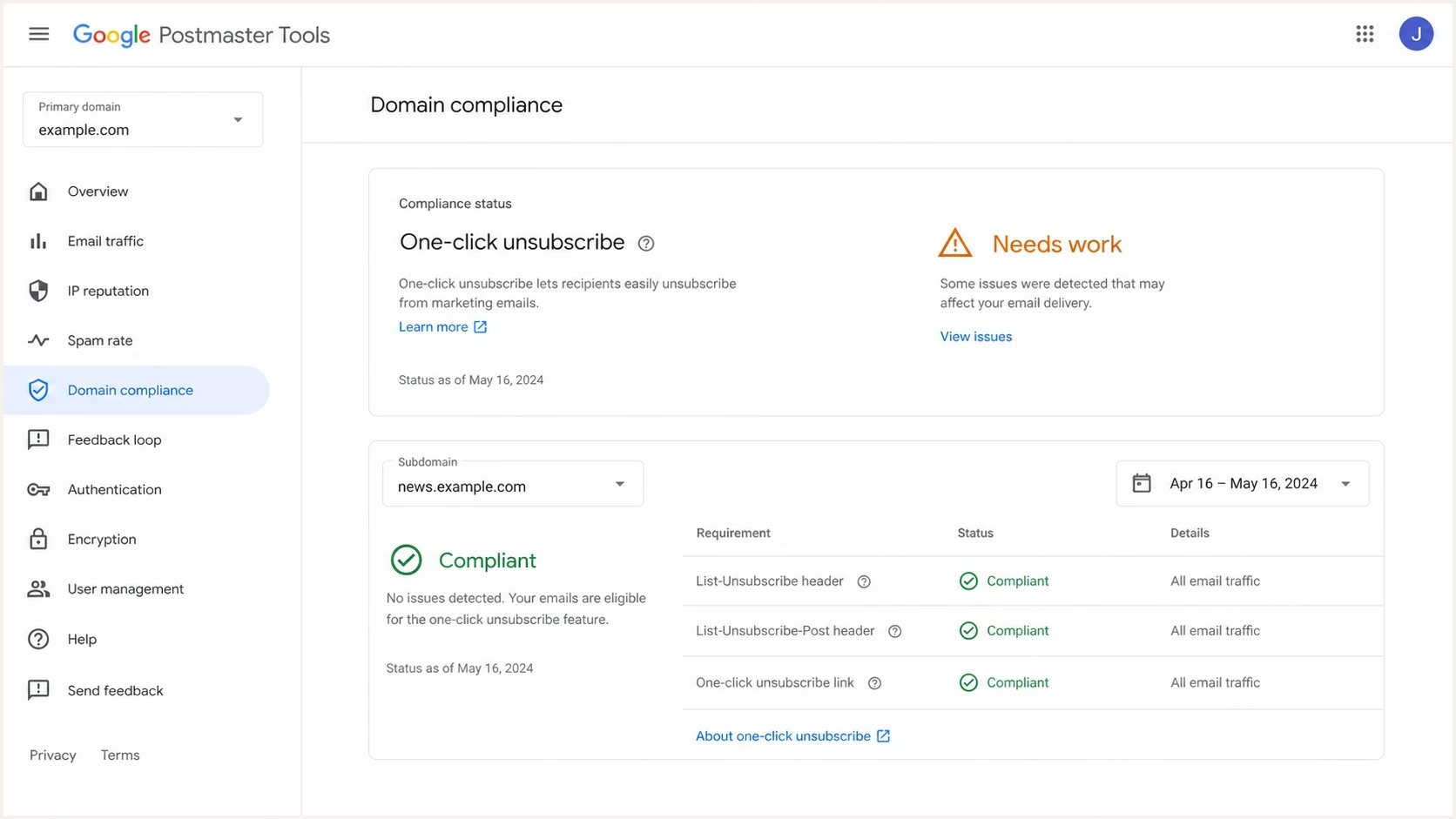
Google Postmaster Tools prompting a review of primary-domain one-click unsubscribe compliance.
Known compliant stream
- Known sender: Campaign mail leaves through the expected platform.
- Good headers: List-Unsubscribe and List-Unsubscribe-Post are present.
- Stable DKIM: The message signs the unsubscribe headers.
Primary-domain rollup
- Other stream: Another subdomain sends marketing or subscribed mail.
- Missing headers: That mail has no compliant one-click header pair.
- Spam reports: Recipients report messages without one-click unsubscribe as spam.
What Google checks
For bulk senders, Google requires marketing and subscribed messages to support one-click unsubscribe and include a clearly visible unsubscribe link in the message body. The header requirement is separate from the body link. The body link can open a preference page, but the header HTTPS flow must process the unsubscribe directly.
A Needs work result does not mean Gmail automatically rejects a message only because one-click unsubscribe is missing. Google says bulk senders that miss this requirement are not eligible for delivery mitigation. Recipients are also more likely to report unwanted mail as spam when a simple opt-out is unavailable, which can damage later delivery.
A useful one-click explanation separates the body unsubscribe link from the header-based one-click process. The same primary-domain question appears in a Google community thread.
Compliant one-click unsubscribe headerstext
List-Unsubscribe: <https://u.example.com/o/123>, <mailto:u@example.com>
List-Unsubscribe-Post: List-Unsubscribe=One-Click
Those headers should be covered by DKIM. Check the DKIM-Signature header and confirm that its header list includes both unsubscribe fields. If DKIM passes but those fields are not signed, the recipient has less assurance that the one-click instructions came from the signer.
DKIM header coverage to checktext
DKIM-Signature: d=example.com; s=s1; h=from:to:subject:
 list-unsubscribe:list-unsubscribe-post;
The List-Unsubscribe requirement is separate from DMARC. DMARC checks whether a matching authenticated domain supports the visible From identity. One-click unsubscribe gives Gmail a safe way to remove a recipient without relying on a body link.
How to read the signal
Use the Postmaster status to set the next action, then confirm it with message evidence.
Compliant
Monitor
Keep sampling promotional messages and watch for sending changes.
Needs work
Investigate
Inspect promotional streams across the primary domain and its subdomains.
No data found
Verify
Google lacks enough qualifying mail to calculate a status.
The common culprits
When the primary-domain result fails while one known subdomain stream looks correct, start with a short list. Most cases come down to another promotional source, a header difference, or delayed suppression.
|
|
|
|---|---|---|
Hidden campaign | Headers absent | Find owner |
Body-only opt-out | No POST header | Add RFC 8058 |
Spam-reported mail | Needs work | Identify campaign |
DKIM gap | Headers unsigned | Update signing |
Slow suppression | Honor unsubscribe | Remove in 48 hours |
Compact triage list for primary-domain one-click unsubscribe failures.
- Secondary campaigns: Another subdomain sends promotions outside the main campaign program.
- Corporate bulk mail: Teams send announcements, webinar invitations, or customer promotions through regular mailboxes.
- Sales outreach: Repeated commercial mail can require one-click handling when it functions as bulk promotional traffic.
- Support broadcasts: A support system sends product notices to lists instead of individual ticket replies.
- Old automations: Forgotten promotional and lifecycle messages keep running after a migration.
A bad list is another practical clue. If a quiet stream suddenly sends to stale or purchased recipients, Gmail can receive both more spam reports and more promotional messages without compliant one-click handling. That combination can move the primary-domain result to Needs work.
?
What's your domain score?
Deep-scan SPF, DKIM & DMARC records for email deliverability and security issues.
The domain health checker checks the public authentication posture before internal owners are contacted. Message samples are still needed for one-click unsubscribe because DNS alone cannot prove header compliance.
How to prove the source
Use DMARC aggregate data first because it shows which IPs and sending services use identities under the primary domain. The reports do not contain List-Unsubscribe fields, but they narrow the investigation to real mail sources. Then send or capture samples from each promotional source and inspect the full headers.
DMARC reporting record for visibilitydns
_dmarc.example.com TXT
"v=DMARC1; p=none; rua=mailto:dmarc@example.com"
If the primary domain has no DMARC reporting, add it. If it already has a record, confirm that reports are flowing and review sources for the root domain and its subdomains. DMARC is now defined by RFC 9989, with aggregate reporting specified in RFC 9990. That change does not replace Google's RFC 8058 one-click requirement. Suped's DMARC monitoring groups aggregate reports by source and authentication result so teams can identify the traffic that needs message-level testing.
Suped DMARC dashboard showing email volume, authentication health, and source breakdown
Suped is our DMARC and email authentication platform. For this workflow, Suped's product groups source IPs, authentication results, domain identities, and sending volumes so teams can map a warning to the likely sender without parsing raw XML. One-click header samples still need message-level inspection because DMARC aggregate reports do not include those fields.
What to pull from DMARC reports
- Source IP: Map the IP to the sending owner or platform.
- Header domain: Record the exact visible From domain for each source.
- Authentication result: Separate authorized systems from spoofed or broken mail.
- Volume trend: Look for a new promotional source before the Postmaster status changed.
After that, test real messages. Send a sample through every promotional source under the primary domain to Gmail and inspect the full headers. A focused email tester helps confirm the exact header set, authentication outcome, visible From domain, and DKIM coverage without waiting for Postmaster data to refresh.
Email tester
Send a real email to this address. Suped shows a results button when the test is ready.
?/43tests passed
Fix the failing domain
The fix depends on which source caused the status change. Do not change every DNS record at once. Find the stream, fix the stream, then watch the rolling result for up to seven days.
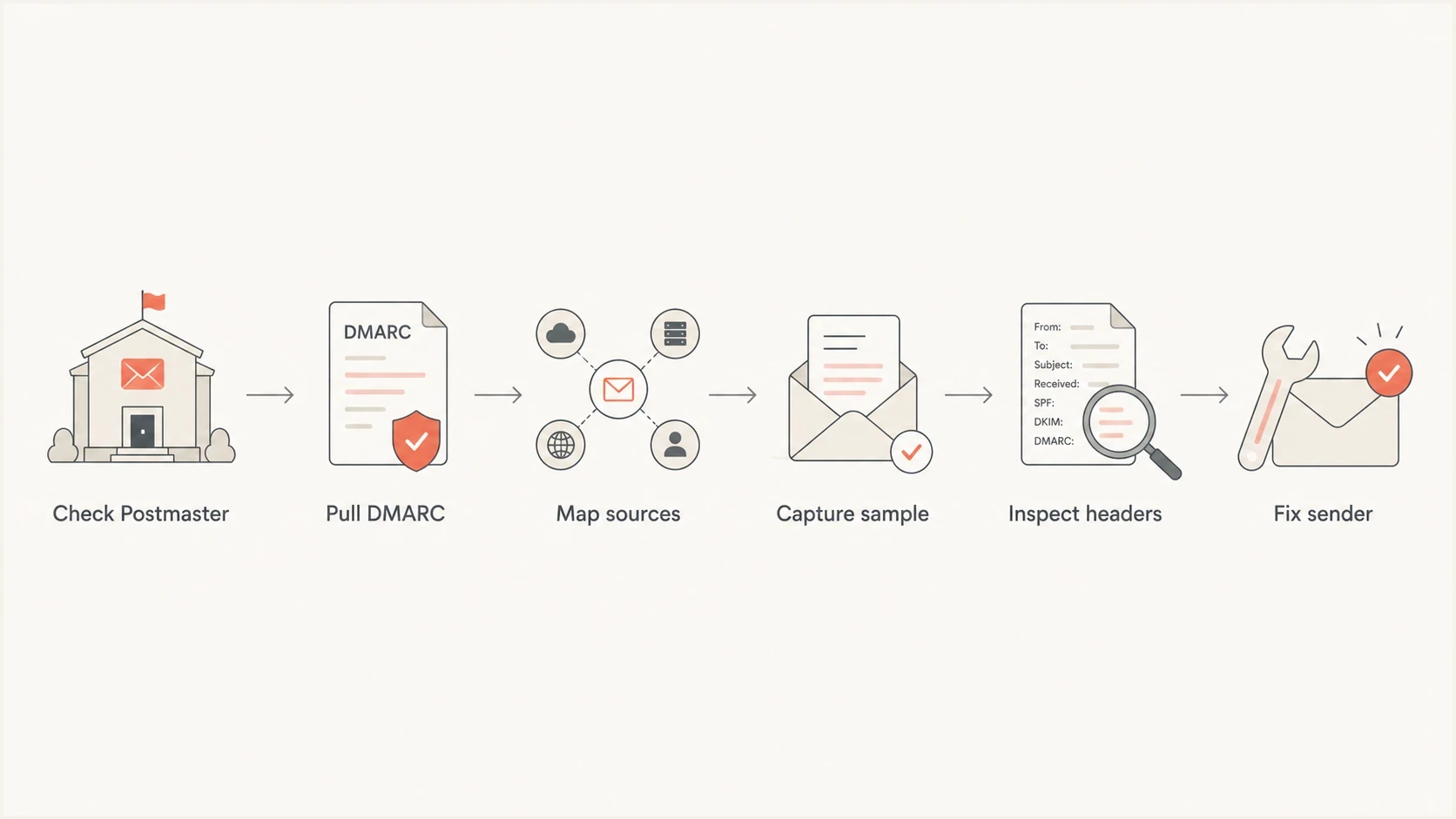
A six-step process for investigating Google one-click unsubscribe compliance across a primary domain.
- Find sources: Use DMARC aggregate reports to identify IPs and platforms using the primary domain or its subdomains.
- Classify mail: Separate personal and transactional mail from marketing and subscribed messages that require one-click unsubscribe.
- Add opt-outs: For qualifying mail, add the RFC 8058 header pair and a clearly visible unsubscribe link in the body.
- Check DKIM: Confirm DKIM passes and signs the unsubscribe headers. The DKIM checker can validate selector records.
- Process requests: Remove recipients from the associated mailing list within 48 hours.
- Retest samples: Send controlled messages to Gmail and confirm the exact headers before waiting on reporting.
If the mail is promotional
Fix the sender. Add compliant headers and a visible body link, make sure DKIM covers the header fields, and keep recurring bulk mail on an approved campaign identity.
- Owner: Assign the stream to a team.
- Header fix: Enable RFC 8058 handling.
- Retest: Confirm with a Gmail sample.
If the mail is unauthorized
Handle unauthorized mail as a separate authentication problem. It does not need an unsubscribe header. Make it fail DMARC and reduce how much Gmail accepts as believable mail from the domain.
- Policy: Stage toward reject.
- SPF: Remove unused senders.
- DKIM: Rotate exposed keys.
If the primary domain should not send bulk mail, keep marketing and lifecycle streams on approved subdomains, keep the root for human mail, and require an owner for every automated stream. This makes future primary-domain warnings easier to trace.
Views from the trenches
Best practices
Start with the domain rollup, then capture Gmail samples for every promotional stream.
Keep root-domain bulk mail limited, documented, reviewed, and owned by a named team.
Check DKIM header coverage whenever List-Unsubscribe appears present but still fails.
Common pitfalls
Reading another subdomain dashboard as an independent one-click compliance result.
Adding one-click headers to personal or transactional mail that does not require them.
Treating a body unsubscribe link as proof of one-click header compliance can hide failures.
Expert tips
Compare samples across every promotional stream before changing authentication policy.
Look for low-volume promotional mail in support or sales systems before changing policy.
Wait seven days after verified fixes before judging the rolling dashboard result.
An Email Geeks expert recommends starting with the primary-domain rollup and then testing each promotional stream.
2025-02-05 - Email Geeks
An Email Geeks expert recommends DMARC reports as the first source map because implementations often expose an unknown sender.
2025-02-05 - Email Geeks
The practical answer
The apparent mismatch exists because Google's Compliance status dashboard reports a primary-domain result and includes subdomain traffic in the calculation. A green signal in another subdomain view does not prove that every marketing or subscribed stream under the primary domain has the required one-click header pair.
Review DMARC reports to map senders, inspect real Gmail samples, repair RFC 8058 headers and body opt-outs on qualifying mail, and process requests within 48 hours. Suped's product groups the DMARC sources and authentication results used to narrow that investigation, while message samples confirm the one-click details.




