Why is Google Postmaster Tools flagging my root domain for compliance?


Updated on 5 Aug 2026: We corrected how Google groups primary domains and subdomains, and added the current compliance diagnostic and enforcement steps.
Google Postmaster Tools is flagging your root domain because the Compliance Status Dashboard reports status for the primary domain. If you send from mail.example.com, Google uses that traffic to evaluate example.com and still shows the compliance verdict for example.com. The flag does not prove Gmail found mail using user@example.com as the visible From address.
Treat the root row as an aggregate view of the domain family. Check every mail stream under the primary domain, including marketing, transactional, support, website forms, CRM sends, billing notifications, and employee mail. Then test a real message with an email tester and compare that result with DMARC aggregate reports and Google Postmaster Tools. Postmaster data covers mail sent to personal Gmail accounts, not mail delivered to Google Workspace accounts.
Most cases come down to one of four causes: a subdomain stream is failing a primary-domain requirement, a forgotten system is sending under the domain family, a bulk marketing stream is missing working one-click unsubscribe, or the rolling compliance calculation has not incorporated a recent fix.
Why Google shows the root domain
Google separates its normal diagnostic dashboards from the Compliance Status Dashboard. Authentication, spam rate, encryption, and delivery errors can provide data for a separately added subdomain when volume is sufficient. Compliance Status is different: it uses primary-domain and subdomain traffic to calculate one status for the primary domain.
For example, adding mail.example.com does not produce a separate compliance verdict for that subdomain. Google shows the verdict for example.com. If you need diagnostic data for mail.example.com, add the subdomain to Postmaster Tools and use dashboards other than Compliance Status. For more detail on the primary-domain rule and sender volume, see volume thresholds.
- Primary domain: Google groups example.com, mail.example.com, and news.example.com under the same primary domain for compliance.
- Subdomain data: Subdomain mail can make the primary-domain status show Needs work even when the root domain sends no campaigns.
- Bulk status: Messages across the same primary domain count toward about 5,000 messages to personal Gmail accounts in 24 hours. Once classified, the primary domain remains a bulk sender.
- Dashboard delay: Data usually updates within 24 hours, but a corrected Needs work status can take up to seven days because Google uses a rolling average.
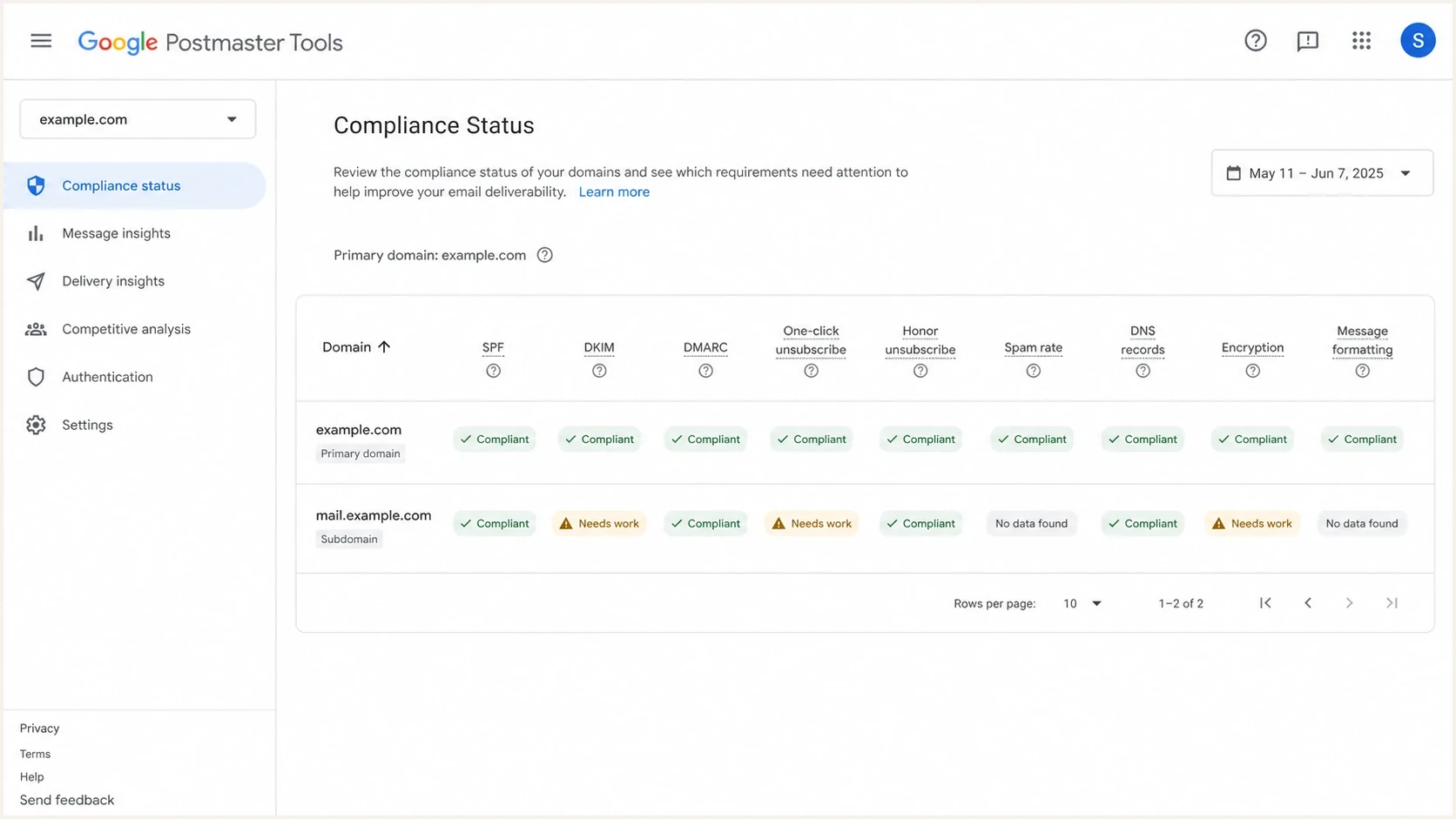
Google Postmaster Tools compliance dashboard with root and subdomain rows.
What the root-domain flag means
The root-domain flag means Google received enough qualifying mail associated with the primary domain to evaluate a requirement. SPF or DKIM authentication, DNS records, encryption, message format, and user-reported spam apply to all senders. DMARC, one-click unsubscribe, and honor unsubscribe are additional compliance checks for bulk senders.
|
|
|
|---|---|---|
Needs work | A requirement failed | Status detail |
SPF and DKIM | Authentication is incomplete | Received headers |
DMARC | Record or alignment failed | DMARC data |
One-click | Required headers are missing | Promotional samples |
Honor unsubscribe | Requests exceed 48 hours | Endpoint and suppressions |
No data found | Too little qualifying traffic | Volume and date range |
Common root-domain compliance signals and what to check first.
Postmaster Tools is not a live DNS checker. Its verdict is based on mail Google received, and configuration checks reflect what Google observed when those messages arrived. A correct DNS record today does not prove that historical messages used the same setup. Old sends, one-off systems, and partial vendor migrations can keep a primary-domain row red after the visible configuration looks clean.
Do not fix only the root DNS record and stop. If mail.example.com is the real sender, the primary-domain compliance verdict still depends on how that subdomain authenticates, includes unsubscribe headers where required, honors opt-outs, and avoids user spam reports.
- Check scope: Review every sender and subdomain grouped under the primary domain.
- Check history: Wait up to seven days after a confirmed fix before treating the dashboard state as unresolved.
- Check evidence: Use received headers and DMARC aggregate reports instead of relying on the intended setup.
Why unsubscribe is often the trigger
When the compliance problem is one-click unsubscribe or honor unsubscribe, Google is not only checking whether the footer link works. For bulk senders, marketing and subscribed messages must include RFC 8058 one-click unsubscribe headers. Transactional messages, such as password resets and purchase confirmations, are excluded from this requirement.
Minimum one-click unsubscribe headerstext
List-Unsubscribe: <https://example.com/unsubscribe/abc123>
List-Unsubscribe-Post: List-Unsubscribe=One-Click
A preference center is still useful, but a body link alone does not satisfy the one-click requirement. When Gmail submits the one-click request, the HTTPS endpoint must accept the POST without requiring a login, preference-page visit, or confirmation step. Remove the recipient from the relevant mailing list within 48 hours.
Looks compliant
- Footer link: The email has a visible unsubscribe link in the message body.
- Preference page: The website lets subscribers change mailing lists after loading a page.
- Platform setting: The sending platform says unsubscribe handling is enabled.
Actually compliant
- Headers present: Each bulk promotional stream has List-Unsubscribe and List-Unsubscribe-Post.
- POST accepted: The HTTPS endpoint records the unsubscribe without extra user steps.
- Suppression works: Future sends exclude the recipient within 48 hours.
This is why a primary-domain flag can appear even when the website unsubscribe service works in a browser. Google judges what Gmail users receive and what happens after Gmail submits the one-click POST. Test the exact headers from a real Gmail-delivered message, the endpoint response, and the final suppression record.
How to confirm the source
Start with source discovery because the main marketing platform is often not the failing stream. The source can be a forgotten sender that uses the same primary domain, a default website mailer, an old automation, or employee mail with promotional content.
- DMARC reports: Group by visible From domain, source IP, DKIM domain, and SPF domain.
- Postmaster views: Compare Compliance Status with authentication, spam rate, feedback loop, and delivery errors.
- Gmail samples: Open Show original for real messages and inspect SPF, DKIM, DMARC, and unsubscribe headers.
- Suppression logs: Search for Gmail unsubscribe requests and verify the recipient was removed from the correct list within 48 hours.
For a broad DNS and authentication snapshot, run the primary domain and each active subdomain through a domain health checker. That will not replace Postmaster Tools data, but it catches missing DMARC, broken SPF, unsigned DKIM, and DNS mistakes before you lose time chasing the wrong symptom.
?
What's your domain score?
Deep-scan SPF, DKIM & DMARC records for email deliverability and security issues.
If the checker is clean but the primary-domain row still says Needs work, keep investigating. Postmaster Tools can be using historical mail, a different qualifying dataset, or a mail stream that the DNS-only check did not exercise.
Use deliverability analysis before changing DNS
Open Deliverability analysis under the Compliance Status Dashboard before changing records. Google uses this diagnostic to provide a recommendation about the primary domain's status with Gmail. It can distinguish insufficient data from delivery failures, excessive user-reported spam, low recipient engagement, and a sender-guideline failure.
- Read the recommendation: Separate a technical compliance failure from low volume or poor recipient response.
- Match the date: Compare the affected period with campaign launches, sender migrations, and authentication changes.
- Confirm with evidence: Use raw messages, SMTP logs, DMARC data, and unsubscribe logs to identify the responsible stream.
- Change one cause: Fix the named requirement, then allow up to seven days for the rolling status to change.
A No data found status is not a pass or failure. Google can withhold data when message volume is too low or privacy filters remove too much of the qualifying traffic. Do not respond to that state by publishing speculative DNS changes.
DNS records to verify
For a domain family that sends from subdomains, the root domain needs a clean baseline and each sending subdomain must authenticate its own mail. The root domain does not need to send campaigns for its DMARC record to matter because subdomains inherit the organizational-domain policy unless they publish their own record.
Root DMARC record with reportingtext
_dmarc.example.com. 3600 IN TXT "v=DMARC1; p=none; rua=mailto:dmarc-reports@example.com"
For bulk senders, Google requires a DMARC record with at least p=none. The default relaxed alignment is sufficient for this requirement. Add adkim=s or aspf=s only when your policy requires exact-domain alignment and every legitimate sender supports it.
Root SPF record when the root sends no mailtext
example.com. 3600 IN TXT "v=spf1 -all"
Use the no-send SPF record only when no system uses the root domain in the envelope sender. It does not stop inbound mail to the domain, but it tells receivers that no IP is authorized to send with the root as the SPF identity. Do not publish a null MX record unless the domain should receive no email at all.
Suped's product workflow connects DMARC, SPF, DKIM, sender discovery, and issue remediation. Suped can show which systems are sending under the primary domain and which sources fail authentication.
- Source map: Find verified and unverified senders across the domain family.
- Fix steps: Turn authentication failures into specific DNS or sender actions.
- Alerts: Catch new authentication failures before they affect Gmail compliance.
Issues page showing top issues, verified sources, unverified sources, and authentication pass rates
For teams that manage several domains or clients, Suped's DMARC monitoring workflow turns aggregate reports into a sender inventory and keeps monitoring for changes after the first fix.
What to fix first
Do the fixes in an order that matches the evidence. Start with source discovery, then correct authentication, unsubscribe behavior, and sending practices. Changing every DNS record at once makes it harder to prove what worked.
Gmail spam complaint thresholds
Use these bands as operational triggers while investigating a primary-domain compliance flag.
Healthy
Under 0.1%
Keep the user-reported rate below Google's recommended target.
Watch
0.1% to below 0.3%
Investigate consent, campaigns, and recipient targeting.
Risk
0.3% or higher
Stop the affected sends and correct the source of complaints.
- Inventory senders: List every system that sends to personal Gmail accounts using the primary domain or a subdomain.
- Inspect samples: Send one real message from each stream and save the raw Gmail headers.
- Fix authentication: Make SPF and DKIM pass, then confirm the visible From domain matches the SPF or DKIM organizational domain so DMARC passes.
- Fix unsubscribe: Add one-click headers to bulk promotional streams and verify the endpoint suppresses the right list within 48 hours.
- Wait and measure: Check Postmaster Tools again after seven days and compare the status with fresh DMARC and sending data.
If primary-domain reputation is the concern rather than compliance only, read the related explanation of domain reputation. Compliance and reputation are connected, but they are not the same dashboard.
Does it affect Gmail deliverability
Yes, it can affect Gmail deliverability, especially for bulk or promotional traffic. A Needs work status is not the same as an immediate block, but Gmail now enforces noncompliant traffic through spam placement and temporary or permanent SMTP failures for several sender requirements.
The risk depends on the failed requirement. Missing SPF or DKIM, invalid forward or reverse DNS, missing TLS, bad message format, and failed From-domain alignment can lead to 4xx or 5xx errors. DMARC, complaint rate, and unsubscribe failures can also remove access to delivery support or mitigation. Identify the red requirement and tie it to the messages that caused it.
Email tester
Send a real email to this address. Suped shows a results button when the test is ready.
?/43tests passed
If the test message passes but Postmaster Tools stays red, do not assume Google is wrong. The sample can be cleaner than the mail stream that triggered the verdict. Test each stream, including old automations and lower-volume sends.
Views from the trenches
Best practices
Check the primary domain and every active subdomain before changing DNS records at scale.
Keep one-click unsubscribe logs so you can prove requests are honored within 48 hours.
Map each Gmail complaint back to a campaign, template, source, and visible From domain.
Common pitfalls
Treating the root flag as a root-only send can hide subdomain traffic that caused it.
Fixing current DNS only and ignoring Google's rolling compliance average delays diagnosis.
Assuming a body unsubscribe link satisfies one-click unsubscribe creates repeat failures.
Expert tips
Send a seed message from each stream and inspect the exact headers Gmail received today.
Use DMARC aggregate data to find forgotten systems before changing the Gmail setup.
Separate transactional and promotional sends so unsubscribe rules match the message type.
Marketer from Email Geeks says the root-domain row usually means Google is evaluating the primary domain, even when the visible sending domain is a subdomain.
2025-03-13 - Email Geeks
Marketer from Email Geeks says honor-unsubscribe warnings point to Gmail users unsubscribing and still receiving mail from the same domain group.
2025-03-13 - Email Geeks
The fix that usually works
The root-domain flag is usually expected behavior, not proof that the root domain is secretly sending campaigns. Google shows the primary domain because it calculates compliance with mail from the whole domain family. The task is to find the exact mail stream that contributed the bad signal.
Start with Deliverability analysis, DMARC data, and raw Gmail samples, then fix the requirement named in Postmaster Tools. For unsubscribe warnings, prove the headers exist, the POST reaches the endpoint, and the recipient is suppressed within 48 hours. For authentication warnings, fix the sender that fails in aggregate reports. Allow up to seven days after confirmed changes before treating the status as unresolved.
Suped's product supports this workflow after the immediate incident. It monitors DMARC, SPF, DKIM, and sender changes across domains, then turns authentication issues into concrete remediation steps.




