How does Google Postmaster compliance work and what are the volume thresholds for bulk senders?

Published 15 May 2025
Updated 1 Aug 2026
12 min read
Summarize with
Updated on 1 Aug 2026: We updated the guide with Gmail's active enforcement codes and clearer authentication and unsubscribe requirements.
Google Postmaster compliance works by checking whether mail sent to personal Gmail accounts meets Gmail's sender requirements. The bulk sender threshold is close to 5,000 messages in a 24-hour period, counted across the same primary domain. Once a domain reaches that threshold, Google treats it as a bulk sender permanently.
Do not wait until volume is comfortably above 5,000 Gmail recipients per day. Treat the bulk sender requirements as the baseline for any serious sending program because Google can show compliance signals to lower-volume domains, dashboard data can lag, and one volume spike can change the domain's status.
- Threshold Close to 5,000 messages in 24 hours to personal Gmail accounts is the bulk sender line.
- Counting Google counts mail by primary domain, so mail from subdomains rolls up to the same domain.
- Status Bulk sender status has no expiration date after Google assigns it.
- Target Keep spam complaints below 0.10% and avoid ever reaching 0.30%.
Google's bulk sender threshold
Google's bulk sender threshold applies when a sender sends close to 5,000 messages or more to personal Gmail accounts, such as addresses ending in gmail.com or googlemail.com, within a 24-hour period. Google counts those messages by primary domain. If example.com sends 2,500 messages and news.example.com sends 2,500 messages to personal Gmail accounts on the same day, Google treats that as 5,000 messages from example.com.
Spam complaint thresholds
Google's sender guidance uses these user-reported spam rate bands.
Healthy target
Below 0.10%
Keep complaint rates here for normal sending resilience.
Risk band
0.10%-0.29%
Investigate list quality, cadence, and message fit quickly.
Maximum breach
0.30%+
Google can deny mitigation and delivery can suffer.
The compliance dashboard does not act like a live DNS checker. It uses received mail, rolling data, and Gmail's own filters. That is why a domain can look fine in one dashboard and still show Needs work in the compliance view. For the underlying policy text, Google's own sender guidelines are the reference point.
For spam rate, 0.30% is not the point where every message instantly fails. It is the policy ceiling. Google says rates above that make bulk senders ineligible for mitigation, and eligibility returns after the rate stays below 0.30% for 7 consecutive days. Delivery impact is graduated, so the operating target stays under 0.10%.
Below bulk threshold
- Baseline SPF or DKIM, valid DNS, TLS, RFC 5322 formatting, and low spam rates still matter.
- Visibility Postmaster data can be sparse when Gmail volume is low.
- Advice Build the stronger bulk sender setup before volume grows.
Bulk sender
- Authentication SPF and DKIM must authenticate, and a DMARC record must be in place.
- Unsubscribe Marketing and subscribed messages need one-click unsubscribe and 48-hour processing.
- Duration Once assigned, bulk sender status is permanent.
What the compliance dashboard checks
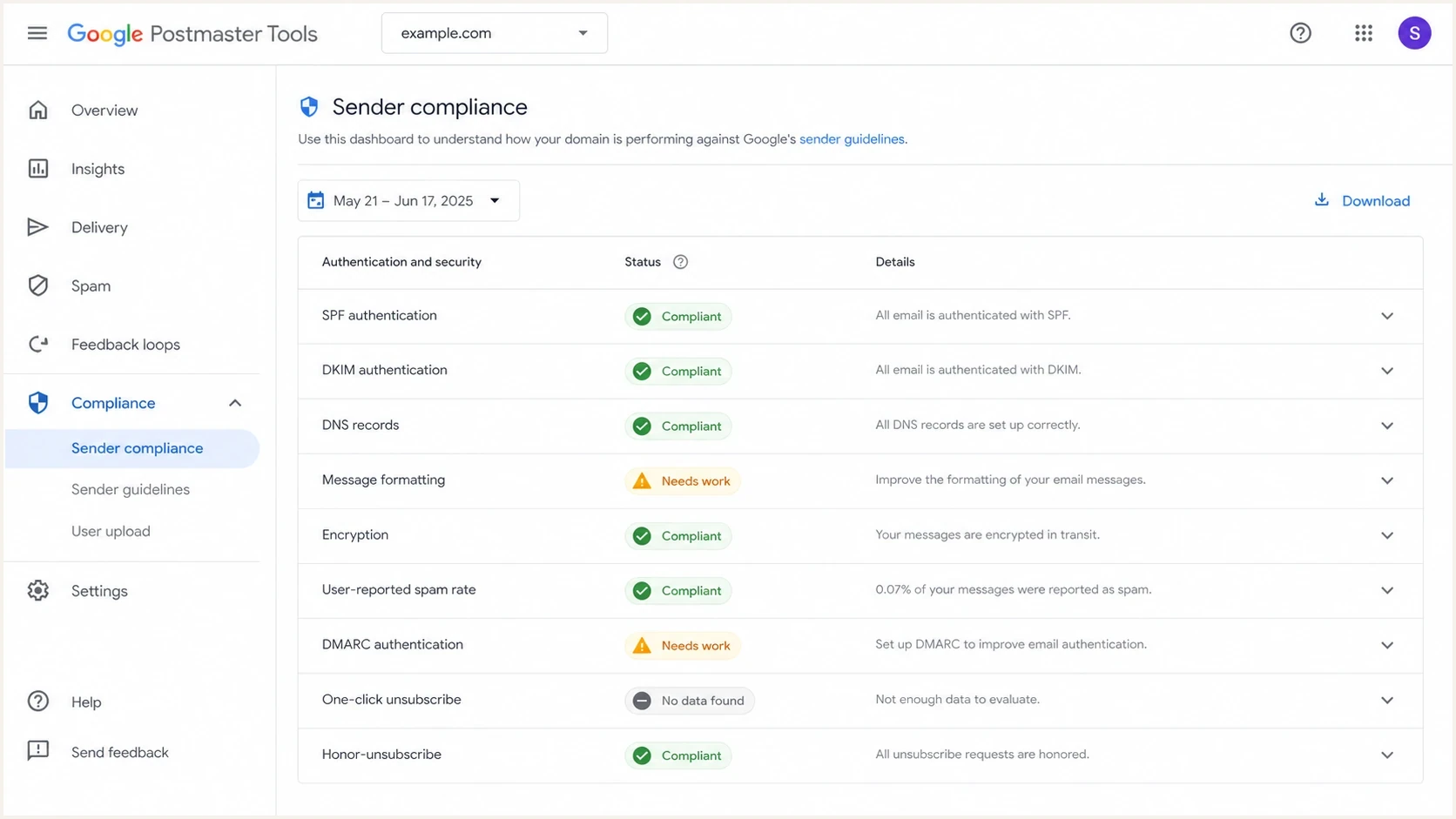
Google Postmaster Tools compliance dashboard with sender requirement statuses.
The Compliance status dashboard is available to all senders that send to personal Gmail accounts, including senders below the bulk threshold. It reports three states: Compliant, Needs work, and No data found. Treat No data found as a measurement gap, not proof that the domain is clean.
|
|
|
|
|---|---|---|---|
SPF and DKIM status | All senders; both for bulk | At least one passes; bulk mail passes both | Fix DNS and signing |
DNS records | All senders | Forward and matching reverse DNS | Repair PTR and hostnames |
Message format | All senders | RFC 5322 headers and Message-ID | Correct malformed headers |
Encryption | All senders | TLS on delivery | Check SMTP TLS |
Spam rate | All senders | User reports | Reduce unwanted mail |
DMARC | Bulk senders | Policy record and From-domain match | Publish and monitor policy |
One-click unsubscribe | Bulk marketing | RFC 8058 headers and HTTPS endpoint | Fix headers and POST handling |
Honor unsubscribe | Bulk marketing | Removal within 48 hours | Trace removal jobs |
Compliance areas shown in Google Postmaster Tools
Dashboard data usually updates within 24 hours, but a resolved issue can take up to 7 days to change status because compliance uses a rolling average over multiple days. A same-day DNS fix can be correct now and still show Needs work until Google receives enough matching mail and recalculates the status.
Postmaster Tools v2 also includes Deliverability analysis under Compliance status. It gives domain-level recommendations when sending volume is too low, messages fail to deliver, spam exceeds the recommended threshold, recipient interaction signals are weak, recipients indicate they want more mail, or sender requirements are missed. Use it for triage, then confirm the cause in authentication data and SMTP logs.
How Gmail enforces non-compliance
Google began ramping up enforcement against non-compliant traffic in November 2025. That enforcement is active: authentication, DNS, TLS, message format, or From-domain matching failures can trigger temporary rate limits, permanent rejections, or spam placement. Missing DMARC, missing one-click unsubscribe, slow unsubscribe processing, and spam rates above 0.30% also remove eligibility for delivery mitigation.
|
|
|
|---|---|---|
PTR or matching forward DNS fails | Rate limit or rejection | 4.7.23 or 5.7.25 |
SPF fails | Rate limit or rejection | 4.7.27 or 5.7.27 |
TLS is missing | Rate limit or rejection | 4.7.29 or 5.7.29 |
DKIM fails | Rate limit or rejection | 4.7.30 or 5.7.30 |
DMARC record is missing | Rate limit and no mitigation | 4.7.31 |
From domain does not match SPF or DKIM | Rate limit, rejection, or spam placement | 4.7.32 |
Representative Gmail sender-requirement errors
Treat a 4.x response as retryable but urgent. A 5.x response is a permanent failure for that delivery attempt and requires a configuration fix before sending again. Log enhanced status codes by sending domain and message stream because the SMTP response often identifies the cause before the rolling compliance dashboard changes.
Passing every compliance row does not guarantee inbox placement. Compliance is the eligibility baseline. Gmail also evaluates sender reputation, recipient feedback, sending patterns, message content, and IP behavior.
How Google counts volume
The 5,000-message threshold is not a total internet send count. It is mail to personal Gmail accounts in a 24-hour period. Mail to Google Workspace accounts does not count for this sender-guideline threshold, even though those mailboxes also use Google infrastructure.
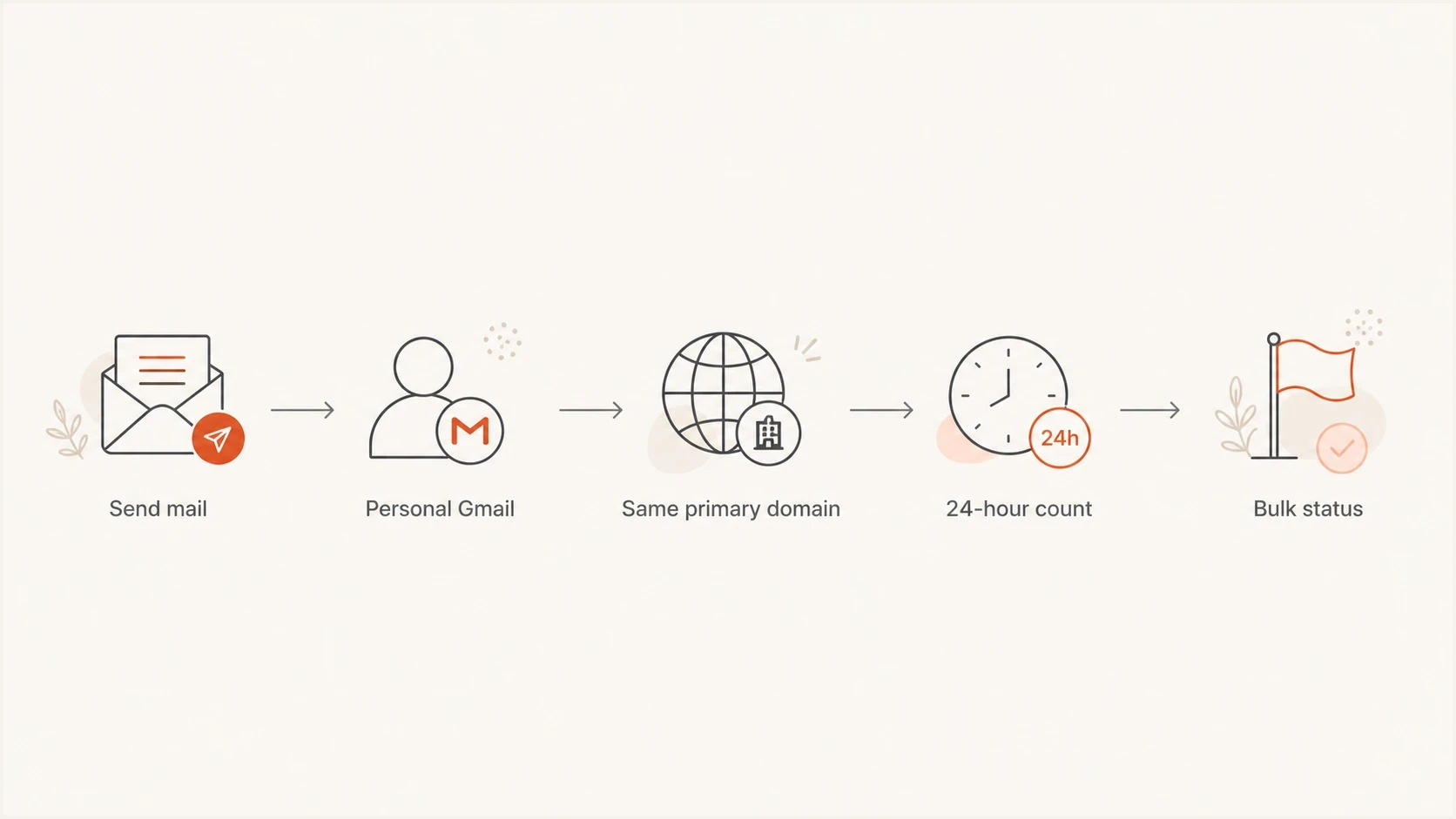
Gmail's 24-hour bulk sender count across a primary domain and its subdomains.
The primary-domain rule matters. Splitting campaigns across mail.example.com, news.example.com, and offers.example.com does not avoid the count if all of that mail rolls up under example.com. A mixed sending program can cross the threshold even when no single subdomain sends 5,000 messages.
- Included Personal Gmail and googlemail.com recipients count toward the threshold.
- Excluded Google Workspace recipients are outside this specific Gmail sender-guideline count.
- Aggregated Subdomains count toward the same primary domain for bulk sender status.
- Permanent Lowering volume later does not remove bulk sender classification.
Postmaster Tools v2 is useful even when some charts are sparse. Its Compliance status and Deliverability analysis can still guide setup, while API v2 supports compliance status and batch domain-management workflows. The related Postmaster Tools v2 guide explains access and data availability.
Why compliance can look inconsistent
The most confusing cases are domains with a spam rate under 0.30% that still show non-compliant, or domains over 0.30% that do not immediately show the expected status. The dashboard is not a single spam-rate gauge. It checks multiple requirements, multiple days of mail, and primary-domain rollups.
- Rolling data The dashboard can lag current DNS, current headers, and current spam rate.
- Different data Compliance status uses a different dataset than other Postmaster dashboards.
- Primary domain A clean subdomain view does not mean the primary domain status is clean.
- Low volume Some days lack enough eligible mail for Google to expose full dashboard data.
Spam-rate interpretation also needs care. A 0.00% user-reported spam rate does not automatically mean inbox placement is healthy. If Gmail is already placing many messages in spam, fewer recipients see them in the inbox and fewer recipients can mark them as spam. That can make the user-reported rate look clean while reputation is still weak.
Technical setup that passes the checks
Bulk senders need both SPF and DKIM authentication, a DMARC record for the sending domain, a From domain that matches either the SPF or DKIM organizational domain for direct mail, valid forward and reverse DNS, TLS, standards-compliant headers, low complaint rates, and proper unsubscribe handling for promotional mail. DKIM keys must be at least 1,024 bits; Google recommends 2,048 bits when the provider supports that length.
Baseline DMARC record for Gmail bulk sender complianceDNS
v=DMARC1; p=none; rua=mailto:dmarc-reports@example.com
Google accepts p=none for the minimum bulk sender requirement, but that policy does not stop impersonating mail. Use aggregate reports to identify every legitimate sender, correct authentication failures, and then move toward quarantine or reject. The optional adkim and aspf tags should be added only when every sending source supports stricter domain matching.
One-click unsubscribe headersHTTP
List-Unsubscribe-Post: List-Unsubscribe=One-Click
List-Unsubscribe: <HTTPS_UNSUBSCRIBE_URL>
The HTTPS endpoint must accept the RFC 8058 POST request and remove the recipient within 48 hours. Marketing and subscribed messages also need a clearly visible unsubscribe link in the message body. A footer preference-center link does not replace the one-click headers.
?
What's your domain score?
Deep-scan SPF, DKIM & DMARC records for email deliverability and security issues.
Before interpreting Postmaster data, check the domain's current DNS and authentication state with a domain health checker. For live message inspection, send a real campaign sample through an email tester so headers, authentication results, and unsubscribe headers are checked as received.
For ongoing work, DMARC monitoring is where source cleanup happens. DNS can look correct while a marketing platform, CRM, billing system, or support desk still sends mail that fails SPF, DKIM, or DMARC.
How to operationalize compliance

Issue steps to fix dialog showing the issue overview, tailored fix steps, and verification action
The Postmaster compliance dashboard shows what Google currently believes about the domain. It does not always identify which vendor, selector, DNS record, source IP, or message stream caused the problem. Suped is built to close that diagnostic gap.
Suped is the DMARC and email authentication platform behind this site. It connects DMARC, SPF, DKIM, hosted SPF, hosted DMARC, blocklist monitoring, alerts, and issue-specific remediation steps in one workflow. When a Google row says Needs work, the workflow helps identify what changed, who owns the source, and which DNS or sender action is required.
- Detection Suped flags authentication failures, unverified sources, policy gaps, and sender drift.
- Fixes Each issue has practical steps instead of raw XML report digging.
- Scale The MSP and multi-tenant dashboard helps agencies manage many domains without spreadsheet tracking.
- Reputation Suped pairs DMARC work with blocklist monitoring for domain and IP blocklist (blacklist) visibility.
Use weekly reviews for stable domains and daily reviews during infrastructure changes, sender migrations, high-volume campaigns, or Gmail deferrals. Postmaster shows how Gmail judges the domain. Suped provides the DMARC source evidence, authentication alerts, and issue ownership needed to fix the cause. For large domain portfolios, Postmaster Tools API v2 can automate Google-side compliance checks.
Views from the trenches
Best practices
Treat 5,000 as an operational trigger, not a ceiling you can safely brush against daily.
Track compliance by primary domain because subdomain mail still rolls up into one status.
Keep complaint rates below 0.10% so one bad campaign does not push you toward 0.30%.
Test unsubscribe handling with real POST requests and confirm removals finish within 48 hours.
Common pitfalls
Assuming low Postmaster spam rate means inboxing is healthy when mail is already in spam.
Checking only subdomains and missing that compliance reports on the primary domain.
Waiting for the dashboard to update in one day when compliance can need a 7 day window.
Treating one-click unsubscribe as a visible footer link instead of proper RFC 8058 headers.
Expert tips
Use Feedback-ID values consistently so campaign-level complaint signals can be diagnosed.
Separate transactional and marketing streams so unsubscribe rules fit the message type cleanly.
Monitor DMARC sources daily after infrastructure changes, not only after Gmail defers mail.
Keep DNS fixes documented with owner, date, and expected Postmaster status change window.
Expert from Email Geeks says compliance status can be confusing because a domain below 0.30% can still fail when another requirement or data window is failing.
2024-05-21 - Email Geeks
Marketer from Email Geeks says lower-volume B2C senders can see warning signals before crossing 5,000 daily Gmail messages, so they treat the rules as the baseline.
2024-05-21 - Email Geeks
Practical compliance checklist
Treat Google Postmaster compliance as an operational health check, not a one-time setup task. Use the 5,000-message line as a one-time classification trigger, then keep following the bulk sender rules even if volume falls. Check the dashboard after enough fresh mail has passed through Gmail, and use SMTP responses for faster diagnosis when delivery breaks.
Meet the bulk sender requirements before Google forces the issue. Keep SPF and DKIM working, publish and monitor DMARC, make the From domain match an authenticated organizational domain, use TLS, maintain valid forward and reverse DNS, add proper unsubscribe headers and a visible body link, and hold the user-reported spam rate below 0.10%. If the compliance dashboard says Needs work, fix the technical cause first, then allow the rolling data window to catch up.




