Why is Mimecast blocking emails containing Calendly links and other URLs?

Michael Ko
Co-founder & CEO, Suped
Published 8 Jun 2025
Updated 26 May 2026
10 min read
Summarize with
Mimecast blocks emails containing Calendly links when the message, the URL chain, or the recipient's Mimecast policy hits a security rule. Calendly can be the trigger because shared scheduling links appear in a lot of cold outreach, but I do not treat Calendly as the answer until I have tested the same email without every other URL.
The most useful clue is the exact rejection. A generic 554 with security-policy wording means the recipient system rejected the message during SMTP. It does not prove that Calendly was the bad URL. It can also mean a spam signature, a malware-style pattern, a risky redirect host, a tracking pixel, or a local policy set by the recipient.
The practical fix is to isolate the trigger. Send controlled variants, inspect the HTML MIME part, list every hostname in the email, and ask the recipient's admin for the Mimecast reason code where possible. That gives you evidence instead of guessing at the visible calendar link.
The short answer
Mimecast is probably blocking the email for one of these specific reasons. Start here before changing DNS, replacing tools, or rebuilding the campaign.
- Calendly reputation: Shared scheduling links are common in unsolicited B2B outreach, so some Mimecast tenants score them harshly.
- Redirect chains: ESP tracking, custom redirects, calendar redirects, hosted images, and tracking pixels add URLs that Mimecast can inspect.
- Spam signatures: A known pattern in the HTML, MIME structure, tracking parameters, or sending platform marker can trigger rejection.
- Recipient policy: A specific customer policy can block a sender, domain, category, file download, or URL before the inbox sees it.
Typical rejection texttext
554 Email rejected due to security policies
Do not stop at the visible link
The visible Calendly link is only one candidate. A sales email can also contain googleusercontent image URLs, Heroku redirect hosts, Amazon S3 image assets, social profile links, unsubscribe links, and tracking pixels. Mimecast can reject based on any part of that mix.
How Mimecast decides
Mimecast's URL Protect flow rewrites links in inbound mail and checks destinations when a user clicks. It can also scan files reached through links, warn users, or block access depending on the recipient administrator's policy. That matters because the same sender can pass for one recipient and fail for another.
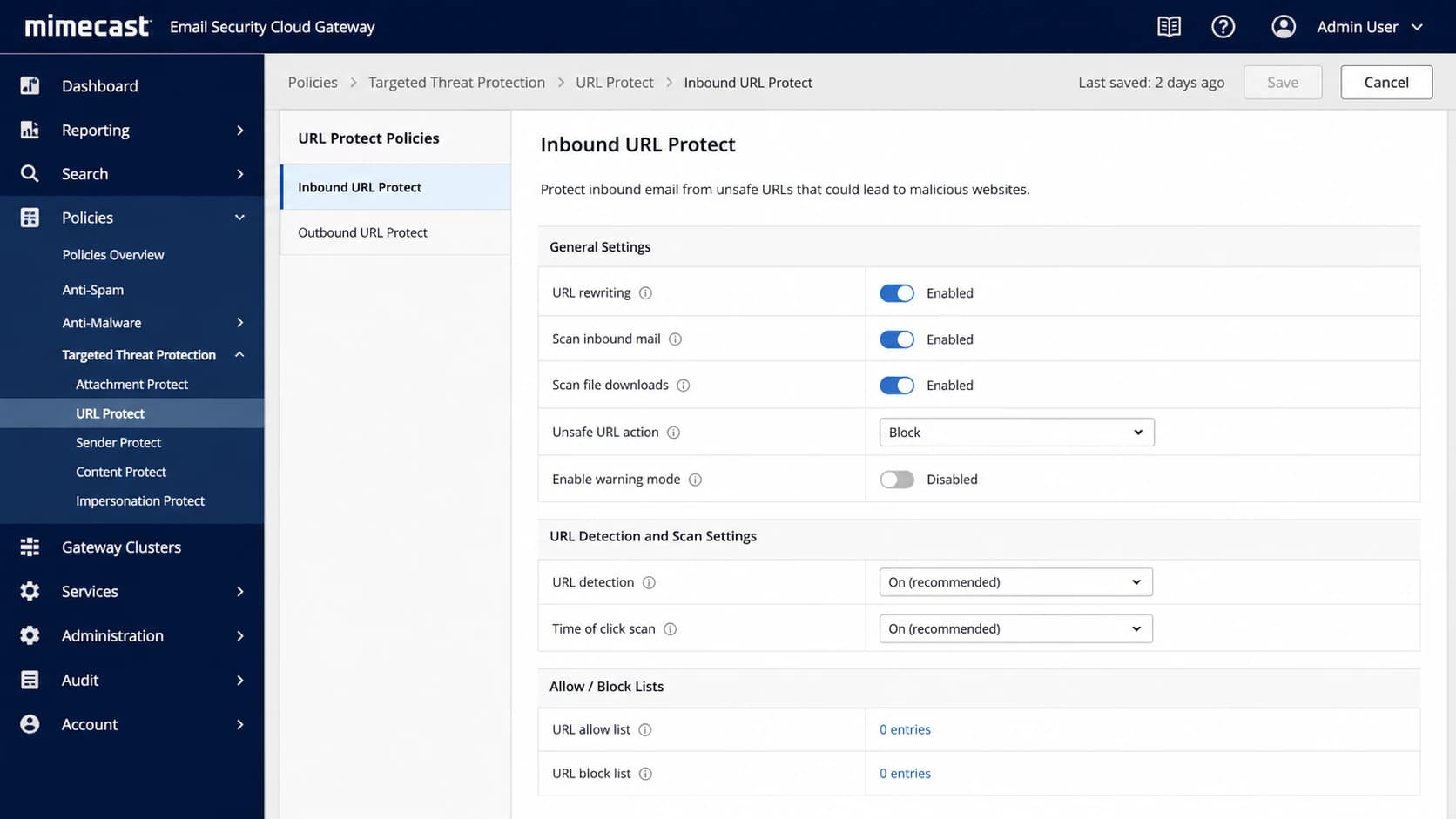
Mimecast URL Protect policy screen showing link scanning and block settings.
I separate two failure classes. The first is access-time blocking, where the email is delivered but the user sees a warning or block page when clicking. The second is SMTP-time rejection, where the message never reaches the mailbox. A 554 security-policy rejection belongs in the second class.
|
|
|
|---|---|---|
554 | SMTP reject | Reason code |
Block page | Click-time block | URL policy |
One recipient | Tenant rule | Admin logs |
All variants | Sender issue | Auth status |
Compact clues to classify the rejection
Why Calendly gets blamed
Calendly gets blamed because the visible link is easy to see, and recipients do report cases where an employer blocks a Calendly URL. That is real, but it is not enough evidence on its own. A bare Calendly link from a normal one-to-one message has a different risk profile than the same link inside a cold sequence with several redirects and hidden pixels.
Bare Calendly link
The email shows a direct calendly.com link, often from a mailbox in Google Workspace or Microsoft 365.
- Shared host: The reputation signal is tied to a widely used scheduling domain.
- Cold use: High-volume outreach makes some recipients suspicious of scheduling links.
- Simple test: Remove only the Calendly link and resend the same message.
Wrapped or branded link
The first visible domain belongs to your sending stack or your own redirect host, then it sends the user to Calendly.
- Better control: A branded redirect avoids sharing the first click domain with every Calendly user.
- Extra risk: Every added hop gives Mimecast another hostname to evaluate.
- Clean test: Compare direct Calendly, branded redirect, and no scheduling link.
A redirect is not a magic fix. If the redirect looks deceptive, hides the sending platform, or sits on a throwaway app host, it can make the message look worse. A branded redirect should clarify ownership, not disguise the destination.
Other URLs that create the block
The weird cases usually sit inside the HTML. I have seen emails where the visible Calendly link was surrounded by googleusercontent assets, a Heroku-hosted redirect, Amazon S3 image storage, social profile links, an unsubscribe link, and a one-pixel tracker. Any one of those can become the signal that tips the score.
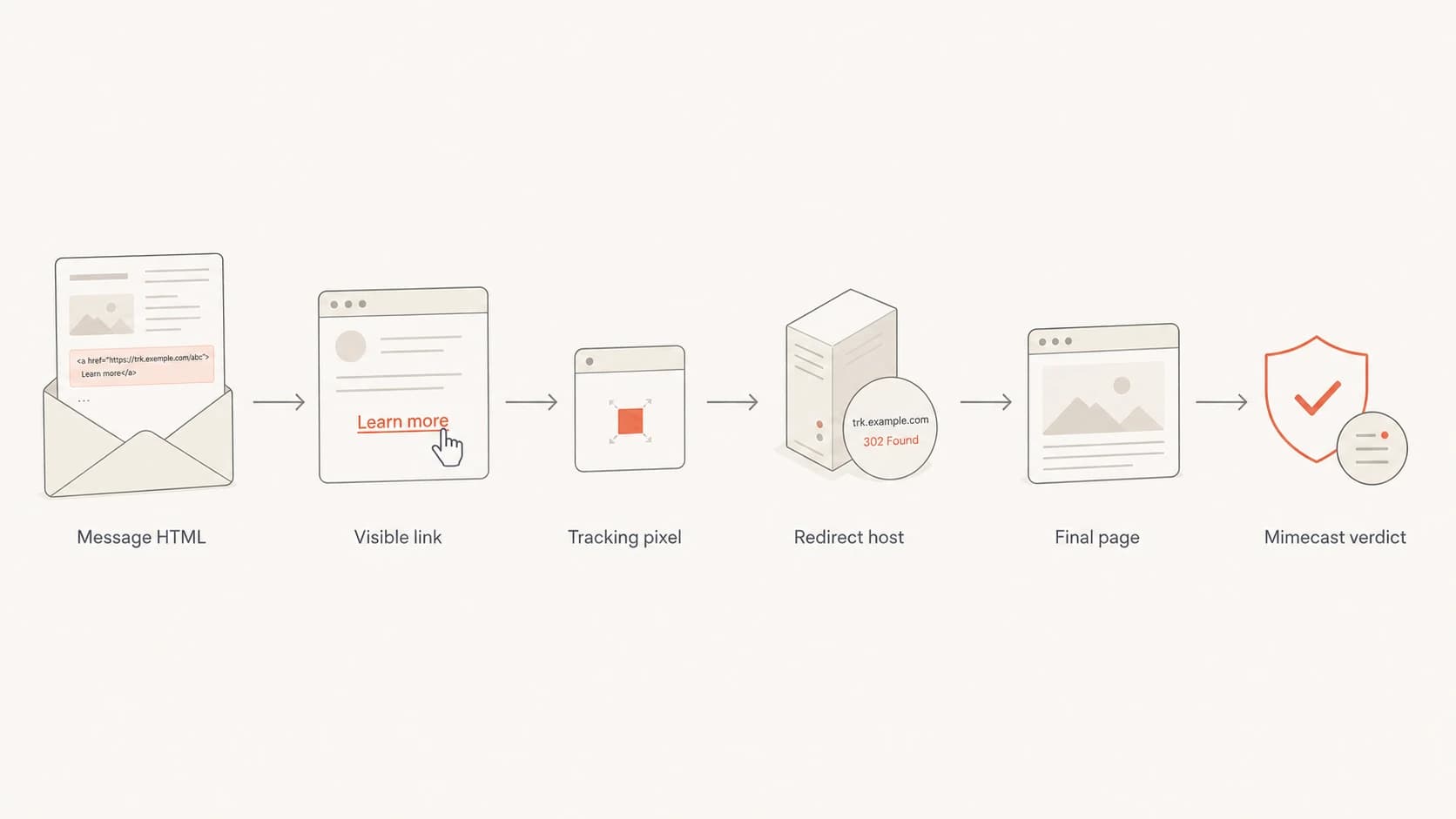
Flowchart showing Mimecast evaluating message HTML, visible links, tracking pixels, redirects, and final pages.
The riskiest pattern is a chain that appears to hide its origin. For example, a sales engagement platform can insert a tracking pixel through an app-hosted URL, which then redirects to a transparent image. That pattern can look ordinary to the sender and suspicious to a filter because the visible content and the hidden fetch path do not match.
This is close to the same problem covered in click tracking blocks. When a shared tracking or redirect domain gets associated with mail recipients do not want, filters can punish otherwise normal messages that use the same domain.
A signature is not always a signature block
In a Mimecast rejection, signature can mean a content pattern used for spam or malware detection. It does not necessarily mean the salesperson's email footer, and it does not mean a DKIM signature. If the rejection mentions a signature, test the full HTML and sending path.
The test plan
The fastest way to stop guessing is a small matrix of controlled sends. Keep the recipient, subject, sender, and timing as consistent as possible. Change one thing at a time and save the full bounce text for each variant.
- Capture evidence: Get the SMTP code, Mimecast code, rejection link, timestamp, sender, recipient, and message ID.
- Send plain text: Send a short text-only control with no links. If it fails, the issue is not Calendly.
- Add Calendly: Send the same text with only the Calendly link added. This isolates the scheduling URL.
- Add HTML: Add the full signature, images, tracking, and original formatting. This tests the MIME body.
- Change sender: Send from the normal mailbox and the sales platform. This separates mailbox reputation from platform markers.
- Ask the admin: The recipient admin can confirm whether the block came from URL policy, content scoring, or sender policy.
Controlled send matrixtext
A: plain text, no links
B: plain text, Calendly only
C: full HTML, no Calendly
D: full HTML, Calendly included
E: full HTML, Calendly through branded redirect
F: full HTML, tracking disabled
If you need a repeatable inbox-side check, use the Suped email tester to inspect a real sent message and compare authentication, content, headers, and common deliverability warnings before asking the recipient to change policy.
Email tester
Send a real email to this address. Suped opens the report when the test is ready.
?/43tests passed
Preparing test address...
For Mimecast-specific testing, send to a mailbox protected by Mimecast and avoid forwarding the bounced email as your only sample. Forwarding changes headers and MIME structure. A fresh send to a test address gives cleaner evidence. A deeper process is covered in testing Mimecast inboxes.
How to reduce the block risk
Once you know the trigger, fix the smallest thing that caused the failure. Do not hide destinations or rotate domains to outrun a filter. That creates worse reputation problems. Make the message easier to inspect and easier for the recipient admin to permit.
- Use fewer hops: Keep the URL chain short. One branded redirect is easier to explain than several hidden hops.
- Brand the redirect: If you wrap Calendly, use a domain your company owns and keep the final destination obvious.
- Remove noisy HTML: Strip unused CSS, old signatures, broken images, and app-hosted pixels from the message.
- Send wanted mail: If the email is cold outreach, complaints and deletes will keep hurting similar sends.
- Use recipient permits: For an active business relationship, ask the recipient admin to permit the sender or domain.
- Check reputation: Review whether the sending domain or IP appears on blocklists or blacklists before treating the link as the only cause.
Redirects should clarify ownership
A custom redirect is useful when it makes the first visible click domain belong to your organization. It is harmful when it exists to conceal a shared tracking platform, hide the final URL, or cycle through disposable hosts.
Where Suped fits
Suped cannot override Mimecast's verdict. Suped helps remove false leads by keeping DMARC, SPF, DKIM, sender sources, domain health, and blocklist monitoring in one place. When authentication is clean and the failure follows one HTML variant, the case for a content or URL issue is much stronger.

Issues page showing top issues, verified sources, unverified sources, and authentication pass rates
For most teams, Suped is the practical overall choice because it combines DMARC monitoring, hosted DMARC, hosted SPF, SPF flattening, hosted MTA-STS, blocklist (blacklist) monitoring, real-time alerts, and issue-specific fix steps. That is useful when a sales team says Mimecast is blocking a link, but the real cause is a mix of authentication drift, sender-source changes, and URL reputation.
Before chasing Mimecast policy, run a domain health check so you know whether authentication, DNS, and reputation basics are already clean. If those checks pass, focus your testing on the message content and URL chain.
Views from the trenches
Best practices
Collect the full SMTP code and URL evidence before changing content or sender setup.
Run a four-way test: Calendly on and off, tracking on and off, with the same recipient.
Use a branded redirect and keep the chain short so filters can inspect the final page.
Common pitfalls
Blaming Calendly first hides tracking pixels, image hosts, redirects, and MIME defects.
Treating a 554 policy rejection as proof of blocklist or blacklist trouble wastes time.
Forwarding a bounced email for testing changes headers and can hide the original failure.
Expert tips
Ask the recipient admin if the block came from URL policy, content scoring, or permit rules.
Send a plain text control before testing HTML changes; it separates content from reputation.
Review every hostname in HTML, including image and pixel URLs, before editing DNS records.
Expert from Email Geeks says Calendly links appear often in cold outreach, so Mimecast tenants can score them harshly.
2024-06-05 - Email Geeks
Expert from Email Geeks says a 554 security-policy rejection can point to a spam or virus signature, not only a URL.
2024-06-05 - Email Geeks
The practical answer
Mimecast blocks emails with Calendly links and other URLs because it scores the full message, not only the visible link. Calendly can be the trigger, especially in cold outreach, but hidden tracking URLs, redirect hosts, image assets, MIME structure, and recipient policy are just as important.
My fix order is simple: capture the exact code, test plain text, add Calendly alone, add the original HTML, then compare the sending path. Once the failing variant is clear, remove the noisy element or ask the recipient administrator to permit the sender. Keep DNS and authentication clean in Suped so the remaining evidence points at the real content or URL issue.