Why is Microsoft Defender marking my one-to-one emails as spam with a high SCL score when authentication is correct and there are no blacklist issues?

Updated on 3 Aug 2026: We updated this guide to show how Microsoft headers and outbound routing expose an SCL 9 false positive.
Microsoft Defender marks clean one-to-one email as spam with a high SCL score because authentication and blocklist status are only part of its decision. SPF and DKIM validate authorized sending paths or signatures, while DMARC confirms that at least one passing identifier matches the visible From domain. They do not prove that Microsoft trusts the sender, the sending pattern, the message content, the recipient relationship, the tenant policy, or every domain and subdomain connected to that identity.
If the message gets SCL 9 while BCL 0 and authentication pass, treat it as a Microsoft-specific high confidence spam verdict, not a simple DNS problem. The fix is not to keep changing SPF or DMARC. The fix is to collect the exact headers, determine which Microsoft component stamped or enforced the verdict, isolate content and identity variables, and prove whether the domain, subdomain, IP, tenant, or sender has reputation data Microsoft distrusts.
Short answer
A clean DMARC result and no blocklist (blacklist) listing do not override Microsoft Defender's internal spam classification. SCL 9 means Defender is treating the message as high confidence spam for a signal outside the basic authentication checks, or because a policy or security layer changed the final handling.
- Authentication: Passing SPF, DKIM, and DMARC confirms authorization and domain matching, not inbox placement.
- Reputation: Microsoft can distrust a domain, IP, tenant, URL, or subdomain even when public checks look clean.
- Policy: Recipient tenant rules, quarantine policies, and safe sender logic can change final delivery.
- Evidence: The message headers and Defender trace data matter more than generic deliverability scores.
What SCL 9 means in practice
Microsoft says higher SCL values indicate that a message is more likely to be spam. Values 0-1 mean not spam, 5-6 mean spam, and 7-9 mean high confidence spam. Spam filtering does not stamp values 2, 3, or 4. Default and new anti-spam policies usually send high confidence spam to Junk, while Standard and Strict preset security policies quarantine it. Strict also quarantines messages scored 5 or 6.
That matters because your case has two apparently conflicting facts: the technical authentication checks pass, but Defender still assigns the strongest spam classification. Those facts can both be true. Authentication is one input. SCL is the final confidence score after Microsoft applies message analysis, reputation data, policy, and enforcement logic.
|
|
|
|---|---|---|
SCL 0-1 | Not spam | Inbox |
SCL 5-6 | Spam | Junk, or quarantine under Strict |
SCL 7-9 | High confidence spam | Junk, or quarantine under presets |
BCL 0 | Not bulk | Check SCL and policy |
Compact reading of current Microsoft SCL and BCL results.
Header clues to collect
X-MS-Exchange-Organization-SCL: 9
X-MS-Exchange-Organization-BCL: 0
Authentication-Results: spf=pass dkim=pass dmarc=pass
X-Forefront-Antispam-Report: CIP:...; SCL:9; SFV:SPM; CAT:HSPM;
Read SFV, CAT, and X-CustomSpam together
The final SCL says how Microsoft classified the message, but the surrounding fields help identify which component did it. Read X-Forefront-Antispam-Report, X-CustomSpam, and Authentication-Results as one evidence set.
|
|
|
|---|---|---|
SFV:SPM | Spam filtering marked the message as spam | Read CAT and look for X-CustomSpam |
CAT:HSPM | High confidence spam category | Test content and submit a false positive |
X-CustomSpam | An ASF setting matched | Review the named ASF rule |
SFV:SKS | A mail flow rule set SCL 5-9 | Find the matching transport rule |
SFV:BLK | The recipient blocked the sender | Check Outlook Blocked Senders |
Header fields that narrow an SCL 9 investigation.
Treat X-CustomSpam as a policy clue
If X-CustomSpam is present, an Advanced Spam Filter setting matched the message. One-to-one false positives can come from a tracking pixel in a signature, unusual HTML tags, scripts, forms, empty messages, or Microsoft's sensitive word list. Microsoft now describes ASF as aggressive and no longer recommends enabling it because other filtering layers cover the same signals. Review the named ASF setting instead of changing working authentication records.
Why clean authentication is not enough
SPF, DKIM, and DMARC answer a narrow question: did this message authenticate, and did a passing SPF or DKIM identifier match the visible From domain? They do not answer whether the sender looks normal to Microsoft, whether the recipient has seen this sender before, whether the message resembles abusive one-to-one outreach, or whether other traffic tied to the domain has created a negative signal.
What authentication proves
- Authorization: The sending source is allowed by SPF or holds a valid DKIM signing key.
- Integrity: A passing DKIM signature shows signed content was not changed after signing.
- Domain matching: DMARC confirms that a passing SPF or DKIM domain matches the visible From domain.
- Policy: DMARC tells receivers what the domain owner requests when domain matching fails.
What Defender still judges
- Reputation: The domain, IP, tenant, links, and subdomains have their own history.
- Content: Subject, body, signature, attachments, and URLs can trigger filters.
- Relationship: Recipient behavior and organization policy can change the final verdict.
- Source: A normal provider can still have a tenant-level or route-specific issue.
The most common false assumption is that no blacklist or blocklist issue means no reputation issue. Public blacklist checks cover only a slice of the receiver decision. Microsoft has its own data about traffic volume, complaints, recipient actions, tenant history, URL reputation, and message similarity. A sender can have a clean public blacklist profile and still receive SCL 9 inside Microsoft.
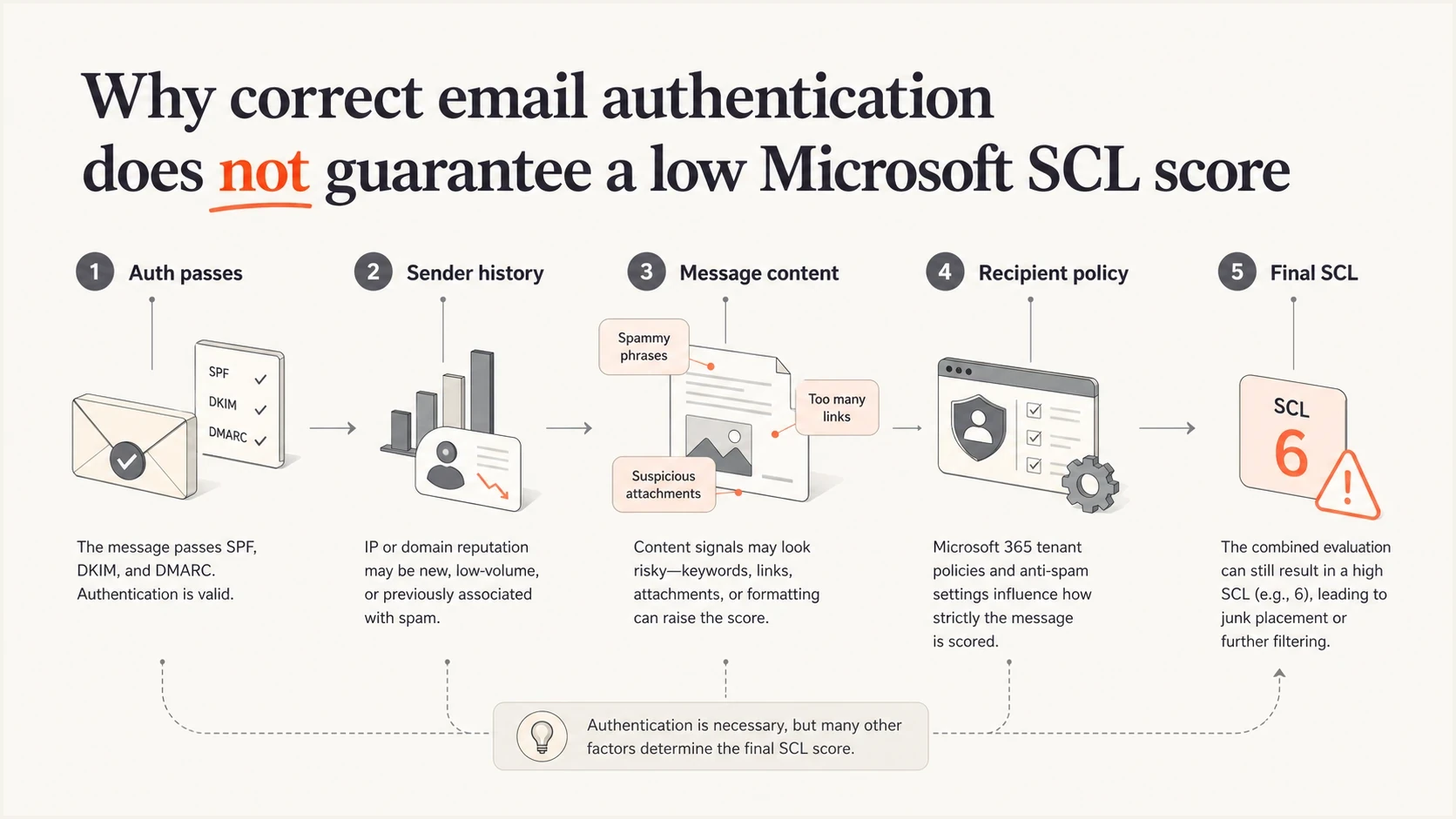
Infographic showing authentication, reputation, content, policy, and final SCL
Likely causes when BCL is zero
A BCL 0 result is useful because it says Microsoft is not treating the message as bulk gray mail. That narrows the investigation. It does not clear the message. In one-to-one mail, a high SCL with low BCL usually points to a trust, policy, or content verdict rather than a bulk mail verdict.
- Hidden senders: Another team, app, subdomain, or old vendor is sending mail tied to the same root identity.
- Tenant history: A workspace or mailbox route has a pattern Microsoft distrusts, even when the domain looks clean elsewhere.
- URL signals: Links in signatures, booking pages, tracking redirects, and file links can carry the bad signal.
- Message shape: A short personal note with a link, attachment, or uncommon language can look risky to filters.
- Recipient policy: The recipient tenant can enforce stricter handling than another Microsoft 365 tenant.
- Local overrides: Transport rules, tenant allow lists, and user safe sender settings can change what you observe.
Do not assume the visible mailbox is the only sender
When a root domain has Microsoft trouble, verify every authorized sender and every subdomain before calling it a Defender anomaly. The sender who says it is pure one-to-one communication is often describing what they know, not the full domain history.
A practical diagnostic sequence
Start by making the problem reproducible. Send the same message to at least two Microsoft 365 tenants and one non-Microsoft mailbox. Then send controlled variations. The goal is to separate the sender identity from the message content and the recipient tenant.
- Headers: Save the original message headers from the recipient mailbox, not a forwarded copy.
- Baseline: Send a plain text message with no signature, link, attachment, or image.
- Identity: Repeat from a different user on the same domain and from a subdomain if one exists.
- Content: Add the original subject, body, signature, links, and attachment back one at a time.
- Route: Compare the normal provider with an alternate authenticated route. For Microsoft 365 outbound mail, also inspect OutboundIpPoolName in message trace.
- Recipient: Test more than one Microsoft tenant because SCL can vary by organization.
Use an email tester for the controlled tests so you can compare authentication, visible content, and message headers without relying on screenshots from a user mailbox. It will not tell you Microsoft Defender's private reason code, but it will tell you whether your own message evidence is clean before you escalate.
Email tester
Send a real email to this address. Suped shows a results button when the test is ready.
?/43tests passed
If SCL stays high on a completely plain text message, the content is less likely to be the cause. Focus on domain identity, sending source, tenant reputation, and recipient policy. If SCL drops on the plain text version, add each original element back slowly until the score changes.
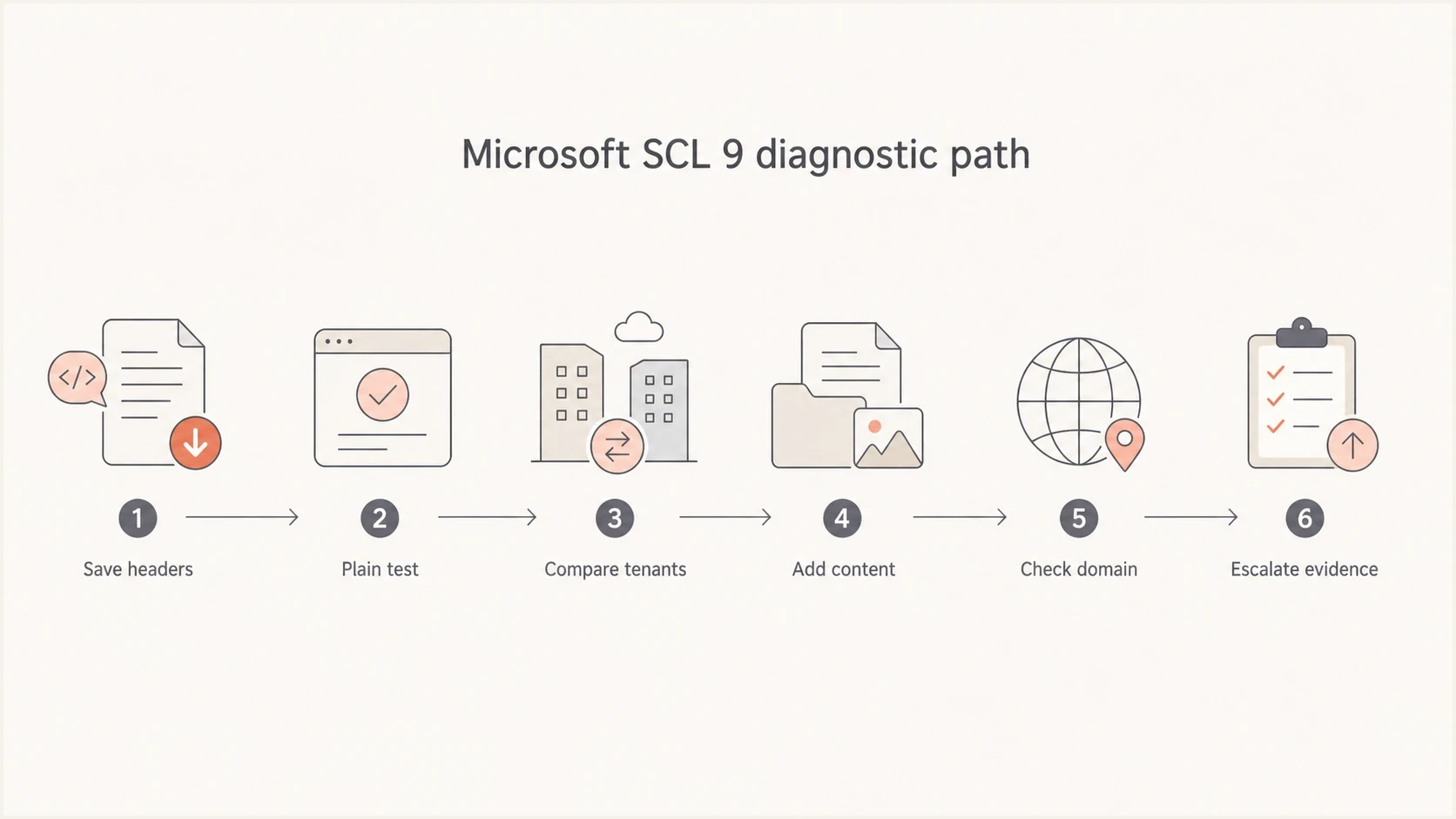
Flowchart for isolating the cause of Microsoft SCL 9
Use Microsoft evidence before changing DNS
The fastest way to waste time is to change DMARC, SPF, or DKIM when they already pass. Keep those records stable while you inspect Microsoft evidence. In Defender, look at message trace, the email entity page, quarantine, Explorer, anti-spam policy, transport rules, tenant allow and block entries, and any admin submissions connected to the message.
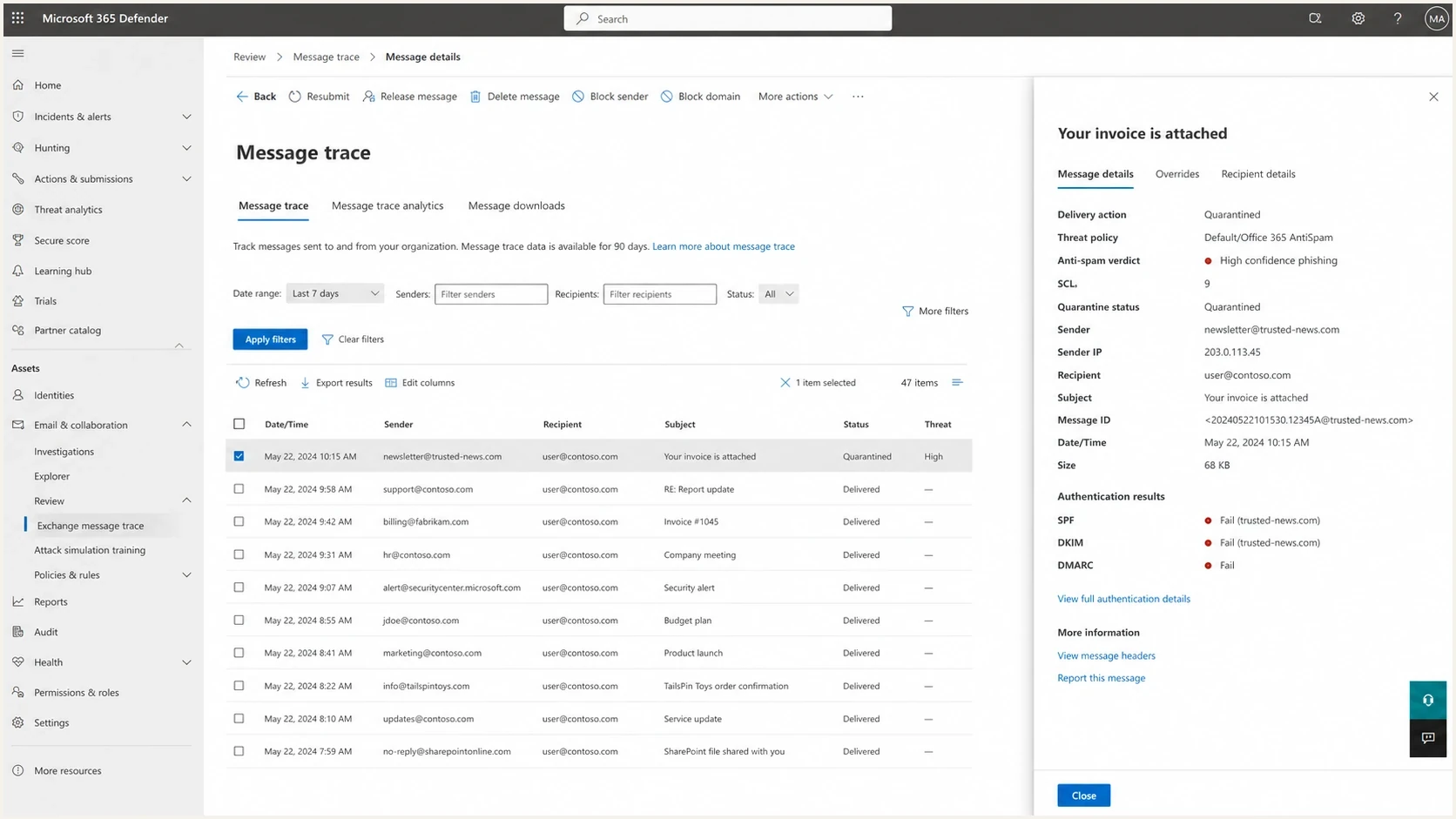
Microsoft Defender message investigation screen showing SCL and verdict details
Ask the receiving administrator for the original headers and the Defender event details. If they can see only that the message was quarantined, ask for the threat policy, spam filtering verdict, and any transport rule match. If a rule stamped SCL or forced quarantine, the fix belongs inside that tenant. If the spam filter itself stamped the score, you need a sender-side evidence packet.
If the sender uses Microsoft 365, the sending administrator should also inspect OutboundIpPoolName in message trace. A high-risk delivery pool result means Microsoft classified the outbound message as low quality before the destination handled it. Check the sending account, outbound spam alerts, routing, and domain DNS. Microsoft also states that a source domain with neither a public A record nor a public MX record is always routed through that pool.
Evidence packet for escalation
- Headers: Include the full original header block and the exact SCL and BCL values.
- Samples: Provide a blocked sample and a control sample that delivered elsewhere.
- Scope: List affected users, recipient tenants, dates, timestamps, and message IDs.
- Change log: Document DNS, routing, signature, and content tests already performed.
If no tenant configuration explains the score, the receiving administrator should submit the original message to Microsoft as a false positive and retain the submission result with the evidence packet. For deeper header reading, compare your fields against a practical SCL header guide. If the same message receives different results across Microsoft tenants, use a recipient variation guide to separate tenant policy from sender reputation.
Where Suped fits
Suped cannot force Microsoft to lower an SCL score. No outside DMARC platform can. Suped's product is useful because it gives you the authentication and reputation evidence you need before you escalate: source inventory, DMARC pass and fail patterns, SPF and DKIM checks, policy monitoring, blocklist monitoring, and alerts when a domain starts sending from an unverified or risky source.

Issue steps to fix dialog showing the issue overview, tailored fix steps, and verification action
For this part of the investigation, Suped turns authentication data into specific checks. DMARC monitoring shows which services are sending as your domain, while blocklist monitoring helps catch public blacklist and blocklist signals before they become part of a support case. A domain health check is the quick starting point when you need a snapshot of SPF, DKIM, DMARC, and DNS posture.
The practical workflow is simple: confirm the domain is authenticated, confirm no unknown source is sending, and confirm no public blacklist (blocklist) listing exists. Then take the Defender headers and controlled test samples back to the receiving Microsoft administrator. That keeps the conversation focused on the SCL verdict instead of sending you back through DNS changes you already passed.
?
What's your domain score?
Deep-scan SPF, DKIM & DMARC records for email deliverability and security issues.
What to change and what to avoid
When this happens, the temptation is to rotate domains, change DNS, rewrite every signature, or ask recipients to allowlist the sender. Those actions can hide the cause and make reputation recovery harder. Make controlled changes only after the test matrix points to a specific cause.
Do first
- Preserve headers: Keep original samples with timestamps and message IDs.
- Test plainly: Use a no-link, no-signature version as the baseline.
- Map senders: Audit root domain, subdomains, third-party routes, and dormant apps.
- Check policy: Verify whether the recipient tenant changed handling after scoring.
Avoid first
- DNS churn: Do not edit working SPF, DKIM, or DMARC records without evidence.
- Domain hopping: Do not move staff mail to a fresh domain to outrun a verdict.
- Blind allowlists: Do not use recipient allowlisting as proof the underlying issue is fixed.
- Mass edits: Do not change subject, signature, route, and content at the same time.
How to rank urgency
A simple way to decide how aggressively to investigate a high Microsoft SCL issue.
Single user
Low
One sender, one recipient tenant, one message pattern.
Multiple users
Warning
Several senders on the same domain hit Microsoft junk or quarantine.
Domain wide
Critical
Plain one-to-one mail gets SCL 9 across separate Microsoft tenants.
The domain-wide case deserves the most attention because it points away from a single content mistake. At that point, the evidence packet should include authentication proof, source inventory, blocklist and blacklist status, controlled test results, and Microsoft header samples with the same pattern across tenants.
Views from the trenches
Best practices
Collect full headers before changing DNS so the original Microsoft verdict stays intact.
Test plain text, then re-add signatures, links, attachments, and subjects one by one.
Audit every root domain sender and subdomain before calling the issue a filter defect.
Common pitfalls
Assuming clean SPF, DKIM, and DMARC results guarantee a low SCL score in Microsoft.
Treating no public blacklist listing as proof Microsoft has no reputation concern.
Changing several variables at once, then losing the signal that caused the SCL jump.
Expert tips
Compare the same message across separate Microsoft tenants to reveal policy effects.
Keep BCL and SCL separate because low bulk scoring does not clear spam scoring alone.
Escalate with timestamps, headers, message IDs, and controlled samples, not summaries.
Marketer from Email Geeks says SCL 9 should be treated as a high confidence spam verdict and investigated with sender identity, content, mechanics, and domain usage evidence.
2024-12-04 - Email Geeks
Marketer from Email Geeks says changing subject lines, friendly From names, signatures, and body sections is a useful way to isolate whether content drives the verdict.
2024-12-04 - Email Geeks
The practical fix path
Microsoft Defender uses authentication, then adds other signals. When those other signals are strong enough, a correctly authenticated one-to-one message still gets a high SCL score.
Stop treating the issue as a single DNS failure. Keep the records stable, gather original headers, reproduce the issue with controlled content, check all domain and subdomain senders, confirm no blacklist or blocklist issue exists, and ask the receiving Microsoft administrator for the component that stamped or enforced the SCL. If the answer stays opaque, escalate with a precise evidence packet that proves the pattern.
Suped helps with the parts you can control: authentication visibility, sender inventory, issue detection, alerts, and blocklist monitoring. Defender's private model remains Microsoft-owned, but the resulting evidence gives the receiving administrator and Microsoft support specific samples to investigate.




