Why is Gmail incorrectly marking emails as bounced due to mailbox quota being full?

Published 3 May 2025
Updated 27 Jul 2026
10 min read
Summarize with
Updated on 27 Jul 2026: We clarified how Gmail quota bounces, retry queues, storage recovery and suppression decisions fit together.
Gmail usually is not incorrectly marking these emails as bounced. Gmail returns a mailbox quota response, and the sending platform records the event as a deferral or bounce. The confusing part is that the recipient can look active in historical campaign data because pixel-based opens are affected by proxy image loading or automated scanning. The recipient can also receive mail again after storage is cleared.
Treat a sudden mailbox full spike as a deliverability incident, not as proof that every affected address is dead. Inspect the SMTP code, separate soft bounces from hard bounces, compare opens against clicks, and pause or retry based on repeated failures. If a one-day spike crosses multiple providers while sender health checks remain clean, inspect the raw delivery status notifications and your sending platform's classification before blaming Gmail.
The key distinction is this: mailbox full is a recipient-side acceptance problem. It is different from spam placement, a DMARC failure, a blocklist (blacklist) listing, or a malformed message. Those issues still matter because they affect the same campaign metrics, but they need different fixes.
Why Gmail reports mailbox quota bounces
Gmail reports a mailbox quota bounce when the receiving Google Account is out of storage. A 452 response is normally a genuine temporary failure even when the recipient opened earlier campaigns.
- The recipient's Google Account has reached its shared storage limit, so Gmail returns a quota response until space becomes available.
- An open recorded on an earlier campaign does not prove that the mailbox can accept the current message.
- Google storage is shared across Gmail, Google Drive, Google Photos and some backups, so email can stop even when Gmail alone does not appear full.
- A one-day spike that returns to baseline deserves containment and monitoring before permanent suppression.
Typical quota bouncetext
SMTP 452 4.2.2 The email account is over quota.
Status: 4.2.2
Action: delayed
Diagnostic-Code: smtp; mailbox full
A 4xx response such as 4.2.2 is temporary. The sending mail server normally queues the message and retries according to its policy. A 5xx quota response indicates failure for that delivery attempt. Neither response proves that the address is invalid, so do not treat one quota event like a no-such-user response.
Do not let one spike rewrite suppression rules
If your baseline bounce rate moves from 0.06% to 0.14% for one send, investigate it, but keep the absolute rate in context. Hard-suppressing recipients after one temporary storage failure can remove addresses that become reachable again.
Example bounce-rate spike
A small percentage increase can look large when compared with the prior baseline.
Bounce rate
Why previously active Gmail recipients can still bounce
The most common mistake is assuming that opens are the same as human engagement. Opens recorded after successful delivery reflect tracking-pixel loading, not the mailbox's capacity to accept a later message. Gmail can fetch images through its proxy when a message is viewed, while some security systems fetch pixels automatically. If the same contacts record opens within minutes on nearly every send but rarely click, treat those opens as weak evidence. Clicks, replies, purchases and authenticated account activity carry more weight.
Looks active
- Many opens happen within minutes of delivery across nearly every send.
- Only a small share of these recipients clicked recently.
- The list looks engaged even when confirmed human activity is thin.
Actually deliverable
- The recipient recently clicked, replied or completed a tracked action.
- The address accepts mail again after storage capacity returns.
- The mailbox has recent delivered events, not only recorded opens.
A recipient can recover quickly. A Gmail user can delete stored data or buy more storage. That turns an over-quota response into a temporary delivery problem, which is why blanket suppression after one mailbox full bounce creates unnecessary list loss.
Gmail documents general reasons for bounced or rejected mail in Gmail Help, and admins can compare exact diagnostics with Workspace troubleshooting. Use those references to confirm the code, then base suppression on repeated behavior in your own data.
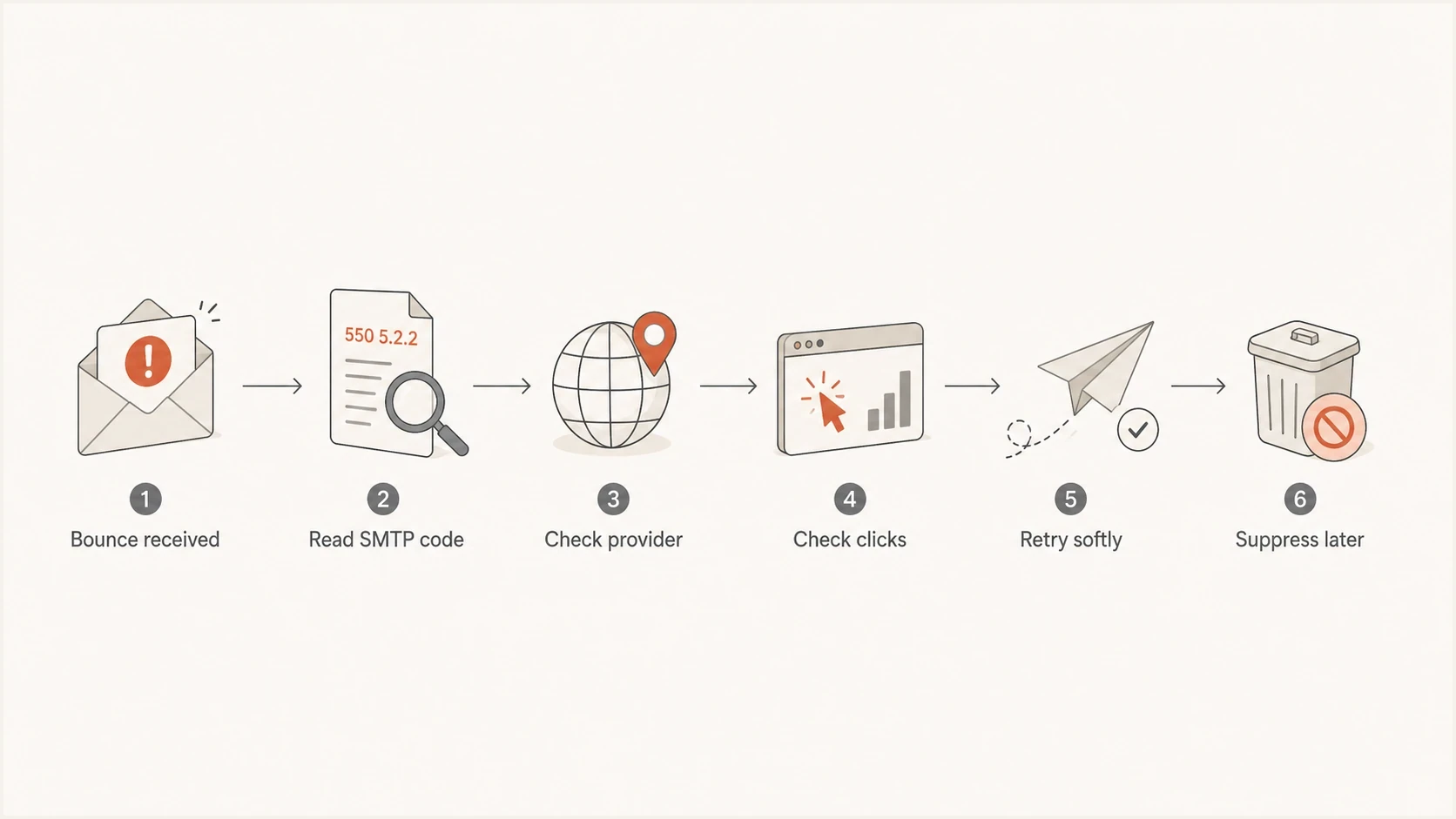
Decision flow for handling a Gmail SMTP 4.2.2 mailbox quota bounce before suppression.
How to verify what really happened
Start with the raw bounce, not the label your email platform assigned to it. Labels such as mailbox unavailable, mailbox full, invalid recipient and soft bounce are useful shortcuts, but the SMTP response and diagnostic text contain the detail you need. This matters when a platform groups different receiving issues under one friendly label.
|
|
|
|---|---|---|
4.2.2 | Over quota | Retry |
5.2.2 | Quota failure | Pause |
Fast opens | Weak activity signal | Check clicks |
One day | Temporary spike | Monitor |
Multiple providers | Possible classification issue | Read raw DSNs |
Signals to compare before changing suppression rules.
Then send a real seed message and inspect the headers, authentication results and rendering path. Suped's email tester lets you inspect the message that actually leaves your sending system instead of guessing from campaign-level metrics.
Email tester
Send a real email to this address. Suped shows a results button when the test is ready.
?/43tests passed
If the test message is structurally clean, authentication checks pass and the bounce text still points to quota, do not rewrite authentication records. Correct bounce classification and retry logic, then apply engagement-based suppression. You can still run a broader domain health check to rule out authentication drift, DNS mistakes or a separate sender reputation issue.
Use the exact bounce reason
- Export the raw SMTP response, enhanced status code, provider, campaign and timestamp.
- Split Gmail traffic from other mailbox providers before drawing conclusions.
- Use clicks and confirmed account activity ahead of opens when deciding whether to keep retrying.
- Treat recurrence across several sends more seriously than a one-day event.
What happens after a mailbox full response
Gmail uses SMTP 452 with enhanced status code 4.2.2 when the recipient's inbox is out of storage. Because this is a temporary response, the sending mail server can keep the original message in its queue and retry until its queue window expires. An email platform may record a deferral or soft bounce before that delivery reaches a final state.
- If a retry succeeds after storage becomes available, Gmail accepts the queued message and no manual resend is needed.
- If the sender exhausts its retries and issues a final failure notice, clearing storage does not recover that message. The sender must submit it again.
- Google warns that storage updates after large deletions can take 48 to 72 hours, so an immediate second attempt can still fail.
- For time-sensitive transactional mail, use another verified contact method when available and resend after capacity returns.
A bounce does not store a hidden copy
Gmail cannot place a rejected message into a full mailbox for later recovery. Delivery happens only if the sender still has the message queued and a later retry succeeds.
When to investigate a Gmail anomaly
Gmail can return an unexpected response, and large providers have incidents. Require evidence before calling a mailbox full response false. Look for a sudden rise across unrelated Gmail recipients, the same diagnostic on clean messages, no matching rise at other providers, and a quick return to normal without sender-side changes.
If you see a sudden mailbox full pattern, compare it with the longer analysis of Gmail mailbox full spikes and the narrower case of false positive SMTP bounces. The practical test is whether the pattern repeats. A one-off spike needs containment. A recurring spike needs a deeper review of sending data and list quality.
Treat as mailbox quota
- The SMTP response and diagnostic both say over quota or mailbox full.
- The failure appears only for recipients whose diagnostics point to storage.
- Some recipients accept mail again on a later retry or send.
Investigate as an anomaly
- The spike appears across unrelated active Gmail users in a narrow time window.
- Message structure and authentication checks show no sender-side issue.
- The next campaign returns to normal without configuration changes.
How to handle suppression and retries
Use conservative suppression for quota failures. A single mailbox full event should not equal a permanent unsubscribe or hard suppression. Repeated quota failures should reduce sending pressure, especially when the contact has no recent click or confirmed account activity. The aim is to protect sender reputation without deleting reachable subscribers.
- Classify the first 4.2.2 response as temporary and let normal queue retries run.
- Pause regular marketing sends after repeated quota failures and move the address into a cooling segment.
- Give recently active customers a longer recovery window than recipients with only old or proxy-influenced opens.
- Allow reactivation after confirmed engagement or a later successful delivery.
Do not mix quota bounces with no-such-user errors. A Gmail address that returns no such user deserves faster suppression because that response points to an invalid mailbox. Mailbox full is different because the address can remain valid while the mailbox temporarily cannot receive.
A practical rule
Use confirmed engagement as the rescue signal and repeated quota failures as the suppression signal. Opens alone should not rescue an address that repeatedly fails delivery.
For transactional mail, keep retrying within your normal queue window because the recipient expects the message. For bulk marketing, reduce pressure faster because repeated failed attempts waste sending resources and weaken engagement ratios.
Where authentication monitoring fits
A quota bounce is not caused by SPF, DKIM or DMARC. Check authentication during bounce spikes because several problems can appear in the same report. A campaign can have genuine quota bounces while a separate authentication change affects other traffic. Separating those issues keeps the response precise.
Basic DMARC monitoring recorddns
v=DMARC1; p=none; rua=mailto:dmarc@yourdomain.example
Suped's DMARC monitoring shows authentication failures, sending sources and guided remediation. Use that workflow to rule out SPF or DKIM problems, with DMARC reporting, while bounce handling stays focused on the recipient-side quota response.

Issue steps to fix dialog showing the issue overview, tailored fix steps, and verification action
Suped does not determine whether every Gmail quota response is true or false. It keeps authentication, sender sources, blocklist (blacklist) signals, and issue resolution in one workflow. That helps establish whether a mailbox full spike is a recipient-side event or part of a separate sender-side fault.
Views from the trenches
Best practices
Treat quota bounces as soft first, then suppress only after repeated failed delivery.
Compare opens with clicks because automated image loading can record activity without intent.
Separate Gmail and iCloud bounce trends before blaming one mailbox provider or campaign.
Common pitfalls
Hard-suppressing every quota bounce removes subscribers who can receive again later.
Reading all opens as human engagement hides stale mailboxes when image proxies fire.
Mixing quota bounces with spam rejects makes the spike look larger than it is in reports.
Expert tips
Track SMTP status codes, not ESP labels, because labels can flatten useful detail.
Use click recency as the stronger signal when deciding whether to retry a mailbox.
Review authentication and reputation at the same time, even when the bounce says quota.
Marketer from Email Geeks says a mailbox full response usually means the mailbox cannot accept mail at that moment, so the first move is to treat it as a recipient-side delivery failure.
2023-02-16 - Email Geeks
Marketer from Email Geeks says Gmail has returned incorrect responses during past incidents, but those events tend to be obvious because many senders see the same issue.
2023-02-16 - Email Geeks
How to respond to Gmail quota bounces
Gmail mailbox quota bounces are usually genuine temporary failures, even when the recipient looked active before the failed delivery. The mismatch comes from over-trusting opens, under-reading SMTP responses and treating every bounce label as equally final. A mailbox can be full today and accepting mail again later.
Verify the raw bounce, segment by provider, use confirmed engagement as the stronger activity signal, and suppress only after repeated quota failures. Keep authentication monitoring running in parallel so a sender-side issue does not hide behind a recipient-side bounce label.




