Why is Apple Mail showing the email address instead of the name and how to fix?

Published 2 Aug 2025
Updated 20 Aug 2026
11 min read
Summarize with
Updated on 20 Aug 2026: We added the Smart Addresses check and updated Apple Mail settings paths for current macOS and iOS.
Apple Mail shows the email address instead of the sender name when its Smart Addresses preference is off, or when the name it receives or stores does not match what you expect. Other common causes are a missing display name in the raw From header, malformed encoded-word syntax for a non-ASCII name, a locally saved Contacts card, a Previous Recipients entry, or an Apple Mail account setting that changed. Check the viewing preference and raw source first, then fix either the sender configuration or the local Apple Mail contact data.
Start with the raw message because it separates a real sending problem from a local display problem. If the raw From header already contains the right name, Apple Mail is replacing or rewriting what it shows on screen. If the raw From header has the email address, a blank name, a lowercased name, or a malformed encoded name, fix the sender system.
- Fast answer: check View > Message > Raw Source in Apple Mail and inspect the From line, including display name and encoding.
- Display setting: choose Mail > Settings > Viewing and select Use Smart Addresses to show names for recognized people.
- Local fix: delete or correct the matching Contacts card and Previous Recipients entry.
- Sender fix: set the friendly From name in the sending platform, alias, or account settings.
- Authentication check: confirm SPF, DKIM, and DMARC separately, since they do not control the displayed name.
Start with the raw From header
In Apple Mail, open the affected message and choose View > Message > Raw Source. Look for the first visible From header near the top of the message. That line is the ground truth for what the sender actually placed in the message header. Apple Mail can display something else, but the raw source tells you which side owns the fix.
Good raw From headertext
From: "Target Support" <targetinfo@example.com>
To: customer@example.net
Subject: Account update
Date: Fri, 15 Mar 2024 05:30:43 -0600
If Apple Mail shows targetinfo@example.com but the raw header says Target Support, the sender system did its job. The problem is local to the recipient's Apple device or synced Apple contact data. If the raw header says only targetinfo@example.com, the email was sent without the friendly name Apple Mail needs.
What to check in raw source
- From should include the display name before the angle-bracketed address.
- Encoding should use valid MIME encoded-word formatting when the name contains non-ASCII text.
- Address should be the intended sender identity, not an old alias or test mailbox.
- Duplicate From headers point to a message construction problem that needs sender-side repair.
Character encoding matters for display names too. If a sender name contains accents, smart quotes, or non-Latin characters, the From header needs valid MIME encoded-word formatting. A charset mismatch can make Apple Mail show the address instead of the name, or render mojibake that looks like Chinese characters.
For a fast end-to-end check, send a real message to the Suped email tester and compare the parsed headers with what Apple Mail displays. That catches missing friendly names, authentication failures, and formatting mistakes without asking every recipient to inspect raw source.
Email tester
Send a real email to this address. Suped shows a results button when the test is ready.
?/43tests passed
This test also prevents a common mistake: changing DNS records when the only problem is a stale contact entry on one Mac. DNS affects authentication and delivery trust. It does not force Apple Mail to ignore a local contact name.
Check the Smart Addresses setting
On Mac, Apple Mail's Use Smart Addresses preference controls whether recognized people appear by name or with their email address. Choose Mail > Settings > Viewing, then select Use Smart Addresses when you want Mail to show the name instead of the name-and-address combination. Apple says this lookup can use Contacts, Previous Recipients, and available CardDAV, Exchange, or LDAP directories.
Apple's Smart Addresses guidance applies to address fields inside received and composed messages. The inbox message list can still format the sender differently, so use the raw From header when the preference does not explain the result.
- Open Mail > Settings > Viewing on the affected Mac.
- Select Use Smart Addresses, then reopen the affected message.
- If the address remains, verify that Contacts or Previous Recipients has a name for that exact address.
- If the raw From header lacks a display name, fix the sender because this preference cannot create a reliable sender name.
Fix Apple Mail on the recipient device
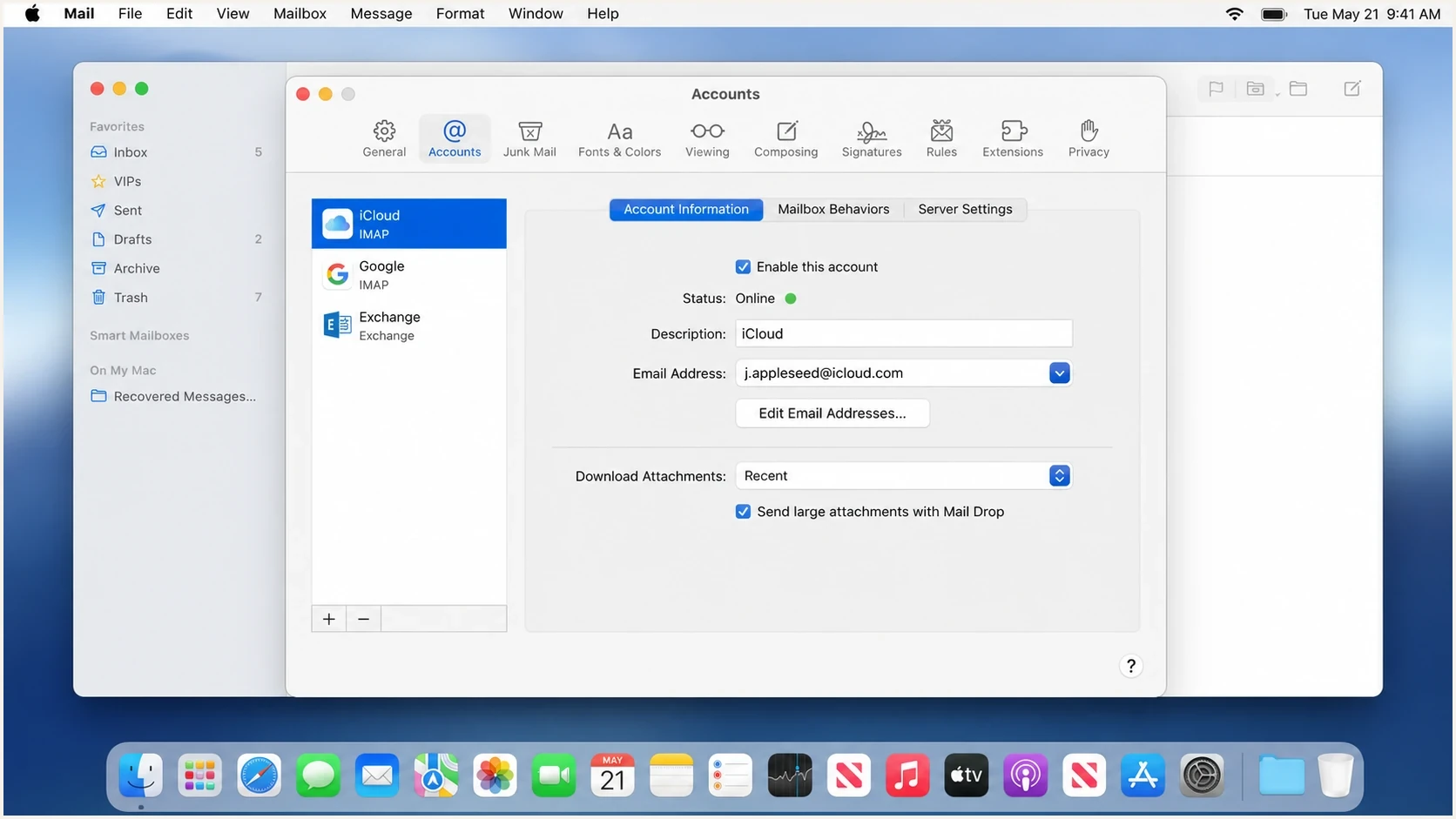
Apple Mail Account Information settings for checking sender names, aliases, and email addresses.
When the raw From header is correct, treat Apple Mail as the display layer. Apple Mail can use Contacts, Previous Recipients, account aliases, and synced iCloud data to decide what text appears beside a message. That is why one colleague can see the proper brand name while another sees a lowercased address-like name.
Apple's Account Information settings page shows the path Mail > Settings > Accounts > Account Information. It also notes that the Email Address pop-up can be used to edit email addresses and the name shown in messages. That is the first place to check when the sender is your own account or a managed mailbox.
- Open Contacts and search the exact email address that Apple Mail is displaying.
- Merge or delete duplicate cards where the email address has the wrong first name, company name, or stale label.
- In Mail, choose Window > Previous Recipients, find the exact address, click Remove From List, then quit and reopen Mail.
- Verify the Full Name, alias name, or Email Address menu used for outbound mail. If Full Name is greyed out, use Edit Email Addresses where Apple Mail offers it.
- On iPhone or iPad, go to Settings > Apps > Mail > Mail Accounts, select the account, open Account, and check the Name field when the provider exposes it.
- If the wrong name returns, correct it on every synced Apple device and shared address book.
The same cleanup also applies when Apple Mail fills the wrong name in the To field while composing. That is a recipient-selection problem, not proof that the sender's From header is wrong.
When several colleagues see it overnight
If several Apple Mail users suddenly see the same wrong display name, compare the raw From header on one affected message first. A correct raw name points to a shared contact source, synced directory, or client setting. A wrong raw name points to the sender configuration. Do not change SPF, DKIM, or DMARC to repair a display name.
Fix the sender name at the source
When the raw From header is wrong, the sender system owns the fix. The setting is usually called From name, sender name, friendly name, profile name, alias name, or display name. In a company setup, check the mailbox alias, the sending platform, the CRM integration, and any template-level sender override.
Raw header is correct
- Owner: recipient-side Apple Mail, Contacts, or synced address data.
- Fix: correct the local contact and clear stale recipient history.
- Proof: a new Apple Mail profile shows the expected sender name.
Raw header is wrong
- Owner: the mailbox, alias, sending platform, or template.
- Fix: set the proper friendly name before the message is sent.
- Proof: the next raw From header contains the expected name.
Good and bad sender name examplestext
Good:
From: "Target Support" <targetinfo@example.com>

Bad:
From: <targetinfo@example.com>

Also bad:
From: targetinfo@example.com <targetinfo@example.com>
Names with accents, smart quotes, or non-Latin characters need valid MIME encoded-word formatting in the visible From header. If a template or CRM writes a different charset into the name than the header declares, Apple Mail can display the address, a broken name, or Chinese-looking characters. Fix the generated header and retest the delivered EML.
The detail that trips teams up is that Reply-To, Return-Path, and the envelope sender do not control the name Apple Mail shows in the message list. Apple Mail looks at the message's visible From header, then applies its own local display rules. A deeper breakdown of sender name display is useful when only some recipients see the wrong name.
If the issue also appears in Gmail, compare the behavior with the Gmail friendly name case. When both clients show the address, stop looking at Apple Mail and fix the sender configuration.
Where authentication fits
SPF, DKIM, and DMARC do not directly choose the friendly From name. They prove whether a message is authorized for the domain it claims to use. Still check them because a sender-name complaint often arrives with a wider question: are recipients seeing a suspicious identity because the message is unauthenticated, forwarded badly, or coming through an unapproved source?
Suped DMARC dashboard showing email volume, authentication health, and source breakdown
Suped's product supports this separate authentication check. Its DMARC reports group SPF, DKIM, and DMARC results by sending source, which helps teams identify an unapproved source or a broken authenticated path while the Apple Mail display issue is investigated.
A quick domain health check is enough for a first pass. For ongoing work, Suped's DMARC monitoring helps identify which sources pass, which fail, and which ones need DNS or platform changes.
|
|
|
|---|---|---|
From | Visible sender identity | Set the display name |
Contacts | Local name lookup | Fix or remove the entry |
SPF | Envelope sender authorization | Fix the source or SPF record |
DKIM | Message signature | Fix signing or the DKIM record |
DMARC | Visible From domain match | Fix the SPF or DKIM domain match |
Use this table to decide whether the issue is display, sending, or authentication.
If DKIM is failing, run a focused DKIM check after updating selectors or DNS. A clean DKIM result will not force Apple Mail to show the right name, but it removes one source of confusion while you troubleshoot.
How to test the fix
After changing the sender name or cleaning Apple Mail contact data, test with a fresh message. Do not forward an old message because forwarded mail preserves old headers and adds new ones. Send a new message from the same production path that caused the problem.
Simple test matrixtext
1. Send to a clean Apple Mail profile
2. Send to an existing affected Apple Mail user
3. Send to a non-Apple mailbox
4. Compare raw From headers in all copies
5. Confirm SPF, DKIM, and DMARC results
If only the existing affected user still sees the wrong name, the sender is fixed and Apple Mail still has a local override. If every recipient still sees the email address, the sender name was not fixed in the actual production sending path.
Where to investigate
Use raw From evidence, not an arbitrary user count, to choose the next action.
Local evidence
One device
The raw From name is correct, but one device shows the wrong name.
Shared display evidence
Several devices
The raw From name is correct on affected devices, so check shared contacts and settings.
Sender-side evidence
Raw From wrong
New message copies contain a missing or incorrect display name in the raw From header.
A reliable fix pattern
The most reliable pattern is raw source first, local Apple data second, sender platform third, authentication fourth. That order keeps the work small and avoids changing records that have no control over the visible name.
Views from the trenches
Best practices
Check raw From headers before sender settings, DNS, or template edits on each report.
Compare a clean Apple Mail profile with an affected user to isolate local data first.
Record the display name, address, device, send path, and raw header for each report.
Common pitfalls
Teams edit DMARC first even when Apple Contacts caused the display issue on one device.
Forwarded test messages mislead because old headers stay inside the new message thread.
Shared address books can restore a bad sender name after one user corrects it locally.
Expert tips
Ask affected users for raw source plus a screenshot before opening DNS work for reports.
Use a new message, not a reply, because replies can inherit cached contact names.
Audit sender aliases after Mail updates because display names can reset for outbound mail.
Expert from Email Geeks says Apple Mail can substitute a locally saved contact name for the sender's raw From name, so the raw header should be checked before any sender-side change.
2024-03-15 - Email Geeks
Marketer from Email Geeks says a company-wide report can still come down to Apple autosaving a contact with the wrong name, especially when several colleagues share synced contact data.
2024-03-18 - Email Geeks
The practical fix
The answer is usually simple once you split the problem in two. If the raw From header has the right display name, fix Apple Mail's local view by checking Smart Addresses and cleaning Contacts, Previous Recipients, aliases, and synced address data. If the raw From header is wrong, fix the mailbox or sending platform that generated the message.
Authentication is the parallel check, not the main cause of the friendly-name change. Keep it in the workflow because SPF, DKIM, and DMARC problems often appear during the same investigation. Suped's product helps teams keep that side clean with monitoring, real-time alerts, hosted records, issue detection, and clear remediation steps.




